
Alura Review: Plans, Features, and Who It's Best For
Disclosure: This post contains affiliate links. If you buy through them, we may earn a commission at no extra cost to you. How we make money.
Alura is one of the most talked-about tools among Etsy sellers. It started as an Etsy keyword and product research tool and has grown into an all-in-one suite with AI listing optimization, A/B testing, Pinterest marketing, email marketing, Etsy Ads tools, and analytics. That is a lot of features, and the question for most sellers is whether they need all of them. This Alura review explains what each plan includes, how the billing options change the price, who Alura is best for, and when a simpler tool is the smarter choice.
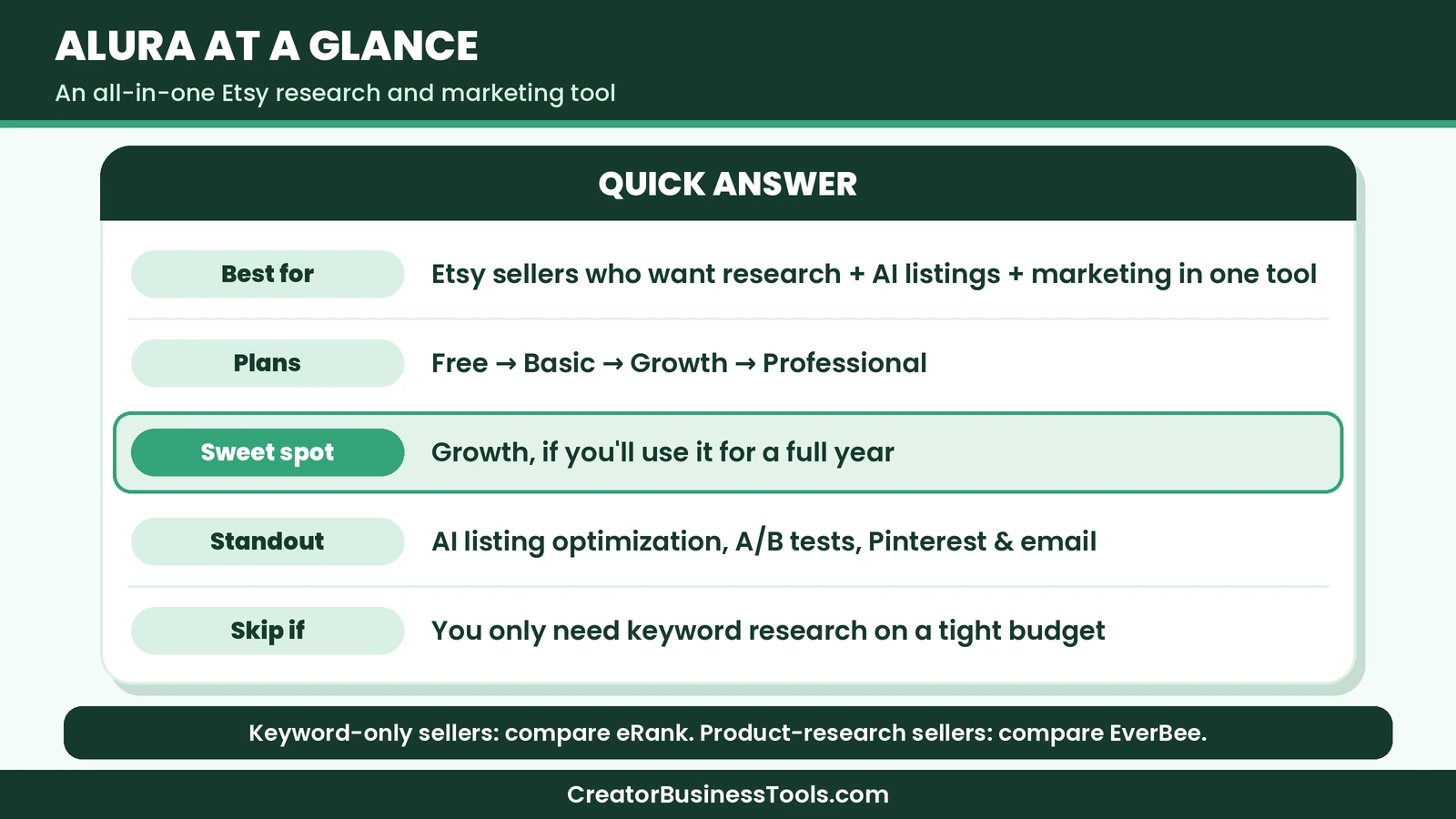
Quick verdict: Alura is a good fit for Etsy sellers who want research, AI listing writing, and marketing tools in one place, and its Growth plan covers the most popular features. Sellers who mainly need keyword research and listing SEO may get more for less from eRank, and sellers focused on product research may prefer EverBee.
Quick picks
- Best Alura plan for most sellers: Growth, with full research, AI listing optimization, A/B tests, Pinterest marketing, and email marketing. Try Alura
- Best for new sellers: Basic, with daily searches and AI help for titles, tags, and descriptions.
- Best for multi-shop sellers: Professional, with unlimited searches and multiple shops.
- Best for checking Alura first: the Free plan, with a few daily searches and the Chrome extension.
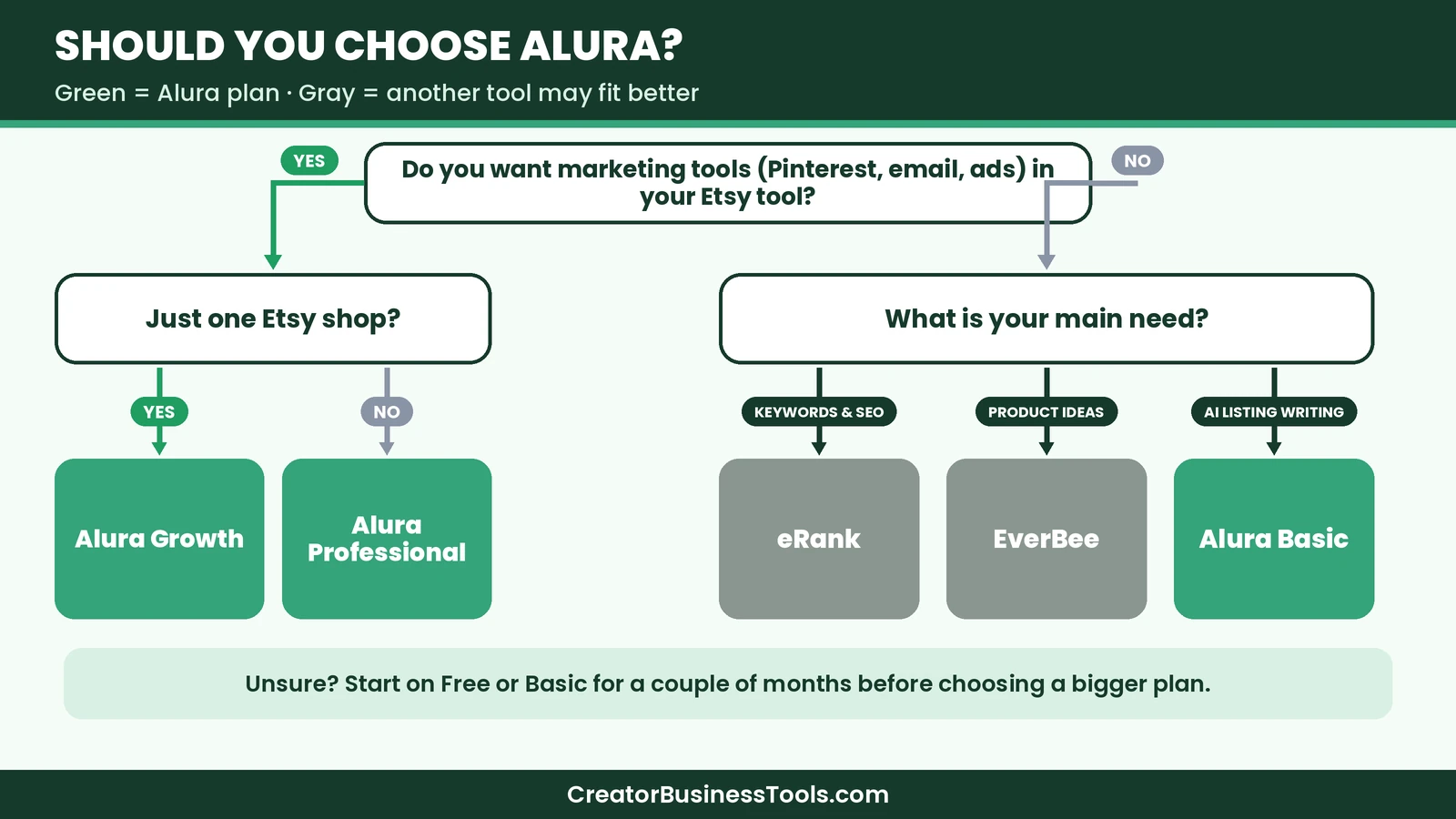
- Best SEO-only alternative: eRank, with budget plans focused on keywords and listing audits. Check eRank
Alura at a glance
| Item | What Alura offers |
|---|---|
| What it is | An Etsy growth suite for research, listing optimization, and marketing |
| Plans | Free, Basic, Growth, Professional |
| Price tiers | Budget to premium, depending on plan and billing cycle |
| Research | Keyword and product research with a research database |
| AI tools | AI listing optimization for titles, tags, and descriptions |
| Testing | Listing A/B tests on Growth and Professional |
| Marketing | Pinterest marketing, email marketing, and Etsy Ads tools on Growth and up |
| Analytics | Analytics Suite with historical data on Growth and up |
| Extras | Chrome extension, profit calculator, API and MCP access on every plan |
What is Alura?
Alura is a software suite for Etsy sellers. Its core job is to help you find what shoppers search for, find products with demand, and write listings that get found. Over time it has added tools that reach beyond Etsy search, such as scheduling Pinterest pins, sending emails to customers, and optimizing Etsy Ads. The aim is to give a seller one dashboard for growth instead of a stack of separate apps.
Alura review: the features that matter
Keyword research
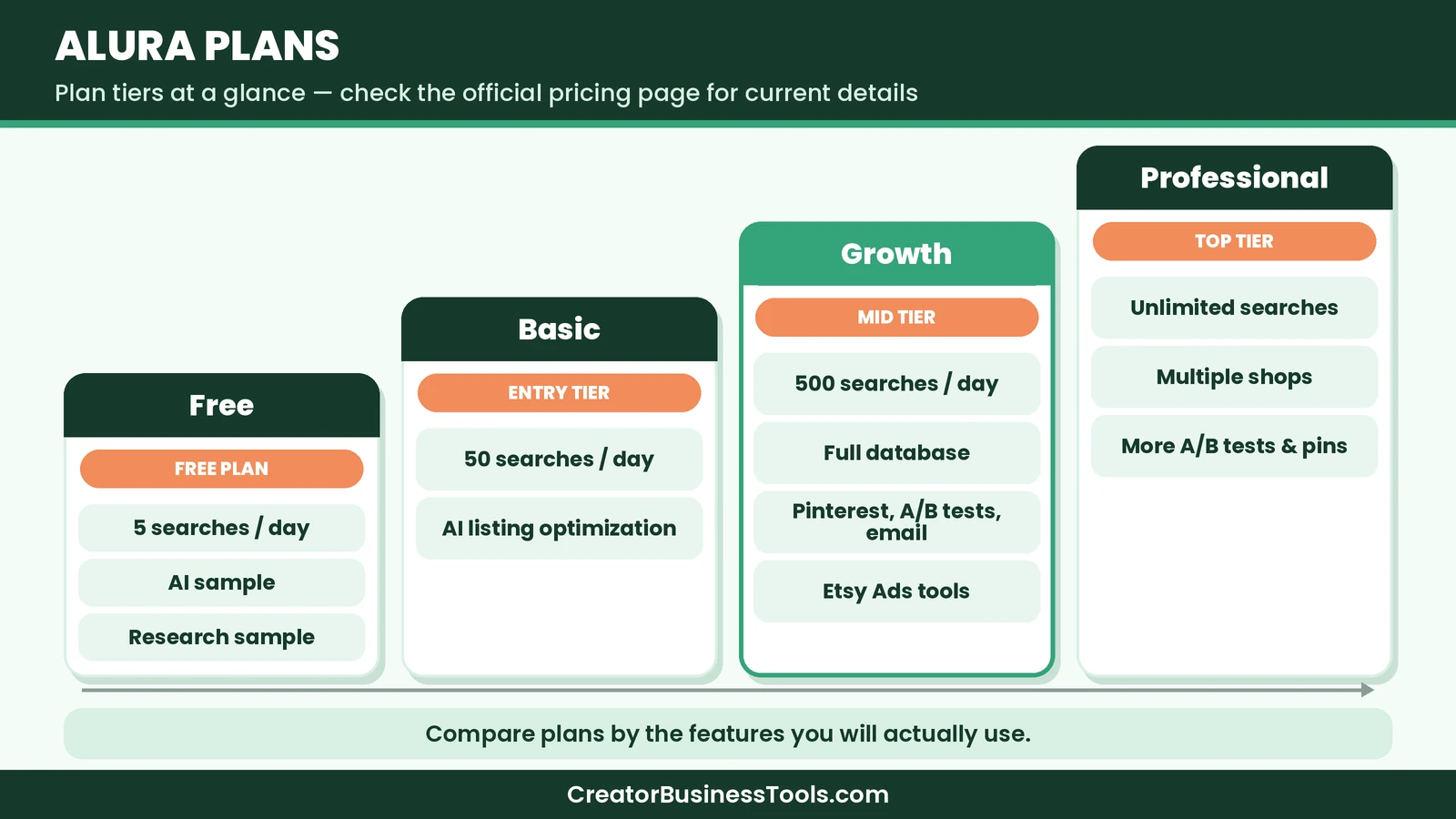
Alura’s keyword tool shows search interest and competition for Etsy keywords and suggests related ideas. The number of daily searches is the main difference between plans: a few a day on Free, a moderate number on Basic, many more on Growth, and unlimited on Professional. For most single-shop sellers, Growth’s allowance is more than enough.
Product research and the research database
Product research helps you spot items and niches with demand. The Free plan shows a sample of Alura’s research database, while Growth unlocks the full database with historical data and CSV export. If you like to study trends in a spreadsheet, the export is a useful touch.
AI listing optimization
This is one of Alura’s strongest features. The AI reviews your listing and suggests or writes improved titles, tags, and descriptions based on keyword data. It is available from Basic, and the Free plan includes a small starting balance so you can see how it works. As with any AI writing, read every suggestion. You know your product better than any tool, and a natural, accurate description builds trust with shoppers.
Listing A/B tests
Growth includes a handful of A/B tests and Professional includes many more. A/B testing lets you compare two versions of a listing element, such as a title, to see which performs better. Few Etsy tools offer this, and it is a real advantage for sellers who like to make decisions based on data rather than guesses.
Pinterest and email marketing
Growth adds Pinterest marketing with a daily pin allowance, and Professional raises that allowance. Pinterest is a strong traffic source for many Etsy categories, such as home decor, weddings, and printables, so having scheduling built in can cut real effort. Email marketing helps you reach past buyers with new products and seasonal launches.
Etsy Ads tools and analytics
Growth also includes tools to manage Etsy Ads and an Analytics Suite with several years of history. These help you see which listings and ads earn their keep. For sellers who already spend on Etsy Ads, this can be one of the more valuable features.
Chrome extension, API, and MCP
The Chrome extension shows Alura data while you browse Etsy. Every plan also includes API and MCP access, which lets you connect Alura data to other tools, including AI assistants. Most sellers will not need this, but it is a rare feature at this price level. Sellers who already use spreadsheets or AI assistants to plan their shop may find it handy for pulling keyword data into their own workflow.
Alura pricing explained
Alura’s pricing has one important detail: the price shown depends on the billing cycle you select. Every paid plan is available with monthly or yearly billing, so check which cycle a listed price refers to before you compare plans.
- Free: a few daily searches, a small AI starting balance, a sample of the research database, a profit calculator, and the Chrome extension.
- Basic: budget tier on both billing cycles. More daily searches and AI listing optimization.
- Growth: budget to mid-range tier, depending on billing cycle. Full research database, historical data, CSV export, Pinterest, A/B tests, Etsy Ads tools, analytics, and email marketing.
- Professional: mid-range to premium tier, depending on billing cycle. Unlimited searches, multiple shops, more A/B tests, and a higher Pinterest allowance.
Growth is the plan where Alura’s research, listing, and marketing tools come together, which makes it the natural choice for most single-shop sellers. Whichever billing cycle you choose, compare Alura against eRank and EverBee on the same billing cycle so the comparison is fair.
A simple way to choose a plan is to look at which tools you will use every week. If you mainly need research and AI listing help, Basic covers that. If you also want Pinterest, email, A/B tests, and Etsy Ads tools, Growth is the better match. If you are still testing what your shop needs, start on Basic, learn the tools for a couple of months, and then move to Growth once you are confident the extra features fit your routine. That path keeps the setup simple and lets you add features only when you need them.
Who Alura is best for
- Sellers who want one tool for growth, covering research, listings, and marketing.
- Shops with Pinterest-friendly products, such as home decor, printables, and wedding items.
- Data-minded sellers who want to A/B test listings instead of guessing.
- Sellers running Etsy Ads who want help deciding where to spend.
- Multi-shop sellers on Professional.
- Seasonal sellers who plan launches around holidays and want research, pins, and emails lined up together.
Who might want something else
- Sellers who only need keyword research and listing SEO. eRank’s budget plans cover this for less.
- Sellers focused on finding products that sell. EverBee’s sales and revenue estimates are more direct.
- Sellers on a very tight budget. Growth and Professional can reach the mid-range and premium tiers.
- Beginners with a handful of listings. Many features will go unused at first.
Alura compared with eRank and EverBee
| Tool | Best at | Lowest paid tier | Marketing tools | Best for |
|---|---|---|---|---|
| Alura | All-in-one research, AI listings, and marketing | Budget | Pinterest, email, Etsy Ads, A/B tests | Sellers wanting one growth suite |
| eRank | Keyword research and listing SEO | Budget | No | SEO-focused sellers on a budget |
| EverBee | Product research and sales estimates | Mid-range | No | Sellers hunting for product ideas |
For a full head-to-head, read our Alura vs eRank vs EverBee comparison. For a wider list, see our guide to the best Etsy SEO tools, plus our eRank review and EverBee review.
Example setups
| Seller | Plan | How they use Alura |
|---|---|---|
| New printables shop | Basic | Research keywords, rewrite listings with AI, track a few ideas |
| Home decor shop | Growth | Optimize listings, schedule Pinterest pins daily, run A/B tests on titles |
| Jewelry shop using Etsy Ads | Growth | Review ad performance, adjust budget, email past buyers about launches |
| Seller with two shops | Professional | Unlimited research and more A/B tests across both shops |
Ease of use
Alura is one of the friendlier Etsy tools to learn. The dashboard is organized around tasks, such as researching, optimizing a listing, or scheduling pins, rather than around raw reports. The AI listing tool is especially approachable, because it gives you a finished suggestion to review instead of a table of numbers to interpret. The Chrome extension also helps beginners, since it adds data right on top of the Etsy pages they already use.
The main challenge is the number of features on Growth and Professional. It is easy to sign up, open every tool in the first week, and feel overwhelmed. We suggest starting with listing optimization and keyword research, then adding Pinterest, email, and A/B tests one at a time.
How accurate is Alura’s data?
Like every third-party Etsy tool, Alura does not see private sales data from other shops. Search interest, competition, and product demand figures are estimates built from public signals. They are useful for comparing options and spotting trends, but they are not exact counts. Use them to rank ideas against each other, then confirm results with Etsy’s own stats for your shop. A/B tests are helpful here, because they measure what actually happens with your own listings.
A typical month with Alura
Imagine a home decor seller on the Growth plan. In the first week, she uses keyword research to plan a seasonal collection and checks the research database for similar items with demand. In the second week, she runs AI optimization on her ten best listings and edits each suggestion so it sounds like her. In the third week, she starts an A/B test on the title of her top seller and schedules a daily set of Pinterest pins for the new collection. In the final week, she emails past buyers about the launch, reviews her Etsy Ads results in the analytics, and pauses ads that are not paying off. That routine is where Alura’s all-in-one design pays off.
What we would like to see improved
The billing difference is the first thing we would change. Because the price shown depends on the billing cycle you select, sellers may need a moment to find the figure that applies to them. Clearer side-by-side figures for each billing cycle would help. We would also like more A/B tests on Growth, since four tests can run out quickly for a busy shop. Finally, sellers who sell on several marketplaces may miss the wider trend data that eRank offers.
Pros and cons
Pros
- Research, AI listing optimization, and marketing in one dashboard
- Listing A/B tests, which few Etsy tools offer
- Pinterest, email, and Etsy Ads tools on Growth
- Monthly or yearly billing on every paid plan
- API and MCP access on every plan
Cons
- Growth and Professional can reach higher price tiers
- More features than SEO-only sellers need
- Product sales data is less direct than EverBee’s
- Keyword tools cost more than eRank’s budget plans for similar SEO depth
A quick example: rewriting twenty listings
Here is a hypothetical case to show where the time goes. Picture a seller with a small print shop who wants to refresh twenty older listings. Done by hand, each listing means pulling keywords from a research tool, rewriting the title, choosing thirteen tags, and updating the description, with Etsy open in another window. That can easily take a full evening.
With an AI listing tool such as Alura’s, the first draft of each title, tag set, and description arrives quickly. The seller’s job shifts from writing to reviewing: checking that every claim is accurate, keeping the shop’s voice, and removing any keyword that does not truly describe the item. The time freed up can go to work that software cannot do, such as better photos or a clearer size guide. The same review-first habit applies to any AI writing tool.
How to get started with Alura
- Sign up for the Free plan and install the Chrome extension.
- Connect your Etsy shop and run AI optimization on one important listing.
- Research keywords for your top three products and note the gaps.
- Upgrade to Basic for daily research, or Growth if you want Pinterest, email, and A/B tests.
- Choose monthly or yearly billing based on how long you expect to use Alura.
- Run one A/B test at a time and review results before the next change.
Tips for using Alura well
- Edit AI suggestions. Keep descriptions accurate and in your own voice.
- Test one element at a time. Titles first, then photos or prices.
- Use Pinterest for evergreen products. Pins keep sending traffic long after you post them.
- Email past buyers sparingly. Share launches and seasonal collections, not daily messages.
- Check Etsy’s own stats too. Etsy shows which searches bring shoppers to you, which helps confirm Alura’s suggestions.
Is Alura worth it?
For sellers who want an all-in-one growth tool, yes, especially on the Growth plan. The combination of AI listing optimization, A/B tests, and Pinterest and email marketing is hard to match elsewhere. If you only need keyword research and listing SEO, eRank is the more focused choice, and if you mainly want product research, EverBee is more focused.
FAQ
What is Alura used for? Alura helps Etsy sellers research keywords and products, optimize listings with AI, test listings, and market their shop through Pinterest, email, and Etsy Ads.
Does Alura have a free plan? Yes. It includes a few daily searches, a small AI starting balance, a sample of the research database, and the Chrome extension.
Does Alura offer monthly and yearly billing? Yes. Every paid plan is available with monthly or yearly billing. Check Alura’s pricing page to see which billing cycle a listed price refers to.
Which Alura plan is best? Growth, for most sellers. It unlocks the full research database, A/B tests, Pinterest, Etsy Ads tools, analytics, and email marketing.
Is Alura better than eRank? Alura offers more marketing and AI features. eRank offers deeper SEO data at a lower price. Choose based on what you need most.
Can I cancel Alura? Yes. Check the account settings and pricing page for current billing terms.
Conclusion: our Alura review in a nutshell
Alura has grown into a full Etsy growth suite, and that is both its strength and its limit. If you want research, AI listing writing, A/B tests, and marketing in one place, Growth is a strong choice. If you need only one of those jobs done well, a focused tool may serve you better. Try Alura
Get our free Etsy listing checklist
Want more views on your Etsy listings? Join our email list for a free Etsy listing checklist covering titles, tags, photos, and descriptions, plus a simple monthly SEO routine. Contact us to request a copy.
Pricing and features from official vendor pages, last checked October 26, 2026.