
Creative Fabrica Review: Is All Access Worth It for Crafters and Sellers?
Disclosure: This post contains affiliate links. If you buy through them, we may earn a commission at no extra cost to you. How we make money.
If you make things with a Cricut, sell printables on Etsy, design shirts for print on demand, or just love collecting fonts, you have probably landed on Creative Fabrica more than once. This Creative Fabrica review looks at what the All Access subscription actually gives you, how the license works when you want to sell what you make, and who should look elsewhere. We based it on Creative Fabrica’s official subscription page, license terms, and help center, so you can decide with clear expectations instead of guesswork.
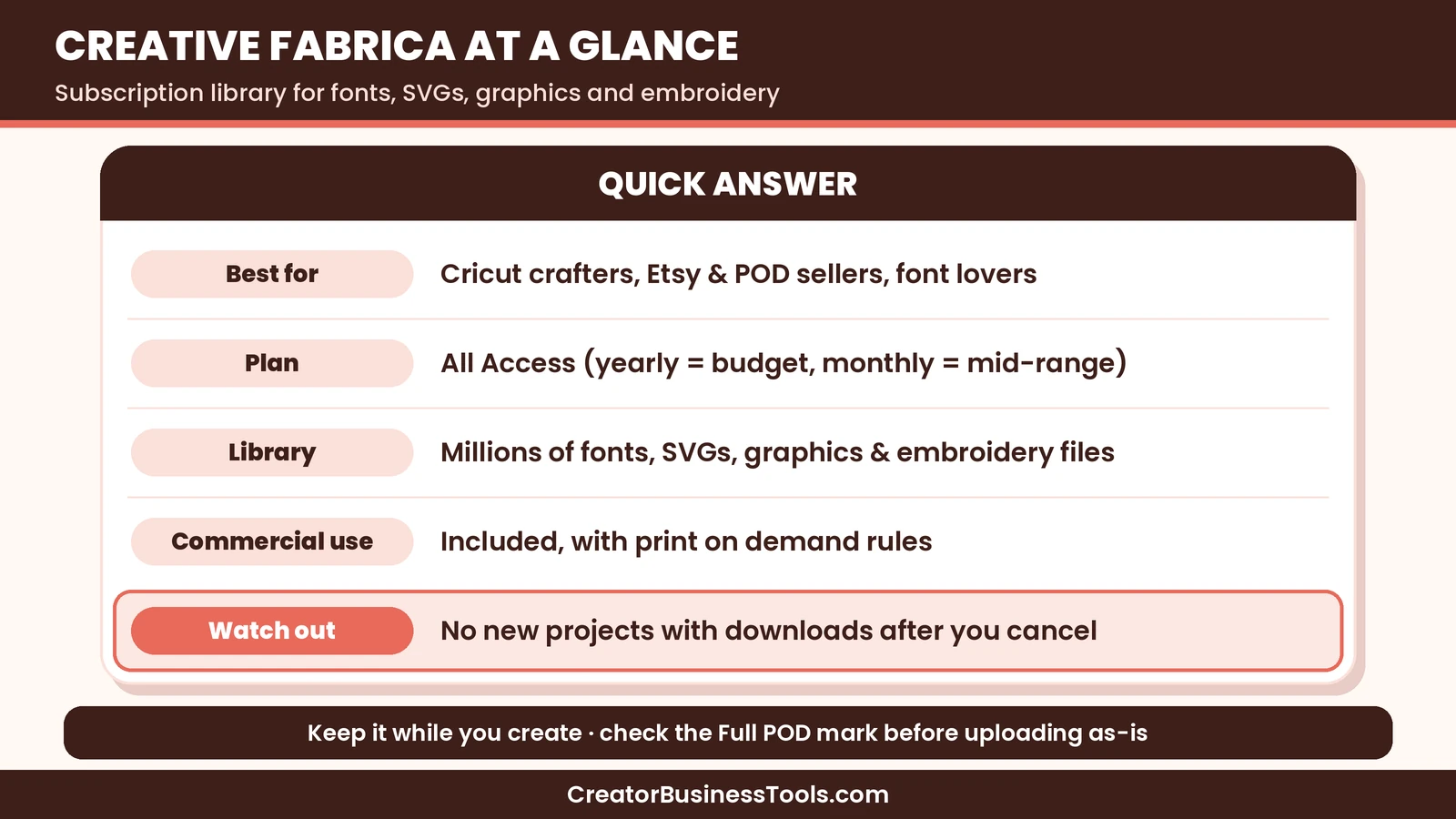
Quick verdict: Creative Fabrica is one of the best-value ways to get a huge library of fonts, SVG cut files, graphics, and embroidery designs, especially if you pay yearly, which keeps it firmly in budget territory. Commercial use is included, which matters for sellers. The catch is in the details: the marketplace is now subscription-only, print on demand rights depend on which license a design carries, and you cannot start new projects with downloaded files after you cancel.
Quick picks
- Best for most crafters and sellers: All Access on yearly billing, the lowest-cost way to unlock the full marketplace. Creative Fabrica
- Best if you only need a few files right now: start with Creative Fabrica’s free assets, then upgrade when you hit a project that needs more.
- Best if you want to try it for a single busy season: monthly All Access, accepting a higher per-month price for flexibility.
- Best if you want AI design tools: Creative Fabrica’s separate Studio subscription, which is billed and licensed on its own.
- Best if you want a capped plan or a different library: compare Design Bundles, covered in our Creative Fabrica vs Design Bundles guide.
Creative Fabrica at a glance
| Item | What Creative Fabrica offers |
|---|---|
| What it is | A subscription marketplace for fonts, SVG cut files, graphics, embroidery designs, and classes |
| Main plan | All Access |
| Price tier | Budget on yearly billing, mid-range on monthly billing |
| Library size | More than eleven million assets, with more added daily |
| File types | Fonts in OTF or TTF, crafts in SVG, PNG, DXF, and EPS |
| Commercial use | Included with downloads, under the subscription license |
| Print on demand | Basic POD for most designs, Full POD for marked designs |
| After you cancel | Keep using and selling what you already made, but no new projects |
| Extras | Premium classes and freebies |
| AI tools | Sold separately as a Studio subscription |
What is Creative Fabrica?
Creative Fabrica is an Amsterdam-based marketplace where independent designers publish fonts, cut files, clip art, patterns, mockups, embroidery files, and more. For years you could either buy items one by one or subscribe. That has changed. According to Creative Fabrica’s help center, the marketplace became subscription-only, which means products are now available through the All Access subscription rather than individual purchases.
For most creators, this simplifies the choice. You are no longer weighing a handful of single purchases against a membership. The question is simply whether All Access fits your projects and budget, and whether its license fits the way you sell.
Creative Fabrica also runs Studio, a separate set of AI-powered design tools. Studio has its own subscription and its own terms, and it does not include marketplace downloads. If you see Studio mentioned, keep in mind that it is a different product from the All Access library this review focuses on.
Creative Fabrica review: the features that matter
A very large library
The headline feature is size. Creative Fabrica’s subscription page lists more than eleven million creative assets. In practice, that means you can usually find several options for common themes such as seasonal SVGs, teacher gifts, wedding fonts, farmhouse signs, and nursery decor. For niche hobbies, the depth is helpful too: there are embroidery designs, laser cutting files, sublimation graphics, and paper craft templates.
A big library is not automatically a good library, and quality varies between designers. The upside of a subscription is that you can download several candidates, test them in your cutting software or design app, and keep the one that works.
Fonts for crafters and sellers
Fonts are one of the strongest reasons people subscribe. Script fonts, handwritten fonts, and display fonts are popular for shirts, mugs, wedding signage, and printables. Most fonts come in OTF or TTF formats, and Creative Fabrica’s FAQ says you can use fonts to create quotes, sentences, and word art for print on demand sites.
If you run an Etsy shop or sell digital products, having a deep font collection under one license can save you a lot of time compared with checking the license of every free font you find online.
SVG cut files for Cricut and Silhouette
For cutting machine owners, craft files typically include SVG, PNG, DXF, and EPS formats. That covers Cricut Design Space, Silhouette Studio, and most laser software. You can also convert files to other formats for your own use, according to the FAQ.
Embroidery, sublimation, and print-ready graphics
Beyond cut files, the library includes embroidery designs, sublimation PNGs, illustrations, patterns, and mockups. If you sell physical products, mockups alone can be worth a lot, because they let you show your design on a shirt, tote, or mug without a photo shoot.
Classes
All Access also includes access to premium classes. These cover crafting techniques, design software, and small business topics. They are a nice bonus rather than the main reason to subscribe, but beginners may find them useful when learning a new machine or app.
How the Creative Fabrica license works
This is the section most sellers should read twice. The good news is clear: Creative Fabrica says all downloads come with a commercial-use license, valid worldwide. You can use fonts and designs in commercial projects, and work you create during your subscription can be used forever, even after you cancel.
There are three details to understand.
- Basic POD versus Full POD. The subscription includes a Basic POD license. Designs marked Full POD can be uploaded as-is to print on demand sites. Designs without that mark can still be used on POD products, but only within the Basic POD rules described in the license.
- Selling Full POD designs after you cancel. For files downloaded through All Access, Creative Fabrica’s FAQ says you can sell Full POD designs while your subscription is active. When the subscription ends, you need to stop selling files downloaded as part of it.
- No new projects after cancelling. Once your subscription ends, you lose access to new downloads, and you are not allowed to create new work with files you downloaded. Finished work made while subscribed can still be used and sold.
In short, Creative Fabrica works best if you plan to keep the subscription as long as you are actively creating and selling with its files. If you prefer to download once and own the rights indefinitely, compare license terms carefully before subscribing.
Creative Fabrica pricing explained
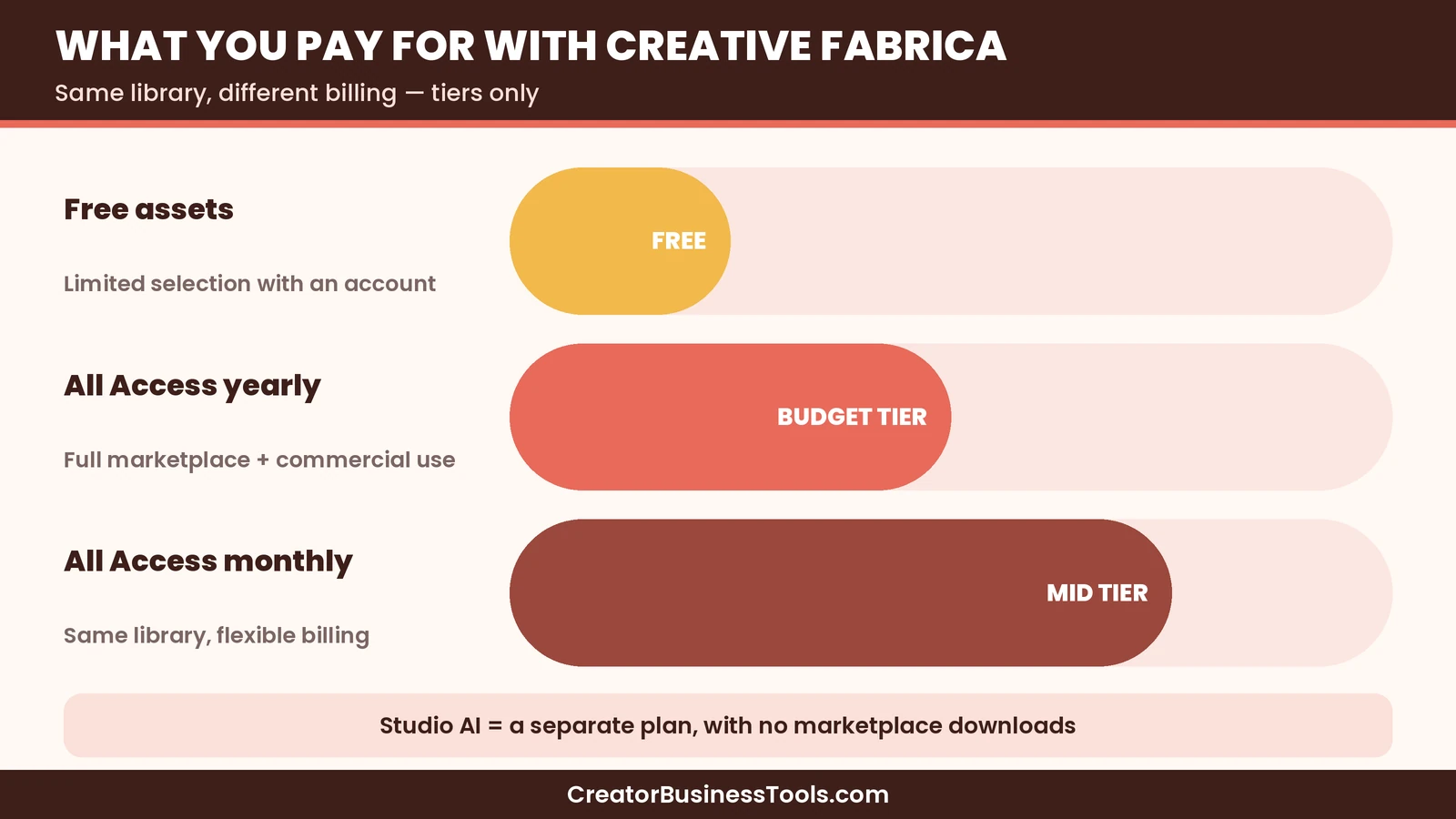
Creative Fabrica keeps the pricing simple. There is one main plan for the marketplace, All Access, and you choose how to pay for it.
- Free assets: Creative Fabrica offers free files you can download with an account. This is a good way to test file quality and see how the site works.
- All Access, yearly billing: the budget option, and by far the lowest cost per month. For most hobby crafters and new sellers, this is the plan we would look at first.
- All Access, monthly billing: a mid-range monthly cost. It costs much more over a full year, but it can make sense if you only need the library for one busy season.
- Studio: a separate subscription for AI design tools, with its own coin system. It does not include marketplace downloads.
Subscriptions renew automatically, and you can cancel any time. If you cancel, access continues until the end of the period you already paid for.
Who Creative Fabrica is best for
- Cricut and Silhouette crafters who make lots of projects and want variety without buying files one at a time.
- Etsy sellers who need fonts, clip art, and mockups for printables, planners, stickers, and listing photos.
- Print on demand sellers who are comfortable checking which designs carry the Full POD mark.
- Teachers, parents, and party planners who make seasonal decorations and want a big collection of themes.
- Pinterest-focused creators who need fresh graphics and fonts for pins and blog images.
Who might want something else
- People who want to own rights after cancelling. Because new projects are not allowed after the subscription ends, a pay-once approach may suit you better.
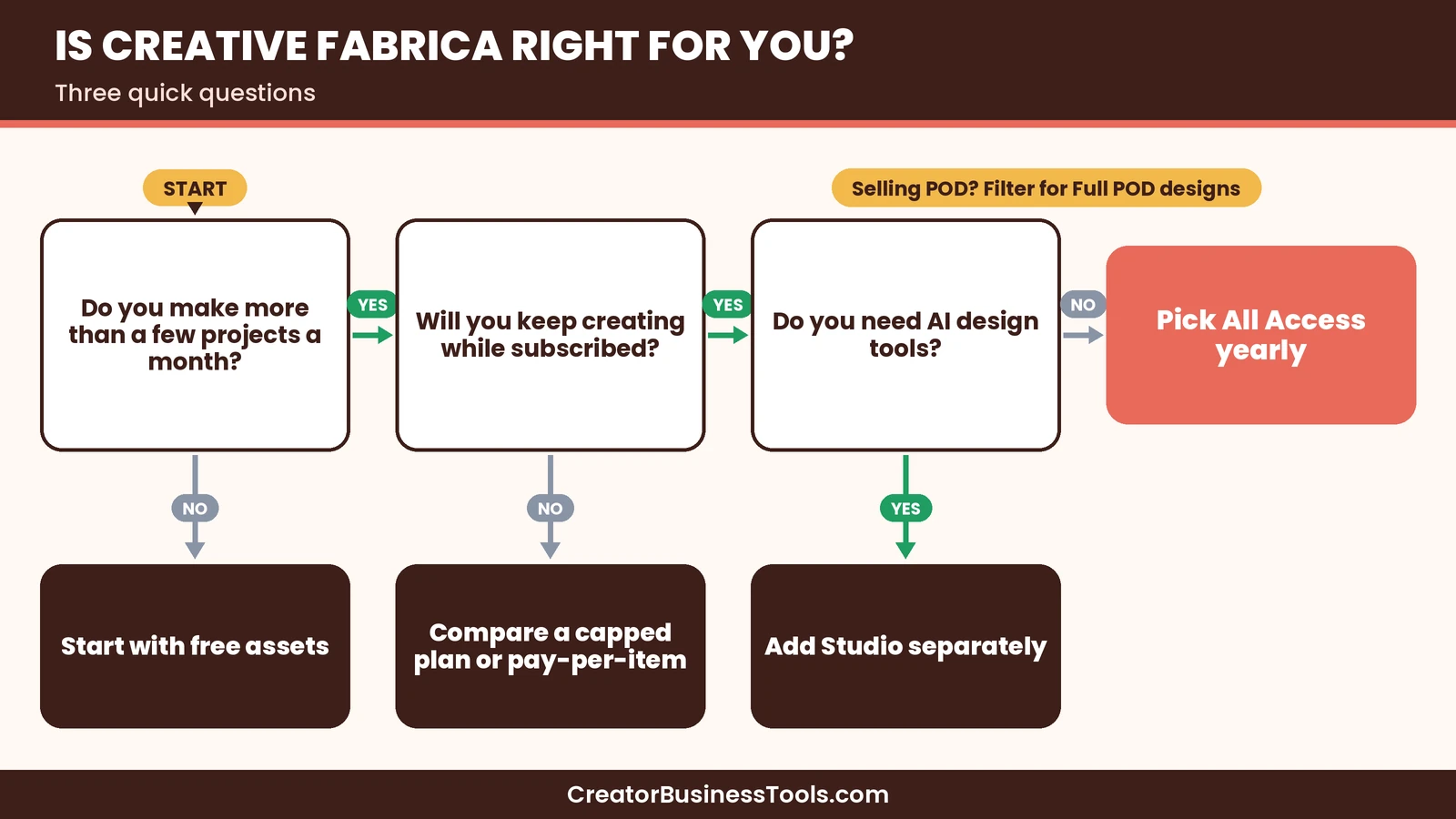
- Very occasional crafters. If you only make a few projects a year, free assets or a capped plan elsewhere may be enough.
- Sellers who need every design cleared for POD as-is. Only Full POD designs can be uploaded without changes, so you will need to filter.
- Anyone mainly after AI tools. The Studio subscription is separate, so All Access alone will not cover that.
How Creative Fabrica compares with other options
| Option | Library focus | Price tier | Commercial use | Best for |
|---|---|---|---|---|
| Creative Fabrica All Access | Fonts, SVGs, graphics, embroidery, classes | Budget yearly, mid-range monthly | Included, Basic POD plus Full POD on marked items | High-volume crafters and sellers |
| Design Bundles | Fonts, SVGs, sublimation, mockups | Budget capped plan, mid-range unlimited, premium business | Personal on the capped plan, commercial and POD on unlimited | Sellers who want a POD license on every unlimited download |
| Free font and SVG sites | Mixed | Free | Varies by file | Very occasional projects |
| Buying from individual designers | Specific shops | Pay per item | Set by each designer | Sellers who want a few signature files |
We compare the two big subscription libraries side by side in our Creative Fabrica vs Design Bundles guide, including license differences that matter for print on demand.
Pros and cons
Pros
- Huge library of fonts, SVGs, graphics, and embroidery files
- Yearly billing keeps the cost in the budget tier
- Commercial use included with downloads
- Common craft formats included: SVG, PNG, DXF, and EPS
- Premium classes included
- Cancel any time, with access until the end of your paid period
Cons
- Subscription-only marketplace, so individual purchases are no longer an option
- New projects with downloaded files are not allowed after you cancel
- Full POD rights only apply to designs marked Full POD
- Quality varies between designers
- AI tools require a separate Studio subscription
A small story from our team
A while back, one of us was building a printable planner to sell and found a lovely script font on a random free font site. Just before launch, we went back to double-check the license and discovered it was for personal use only. We spent most of an afternoon searching for a replacement, re-exporting every page, and redoing the listing images. That experience is why we now care so much about having fonts and graphics under one clear license. It is also why we read the fine print on cancellation rules before recommending any subscription library.
How to get started with Creative Fabrica
- Create a free account and download a few free assets to test file quality in your software.
- Make a short list of the projects you plan to make over the next few months.
- Choose All Access with yearly billing if you expect steady use, or monthly if you only need a short burst.
- Set up folders on your computer by project or theme, because downloads add up quickly.
- For print on demand, filter or check each design for the Full POD mark before uploading as-is.
- Keep a simple record of which files you used in which products, in case you ever need to check a license.
Tips for getting the most from All Access
- Batch your downloads by season. Plan holiday designs a couple of months ahead so you have time to test and cut.
- Favorite designers you trust. Once you find designers whose files cut cleanly, follow them for new releases.
- Pair fonts deliberately. One script and one simple sans-serif usually look more professional than three decorative fonts.
- Use mockups for listings. Clean mockups can make an Etsy listing or pin look polished without a photo shoot.
- Watch the classes for your machine. A short class can save hours of guesswork on a new cutter or embroidery machine.
Creative Fabrica and Pinterest
Craft and font content does very well on Pinterest, because people save project ideas long before they make them. A Creative Fabrica subscription gives you plenty of material for pins: finished project photos, font pairing boards, seasonal SVG roundups, and printable previews. If you sell on Etsy or run a craft blog, consistent pins built with licensed fonts and graphics can bring steady traffic. Just remember that the license still applies, so use designs within the commercial terms.
Is Creative Fabrica worth it?
For active crafters and small sellers, yes, especially on yearly billing. The value comes from volume: if you download a handful of files each month, the subscription quickly costs less than buying individually would have. The commercial license is a real plus, as long as you understand the POD rules and the fact that new projects stop when the subscription stops.
If you only make an occasional gift, free assets may be enough. If your business depends on uploading lots of designs as-is to POD sites, compare Creative Fabrica with Design Bundles before deciding.
FAQ
Is Creative Fabrica free? Creative Fabrica offers free assets with an account, but the full marketplace requires the All Access subscription.
Can I buy single files on Creative Fabrica? According to Creative Fabrica’s help center, the marketplace is now subscription-only, so products are available through All Access rather than individual purchases.
Does Creative Fabrica include a commercial license? Yes. Downloads come with a commercial-use license, with Basic POD rights for most designs and Full POD rights for designs marked Full POD.
What happens if I cancel? You keep access until the end of your paid period. After that, you cannot download new files or create new work with downloaded files, but you can keep using and selling work you already made.
Does All Access include the AI Studio? No. Studio is a separate subscription and does not include marketplace downloads.
Which file formats are included? Fonts usually come as OTF or TTF. Craft files include SVG, PNG, DXF, and EPS.
Conclusion: our Creative Fabrica review in a nutshell
Creative Fabrica is a strong, budget-friendly choice for crafters and small sellers who want a massive library under one commercial license. Choose yearly billing if you will use it steadily, check the Full POD mark for print on demand, and keep the subscription active while you are still creating with its files. If those conditions fit your workflow, it is one of the easiest ways to keep your craft room and shop stocked with fresh designs. Check Creative Fabrica All Access
Get our free Etsy seller toolkit
Want more help choosing fonts, graphics, and tools for your shop? Join our email list for a free toolkit with a license checklist, a listing photo checklist, and simple ideas for seasonal product planning. Contact us to request a copy.
Pricing and features from official vendor pages, last checked October 25, 2026.