
Divi Pricing Explained: Which Divi Plan Should You Buy?
Disclosure: This post contains affiliate links. If you buy through them, we may earn a commission at no extra cost to you. How we make money.
Divi is one of the few WordPress page builders that does not charge per website. That single fact shapes almost every part of Divi pricing, and it is the reason the “right” plan depends so much on how many sites you build and how long you plan to keep using WordPress.
This guide explains Divi pricing in plain terms: what each plan includes, what you pay for once versus every year, where Divi Pro fits, and how the cost compares with Elementor’s per-site plans. It is based on Elegant Themes’ official pricing page and FAQ, not on sponsored claims or promotional pages.
Quick verdict: For most bloggers and small business owners, the yearly Divi plan is a budget-friendly way to start, with unlimited sites and full support. If you are confident you will stay with Divi for several years, Divi Lifetime can lower the long-term cost. Divi Pro mainly makes sense for freelancers and agencies who will actually use the AI tools, cloud library, faster support, and team seats.
Quick picks
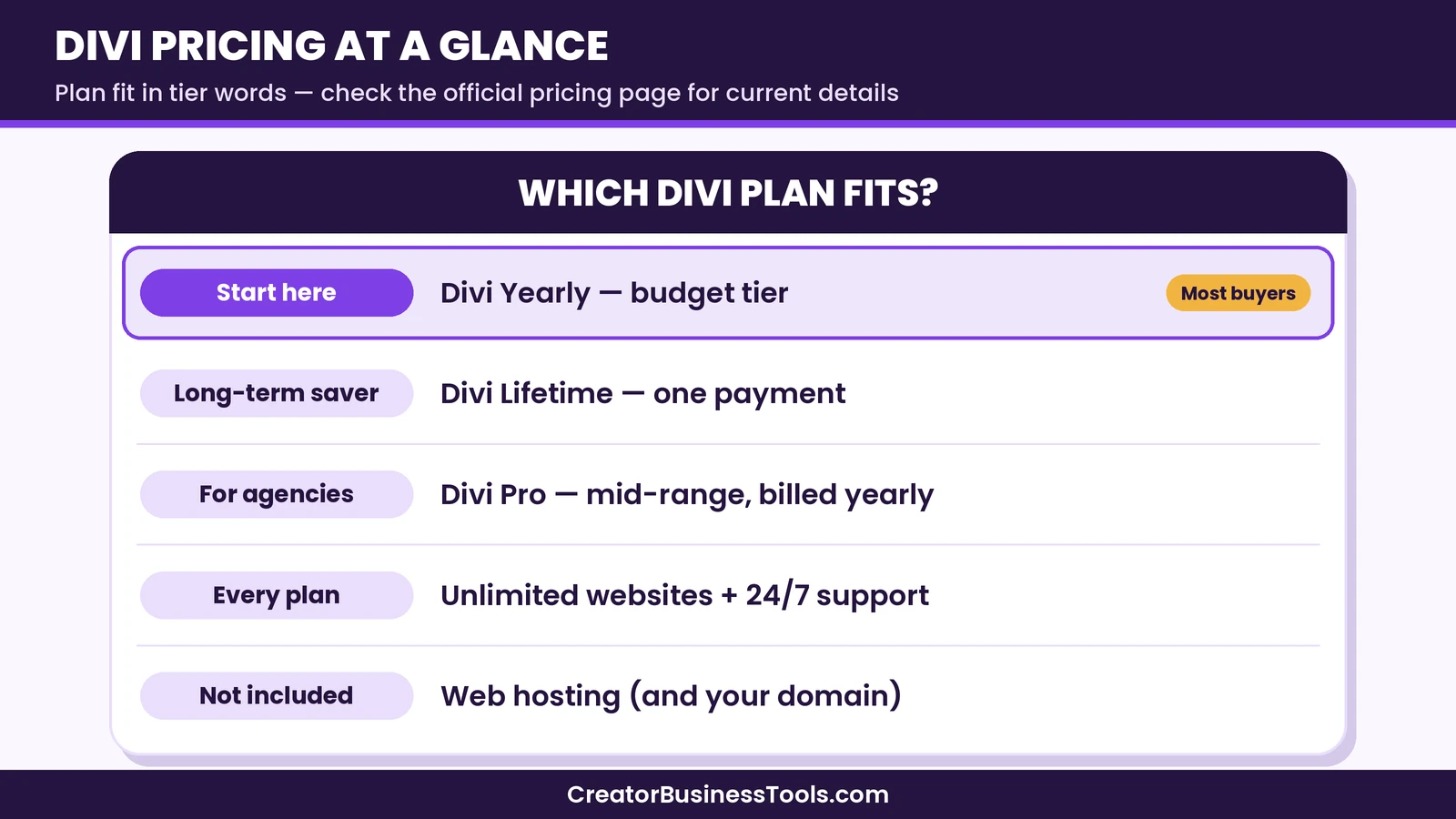
- Best for a first website or two: Divi Yearly. It sits in a budget tier, covers unlimited sites, and includes the full builder, theme builder, and support. See Divi’s plans
- Best for long-term WordPress users: Divi Lifetime. You pay once for Divi and its updates and support, with no recurring bill for the core product.
- Best for freelancers and agencies: Divi Pro. It bundles Divi AI, Divi Cloud, Divi VIP support, and four Divi Teams seats into one yearly price.
- Best for agencies planning to stay for years: Divi Lifetime + Pro, a one-time payment for Divi plus a yearly fee for the Pro services that you can cancel later.
Divi pricing at a glance
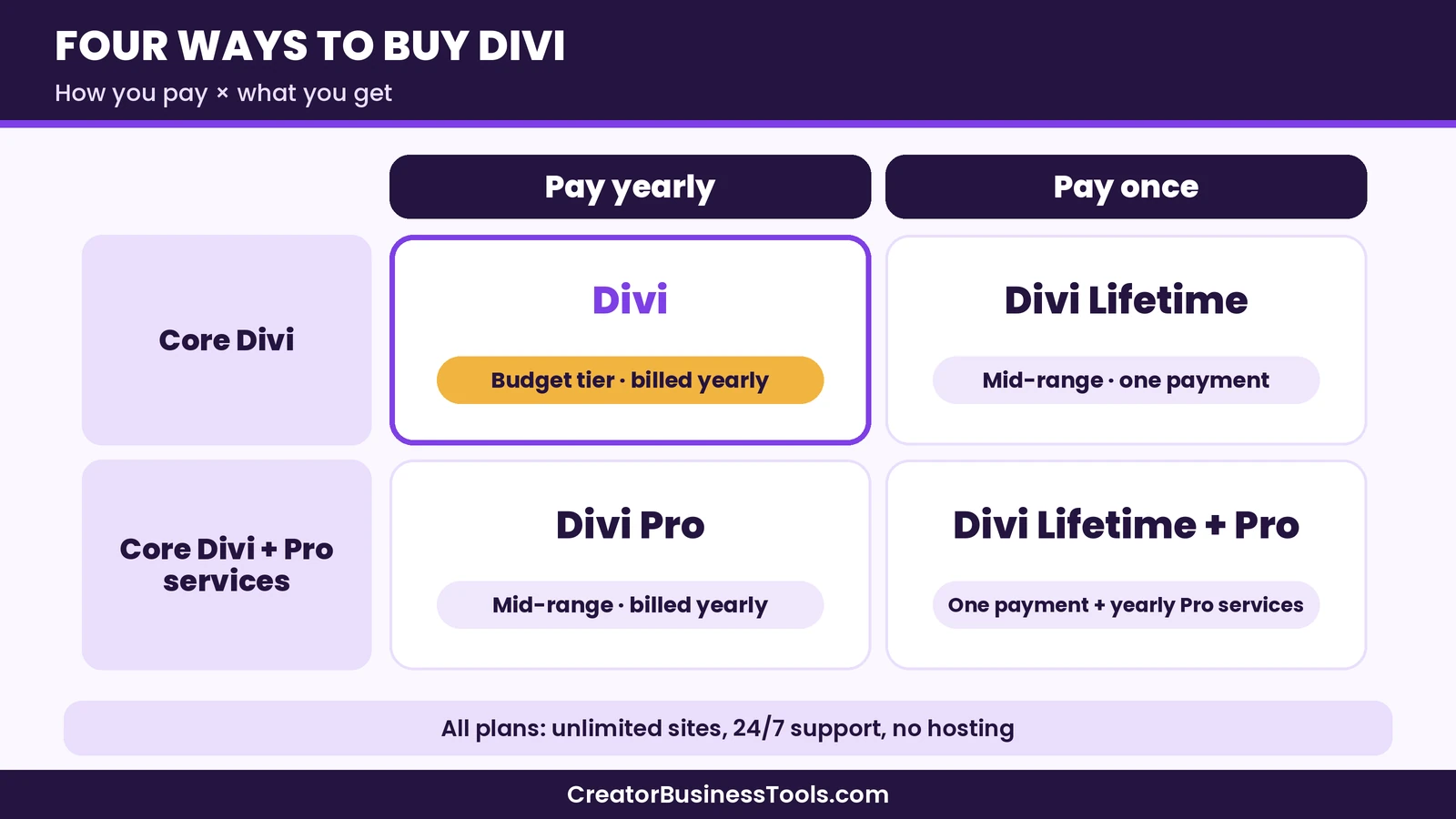
Elegant Themes sells Divi in two billing styles, yearly and lifetime, and each comes with or without the Pro services. That gives you four plans in total.
| Plan | How you pay | Price tier | Websites | Pro services |
|---|---|---|---|---|
| Divi | Yearly | Budget | Unlimited | Not included |
| Divi Pro | Yearly | Mid-range | Unlimited | Included |
| Divi Lifetime | One payment | Mid-range (one time) | Unlimited | Not included |
| Divi Lifetime + Pro | One payment plus a yearly fee for Pro services | Mid-range to premium | Unlimited | Included while you keep paying for them |
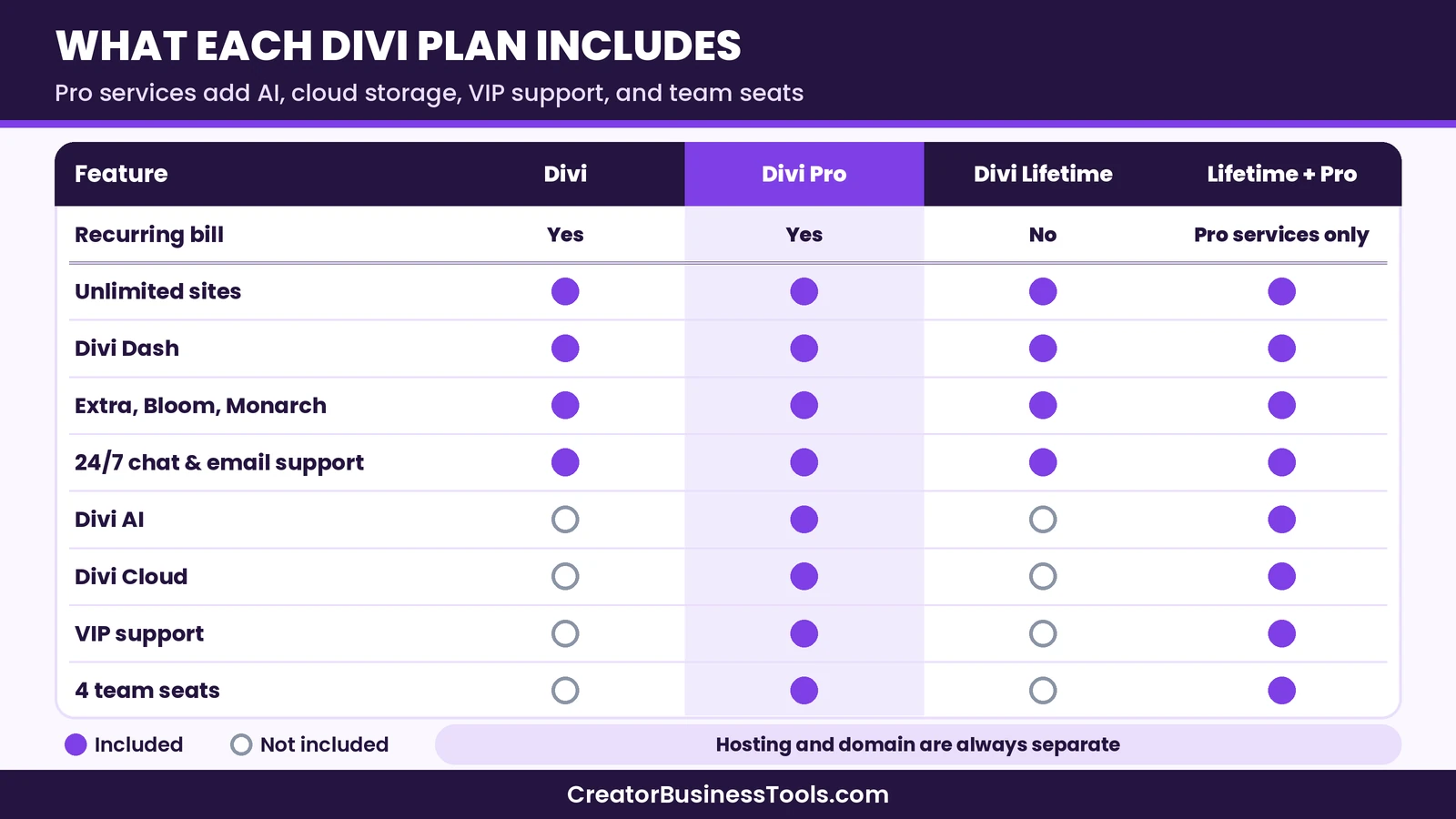
Every plan includes the Divi theme and builder, the Divi Dash site manager, Elegant Themes’ other themes and plugins (Extra, Bloom, and Monarch), and 24/7 chat and email support. Elegant Themes also offers a money-back guarantee, so check the refund policy on the official page before you buy.
What every Divi plan includes
Before you compare plans, it helps to know what you get at the base level. The core product is the same on all four plans, so the main differences are billing style and the add-on services.
The Divi theme and visual builder
Divi is a WordPress theme with a built-in visual, drag-and-drop builder. You can design pages from scratch or start from hundreds of pre-made layouts. Elegant Themes describes a universal design system with class-based presets, global variables, and theme templates, which helps keep fonts, colors, and spacing consistent across a site.
Theme builder and Quick Sites
The theme builder lets you design headers, footers, blog post templates, and archive pages without code. Divi Quick Sites can generate a starter website with real content, which can be a helpful shortcut if you are building a site for a small business or a portfolio and want a structure to edit.
Ecommerce modules
If you use WooCommerce, Divi includes ecommerce modules and design settings for product pages, carts, and shop layouts. That means a small online store can share the same design system as the rest of the site.
Divi Dash
Divi Dash is a site manager included on every plan. You can add unlimited sites and handle updates, themes, plugins, and users from one place. For anyone running several WordPress sites, this can reduce routine maintenance work.
Extra, Bloom, and Monarch
Your membership also covers Elegant Themes’ other products: the Extra magazine-style theme, the Bloom email opt-in plugin, and the Monarch social sharing plugin. Not everyone needs them, but they are part of the package on every plan.
Support
The standard plans include 24/7 customer support via chat and email. Divi Pro upgrades this to Divi VIP, which Elegant Themes says answers questions around the clock in under 30 minutes.
Divi Yearly: the starting point
The yearly Divi plan is the simplest choice and the cheapest way in. You pay once a year and get the full theme and builder on unlimited websites, plus Divi Dash and support.
According to the official FAQ, if you cancel, your account stays active until the end of the yearly term. After that, you lose access to the members area, new themes, updates, and support, but you can keep using the themes you already downloaded. In practice, that means your sites keep working, but you would be running an un-updated theme over time, which is not ideal for security or compatibility.
The yearly plan suits you if:
- You are building your first site or two and want to test Divi properly.
- You are not sure yet whether a visual builder fits the way you work.
- You prefer a lower upfront cost over the lowest possible long-term cost.
Divi Lifetime: pay once for the core product
Divi Lifetime is a one-time payment for Divi and Divi Dash. Elegant Themes says it includes lifetime updates and support and unlimited website use, with no recurring subscription. It does not include the Pro services.
The trade-off is a higher upfront payment in exchange for no yearly bill. As a rough rule, the lifetime plan costs about as much as a few years of the yearly plan. So if you expect to use Divi for longer than that, Lifetime is likely to be the cheaper path. If you might switch builders in a year or two, the yearly plan keeps your options open.
Example scenario (hypothetical): a blogger who has used WordPress for years and plans to keep the same site for the long run would likely save money with Lifetime. A new freelancer who is still testing different builders would probably be better off with the yearly plan first, then upgrading if Divi sticks.
Elegant Themes’ FAQ notes that only the themes and plugins membership is available as a lifetime purchase. Divi AI, Divi Cloud, Divi VIP, and Divi Teams are sold only as monthly or yearly subscriptions.
Divi Pro: what the extra services add
Divi Pro bundles Divi with its “pro services” for a yearly price in the mid-range tier. Elegant Themes positions it for web professionals who build sites for clients.
Divi AI
Divi AI can generate layouts, text, images, and code inside the builder. On Divi Pro, Elegant Themes says layout, text, image, and code generation is unlimited, though this does not apply to AI Agent usage. Pro also includes a small monthly allowance for the AI Agent, which builds sites using natural language in the Visual Builder.
Divi Cloud
Divi Cloud stores your layouts, theme builder templates, and code snippets in the cloud so you can reuse them on every new site. On Pro, storage is unlimited.
Divi VIP
Divi VIP is faster support. Elegant Themes says VIP members get answers around the clock in under 30 minutes, and it also includes Marketplace purchase benefits for VIP members.
Divi Teams
Divi Teams lets you invite team members or clients, each with their own account. Divi Pro includes four Teams seats.
Can you drop services you don’t use?
Yes. Elegant Themes says that if you don’t use a particular service, you can cancel it and reduce your Divi Pro price. That flexibility matters: if you only want Divi AI, for example, you may not need the full bundle.
Is Divi Pro worth it?
Divi Pro is worth considering when you will use at least two of the services regularly. A solo blogger who builds one site and rarely needs support probably won’t get much value from it. A freelancer who reuses layouts across client sites, wants AI help with copy and images, and needs quick answers during client work is much more likely to.
Divi Lifetime + Pro: the long-term agency option
This plan combines a one-time payment for Divi with a yearly fee for the Pro services. Elegant Themes says you can cancel the Pro services at any time and keep using Divi.
It suits agencies and freelancers who:
- Are confident they will build with Divi for many years.
- Want the AI tools, cloud library, VIP support, and team seats now.
- Like knowing they can drop the yearly Pro services later without losing the builder.
Because there is still a yearly component, this is not a “pay once and forget” plan. Treat it as Lifetime for the core product, plus an optional subscription you can stop.
How to choose a Divi plan
The decision mostly comes down to two questions: how long will you use Divi, and will you use the Pro services?
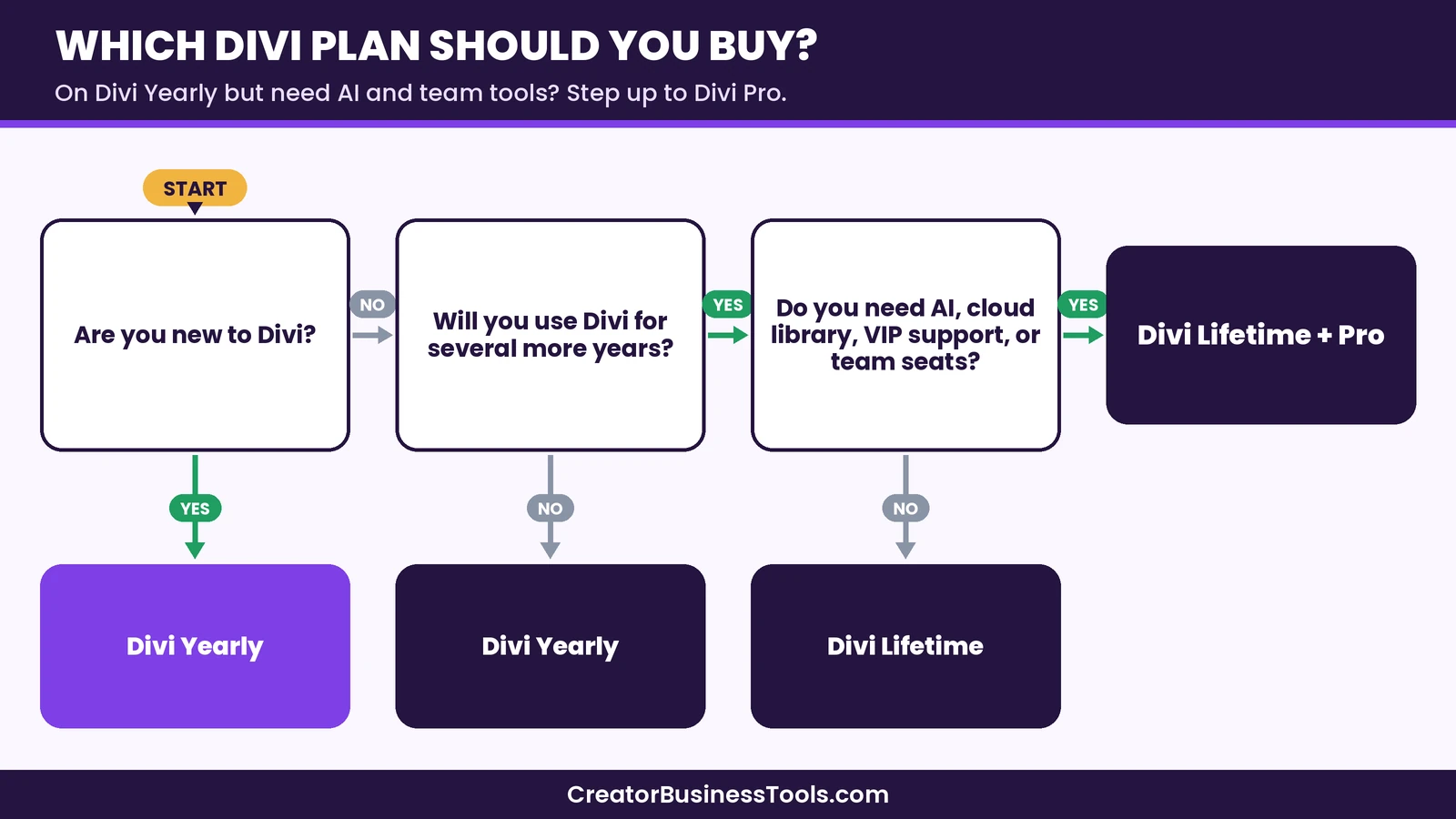
A few practical rules of thumb:
- Not sure yet? Start with the yearly plan. Elegant Themes says you can upgrade to a different package after signing up.
- Already committed to WordPress and Divi? Lifetime usually wins over a long enough period.
- Building client sites every month? Look closely at Divi Pro or Lifetime + Pro, but only if you will use the services.
- Need help fast while working on client projects? VIP support is one of the clearest reasons to pick a Pro plan.
Divi pricing vs Elementor pricing
Elementor is the builder most people compare with Divi, and the two take very different approaches to pricing.
Elementor offers a free plugin and paid Pro plans, all billed yearly and priced by the number of websites. The lowest paid plans cover a single site, mid-level plans cover a few sites, and the agency-level plans cover many more. Elementor also sells “One” bundles that combine its tools; check Elementor’s pricing page for current list prices and renewal terms.
Divi takes the opposite approach: every plan covers unlimited websites.
| Factor | Divi | Elementor |
|---|---|---|
| Free version | No free version | Free plugin available |
| Pricing model | One price, unlimited sites | Tiered by number of sites |
| Billing options | Yearly or one-time lifetime | Yearly |
| Entry price tier | Budget (yearly) | Budget (single site) |
| Many-site use | Same plan covers all sites | Higher tiers needed |
| Hosting | Not included | Not included in builder plans |
What this means in practice:
- One site, small budget: Elementor’s free plugin or entry plan can be the lowest-cost start. Divi’s yearly plan is also in a budget tier but has no free version.
- Several sites: Divi’s unlimited-site model often becomes cheaper, since site count doesn’t push you into a higher tier.
- Long-term use: Divi Lifetime has no direct equivalent among Elementor’s plans, which are all yearly.
If you want a deeper feature comparison rather than just pricing, see our Divi review for how the builder itself works.
Hidden and extra costs to plan for
Divi’s plans are simple, but a WordPress site has other costs around the builder.
Web hosting
Divi memberships do not include hosting. Divi works with any host, and Elegant Themes also offers Divi Hosting with Divi pre-installed. Budget for hosting separately, since it is often a larger yearly cost than the builder itself.
Domain name
You will also need a domain name, which is billed by a registrar or your host.
Marketplace add-ons
The Divi Marketplace sells extra modules, layouts, and child themes from third-party creators. They are optional, but it is easy to buy several, so set a budget.
Plugins outside Divi
You may still need plugins for things like SEO, backups, caching, or forms beyond what Divi covers. Some are free; others are paid.
WordPress.com sites
According to Elegant Themes, Divi works on the WordPress.com Business plan, which allows third-party themes and plugins. Check that your WordPress.com plan allows third-party themes before you buy.
Before you buy
- Decide whether you want yearly or lifetime billing first. That choice matters more than any add-on.
- Remember that hosting and your domain are separate costs.
- If you pick Divi Pro, list which services you will actually use. You can cancel unused ones to lower the price.
- Read the refund policy on the official pricing page so you know the window for a money-back request.
- On WordPress.com, confirm you are on a plan that allows third-party themes.
Example scenarios: which plan fits?
These are hypothetical situations to show how the plans map to different needs. They are not customer stories.
A new blogger with one site
A new blogger who wants a polished design without code would likely start with Divi Yearly. It keeps the upfront cost in a budget tier and gives access to support while learning. If Divi becomes a long-term tool, upgrading later is an option.
A small business owner with a shop
A shop owner using WooCommerce might choose Divi Yearly or Lifetime, depending on how long they plan to keep the site. The ecommerce modules work on every plan, so there’s no need for Pro just to sell products.
A freelancer building client sites
A freelancer launching several client sites a year could benefit from Divi Pro. Divi Cloud helps reuse layouts, Divi AI can speed up drafts of copy and images, and VIP support helps during deadlines. Team seats let clients log in with their own accounts.
An established agency
An agency already committed to Divi might compare Divi Pro with Lifetime + Pro. Over several years, paying once for the core product and only paying yearly for the services can lower the total cost, while keeping the option to cancel the services later.
Divi pricing: pros and cons
Pros
- Unlimited websites on every plan, which is uncommon among page builders.
- A lifetime option for the core product.
- Extra themes and plugins included at no added cost.
- 24/7 chat and email support on every plan.
- Pro services can be cancelled individually to lower the price.
- A money-back guarantee if Divi doesn’t fit your workflow.
Cons
- No free version to test the builder long-term.
- Hosting isn’t included.
- The AI Agent sits outside the unlimited AI generation on Pro.
- The lifetime plan doesn’t include AI, Cloud, VIP, or Teams.
- After cancelling a yearly plan, you lose updates and support.
How to get started with Divi
- Pick your billing style. Choose yearly if you’re testing, or lifetime if you’re committed.
- Decide on Pro. Add Pro only if you’ll use the services.
- Set up hosting and a domain. Make sure WordPress is installed and running.
- Install Divi. Download it from the members area and activate it in WordPress.
- Start from a layout or Quick Sites. Edit a pre-made design rather than starting from a blank page.
- Set global styles early. Fonts, colors, and presets save time later.
- Add Divi Dash. Connect your sites so updates are easier to manage.
FAQ
How much does Divi cost?
Divi’s yearly plan is in a budget price tier, Divi Pro is in a mid-range tier, and Divi Lifetime is a one-time payment in a mid-range tier. Check the official pricing page for exact amounts in your currency.
Is Divi a one-time payment?
It can be. Divi Lifetime and Divi Lifetime + Pro both include a one-time payment for Divi. The Pro services on Lifetime + Pro are billed yearly.
Can I use Divi on unlimited websites?
Yes. Elegant Themes says every Divi plan includes unlimited website use, including client sites, with no per-site fees.
What happens if I cancel my yearly Divi plan?
Your account stays active until the end of the term. After that, you lose updates and support, but you can keep using the themes you already downloaded.
Does Divi include hosting?
No. Divi works with any host, and Elegant Themes offers Divi Hosting with Divi pre-installed as a separate service.
Is Divi Pro worth it for a single blog?
Usually not. Divi Pro makes the most sense when you build many sites, work with a team, or rely on AI tools and fast support.
Can I upgrade from Divi to Divi Pro later?
Yes. Elegant Themes says you can upgrade to a different package and add services after you sign up.
Is Divi cheaper than Elementor?
It depends on how many sites you build. For one site, Elementor’s free plugin or entry plan can cost less. For several sites, Divi’s unlimited-site pricing is often cheaper.
Does Divi offer a refund?
Elegant Themes offers a money-back guarantee. Check the official refund policy for the time window.
Bottom line
Divi pricing is simpler than most page builders because every plan covers unlimited websites. For most people, the yearly plan is the safest start: low upfront cost, full features, and support. If you know you’ll use Divi for years, Divi Lifetime can save money over time. Divi Pro and Lifetime + Pro make the most sense for freelancers and agencies who will use AI tools, a cloud library, fast support, and team seats.
Compare your site count and how long you plan to use WordPress, and the right Divi plan usually becomes clear.
This section contains an affiliate link. We may earn a fee if you buy, at no extra cost to you.
[Compare Divi's plans](https://www.elegantthemes.com/gallery/divi/)Free checklist: Planning a new WordPress site? Get our free WordPress Site Launch Checklist, a one-page plan covering hosting, theme setup, key pages, and pre-launch checks. Contact us to request a copy.
Pricing and features from official vendor pages, last checked October 28, 2026.