
Elementor Free vs Pro: What You Get and When to Upgrade
Disclosure: This post contains affiliate links. If you buy through them, we may earn a commission at no extra cost to you. How we make money.
Elementor free vs Pro is the question almost every Elementor user reaches sooner or later. The free plugin is generous enough to build real pages, so it isn’t obvious when paying makes sense. Upgrade too early and you pay for features you don’t use. Upgrade too late and you spend hours working around missing tools.
This guide compares what the free version includes with what Elementor’s paid plans add, which paid plan to choose if you do upgrade, and the signs that it’s time to switch. It’s based on Elementor’s official pricing page, widget list, and help documentation, not on sponsored claims.
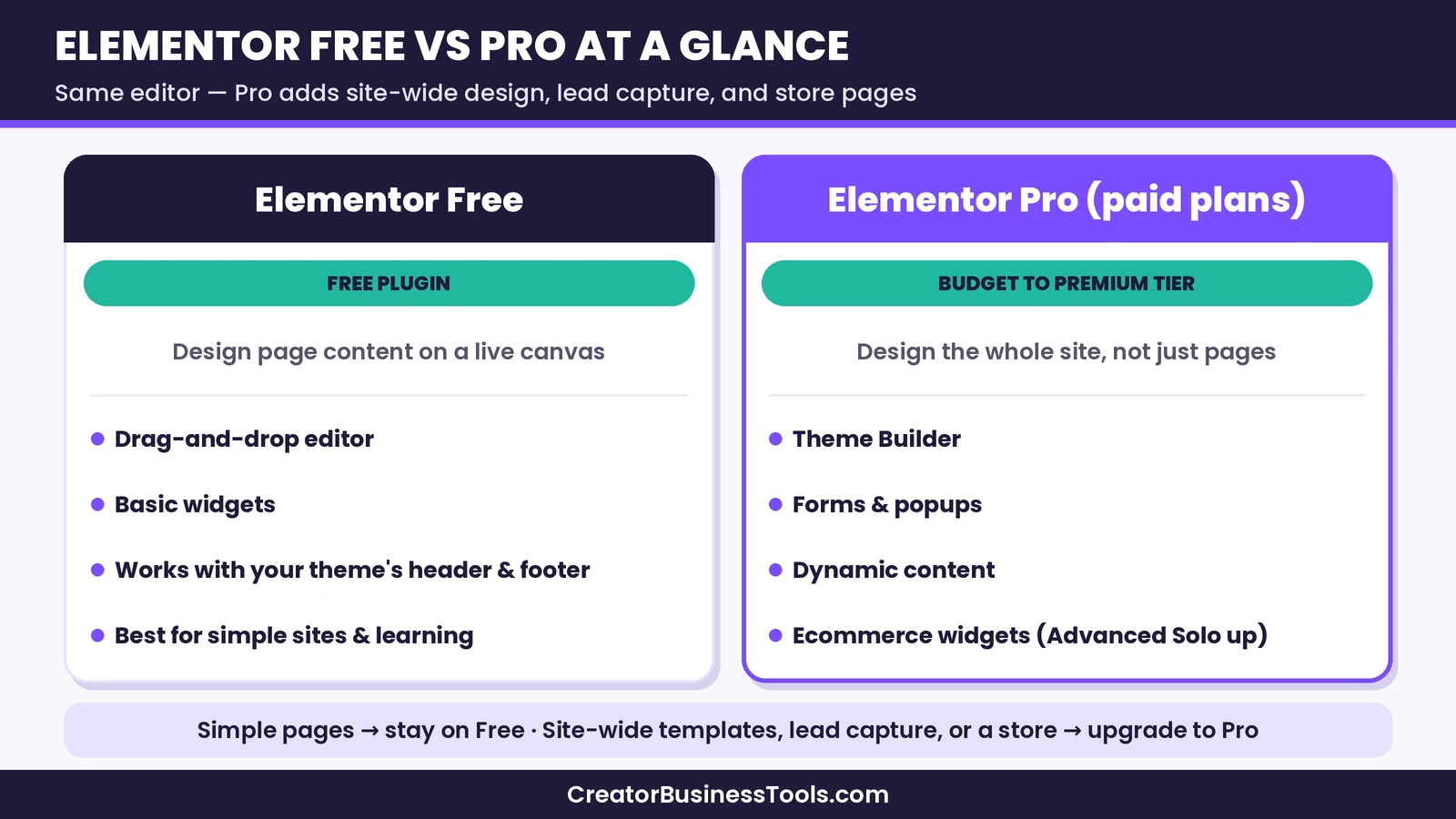
Quick verdict: Stay on Elementor Free if you’re building a simple site with a handful of pages and your theme already handles the header, footer, and blog layout. Move to a paid plan when you need the Theme Builder, professional forms, popups, dynamic content, or WooCommerce page design. For most single-site owners, the best paid starting point is Editor Pro Advanced Solo, because Essential leaves out popups, custom code, and ecommerce widgets.
Quick picks
- Best for learning and simple pages: Elementor Free.
- Best first upgrade for one business site: Editor Pro Advanced Solo, the full Pro feature set for one site. See Elementor Editor Pro plans
- Best for a basic site that only needs the Theme Builder: Editor Pro Essential. See Elementor Editor Pro plans
- Best for freelancers: Editor Pro Advanced or Expert, depending on how many sites you manage. See Elementor Editor Pro plans
- Best if you also want AI and site tools: Elementor One. See Elementor One
Elementor links on this page are affiliate links.
Elementor free vs Pro at a glance
| Elementor Free | Elementor Pro (paid plans) | |
|---|---|---|
| Price tier | Free | Budget to premium, depending on plan |
| Where to get it | WordPress.org plugin directory | Elementor’s website |
| Visual editor | Yes | Yes |
| Widgets | Basic set | Basic set plus dozens of Pro widgets |
| Theme Builder (headers, footers, templates) | No | Yes, on every paid plan |
| Forms | No Pro form widget | Yes, with integrations |
| Popups | No | Advanced Solo and up |
| Dynamic content | No | Yes (custom fields from Advanced Solo up) |
| WooCommerce widgets | No | Advanced Solo and up |
| Custom code and CSS | Limited | Advanced Solo and up |
| AI and site services | No | Elementor One plans |
| Support | Community and docs | Official support |
What Elementor Free includes
The free plugin gives you the full drag-and-drop editor. You can design pages on a live canvas, control layout with containers and grids, and adjust typography, spacing, colors, and responsive settings for desktop, tablet, and mobile.
Elementor’s widget list shows the free set includes the essentials most pages need:
- Layout: container, grid, spacer, divider
- Content: heading, text editor, image, video, button, icon, icon list, image box, icon box
- Engagement: testimonial, tabs, accordion, counter, progress bar, star rating, alert
- Media: basic gallery, image carousel, Google Maps, SoundCloud
- Utility: shortcode, HTML, menu anchor, sidebar, read more, text path, and a simple link-in-bio widget
That’s enough to build a clean homepage, about page, services page, and landing page. Many small sites never need more.
Where Free runs out
The limits show up in three places:
- Site-wide design. Free edits page content, but your theme still controls the header, footer, blog post layout, and archive pages. If your theme’s options don’t match your design, you’re stuck.
- Lead capture. There’s no Pro form widget and no popup builder, so collecting leads usually means adding another plugin.
- Dynamic and store pages. Free can’t build templates that pull in post data, custom fields, or WooCommerce product details.
What Elementor Pro adds
“Elementor Pro” is the name most people still use, though Elementor’s pricing page now calls the paid builder “Editor Pro”. Every paid plan includes it. Here’s what you get.
Theme Builder
The Theme Builder lets you design the parts of the site your theme normally controls: headers, footers, single post templates, archive pages, search results, and 404 pages. You set display conditions, such as a different header for your shop, and Elementor applies templates automatically. For many people, this one feature is the reason to upgrade.
Pro widgets
Elementor lists dozens of extra widgets on its paid plans, including:
- Posts, portfolio, loop grid, and loop carousel for showing content dynamically
- Form, login, and price table widgets
- Slides, media carousel, testimonial carousel, and gallery
- Animated headline, flip box, hotspot, call to action, and countdown
- Table of contents, share buttons, reviews, and video playlist
- Menu, off-canvas, and taxonomy filter for navigation
- Theme elements such as site logo, post title, featured image, and breadcrumbs
Forms
The Pro form widget handles contact, quote, and signup forms, and connects to popular email marketing tools. From Advanced Solo up, you can also manage form submissions from the WordPress dashboard. Essential includes the form builder but not submission management.
Popups
The Popup Builder, from Advanced Solo up, lets you design popups with the same editor and trigger them by scroll depth, exit intent, clicks, or time on page. It’s a common way to grow an email list.
Dynamic content
Pro can pull data such as post titles, author info, and featured images into your designs. From Advanced Solo up, it can also use custom fields and custom post types, which matters for directories, listings, and portfolios.
WooCommerce widgets
From Advanced Solo up, Elementor adds widgets for product titles, images, prices, add-to-cart buttons, cart, checkout, and account pages. If you run a store and want control over how it looks, this is essential.
Custom code and collaboration
Advanced Solo and higher plans add custom code and CSS controls and collaborative notes for working with clients or teammates.
Free vs Pro by site type
The right answer depends heavily on what you’re building. Here’s how the two compare for the most common small business and freelance projects.
Brochure sites for local businesses
A plumber, salon, or consultant usually needs a homepage, a services page, an about page, and a contact page. Free handles the page design well. The gap is the contact form and site-wide header. If your theme’s header looks fine and you already use a form plugin, Free is enough. If you want a custom sticky header, a quote form connected to your email tool, and consistent footers, Essential or Advanced Solo will make the job easier.
Blogs and content sites
Content sites live and die by templates. Every post, category page, and search page should look consistent. Free can’t design those templates, so you depend on your theme. Pro’s Theme Builder, posts widget, loop grid, and table of contents widget are built for exactly this job. If your blog is central to your business, Pro is usually worth it.
Online stores
For WooCommerce stores, the free plugin can design regular pages but not product, cart, or checkout layouts. Advanced Solo and higher plans add the WooCommerce widgets you need for that. Essential doesn’t, so it’s the wrong pick for a store.
Portfolios and directories
Portfolios and listing sites often rely on custom post types and custom fields. Pro’s dynamic content and loop templates handle this, but custom fields require Advanced Solo or higher. Free can show a static gallery, which suits a small portfolio that rarely changes.
Client sites for freelancers
If you build sites for clients, Pro’s reusable templates, global settings, and site count options matter more than any single widget. Advanced covers three sites, and Expert covers 25. Many freelancers start with Advanced and move up as their client list grows.
How the editing experience differs
Free and Pro use the same editor, so the day-to-day experience feels identical. You don’t learn a new interface when you upgrade. The difference is what appears in the widget panel and the extra areas in the WordPress dashboard, such as the Theme Builder and, on higher plans, form submissions. This makes upgrading low-risk: anything you’ve learned on Free carries over.
Performance is similar too. Pro adds features, but Elementor loads assets for the widgets you use, so a page built with a few Pro widgets doesn’t automatically load much more than a page built with free ones. Good hosting, optimized images, and a lean theme matter more for speed than which version you run.
Which paid plan should you choose?
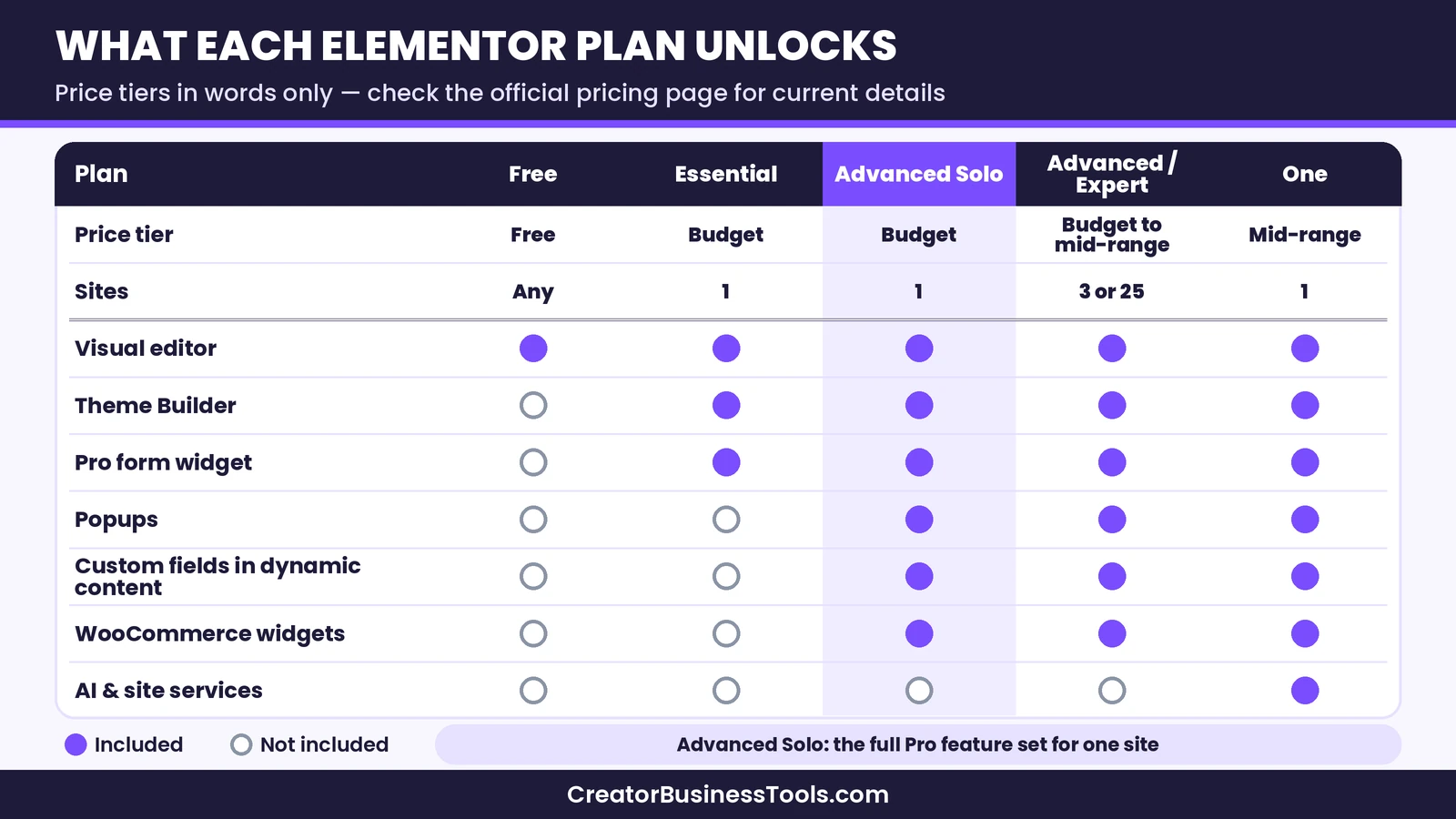
If you’ve decided to upgrade, the next question is which plan. Elementor’s paid plans differ mainly by features and number of sites.
| Plan | Sites | Price tier | Good for |
|---|---|---|---|
| Essential | 1 | Budget | Basic sites that need the Theme Builder and Pro widgets, but no popups or store |
| Advanced Solo | 1 | Budget | Most business sites and small stores |
| Advanced | 3 | Budget | Owners with a few sites, or freelancers starting out |
| Expert | 25 | Mid-range | Freelancers and small agencies |
| One | 1 | Mid-range | Owners who want AI, image optimization, accessibility, and email tools bundled |
| One Agency | Unlimited | Premium | Agencies managing many client sites with bundled services |
Essential or Advanced Solo?
This is the most common choice for single-site owners. Essential is the lowest paid tier, but Elementor’s pricing page shows it doesn’t include the Popup Builder, custom code and CSS, ecommerce widgets, form submission management, or custom fields in dynamic content. If you expect to need any of those, Advanced Solo is the more practical starting point, since it sits in the same budget tier and unlocks the full Pro feature set.
Do you need Elementor One?
Elementor One includes everything in Editor Pro plus AI, image optimization, accessibility tools, cookie consent, email deliverability, and site management, all running on monthly credits. It makes sense if you’d otherwise pay for several of those tools separately. If you mainly want Pro’s design features, Editor Pro is enough. Elementor’s FAQ says you can upgrade from Pro to One later.
Every paid plan renews on its billing cycle at list price, according to Elementor’s pricing page, so check the renewal terms before you commit.
Signs it’s time to upgrade
- You’re fighting your theme to change the header or footer.
- You’ve installed a separate plugin just for forms or popups.
- You want a blog post layout that your theme can’t produce.
- You’re building a WooCommerce store and want custom product pages.
- You manage client sites and need consistent templates across them.
- You find yourself copying the same section to many pages by hand.
If none of these apply, Free is probably still the right tool.
When to stay on Elementor Free
- Your site has a few static pages, such as a portfolio or a local business site.
- Your theme already provides a header, footer, and blog layout you like.
- You collect leads with a form plugin you already use.
- You’re still learning and aren’t sure Elementor is the right builder for you.
Staying on Free isn’t a compromise if it covers your needs. Many sites run on it for a long time.
A hypothetical example
Here is a hypothetical case to make the decision concrete. Picture a yoga instructor with a five-page WordPress site: home, classes, about, schedule, and contact. Her theme handles the header and footer, and she uses a separate booking tool. For her, Elementor Free covers everything, and paying would add little.
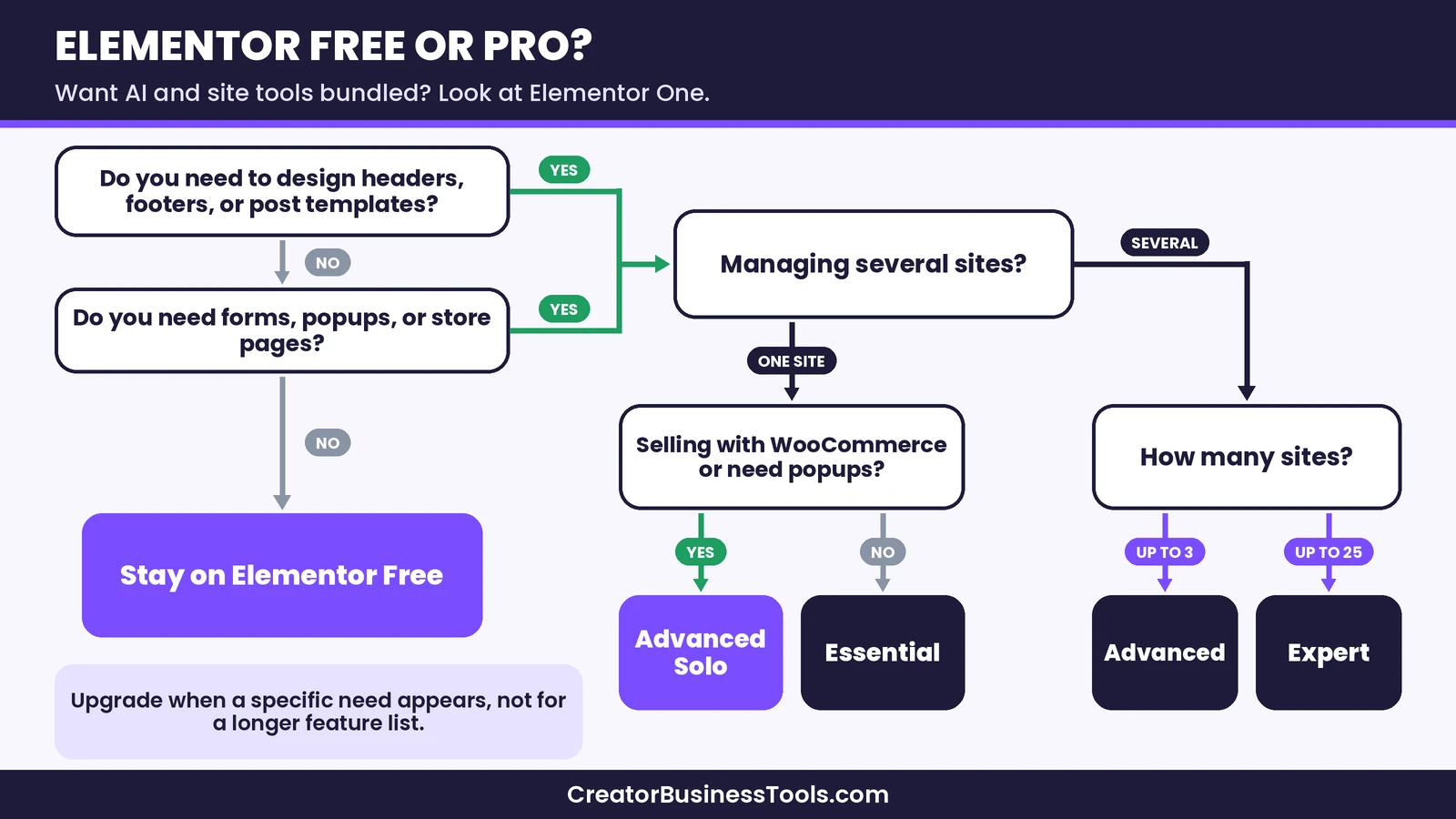
Now imagine she starts selling class packs with WooCommerce and wants an email popup for her newsletter. Her needs have changed: she wants custom product pages, a popup, and a header that matches her new branding. At that point, Advanced Solo makes sense, because Essential lacks both popups and ecommerce widgets. The lesson is to upgrade when a specific need appears, not because the paid version has a longer feature list.
What happens if you stop paying for Pro?
Elementor’s paid plans are subscriptions. If you stop renewing, you lose access to updates and support for Pro, and pages that rely on Pro widgets or Theme Builder templates may stop displaying as designed. Content built with free widgets keeps working with the free plugin. Before you cancel, check Elementor’s help center for the current details and plan how you’d replace any Pro features you rely on.
Pros and cons
| Pros | Cons | |
|---|---|---|
| Elementor Free | No cost, full visual editor, large community | No Theme Builder, forms, popups, or store widgets |
| Editor Pro | Theme Builder, Pro widgets, forms, popups, ecommerce | Subscription to keep features, plan limits by site count |
| Elementor One | Pro plus AI and site services in one plan | Credits reset monthly, more than many owners need |
Prices, plan names, and limits change. Check Elementor’s official pricing page before you buy, and check the renewal terms for the plan you choose.
Common mistakes to avoid
- Upgrading before you’ve used Free. Build a real page first so you know what’s missing.
- Choosing Essential for a store. It doesn’t include ecommerce widgets or popups.
- Stacking add-on plugins instead of upgrading. Several third-party add-ons can cost more effort than one Pro plan.
- Buying One for features you won’t use. Count the services you’d use each month first.
- Forgetting about site count. Pick a plan that covers the sites you’ll activate, not just today’s site.
FAQ
Is Elementor Free good enough?
For simple sites, yes. It includes the full editor and basic widgets. You’ll need Pro for the Theme Builder, forms, popups, dynamic content, and store pages.
What is the main difference between Elementor free and Pro?
Free lets you design page content. Pro lets you design the whole site, including headers, footers, and templates, and adds forms, popups, dynamic content, and ecommerce widgets.
Is Elementor Pro worth it for a small business?
Usually, once you need site-wide design control or lead capture. Advanced Solo covers most single business sites.
Can I use Elementor Pro without the free version?
No. Pro runs on top of the free plugin, so you keep the free version installed.
Can I use Elementor Pro on more than one site?
Yes, with the right plan. Advanced covers three sites, Expert covers 25, and One Agency covers unlimited sites.
Does Elementor Pro include hosting?
No. Hosting is separate. Elementor sells its own hosting, or you can use any compatible WordPress host.
Does Elementor Free include AI?
Elementor’s AI and site services are part of the One plans, which run on monthly credits.
Can I upgrade from Free to Pro without rebuilding my pages?
Yes. Pro adds to the free plugin, so existing pages keep working and you can start using Pro widgets right away.
Is there a free version of the Theme Builder?
No. The Theme Builder is included in every paid plan but not in the free plugin.
Bottom line: Elementor free vs Pro
In the Elementor free vs Pro decision, start free and upgrade when you hit a specific limit. Free is excellent for learning and for simple sites. Once you need site-wide templates, forms, popups, or a custom store, Editor Pro is the natural next step, and Advanced Solo is the most practical single-site plan. Consider Elementor One only if you’ll use its bundled services each month.
Elementor links below are affiliate links.
[See Elementor's plans](https://elementor.com/pricing/)Free checklist: Not sure whether to upgrade? Get our free Page Builder Decision Checklist, with the questions to ask about features, site count, renewals, and hosting before you buy. Contact us to request a copy.
Pricing and features from official vendor pages, last checked October 27, 2026.