
How to Collect Testimonials for Your Course (Senja vs Testimonial.to and More)
Disclosure: This post contains affiliate links. If you buy through them, we may earn a commission at no extra cost to you. How we make money.
If you’ve built a course, you’ve probably heard that testimonials can make a big difference on your sales page. The tricky part is actually getting them. In this guide, we walk through how to collect testimonials for your course step by step: when to ask, what to ask, how to get permission, and which tools can make the whole process easier. We also compare Senja, Testimonial.to, simple forms, and built-in course platform features, so you can pick an approach that fits your budget and your energy.
Quick verdict: For most beginner course creators, a dedicated testimonial tool with a free plan is a comfortable middle ground. Senja’s free plan holds a larger number of testimonials, which can suit creators building a library over time. Testimonial.to has a smaller free allowance but strong video features on its upper tiers. A plain form works if you only need a few quotes, though you’ll do more work to display them.
Quick picks
- Best all-round tool for course creators: Senja, with a usable free plan and an affordable entry tier. Senja
- Best for heavy video use and integrations: Testimonial.to on its upper tiers. Testimonial.to
- Best zero-cost starting point: A simple online form plus a spreadsheet.
- Best if you want everything inside your course platform: Your platform’s built-in review or comment features, if it has them.
Why testimonials matter for a course
When someone lands on your course sales page, they usually have one quiet question: “Will this work for someone like me?” A testimonial from a student who started in a similar place can answer that better than any feature list.
Testimonials can help in a few specific ways:
- They reduce doubt. Hearing from a real student makes the result feel achievable.
- They highlight benefits you might overlook. Students often mention outcomes you never thought to promote.
- They give you language. The words students use can shape your headlines and emails.
- They work across channels. One good quote can live on your sales page, in a launch email, and on a Pinterest pin.
How to collect testimonials: a step-by-step process
This is the core of the guide. You can follow these steps with any tool, including a free form.
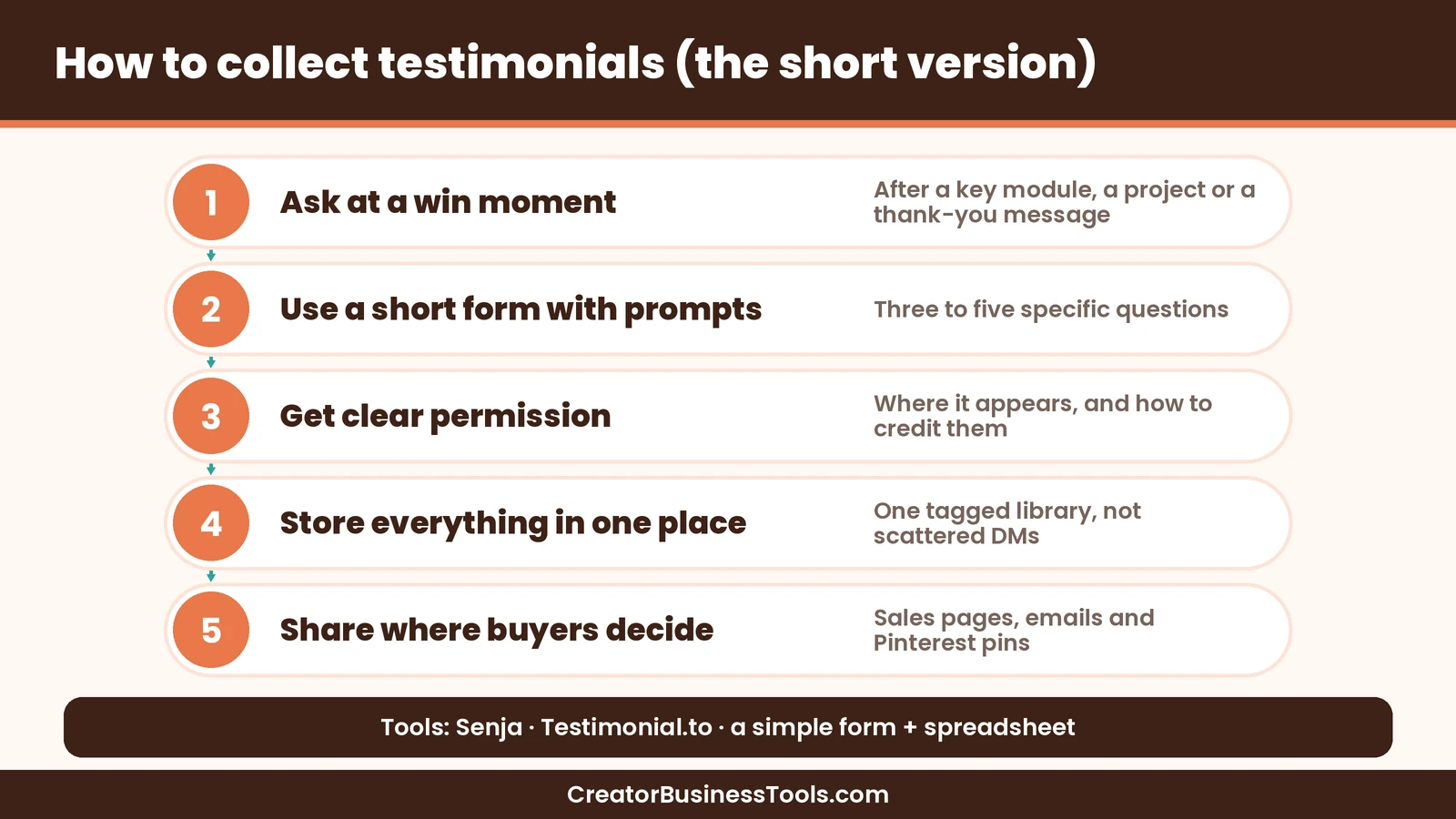
Step 1: Decide when to ask
Timing matters more than most people expect. The best moments tend to be right after a student experiences a small win. That might be:
- Finishing a key module
- Completing a project or assignment
- Sharing a result in your community
- Sending you an unprompted thank-you message
- Reaching the end of the course
We’d suggest building at least one automatic request into your course, such as a message at the end of a module, plus a manual ask whenever someone shares good news.
Step 2: Ask specific questions
“Can you write a testimonial?” often leads to silence or a vague “It was great!” Specific prompts tend to work much better. A few that usually help:
- What were you struggling with before you joined?
- What made you decide to sign up?
- What’s one thing you learned or changed?
- What result have you seen so far, even a small one?
- Who would you recommend this course to?
Keep the form short. Three to five prompts is plenty, and it’s fine to make some optional.
Step 3: Make it easy to respond
Every extra click lowers the chance someone finishes. A single link that opens a short form on any device is ideal. Offer both text and video if you can, since some people love recording a quick clip while others would much rather type.
Step 4: Get clear permission
Always let students know where their words might appear, such as your sales page, emails, or social media. Ask whether they’re happy for you to use their name, photo, or only initials. Many testimonial tools include a consent checkbox in the form, which keeps things tidy.
It’s also worth reading up on the advertising rules where you and your audience live. In many places, testimonials should reflect honest experiences and typical results shouldn’t be misrepresented. This isn’t legal advice, so check the official guidance if you’re unsure.
Step 5: Store everything in one place
Testimonials scattered across DMs, email threads, and screenshots are easy to lose. A single library, whether that’s a testimonial tool or a well-organized spreadsheet, makes it much easier to find the right quote later. Tagging by topic, such as “beginner,” “confidence,” or “pricing,” can save a lot of time during a launch.
Step 6: Share them where they help most
Common places to show testimonials include:
- Your course sales page, near the price and near the signup button
- Launch and welcome emails
- Your website’s homepage or about page
- Social media and Pinterest graphics
- Checkout pages, if your platform allows it
Step 7: Say thank you and follow up
A short, personal thank-you note can make students feel appreciated and more likely to share updates later. Some creators also check back after a few months to ask how things have progressed, which can lead to even stronger stories.
The tools: comparing your options
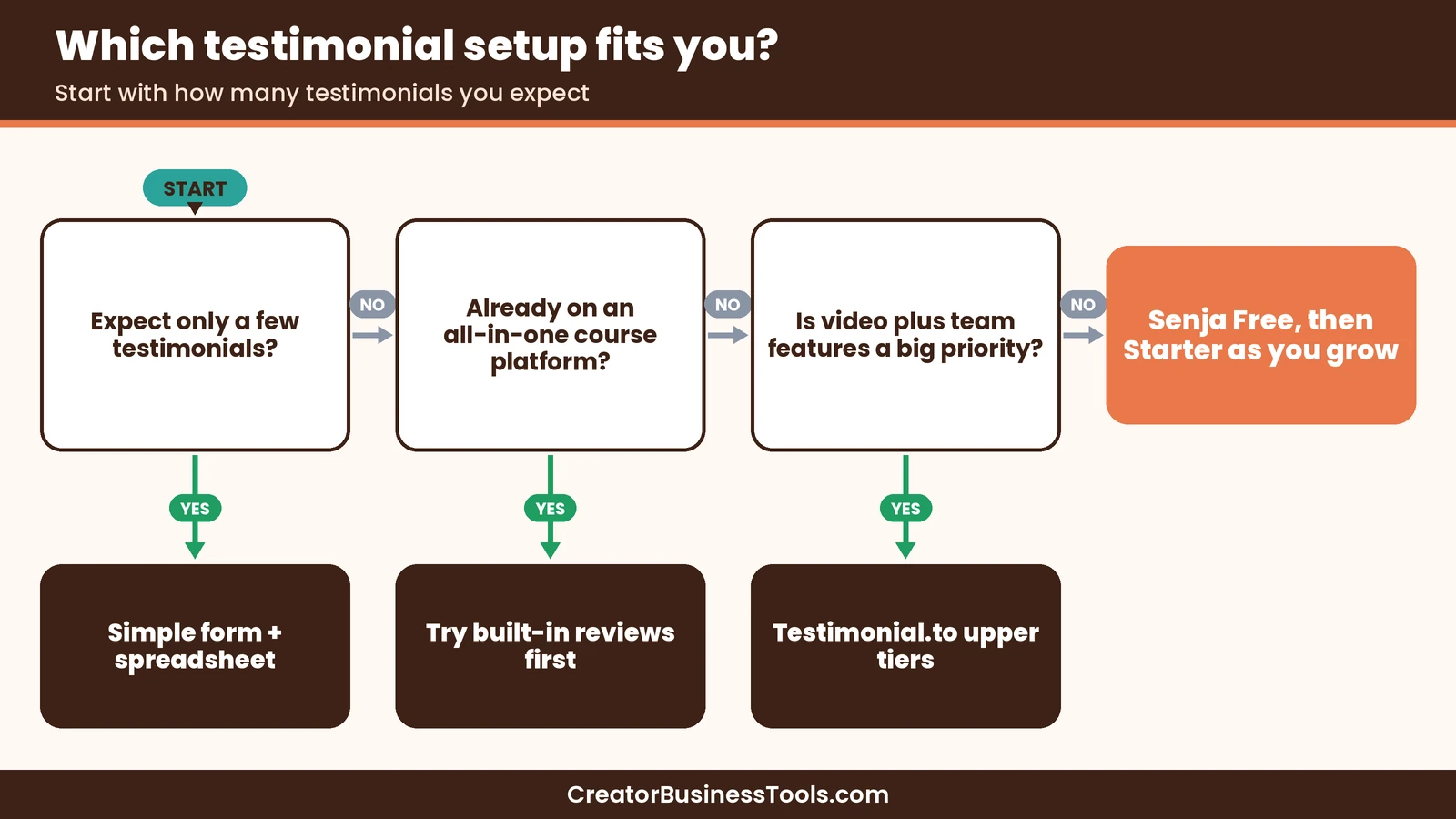
Now that the process is clear, here’s how the main tool options compare. We focused on what beginner course creators usually care about: cost, ease of use, video, and sharing.
| Option | Free plan | Paid tiers | Video | Best for |
|---|---|---|---|---|
| Senja | Yes, roomier cap | Budget to mid-range | Yes | Course creators who want collection plus easy sharing |
| Testimonial.to | Yes, smaller cap | Budget to premium | Yes, unlimited on upper tiers | Video-heavy creators and teams |
| Simple form + spreadsheet | Free | None | Usually links only | Very early creators |
| Built-in course platform features | Included | Part of your plan | Varies | Creators who want one tool |
Senja
Senja is a testimonial tool built with creators in mind. Its free plan lets you keep a capped number of text and video testimonials, which is enough for many new course creators to get going. The Starter tier removes that cap and adds a few collection forms and helpful automation, while Pro adds more projects, more seats, and team access.
What stands out for course creators:
- Simple or multistep collection forms you can set up quickly
- Imports from many platforms, so existing praise isn’t lost
- Widgets and a Wall of Love page for your website
- Testimonial images you can share on social media and Pinterest
- Optional rewards on paid plans to encourage more responses
Possible downsides: Senja branding appears on free widgets, and video downloads are standard quality on the free plan.
[Try Senja free](https://senja.io/)Testimonial.to
Testimonial.to is another popular testimonial platform, with a strong focus on video. Its free plan includes a small number of text and video testimonials in total, along with imports from some social platforms and a public testimonial page.
What stands out:
- Starter unlocks unlimited text testimonials
- Upper tiers add unlimited video testimonials, longer video limits, and integrations such as an API and Zapier
- Team member invites on higher plans
- Enterprise options for larger organizations
Possible downsides: the free plan’s total allowance is fairly small, and unlimited video sits on the higher tiers, which are priced per space. If you run multiple brands, the total can add up.
[See Testimonial.to](https://testimonial.to/)A simple form plus a spreadsheet
If you’re just starting and only need a few quotes, a free online form can do the job. You’d write your prompts, add a consent checkbox, and collect answers into a spreadsheet.
What stands out:
- No cost and very little setup
- Full control over the questions
Possible downsides: there’s no built-in widget or Wall of Love, video needs a separate upload process, and you’ll need to design quote graphics yourself.
Built-in course platform features
Some course platforms include reviews, comments, or community features where students can leave feedback. If you already use an all-in-one platform, it’s worth checking what’s available before adding another tool.
Possible downsides: these features are often more basic, may not support video, and can be harder to reuse outside the platform.
Senja vs Testimonial.to: which should a course creator choose?
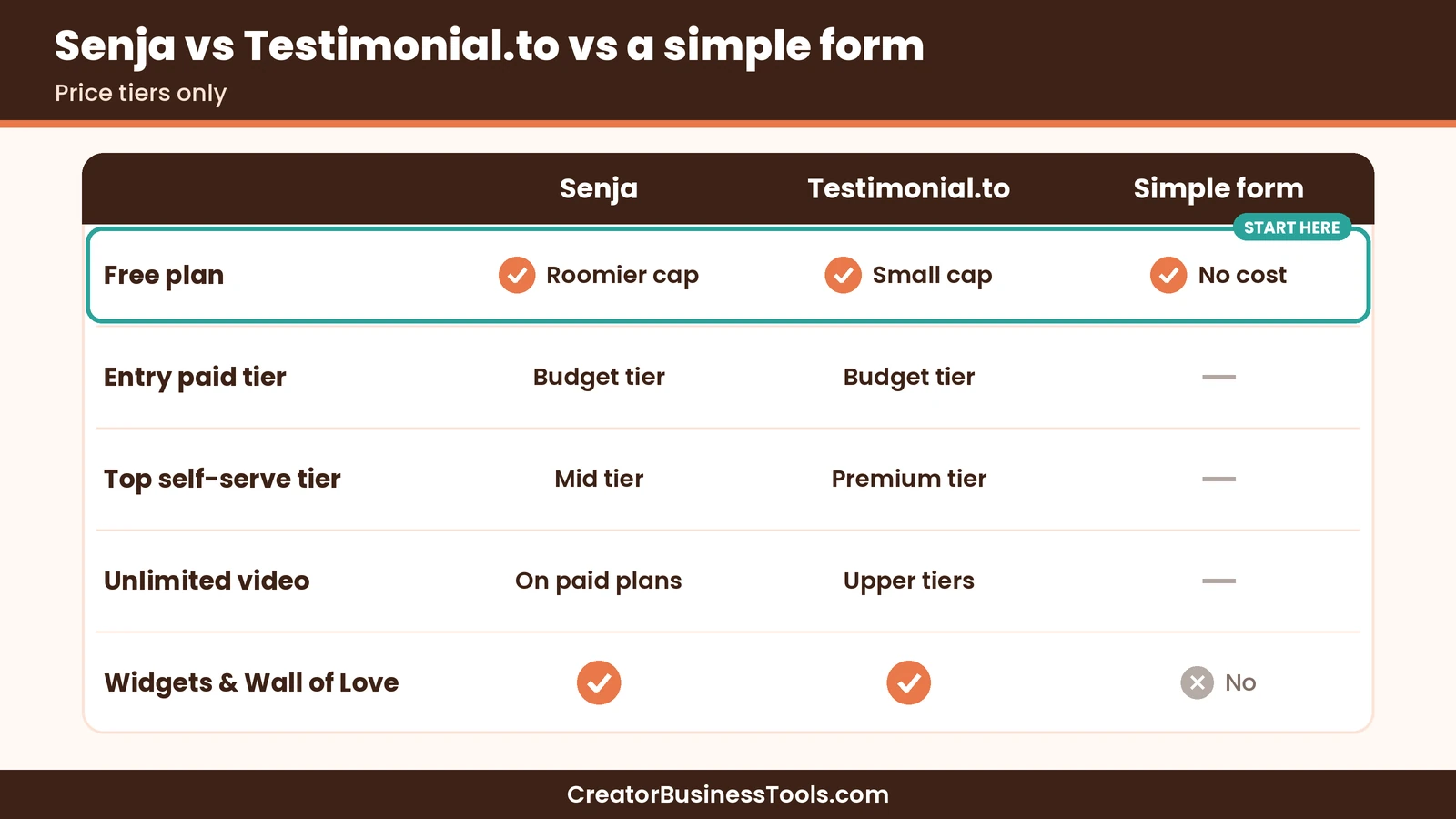
Both tools cover the basics well: a collection link, a library, widgets, and a public page of testimonials. The decision often comes down to a few practical questions.
How generous does the free plan need to be? Senja’s free plan lets you keep more testimonials than Testimonial.to’s free plan. If you want to build a library without paying for a while, that can matter.
How important is video? Testimonial.to puts a lot of emphasis on video, with unlimited video and longer recording limits on its upper tiers. If video is central to your marketing, it’s worth a closer look.
How many brands or courses do you run? Testimonial.to’s upper tiers are priced per space, while Senja’s Pro tier includes several projects with add-ons available. Mapping out your setup can help you compare the real total.
Do you want sharing tools for social media? Senja leans into creator-friendly sharing, such as testimonial images that can work well as Pinterest pins.
For a solo course creator with one main course, we think Senja’s free plan or Starter tier is often the simpler starting point. For a team producing lots of video content, Testimonial.to’s upper tiers may justify their place.
A lesson we learned the hard way
When we first asked students for feedback on an early course, we sent a single email that said something like, “If you enjoyed the course, we’d love a testimonial!” We heard back from almost no one. A few weeks later, we tried again with three short prompts and a one-click form, sent right after students finished the final module. The difference was striking: more replies, and far more specific ones, including details we would never have thought to put on the sales page. That experience is why we now suggest prompts and good timing before worrying about which tool to buy.
A simple testimonial request email you can adapt
Here’s a short template you could adjust for your own course. Keep the tone warm and the request small.
Subject: Quick favor? (2 minutes)Hi [Name], congratulations on finishing the module! We’d love to hear how it went for you. Would you answer a few short questions? It should only take a couple of minutes, and you’re welcome to type or record a quick video.
[Link to your form]
We may share your answers on our course page or social media. You can choose to use your full name, first name only, or stay anonymous. Thank you so much for being part of the course!
A few small tweaks can help this email work better. Mention something specific the student did, if you know it. Send it soon after the win. And if someone doesn’t reply, one gentle reminder a few days later is usually plenty.
Keeping your testimonial library organized
Once testimonials start arriving, a little structure goes a long way. Whether you use a dedicated tool or a spreadsheet, consider tracking:
- The student’s name and how they’d like to be credited
- The course or product it relates to
- Topic tags, such as “confidence,” “time-saving,” or “first sale”
- Permission status, so you never have to guess later
- Format, such as short quote, long story, or video
- Where you’ve used it, to avoid repeating the same quote everywhere
This might feel like extra admin at first, but it makes launches much calmer. When you write a new sales page or email, you can pull the right story in minutes instead of digging through old messages.
Common mistakes to avoid
- Asking too late. Excitement fades. Ask while the win feels fresh.
- Asking vaguely. Use specific prompts to avoid generic praise.
- Skipping permission. Always confirm how and where you’ll use someone’s words.
- Over-editing. Light trimming is fine, but keep the meaning and tone intact.
- Hiding testimonials. Place them near decision points, such as the price and the signup button.
- Using only one type. Mix short quotes, longer stories, and video when you can.
How to use testimonials on Pinterest
Many of our readers find us through Pinterest, so here’s a quick note on using testimonials there. A clean pin with a short student quote can attract people who share the same struggle. Keep the quote brief, add a clear title such as “What students say about our beginner course,” and link the pin to the course sales page.
You can create these images in a design tool or, with some testimonial tools, directly from your library. Rotate a few quote pins alongside your usual content, and update them as new testimonials come in.
How many testimonials do you need?
There’s no magic number, but a handful of specific, varied testimonials usually does more than a long wall of short praise. Aim to show different types of students, such as complete beginners, busy parents, or people switching careers, so more readers see themselves in your results.
As your course grows, you can rotate testimonials based on the audience of each page or email. That’s where a tagged library becomes really helpful.
FAQ
What’s the easiest way to start collecting testimonials?
Create a short form with three to five specific prompts and a consent checkbox, then send it right after students finish a key module.
Do I need a paid testimonial tool?
Not necessarily. A free plan from a tool like Senja or Testimonial.to, or even a simple form, can work well at the start. Paid plans tend to make sense once you’re collecting regularly.
Should I ask for video testimonials?
Video can feel personal and convincing, but it’s best offered as an option. Many students prefer to type, and that’s fine.
Can I edit testimonials?
Light edits for length or typos are usually okay if you keep the meaning. When in doubt, ask the student to approve the final version.
Where should I put testimonials on my sales page?
Near the top for quick reassurance, near the price, and close to the signup button tend to be helpful spots.
Is Senja or Testimonial.to better for courses?
It depends on your priorities. Senja’s free plan is roomier and its sharing tools suit creators, while Testimonial.to offers strong video features on its upper tiers.
Conclusion: how to collect testimonials without the stress
Learning how to collect testimonials is less about the tool and more about timing, good prompts, and clear permission. Ask at a win moment, keep the form short, store everything in one place, and share testimonials where students are deciding. For most beginner course creators, a free testimonial tool like Senja is a comfortable way to start, with Testimonial.to worth a look if video and team features are central to your plans.
[Start collecting with Senja](https://senja.io/)Get our free testimonial request templates
Want the exact prompts and email templates we suggest? Join our email list and we’ll send you a free pack of testimonial request templates you can copy into any form or tool. Contact us to request a copy.
Pricing and features from official vendor pages, last checked October 24, 2026.