
Kinsta vs WP Engine: Which Managed WordPress Host Fits Creators?
Disclosure: This post contains affiliate links. If you buy through them, we may earn a commission at no extra cost to you. How we make money.
Your WordPress host decides how fast your blog loads, how safely your shop runs, and how much time you spend fixing things. For creators and small shops, the choice usually comes down to price versus peace of mind.
This guide compares Kinsta vs WP Engine, two premium managed WordPress hosts, and adds SiteGround as a lower-cost alternative. It’s based on each company’s official plan pages, not on paid placements or benchmark claims.
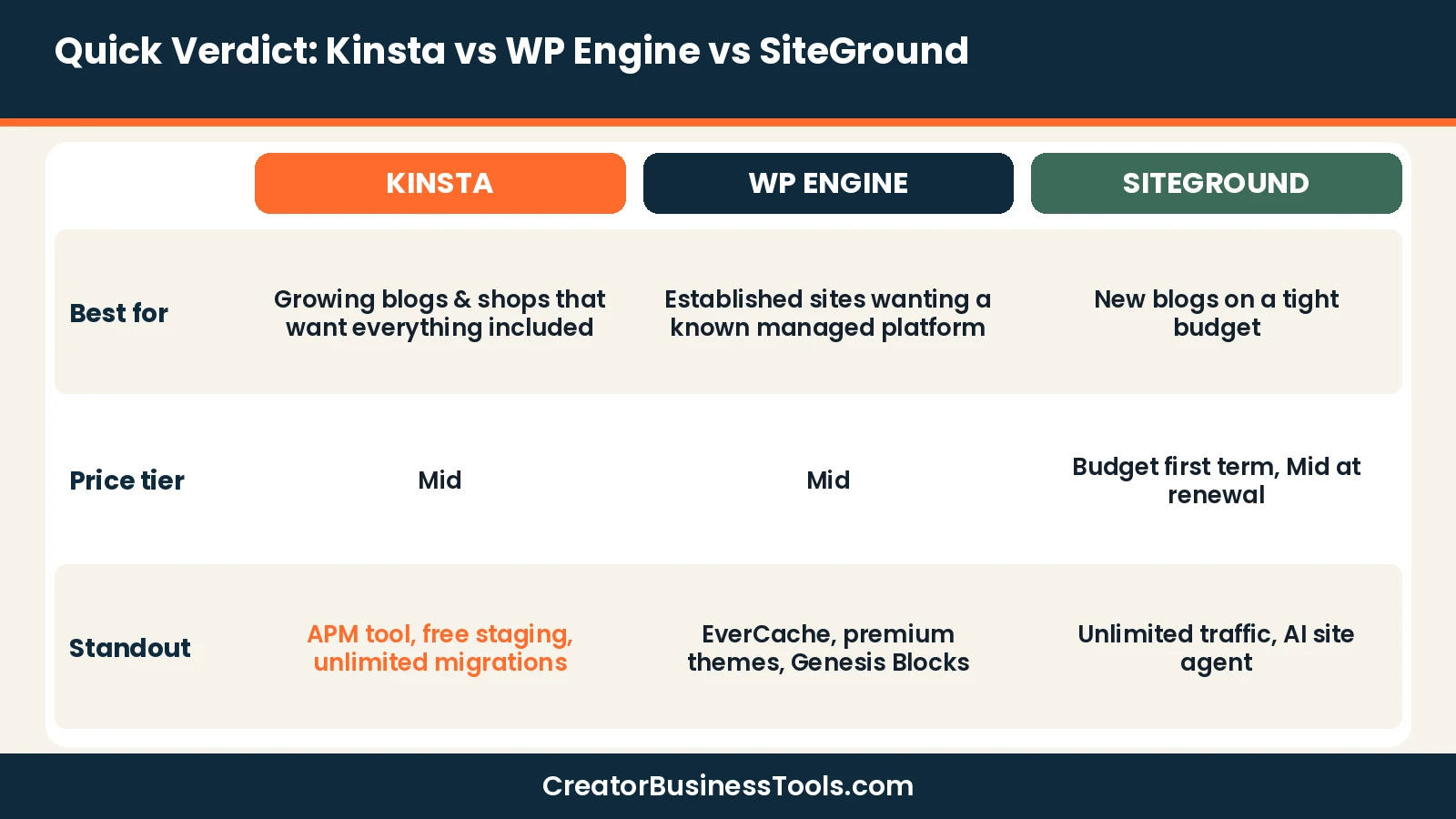
Quick verdict: Kinsta is the best fit for creators who want a simple per-site plan with a long list of tools included, such as staging, performance monitoring, and malware removal. WP Engine suits sites that want a well-known managed platform with built-in themes and block tools. SiteGround is the budget pick for new blogs, as long as you plan for higher renewal prices.
Quick picks
- Best overall for creators and small shops: Kinsta
- Best for a familiar managed platform: WP Engine
- Best budget starting point: SiteGround
Kinsta vs WP Engine vs SiteGround at a glance
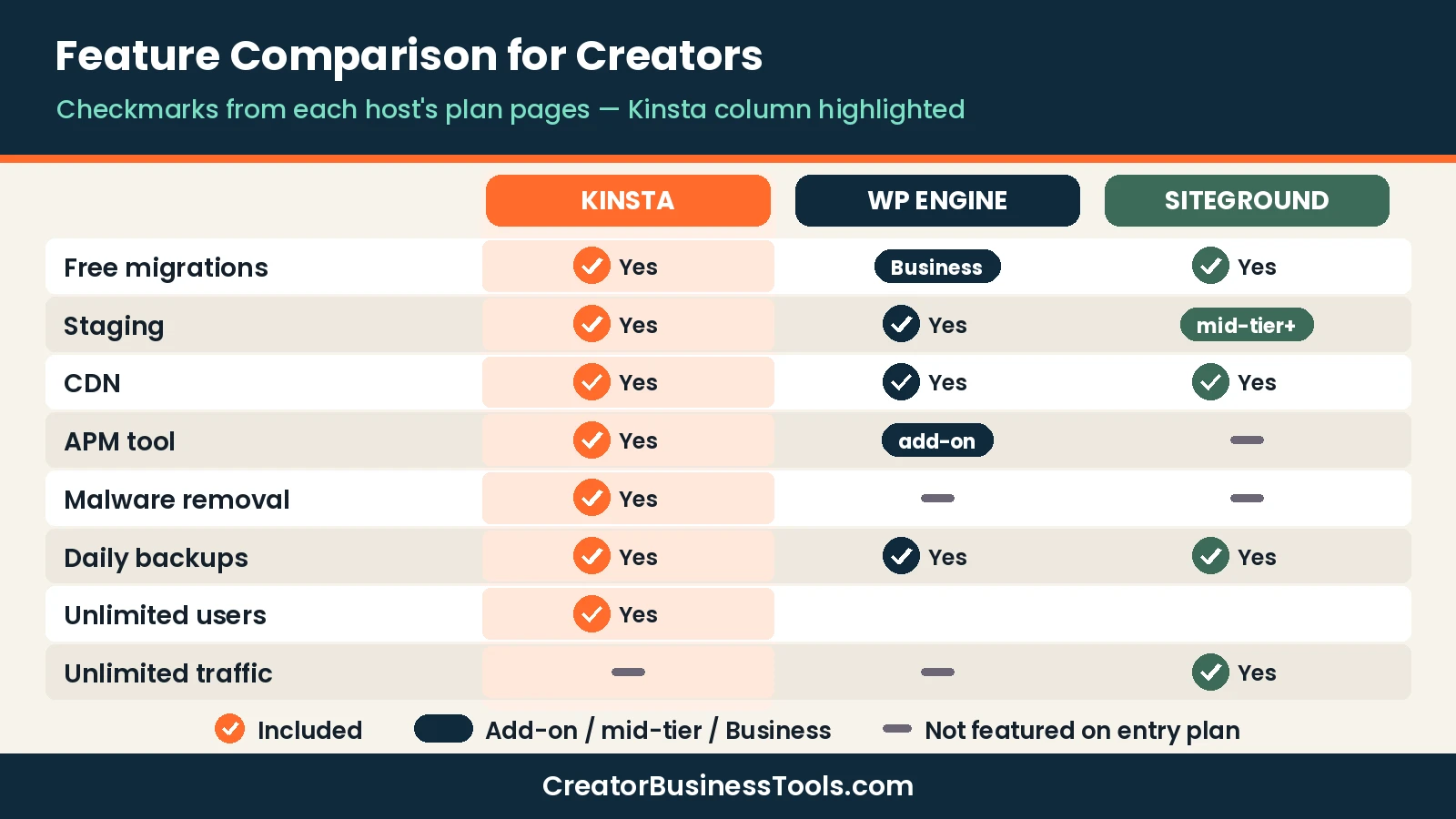
| Feature | Kinsta | WP Engine | SiteGround |
|---|---|---|---|
| Hosting type | Managed WordPress | Managed WordPress | WordPress hosting with managed features |
| Entry price tier | $$ | $$ | $ (first year) |
| Plans measured by | Monthly visits (or bandwidth on some plans) | Monthly visits | Number of sites and storage |
| Free migrations | ✓ Unlimited | Managed migrations on Business | ✓ |
| Staging | ✓ All plans | ✓ 1-click | Mid-tier and up |
| CDN | ✓ | ✓ | ✓ |
| Performance monitoring (APM) | ✓ Included | Add-on on higher plans | — |
| Support | 24/7, multiple languages | 24/7 chat (phone on Business) | 24/7 |
Kinsta review
Kinsta is a managed WordPress host that sells plans by monthly visits, with bandwidth-based options too. Its entry Single plans host one site, while WP and Agency plans host multiple sites.
What stands out on Kinsta’s pricing page is how much is included on every plan:
- ✅ Unlimited free migrations
- ✅ Free malware removal
- ✅ 24/7 support in several languages
- ✅ CDN with a large global network
- ✅ Application performance monitoring (APM) tool
- ✅ Firewall and DDoS protection through Cloudflare
- ✅ Free staging environments
- ✅ Unlimited users and SSL
Kinsta defines a visit as one unique IP address within 24 hours. If you go over your plan’s limit, your site stays online; Kinsta sends notices as you approach and reach the limit and then charges overage fees.
For online stores and membership sites, Kinsta recommends starting at its mid-level Single plan or its multi-site WP plans rather than the smallest plan.
Keep in mind: The entry plan covers one site. If you run a blog plus a separate shop, compare the multi-site plans.
Best for: creators and small shops that want speed tools, staging, and security handled without add-ons.
Not ideal for: brand-new blogs with almost no traffic and a minimal budget.
WP Engine review
WP Engine is one of the best-known managed WordPress hosts. Its plans page shows three tiers: Essential, Business, and Enterprise.
The Essential tier covers small and mid-sized sites, with daily automated backups, 24/7 chat support, managed WordPress and PHP updates, free SSL and SSH, its EverCache caching layer, a global CDN, and one-click staging. It also includes ten premium themes and Genesis Blocks for page building.
Business adds isolated resources, phone support, managed migrations, and a 99.99% uptime SLA. Several tools, such as advanced firewall, uptime monitoring, and front-end optimization, are optional add-ons on the entry tier.
Keep in mind: The advertised entry price is first-year pricing for new customers on annual billing. Check renewal pricing before you commit.
Best for: sites that want an established managed platform with themes and block tools included.
Not ideal for: budget-focused creators who want performance monitoring included on the entry tier.
See plans on the WP Engine plans page.
SiteGround review
SiteGround sits between budget shared hosting and premium managed hosting. Its WordPress plans are StartUp, GrowBig, and GoGeek.
All plans include free SSL, CDN, daily backups, free email, free site migrations, managed auto-updates, its Speed Optimizer and Security Optimizer plugins, and an AI agent for managing WordPress through chat. GrowBig adds staging and on-demand backups; GoGeek adds Git, white-label access, and priority support.
The entry plan hosts one website, while higher plans allow unlimited sites. Plans are prepaid for 12 months, and the introductory price rises at renewal.
Keep in mind: Plan for the renewal price, not just the first-year price.
Best for: new bloggers and small shops that need solid hosting on a small budget.
Not ideal for: growing stores that want premium managed features like an APM tool.
See plans on the SiteGround WordPress hosting page.
Kinsta vs WP Engine: head-to-head
Since this is the main matchup, here is how the two premium hosts differ in the areas creators care about most.
Plan structure
Kinsta splits its lineup into Single plans for one site, WP plans for multiple sites, and Agency plans for larger portfolios. Within Single, you choose by monthly visits, and some plans are sized by bandwidth instead.
WP Engine uses three broad tiers. Essential spans a wide range of visit levels and storage sizes, Business moves you onto isolated resources, and Enterprise is a custom quote. You build your Essential plan by choosing the size you need.
What it means for you: Kinsta’s per-site entry plan is easy to understand if you run one blog or shop. WP Engine’s build-your-plan approach is flexible but takes a little more comparison.
Included tools
Kinsta lists staging, an APM tool, malware removal, Cloudflare-based firewall protection, unlimited users, and unlimited migrations on every plan. WP Engine’s entry tier includes backups, staging, caching, a CDN, premium themes, and Genesis Blocks, with tools like advanced firewall, uptime monitoring, and front-end optimization available as add-ons.
What it means for you: if you’d rather not pay extra for monitoring and security tools, Kinsta’s included list is the simpler deal. If you want built-in themes and blocks, WP Engine adds value there.
Support
Kinsta offers 24/7 support in multiple languages on all plans. WP Engine offers 24/7 chat on Essential, with phone support added on Business.
Scaling up
Both hosts let you move to bigger plans as traffic grows. Kinsta’s overage policy keeps your site online when you exceed your visit limit and bills the extra. WP Engine’s Business tier adds isolated resources and an uptime SLA for sites where downtime is costly.
| Area | Kinsta | WP Engine | Edge |
|---|---|---|---|
| Entry plan simplicity | One site, clear visit tiers | Build-your-plan Essential | Kinsta |
| Monitoring and security included | APM, WAF, malware removal | Some as add-ons | Kinsta |
| Themes and page building | Bring your own | Premium themes + Genesis Blocks | WP Engine |
| Phone support | Not listed on pricing page | Business tier | WP Engine |
| Uptime SLA | Not listed on pricing page | Business tier | WP Engine |
| Users and migrations | Unlimited on all plans | Managed migrations on Business | Kinsta |
Kinsta vs SiteGround: is premium worth it?
SiteGround is the most common “do I really need to pay more?” alternative. Its plans include many WordPress conveniences, such as staging on mid-tier plans, daily backups, and speed and security plugins, at a low first-year price.
The trade-offs are the renewal increase and the lack of an included performance monitoring tool. Kinsta costs more up front but keeps tooling like APM and malware removal included on every plan.
A practical rule: if your site earns little yet, SiteGround keeps costs low while you grow. Once your blog or shop brings in steady income and slowdowns cost you money, a managed host like Kinsta becomes easier to justify.
Pricing compared
Exact prices change often, so we use price tiers here. Check each official page for current numbers.
| Host | Entry plan | Multi-site plans | Billing notes |
|---|---|---|---|
| Kinsta | $$ (Single, 1 site) | $$$ (WP and Agency plans) | Monthly or annual; annual is cheaper |
| WP Engine | $$ (Essential) | $$$ (Business) | Advertised price is first-year, billed annually |
| SiteGround | $ first year (StartUp) | $ first year (GrowBig, GoGeek) | Prepaid 12 months; renews at $$ |
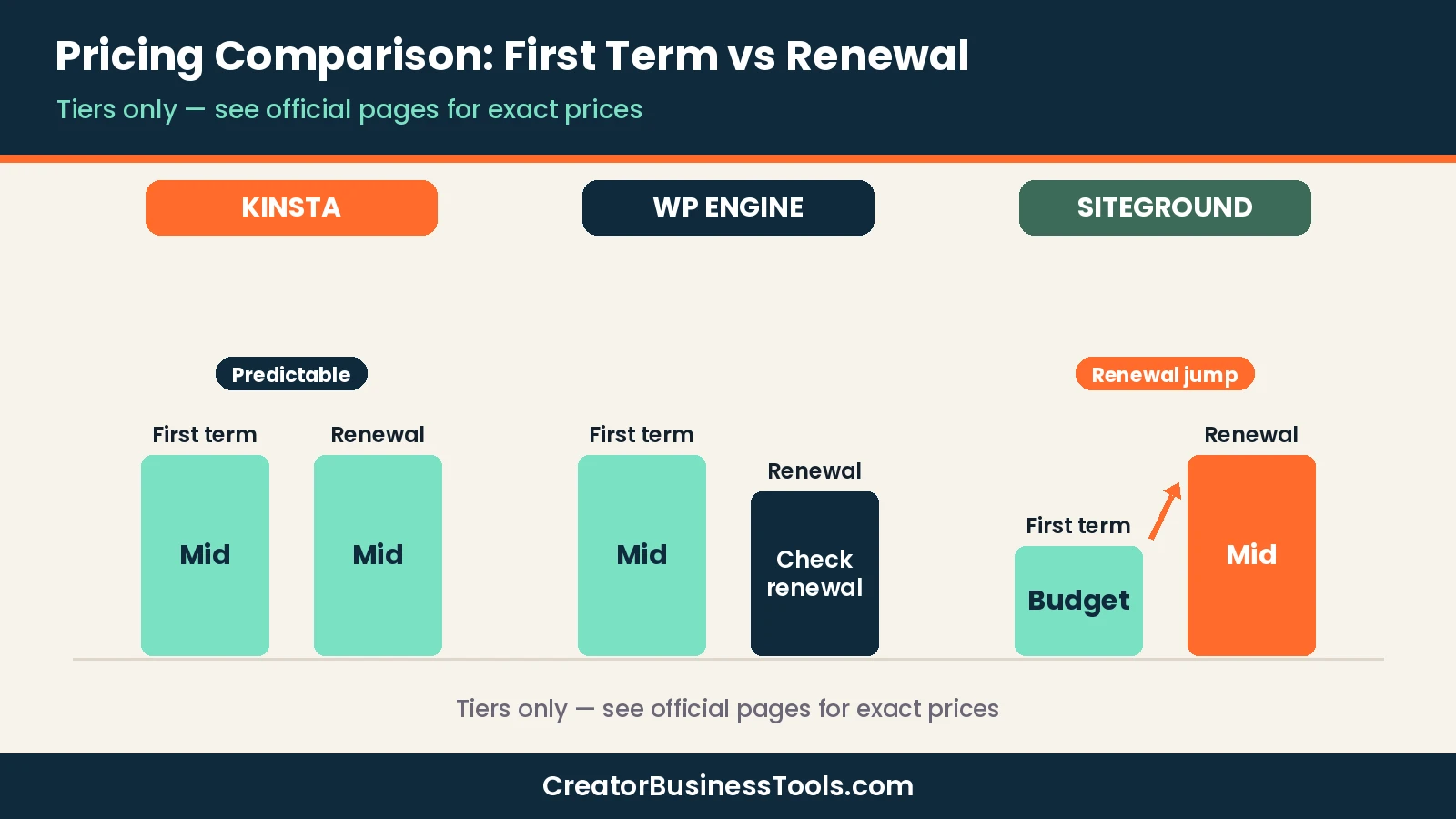
The headline difference is predictability. Kinsta lists the same plan price for monthly billing, with lower prices for annual billing. SiteGround and WP Engine advertise lower first-year prices, so your second-year bill matters more.
Is your WordPress site too slow? When to switch hosting
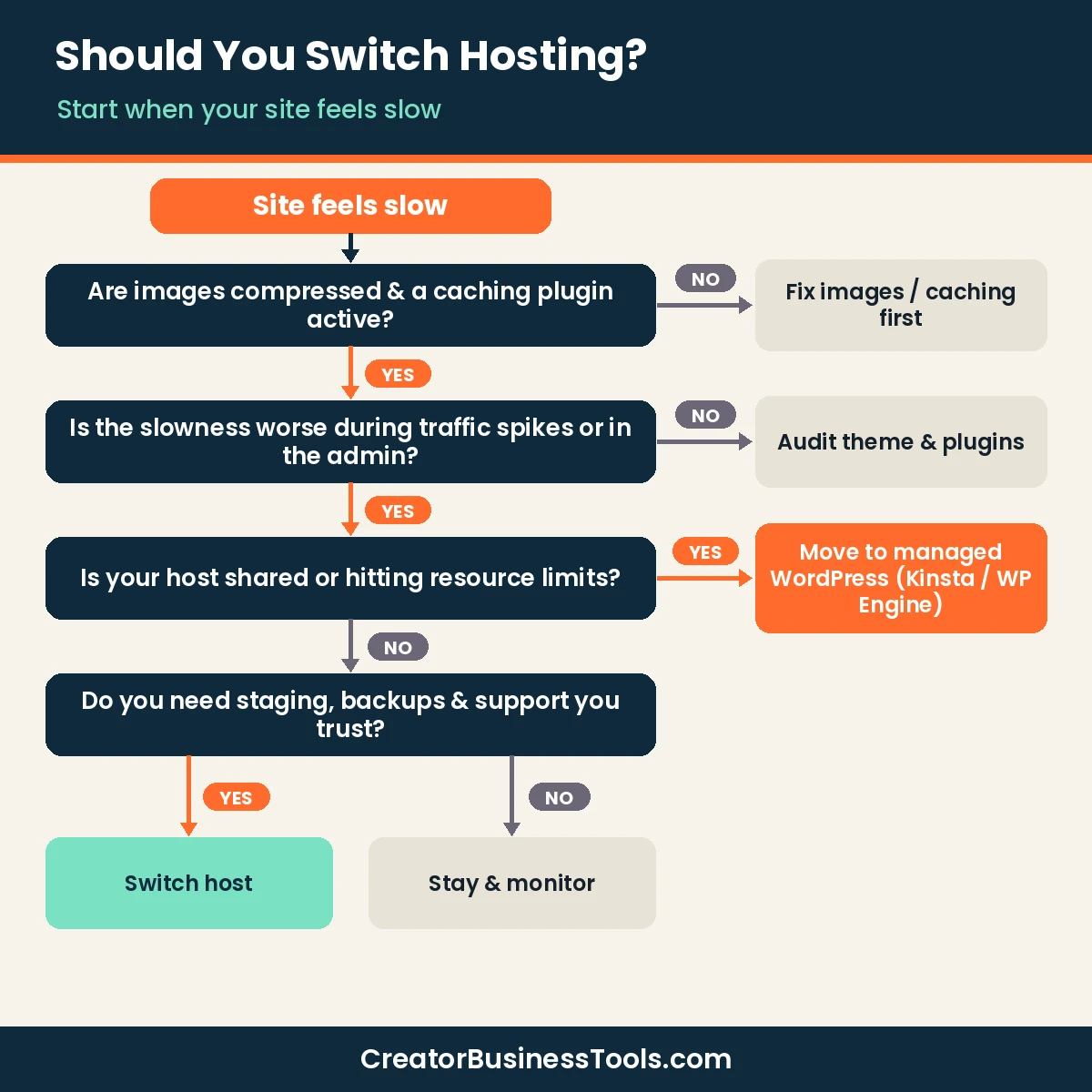
Not every slow site needs a new host. Images, heavy themes, and too many plugins cause many speed problems. Work through these checks first.
Signs it’s the host, not your site
- ☐ Your site slows down or errors during traffic spikes, such as after a Pinterest pin or newsletter goes out.
- ☐ The WordPress admin is sluggish even with few plugins.
- ☐ Your host warns you about resource limits.
- ☐ Support can’t explain recurring downtime.
- ☐ You have no easy staging site to test updates safely.
If you tick two or more, a managed host is worth a look. If none apply, optimize images, caching, and plugins first.
When to stay put
- Your traffic is small and steady.
- Page speed problems disappear after compressing images and enabling caching.
- Your budget can’t absorb a higher monthly bill yet.
What managed hosting changes
Managed WordPress hosts handle updates, caching, backups, and security at the server level. That means fewer plugins to maintain and quicker help when something breaks. Kinsta’s APM tool, for example, helps pinpoint slow plugins or queries.
Before you switch hosts
- Take a full backup of your site and database before any migration.
- Check renewal prices, not just first-year prices.
- Confirm which plan your traffic level needs; visit-based plans charge overages if you exceed limits.
- Online stores and membership sites need more resources than a simple blog. Pick a plan sized for them.
- Keep your old hosting active until you’ve confirmed the new site works and DNS has switched.
Hosting needs by creator type
Different creator businesses stress a host in different ways. Use this section to match your situation to the features that matter.
Bloggers who get Pinterest or social traffic
Social traffic often arrives in bursts. A pin or a viral post can send a wave of visitors in a few hours. Look for a host that keeps your site online during spikes and tells you clearly what happens when you pass your plan limit. Kinsta’s policy of staying online and billing overage is predictable here.
Small WooCommerce shops
Checkout pages, carts, and account pages can’t be fully cached, so stores rely more on server resources. Kinsta recommends its mid-level Single plan and up for ecommerce. Staging is also essential so you can test plugin updates before they touch your live checkout.
Membership and course sites
Logged-in members also bypass much of the cache. Choose a plan with headroom and consider performance monitoring so you can spot slow plugins as your member base grows.
Creators running several small sites
If you run a blog, a shop, and a portfolio, compare multi-site plans. Kinsta’s WP plans and SiteGround’s GrowBig and GoGeek plans cover more than one site, while Kinsta Single and SiteGround StartUp cover one.
Which host fits which creator?
| Situation | Best fit | Why |
|---|---|---|
| New blog, low traffic | SiteGround | Lowest first-year cost with key WordPress tools |
| Growing blog with steady traffic | Kinsta Single | One site, staging, APM, and security included |
| Small WooCommerce shop | Kinsta mid-level Single or WP plan | Kinsta recommends these tiers for ecommerce |
| Blog + shop on separate sites | Kinsta WP plans or SiteGround GrowBig | Multi-site plans |
| Established site wanting themes and blocks built in | WP Engine Essential | Premium themes and Genesis Blocks included |
| High-traffic business site | WP Engine Business or Kinsta WP plans | Isolated resources, higher visit limits |
Migration: how hard is switching?
All three hosts offer help with moving an existing WordPress site. Kinsta includes unlimited free migrations on every plan. SiteGround offers free site migrations and a Migrator plugin. WP Engine includes managed migrations on its Business tier and offers tools such as WP Migrate.
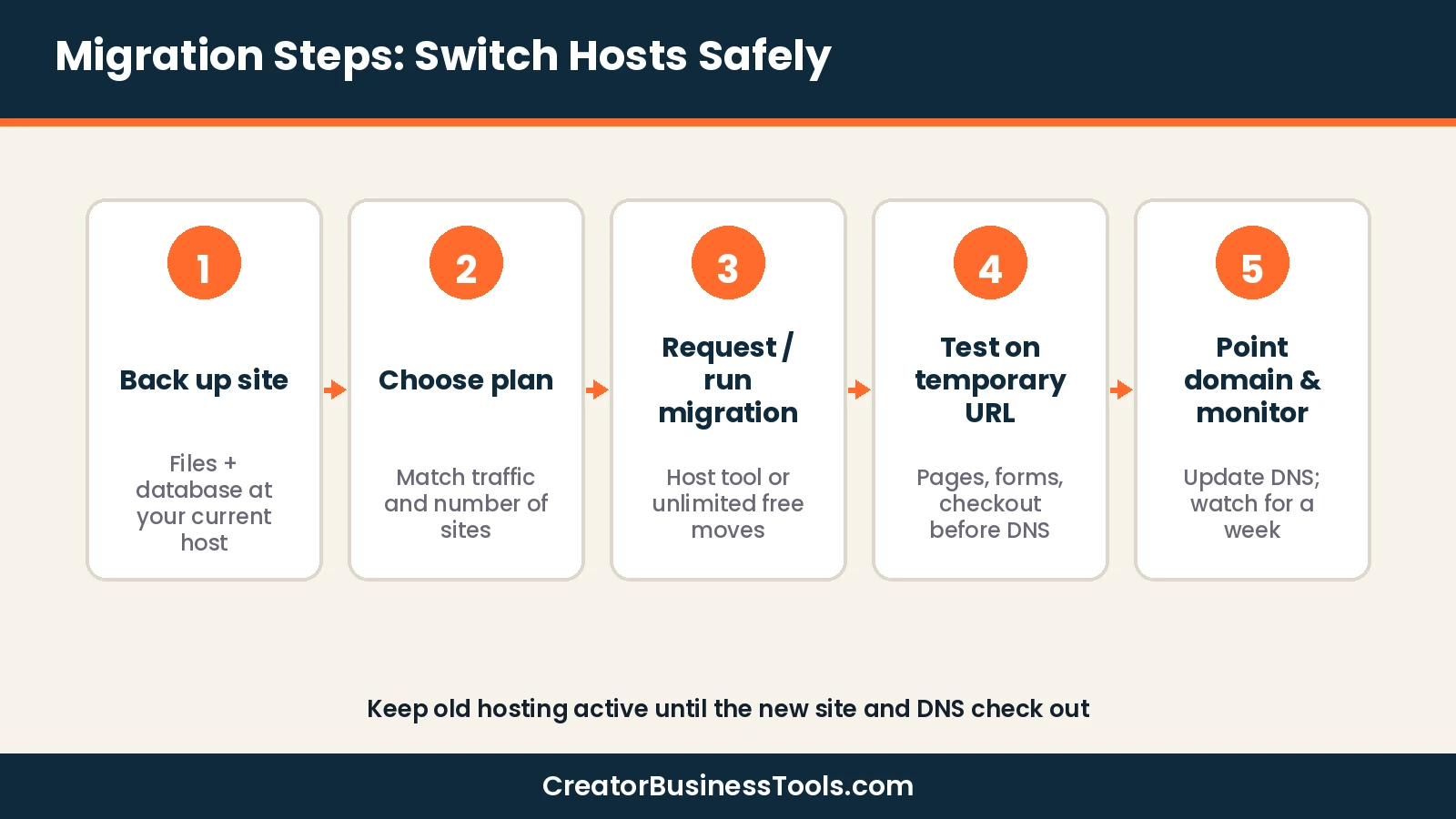
Migration checklist
- Back up files and database at your current host.
- Note your current traffic so you can choose the right plan size.
- Request the migration or run the host’s migration tool.
- Test pages, forms, and checkout on the new server before switching DNS.
- Update DNS, then monitor speed and errors for a week.
- Cancel the old hosting only after everything checks out.
What to budget for beyond the plan price
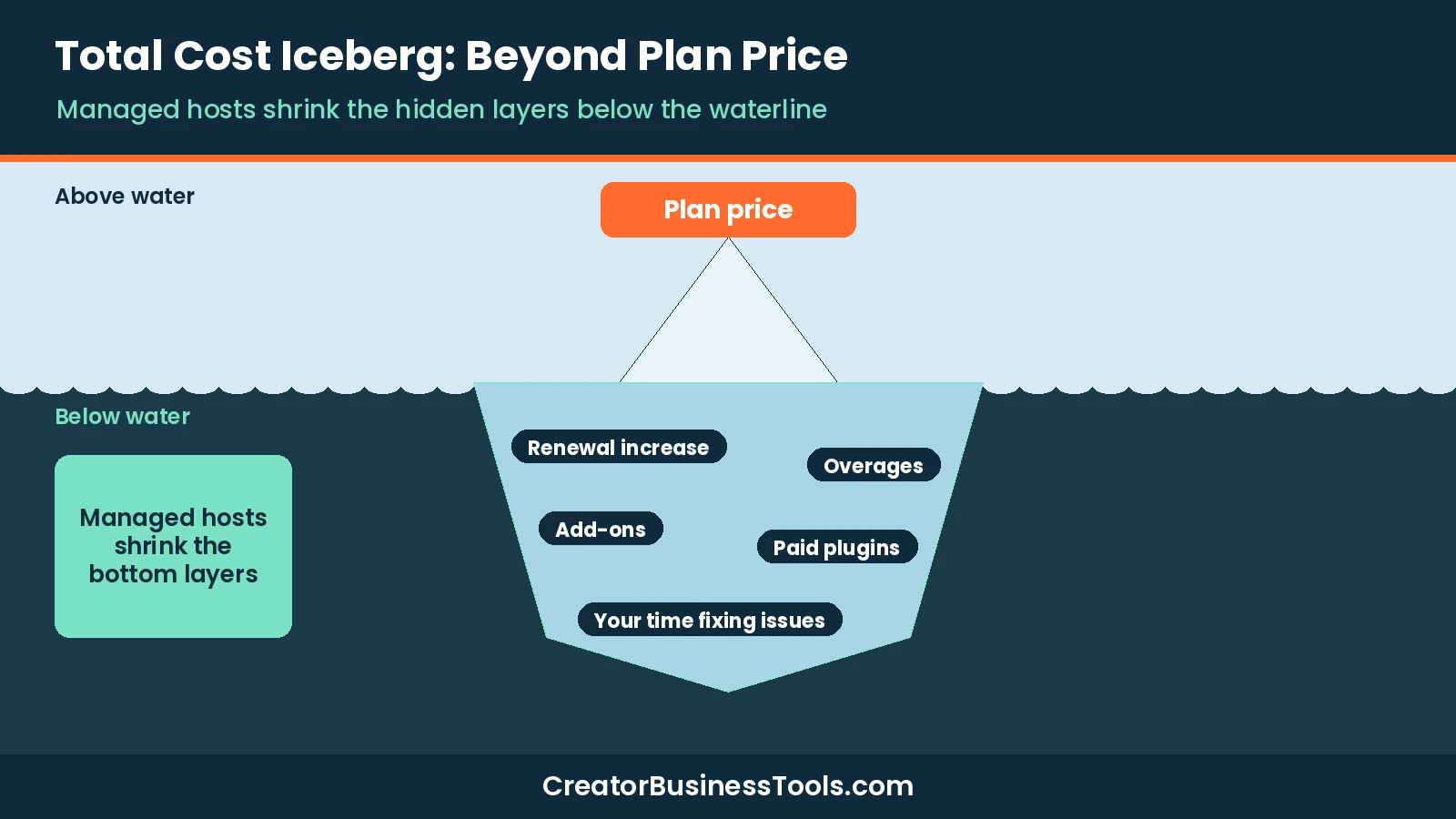
The plan price is only part of hosting cost. Before choosing, list the other items you may need:
- Renewal pricing: the biggest surprise with introductory offers.
- Overages: visit-based plans can bill extra if traffic spikes past your limit.
- Add-ons: monitoring, advanced firewall, or extra sites may cost more on some hosts.
- Plugins you can drop: if the host handles caching, backups, and security, you may cancel some paid plugins.
- Your time: fewer emergencies and faster support have real value when your site is your business.
How to choose managed WordPress hosting
- Measure your traffic. Kinsta and WP Engine size plans by monthly visits; pick a plan with headroom.
- Count your sites. One site fits Kinsta Single or SiteGround StartUp; more sites need multi-site plans.
- List must-have tools. Staging, performance monitoring, and malware removal are included at Kinsta; some are add-ons elsewhere.
- Compare renewal costs. Budget for year two, not just year one.
- Check support. Make sure the support channels match how you like to get help.
- Think about ecommerce. Stores need more resources; size up accordingly.
Beyond hosting: tools for building your WordPress site
A good host keeps your site fast and online, but you still need tools to build pages and grow your list. One option is Thrive Suite from Thrive Themes. It’s a set of WordPress plugins that includes a page builder (Thrive Architect), opt-in forms (Thrive Leads), an online course plugin (Thrive Apprentice) and a theme builder. It’s sold as a yearly or quarterly subscription, can be installed on up to 5 websites, and has a 30-day money-back guarantee. It’s built for self-hosted WordPress (WordPress.org), so if your site is on WordPress.com, check Thrive’s current compatibility notes before you buy.
If you’d rather start with a visual theme and page builder, Divi from Elegant Themes is another option. It’s a WordPress theme with a drag-and-drop visual builder and premade layouts, and Elegant Themes says it works with any web host.
Browse more WordPress tools for creators.
FAQ
Is Kinsta better than WP Engine?
For most creators and small shops, Kinsta includes more tools on its entry plan, such as APM, staging, and malware removal. WP Engine is a strong choice if you value its themes, block tools, and established platform.
Is Kinsta worth it for a small blog?
It’s worth it once your blog has steady traffic and speed or reliability matters to your income. For a brand-new blog, a budget host like SiteGround is a reasonable start.
What is the best managed WordPress hosting for creators?
Kinsta is our top pick for creators who want an all-included plan. WP Engine and SiteGround are fair alternatives depending on budget and features.
What happens if I exceed Kinsta’s visit limit?
According to Kinsta, your site stays online. You get notified as you approach and reach the limit, and overage fees apply.
Does SiteGround’s price go up?
Yes. SiteGround’s advertised prices are introductory and prepaid for 12 months; plans renew at a higher price.
Can I move my site to Kinsta for free?
Kinsta includes unlimited free migrations on all plans.
Does WP Engine include staging?
Yes. WP Engine lists one-click staging and development environments on all three of its plan tiers, including Essential.
Which host includes performance monitoring?
Kinsta includes its APM tool on every plan. On WP Engine, application performance monitoring is an optional add-on on higher tiers and is not included on Essential.
Bottom line
Kinsta is the best all-around pick for creators and small shops ready for managed WordPress hosting, thanks to the tools it includes on every plan and its straightforward pricing. WP Engine is a solid, well-known alternative, and SiteGround is the sensible budget start for new blogs.
If your site is slowing down under real traffic, start with the checklist above. If the host is the bottleneck, Kinsta is the first plan page to check.