
Mighty Networks Pricing: Plans, Fees, and Whether It's Worth It
Disclosure: This post contains affiliate links. If you buy through them, we may earn a commission at no extra cost to you. How we make money.
Mighty Networks is one of the most complete platforms for running a paid community with courses, events, and livestreams under one roof. But its pricing page has several plans, per-plan transaction fees, usage limits, and optional add-ons, so it’s not always obvious what you’ll actually pay.
Here’s the short answer: Mighty Networks’ self-serve plans start in the $50–$100/month range and climb to the $350–$450/month range for the top self-serve tier. Branded apps sit on a custom-priced plan above that. Every paid plan adds a small platform fee on member payments, and that fee shrinks as you move up. You can try it free first, and paying annually lowers the monthly cost.
Below, we break down each plan, the fees and add-ons to budget for, and how Mighty Networks compares with Circle, Skool, Kajabi, and Podia.
Mighty Networks plans at a glance
| Plan | Price band | Who it’s for | Key limits and extras |
|---|---|---|---|
| Launch | $50–$100/month | Your first paid community or course | 3 hosts, 10 moderators, 200 GB storage, 20 livestream hours a month for up to 100 viewers |
| Scale | $150–$250/month | Growing communities that need integrations | 5 hosts, 15 moderators, 500 GB storage, more automations, APIs, and third-party integrations |
| Growth | $350–$450/month | Multiple programs and bigger live events | 10 hosts, 100 moderators, 1 TB storage, 1,000 livestream viewers, advanced automations, priority support, migration help |
| Mighty Pro | Custom pricing | Brands that want their own apps | Branded iOS and Android apps, community services, advanced reporting, custom storage |
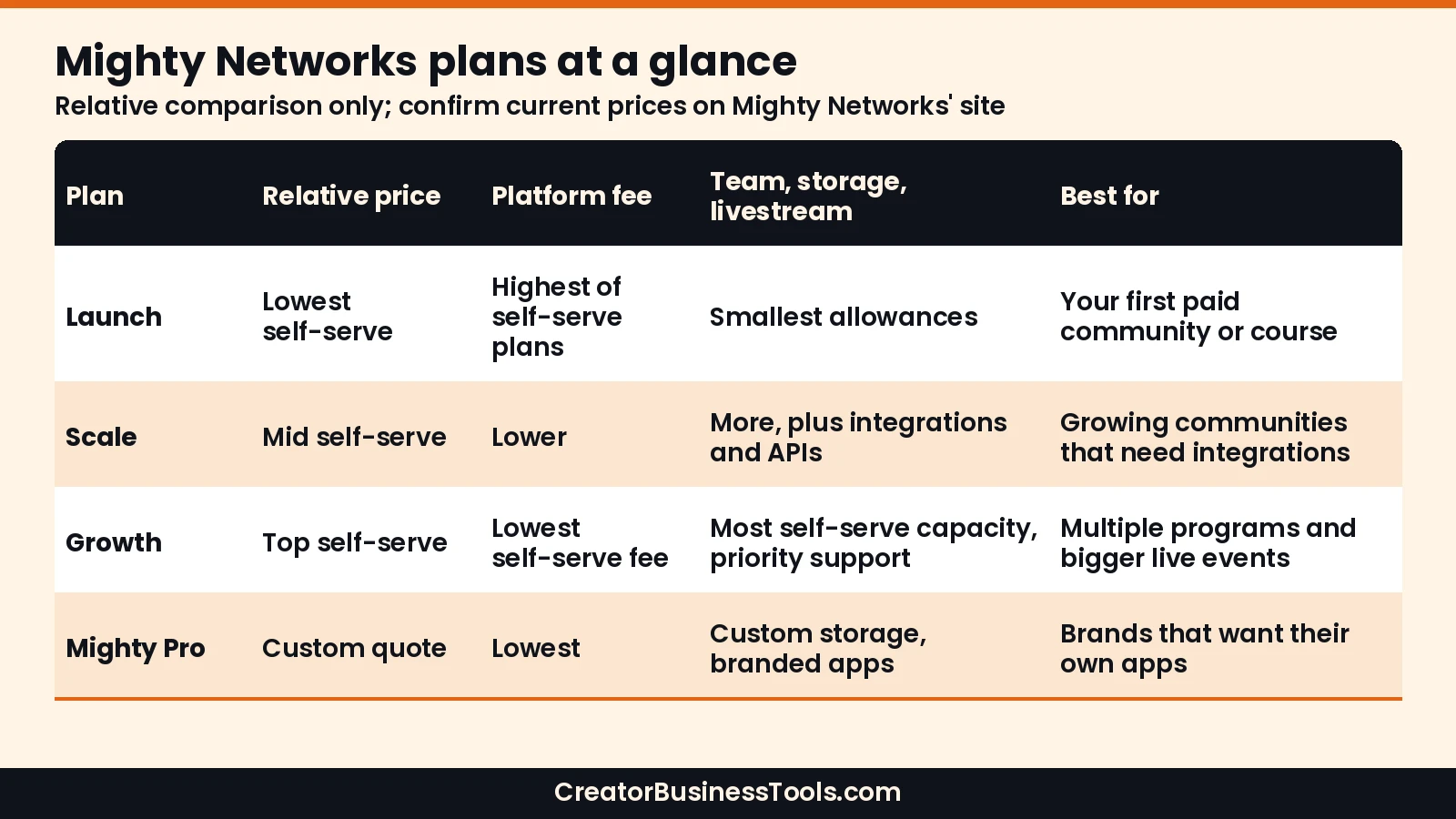
All self-serve plans include unlimited members and spaces, community feeds, chat, courses, events, iOS and Android apps, and a custom domain.
How Mighty Networks pricing works
Launch plan ($50–$100/month)
Launch is the entry point. It covers the essentials: community spaces, activity feeds, chat, questions and polls, online and in-person events, livestreaming, and courses. Course features include native video, quizzes, cohort-based and dripped courses, resource libraries, habit trackers, and badges and certificates. You also get Mighty’s AI Cohost for setup help, basic automations for onboarding and attendance, member profiles with a handful of custom fields, points and leaderboards, member streaks, and a built-in member referral program. Every Launch community also gets one customizable landing page and a small number of scheduled promotions.
On the payments side, Launch lets you charge for memberships, courses, and spaces with subscriptions, one-time payments, installments, multiple tiers, free trials, promo codes, and hidden free access, in hundreds of currencies. You connect your own Stripe account; Mighty Networks does not hold your funds.
The main trade-offs are the limits. You get a small team allowance (a few hosts and moderators), about 200 GB of storage, 20 livestream hours a month for up to 100 simultaneous viewers, and the highest transaction fee of any self-serve plan. Popular integrations such as Zapier, Kit, Google Analytics, and marketing pixels aren’t included on Launch—those start on Scale.
Scale plan ($150–$250/month)
Scale is for hosts who’ve proven their idea and want to connect Mighty to the rest of their tools. It adds more automations, API and MCP access, and third-party integrations, including Zapier, Kit, Google Analytics, marketing pixels, and affiliate integrations. It also raises team seats, storage (to 500 GB), and livestream limits (30 hours a month for up to 200 viewers), adds automated questions and polls through Mighty’s Infinite Question Engine, and lets you charge for one-time events. Custom profile fields and scheduled promotions both increase. The platform fee per transaction is lower than on Launch, so Scale often pays for itself once you have steady membership revenue.
Growth plan ($350–$450/month)
Growth is the top self-serve tier and the plan you get during the free trial. It’s built for hosts running several offers at once. On top of everything in Scale, you get advanced automations (including activity- and content-based rules and AI automation filters), simultaneous promotions, growth expert sessions, priority support, and migration services. It also adds advanced leaderboards, member video uploads, optional SSO, optional email white-labeling, and the ability to let space hosts and moderators go live. Storage rises to 1 TB, livestream capacity jumps to 40 hours a month for up to 1,000 viewers per stream, and Growth carries the lowest self-serve transaction fee.
Mighty Pro (custom pricing)
Mighty Pro is Mighty Networks’ premium tier, with your own branded native apps in the Apple App Store and Google Play under your name and logo. Mighty’s help center says those apps typically go live in the stores within a few weeks of setup, and new Mighty Pro features roll into your apps without custom development. The plan also includes full community management services, advanced data reports, custom storage and usage, unlimited hosts and moderators, and the highest livestream limits (thousands of viewers per stream, with larger audiences available for an extra fee). Pricing is by quote, so you’ll need to book a call.
Monthly vs. annual billing
Every self-serve plan costs less per month when you pay annually. Mighty advertises this as roughly two months free, which matters on the higher tiers. If you’re still validating your offer, monthly billing keeps the commitment short. Once members are paying reliably, annual billing is usually the better deal.
What you’ll actually pay: a cost-of-ownership walkthrough
When people ask what Mighty Networks costs, they usually mean the subscription. The real number is subscription + platform fees + payment processing + any add-ons.
Scenario A: small paid community on Launch. You’re charging a modest monthly membership to a few dozen people and hosting a couple of short live sessions each month. The subscription sits in the $50–$100/month band. You’ll also pay Mighty’s Launch-level platform fee on each sale, plus Stripe’s processing fee. If you stay under Launch’s livestream hours and storage, you don’t need a Boost. This is the lightest full Mighty Networks setup.
Scenario B: growing community on Scale. Your membership revenue is steady, you sell the occasional one-time workshop, and you want Zapier or Kit connected to your email list. The subscription moves into the $150–$250/month band, but the lower platform fee and higher livestream and storage limits often offset that jump. Annual billing helps here.
Scenario C: multi-program host on Growth. You run several cohorts, livestream to larger groups, and need more hosts and moderators. The subscription lands in the $350–$450/month band, with the lowest self-serve fee and 1 TB of storage. Migration help and priority support matter if you’re moving off another tool.
Scenario D: branded apps. If members need to find your community under your brand in the app stores, you’re looking at Mighty Pro. Budget for a custom quote rather than a self-serve sticker price, and confirm livestream and storage needs on the sales call.
In every scenario, leave room for Stripe fees on web sales and Apple’s cut on iOS in-app purchases. Those aren’t optional if you sell through those channels.
Transaction fees and hidden costs
The subscription is only part of what you’ll pay. Here’s what else to budget for, all documented in Mighty Networks’ official pricing page and help center.
- Platform transaction fee. Mighty takes a small percentage of each member payment, deducted from your Stripe payouts. It’s highest on Launch, lower on Scale, and lowest on Growth and Mighty Pro. Your members don’t pay it; you do. Mighty’s help center notes a higher fee applies to sales made during the free trial.
- Stripe processing fees. Mighty processes web payments through your own Stripe account, and Stripe charges its own processing fee on top. PayPal isn’t supported.
- Apple’s cut on iOS purchases. When members buy through the Mighty iOS app, Apple processes the payment and takes its own fee, and payouts arrive on Apple’s slower schedule. Mighty doesn’t add its fee to iOS purchases, and you can set a higher iOS price to offset Apple’s cut.
- Engagement Boosts. If you run out of livestream hours, viewer capacity, or storage, you can buy a monthly Engagement Boost on top of your plan. Boosts aren’t refundable. Course videos count toward storage on current plans, so video-heavy programs should check this.
- Bigger livestream audiences. Mighty lists capacity up to 10,000 viewers per stream for an additional fee.
- Branded apps. Your own app in the app stores requires Mighty Pro. The standard plans use Mighty’s own apps.
Bottom line on cost: For a small community running a few live sessions a month, Launch plus Stripe fees is the realistic total. If you livestream weekly to a large audience or upload lots of video, price in a higher plan or a Boost from the start.
Want to see the plans for yourself? You can start a free Mighty Networks trial without a credit card.
Is Mighty Networks worth it?
Mighty Networks is worth it if your paid community is built around live sessions, structured courses, and cohorts. It packs native livestreaming, quizzes, certificates, and flexible payment options into even the entry plan, and its transaction fees stay low.
It’s less compelling if you want the lowest monthly bill, built-in email marketing, or a branded app without an enterprise-style quote. That’s where the alternatives below come in. For a deeper community-first comparison, see our Circle vs Skool vs Mighty Networks guide.
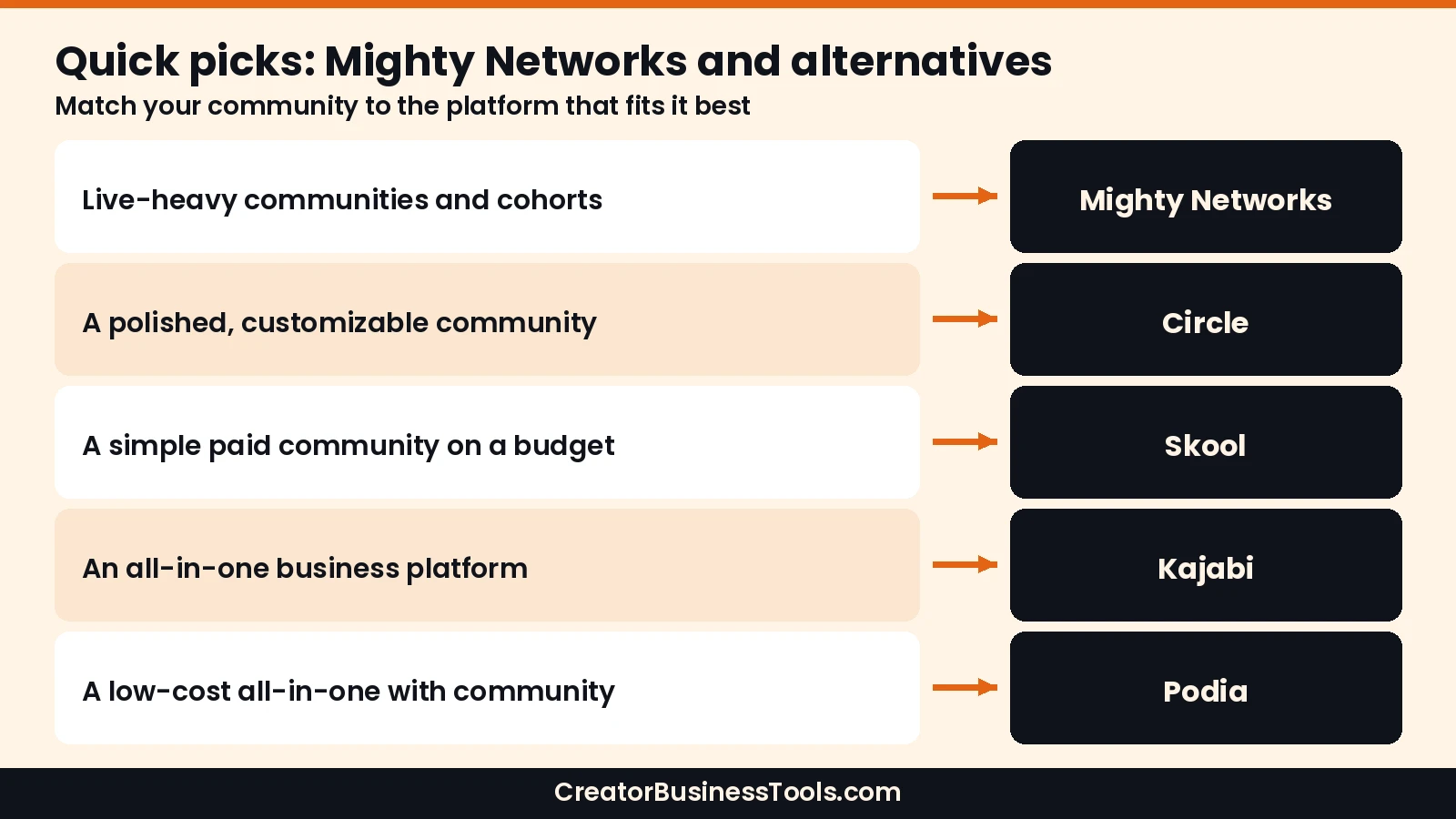
Quick picks
- Best for live-heavy communities and cohorts: Mighty Networks, $50–$100/month to start
- Best for a polished, customizable community: Circle, $50–$100/month to start on annual billing
- Best budget option for a simple paid community: Skool, Under $10/month to start ($50–$100/month for the lower-fee plan)
- Best all-in-one business platform: Kajabi, $100–$200/month to start
- Best low-cost all-in-one with community: Podia, Under $50/month to start
Mighty Networks vs. alternatives: comparison table
| Feature | Mighty Networks | Circle | Skool | Kajabi | Podia |
|---|---|---|---|---|---|
| Entry price band | $50–$100/month | $50–$100/month (annual) | Under $10/month | $100–$200/month | Under $50/month |
| Free trial | Yes, no card | Yes, no card | Yes | Yes, plus money-back guarantee | Yes, no card |
| Platform transaction fee | Small; drops on higher plans | Small; drops on higher plans | Higher on entry plan; lower on Pro | None (processing still applies) | Entry plan only |
| Courses | Yes, with quizzes and cohorts | Yes | Yes | Yes | Yes |
| Native livestreaming | Yes, with hour and viewer limits | Yes, with limits | Yes | Live cohort courses on higher tiers | Events via Zoom, Meet, or YouTube Live |
| Custom domain | All plans | All plans | Not listed | All plans | All plans |
| Built-in email marketing | Not listed | Paid add-on | Not listed | Yes | Yes, small subscriber allowance |
| Mobile apps | iOS and Android; branded apps on top tier | iOS, Android, and desktop; branded apps on top tier | iOS and Android | Customer app; branded app on top tier | Not listed |
Platform reviews
Mighty Networks
Mighty Networks combines community, courses, events, livestreaming, and payments, with apps on iOS, Android, and the web. Course tools are deep for a community platform: quizzes, cohorts, drip schedules, and badges and certificates are all on the entry plan.
Keep in mind: Livestream hours, viewer caps, and storage are limited by plan, and extra capacity costs more. Integrations like Zapier and marketing pixels start on the second tier, and branded apps need a custom-priced plan.
Best for: Coaches running cohorts, challenges, or live-heavy memberships who want strong course tools inside their community.
Not ideal for: Creators on a very tight budget, or anyone who needs built-in email marketing and sales funnels in the same tool.
Circle
Circle is a polished community platform with a website, courses, live events, payments, gamification, a custom domain, and iOS, Android, and desktop apps on its entry plan. Higher tiers add workflows, APIs, and branding removal.
Keep in mind: Lower plans cap admins, moderators, and spaces. Removing Circle branding takes a higher tier, and email marketing is a separate paid add-on.
Best for: Creators and brands who want a customizable, professional-looking community on their own domain.
Not ideal for: Hosts who mainly want the lowest monthly cost, or who need deep quiz-and-cohort course tools out of the box.
Skool
Skool keeps things simple: a community feed, a classroom for courses, a calendar with native live calls, and built-in gamification. It has two plans: a very low-cost entry plan and a Pro plan with a much lower transaction fee and extra tools like member affiliates.
Keep in mind: Design and branding options are limited, and its pricing page doesn’t list custom domains or email marketing. The entry plan’s transaction fee is much higher than Pro’s.
Best for: Coaches who want a fast, simple, highly engaging paid community without much setup.
Not ideal for: Brands that need a custom-designed site, their own domain, or advanced course features like quizzes.
Kajabi
Kajabi is an all-in-one business platform: courses, coaching, community, website, email marketing, landing pages, funnels, and checkout. It takes no revenue share as a platform. If you’re weighing it against course-first tools, see our Kajabi vs Teachable comparison.
Keep in mind: Kajabi starts at a meaningfully higher monthly price, and community is one feature among many rather than the centerpiece.
Best for: Established coaches who want to replace separate website, email, and checkout tools with one system.
Not ideal for: Creators whose business is mainly a live, community-first membership, or anyone testing an idea on a small budget.
Podia
Podia is a lighter all-in-one that includes community on every plan, with topic spaces, group chats, member DMs, and free or paid tiers. It also covers courses, downloads, coaching, events, a website, a custom domain, and email.
Keep in mind: The entry plan charges a platform transaction fee, and built-in email covers only a small number of subscribers before you pay more. Live events run through tools like Zoom rather than native streaming.
Best for: Solo creators who want community, courses, and email together at a low monthly price.
Not ideal for: Communities built around frequent native livestreams, large cohorts, or gamification.
⚠️ Pricing, limits, and fees on community platforms change often. This guide is based on each company’s official pricing pages and help docs, not hands-on testing. Payment processing fees apply on every platform, and app-store purchases may carry extra fees. Confirm current prices, transaction fees, and plan limits on each vendor’s site before you buy.
Also check livestream caps, storage, team seats, and which integrations unlock only on higher tiers. Free trials can differ from paid plans—Mighty Networks trials the Growth plan, not Launch—so treat the trial as a build test, then match the paid plan to the features you actually need. If you sell on both web and iOS, confirm Stripe and Apple fee impacts before you set membership prices.
How to choose
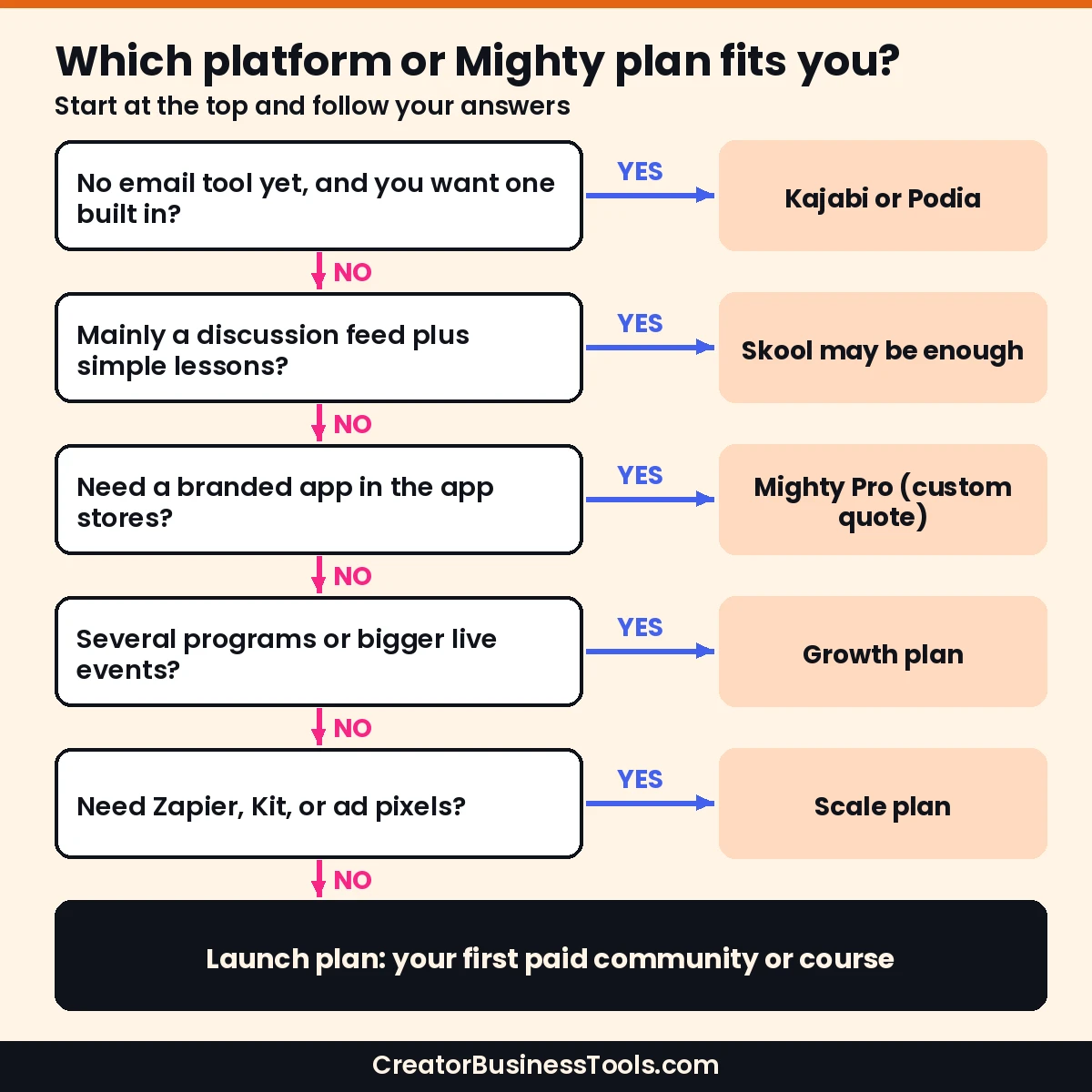
- Estimate your monthly member revenue. Then compare each platform’s subscription plus its transaction fee at that revenue, not just the sticker price. A lower monthly plan with a higher fee can cost more once you have dozens of paying members.
- Count your live sessions. If you stream weekly to a big group, check hours and viewer limits on Mighty Networks and Circle. Unused livestream hours don’t roll over on Mighty Networks, according to its help center.
- Decide how important course depth is. Quizzes, cohorts, drip schedules, and certificates favor Mighty Networks. If you mainly need a discussion feed plus simple lessons, Skool may be enough.
- Check your email setup. Mighty Networks doesn’t list built-in email marketing on its pricing page. If you have no email tool, Kajabi or Podia may save you a separate subscription.
- Decide if you need a branded app. On Mighty Networks, that means a custom-priced plan; compare that with Circle and Kajabi’s top tiers.
- List your must-have integrations. On Mighty Networks, Zapier, Kit, and ad pixels start on the second tier. Map those against your current stack before you pick Launch.
- Price annual vs. monthly. Annual billing lowers the monthly cost on every self-serve plan. Use monthly only while you’re still testing.
- Use the free trial with real content. The trial runs on Growth, so you’ll see higher limits than Launch or Scale. Build a space, upload a lesson, schedule an event, and run a test checkout—then decide which paid plan matches what you actually used.
FAQ
How much does Mighty Networks cost?
Self-serve plans range from the $50–$100/month band for Launch to the $350–$450/month band for Growth. Mighty Pro, with branded apps, is custom priced. Annual billing lowers the monthly cost.
Does Mighty Networks have a free plan?
No free-forever plan is listed. You can start with a free trial of the Growth plan, and no credit card is required.
Does Mighty Networks charge transaction fees?
Yes. Each plan has a small platform fee on member payments, which shrinks on higher plans. Stripe’s processing fee applies on top, and Apple takes its own fee on iOS in-app purchases.
What’s the difference between the Launch and Scale plans?
Scale adds more automations, API access, third-party integrations like Zapier, Kit, and Google Analytics, higher team and livestream limits, more storage, and a lower transaction fee.
Can I get my own branded app on Mighty Networks?
Yes, through Mighty Pro, which includes branded iOS and Android apps in the app stores. It’s priced by quote.
Can I use my own domain?
Yes. Mighty Networks lists custom domains on all of its self-serve plans.
What happens if I need more livestream hours or storage?
You can add a monthly Engagement Boost on top of your plan, or upgrade. Growth and Mighty Pro hosts contact Mighty’s team for extra capacity.
Is Mighty Networks cheaper than Kajabi?
Its entry plan sits in a lower price band than Kajabi’s. Kajabi includes email marketing and funnels but takes no platform revenue share, so compare your full tool stack and fees.
What happens when the free trial ends?
Mighty Networks’ free trial runs on the Growth plan. After it ends, you can stay on Growth or move to Launch or Scale. Features that aren’t on your chosen plan stop being available, but content you created during the trial remains if you upgrade again later.
The bottom line
Mighty Networks’ pricing makes sense for coaches and course sellers whose community runs on live sessions, cohorts, and structured courses. Launch covers more than most entry plans, and transaction fees stay small. Just budget for Stripe fees, the plan’s livestream and storage limits, and a higher tier if you need integrations. If you want the lowest bill, Skool or Podia are worth a look. For a more customizable community, consider Circle, and for one system that runs your whole business, consider Kajabi.
The best next step is to try Mighty Networks free, build one space and one course lesson, and see whether the plan you’d need fits your budget.