
Sellfy vs Gumroad: Fees, Features, and Which Fits Your Digital Products
Disclosure: This post contains affiliate links. If you buy through them, we may earn a commission at no extra cost to you. How we make money.
If you sell digital products such as templates, ebooks, presets, or courses, Sellfy vs Gumroad is one of the first comparisons you’re likely to run into. Both let you open a simple store without building a full website. The big difference is how you pay: Sellfy charges a flat plan price with no transaction fee from Sellfy, while Gumroad charges nothing monthly and takes a fee from each sale.
This guide compares Sellfy and Gumroad on fees, taxes, what you’re allowed to sell, store design, marketing tools, and who each one fits. It is based on each company’s official pricing pages, feature pages, and help center, not on sponsored claims.
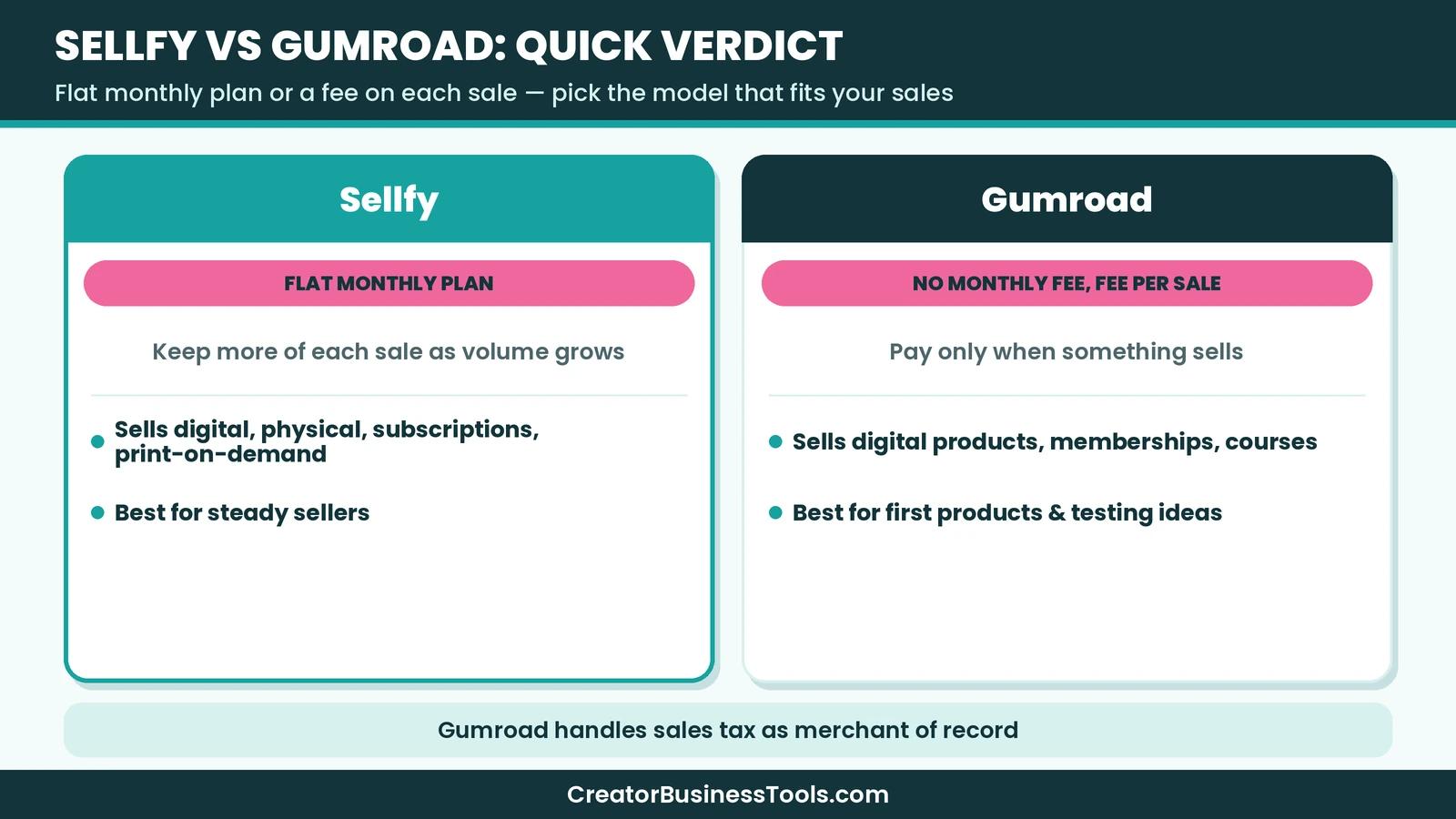
Quick verdict: Gumroad is the easier, lower-risk start if you’re testing your first digital product and sales are small or unpredictable, and it handles sales tax for you as a merchant of record. Sellfy tends to make more sense once you have steady sales, want to keep more of each order, sell physical or print-on-demand products alongside downloads, or want built-in upsells and cart recovery.
Quick picks
- Best for steady sales and keeping more per order: Sellfy. You pay a flat plan price, and Sellfy doesn’t take a transaction fee. Try Sellfy
- Best for testing a first product with no monthly bill: Gumroad. You only pay when you make a sale.
- Best for selling merch or physical goods with downloads: Sellfy, which supports physical and print-on-demand products.
- Best for hands-off sales tax: Gumroad, which acts as merchant of record and collects and remits sales tax where it has obligations.
Sellfy vs Gumroad at a glance
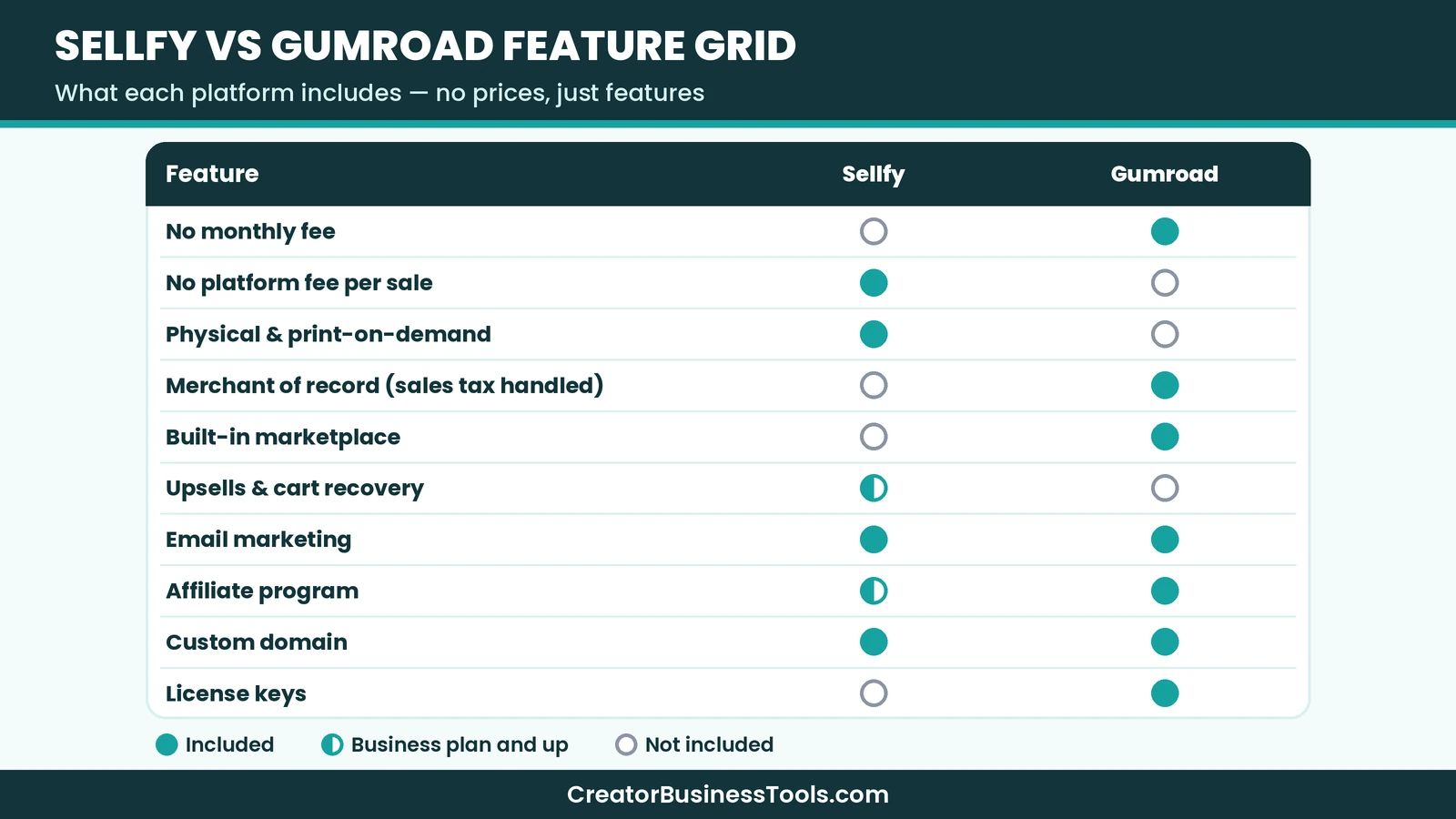
| Factor | Sellfy | Gumroad |
|---|---|---|
| Pricing model | Monthly or yearly plan | No monthly fee |
| Platform transaction fee | None from Sellfy | Fee on every sale |
| Marketplace | No built-in marketplace | Discover marketplace (higher fee) |
| Payment processing | PayPal or Stripe fees extra | Card and PayPal processing extra on direct sales |
| Sales tax | VAT and tax settings you manage | Gumroad acts as merchant of record |
| Digital products | Yes | Yes |
| Physical products | Yes, including print-on-demand | Not allowed |
| Subscriptions and memberships | Yes | Yes |
| Email marketing | Built in, with email credits | Broadcasts and automated workflows |
| Upsells and cart abandonment | Business plan and up | Not listed on the features page |
| Affiliate program for your store | Business plan and up | Yes |
| Custom domain | Yes | Yes |
| Price tier | Budget to premium plans | Free to start, pay per sale |
What is Sellfy?
Sellfy is an ecommerce platform built for creators. You can sell digital downloads, subscriptions, physical products, and print-on-demand merch from one store, with unlimited products on every plan.
Sellfy includes a store editor, themes, custom code, and the option to connect your own domain. If you already have a website, you can embed “buy now” buttons, product widgets, or the full store. If you don’t, Sellfy says you can build a store and sell directly on social platforms.
Payments go straight to your PayPal or Stripe account right after a purchase. Sellfy itself doesn’t take a transaction fee, but your payment processor charges its usual fees.
What is Gumroad?
Gumroad is a platform for selling digital products, memberships, and courses directly to your audience. There’s no monthly charge. Instead, Gumroad takes a fee from every sale, with a higher fee for sales that come through its Discover marketplace.
Gumroad includes a page editor for building a storefront, custom domain support, embeddable checkout, memberships and subscriptions, pay-what-you-want pricing, license key generation, multiple product versions, and email broadcasts with automated workflows.
Gumroad also acts as a merchant of record. According to its pricing page, it handles sales tax collection and remittance in regions where it has tax obligations, so you don’t manage tax settings yourself.
Sellfy vs Gumroad pricing and fees
This is the core of the decision, because the two platforms use opposite pricing models.
How Sellfy charges
Sellfy has three paid plans: Starter, Business, and Premium. Starter is in a budget tier, Business is mid-range, and Premium is premium. Paying yearly lowers the monthly equivalent.
Each plan has a yearly sales limit. If you go over the limit for your plan, Sellfy expects you to upgrade, and its FAQ says it may charge an overage fee on revenue above the limit if you don’t. Sellfy says it will notify you when you reach your plan’s limit.
Sellfy doesn’t charge transaction fees on any plan, but you still pay PayPal or Stripe processing fees. Sellfy has no free plan. Check the official pricing page for current refund terms on upgrades.
How Gumroad charges
Gumroad has no monthly fee. On direct sales through your profile or links, it takes a percentage plus a small fixed fee per transaction. Card processing and PayPal fees are charged on top.
Sales made through Gumroad’s Discover marketplace carry a higher flat fee, which includes processing. Gumroad’s help center also describes a lower rate on direct sales once your monthly sales pass a high threshold, applied automatically and reset each month.
When a sale is refunded, Gumroad says its own fee on the refunded part is returned, but the payment processing part is not.
Which one costs less?
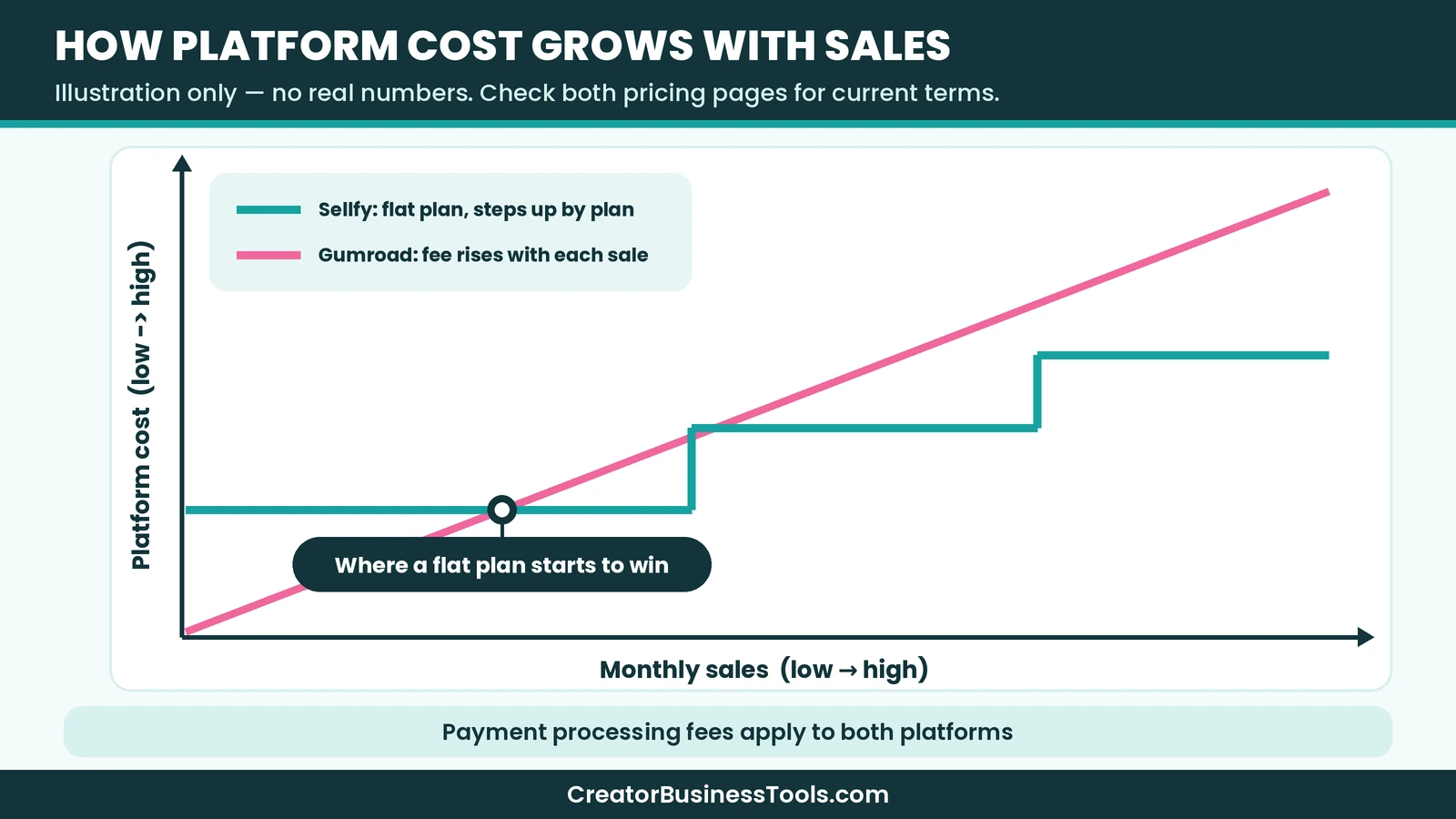
It depends on your sales volume.
- Low or occasional sales: Gumroad usually costs less, because you pay nothing in months without sales.
- Steady monthly sales: Sellfy’s flat plan can become cheaper, because the per-sale fee on Gumroad grows with every order while Sellfy’s plan price stays the same within your plan’s limit.
- Marketplace sales: If Discover brings you new buyers, Gumroad’s higher fee on those sales may be worth it, since Sellfy doesn’t have a comparable marketplace.
Example scenario (hypothetical): a designer selling one low-priced template a few times a month would likely pay less on Gumroad. A creator selling a bundle of planners every day would likely pay less on Sellfy Starter, as long as yearly sales stay within the Starter limit. To find your own break-even point, compare your average order value and monthly sales on both official pricing pages.
[See Sellfy's plans](https://sellfy.com/)Taxes: merchant of record vs managing it yourself
Taxes are a big but often overlooked difference.
Gumroad is a merchant of record. It says it collects and remits sales tax worldwide in regions where it has tax obligations, and it automatically disables your own tax settings. For a solo creator selling to buyers in many countries, this removes a lot of paperwork.
Sellfy offers advanced VAT and tax settings on every plan. That gives you control over tax rules, but you are responsible for setting them up correctly and for your own tax obligations. If you sell internationally, check the rules that apply to you or ask a tax professional.
If you want to avoid handling sales tax yourself, this point alone may favor Gumroad.
What you can sell on each platform
Sellfy
Sellfy supports:
- Digital downloads, with up to 50 files per product
- Subscriptions
- Physical products
- Print-on-demand merch such as apparel
This makes Sellfy a good fit if you want to sell a digital product line and branded merch from one store.
Gumroad
Gumroad supports digital products, ebooks, courses, tutorials, memberships, bundles, and services. However, its help center lists physical products as not allowed. It also doesn’t allow reselling products you don’t own, such as private label rights ebooks or resold templates, along with other restricted categories.
If physical products are part of your plan, Sellfy is the clearer choice of the two.
Store design and customization
Both platforms let you sell without a separate website.
Sellfy gives you a store editor, themes, the option to apply custom code, and a custom domain on every plan. Removing Sellfy branding requires the Business plan or higher. Higher plans also include store design migration, where Sellfy’s team helps bring your existing design over.
Gumroad provides a page editor for a profile storefront and product pages, lets you customize colors, and supports linking a custom domain. You can also embed Gumroad’s checkout and a “follow” button on your own site.
For creators who care about a polished branded store, Sellfy offers more store-level controls. For creators who want a quick product page, Gumroad is simpler.
Marketing and growth tools
Sellfy
Every Sellfy plan includes email marketing with a set number of email credits, plus customer reviews. Business and Premium add product upselling, cart abandonment, custom fields, and an affiliate program you can offer to promoters. Higher plans also include more email credits, and you can buy more in the dashboard.
Gumroad
Gumroad includes email broadcasts, automated workflows, sales analytics, and a way to import your existing email list. It supports affiliates for your products, pay-what-you-want pricing, and license keys for software. The Discover marketplace can help new buyers find your products, for a higher fee.
Summary: Sellfy leans toward store conversion tools like upsells and cart recovery. Gumroad leans toward simple audience tools and marketplace discovery.
Payouts and payments
Sellfy sends payments straight to your PayPal or Stripe account when a purchase is made. If neither PayPal nor Stripe supports your country, Sellfy says you can only offer free products.
Gumroad pays creators by direct deposit or PayPal, depending on the country. Check Gumroad’s help center for the payout schedule and methods available where you live.
Customer support
Sellfy includes 24/7 email support on every plan, and the Premium plan adds priority support. Sellfy also offers one-time migration help: email migration on all plans, plus product and store design migration on higher plans.
Gumroad’s support is centered on its help center, which covers fees, payouts, product setup, and content rules in detail. If you’re unsure whether a product is allowed, Gumroad’s prohibited products page suggests contacting its support team by email with a description or example.
If you expect to need hands-on help setting up a store, Sellfy’s migration services and priority support on higher plans are worth weighing.
Selling on social media and your own site
Both platforms work well if most of your audience lives on social media.
Sellfy says you can build a store and start selling on social networks such as YouTube without a website. If you do have a site, you can embed buy buttons, product widgets, or the whole store.
Gumroad gives you a profile storefront and individual product links that you can share anywhere, and you can embed its checkout and a follow button on your own site. Followers can subscribe to your updates, which makes it easy to announce new products.
For link-in-bio selling, either option works. The choice comes back to fees, taxes, and product types.
Who should choose Sellfy?
Sellfy is likely the better fit if you:
- Have steady monthly sales and want to keep more of each order.
- Want to sell physical products or print-on-demand merch alongside digital products.
- Want upsells, cart abandonment, and a store affiliate program.
- Care about a branded store with themes, custom code, and no platform branding.
- Are comfortable managing your own VAT and tax settings.
Who should choose Gumroad?
Gumroad is likely the better fit if you:
- Are launching your first digital product and don’t want a monthly bill.
- Have small or irregular sales.
- Want Gumroad to handle sales tax as merchant of record.
- Sell software and need license keys, or want pay-what-you-want pricing.
- Want a chance at extra buyers through the Discover marketplace.
Example scenarios
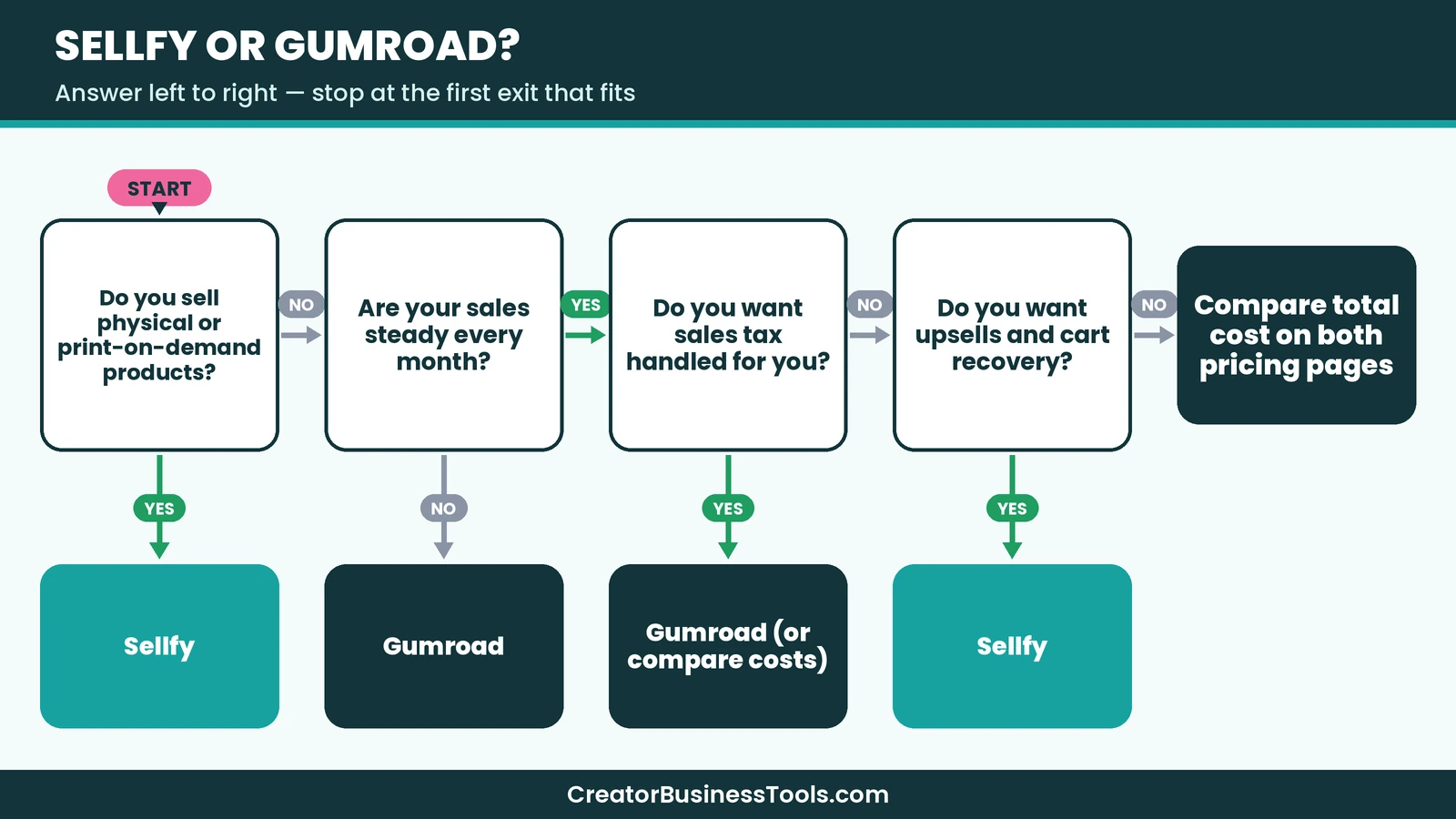
These are hypothetical cases to show how the choice can play out. They are not customer stories.
A first-time ebook author
An author releasing one ebook to a small newsletter would likely start on Gumroad. There is no monthly fee during slow months, and sales tax is handled for them.
A planner shop with merch
A creator selling digital planners and printed notebooks would likely choose Sellfy, since it supports physical and print-on-demand products along with downloads.
A growing template business
A creator selling templates every day, with a growing email list, might start on Gumroad and move to Sellfy once the per-sale fees add up to more than a Sellfy plan. Upsells and cart abandonment on Sellfy’s Business plan could also help raise order value.
A software creator
A developer selling a small app or plugin may prefer Gumroad for its built-in license key generation.
Before you choose
- Estimate your monthly sales and average order value, then compare costs on both official pricing pages.
- Remember that payment processing fees apply on both platforms.
- On Sellfy, check your plan’s yearly sales limit so you aren’t surprised by an upgrade.
- On Gumroad, check the list of products that aren’t allowed before you build your catalog.
- If you sell internationally, decide whether you want to manage sales tax yourself.
Switching from Gumroad to Sellfy
If you start on Gumroad and later move to Sellfy, plan the switch carefully:
- Export your customer and follower list from Gumroad.
- Sign up for Sellfy and set up your store design and domain.
- Use Sellfy’s email migration, available on all plans, to import contacts into its built-in email marketing.
- Upload your products, or use product migration on higher plans.
- Update links on your social profiles, newsletter, and website.
- Email existing customers to explain where new products will live.
Sellfy vs Gumroad: pros and cons
Sellfy pros
- No transaction fee from Sellfy on any plan
- Sells digital, physical, subscription, and print-on-demand products
- Upsells, cart abandonment, and an affiliate program on higher plans
- Store themes, custom code, and custom domain
- 24/7 email support
Sellfy cons
- No free plan
- Yearly sales limits on each plan
- You manage your own VAT and tax settings
- No built-in marketplace
Gumroad pros
- No monthly fee
- Merchant of record that handles sales tax
- Discover marketplace for extra exposure
- License keys, pay-what-you-want, and memberships
Gumroad cons
- A fee on every sale, which adds up as you grow
- Higher fee on marketplace sales
- Physical products aren’t allowed
- Fewer store-level design controls
FAQ
Is Sellfy cheaper than Gumroad?
It depends on your sales. Gumroad usually costs less with small or irregular sales, since there’s no monthly fee. Sellfy can cost less once you have steady sales, because it doesn’t take a per-sale platform fee.
Does Sellfy take a cut of each sale?
No. Sellfy says it doesn’t charge transaction fees. You pay your plan price plus PayPal or Stripe processing fees.
Does Gumroad have a monthly fee?
No. Gumroad charges a fee per sale instead of a monthly subscription.
Can I sell physical products on Gumroad?
Gumroad’s help center lists physical products as not allowed. Sellfy supports physical and print-on-demand products.
Does Gumroad handle sales tax?
Yes. Gumroad acts as merchant of record and collects and remits sales tax where it has tax obligations.
Does Sellfy have a free plan?
No. Sellfy has no permanent free plan.
Can I use my own domain?
Yes, both Sellfy and Gumroad support connecting a custom domain.
Which is better for beginners?
Gumroad is often easier for a first product because there’s no monthly cost. Sellfy is beginner-friendly too and may fit better if you plan to grow a full store.
Bottom line
The Sellfy vs Gumroad choice comes down to your sales pattern and what you sell. Gumroad is a low-risk way to launch a first digital product, with no monthly fee and sales tax handled for you. Sellfy is a strong fit once sales are steady, when you want to keep more of each order, sell merch or physical goods, and use upsells and cart recovery to grow.
Estimate your monthly sales, compare both pricing pages, and pick the model that fits where your shop is heading.
This section contains an affiliate link. We may earn a fee if you sign up, at no extra cost to you.
[Start your Sellfy store](https://sellfy.com/)Free checklist: Getting ready to sell your first product? Get our free Digital Product Launch Checklist, a one-page plan for your product page, pricing, delivery, and launch emails. Contact us to request a copy.
Pricing and features from official vendor pages, last checked October 28, 2026.