
Senja Review: A Creator-Friendly Testimonial Tool With a Generous Free Plan
Disclosure: This post contains affiliate links. If you buy through them, we may earn a commission at no extra cost to you. How we make money.
If you sell a course, coaching, templates, or a membership, you already know that kind words from real customers can do more for a sales page than any clever headline. This Senja review looks at whether Senja is a good fit for beginner creators who want to collect, organize, and show testimonials without a complicated setup. We based it on Senja’s official pricing and product pages, so you can see what the free plan covers, where the paid tiers come in, and who might be better served by something else.
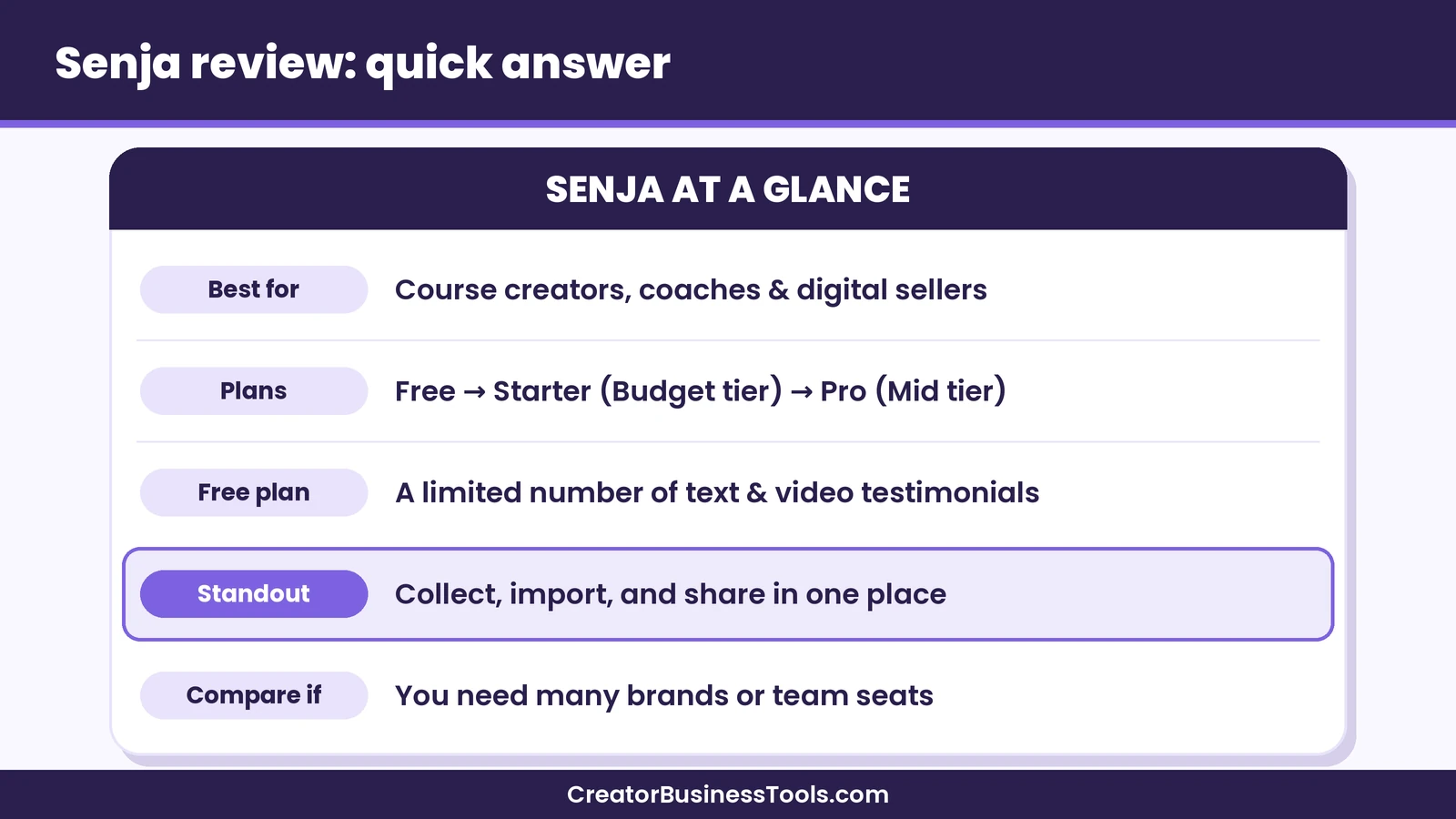
Quick verdict: Senja looks like one of the friendliest testimonial tools for creators, with a genuinely usable free plan, simple collection forms, and plenty of ways to share social proof on your site, in emails, and on Pinterest-ready graphics. The free plan has a cap on how many testimonials you can keep, so growing creators will likely want the entry paid tier. Teams and agencies with several brands may prefer the higher tier.
Quick picks
- Best way to start: Senja Free, which lets you collect a limited number of text and video testimonials and try widgets. Senja
- Best for most solo creators: Senja Starter, with unlimited testimonials and a few collection forms.
- Best for teams or multiple brands: Senja Pro, with more projects, more seats, and unlimited forms.
- Best if you just want a simple Wall of Love: Senja Free or a similar free tool from the alternatives section below.
Senja at a glance
| Item | What Senja offers |
|---|---|
| What it is | A tool to collect, manage, and share testimonials |
| Plans | Free, Starter, Pro |
| Price tier | Free, then budget (Starter) and mid-range (Pro) |
| Free plan limit | A capped number of text and video testimonials |
| Collection | Simple or multistep forms, plus imports from many platforms |
| Sharing | Website widgets, Walls of Love, images for social posts |
| Video exports | Standard quality on Free, higher quality on paid plans |
| Billing | Monthly or yearly |
What is Senja?
Senja is a testimonial and social proof tool built with creators in mind. In plain terms, it helps you ask customers for feedback, gathers that feedback in one tidy library, and then lets you show the best bits wherever your audience sees them.
Instead of screenshots scattered across your phone, inbox, and DMs, you get a single place where every testimonial lives. Each one can be tagged, searched, and turned into a widget for your sales page or an image you can pin or post.
Senja describes itself as a small team of creators building for creators, and that focus shows in its examples: course creators, coaches, newsletter writers, freelancers, and small online shops. If you sell digital products and lean on Pinterest for traffic, many of its features map neatly onto what you already do.
Senja review: the features that matter for beginners
Collection forms
The heart of Senja is its collection form. You create a link, send it to happy customers, and they can leave a written testimonial or record a short video. Senja says you can build a simple or multistep form in about a minute, which matters when you’d rather spend your energy on your next product.
We like that the form can guide people with prompts. Many customers want to help but freeze when asked to “write a review.” A few gentle questions about what they struggled with before and what changed after usually lead to more specific, more convincing feedback.
Importing existing testimonials
If you already have praise sitting on other platforms, Senja can import it. Its pricing page mentions imports from over thirty platforms, including X, Facebook, Google, Capterra, and Trustpilot. For Etsy sellers, this can be a gentle way to bring existing reviews and kind messages into one library, though we’d suggest checking each platform’s terms before reusing reviews on your own site.
Senja also mentions a free concierge migration if you’re moving from another testimonial tool, which could save a tired afternoon of copy and paste.
Managing your library
Once testimonials come in, you can tag them, filter them, and pick favorites. This sounds small, but it makes a big difference later. When you launch a new course, you can quickly pull every testimonial that mentions “beginner friendly” or “clear lessons” instead of scrolling through months of messages.
Widgets and Walls of Love
Senja offers embeddable widgets and a “Wall of Love” page that gathers your testimonials into one shareable spot. You can drop a widget onto a sales page, a course landing page, or a blog post. On the Free plan, widgets show Senja branding; paid plans remove it.
Widget analytics are included as well, so you can see roughly how many people view and click your social proof. That data can hint at which pages benefit most from testimonials.
Images for social media and Pinterest
One of our favorite ideas in Senja is turning a testimonial into a designed image. For creators who rely on Pinterest, a clean quote graphic from a happy student can make a natural pin, alongside your usual product mockups. It’s a low-effort way to reuse feedback you already have.
Video testimonials
Customers can record short video testimonials through your form. Video can feel more personal than text, especially for coaching and courses where trust matters. Senja notes that video downloads are standard quality on the Free plan and higher quality on paid plans, so if video is a big part of your plan, that’s worth keeping in mind.
Rewards and automation on paid plans
The Starter tier adds a few extras aimed at collecting more feedback with less effort. Senja’s “Spin the Wheel” feature offers a small reward to people who leave a testimonial, and Senja says it can help you collect noticeably more responses. Paid plans also include testimonial autosync, which pulls in new reviews automatically, plus an API and webhooks for anyone who likes to connect tools.
Senja pricing explained
We’ll keep this simple and avoid exact figures, since pricing can change. Check the official page before you decide.
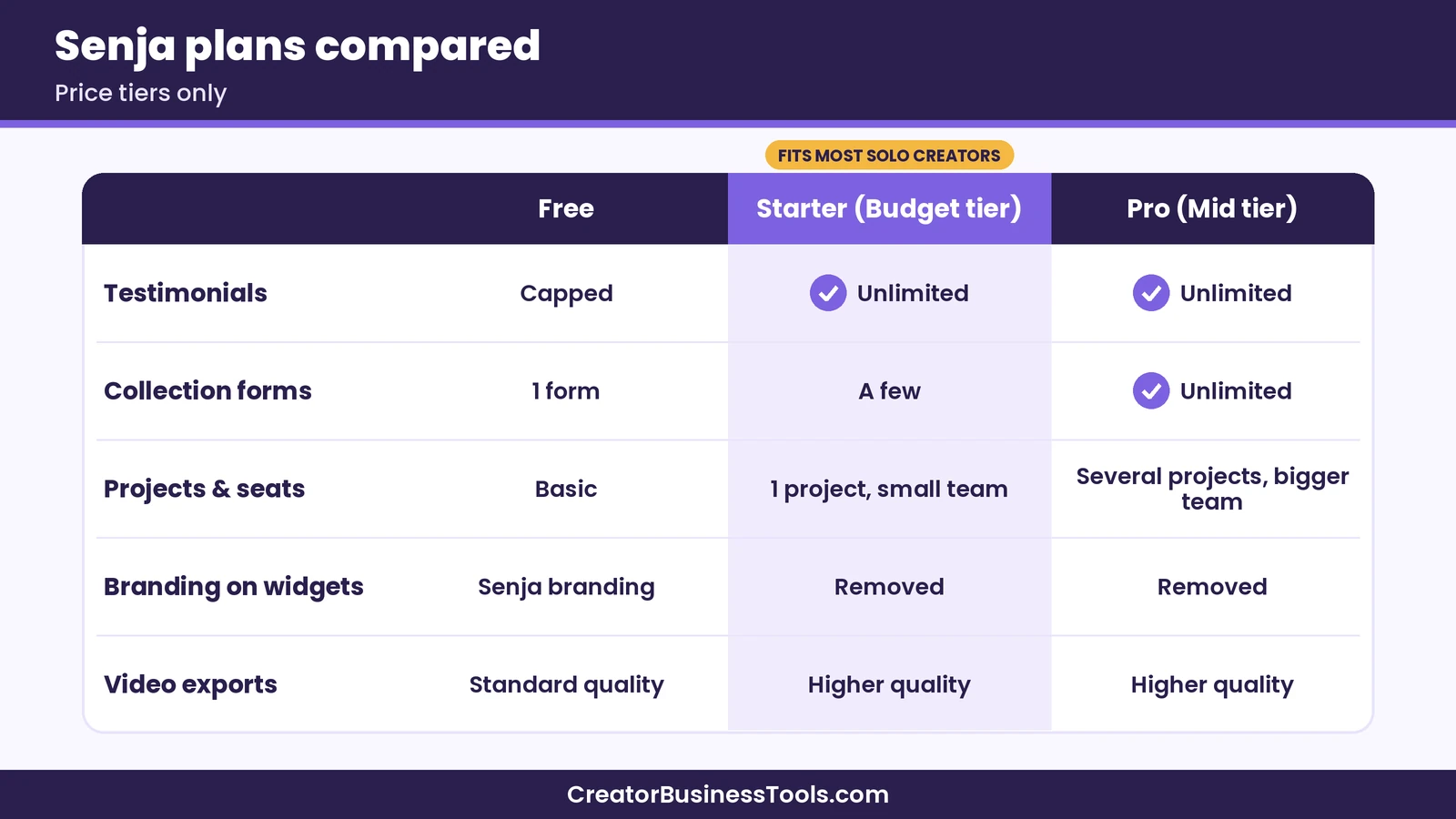
- Free: No monthly fee. You can collect a limited number of text and video testimonials, use the collection form, and add widgets with Senja branding.
- Starter (budget): Unlimited testimonials, a few collection forms, one project, a couple of seats, and the automation extras mentioned above.
- Pro (mid-range): Everything in Starter plus unlimited forms, several projects, more seats, and team access. You can add more projects and seats for an extra fee.
If you cancel or downgrade, Senja says you move back to the Free plan at the end of your billing period, your testimonials stay, and your links keep working. New testimonials above the free limit are hidden until you upgrade again.
Who Senja is best for
Senja seems like a natural fit for:
- Course creators who want testimonials on sales pages and in launch emails.
- Coaches and service providers who rely on trust before someone books a call.
- Digital product sellers who want social proof on their own store, not only on a marketplace.
- Newsletter writers and community hosts who want a Wall of Love to share with sponsors or new members.
- Pinterest-focused creators who’d like quote graphics they can pin.
It may be less ideal if you only need two or three quotes on a single page. In that case, a manual copy-and-paste approach might be enough for a while.
Who might want something else
If you run many brands with large teams, you may find yourself adding projects and seats to Pro, so it’s worth comparing the total with other tools. If you’re mainly interested in automated review requests after every e-commerce order, a dedicated review app built into your store platform might be closer to what you need.
Some creators also prefer tools that bundle testimonials into a larger course or website platform. That can be simpler if you already pay for an all-in-one tool, though the testimonial features tend to be more basic.
How Senja compares with other testimonial tools
There are several testimonial tools aimed at small businesses, and they share a lot of ideas: a collection link, a library, and widgets. The differences often come down to how generous the free plan is, how video is handled, and how pricing scales as you add brands or team members.
| Tool | Free plan | Paid tiers | Good for |
|---|---|---|---|
| Senja | Yes, with a testimonial cap | Budget to mid-range | Creators who want collection plus sharing tools |
| Testimonial.to | Yes, with a smaller cap | Budget to premium | Teams that want many video features and integrations |
| Built-in course platform reviews | Included with your platform | Part of your plan | Creators who want everything in one place |
| Manual screenshots | Free | None | Very early creators with only a few quotes |
We compare the options in more depth in our guide on how to collect testimonials for your course, including a step-by-step process you can use with any tool.
Pros and cons
Pros
- A free plan that’s useful for real testimonials, not just a quick test
- Simple collection forms with optional prompts
- Imports from many platforms, plus a free migration option
- Widgets, Walls of Love, and shareable images in one tool
- Video testimonials included
- Clear tiers, and your testimonials stay if you downgrade
Cons
- The free plan caps how many testimonials you can keep visible
- Senja branding appears on free widgets
- Video downloads are standard quality on Free
- Extra projects and seats on Pro add to the cost for bigger teams
- Some features, like automation, may be more than a brand-new creator needs
A small story from our team
When one of us launched a first mini-course, the “testimonials” were a messy mix of Instagram DMs, email replies, and a couple of comments under a Pinterest pin. Before launch week, we spent an entire evening hunting for screenshots, cropping them, and trying to remember who said what so we could ask permission. Several of the best ones never made it onto the sales page because we simply couldn’t find them in time. That evening is a big reason we now think a single place for testimonials is worth setting up early, even with a free plan.
How to get started with Senja
If Senja sounds like a fit, here’s a gentle way to begin:
- Create a free account. Start with the Free plan so you can learn the basics without committing. Try Senja
- Build one collection form. Add two or three friendly prompts, such as “What were you struggling with before?” and “What changed for you?”
- Send it to a small group. Past students, clients, or customers who’ve already said nice things are a good first audience.
- Import what you already have. Pull in reviews and kind messages from other platforms where possible.
- Add one widget. Place it on your main sales page and see how it looks.
- Make a quote graphic. Turn your favorite testimonial into an image and test it as a Pinterest pin.
- Review after a few weeks. If you’re nearing the free limit or want to remove branding, compare the Starter tier.
Tips for getting better testimonials
Whatever tool you choose, the quality of your testimonials depends a lot on how you ask. A few ideas that tend to help:
- Ask at the right moment. Right after someone finishes a module, gets a result, or sends you a thank-you message is often ideal.
- Make it easy. A short form with prompts usually works better than an open request.
- Ask about the before and after. Specific changes are more convincing than general praise.
- Ask permission clearly. Let people know where their words might appear, and respect anyone who prefers to stay anonymous.
- Offer video as optional. Some people love recording a quick clip; others would rather type. Giving both options can help.
- Say thank you. A short personal note goes a long way and can turn a customer into a long-term fan.
Senja and Pinterest: a natural pairing
Because many of our readers arrive from Pinterest, it’s worth spelling out how Senja might fit into a pin-based workflow. Pinterest rewards fresh, helpful images, and testimonial graphics can be a quiet but convincing addition to your boards. A pin that shows a short quote like “I finally understood how to price my printables” can speak to a reader’s exact worry in a way a product mockup can’t.
A simple routine could look like this: collect testimonials through Senja, pick one or two each week, turn them into images, and pin them alongside your usual content. Link each pin to the relevant product or course page. Over time, you build a small library of social proof pins that keep working in the background.
We’d suggest keeping these pins honest and specific. Avoid editing a customer’s words beyond light trimming, and always make sure you have permission to share them publicly.
Is Senja worth it?
For many beginner creators, we think the answer is “probably, at least on the free plan.” It gives you a place to collect and share testimonials without much setup, and the free tier is generous enough to see whether testimonials actually move the needle on your sales pages.
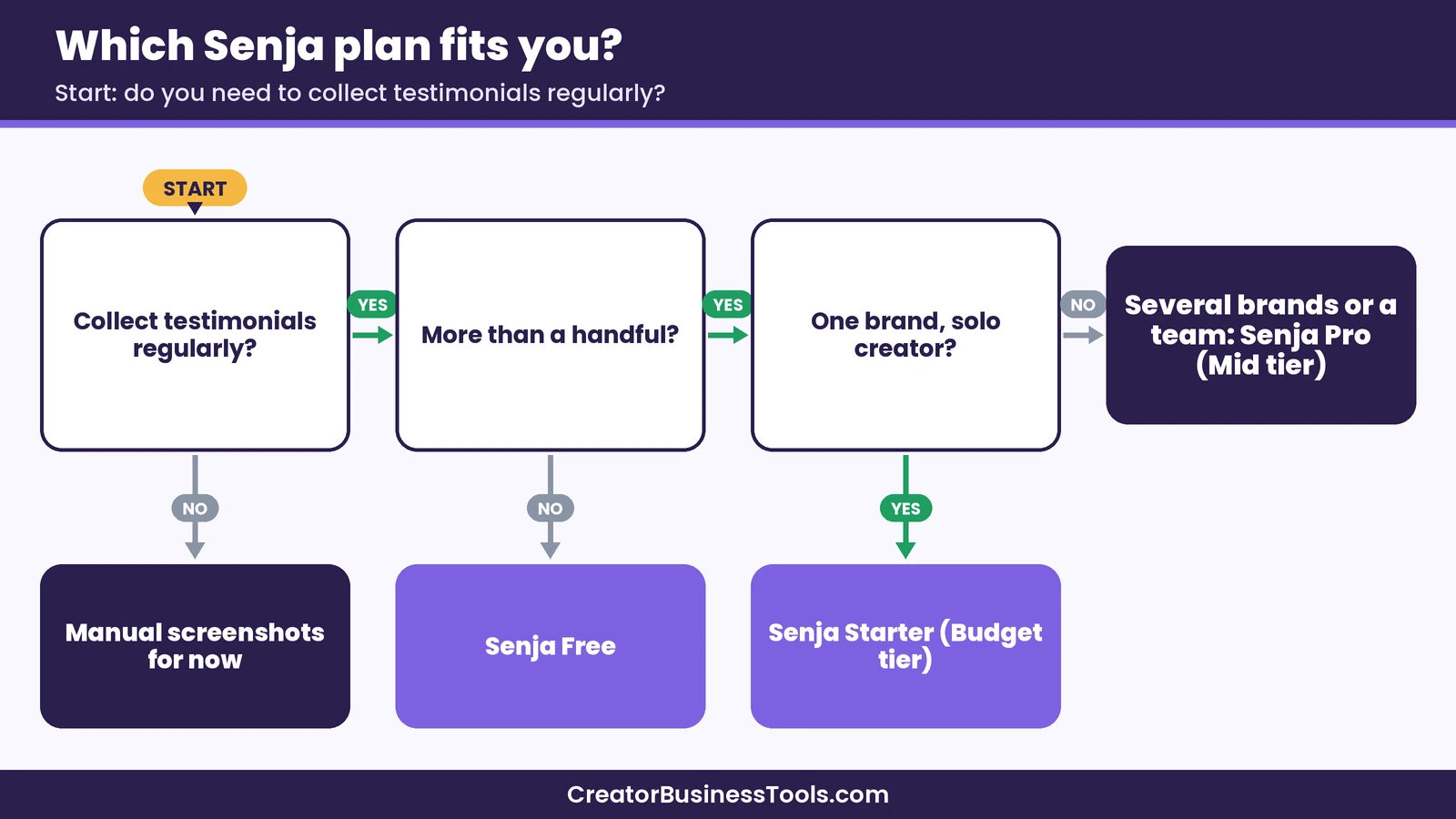
The bigger question is when to upgrade. If you collect feedback regularly and your library grows past the free cap, the Starter tier seems like the most sensible step for a solo creator. Pro makes more sense once you have multiple brands, a team, or a client roster.
As always, your situation is unique. If you have only a handful of testimonials and no plans to collect more soon, it may be fine to wait.
FAQ
Is Senja free?
Senja has a free plan with no monthly fee. It includes a capped number of text and video testimonials, a collection form, and widgets with Senja branding.
What’s the main difference between Senja Starter and Pro?
Starter is aimed at solo creators, with unlimited testimonials, a few forms, and one project. Pro adds unlimited forms, more projects, more seats, and team access.
Can I import testimonials from other sites?
Senja says it can import from over thirty platforms, including popular social and review sites. It also mentions a free migration service from other testimonial tools.
What happens to my testimonials if I downgrade?
According to Senja, your testimonials stay and your links keep working. New testimonials above the free limit are hidden until you upgrade, and you may want to download high-quality videos before downgrading.
Does Senja work for Etsy sellers?
It can, especially if you also sell from your own website or promote products on Pinterest. Check Etsy’s policies before reusing marketplace reviews elsewhere.
Is Senja good for course creators?
It seems well suited to course creators, since testimonials from students can strengthen sales pages, launch emails, and social posts.
Conclusion: our Senja review in a nutshell
To sum up this Senja review, Senja looks like a thoughtful, creator-friendly testimonial tool with a free plan that’s actually useful. It helps you collect feedback, keep it organized, and share it on your website, in emails, and as Pinterest-friendly images. Most solo creators will probably start on Free and move to Starter once their library grows, while teams and multi-brand businesses may want Pro.
If you’ve been meaning to “get organized” with testimonials for a while, Senja might be a gentle place to start. Get started with Senja
Get our free sales page checklist
Want more help turning testimonials into sales? Join our email list for a free checklist covering where to place social proof, how to ask for feedback, and simple layout ideas for beginner sales pages. Contact us to request a copy.
Pricing and features from official vendor pages, last checked October 24, 2026.