
Teachery Review: Flat Pricing, No Transaction Fees
Disclosure: This post contains affiliate links. If you buy through them, we may earn a commission at no extra cost to you. How we make money.
If you’d like to sell an online course without decoding complicated pricing tiers, Teachery is a name worth knowing. In this Teachery review, I’ll walk through what the platform offers, how its flat pricing works, why “no transaction fees” may matter more than you think, and who it suits best. It’s based on Teachery’s official pricing and feature pages, with a quick comparison to Teachable so you have a reference point.
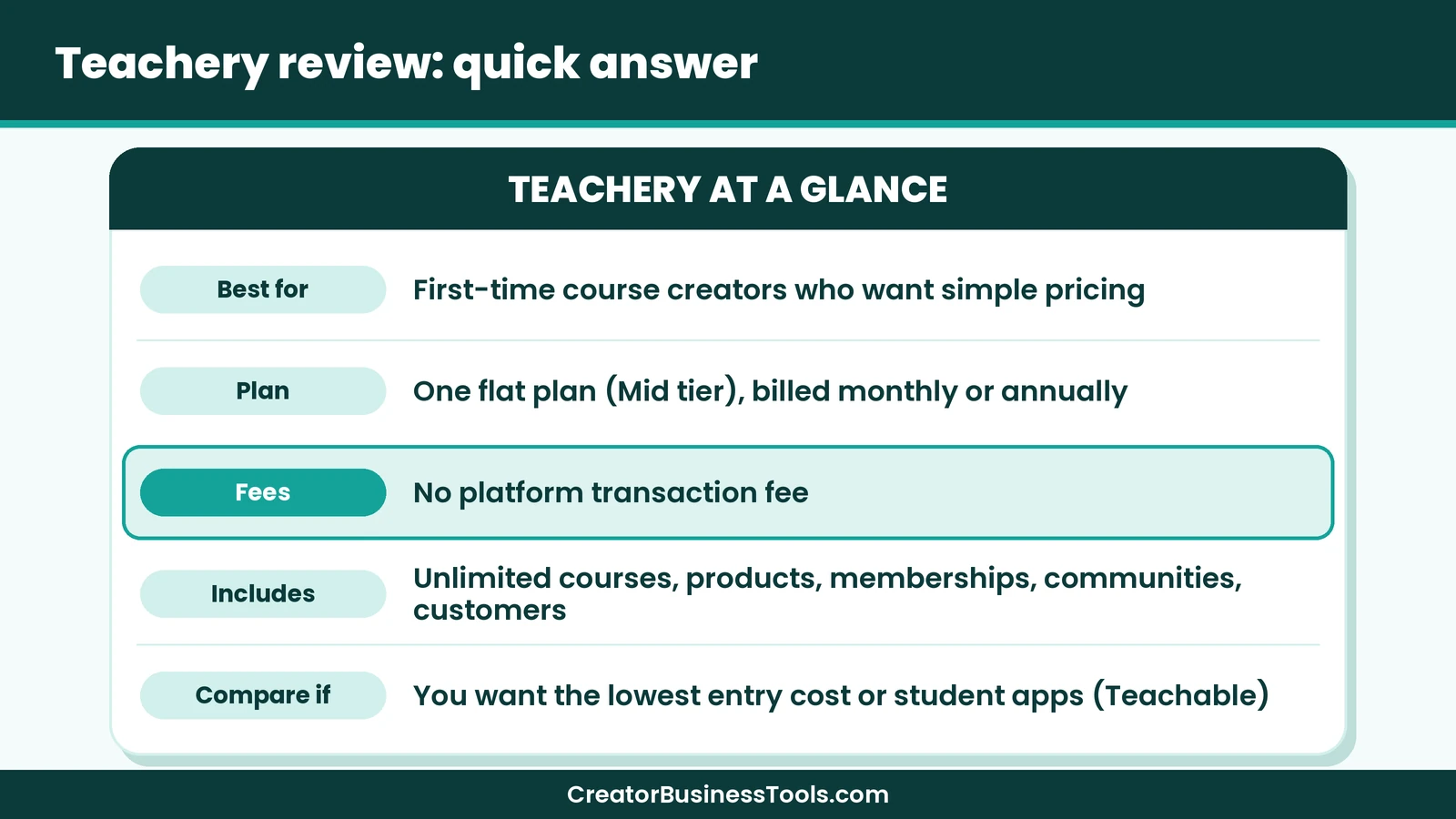
Quick verdict: Teachery looks like a good fit for beginner course creators who value simplicity: one plan, everything included, unlimited courses and students, and no platform transaction fees. It may not suit you if you need the cheapest possible starting point or dedicated student mobile apps, in which case Teachable’s entry tier could be worth comparing.
Quick picks
- Best for a simple, all-inclusive course platform: Teachery’s all-inclusive plan. Teachery
- Best if you want the lowest entry cost: Teachable Starter (with a per-sale fee). Teachable
- Best if your students learn mostly on phones: Teachable, with its student mobile apps.
Teachery at a glance
| Item | What Teachery offers |
|---|---|
| What it is | A course platform for selling courses, products, memberships, and communities |
| Plans | One plan, billed monthly or annually |
| Price tier | Mid-range |
| Platform transaction fee | None |
| Courses and products | Unlimited |
| Customers | Unlimited |
| Admins and custom domains | Unlimited |
What is Teachery?
Teachery is an online course platform built around a simple promise: “Simple pricing. No hidden upgrades.” Instead of several tiers that unlock features step by step, every Teachery plan includes unlimited courses, products, communities, memberships, checkout pages, and customers. You simply choose whether to pay monthly or annually.
Teachery brings course creation, community, selling, and customer management into one place. That makes it more than a course builder; it aims to be a small home base for a creator business.
Teachery features that matter for beginners
Courses and learning
Teachery supports lessons and sublessons, resources, and lesson comments. Lessons can include text, media, embeds, buttons, and files. You can add quizzes with grading and feedback, progress gates, drip schedules, locked lessons, free previews, course announcements, and completion certificates.
For a first course, that list covers far more than you’ll probably need, which is a nice position to be in.
Products, memberships, and communities
Alongside courses, Teachery lets you sell products, run memberships, and host communities. For Etsy and printable sellers, this means you could sell a template pack, a mini-course, and a monthly membership from the same account.
Checkout pages
Teachery’s checkout pages support multiple pricing options, upsells, post-purchase offers, promo codes, and timers. These are the tools that often help a small course earn a bit more per buyer.
Customer management
You get customer profiles, tags, access rules, announcements, and messages. Teachery also describes a built-in affiliate program, so your students or partners could help promote your course.
Helpful extras
Teachery mentions a faster, mobile-friendly editor, an optional AI assistant, and an MCP connector for working with AI tools. CSS snippets allow light design customization.
Teachery review: pricing explained
Teachery’s pricing is about as simple as course platforms get.
| Billing option | Price tier | What’s included |
|---|---|---|
| Monthly | Mid-range | Everything, cancel any time |
There are no feature tiers and no per-student charges listed. Your platform cost stays the same whether you sell one course or many.
Why “no transaction fees” matters
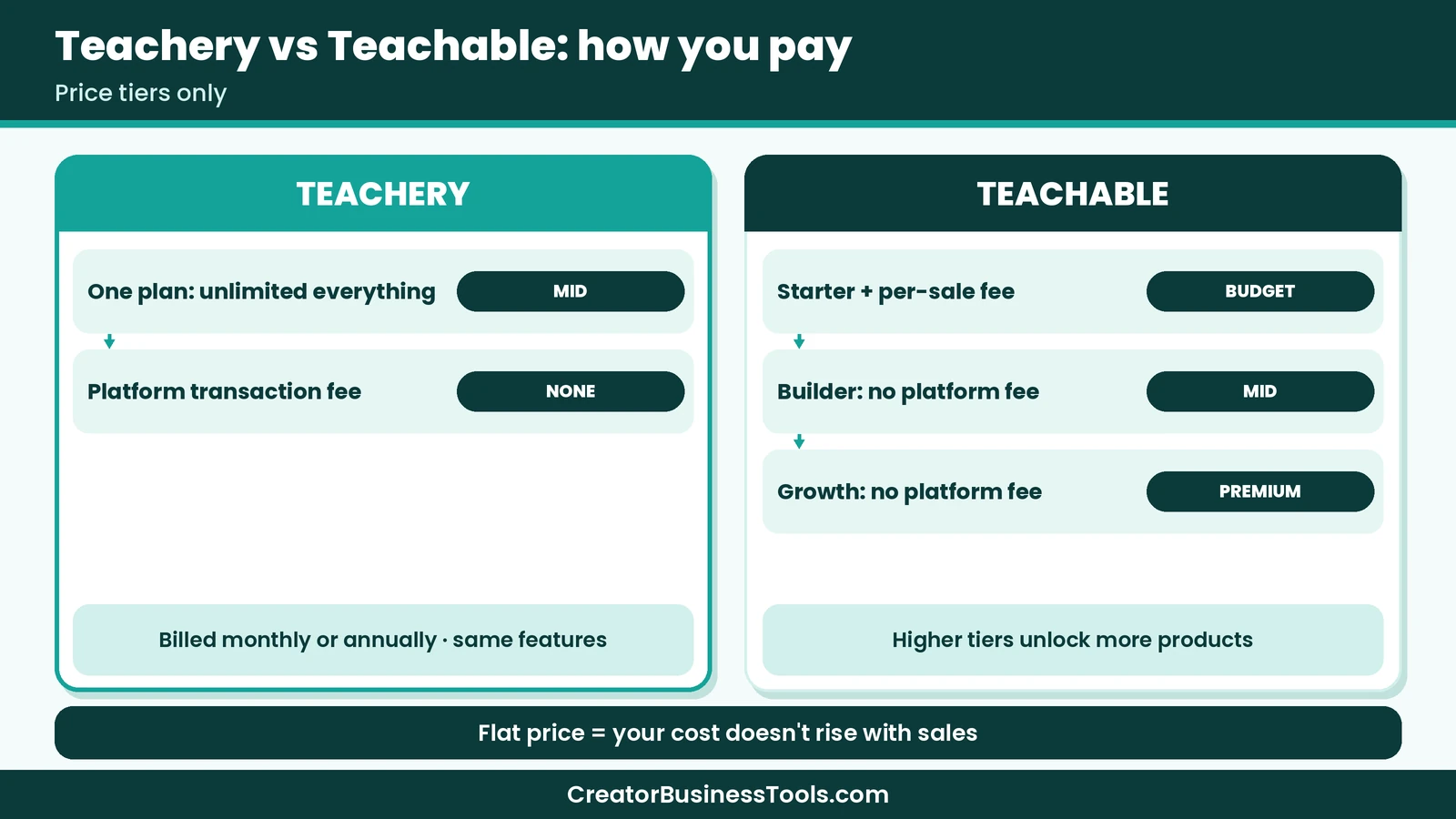
Some course platforms take a percentage of every sale on lower plans. That can feel invisible at first, but as sales grow, the percentage grows with them. With Teachery, there’s no platform transaction fee on any sale, so your platform cost doesn’t scale with revenue.
You’ll still pay payment processing fees from your payment provider. That’s true on every course platform, so it’s worth including in your pricing.
Choosing how to pay
Monthly billing gives you flexibility to cancel at any time, which may be the gentler option while you validate your idea. Other billing options may be listed on the pricing page, so compare them once you’re confident you’ll keep teaching. Many beginners start monthly and reassess once they’ve had a few sales.
A small pricing worry I had
Here’s my one personal story. When I first sketched out a small course idea, I spent far too long worrying about how much a per-sale fee would eat into each enrollment, and I kept changing the price in my notes. Seeing a platform with a flat cost made that worry disappear, because the math became simple: cover one monthly cost, and everything after that is yours, minus payment processing. Your situation may differ, but I found that clarity calming.
Teachery vs Teachable
Teachable is the platform most beginners compare Teachery against, so here’s the short version. We cover this in more depth in our Teachery vs Teachable guide.
| Feature | Teachery | Teachable |
|---|---|---|
| Pricing model | One flat plan | Several tiers |
| Entry price tier | Mid-range | Budget |
| Platform transaction fee | None | On entry tier only |
| Product limits | Unlimited | Tier-based |
| Communities | ✓ | Not a core feature (check details) |
| Student mobile apps | Not listed | ✓ iOS and Android |
| Certificates | ✓ | ✓ Top tier |
| Affiliate program | ✓ | ✓ Middle tier and up |
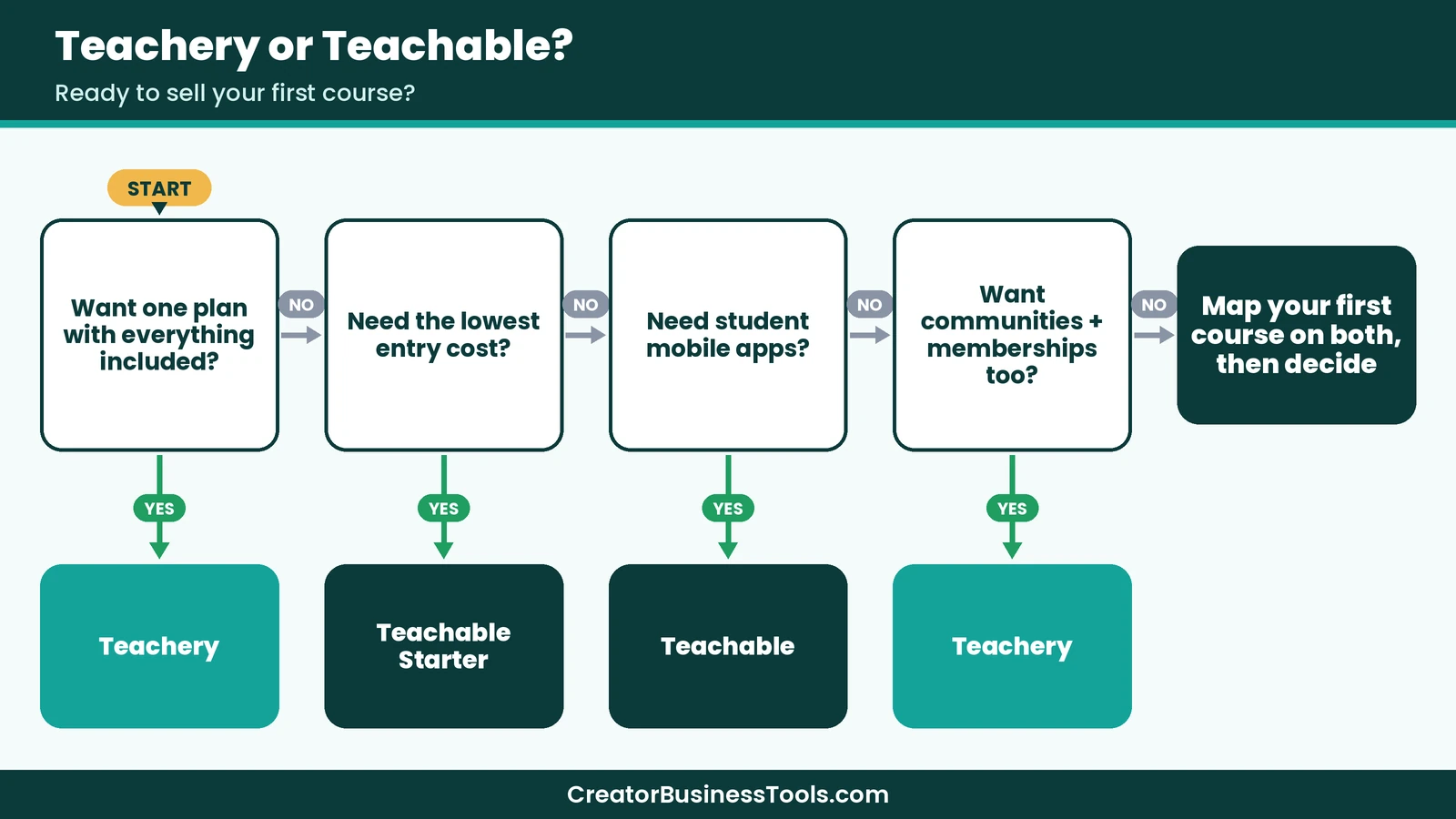
When Teachery may win
Teachery tends to win on simplicity and predictability. If you want unlimited courses, communities, and memberships without thinking about tiers, it’s a strong match.
When Teachable may win
Teachable may be the better fit if you want the lowest-cost way to test a single course, need student mobile apps, or prefer a large, long-established platform.
Teachery review: pros and cons
| Pros | Cons |
|---|---|
| One plan with every feature included | No low-cost starter tier |
| Unlimited courses, products, and customers | Student mobile apps not listed |
| No platform transaction fees | Smaller ecosystem than the biggest platforms |
| Communities and memberships built in | Platform is moving through a major version update |
| Flexible checkout with upsells and promo codes | Design customization is lighter than a full website builder |
| Built-in affiliate program | Monthly cost applies even before your first sale |
Best for: beginner course creators, coaches, and Etsy or printable sellers who want a simple, predictable platform for courses, products, and memberships.
Not ideal for: creators who want the cheapest possible test run, or whose students need dedicated mobile apps.
Before you sign up
- Check Teachery’s pricing page for plan details before deciding.
- Payment processing fees apply on top of the plan price.
- Teachery is moving through a major version update, so it’s worth reading the announcement on its site.
- Build a small test lesson before you commit to a plan.
How to launch your first course on Teachery
- Outline a small course. Pick one problem and a handful of short lessons.
- Explore the editor. Check whether a trial is offered, and test the builder before committing.
- Build one lesson end to end. Add a video, text, and a downloadable worksheet.
- Create a checkout page. Set your price and consider a simple upsell, such as a template pack.
- Add a free preview lesson. Let visitors sample the course.
- Connect your marketing. Link your sales page from Pinterest pins, your blog, and your email list.
- Invite a few founding students. Their feedback and testimonials can shape the next version.
Launch checklist
- ☐ Course promise written in one sentence
- ☐ Lesson outline finished
- ☐ First lesson published and previewed
- ☐ Checkout page tested with a sample purchase
- ☐ Free preview lesson enabled
- ☐ Welcome announcement or message ready for new students
- ☐ Pinterest pins linking to your sales page or blog post
Course ideas for Etsy and printable sellers
If you already sell printables or templates, you may have course material hiding in plain sight:
- “How I design printable planners” for aspiring sellers.
- “Etsy listing photos with free tools” using your mockup workflow.
- “Build a budget that sticks” paired with your budget printables.
- “Homeschool planning made simple” alongside worksheets.
- “Canva templates for small businesses” with a template bundle as a bonus.
Pairing a short course with products you already make can raise the value of both. Teachery’s ability to host products, courses, and memberships together suits this kind of bundle well.
Is Teachery a good next step for Etsy sellers?
If you’ve been selling printables or templates on Etsy, a course can feel like a natural next step, but it’s a different kind of business. A few things to think through before you start:
- You’ll own the customer relationship. Unlike a marketplace, students buy directly from you, so you can welcome them, message them, and invite them to future products.
- You’ll need your own traffic. Teachery doesn’t come with a marketplace full of shoppers, so Pinterest, a blog, or an email list becomes your main source of buyers.
- Your products can support your course. Printables and templates make great course bonuses, and Teachery lets you sell them alongside the course.
- Pricing works differently. Courses often sell at a higher price than single printables, which means fewer sales can still be meaningful. That said, buyers usually need more trust before purchasing, so free content and email matter.
- Support takes time. Students may have questions, so plan a little time each week to answer comments and messages.
For many Etsy sellers, the most comfortable path seems to be starting with a small, focused course that teaches something you already do well, using your existing printables as worksheets. Teachery’s flat plan means you won’t need to rethink pricing when you add a second course or a membership later.
Growing beyond your first course
Once your first course is selling, Teachery’s unlimited plan makes it easy to experiment:
- Add a second, related course without worrying about product limits.
- Launch a membership with monthly templates or Q&A sessions.
- Open a community so students can support each other.
- Recruit affiliates among happy students.
- Refresh older lessons based on student questions, so the course keeps improving.
- Use upsells and post-purchase offers to suggest the next step.
Because your platform cost stays flat, each new product may improve your margins rather than pushing you into a higher tier.
How a flat price plays out as you grow
It helps to picture your platform cost at different stages, without worrying about exact figures.
Before your first sale. A flat plan means you pay the monthly cost whether or not anyone buys. This is the one stage where a tiered platform with a cheaper entry tier may cost less, so a short hands-on test and a clear launch plan help.
A few sales each month. Once enrollments start, a flat plan with no platform fee means each new sale adds to your income without a platform cut. On a tiered platform’s entry tier, a portion of each sale would go to the platform.
Steady sales and several products. This is where Teachery’s model tends to shine. Adding a second course, a membership, or a product bundle doesn’t change your plan, and there’s no product limit to bump into.
Long-term commitment. Once you’re confident you’ll keep teaching, review the billing options on the pricing page to see which fits your budget best.
The key idea is predictability. You can budget for one known cost and focus on creating and selling.
Bringing students in from Pinterest
Many beginner creators find their first students on Pinterest, especially in lifestyle, planning, crafting, and small business niches. A simple approach:
- Create a free lead magnet related to your course, such as a checklist or mini-workbook.
- Pin it in several designs, using keywords your audience searches for.
- Send pinners to a blog post or landing page where they can download the freebie and join your email list.
- Use a short welcome series to share helpful tips and introduce the course.
- Offer a free preview lesson on Teachery so subscribers can try before buying.
This path builds trust gradually, which often matters more for a course than for a low-priced printable.
Questions to answer while you test
- How quickly can you publish one complete lesson?
- Does the checkout page feel trustworthy and on-brand?
- Can you add a promo code and an upsell without help?
- How does the student view look on a phone?
- Is it clear how to reach support if you get stuck?
A simple first-week plan on Teachery
If you decide to try Teachery, a short plan helps you test it well instead of clicking around. Here’s a simple way to spend your first week:
- Day one: Write a one-sentence promise for your course and a list of five to seven lesson titles.
- Day two: Create the course shell in Teachery and add placeholder lessons for each title.
- Day three: Record or write your first two lessons and upload any worksheets or printables.
- Day four: Build your sales page and checkout, and add one bonus or upsell if it fits.
- Day five: Preview everything as a student, including on your phone, and fix anything confusing.
- Day six: Share a short “coming soon” note with your email list or social followers.
- Day seven: Review what worked, list what’s still missing, and decide whether Teachery fits your plans.
By the end of the week, you’ll know whether the platform feels right, and you’ll have a real course started either way.
Who should use Teachery?
| Creator | Is Teachery a good fit? | Why |
|---|---|---|
| First-time course creator | Likely yes | Simple pricing, everything included |
| Printable seller adding a mini-course | Likely yes | Products and courses in one place |
| Coach wanting a community | Likely yes | Communities and memberships included |
| Creator testing an idea on a tiny budget | Maybe not | Compare Teachable’s entry tier |
| Creator whose students learn on phones | Compare first | Teachable lists student apps |
Common beginner mistakes
- Overbuilding the first course. Short and focused usually sells and finishes better.
- Waiting for perfect video. Clear audio and helpful content matter more than fancy production.
- Forgetting processing fees. Factor them into your price.
- Launching to no one. Build an email list while you create the course.
- Ignoring feedback. Your first students can tell you exactly what to improve.
FAQ
Is Teachery worth it?
For beginners who want simple, predictable pricing and unlimited courses with no platform transaction fees, Teachery seems worth a close look. If you need the lowest possible entry cost, compare Teachable’s starter tier.
Does Teachery charge transaction fees?
Teachery says it charges no platform transaction fees. Payment processing fees from your payment provider still apply.
Can I test Teachery before committing?
Check Teachery’s pricing page to see whether a trial is offered. Either way, building one short lesson is the quickest way to judge the editor.
Do Teachery’s billing options change the features?
No. Every Teachery plan includes everything, so your billing choice only affects how you pay, not what you get. Monthly billing can be cancelled any time.
Can I sell digital products on Teachery?
Yes. Teachery lets you sell products alongside courses, memberships, and communities.
Does Teachery limit students or courses?
Teachery’s pricing page says every plan includes unlimited courses, products, and customers.
Is Teachery better than Teachable?
Neither is better for everyone. Teachery is simpler and flat-priced, while Teachable offers a lower-cost entry tier, student apps, and a larger ecosystem.
Conclusion: my Teachery review verdict
To sum up this Teachery review: Teachery offers one of the simplest pricing models among course platforms, with one flat plan, unlimited courses and customers, and no platform transaction fees. For a beginner who wants to focus on teaching instead of comparing tiers, that simplicity may be its biggest feature.
If you need the lowest possible starting cost or dedicated student apps, Teachable is worth comparing. Otherwise, a short hands-on test of Teachery is a gentle, low-pressure way to see whether it feels right for your first course.
[Explore Teachery's plan](https://www.teachery.co/)Free checklist: Get our free First Course Planner, a one-page outline for your course promise, lessons, worksheet, and launch emails. Contact us to request a copy.
Pricing and features from official vendor pages, last checked October 23, 2026.