
Teachery vs Teachable: Which Is Simpler for a First Course?
Disclosure: This post contains affiliate links. If you buy through them, we may earn a commission at no extra cost to you. How we make money.
Choosing a platform for your very first online course can feel bigger than writing the course itself. In this Teachery vs Teachable comparison, I’ll look at which one is simpler for a beginner, how their pricing models differ, and which kinds of creators each one tends to suit. Everything here is based on each company’s official pricing page, so you can make a calm, informed choice.
Quick verdict: Teachery is likely the simpler choice if you want one flat plan with unlimited courses, unlimited students, and no platform transaction fees. Teachable may be the better pick if you’d like a lower-cost entry plan, student mobile apps, and a larger, more established ecosystem, and you’re comfortable choosing between tiers with different limits.
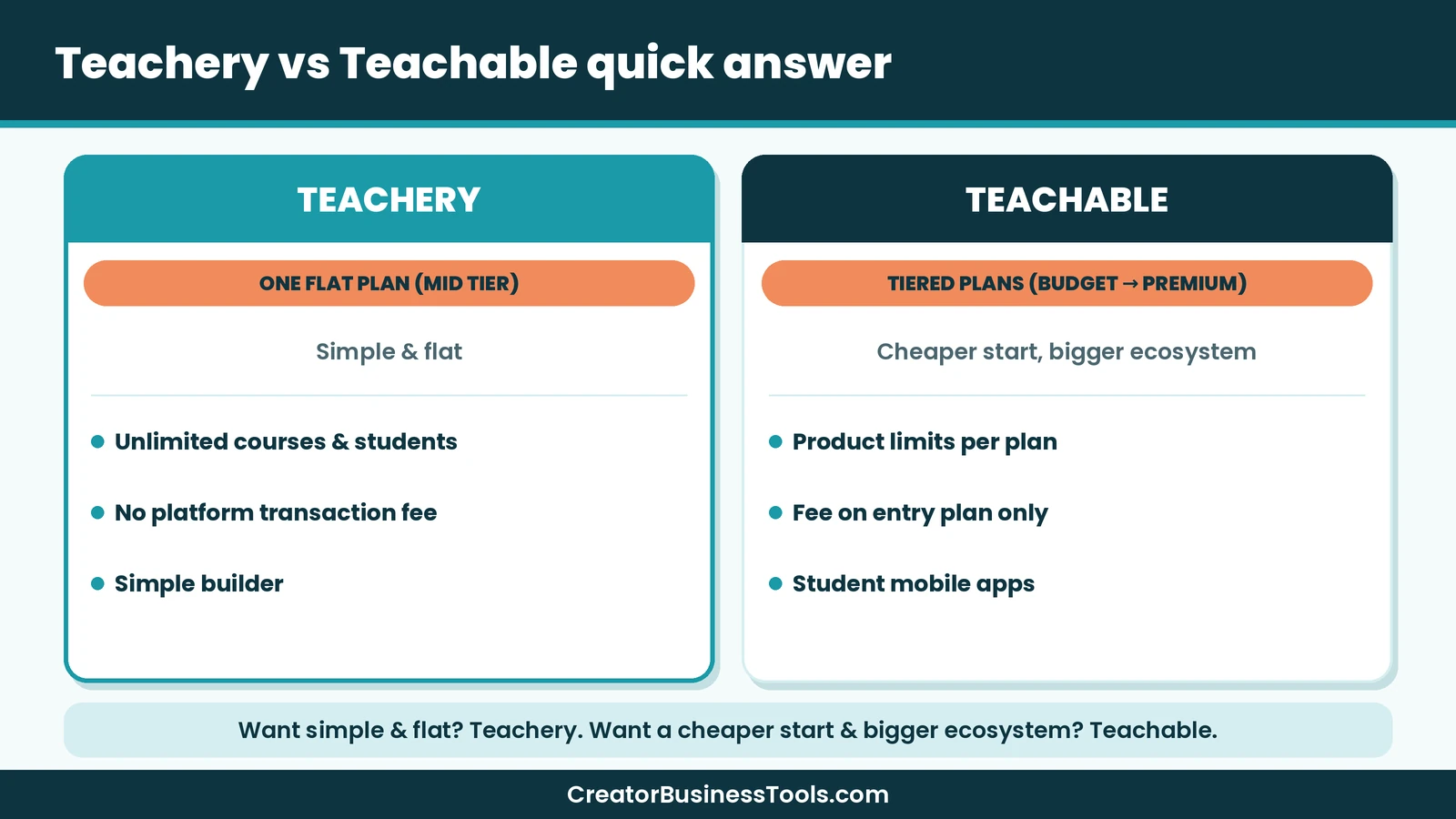
Quick picks
- Simplest all-inclusive plan for a first course: Teachery. Teachery
- Lowest-cost way to test a single course: Teachable Starter (with a per-sale fee). Teachable
- Best for a growing course catalog with no transaction fee on Teachable: Teachable Builder.
- Best for established course businesses wanting certificates and white-labeling on Teachable: Teachable Growth.
Teachery vs Teachable at a glance
| Item | Teachery | Teachable |
|---|---|---|
| Pricing model | One plan, monthly or annual | Several tiers, monthly or annual |
| Price tier | Mid-range | Budget (Starter), mid-range (Builder), premium (Growth) |
| Platform transaction fee | None | On Starter only; none on higher tiers |
| Courses / products | Unlimited | Limited by tier |
| Students / customers | Unlimited | Unlimited via Teachable checkout |
| Communities and memberships | ✓ | Memberships ✓ |
| Student mobile apps | Not listed | ✓ iOS and Android |
What is Teachery?
Teachery is a course platform built around simplicity. Its pricing page describes “simple pricing” with “no hidden upgrades,” and every plan includes unlimited courses, products, communities, memberships, checkout pages, and customers.
Teachery brings together courses, products, communities, and memberships, plus checkout pages with upsells, promo codes, and timers. It also lists customer profiles, tags, an affiliate program, quizzes, drip schedules, completion certificates, and an optional AI assistant.
For a beginner, the appeal is that you don’t need to guess which tier unlocks which feature. You pick monthly or annual billing, and you get everything.
What is Teachable?
Teachable is one of the best-known online course platforms. It lets you sell online courses, digital downloads, memberships, and coaching, with features like AI course creation tools, iOS and Android student apps, global payments and tax handling, upsells, and cart recovery.
Teachable uses tiered pricing. The entry plan is the least expensive but includes a per-sale transaction fee and a smaller product limit. Higher plans remove the transaction fee (when using Teachable Payments) and add more products, an affiliate program, real-time support, certificates, and branding removal.
Teachery vs Teachable pricing
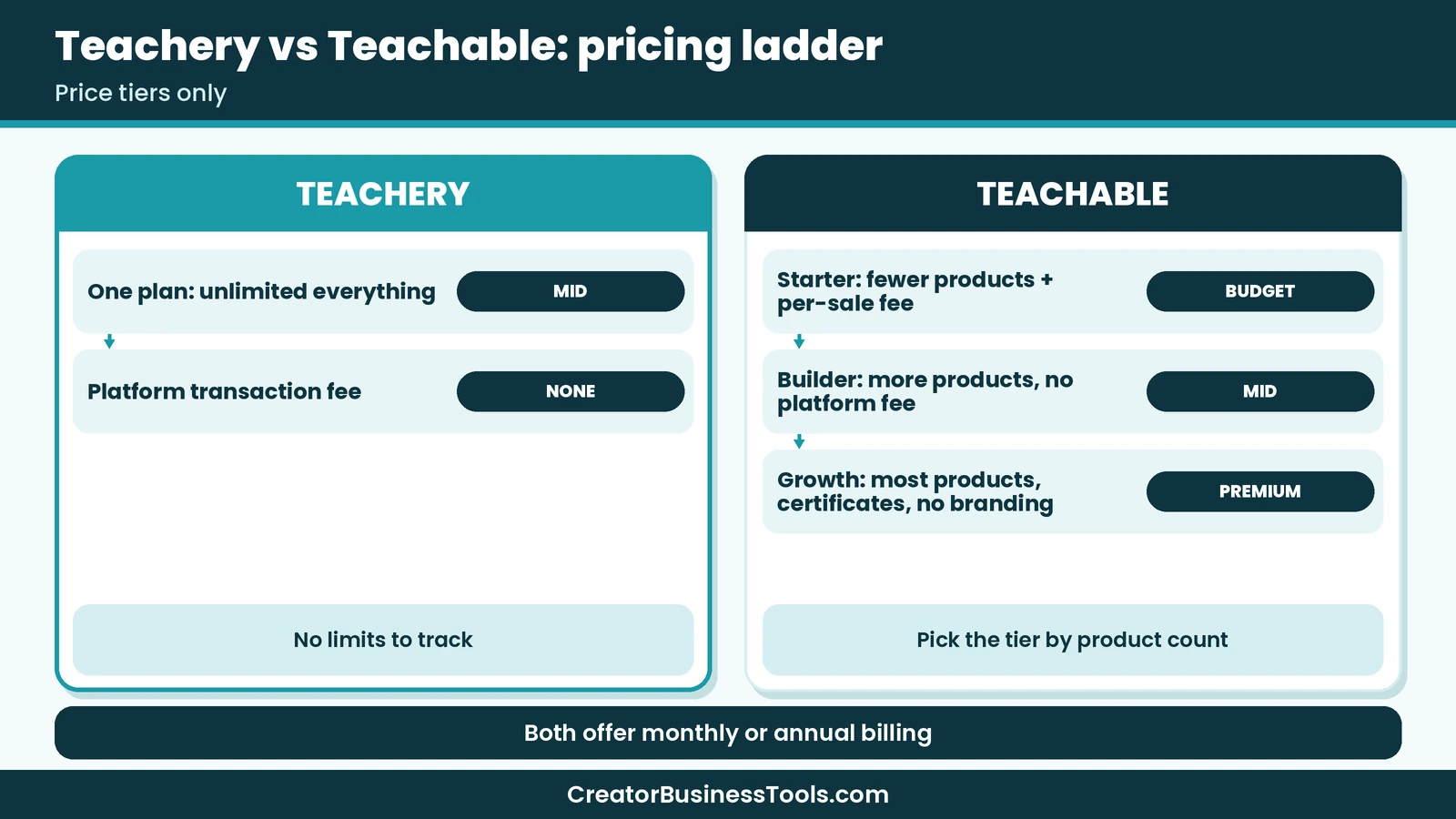
| Plan | Price tier | Platform fee | Product limit | Notable extras |
|---|---|---|---|---|
| Teachery (monthly or annual) | Mid-range | None | Unlimited | Communities, memberships, upsells, affiliates |
| Teachable Starter | Budget | Yes | Small | Mobile apps, upsells, cart recovery |
| Teachable Builder | Mid-range | None* | Moderate | Affiliate program, real-time support |
| Teachable Growth | Premium | None* | Large | Certificates, branding removal, more admins |
Note: Teachable notes that its no-fee pricing on higher plans applies when you use Teachable Payments. Payment processing fees apply on every platform.
What the pricing means for a first course
- If you’re testing one course on a tight budget, Teachable’s entry tier is less expensive up front, but you’ll pay a fee on each sale.
- If you plan several courses or products, Teachery’s unlimited plan may be easier to budget for, since nothing is gated.
- If you want to remove Teachable’s transaction fee, you’ll need a higher Teachable tier, which sits in a similar price range to Teachery.
- Billing options differ, so check each pricing page before you commit.
Which is simpler for a first course?
Simplicity shows up in three places: pricing decisions, setup, and day-to-day running.
Pricing simplicity
Teachery has a clear edge here. There’s one plan with everything included, so you won’t hit a product limit or need to upgrade to unlock a feature. Teachable’s tiers are well explained, but you’ll want to think about product limits and transaction fees before choosing.
Setup simplicity
Both platforms aim to be beginner-friendly. Teachable highlights AI tools to help create course content, and Teachery highlights a faster, mobile-friendly editor and an optional AI assistant. I’d suggest building one short module on each and seeing which editor feels more natural to you.
Running your course
Teachable includes iOS and Android student apps, which may matter if your students learn on their phones. Teachery bundles communities and memberships into its single plan, which may appeal if you’d like a community space alongside your course.
The feature list that helped me decide
Here’s my one personal story. Before I ever chose a course tool, I made a short list of the only features I truly needed for a first course: lessons, a checkout page, a way to email students, and maybe a coupon code. Crossing off everything else made the decision feel much smaller. I’d gently suggest doing the same, because both platforms offer far more than a first course usually needs.
Teachery vs Teachable: feature comparison
| Feature | Teachery | Teachable |
|---|---|---|
| Unlimited courses | ✓ | Tier-based limits |
| Drip content | ✓ | ✓ |
| Quizzes | ✓ | ✓ Auto-graded |
| Completion certificates | ✓ | ✓ Growth tier |
| Communities | ✓ | Not a core feature (check details) |
| Memberships | ✓ | ✓ |
| Upsells and promo codes | ✓ | ✓ |
| Affiliate program for your course | ✓ | ✓ Builder tier and up |
| Student mobile apps | Not listed | ✓ |
| Tax handling | Check details | ✓ Global payments and taxes |
| Custom domain | ✓ | ✓ |
A closer look at each platform’s strengths
Where Teachery shines
Teachery’s biggest strength is that it removes decisions. With one plan, you won’t spend an evening comparing tiers or wondering whether you’ll need to upgrade when you add a second course. Everything from checkout pages with upsells and promo codes to quizzes, drip schedules, and certificates sits in the same plan.
That simplicity also helps with budgeting. A flat monthly or annual cost with no platform transaction fee means your platform cost doesn’t rise as your sales grow. For a creator who hopes to add a membership or a small community down the road, having those tools already included may feel freeing.
Teachery also describes customer profiles, tags, access rules, and messages, which can help you keep track of students without bolting on extra tools.
Where Teachable shines
Teachable’s biggest strength is maturity and reach. It supports courses, digital downloads, memberships, and coaching, and it includes iOS and Android student apps, so learners can study on the go. Its pricing page also highlights global payments and tax handling, which can reduce admin for creators selling internationally.
The tiered structure, while more complex, gives you a lower-cost starting point. If you’re not sure your course idea will sell, starting small and upgrading later may feel less risky. Higher tiers add an integrated affiliate program, real-time support, certificates, and branding removal as your business grows.
Pros and cons
Teachery
| Pros | Cons |
|---|---|
| One flat plan with everything included | No low-cost entry tier |
| Unlimited courses, products, and customers | Smaller ecosystem and community of users |
| No platform transaction fees | Student mobile apps not listed |
| Communities and memberships included | Platform is going through a major version update |
Teachable
| Pros | Cons |
|---|---|
| Low-cost entry tier to test an idea | Transaction fee on the entry plan |
| iOS and Android student apps | Product limits on each tier |
| Global payments and tax handling | Certificates and branding removal need the top tier |
| Large, established platform | Choosing a tier takes more thought |
Before you sign up
- Prices and plan details can change. Check both pricing pages before you decide.
- Payment processing fees apply on both platforms, separate from any platform fee.
- Teachery’s single plan includes everything, but compare it with your expected number of courses and students.
- On Teachable, check how product limits and transaction fees apply to your plan.
How to choose: a simple decision path
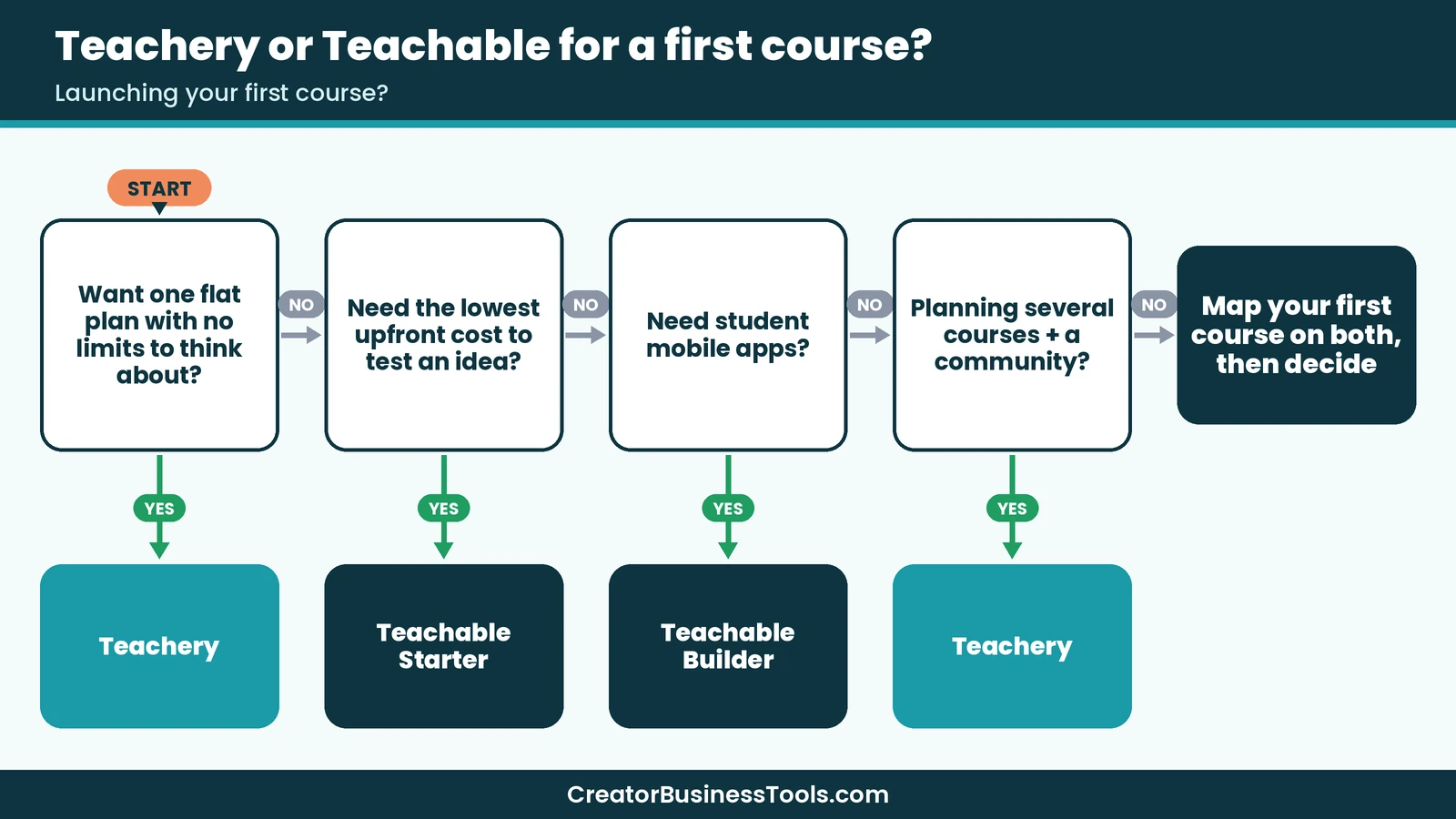
- Count your products. One course is fine anywhere; several courses plus downloads lean toward Teachery’s unlimited plan or a higher Teachable tier.
- Estimate sales. If sales may be slow at first, a lower monthly tier with a fee could cost less. If sales are steady, a no-fee plan usually wins.
- Think about your students. If they learn mostly on phones, Teachable’s apps may help.
- Decide if you want community. Teachery includes communities in its plan.
- Test before you commit. Check whether a trial is offered, then build one module on each and see which feels easier.
Total cost: three example scenarios
Because prices change, here’s a qualitative look at how total cost tends to play out.
A creator testing one small course. If you expect only a few sales at first, Teachable’s entry tier may cost the least overall, even with its per-sale fee, because the monthly cost is lower. Teachery’s flat plan costs more up front for a single course that isn’t selling yet.
A creator with steady sales. Once sales are regular, per-sale fees start to add up. At that point, a plan with no platform fee, either Teachery or a higher Teachable tier, often becomes the better deal. Teachery and Teachable’s middle tier sit in a broadly similar price range, so features and limits may decide it.
A creator with many products. If you’d like several courses, a few downloads, a membership, and a community, Teachery’s unlimited plan may be easier to budget for. On Teachable, you’d want to check whether your product count fits a tier’s limit.
Pricing your first course
Platform fees matter, but your course price matters more. A few gentle guidelines:
- Price the outcome. Think about what the student gains, such as time saved or a skill learned, rather than lesson count.
- Look at similar courses in your niche to understand the range buyers expect.
- Consider a founding-student price for your first group in exchange for feedback and testimonials.
- Offer a bundle. Pairing a course with templates or printables can raise perceived value.
- Keep refunds in mind. A clear refund policy builds trust and reduces hesitation.
Marketing a course with Pinterest
Many Etsy and printable sellers already have Pinterest experience, which can be a real advantage for course creators.
- Pin your free lesson or freebie, not just the sales page. A free resource that leads to your email list tends to build trust first.
- Create pins around student problems, like “How to price printables” or “Start a planner shop.”
- Link pins to a helpful blog post that introduces the course naturally.
- Use a welcome email series to explain who the course is for before you ask for the sale.
- Repurpose lessons into pins. Each lesson can inspire several idea pins or tip graphics.
Switching platforms later
It’s reassuring to know your first choice isn’t permanent. Course content, such as videos, worksheets, and lesson text, lives on your computer too, so moving later is mostly about rebuilding pages and moving students. To keep options open:
- Keep master copies of every video and download.
- Own your email list, so you can reach students wherever you go.
- Document your course structure in a simple outline.
- Check each platform’s export options for student data before you commit.
Questions to ask while you test
To make the most of your testing, try to answer these questions before you commit:
- How long did it take to publish one lesson with a video and a download?
- Did the checkout page look trustworthy and match your brand?
- Could you set up a coupon or upsell without searching help articles?
- How does the student view look on your phone?
- Where would you go for help, and how quickly did you find an answer?
Testing both platforms side by side
The fairest way to compare Teachery and Teachable is to build the same small thing on each. Pick one lesson, one worksheet, and one sales page, and recreate them on both platforms while you test. That keeps the comparison about the tools, not about your content.
As you go, keep simple notes:
- Time to publish: How long did one lesson and one sales page take?
- Checkout feel: Which checkout looked more trustworthy to a first-time buyer?
- Student view: Which lesson page was easier to follow on a phone?
- Cost at your size: Using your expected number of courses and sales, which plan would you need?
When you’re done, the better fit is usually obvious. If it still feels close, choose the one you enjoyed using, because you’ll spend a lot of time inside it.
Who should choose which?
| Creator | Suggested platform | Why |
|---|---|---|
| First-time course creator who hates tier decisions | Teachery | One plan, everything included |
| Creator testing an idea on a small budget | Teachable Starter | Lowest upfront cost |
| Etsy seller turning a printable into a mini-course | Teachery or Teachable Starter | Depends on how many products you’ll add |
| Coach with a course plus a community | Teachery | Communities and memberships included |
| Creator whose students learn on mobile | Teachable | iOS and Android apps |
Planning your first course
Whichever platform you choose, a small, focused course is usually easier to finish and sell.
- Solve one problem. “Design your first printable planner” beats “Everything about printables.”
- Keep it short. A handful of short lessons is often enough.
- Outline before you record. Write lesson titles and one key takeaway for each.
- Add one worksheet or template. Etsy and printable sellers already have a head start here.
- Pre-sell or collect a waitlist. An email list helps you validate demand before you build.
First course checklist
- ☐ One clear promise for the course
- ☐ Outline of short lessons
- ☐ One downloadable worksheet or template
- ☐ Sales page with who it’s for and what they’ll learn
- ☐ Checkout tested with a sample purchase
- ☐ Welcome email for new students
Common beginner mistakes
- Choosing a platform before outlining the course. Your needs become clearer once you know what you’re building.
- Paying for features you won’t use yet. Start with what your first course needs.
- Ignoring transaction fees. They can matter more than the monthly fee at certain sales levels.
- Building in silence. Share progress with your audience to build interest.
- Skipping a hands-on test. Build a small lesson before committing to either platform.
FAQ
Is Teachery cheaper than Teachable?
It depends on the plan. Teachable’s entry tier costs less up front but charges a per-sale fee. Teachery’s single plan sits in a similar range to Teachable’s middle tier and includes unlimited courses with no platform transaction fee.
Does Teachery charge transaction fees?
Teachery says it charges no platform transaction fees. Payment processing fees still apply.
Does Teachable charge transaction fees?
Teachable’s entry plan includes a per-sale transaction fee. Its higher plans list no transaction fee when you use Teachable Payments.
Which is easier for beginners, Teachery or Teachable?
Teachery is likely simpler to choose because it has one all-inclusive plan. Both aim to be easy to use, so a short hands-on test with each is the best way to decide.
Can I test both platforms before paying?
Check each pricing page to see whether a trial is offered. Either way, building one short lesson on each is the clearest test.
Can I sell digital downloads as well as courses?
Yes. Teachery includes products alongside courses, and Teachable supports digital downloads.
Does Teachery have a mobile app for students?
Teachery’s pricing page highlights a mobile-friendly editor but doesn’t list dedicated student apps. Teachable lists iOS and Android student apps.
Conclusion: Teachery vs Teachable for your first course
In the Teachery vs Teachable decision, simplicity tends to favor Teachery: one flat plan, unlimited courses and students, and no platform transaction fees. Teachable may be the better fit if you’d like the lowest possible entry cost, student mobile apps, or a larger, long-established platform, and you don’t mind choosing between tiers.
If you’re still unsure, build one short lesson on each platform, and go with the one that feels calmer to use.
[Try Teachery](https://www.teachery.co/) · [Try Teachable](https://teachable.com/)Free checklist: Get our free First Course Planner, a one-page outline for your course promise, lessons, worksheet, and launch emails. Contact us to request a copy.
Pricing and features from official vendor pages, last checked October 23, 2026.