
Elementor Review: Editor Pro, Elementor One, and Hosting Compared
Disclosure: This post contains affiliate links. If you buy through them, we may earn a commission at no extra cost to you. How we make money.
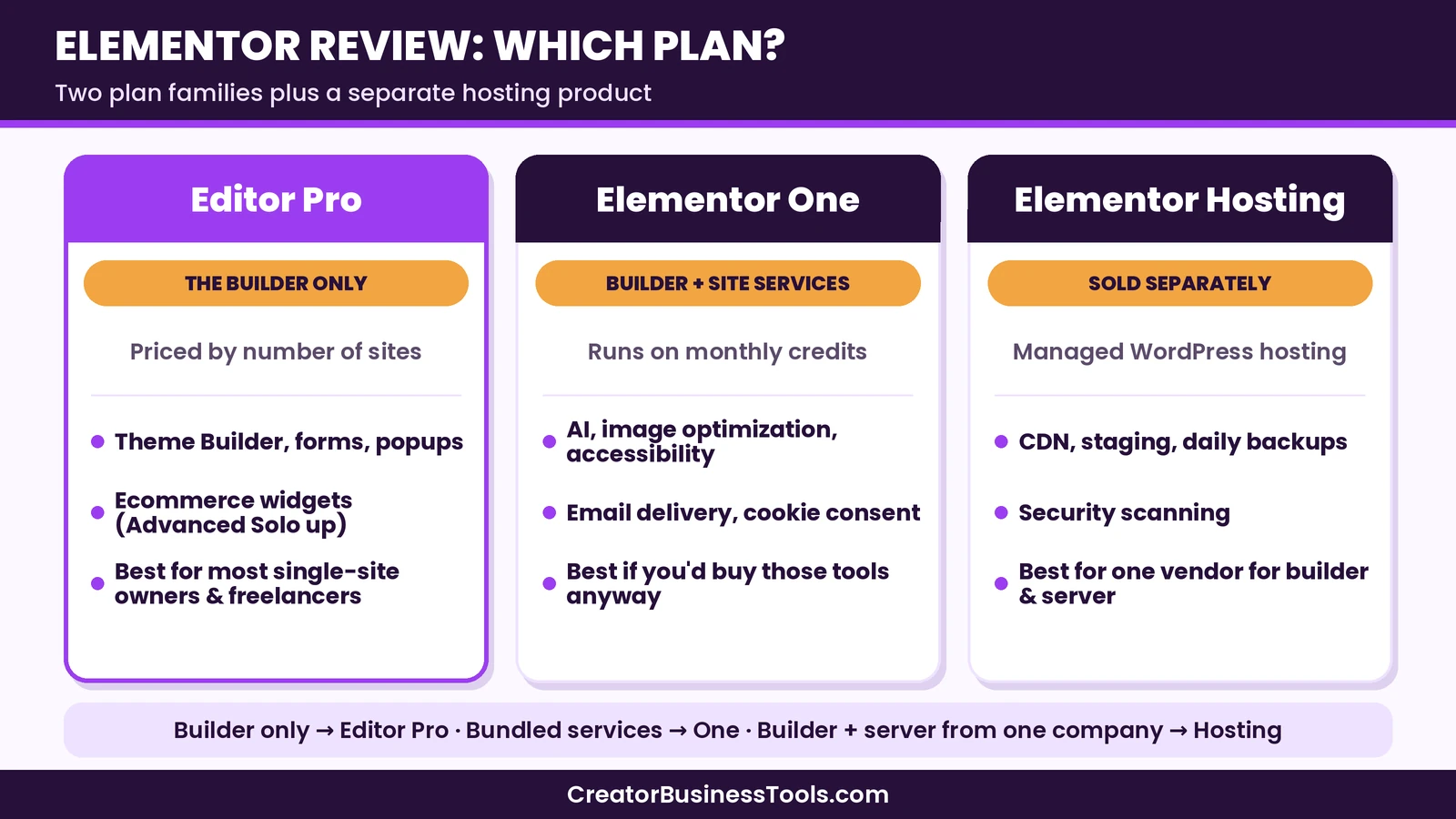
Elementor is one of the most widely used visual page builders for WordPress. In this Elementor review, we focus on the question most buyers actually get stuck on: which plan should you buy? Elementor now sells two families of paid plans, Editor Pro and Elementor One, plus a separate managed hosting product called Elementor Hosting. They overlap, and the names don’t make the differences obvious.
This review explains what each option includes, who it suits, and where the limits are. It’s based on Elementor’s official pricing page, plan FAQ, hosting page, and release notes, not on sponsored claims or hands-on benchmarks.
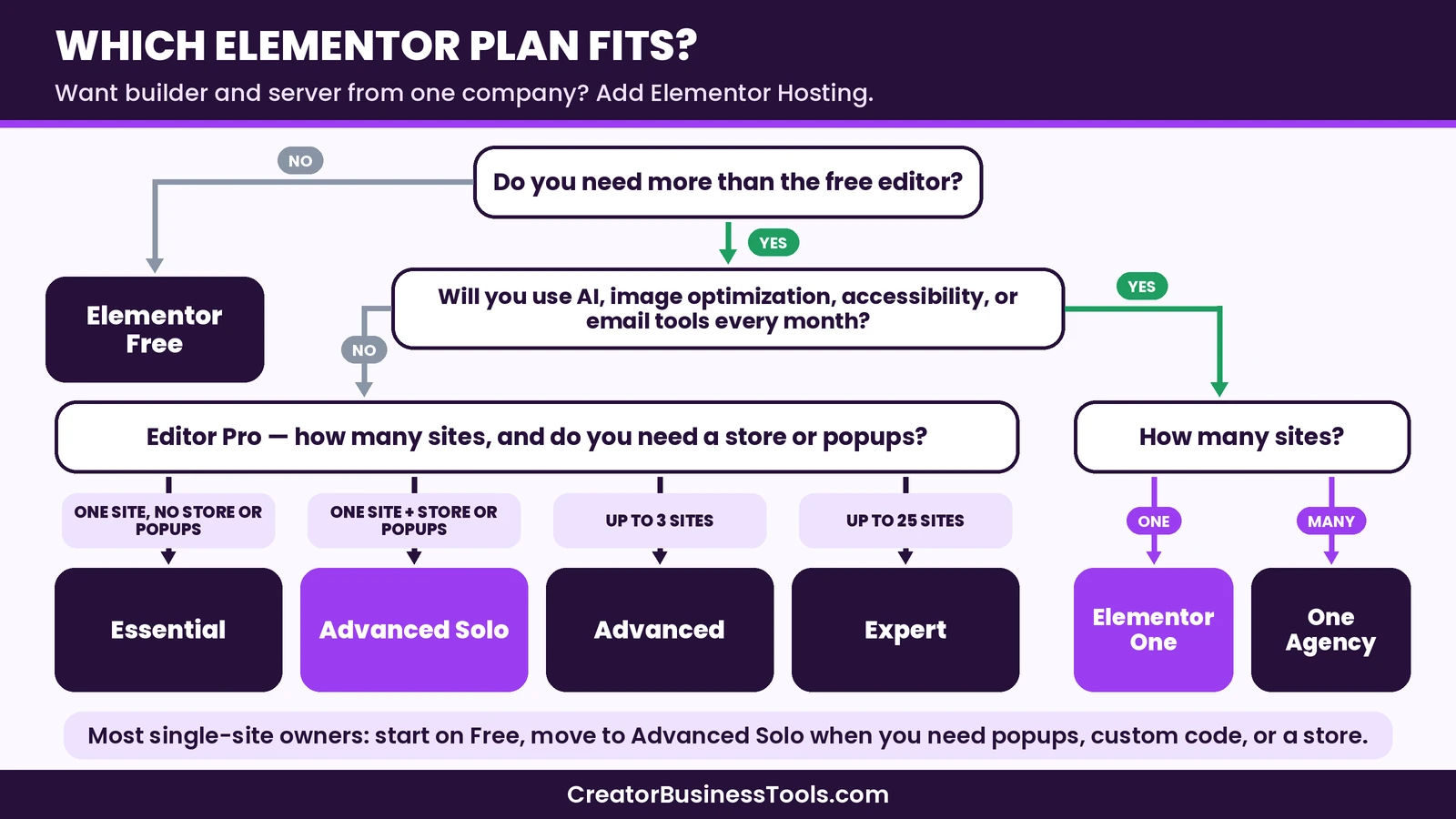
Quick verdict: Elementor is a strong choice for small business owners and freelancers who want to design WordPress sites visually without writing code. Most people with one site should start with the free plugin and move to Editor Pro Advanced Solo when they need popups, custom code, or a store. Choose Elementor One only if you’ll actually use its bundled services, such as AI, image optimization, and accessibility tools. Elementor Hosting makes sense if you want one company to handle both the builder and the server.
Quick picks
- Best for starting out: Elementor’s free plugin, which covers the core drag-and-drop editor.
- Best for one business site or small store: Editor Pro Advanced Solo, which unlocks the full Pro feature set for one site. See Elementor Editor Pro plans
- Best for freelancers with a handful of client sites: Editor Pro Advanced (three sites) or Expert (25 sites). See Elementor Editor Pro plans
- Best for an all-in-one toolkit: Elementor One, if you’ll use the AI and site services each month. See Elementor One
- Best for builder plus server in one place: Elementor Hosting. See Elementor Hosting
Elementor links on this page are affiliate links.
Elementor at a glance
| Details | |
|---|---|
| What it is | Visual drag-and-drop page builder plugin for WordPress |
| Free version | Yes, the core editor on WordPress.org |
| Paid plan families | Editor Pro (builder only) and Elementor One (builder plus bundled services) |
| How plans are priced | By number of sites, billed per plan cycle |
| Price range | Free, then budget to premium tier |
| Hosting | Not included in Editor Pro or One. Elementor Hosting is a separate product |
| AI tools | Included in One plans through monthly credits |
| Best for | Small business owners and freelancers who want visual control over WordPress |
What is Elementor?
Elementor is a page builder plugin for WordPress. Instead of editing blocks in the default WordPress editor, you design pages on a live canvas: you drag widgets such as headings, images, buttons, and forms onto the page and style them directly. Because it’s a plugin, it works with the theme you already have, though many people pair it with a lightweight theme and use Elementor’s Theme Builder to design headers, footers, and templates.
The free plugin covers the core editor and a set of basic widgets. The paid plans add more widgets, the Theme Builder, forms, popups, dynamic content, ecommerce widgets, and, in the One plans, a group of connected services that run on credits.
Elementor’s newer editor generation adds atomic elements, reusable classes, design variables, and components. According to Elementor’s help pages, these are on by default for new sites and can be turned on manually for existing sites, and older widgets keep working alongside them. That matters for anyone maintaining several sites, because it makes consistent styling easier to manage.
Elementor pricing explained
Elementor’s pricing page lists six paid plans. Four are Editor Pro plans, and two are Elementor One plans. Here is how they line up.
| Plan | Family | Sites | Price tier | Key extras |
|---|---|---|---|---|
| Free | Free plugin | Any | Free | Core editor and basic widgets |
| Essential | Editor Pro | 1 | Budget | Theme Builder, 57 Pro widgets, no popups, no ecommerce widgets |
| Advanced Solo | Editor Pro | 1 | Budget | Full Pro feature set, 85 widgets |
| Advanced | Editor Pro | 3 | Budget | Full Pro feature set |
| Expert | Editor Pro | 25 | Mid-range | Full Pro feature set, large cloud template library |
| One | Elementor One | 1 | Mid-range | Editor Pro plus AI and site services on monthly credits |
| One Agency | Elementor One | Unlimited | Premium | Same services, much larger credit pool |
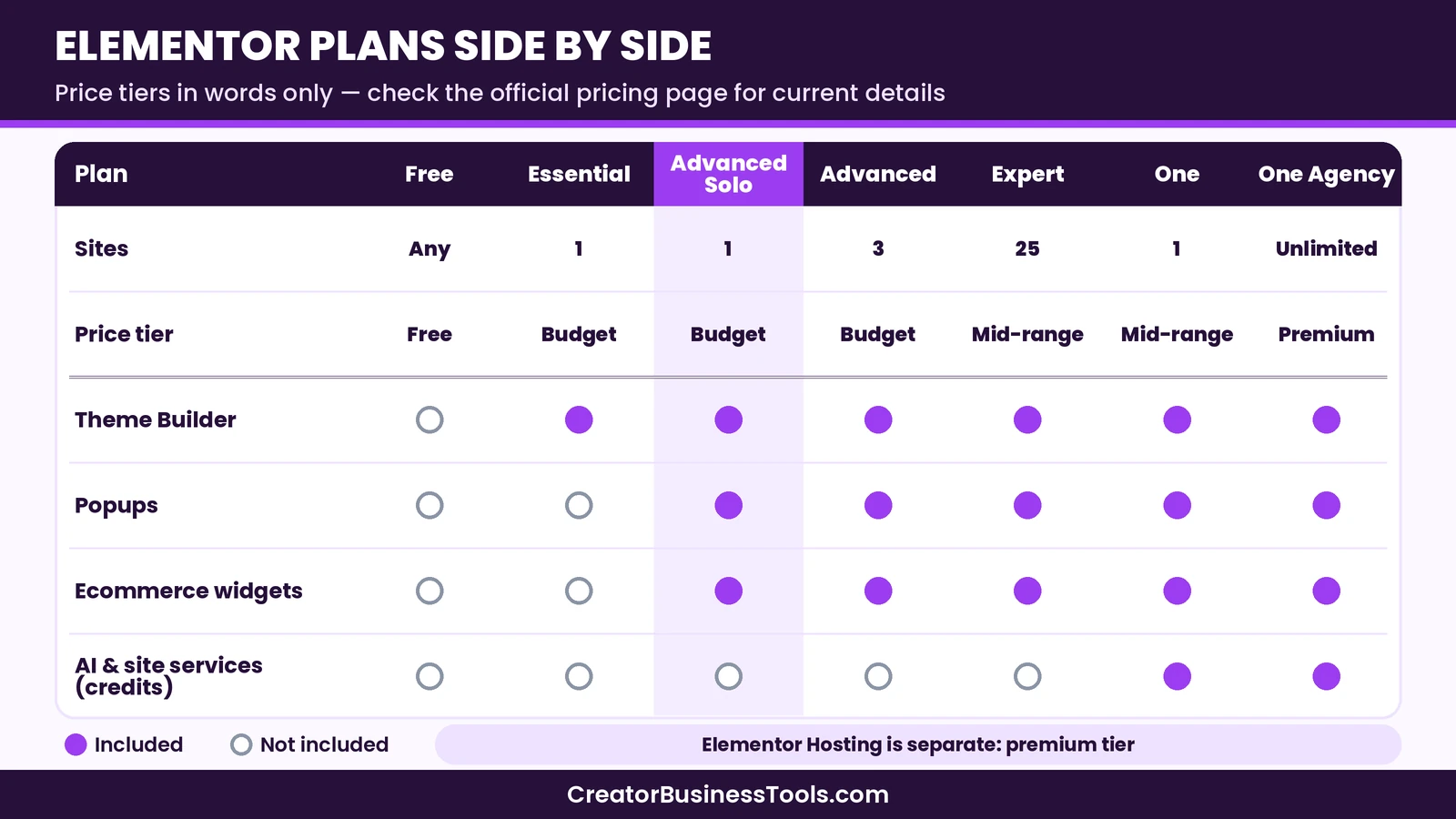
A few details are worth knowing before you compare:
- Every plan renews. Elementor’s pricing page says subscriptions renew on your billing cycle at list price. Check the renewal terms for the plan you pick.
- Essential is limited. It lacks the Popup Builder, custom code and CSS, ecommerce widgets, form submission management, and custom fields in dynamic content. Many buyers outgrow it quickly.
- Hosting is never included in Editor Pro or One. Elementor’s FAQ confirms One doesn’t include hosting.
- You can move up later. Elementor’s FAQ says Pro plans can be upgraded to One, and the remaining value of the current plan is credited toward it.
Elementor offers monthly billing on some plans and longer billing cycles on others. Check the pricing page for the billing options on the plan you want.
Elementor One vs Editor Pro: which plan should you buy?
This is the core decision in any Elementor review, so let’s break it down.
What Editor Pro gives you
Editor Pro is the builder. It includes the Pro widgets, Theme Builder, dynamic content, forms, popups, custom code, ecommerce widgets, and collaborative notes (on Advanced Solo and above). You pick a plan based on how many sites you need to activate. If all you want is to design WordPress sites visually, Editor Pro is the whole product.
What Elementor One adds
Elementor One includes the full Editor Pro feature set plus connected services:
- AI for copy, code, images, and layouts
- Image optimization, including conversion to modern formats
- Site accessibility scans, AI-powered fixes, and a visitor usability widget
- Cookie consent banners with scanning and consent records
- Email deliverability for transactional emails, without a separate SMTP plugin
- A site management dashboard for updates, performance, and security checks
These services run on a shared pool of monthly credits. Using Editor Pro, accessibility scans, and site management costs no credits. Optimizing an image, sending an email, applying an AI accessibility fix, or running an AI action uses credits. Unused credits don’t carry over to the next month.
How to decide
The honest test is simple: list the extra services you’d use in a normal month. If you already pay for an image optimization plugin, an SMTP service, a cookie banner tool, and an accessibility tool, One can replace several subscriptions with one. If you’d mainly use the builder and try the AI now and then, Editor Pro keeps things simpler, and you can move up to One later.
| Question | Points to Editor Pro | Points to Elementor One |
|---|---|---|
| Do you need image optimization, cookie consent, or email delivery tools? | No, or you already have them | Yes, and you’d rather manage them in one place |
| How often will you use AI? | Rarely | Weekly or more |
| How many sites? | One to 25, priced by site count | One site (One) or unlimited (One Agency) |
| Do you want the simplest setup? | Yes, builder only | You’re happy to track monthly credits |
Elementor Hosting
Elementor Hosting is a managed WordPress hosting product sold separately from Editor Pro and One. It’s built on cloud infrastructure with a content delivery network, and Elementor lists these features on its hosting page:
- Cloudflare Enterprise CDN and premium SSL
- Firewall plus DDoS and botnet protection
- A vulnerability scanner for installed plugins
- Daily automatic backups plus manual backups
- A staging environment for testing changes
- Automated scaling for traffic spikes
- Free site migration
- Object caching and a choice of PHP versions
The plan shown by default on the hosting page is a single-site plan in the premium tier, with set limits on monthly visits, storage, and bandwidth. Multi-site plans sit higher. Plans can be adjusted for capacity, so check the hosting page for the limits that match your traffic.
Who Elementor Hosting suits
Elementor Hosting suits people who want one company responsible for both the builder and the server, so support questions don’t bounce between a host and a plugin vendor. It also suits people who don’t want to compare hosts at all.
It’s a weaker fit if you already have a reliable host, if you run many small low-traffic sites, or if you want a budget-tier host for a simple brochure site. Elementor’s own FAQ notes that Editor Pro and One work on any compatible WordPress host, so you don’t need Elementor Hosting to use the builder. If you’re comparing hosts more broadly, check whether the plan you’re considering includes Editor Pro, since that affects the total cost.
Key features
Visual editor and widgets
The editor is the reason most people choose Elementor. You see the page as visitors will, edit text in place, and adjust spacing, colors, and typography from a side panel. Responsive controls let you change layout and visibility separately for desktop, tablet, and mobile.
Theme Builder
Every Editor Pro plan includes the Theme Builder, which lets you design headers, footers, single post templates, archive pages, and 404 pages. This is the feature that turns Elementor from a page builder into a full site builder.
Forms and popups
Pro forms connect to many email marketing tools. Popups, available from Advanced Solo up, can be triggered by scroll, exit intent, clicks, or time on page. For a small business, these two features often replace a separate form plugin and a separate popup plugin.
Ecommerce
From Advanced Solo up, Elementor includes WooCommerce widgets for product pages, cart, checkout, and account pages. Essential doesn’t include them, so store owners should skip it.
Design system
Classes, variables, and components let you define styles once and reuse them across pages. For freelancers maintaining client sites, this makes later redesigns faster and keeps sites consistent.
AI
Elementor’s AI can write and rewrite copy, generate images, suggest code, and build layouts. It’s part of the One plans and uses credits, and the cost per action varies with the task.
Ease of use
Elementor is one of the easier builders to learn because changes appear on the canvas as you make them. Most beginners can build a simple landing page in an afternoon. The learning curve comes later, with the Theme Builder, dynamic content, and the newer class-based styling. These are powerful, but they take time to understand.
Elementor’s large community is a real advantage. There are many tutorials, template kits, and third-party add-ons, so most questions already have an answer somewhere.
Performance and lock-in
Page builders add code to every page, and Elementor is no exception. Elementor’s newer editor generation outputs leaner markup than older versions, and you can keep pages fast by using a lightweight theme, optimizing images, and avoiding unnecessary add-ons.
Lock-in is the bigger long-term consideration. Pages built with Elementor depend on the plugin. If you stop paying for Pro, Pro widgets and templates stop working properly, and if you switch builders, most pages need to be rebuilt. Plan for this before you build a large site.
Pros and cons
| Pros | Cons |
|---|---|
| Free plugin to learn the editor before paying | Plan names and families can be confusing |
| Live visual editing with strong responsive controls | Essential lacks popups, custom code, and ecommerce widgets |
| Theme Builder on every paid plan | One’s services run on monthly credits that don’t carry over |
| Large community, templates, and add-ons | Hosting is a separate purchase |
| One bundles AI and site tools many owners buy separately | Pages depend on the plugin, so switching later means rebuilding |
Prices, plan names, and limits change. Check Elementor’s official pricing and hosting pages before you buy, and check the renewal terms for the plan you choose.
Who should choose Elementor?
- Small business owners who want to update their own site without hiring a developer for every change.
- Freelancers who build sites for clients and want a familiar, widely supported editor.
- Store owners using WooCommerce who want custom product and checkout pages.
- Beginners who want to try a visual builder for free before paying.
Who should look elsewhere?
- People who build many sites and prefer a single plan that covers unlimited sites at a lower tier. Our Divi review covers one alternative.
- Developers who prefer writing code or using the native block editor.
- Owners of very simple sites who are happy with a well-designed block theme.
A hypothetical example
To make the plan choice concrete, here is a hypothetical case. Picture a café owner with one WordPress site who wants an online menu, a booking form, and a seasonal popup. The free plugin would cover the menu pages, but she needs forms and popups, so Editor Pro Advanced Solo fits. She already uses a separate image plugin and has no need for AI, so One would add little for her.
Now picture a freelancer who manages a dozen client sites and sends contact form emails, compresses images, and runs accessibility checks for each. For him, One Agency could replace several tools, and the shared credit pool covers all client sites. The point is that the right plan depends on what you’d use each month, not on which plan has the longest feature list.
How to choose your Elementor plan
- Start with the free plugin and build one real page.
- List the Pro features you actually need: Theme Builder, forms, popups, ecommerce, custom code.
- Count the sites you’ll activate over the next year.
- List the extra services you pay for today, such as image optimization or email delivery.
- If those services matter, compare One with your current tools. If not, pick the Editor Pro plan that matches your site count.
- Decide on hosting separately, based on your traffic and support needs.
Common mistakes to avoid
- Buying Essential for a store. Essential doesn’t include ecommerce widgets or popups.
- Choosing One for the AI alone. If AI is the only service you’d use, check how many actions your monthly credits cover.
- Assuming One includes hosting. It doesn’t. Hosting is a separate product.
- Ignoring renewal terms. Check what each plan renews at before you commit.
- Building a large site without a lock-in plan. Decide early how you’d handle a switch.
FAQ
Is Elementor worth it?
For most small business owners and freelancers who want visual control over WordPress, yes. Start with the free plugin, and pay only when you need Pro features such as the Theme Builder, forms, or popups.
What is the difference between Elementor Pro and Elementor One?
Elementor Pro, now called Editor Pro, is the builder itself. Elementor One includes Editor Pro plus AI, image optimization, accessibility, cookie consent, email deliverability, and site management, all running on monthly credits.
Does Elementor One include hosting?
No. Elementor’s FAQ says One doesn’t include hosting. You can use it on any compatible WordPress host, or buy Elementor Hosting separately.
Is Elementor free?
The core editor is free on WordPress.org. Pro features such as the Theme Builder, Pro widgets, and popups need a paid plan.
How many sites can I use Elementor on?
It depends on the plan: one site on Essential, Advanced Solo, and One; three on Advanced; 25 on Expert; and unlimited on One Agency.
Do One credits roll over?
No. Credits reset each month, and unused credits don’t carry over.
Can I upgrade from Editor Pro to One later?
Yes. Elementor’s FAQ says you can upgrade from your account, and the remaining value of your current plan is credited toward One.
Is Elementor Hosting good?
It offers a strong feature list, including a CDN, staging, backups, and security scanning. It sits in the premium tier, so it fits best if you value having one company for both builder and hosting.
Is Elementor good for beginners?
Yes. The live editor is easy to learn, and there are many tutorials. Advanced features take longer to master.
Does Elementor slow down WordPress?
Any page builder adds some weight. A lightweight theme, optimized images, and fewer add-ons keep Elementor sites fast.
Bottom line: Elementor review
Elementor remains one of the most practical ways to build a WordPress site visually. For most single-site owners, the free plugin plus Editor Pro Advanced Solo is the sensible path. Freelancers should match an Editor Pro plan to their site count. Elementor One is worth it only if you’ll use its bundled services every month, and Elementor Hosting is a convenience choice for people who want one vendor for everything.
Elementor links below are affiliate links.
[See Elementor's plans](https://elementor.com/pricing/)Free checklist: Not sure which plan fits your next project? Get our free Page Builder Decision Checklist, with the questions to ask about site count, renewals, hosting, and AI before you buy. Contact us to request a copy.
Pricing and features from official vendor pages, last checked October 27, 2026.