
Divi Review: Is Unlimited-Site WordPress Building Worth It?
Disclosure: This post contains affiliate links. If you buy through them, we may earn a commission at no extra cost to you. How we make money.
If you build WordPress sites, you’ve probably seen Divi everywhere. It’s a theme and visual page builder from Elegant Themes, and it’s known for one big pricing difference: one plan covers unlimited websites.
This Divi review explains what’s included, how the plans work, who Divi fits, and whether it’s cheaper than Elementor over time.
It’s based on Elegant Themes’ official pricing and product pages, not on hands-on benchmarks.
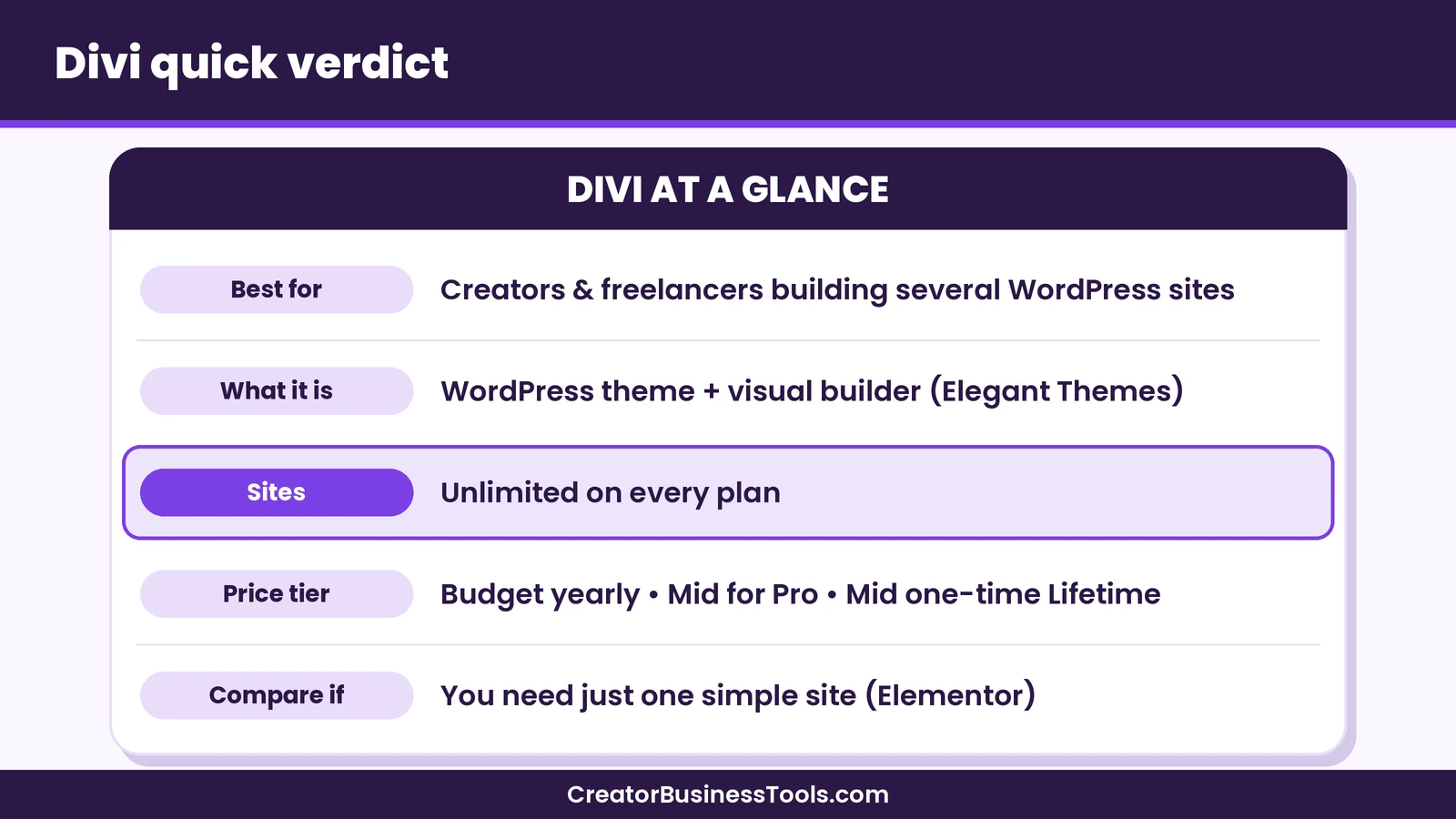
Quick verdict: Divi is a strong value for creators and freelancers who build more than one WordPress site. Every plan includes unlimited website use, and a one-time lifetime option removes renewals. If you only ever need one simple site, Elementor’s free plugin or a single-site Elementor plan may cost less.
Quick picks
- Best value for several sites: Divi (yearly). See Divi’s plans
- Best if you hate renewals: Divi Lifetime, a one-time payment for the theme and builder.
- Best for freelancers and agencies: Divi Pro, which adds AI, cloud storage, team seats and VIP support.
- Best free starting point: Elementor’s free plugin, if you only need one basic site. See Elementor
What is Divi?
Divi is a WordPress theme with a built-in visual builder. You design pages by clicking and dragging on the live page, instead of editing code.
According to Elegant Themes, every Divi membership includes the no-code builder, the theme builder, website packs and the full set of content elements and design options.
Your membership also covers Elegant Themes’ other themes and plugins: Extra, Bloom, Monarch and the Divi Builder plugin.
| Included | What it does |
|---|---|
| Divi theme | The main theme, with the visual builder built in |
| Divi Builder | The builder as a plugin, for use with other themes |
| Theme builder | Design headers, footers and templates |
| Website packs | Pre-built layouts to start from |
| Extra, Bloom, Monarch | A magazine theme, an email opt-in plugin and a social sharing plugin |
Who Divi is for
Divi suits people who want visual control over WordPress without writing code, and who expect to build more than one site.
| Creator type | Why Divi fits | What to watch |
|---|---|---|
| Blogger with several sites | One plan covers every site | Hosting is separate for each site |
| Freelance web designer | Unlimited client sites, Divi Cloud for reusable layouts | Pro services add a yearly cost |
| Course creator or coach | Landing pages plus Bloom for opt-ins | Course features need another plugin |
| Illustrator or photographer | Visual portfolio layouts from website packs | Optimize large images for speed |
| Small agency | Divi Teams seats and Divi Dash | Divi Pro includes 4 Teams seats |
If you only plan to run a single blog and you’re happy with a block theme, you may not need a page builder at all. WordPress’s own block editor has become far more capable, and it’s free.
Where Divi runs
Divi is built for WordPress. Use it on a self-hosted WordPress.org site, or on a WordPress.com plan that allows third-party themes and plugins. Elegant Themes names the WordPress.com Business plan.
Divi memberships don’t include hosting. Elegant Themes says Divi works with any web host, and it also sells a separate Divi Hosting service.
If you’re still choosing a host, our Kinsta vs WP Engine comparison covers two managed WordPress options.
Divi pricing explained
Elegant Themes sells four main options. All of them include unlimited website use.
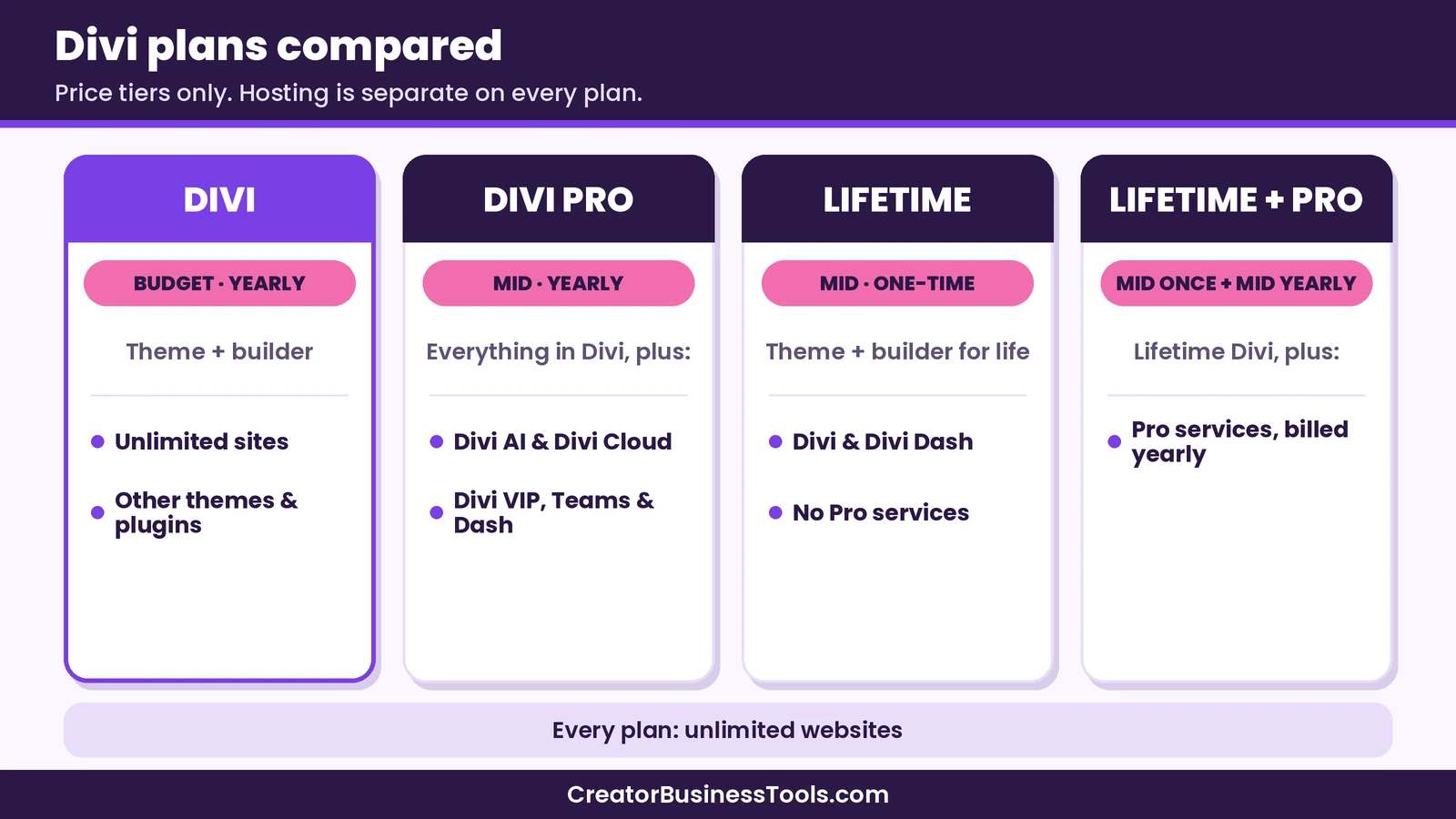
| Plan | Price tier | Billing | What’s included |
|---|---|---|---|
| Divi | $ | Yearly | Divi theme and builder, other themes and plugins, unlimited sites |
| Divi Pro | $$ | Yearly | Everything in Divi plus Divi AI, Divi Cloud, Divi VIP, Divi Teams and Divi Dash |
| Divi Lifetime | $$ | One-time | Divi and Divi Dash for life, no Pro services |
| Divi Lifetime + Pro | $$ + $$ / year | One-time plus yearly services | Lifetime Divi plus the Pro services, billed yearly |
Why the lifetime plan can cost less than Pro
This confuses a lot of buyers. Divi Lifetime can cost less than one year of Divi Pro, which looks odd at first.
The reason is what’s included. Divi Pro is a yearly subscription that bundles the theme with paid services like Divi AI and Divi Cloud. Divi Lifetime is a one-time payment for the theme and builder only.
If you want both lifetime access and the Pro services, Elegant Themes sells Divi Lifetime + Pro: a one-time payment, plus a yearly fee for the services.
What happens if you stop paying?
Elegant Themes says that if you cancel a yearly plan, your account stays active until the end of your term.
After that, you lose access to the members area, new themes, updates and support. You can keep using the themes you’ve already downloaded.
With Divi Lifetime, Elegant Themes says updates and support continue for life.
Elegant Themes also offers a money-back guarantee. Check the current terms on its pricing page.
What the Pro services add
Divi Pro bundles several services that are also sold separately.
- Divi AI: generates layouts, text, images and code inside the builder.
- Divi Cloud: stores layouts, theme builder templates and code snippets so you can reuse them on every site.
- Divi VIP: priority support, plus a discount on Divi Marketplace purchases.
- Divi Teams: gives team members and clients access to your services. Divi Pro includes 4 seats.
- Divi Dash: manage updates, themes, plugins and users across your sites from one place.
For a solo creator with one or two sites, these are nice extras rather than must-haves. For freelancers building client sites every month, Divi Cloud and Divi Dash can save real time.
The Divi Marketplace
Beyond the core plans, Elegant Themes runs the Divi Marketplace, where third-party developers sell Divi modules, layouts and child themes.
You don’t need it to build a good site. It’s useful when you want a specific feature, such as a special menu style or a ready-made layout for a niche, without building it yourself.
Divi VIP, part of Divi Pro, includes a discount on Marketplace purchases. If you expect to buy add-ons often, that’s worth factoring into the Pro decision.
As with any add-on, check that a Marketplace product is kept up to date before you rely on it.
What stands out about Divi’s approach
Three things set Divi apart from most WordPress builders.
Flat pricing. One plan covers every site you build, so growth doesn’t change your bill.
A lifetime option. Elementor’s paid plans are billed yearly, while Divi also sells a one-time license. For long-term site owners, that removes a recurring cost for the theme and builder, although the optional Pro services are still billed yearly. It also makes budgeting simpler: you know your builder cost up front, and the only recurring line items left are hosting, your domain and any add-ons you choose.
An all-in-one membership. The theme, the builder plugin, a magazine theme, an opt-in plugin and a social sharing plugin all come together.
Divi vs Elementor: which is cheaper in the long run?
For a full side-by-side, see our Divi vs Elementor comparison. This is the question most buyers are really asking. The answer depends on how many sites you build and how long you keep them.
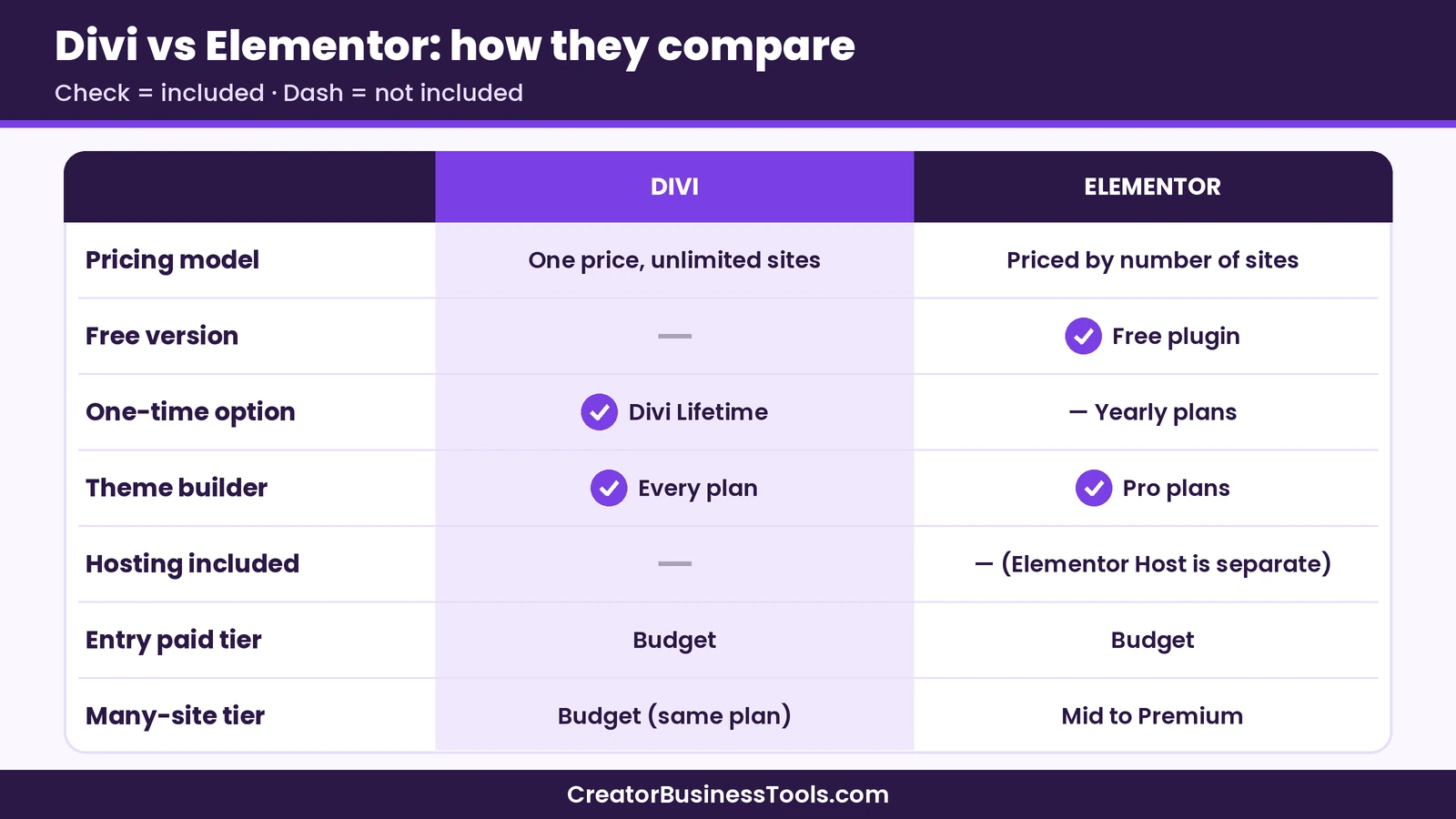
| Divi | Elementor | |
|---|---|---|
| Free version | No | Yes, a free plugin |
| Pricing model | One price, unlimited sites | Priced by number of sites |
| One-time option | Yes, Divi Lifetime | No, yearly plans |
| Theme builder | Included in every plan | Included in Pro plans |
| Hosting | Not included | Not included (Elementor Host is separate) |
| Entry paid tier | $ | $ |
| Many-site tier | $ (same plan) | $$ to $$$ |
One site, one or two years
For a single site, the costs are close. Elementor’s entry paid plan and Divi’s yearly plan sit in the same low tier.
If you only need basic pages, Elementor’s free plugin costs nothing at all, which makes it the cheapest starting point.
One site, five years or more
Over a longer period, Divi Lifetime starts to look attractive. You pay once and avoid renewals, while yearly plans keep billing every year.
Divi Lifetime doesn’t include the Pro services, so factor in whether you’d want those.
Several sites
This is where Divi pulls ahead. Divi’s price stays the same whether you run one site or many.
Elementor’s paid plans are priced by the number of sites, so the cost climbs into higher tiers as you add sites. Elementor’s top agency plan covers unlimited sites, but at a higher tier.
Three hypothetical long-run scenarios
To make the trade-offs concrete, here are three hypothetical buyers. We use price tiers rather than exact figures, because prices change.
Scenario 1: One hobby blog. A blogger wants a nicer homepage and a few landing pages. Elementor’s free plugin covers the basics at no cost. If they later want theme building, an entry paid plan from either Divi or Elementor sits in the same low tier.
Scenario 2: A creator with three sites. A coach runs a main site, a course sales site and a personal blog. With Elementor, the plan has to cover three sites, which pushes it up a tier. With Divi, the same yearly plan, or a single Lifetime payment, covers all three.
Scenario 3: A freelancer building client sites. A designer launches several client sites a year. Elementor’s cost rises with the site count, while Divi’s stays flat. Divi Pro’s cloud library and Divi Dash also help with repeat work.
In all three cases, remember the hidden line item: hosting. Each site needs a host, whichever builder you choose.
Our take on long-run cost
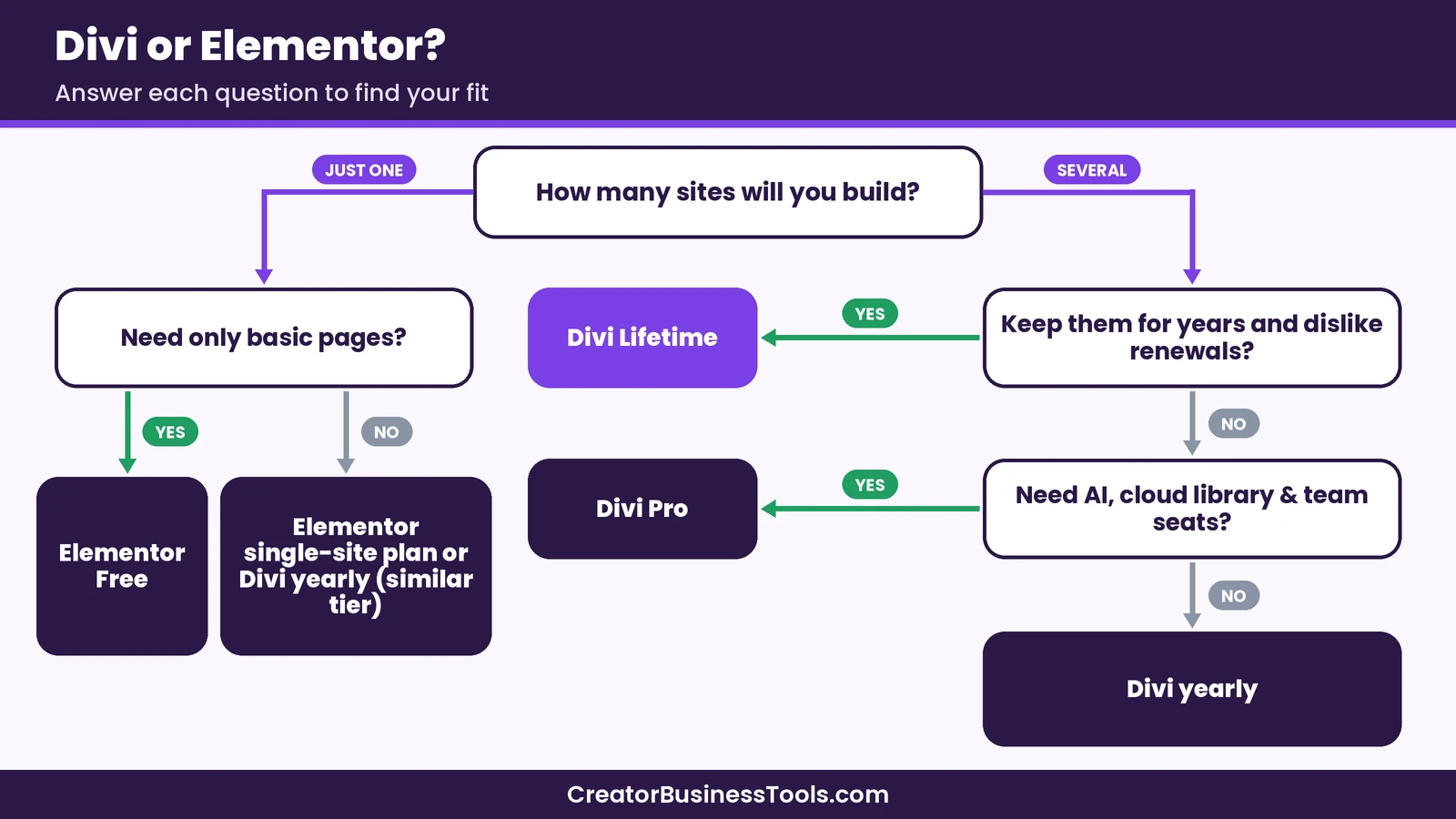
- One simple site: Elementor Free, or either paid entry plan.
- One site you’ll keep for years: Divi Lifetime is hard to beat on renewals.
- Several sites or client work: Divi, because one plan covers them all.
- Agency work with a team: Divi Pro, for the cloud library, Divi Dash and team seats.
Price is only part of the decision. If you prefer Elementor’s editor or rely on its add-ons, that can be worth paying for.
How to build a portfolio site with Divi
A portfolio is one of the most common first Divi projects. Here’s a short outline you can follow.
- Set up WordPress and hosting. Install WordPress on your host, or use a
WordPress.complan that allows third-party themes. - Install and activate Divi. Download it from your Elegant Themes account, then upload it under Appearance → Themes.
- Start from a website pack. Choose a pre-built layout close to the look you want, so you’re editing instead of building from scratch.
- Build your key pages. Most portfolios need four: Home, Work (or Portfolio), About and Contact.
- Add your projects. Show 6 to 12 of your best pieces. For each, add a short note on the goal, your role and the result.
- Use the theme builder for a consistent header and footer. Keep navigation simple, with a clear contact button.
- Check mobile views and speed. Preview every page on a phone-sized screen, compress images, then publish.
A hypothetical example
Imagine a hypothetical illustrator who wants a portfolio and a simple shop link. They start from a pre-built pack, swap in their artwork, and add an opt-in form with Bloom to collect emails from visitors.
Later, the same Divi membership could cover a second site, such as a blog or a client project, at no extra license cost.
Keep in mind: Divi needs WordPress, and hosting is sold separately. If you’re on
WordPress.com, make sure your plan allows third-party themes and plugins before you buy. Elegant Themes names the Business plan.
Mistakes to avoid when choosing a page builder
Comparing first-year prices only. Look at what you’ll pay over three to five years, including renewals and the number of sites.
Forgetting about lock-in. Page builders store layouts in their own format. If you switch builders later, pages often need to be rebuilt. Pick one you’re happy to stay with.
Paying for services you won’t use. Divi Pro’s extras are valuable for client work. For one personal site, the base Divi plan or Divi Lifetime may be all you need.
Ignoring speed. Any visual builder adds some weight. Compress images, keep layouts simple and choose a solid host.
Not testing early. Elegant Themes offers a money-back guarantee, so build a test page early and confirm the editor suits you.
Divi pros and cons
Pros
- Unlimited websites on every plan
- One-time lifetime option for the theme and builder
- Visual builder, theme builder and website packs included
- Extra, Bloom and Monarch included with the membership
- Pro services for AI, cloud storage, team seats and site management
Cons
- No free version
- Hosting not included
- The Pro services add a yearly cost, even on the lifetime plan
- After a yearly plan ends, updates and support stop
Best for: creators, freelancers and small agencies who build several WordPress sites and want one predictable cost. Not ideal for: anyone who needs only one basic site and is happy with a free builder, or anyone not using WordPress.
How to get started with Divi
- Decide how many sites you’ll build in the next few years.
- Choose a plan: Divi yearly to start, Divi Lifetime to avoid renewals, or Divi Pro for client work. See Divi’s plans
- Set up hosting and WordPress if you haven’t already.
- Install Divi and pick a website pack.
- Build your core pages and test them on mobile.
- Add Bloom if you want an email opt-in form.
FAQ
Is Divi worth it?
For anyone building more than one WordPress site, Divi is a strong value, because every plan covers unlimited websites. For a single basic site, a free builder may be enough.
Can I use Divi on unlimited websites?
Yes. Elegant Themes says both the Divi and Divi Pro plans include unlimited Divi usage, including client sites, with no per-site fees.
Does Divi need self-hosted WordPress?
Divi needs WordPress. Elegant Themes says its products work with the WordPress.com Business plan, which allows third-party themes and plugins. A self-hosted WordPress.org site also works.
Does Divi include hosting?
No. Divi works with any web host, and Elegant Themes sells Divi Hosting separately.
What’s the difference between Divi and Divi Pro?
Both include Divi and its core features. Divi Pro adds Divi AI, Divi Cloud, Divi VIP, Divi Teams seats and Divi Dash.
Why is Divi Lifetime cheaper than Divi Pro?
Divi Lifetime covers only the theme and builder, paid once. Divi Pro is a yearly plan that also includes paid services such as Divi AI and Divi Cloud.
Is Divi better than Elementor?
For more options, see our Elementor alternatives guide. Neither is better for everyone. Divi tends to cost less when you build many sites. Elementor has a free plugin and per-site pricing that can be cheaper for a single site.
Bottom line
Divi is one of the best-value WordPress builders for creators who run more than one site. Unlimited website use on every plan and a one-time lifetime option make long-run costs easy to predict.
If you’re building a portfolio, a blog and maybe a client site or two, Divi is worth a close look. See Divi’s plans
Only need one simple site? Start with Elementor’s free plugin and upgrade later. Visit Elementor
Free checklist: Want a head start? Get our free WordPress Site Launch Checklist, a one-page plan for your theme, key pages, and launch-day checks. Contact us to request a copy.
Pricing and features from official vendor pages, last checked October 20, 2026.