
Payhip Review: Is It the Best Gumroad Alternative?
Disclosure: This post contains affiliate links. If you buy through them, we may earn a commission at no extra cost to you. How we make money.
If you sell printables, templates, ebooks, or mini-courses, you’ve probably wondered where to host them once you outgrow a single marketplace. This Payhip review looks at whether Payhip is a good Gumroad alternative for beginner creators, how its pricing works, and where it might fall short. It’s based on Payhip’s official pricing page and Gumroad’s published fees, so you can compare the two without wading through sponsored hype.
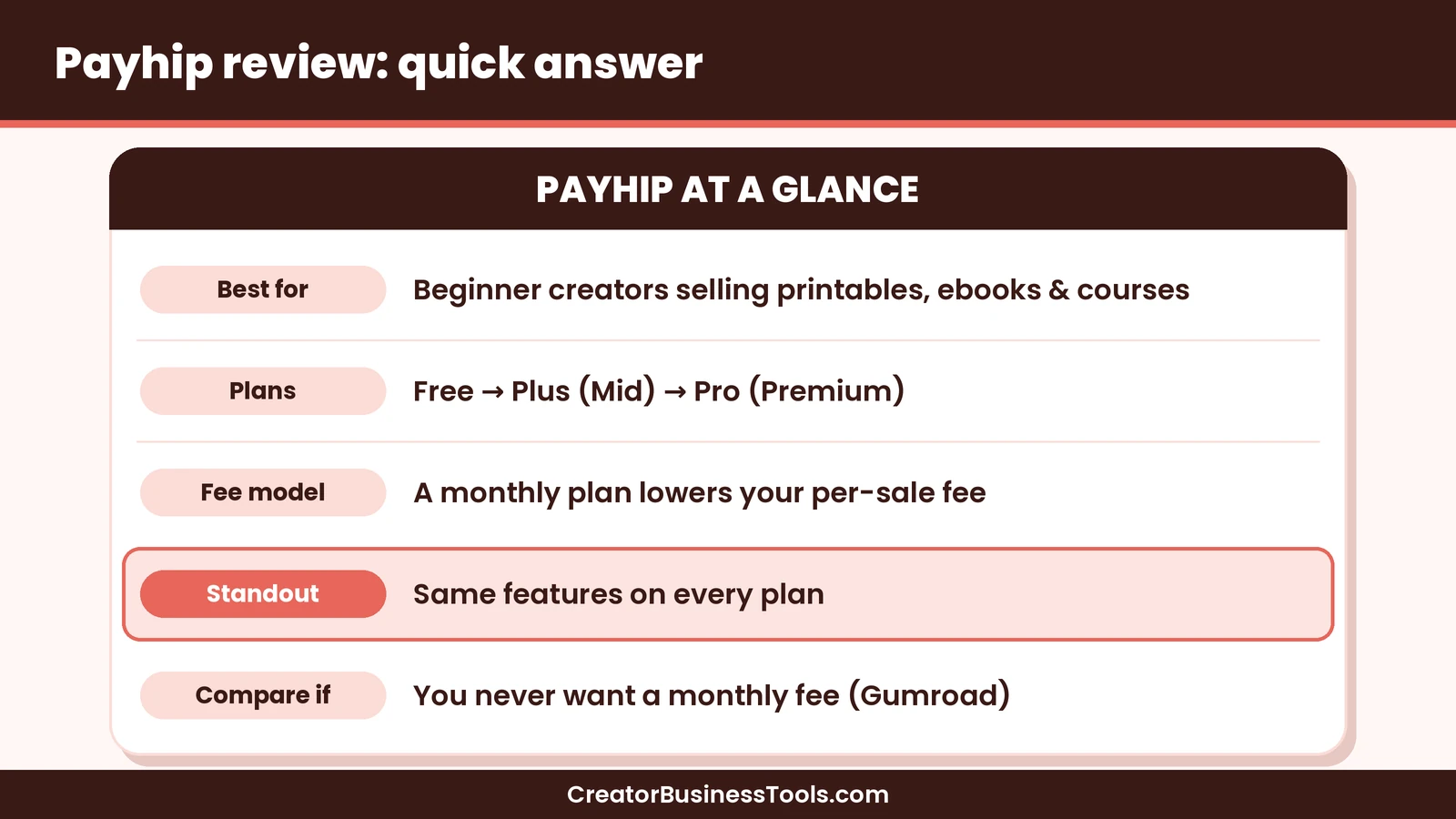
Quick verdict: Payhip looks like a strong fit for beginner creators who want their own simple storefront, a free way to start, and the option to lower per-sale fees as sales grow. Every plan includes the same features, which keeps the decision simple. Gumroad may still suit you if you never want a monthly fee and like the idea of a discovery marketplace, but its per-sale cut tends to be higher.
Quick picks
- Best place to start for free: Payhip Free Forever, with all features and a per-sale fee. Payhip
- Best once you have steady sales: Payhip Plus, which trades a monthly fee for a lower per-sale fee.
- Best for higher-volume sellers: Payhip Pro, with no Payhip transaction fee.
- Best if you want zero monthly fees and marketplace discovery: Gumroad. Gumroad
Payhip at a glance
| Item | What Payhip offers |
|---|---|
| What it is | An online store for digital products, courses, and memberships |
| Plans | Free Forever, Plus, Pro |
| Price tier | Free, then mid-range (Plus) and premium (Pro) |
| Platform fee | Highest on Free, lower on Plus, none on Pro |
| Features by plan | Identical on every plan |
| Products and revenue | Unlimited on every plan |
| Payments | PayPal and major cards via Stripe |
| Taxes | Handles EU/UK VAT and US/Canadian sales tax on digital sales |
What is Payhip?
Payhip is an all-in-one platform for selling digital products from your own storefront. Instead of listing in a crowded marketplace, you get a store page and checkout links you can share on Pinterest, Instagram, your blog, or in your emails.
The idea is simple. You upload a file, set a price, and Payhip handles checkout and delivery. Buyers can pay with PayPal or a card, and Payhip says it deposits your sales right after each transaction completes.
What I appreciate most is how plainly the pricing is laid out. Payhip says it doesn’t gate features, so the free plan and the top plan share the same toolkit. The only thing that changes is how you pay: a bigger cut per sale, or a monthly fee with a smaller cut.
Payhip review: the features that matter for beginners
Digital downloads
This is Payhip’s bread and butter. Printables, planners, SVG files, ebooks, presets, templates, and similar files can all be sold as instant downloads. For Etsy sellers coming from Pinterest, this feels familiar, but the customer buys from your store rather than from a marketplace listing.
Courses and memberships
Payhip also positions itself as a place to sell online courses and memberships. That matters if you’d like to grow from a single printable into a small paid workshop or a monthly template club later, without moving platforms. I’d suggest checking the course and membership pages yourself before committing, since your needs here may be specific.
Taxes handled for digital sales
Tax rules for digital products can feel intimidating. Payhip says it automatically collects, reports, and remits EU and UK VAT, along with US and Canadian sales tax, on your behalf. You can also set up other taxes, which Payhip then reports to you. For a beginner selling worldwide, that may remove one of the scariest admin tasks.
Fast payouts
Payhip says sales are deposited to you right after a transaction completes, through PayPal or Stripe. You don’t wait for a payout schedule, which can help with cash flow when you’re just starting.
Unlimited products and revenue on every plan
There’s no cap on how many products you list or how much you sell, even on the free plan. That makes it easy to test lots of small products, which is often how printable sellers find their winners.
Payhip pricing explained
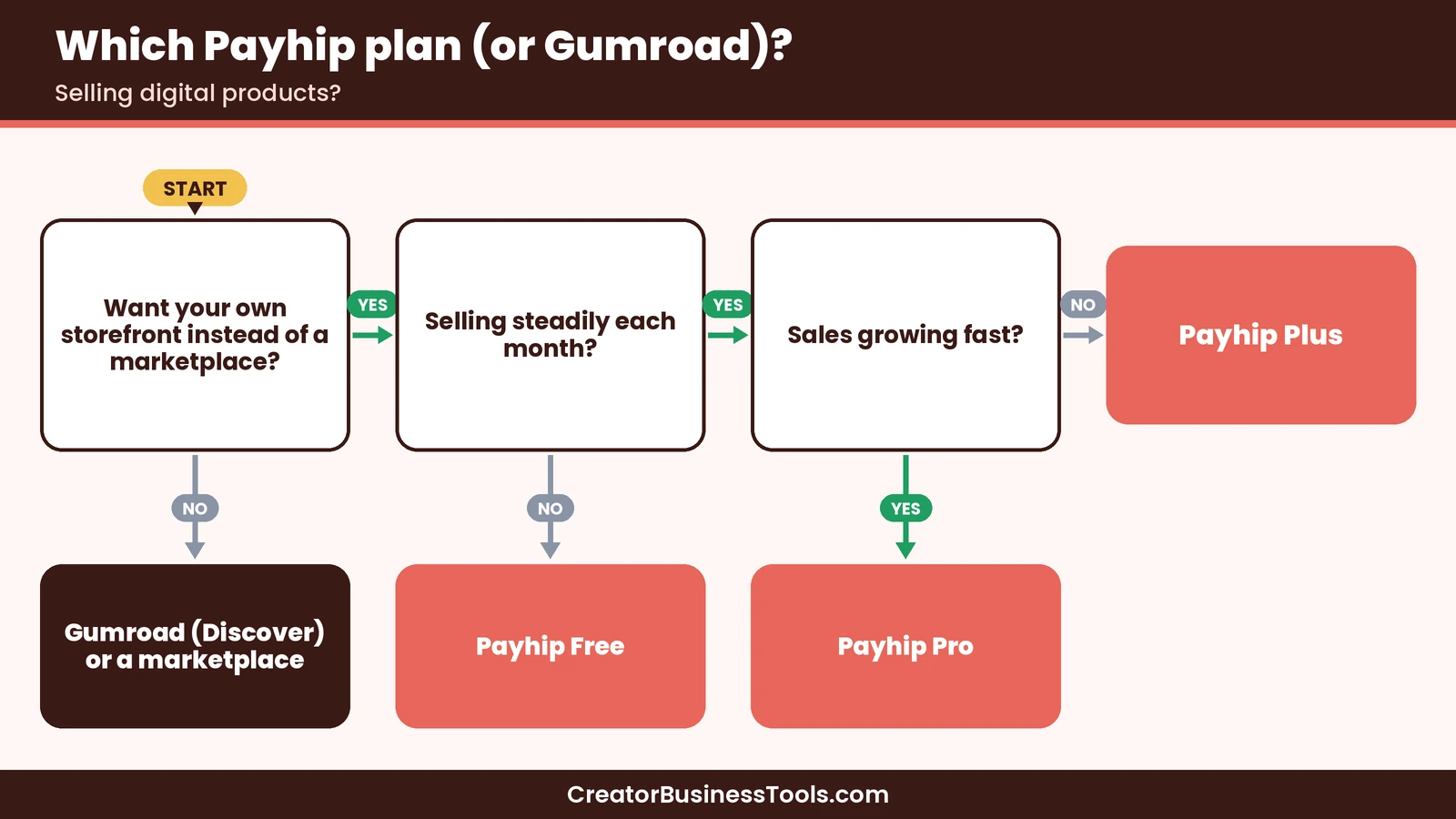
Payhip’s pricing is refreshingly short. Each plan includes every feature, so the only real question is how much you sell.
| Plan | Price tier | Payhip fee per sale | Best for |
|---|---|---|---|
| Free Forever | Free | Highest of the three | Testing your first products |
| Plus | Mid-range | Lower | Sellers with steady monthly sales |
| Pro | Premium | None | Higher-volume stores |
How to think about the fee trade-off
- Low or unpredictable sales: the free plan is likely the cheapest, because you only pay when you sell.
- Steady sales: at some point the monthly fee on Plus costs less than the extra per-sale fee you’d pay on Free.
- High sales: Pro removes Payhip’s transaction fee entirely, which may make sense once your monthly revenue is well established.
- Payment processing still applies: PayPal and Stripe charge their standard rates on every plan, so factor that into your pricing.
A simple rule of thumb: start free, then check your monthly sales every so often. When the extra fees you’re paying on Free start to look bigger than the Plus subscription, it’s probably time to upgrade.
Payhip vs Gumroad
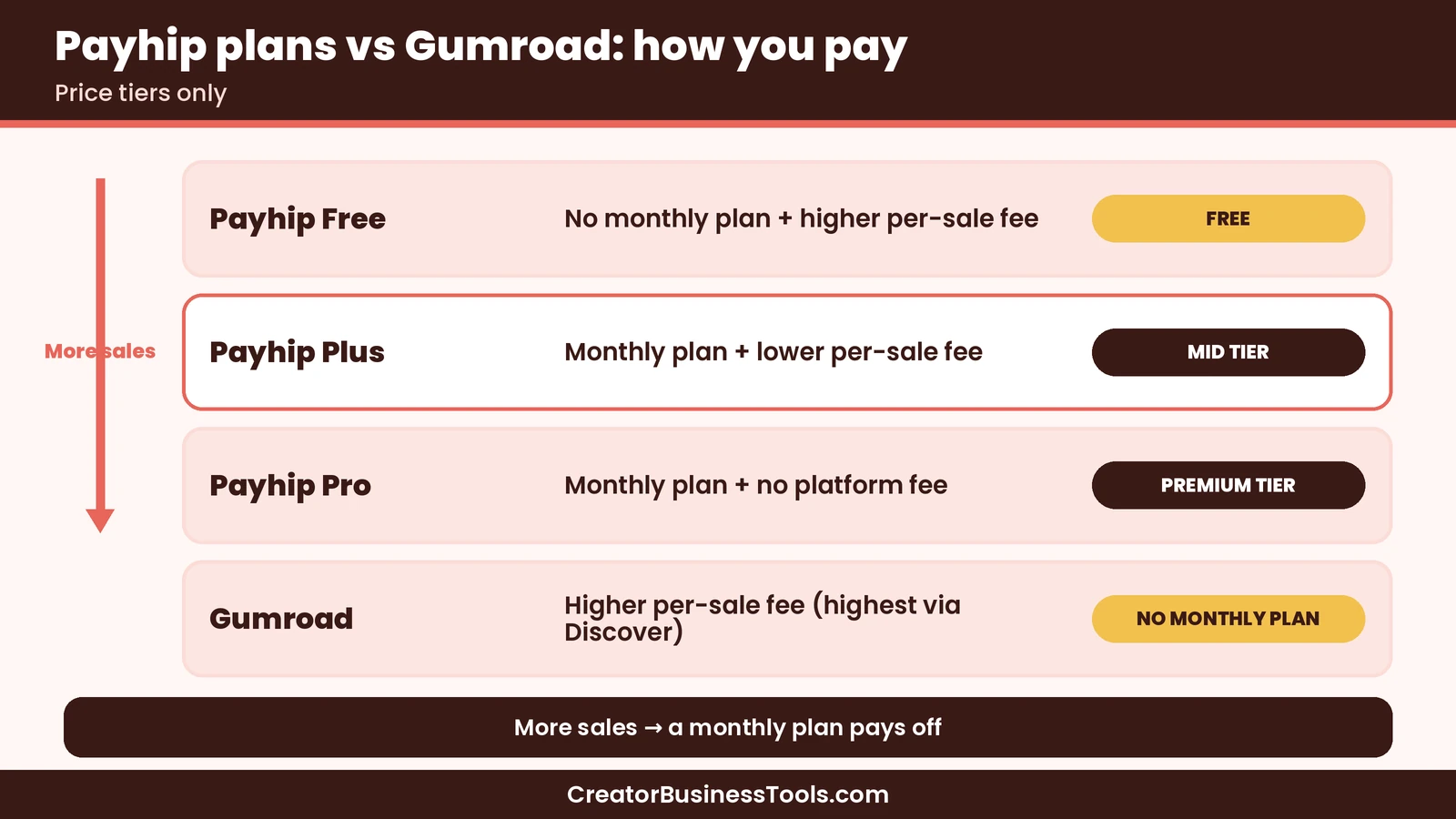
Gumroad is the platform most beginners compare first, so here’s how the two stack up on the things that tend to matter most.
| Feature | Payhip | Gumroad |
|---|---|---|
| Monthly fee | Optional (free plan available) | None |
| Per-sale platform fee | Higher on Free, lower on Plus, none on Pro | Flat percentage plus a small fixed fee |
| Marketplace discovery | Storefront-focused | Discover marketplace (higher fee on those sales) |
| Features by plan | Same on every plan | One pricing model |
| Digital downloads | ✓ | ✓ |
| Courses and memberships | ✓ | ✓ |
| Tax handling | EU/UK VAT and US/Canadian sales tax | Acts as merchant of record and handles sales tax |
| Payment processing | PayPal/Stripe fees apply on top | Check Gumroad’s fee page for details |
When Payhip may win
Payhip tends to make more sense when you’d like to keep more of each sale as you grow. Because you can switch to a monthly plan with a lower fee, or no platform fee at all, your costs don’t scale up as steeply with revenue. If you’re driving your own traffic from Pinterest or a blog, that flexibility can add up.
When Gumroad may win
Gumroad keeps things very simple: no monthly fee. It also offers a Discover marketplace where new buyers can find you, though Gumroad charges a noticeably higher cut on sales that come through Discover. If you sell rarely, or you value marketplace exposure, Gumroad could still be the easier pick.
Gumroad also acts as a merchant of record, meaning it takes on sales tax handling worldwide. Payhip handles the main digital tax regimes too, so for most beginners both platforms cover the basics.
Payhip vs Gumroad: a quick way to decide
- Estimate your monthly sales. If they’re small, both platforms’ no-upfront-cost options are worth a look.
- Ask where your buyers come from. If you bring your own traffic, you probably don’t need a marketplace.
- Compare the per-sale cut at your price point. A fixed fee per sale hurts low-priced printables more than higher-priced courses.
- Think about growth. If you hope to sell more over time, a plan that lowers your fee can be appealing.
A note on low-priced printables
Here’s my one personal story. When I first priced a small printable bundle, I added up the platform fee, the fixed per-sale charge, and the payment processing fee on a scrap of paper, and I was a little shocked by how much of a low-priced sale disappeared. That exercise is why I always suggest running the numbers at your actual price point before choosing a platform.
Fixed per-sale charges matter most for cheap products. A small fixed fee barely registers on a larger course, but on a low-priced printable it can take a surprisingly big bite. Payhip’s model doesn’t include a fixed platform charge in the same way, though PayPal and Stripe still apply their own processing fees, so it’s worth testing a few price points.
Payhip review: pros and cons
| Pros | Cons |
|---|---|
| Free plan with every feature | Highest per-sale fee on the free plan |
| Same features on every plan, so no upsell surprises | Monthly plans only pay off once sales are steady |
| Unlimited products and revenue | No large built-in marketplace like Etsy |
| Handles major digital sales taxes | PayPal/Stripe processing fees still apply |
| Fast deposits after each sale | You’ll need to drive your own traffic |
| Room to grow into courses and memberships | Fewer design options than a full website builder (worth checking) |
Best for: beginner creators and Etsy sellers who want their own storefront, drive traffic from Pinterest or a blog, and would like costs that shrink as sales grow.
Not ideal for: sellers who depend on marketplace search to find buyers, or anyone who wants a completely custom-designed website.
Before you sign up
- Fees and plans can change. Check Payhip’s and Gumroad’s pricing pages before you decide.
- Payment processing fees from PayPal or Stripe apply on top of platform fees.
- Make sure you own the rights to everything you sell, including fonts and clip art in printables.
- Read the license terms of any templates you use, especially commercial-use rules.
How to set up a Payhip store in 6 steps
- Pick one starter product. A single printable or template is plenty to test with.
- Create a free account. You can start without choosing a paid plan.
- Upload your file and write a clear description. Explain what’s included, file formats, and how buyers use it.
- Connect PayPal and/or Stripe. This is how buyers pay and how you get paid.
- Customize your storefront. Add your logo, colors, and a short “about” line.
- Share your product link. Add it to a Pinterest pin, your link-in-bio page, or a blog post.
Store launch checklist
- ☐ One product uploaded and tested with a sample purchase
- ☐ Product description covers what’s included and how to use it
- ☐ Payment methods connected
- ☐ Storefront branded with your logo and colors
- ☐ Product link added to Pinterest and your bio
- ☐ A free opt-in so visitors can join your email list
Moving from Gumroad or Etsy to Payhip
If you already sell elsewhere, you don’t have to move everything at once. Many creators run two platforms side by side for a while.
- Start with your best seller. Add it to Payhip and send your own traffic there.
- Keep marketplace listings live if they still bring in buyers who wouldn’t find you otherwise.
- Update your pins and links gradually, so you can compare results.
- Tell your email list about your new store, since those buyers already know you.
Product ideas that suit a Payhip store
If you’re not sure what to sell first, these digital product types tend to work well for beginners, because they’re quick to make and easy to deliver as a download:
- Printable planners and trackers. Habit trackers, meal planners, budget sheets, and cleaning schedules are popular on Pinterest.
- Templates. Social media templates, resume layouts, wedding signage, or small business forms can save buyers real time.
- Ebooks and mini-guides. A short, focused guide that solves one problem is often easier to sell than a long book.
- Digital art and SVG files. Crafters and Cricut fans look for cut files and clip art, as long as your license terms are clear.
- Workbooks that pair with a course. If you plan to teach later, a workbook can be a stepping stone.
A good first product usually solves one specific problem for one specific person. “A weekly meal planner for busy parents” is easier to market on Pinterest than “a planner.” Once one product sells, you can build bundles around it, which may also help offset fixed processing fees on low-priced items.
Who should use Payhip?
| Reader | Suggested plan | Why |
|---|---|---|
| Brand-new creator testing ideas | Free Forever | Pay only when you sell |
| Etsy seller adding a direct store | Free, then Plus | Keep more of your direct sales as they grow |
| Creator with steady monthly sales | Plus | Lower per-sale fee |
| Established store with high volume | Pro | No Payhip transaction fee |
| Seller who wants marketplace exposure | Compare Gumroad or Etsy | Built-in discovery |
Common beginner mistakes
- Choosing a paid plan too early. The free plan includes every feature, so there’s little reason to rush.
- Forgetting processing fees. Factor in PayPal or Stripe when pricing.
- Pricing too low. Fixed fees and processing charges hit cheap products hardest.
- Skipping the email list. A store link is great; a subscriber you can email again is better.
- Not testing the checkout. Buy your own product once to see what customers see.
FAQ
Is Payhip free?
Yes. Payhip offers a Free Forever plan with all features, unlimited products, and unlimited revenue. You pay a per-sale transaction fee instead of a monthly fee.
What’s the difference between Payhip’s plans?
All plans include the same features. The difference is the fee structure: Free has the highest per-sale fee, Plus adds a monthly fee with a lower per-sale fee, and Pro has a higher monthly fee with no Payhip transaction fee.
Is Payhip a good Gumroad alternative?
For many beginners, it seems to be. Payhip lets you lower your per-sale cost as you grow, while Gumroad keeps a single fee model with no monthly charge. The better fit depends on your sales volume and whether you want marketplace discovery.
Payhip vs Gumroad: which is cheaper?
It depends on how much you sell. At very low sales, both no-monthly-fee options can be inexpensive. As sales grow, Payhip’s paid plans may cost less overall because they reduce or remove the platform fee.
Do I still pay PayPal or Stripe fees on Payhip?
Yes. Payhip says PayPal and Stripe charge their standard rates on every plan.
Does Payhip handle sales tax and VAT?
Payhip says it automatically collects, reports, and remits EU/UK VAT and US/Canadian sales tax on your behalf, and lets you set up other taxes.
Can I sell printables on Payhip?
Yes. Printables, planners, templates, and other digital files are a natural fit for Payhip’s digital download feature.
How fast does Payhip pay me?
Payhip says sales are deposited right after a transaction completes, through PayPal or Stripe.
Can I cancel Payhip at any time?
Payhip says you can cancel your account whenever you like.
Bottom line: my Payhip review verdict
Creating printables to sell? Creative Fabrica is a common source for design assets.
To wrap up this Payhip review: Payhip looks like a friendly, low-risk way for beginner creators to sell digital products from their own store. The free plan includes every feature, the paid plans let you trade a monthly fee for lower per-sale costs, and tax handling for major regions is built in.
If you never want a monthly fee or you rely on marketplace discovery, Gumroad may still suit you. But if you’re bringing your own traffic from Pinterest and hope to grow, Payhip is a strong Gumroad alternative worth trying first.
[Explore Payhip's plans](https://payhip.com/)Free checklist: Want a head start? Get our free Digital Product Launch Checklist, a one-page plan for your first product, store page, and Pinterest pins. Contact us to request a copy.
Pricing and features from official vendor pages, last checked October 23, 2026.