
Sellfy Pricing Explained: Starter vs Business vs Premium
Disclosure: This post contains affiliate links. If you buy through them, we may earn a commission at no extra cost to you. How we make money.
Sellfy pricing looks simple at first: three plans, monthly or yearly billing, and no platform transaction fees. But the plan you need depends on something many creators overlook, which is the yearly sales limit attached to each plan. Pick too small a plan and you may need to upgrade sooner than expected. Pick too big a plan and you pay for features you don’t use.
In this guide, we break down each Sellfy plan, what’s included, how the sales limits work, which fees still apply, and how Sellfy compares with per-sale-fee platforms like Payhip and Gumroad. Everything here is based on Sellfy’s official pricing page and FAQ, not on hands-on tests or sponsored claims.
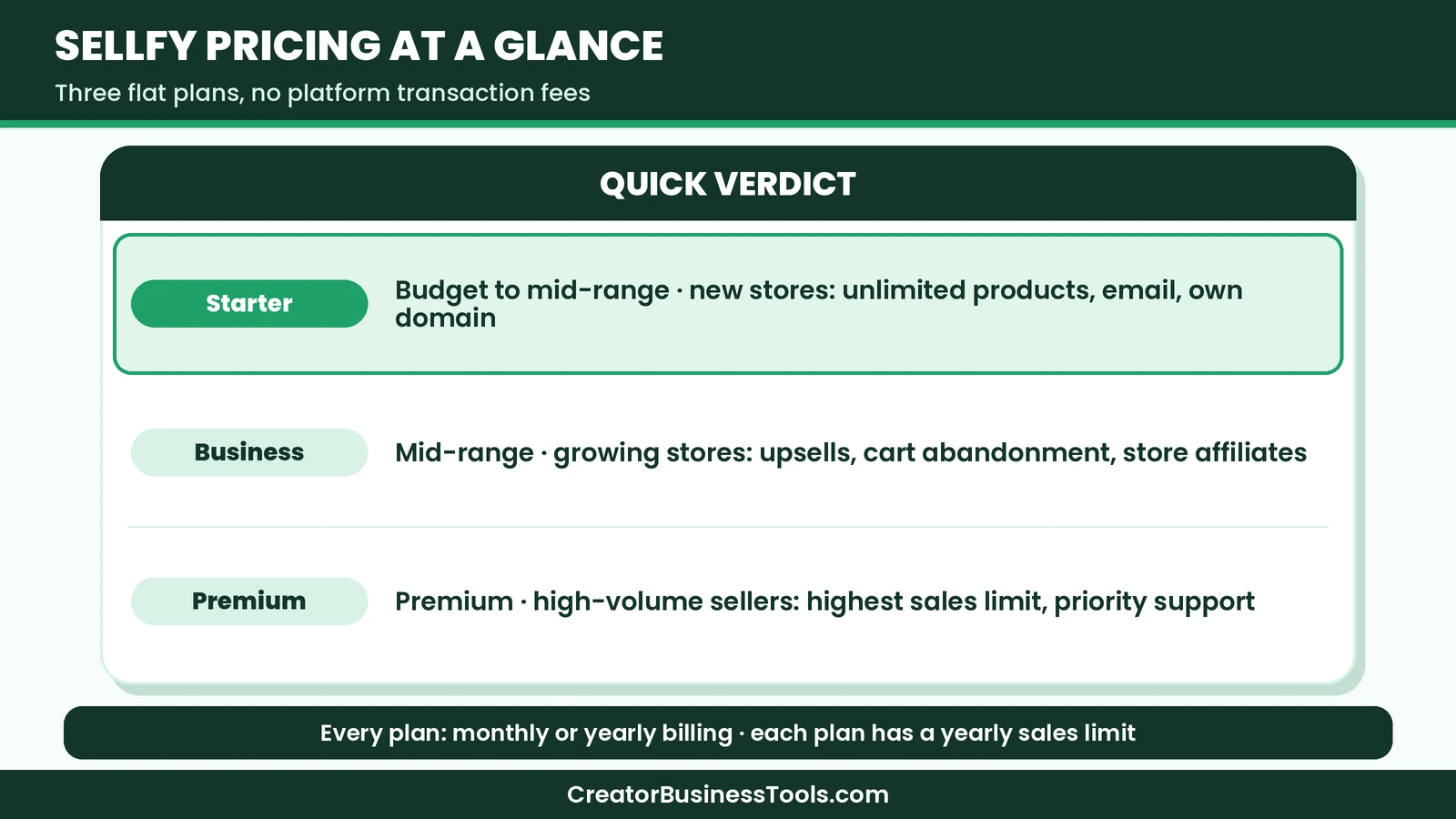
Quick verdict: Most new creators can start on Sellfy Starter, which already includes unlimited products, email marketing, and your own domain. Move to Business when you want upsells, cart abandonment emails, an affiliate program for your store, or to remove Sellfy branding. Premium is for stores with high yearly sales that want priority support and help migrating products.
Quick picks
- Best for new creators: Sellfy Starter. See Sellfy Starter
- Best for growing stores: Sellfy Business, which adds upsells, cart abandonment, and store affiliates. See Sellfy Business
- Best for high-volume sellers: Sellfy Premium, with the highest sales limit and priority support. See Sellfy Premium
- Best if you sell only occasionally: a per-sale-fee platform such as Payhip’s free plan or Gumroad may cost less until sales pick up.
Sellfy pricing at a glance
| Plan | Price tier | Billing | Yearly sales limit | Best for |
|---|---|---|---|---|
| Starter | Budget to mid-range | Monthly or yearly | Entry-level | New stores and side projects |
| Business | Mid-range | Monthly or yearly | Several times higher than Starter | Growing stores that want marketing tools |
| Premium | Premium | Monthly or yearly | Highest | High-volume stores |
| Custom | Contact sales | Custom | Above Premium | Very large stores |
Every plan includes zero platform transaction fees, unlimited products, and the core store builder. Your payment processor, PayPal or Stripe, still charges its own fees on each sale.
What is Sellfy?
Sellfy is an all-in-one ecommerce platform for creators. You can sell digital products, physical products, subscriptions, and print-on-demand merch from a single storefront. It includes a store editor, themes, built-in email marketing, special-offer tools for your own store, and product reviews.
You don’t need an existing website. Sellfy gives you a hosted store that you can connect to your own domain. If you already have a site or blog, you can also embed products or add buy buttons. Payments go straight to your PayPal or Stripe account, so you don’t wait for a platform payout schedule.
For a full look at the platform beyond pricing, see our Sellfy review.
Sellfy plans explained
Starter
Starter is Sellfy’s entry plan. It sits in the budget to mid-range tier, depending on the billing cycle you choose. Despite being the smallest plan, it isn’t stripped down. It includes:
- Digital, physical, subscription, and print-on-demand products
- Unlimited products
- Store editor, themes, custom code, and your own domain
- Special-offer tools, product reviews, and built-in email marketing
- VAT and tax settings
- Instant payouts to PayPal or Stripe
- Round-the-clock email support
The main limits are the yearly sales cap, the smallest file storage allowance, and the smallest email credit allowance. Sellfy branding also stays on your store.
Business
Business is the mid-range plan, and it’s where Sellfy adds most of its growth tools:
- Remove Sellfy branding
- Custom fields at checkout
- Upselling
- Cart abandonment emails
- An affiliate program you can run for your own store
- Store design migration on yearly billing
- A much higher yearly sales limit, more file storage, and more email credits
If you plan to grow a list of buyers and want to recover lost sales, Business is usually the plan to aim for.
Premium
Premium is the top published plan. It includes everything in Business and adds:
- The highest published yearly sales limit
- The largest file storage and email credit allowances
- Product migration help (see the note on migration below)
- Priority support
Stores that sell beyond Premium’s limit can contact Sellfy for a custom plan.
[Compare Sellfy's plans](https://sellfy.com/)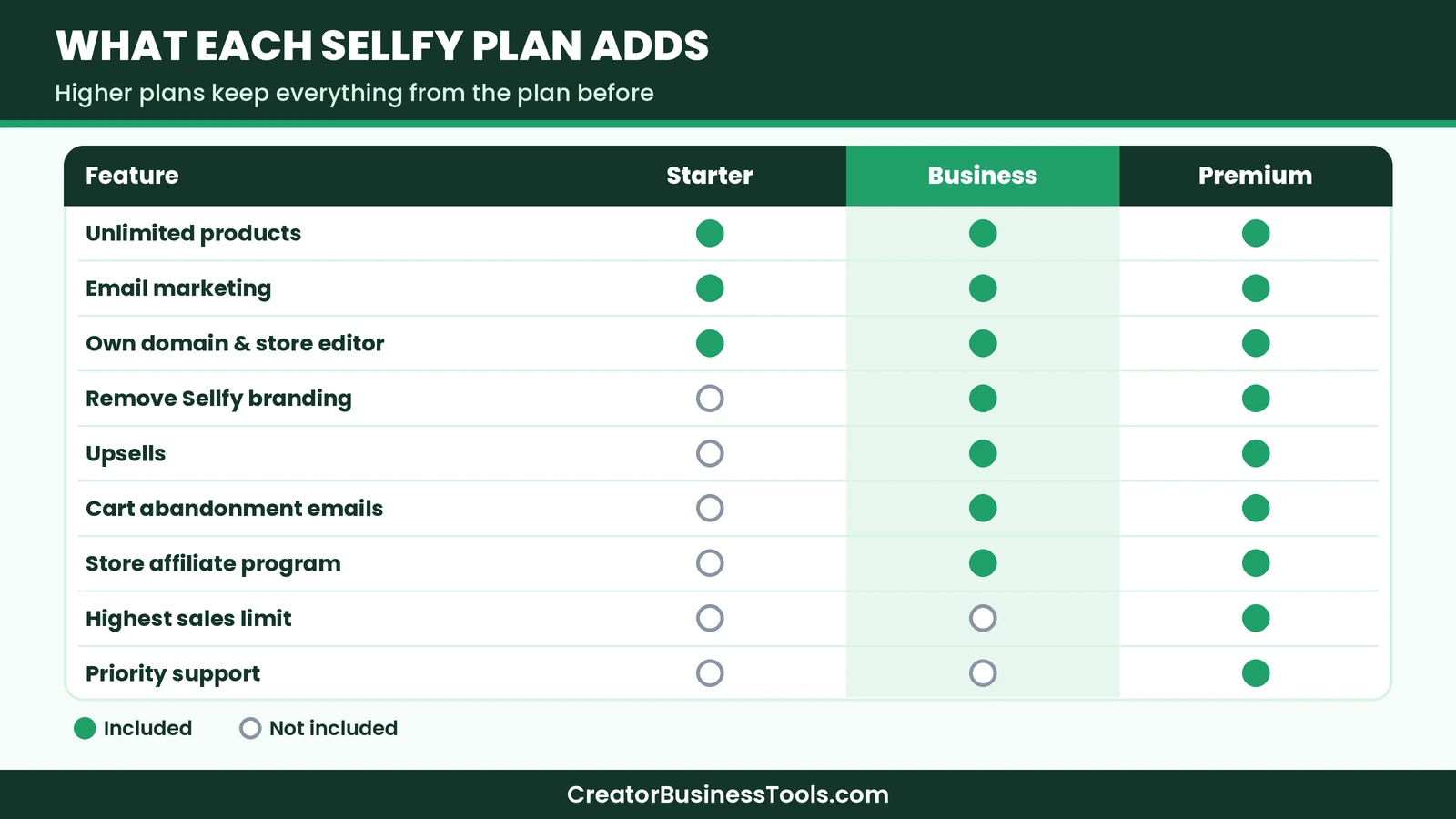
How Sellfy’s sales limits work
This is the most important part of Sellfy pricing to understand. Each plan has a yearly sales limit. Starter has the lowest limit, Business allows several times more, and Premium allows the most. Above that, Sellfy offers custom plans.
According to Sellfy’s FAQ, if your sales go over your plan’s limit and you don’t upgrade, an overage fee can apply to the extra sales. In practice, that means you should look at your expected yearly revenue, not just your monthly budget, when choosing a plan.
A simple way to plan:
- Estimate your yearly sales from your product price and expected orders.
- Choose the plan whose limit sits comfortably above that number.
- Revisit the decision when you launch a new product or plan a big launch.
Sellfy also says it notifies you when you reach the maximum revenue for your plan, so you aren’t left guessing. Still, it’s smarter to plan ahead. If a launch could push you past your limit, upgrading before the launch keeps things simple.
Migration services by plan
Sellfy offers three one-time migration services, and they’re an easy-to-miss part of Sellfy pricing:
- Email migration is available on every plan. Sellfy imports your existing email contacts into its built-in marketing tool.
- Product migration means Sellfy’s team helps upload your product files and descriptions. The pricing table lists it under Premium, while the FAQ says it’s available on Business and Premium, so confirm with Sellfy if this matters to you.
- Store design migration is available on yearly Business or Premium plans. Sellfy’s team helps bring your current website’s design elements into your new Sellfy store.
If you’re moving a large catalog from another platform, these services can cut hours of setup. That alone can justify starting on a higher plan, then reviewing your needs later.
Email credits and add-ons
Sellfy’s built-in email marketing runs on email credits, which are the number of emails you can send through the tool. Higher plans include more credits. If you run out, Sellfy says you can buy more credits from your dashboard, so you don’t have to upgrade your whole plan just to send more emails.
For many small stores, the included credits cover launch emails and occasional newsletters. If email is your main sales channel and your list is large, compare the cost of extra credits with a dedicated email platform.
Payment methods and availability
Sellfy collects payments through PayPal and Stripe, and the platform is available worldwide. The catch is that your payment processor must support your country. Sellfy recommends checking that PayPal or Stripe works where you live before you build your store. Because money goes directly to your processor account right after each purchase, your cash flow depends on that processor’s own payout timing to your bank.
Sellfy pricing for social media sellers
Many creators sell mainly through social platforms rather than a website. Sellfy’s FAQ notes that you can build a store and start selling on social networks such as YouTube and Facebook without a website, and that you can embed buy buttons, product widgets, or the whole store on a site if you have one.
For social-first creators, this changes the pricing math a little. You aren’t paying for a separate website builder, so the Sellfy plan is effectively your storefront, checkout, and email tool in one. If you were going to pay for those pieces separately, even Starter can be a reasonable value. If you only post a product link now and then, though, a per-sale-fee option may be the lighter starting point.
Fees you still pay with Sellfy
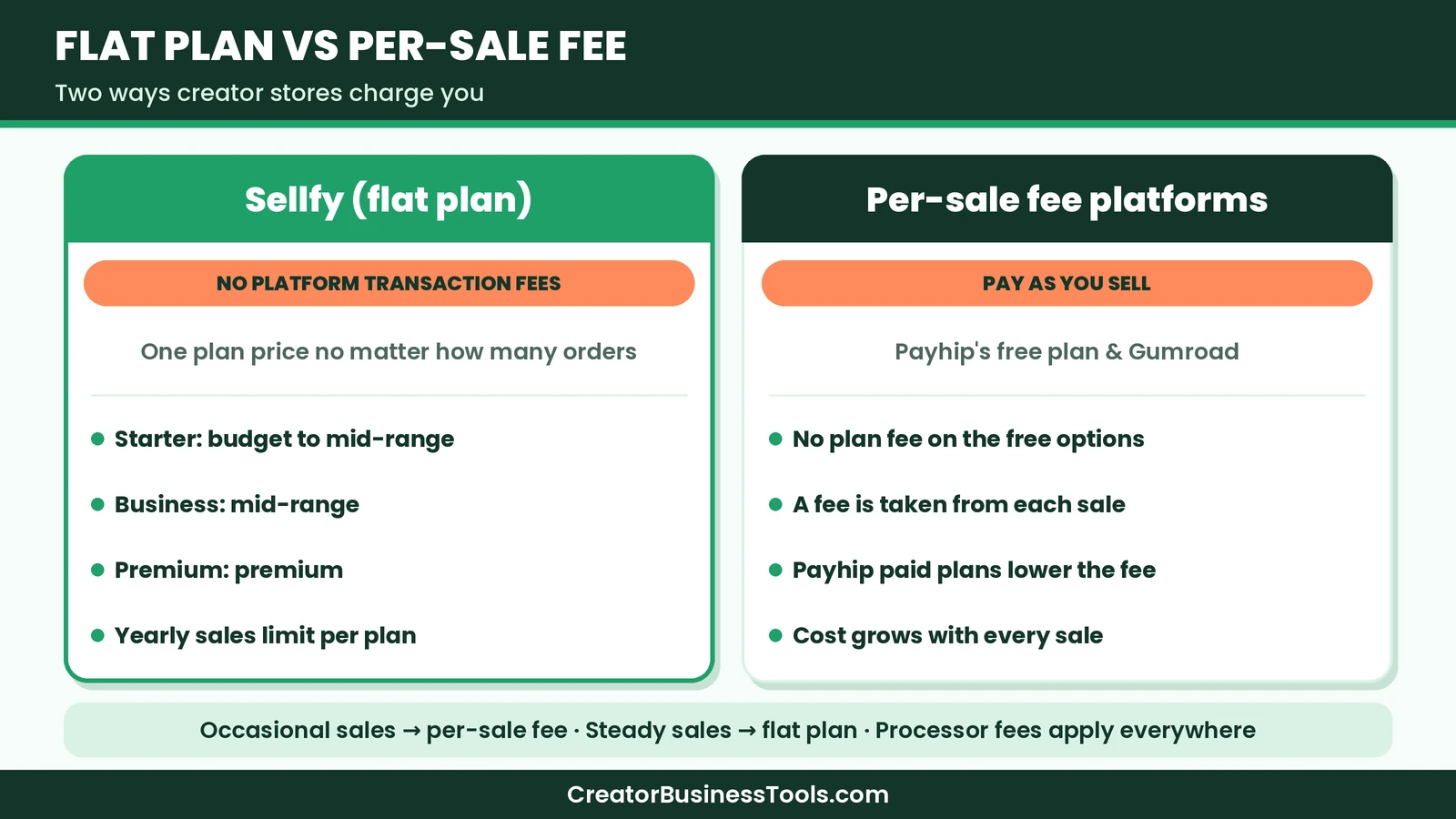
Sellfy doesn’t take a platform transaction fee on any plan. That’s a key difference from per-sale-fee platforms. However, two kinds of costs remain:
- Payment processing fees. PayPal and Stripe charge their standard processing fees on each transaction. Every platform that uses these processors passes these on in some form.
- Overage fees. As noted above, exceeding your yearly sales limit without upgrading can trigger an additional fee.
There are no separate charges for listing products, and products are unlimited on every plan.
Monthly vs yearly billing
Every Sellfy plan can be billed monthly or yearly. Check the official pricing page for the current price of each plan on each billing cycle.
Choose the billing cycle that matches how long you expect to use Sellfy. Store design migration is also available only on yearly billing for Business and Premium.
Does Sellfy have a free plan?
Sellfy doesn’t offer a free-forever plan. All three plans are paid. Check the official pricing page for current plan terms and the refund policy before you buy.
If you need a permanently free option, a per-sale-fee platform may fit better at the very start. Many creators begin there and move to a flat monthly plan once sales are steady.
Sellfy pricing vs Payhip and Gumroad
| Sellfy | Payhip | Gumroad | |
|---|---|---|---|
| Pricing model | Monthly or yearly plan | Free plan with per-sale fee, or paid plans with lower or no fee | No monthly fee, per-sale fee |
| Platform transaction fee | None | Depends on plan | Yes, higher on marketplace sales |
| Free plan | No | Yes | Yes |
| Product types | Digital, physical, subscriptions, print-on-demand | Digital products, courses, memberships, coaching, physical | Digital products, memberships, courses |
| Sales limits | Yearly limit per plan | Unlimited | Unlimited |
| Tax handling | VAT and tax settings you manage | Handles EU/UK VAT and US/Canadian sales tax | Acts as merchant of record and handles sales tax |
| Email marketing | Built in | Built in | Built in |
When Sellfy costs less
A flat plan with no transaction fee rewards steady sales. Once your monthly revenue reaches a modest level, the per-sale fees on a free plan can add up to more than a Sellfy Starter subscription. From there, every additional sale keeps more money in your pocket with Sellfy, aside from processor fees.
When a per-sale fee costs less
If you sell only a few products a month, paying a fee per sale can cost less than any monthly plan. Payhip’s free plan and Gumroad don’t charge until you make a sale, which suits early experiments.
Tax and compliance
One trade-off to weigh: Payhip handles EU and UK VAT plus US and Canadian sales tax for you, and Gumroad acts as the merchant of record. Sellfy gives you VAT and tax settings, but you remain responsible for your tax obligations. If you sell heavily into regions with complex digital tax rules, factor in that extra work.
Pros and cons of Sellfy pricing
| Pros | Cons |
|---|---|
| No platform transaction fees on any plan | No free-forever plan |
| Unlimited products on every plan | Yearly sales limits can force an upgrade |
| Email marketing included from Starter | Branding removal requires Business |
| Physical, digital, subscription, and print-on-demand in one store | You handle your own tax obligations |
| Instant payouts to PayPal or Stripe | Upsells and cart abandonment require Business |
Plan limits, allowances, and fees can change. Check Sellfy’s official pricing page and FAQ before you choose a plan, especially the yearly sales limit for each plan.
How to choose the right Sellfy plan
Ask yourself four questions:
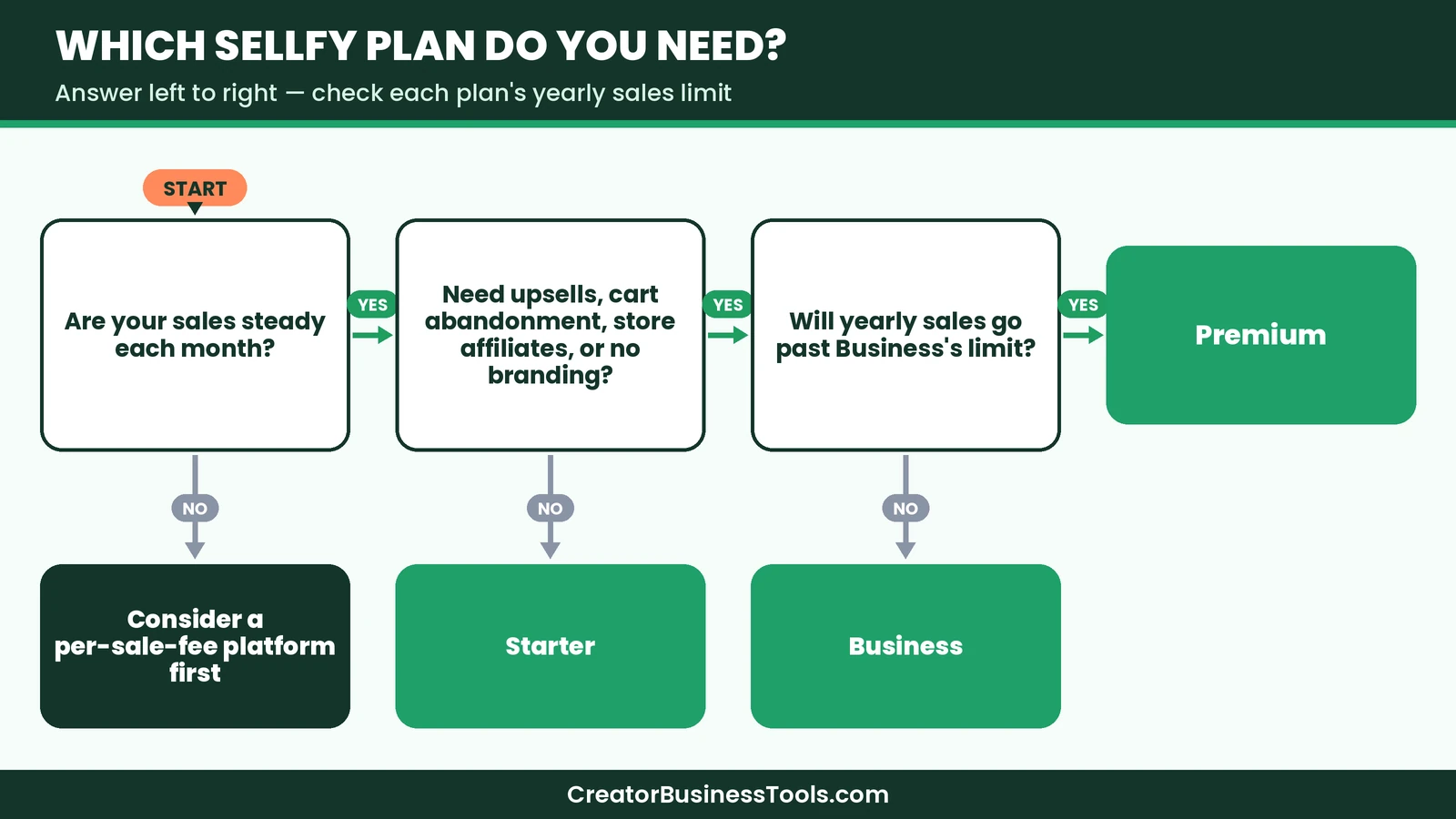
- What are my expected yearly sales? Choose a plan whose sales limit sits above that number with room to grow.
- Do I need upsells, cart abandonment, or store affiliates? If yes, start at Business.
- Does Sellfy branding bother me? Removing it requires Business or Premium.
- Am I selling steadily or occasionally? Steady sellers benefit from a flat plan; occasional sellers may prefer a per-sale fee.
A hypothetical example
To show how the decision works, imagine a planner designer who sells printable templates. In her first months, she sells a handful of files each week. Starter covers her needs: unlimited products, her own domain, and email marketing to send launch announcements. Because her sales are steady, a flat plan likely beats a per-sale fee for her.
A year later, she adds a membership and starts running seasonal campaigns. She wants to recover abandoned carts, offer upsells at checkout, and let other creators promote her templates. That’s the point where Business makes sense, and because her yearly sales are rising, its higher sales limit gives her room to grow.
Common mistakes to avoid
- Ignoring the yearly sales limit. Compare your expected revenue with each plan’s cap, not just the monthly price.
- Ignoring billing terms. Check the monthly and yearly options and the renewal terms before you commit.
- Upgrading before you need the tools. Starter already includes email marketing and unlimited products.
- Forgetting processor fees. PayPal and Stripe fees apply on every platform.
- Overlooking tax work. Plan how you’ll handle VAT and sales tax before you scale.
FAQ
How much does Sellfy cost?
Sellfy has three published plans. Starter is in the budget to mid-range tier, Business is mid-range, and Premium is premium. Check Sellfy’s pricing page for exact prices.
Does Sellfy charge transaction fees?
No. Sellfy doesn’t charge platform transaction fees on any plan. PayPal or Stripe processing fees still apply.
What happens if I go over my sales limit?
Sellfy’s FAQ says an overage fee can apply to sales beyond your plan’s limit if you don’t upgrade. Upgrading to a plan with a higher limit avoids it.
Is there a Sellfy free plan?
No. Sellfy has no free-forever plan; all three plans are paid.
Can I use Sellfy without PayPal?
Yes. If you don’t have a PayPal account, you can receive payments through Stripe instead. Sellfy notes that if neither PayPal nor Stripe supports your country, you can only offer free products, so check processor availability first.
Which Sellfy plan is best for beginners?
Starter is usually enough for beginners. It includes unlimited products, email marketing, and your own domain.
Can I sell physical products on Sellfy?
Yes. Every plan supports physical products, digital products, subscriptions, and print-on-demand merch.
Does Sellfy include email marketing?
Yes. Every plan includes built-in email marketing, with more email credits on higher plans.
Can I remove Sellfy branding?
Yes, on the Business and Premium plans.
Does Sellfy cost less than Gumroad?
It depends on your sales. For occasional sales, Gumroad’s per-sale fee can cost less. For steady sales, Sellfy’s flat plan with no transaction fee often costs less.
Do I need a website to use Sellfy?
No. Sellfy gives you a hosted store. You can also embed products on an existing site.
Bottom line: is Sellfy pricing worth it?
Sellfy pricing is a good fit for creators with steady sales who want an all-in-one store without platform transaction fees. Start with Starter, move to Business when you need upsells, cart abandonment, and store affiliates, and choose Premium only when your yearly sales call for it. If you sell only occasionally, a per-sale-fee platform may be the lower-cost first step.
[Start your store](https://sellfy.com/)Free checklist: Choosing a store platform? Get our free Digital Store Pricing Checklist to compare monthly plans, per-sale fees, sales limits, and tax handling before you commit. Contact us to request a copy.