
Sellfy Review: Sell Digital Downloads With No Transaction Fees
Disclosure: This post contains affiliate links. If you buy through them, we may earn a commission at no extra cost to you. How we make money.
Selling printables, templates or ebooks sounds simple until you see the fees. Some platforms take a cut of every sale, and others charge a monthly fee instead.
Sellfy is in the second group. It charges a monthly plan and no transaction fee on top, which makes it attractive once your sales start to grow.
This Sellfy review explains what you get, how the plans work, who it fits, and how it compares with Gumroad and Payhip for selling printables.
It’s based on Sellfy’s official pricing and product pages, not on hands-on testing.
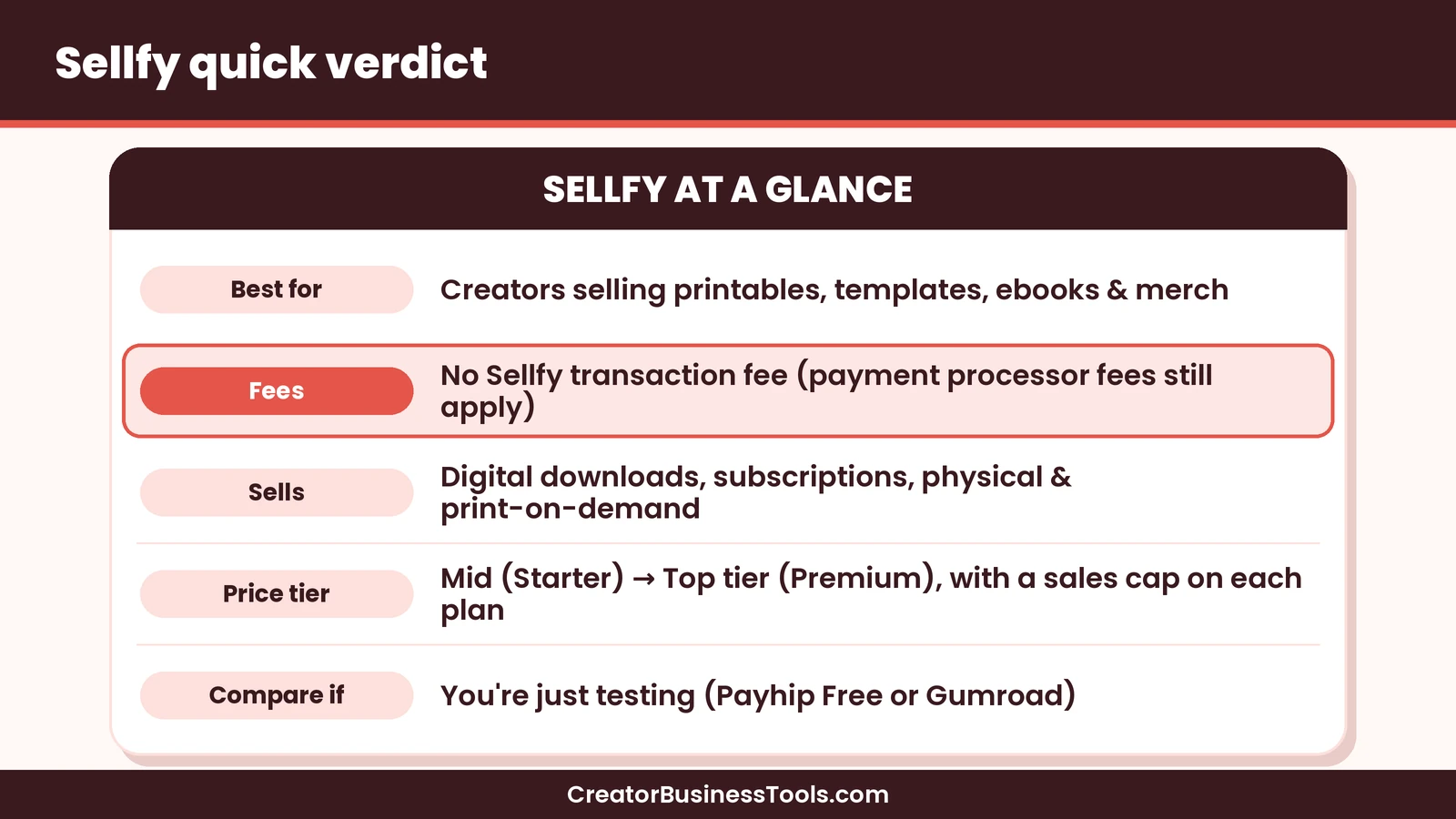
Quick verdict: Sellfy is a strong choice for creators who sell digital downloads regularly and want a simple store with no transaction fees. You pay a monthly plan, plus normal PayPal or Stripe processing fees. If you’re just testing an idea with a few sales, Payhip’s free plan or Gumroad’s no-monthly-fee model may cost less at first.
Quick picks
- Best for steady digital product sales: Sellfy Starter. See Sellfy’s plans
- Best for growing stores: Sellfy Business, for upsells, cart recovery and removing Sellfy branding.
- Best free way to start: Payhip’s free plan, which charges a per-sale fee instead of a monthly one.
- Best for occasional sales and marketplace reach: Gumroad, with no monthly fee.
What is Sellfy?
Sellfy is an online store builder for creators. You upload products, customize a storefront, and share links. Sellfy handles checkout and delivery.
It’s built for four product types, all available on every plan:
| Product type | Examples |
|---|---|
| Digital downloads | Printables, planners, Canva templates, ebooks, presets |
| Subscriptions | Monthly template packs, members-only downloads |
| Physical products | Prints, books, handmade goods |
| Print-on-demand | T-shirts, totes, mugs printed and shipped by Sellfy’s partners |
Every plan includes unlimited products. Sellfy says one digital product can hold up to 50 files.
You don’t need a website. Sellfy is the store. If you do have a site, you can embed buy buttons, product widgets or your whole store on your pages.
Who Sellfy is for
Sellfy suits creators who already know what they sell and want a clean store without per-sale cuts.
| Creator type | Why Sellfy fits | What to watch |
|---|---|---|
| Printable and planner seller | No platform fee, instant delivery | Sales cap on each plan |
| Canva template designer | Unlimited products, store themes | Branding removal starts on Business |
| Ebook author | Simple checkout, email marketing | Configure tax settings yourself |
| YouTuber or illustrator with merch | Print-on-demand plus digital in one store | POD margins depend on product costs |
| Membership creator | Subscriptions on every plan | Plan for churn and member emails |
If you’re still validating your first product and expect only a handful of sales, a fee-per-sale platform may be cheaper for now.
Sellfy pricing explained
Sellfy has three plans: Starter, Business and Premium. You can pay monthly or yearly, and yearly billing costs less per month.
Each plan has a yearly sales cap. That’s the key to understanding Sellfy’s pricing.
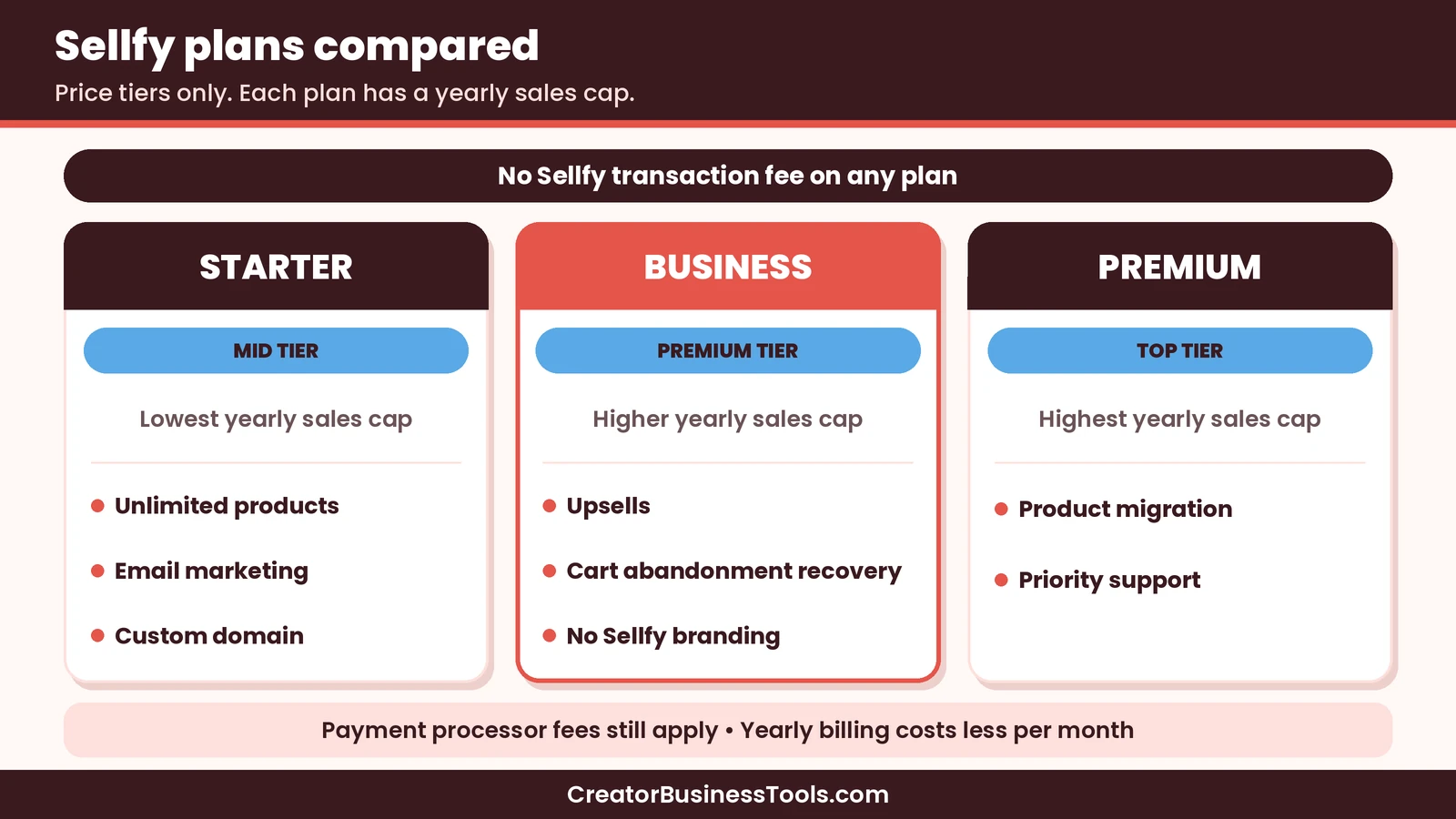
| Plan | Price tier | Yearly sales cap | Key extras |
|---|---|---|---|
| Starter | $$ | Lowest | Unlimited products, email marketing, coupon codes, custom domain |
| Business | $$$ | Higher | Adds upsells, cart abandonment, affiliate marketing, branding removal |
| Premium | $$$$ | Highest | Adds product migration and priority support |
How the “no transaction fee” works
Sellfy says it does not charge a transaction fee on any plan. You pay your plan price, and Sellfy doesn’t take a cut of each sale.
You still pay the payment processor. Sellfy works with PayPal and Stripe, and their standard processing fees apply to every sale.
What the sales cap means
Each plan covers sales up to a yearly limit. If you go over, Sellfy expects you to upgrade to the next plan.
Sellfy says it will notify you when you reach the limit. If you don’t upgrade, it may charge an overage fee on revenue above the cap. Keep an eye on this as you grow.
Is there a free plan?
Sellfy’s pricing page doesn’t list a free plan. It offers a free trial and a money-back guarantee instead, so you can test the store before committing.
Choosing the right Sellfy plan
The plan decision mostly comes down to your expected yearly sales and which growth tools you want.
Starter fits creators who are selling steadily but are still below the lowest sales cap. You get the full store, unlimited products, email marketing and coupon codes.
Business makes sense when two things happen: your sales approach the Starter cap, or you want growth tools. Upsells, cart abandonment emails, an affiliate program for your promoters and branding removal all start here.
Premium is for established stores near the Business cap, or sellers who want Sellfy’s team to migrate products and provide priority support.
A practical approach is to start on Starter, track your sales monthly, and upgrade when you’re within reach of the cap. Yearly billing lowers the monthly cost once you’re confident you’ll stay.
Sellfy’s email marketing in practice
Email is where many printable sellers make repeat sales. Sellfy’s built-in email marketing lets you send product announcements and newsletters to customers from the same dashboard.
Each plan includes a monthly allowance of email credits, and Sellfy says you can buy more from the merchant dashboard if you run out. Sellfy’s comparison table lists an email credit allowance on every plan, rising on Business and Premium. Confirm the current allowance in your dashboard before planning a large email campaign, and keep your list clean so credits go to engaged buyers.
Key features for printable sellers
Store and branding
Every plan includes a store editor, themes, custom code and your own domain. Removing the “Sellfy” branding starts on Business.
Instant delivery and payouts
Digital products are delivered automatically after purchase. Sellfy says money goes straight to your PayPal or Stripe account right after a sale.
Marketing tools
All plans include coupon codes, customer reviews and built-in email marketing with a monthly allowance of email credits. Higher plans include more credits.
Business adds product upselling, cart abandonment emails and an affiliate program you can offer to your own promoters.
File limits
Maximum file size rises by plan: from 10GB on Starter up to 20GB on Premium. That’s plenty for PDFs and templates, and comfortable for video or large design files.
Taxes
Every plan includes VAT and tax settings. You configure them for your store.
Sellfy vs Gumroad vs Payhip for selling printables
These three platforms are the usual shortlist for printables and digital downloads. The biggest difference is how each one charges you.
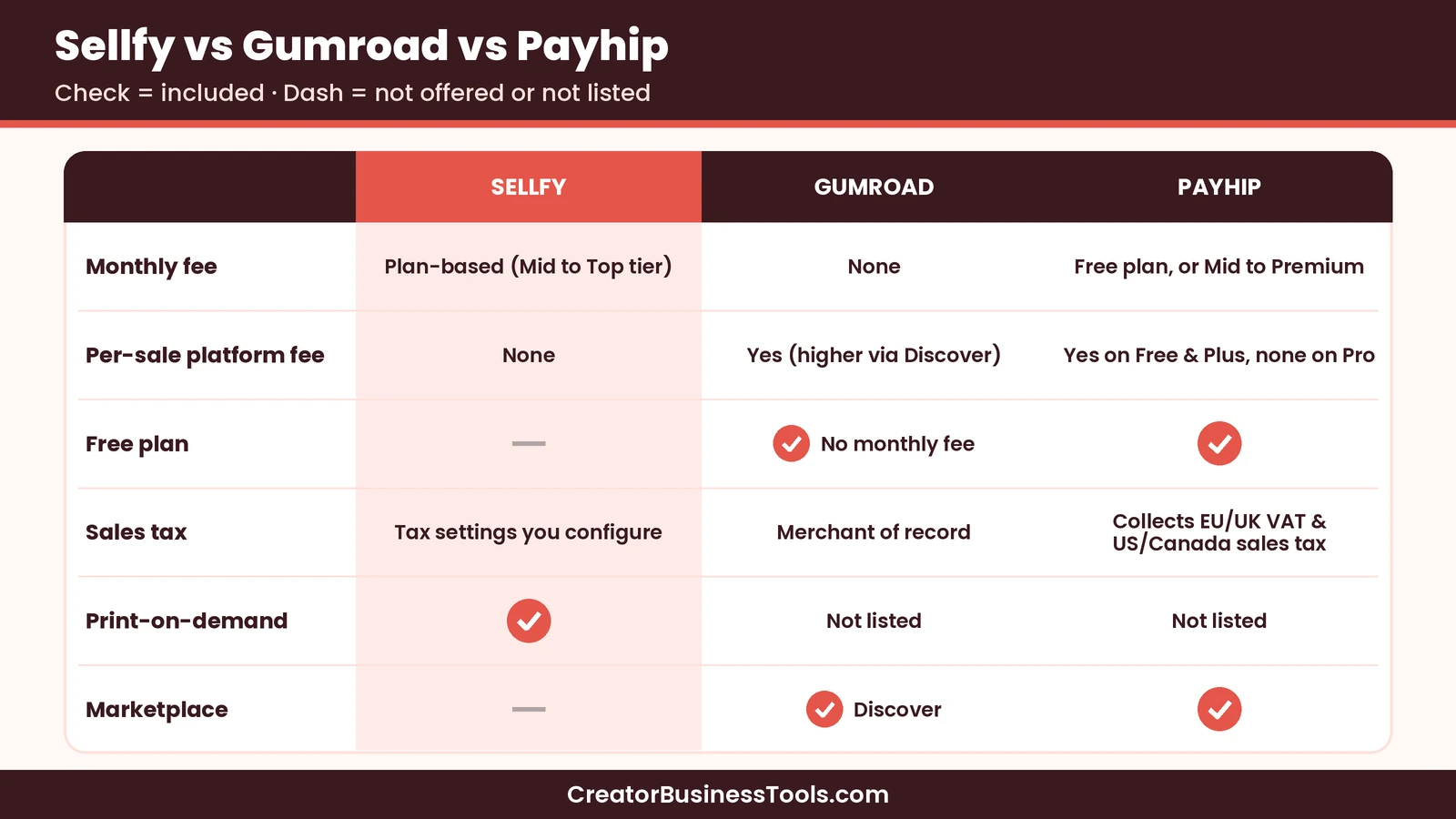
| Sellfy | Gumroad | Payhip | |
|---|---|---|---|
| Monthly fee | Yes, plan-based ($$ to $$$$) | None | Free plan, or $$ to $$$ |
| Platform fee per sale | None | Yes, a percentage plus a fixed fee | Yes on Free and Plus, none on Pro |
| Marketplace | No | Discover (a higher fee applies) | Yes |
| Sales tax | Tax settings you configure | Acts as merchant of record | Collects and remits EU/UK VAT and US/Canadian sales tax |
| Print-on-demand | Yes | Not listed on pricing page | Not listed on pricing page |
| Feature gating | Some features on higher plans | Not applicable | Same features on every plan |
| Processor fees | PayPal/Stripe fees apply | Not broken out on its pricing page | PayPal/Stripe fees apply |
When Gumroad is the better pick
Gumroad charges no monthly fee. Instead, it takes a fee on each sale, and a higher fee when new customers find you through its Discover marketplace.
That’s ideal when you’re testing an idea or only sell occasionally. Gumroad also acts as the merchant of record and handles sales tax collection and remittance, which removes a big admin headache.
As sales grow, the per-sale fee adds up. At some point a flat monthly plan becomes cheaper.
When Payhip is the better pick
For the full write-up, see our Payhip review.
Payhip has a free plan with a per-sale fee. Its paid plans lower that fee, and the top plan removes it.
Payhip says every plan has the same features, and it handles EU/UK VAT and US/Canadian sales tax for digital products. That makes its free plan a very low-risk way to start.
When Sellfy is the better pick
Sellfy makes sense once you sell steadily and want predictable costs. With no platform fee, every extra sale keeps more money in your pocket.
It also stands out if you want print-on-demand merch alongside your printables, or built-in email marketing and cart recovery in the same tool.
A simple way to compare costs
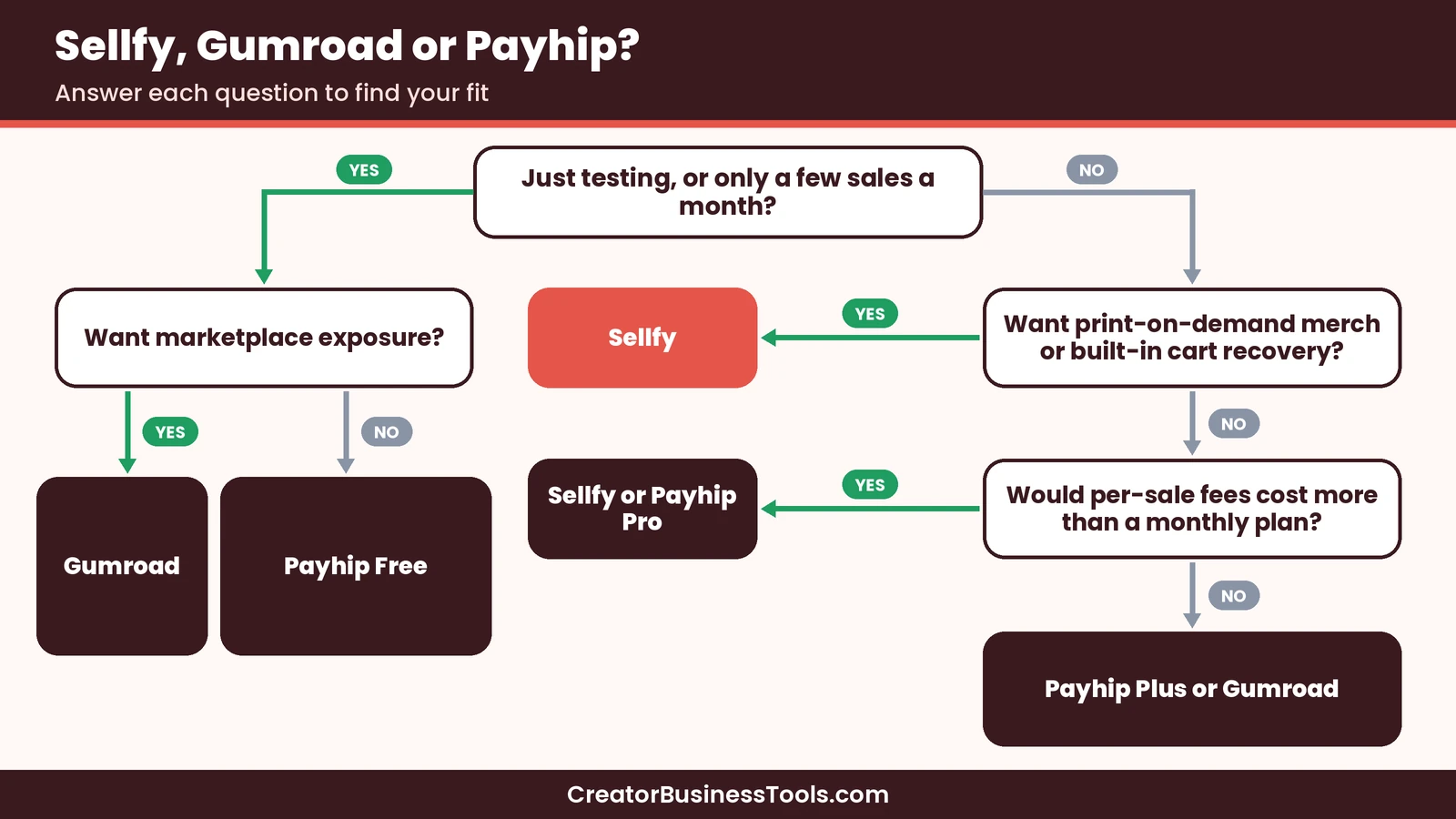
Here’s a rule of thumb. Multiply your expected monthly sales by each platform’s per-sale fee, then compare that with Sellfy’s monthly plan.
If the per-sale fees are lower, Gumroad or Payhip’s free plan wins. If the fees would exceed Sellfy’s plan price, Sellfy is cheaper. Check each platform’s pricing page for current numbers before you decide.
How to sell digital downloads from Pinterest with a Sellfy store
Pinterest is one of the best traffic sources for printables, because people use it to search for ideas and save them for later. Sellfy has an official guide to selling on Pinterest, and the basic steps are simple.
- Set up your Sellfy store and add your products: printables, planners, templates or ebooks.
- Add your store link to your Pinterest profile, so anyone who visits your profile can find your shop.
- Create Pins for each product. Use a tall image that shows the product clearly, with a short, keyword-rich title.
- Set each Pin’s destination URL to the matching product page in your store. Sellfy says you can do this through Pinterest’s destination link field.
- Use keywords people search for. Add them to Pin titles, descriptions and board names.
- Capture emails. Sellfy collects buyer emails, and its email tools let you reach past buyers when you launch something new.
- Recover lost sales. On Business and above, cart abandonment emails follow up with visitors who started checkout but didn’t finish.
Sellfy notes that you don’t need Pinterest approval to link to your store, and you don’t need a website.
Pin ideas for printable sellers
- Product mockups: show the printable on a desk, fridge or tablet.
- Before-and-after: a messy schedule next to a filled-in planner.
- “What’s inside” Pins: a grid of the pages in a bundle.
- How-to Pins: “How to use this meal planner in 3 steps”.
- Seasonal Pins: holiday, back-to-school or new-month planners.
A hypothetical example
Imagine a hypothetical teacher who sells classroom printables. They create five Pins per product, each pointing to the product page in their Sellfy store.
Some Pins point to a free sample instead. Those buyers join the email list, and later receive a message when a new bundle launches.
Keep in mind: Sellfy’s plans have yearly sales caps. If your Pinterest traffic takes off and you pass the cap, plan to upgrade, or you may be charged an overage fee on the extra revenue. Processor fees from PayPal or Stripe apply on every plan.
Common mistakes when selling printables
Choosing a platform on fees alone. Fees matter, but so do checkout experience, email tools and tax handling. Weigh all of them.
Launching with one product. A small catalog of related printables gives Pinterest visitors more reasons to buy, and makes bundles possible.
Weak previews. Buyers can’t touch a PDF. Show clear mockups and a page-by-page preview so they know exactly what they’ll get.
Ignoring taxes. Digital products can carry sales tax or VAT obligations. On Sellfy, you configure tax settings yourself, so learn the basics for your buyers’ locations.
No email follow-up. A one-time buyer is easier to sell to again than a stranger. Use Sellfy’s email tools to announce new products to past customers.
Forgetting the sales cap. If a product goes viral on Pinterest, check your yearly sales against your plan so an overage fee doesn’t surprise you.
What sells well as a digital download
These categories fit Sellfy’s digital download and Pinterest model well:
- Planners and trackers: budget, meal, fitness, habit and homeschool planners.
- Templates: Canva social templates, resumes, wedding invitations and business cards.
- Educational printables: worksheets, flashcards and classroom decor.
- Guides and ebooks: recipes, travel itineraries and how-to guides.
- Creative assets: Lightroom presets, fonts, patterns and clip art.
Bundles work especially well. A “complete planner set” is easier to pin, easier to market and often more valuable to buyers than single pages.
Sellfy pros and cons
Pros
- No Sellfy transaction fee on any plan
- Digital, subscription, physical and print-on-demand products in one store
- Unlimited products and generous file limits
- Built-in email marketing and coupon codes
- No website required, with embeddable buy buttons if you have one
- Payouts go straight to PayPal or Stripe
Cons
- No free plan, only a trial
- Yearly sales caps, with possible overage fees
- Branding removal, upsells and cart recovery start on Business
- Sales tax is configured by you, unlike Gumroad’s merchant-of-record model
Best for: printable, template and ebook sellers with steady sales who want predictable monthly costs and no platform cut. Not ideal for: creators testing their first product, or sellers who want a platform to handle sales tax for them.
How to get started with Sellfy
- Start a trial and set up your store. See Sellfy’s plans
- Choose a theme and add your logo and colors.
- Upload your first products with clear titles, descriptions and preview images.
- Connect PayPal or Stripe so you can get paid.
- Set up taxes in Sellfy’s VAT and tax settings.
- Share your store link on Pinterest, social media and your email list.
- Pick a plan based on your expected yearly sales.
FAQ
Does Sellfy charge transaction fees?
No. Sellfy says it doesn’t charge a transaction fee on any plan. You still pay PayPal or Stripe processing fees.
Does Sellfy have a free plan?
Sellfy’s pricing page doesn’t list a free plan. It offers a free trial and a money-back guarantee.
What’s the cheapest Sellfy plan?
Starter is the cheapest plan, and yearly billing lowers the monthly cost.
Is Sellfy better than Gumroad?
For steady sellers, Sellfy can cost less because it doesn’t take a per-sale cut. Gumroad has no monthly fee and handles sales tax, which suits occasional sellers.
Is Sellfy better than Payhip?
Payhip’s free plan is a cheaper way to start. Sellfy adds print-on-demand and has no platform fee on its entry plan, while Payhip removes its fee only on its top plan.
Can I sell on Pinterest with Sellfy?
Yes. Add your store link to your Pinterest profile and set each Pin’s destination link to a product page. Sellfy says no Pinterest approval or website is needed.
Do I need a website to use Sellfy?
No. Sellfy hosts your store. You can also embed products on an existing website.
Bottom line
Sellfy is a simple, predictable way to sell printables and digital downloads. No transaction fee, unlimited products and built-in email marketing make it a solid home base for growing creators.
If you already sell regularly, or plan to drive steady Pinterest traffic, Sellfy is worth a look. See Sellfy’s plans
Just testing your first product? Start with Payhip’s free plan or Gumroad, and move to Sellfy as sales grow.
Free checklist: Want a head start? Get our free Printable Launch Checklist, a one-page plan for your first product, store page, and Pinterest pins. Contact us to request a copy.
Pricing and features from official vendor pages, last checked October 20, 2026.