
Skool Review: Is Skool the Right Platform for Your Paid Community?
Disclosure: This post contains affiliate links. If you buy through them, we may earn a commission at no extra cost to you. How we make money.
If you’re a coach or course seller thinking about launching a paid community, Skool is probably already on your shortlist. Here’s the short verdict: Skool is one of the simplest ways to launch a paid community with courses, a calendar, and built-in engagement in a single place. It’s a strong fit if you want to get set up quickly and keep your members in one clean space. It’s a weaker fit if you need a fully branded website, built-in email marketing, or deep design control.
There are two plans: a low-cost Hobby plan (under $10/month) and a Pro plan ($50–$100/month). The biggest differences between them are transaction fees, team access, and growth tools like member affiliates. Below, we walk through how Skool works, what each plan includes, the real trade-offs, and how it stacks up against Circle, Mighty Networks, and Kajabi.
Skool at a glance
| Feature | What Skool offers |
|---|---|
| Pricing band | Hobby: Under $10/month. Pro: $50–$100/month. Yearly billing lowers both. |
| Free plan | No. Both plans start with a free trial, and you can cancel anytime. |
| Transaction fees | Higher percentage on Hobby; much lower on Pro (plus a small fixed fee per transaction) |
| Members, courses, videos, live calls | Unlimited on both plans |
| Courses | Classroom with folders, lessons, native video, drip, and level, time, or purchase unlocks |
| Calendar and live | Shared calendar plus native live calls on both plans; webinars on Pro |
| Gamification | Points, levels, and leaderboards that can unlock courses and events |
| Mobile apps | Official iOS and Android apps |
| Custom URL and branding | Branded skool.com URL on Pro; logo, cover image, and About page. Custom domains aren’t listed on the pricing page. |
| Admins | One admin on Hobby; multiple admins on Pro |
| Member affiliates | Pro only |
| Automations and integrations | Zapier, AutoDM, webhooks, and ad tracking plugins on Pro |
| Payments | Built in, with weekly payouts to your bank account |
What Skool is and how it works
Skool is an all-in-one platform for running an online community. Each community (Skool calls it a “group”) is built around a few simple tabs:
- Community: a discussion feed where you and your members post, comment, and like.
- Classroom: where your courses, guides, and resources live.
- Calendar: your schedule of live calls, workshops, and events.
- Members and Leaderboards: who’s in the group and who’s most active.
Every group also has a public About page. That’s what prospects see before they join, and it’s the link you share on social media and in your emails.
You decide how people get in. Skool supports free groups, monthly or annual subscriptions, a freemium setup (a free tier plus a paid upgrade), multiple paid tiers, and one-time payments. You can even sell individual courses inside a group with a one-time “Buy now” price. If you raise prices later, existing members keep the price they joined at.
Payments run through Skool itself. Members pay in U.S. dollars, and Skool sends your available balance to your bank account every week through a Stripe Express connection. One thing to know upfront: you can’t plug in your existing Stripe account. Skool sets up a new connection just for payouts.
The design is intentionally minimal, and every Skool community works much the same way. That limits your look, but members who already use Skool will feel at home right away.
Key features
Community feed and chat
The feed is the heart of every Skool group. You can organize posts into categories, pin important posts, and let members share videos in their posts and comments. Members can also message each other directly in chat. For larger groups, built-in controls let you lock chat or posting until a member reaches a certain level. An AutoMod feature flags high-risk accounts so admins can review them.
Classroom (courses)
The Classroom handles course delivery. You build courses from pages, organize them in folders, and add video, text, downloadable files, resource links, and transcripts. Skool hosts your videos natively and automatically adds English closed captions to videos with sound. You can also embed videos from YouTube, Vimeo, Loom, and Wistia.
Access controls are flexible. A course can be open to everyone, unlocked at a certain level, unlocked a set number of days after someone joins, sold as a one-time purchase, or limited to specific members or tiers. You can also drip individual lessons over time.
Calendar, live calls, and webinars
The Calendar shows members your upcoming events, with options for recurring events and level- or tier-based access. Skool’s native live calls (Skool Call) are included on both plans. You can share your screen, chat with attendees, and record the session to download afterward. You can also use Zoom, Google Meet, or a physical address for in-person meetups. One-to-many webinars are a Pro feature.
Gamification
This is the feature Skool is best known for. Members earn points when others like their posts and comments. Points move them up through levels, and leaderboards show who’s most engaged. You can tie rewards to those levels, such as unlocking a bonus course or giving access to a special call, so members have a reason to keep showing up and helping each other.
Member affiliates (Pro)
On Pro, you can let members refer new people to your community and earn a commission you set. Skool tracks the referrals and handles the payouts. It’s a low-effort way to turn happy members into a word-of-mouth sales team.
Plugins and integrations
Some plugins work on both plans, including membership questions and level-based chat and posting locks. Pro adds the business tools: AutoDM welcome messages, an onboarding video, a cancellation video, Zapier, Google Ads tracking, custom links, instant membership approval, and webhooks.
Discovery and Growth Boost
Skool has a public Discovery directory where people browse communities, and groups that meet activity requirements can show up there. An optional Growth Boost setting (on by default) lets Skool promote your group in search results and through off-site ads. In return, Skool takes a share of revenue from members it brings in. Skool’s help center says this isn’t recommended for high-ticket offers sold through sales calls or funnels, and you can switch it off in settings.
Mobile apps
Official iOS and Android apps let members follow the feed, take courses, check the calendar, and chat on the go.
Skool pricing explained
Skool keeps pricing simple, with just two plans. Both include unlimited members, courses, videos, and live calls, and both start with a free trial.
Hobby (Under $10/month). This plan is built for getting started. You get the full community, classroom, calendar, and live-call experience. The trade-offs are a noticeably higher transaction fee on every sale, a single admin seat, and no member affiliates, Pro plugins, webinars, or custom URL.
Pro ($50–$100/month). Pro costs much more each month but charges a much lower percentage on each sale, close to what you’d expect from a standard card processor. It also unlocks multiple admins, member affiliates, webinars, a branded skool.com URL, and automation plugins like AutoDM and Zapier.
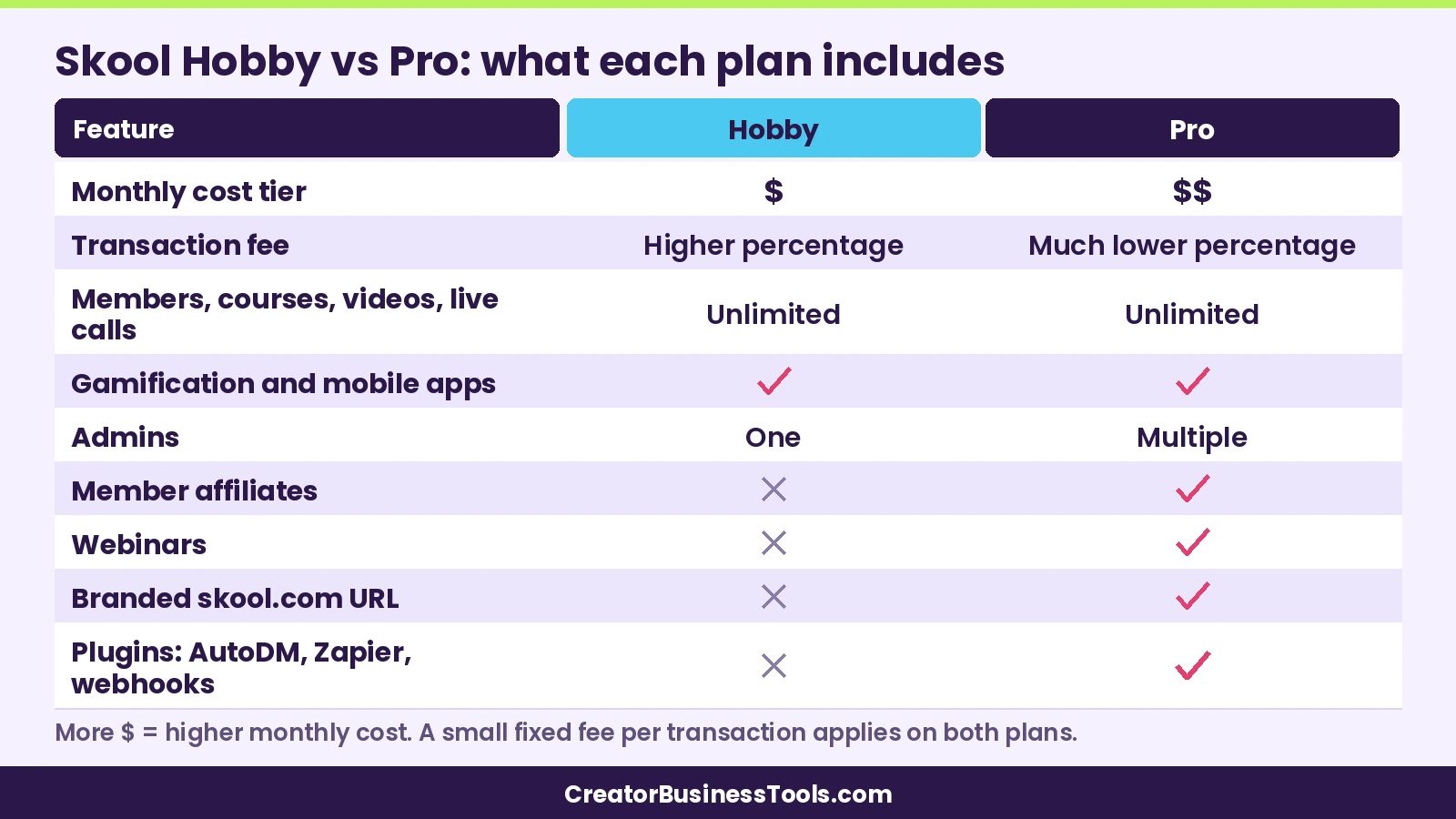
Yearly billing. Both plans cost less per month when you pay yearly.
How to choose between them: If you’re still testing an idea or charging a small amount to a handful of members, Hobby keeps your fixed costs very low. Once your monthly community revenue grows, the gap in transaction fees adds up fast, and at some point Pro’s lower fee more than covers its higher subscription price. Work out your own break-even using Skool’s current fee table before you commit. If you need a team, affiliates, or automations, you’ll want Pro regardless of revenue.
To turn member wins into testimonials, Senja pairs well with community platforms.
Keep a few extra costs in mind. A small fixed fee applies to every transaction on both plans, which matters most for low-priced memberships. Growth Boost takes a share of revenue from members Skool brings you, if you leave it on. And changing your custom URL more than once costs extra.
Ready to try it? You can start a free trial on Skool and build out your Classroom before you pay.
Pros and cons
Pros
- Very easy to set up, with little to configure.
- Community, courses, calendar, and live calls all live in one place.
- Gamification is built in and closely tied to course and event access.
- Unlimited members, courses, and videos on both plans.
- Very low entry price on Hobby, and a low transaction fee on Pro.
- Payments and payouts are built in, and Skool handles EU VAT.
- Member affiliate program on Pro.
- Official iOS and Android apps.
Cons
- Limited design and branding control compared with platforms that include a website builder.
- No custom domain support listed on the pricing page; Pro gives you a branded skool.com URL instead.
- The pricing page doesn’t list email marketing, landing pages, or sales funnels, so you’ll likely need separate tools for those.
- Hobby’s transaction fee is much higher, and it’s limited to one admin.
- You can’t connect your own Stripe account, and members pay in U.S. dollars.
- Subscription fees aren’t refundable, and canceling turns your group read-only at the end of the billing period.
Who Skool is best for (and who should skip it)
Best for:
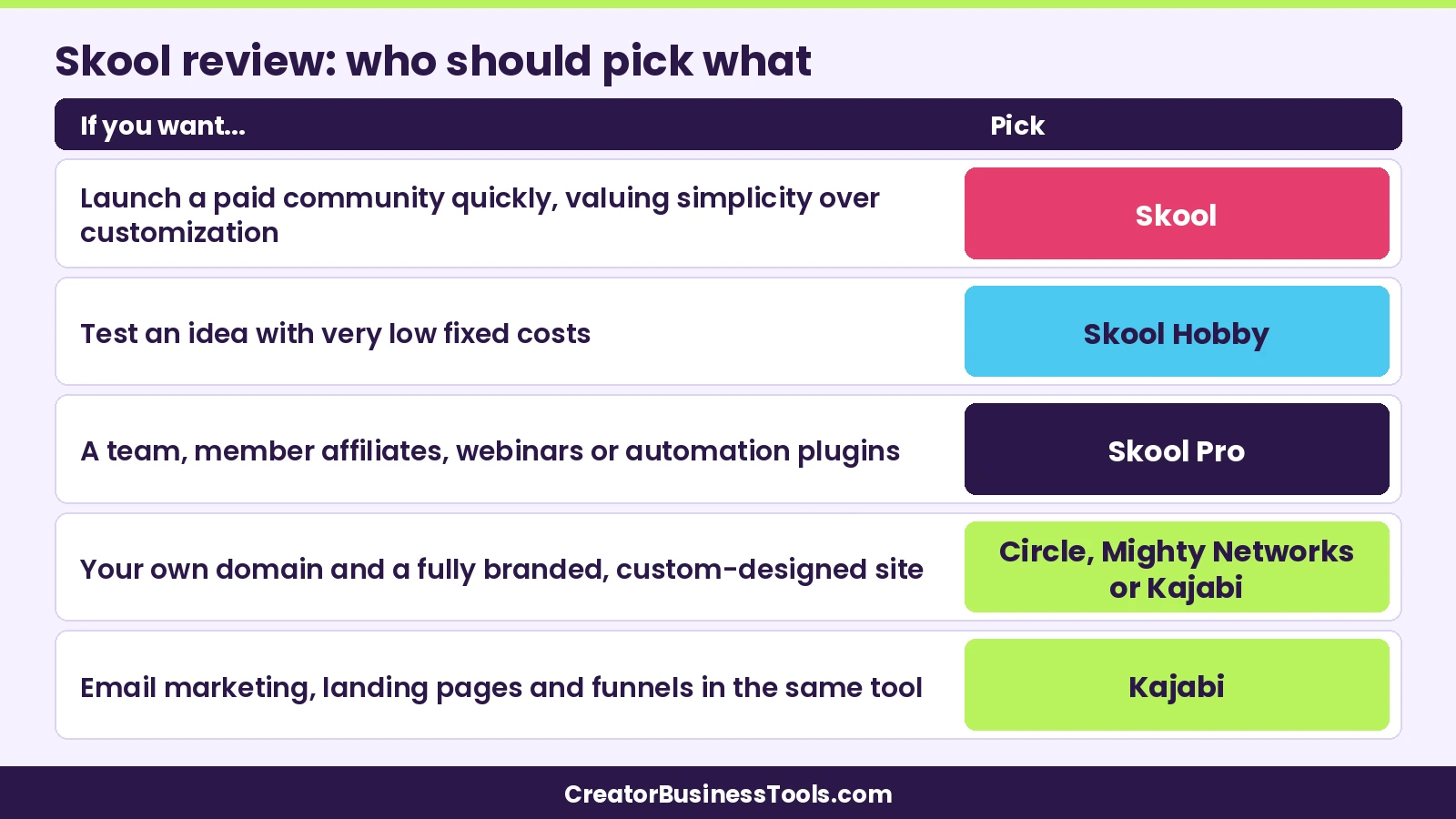
- Coaches who want to launch a paid community quickly, without stitching tools together.
- Course sellers who want courses and discussion in one place, with engagement baked in.
- Creators who run regular live calls and want calls and recordings on the same platform.
- Anyone who values simplicity over customization.
- Growing communities that want a built-in way to reward members for referrals (on Pro).
Not ideal for:
- Brands that need a fully custom-designed site, their own domain, or a white-labeled experience.
- Creators who want email marketing, landing pages, and funnels inside the same tool.
- Businesses that need their own Stripe account or prefer to charge in a currency other than U.S. dollars.
- Teams that need detailed custom member profiles, advanced workflows, or deep integrations beyond what Skool’s plugins offer.
Skool alternatives
Skool isn’t the only option. Here’s how three popular alternatives compare. For a deeper, side-by-side breakdown, see our Circle vs Skool vs Mighty Networks comparison.
Circle
Circle is a community platform with more customization than Skool. Its entry plan falls in the $50–$100/month range on annual billing. It includes community, courses, live events, a website, payments, gamification, a custom domain, and iOS, Android, and desktop apps. Higher tiers add workflows, APIs, and the option to remove Circle branding.
Keep in mind: Lower plans cap admins, moderators, and spaces, and each tier charges its own transaction fee. Removing Circle branding requires a higher tier.
Best for: Creators and brands who want a polished, customizable community on their own domain, with room to grow into automations.
Mighty Networks
Mighty Networks combines community, courses, events, and paid memberships. Its entry plan falls in the $50–$100/month range, with yearly billing lowering the cost. It offers iOS, Android, and web access, livestreaming, quizzes, cohort-based courses, member badges, and a custom domain. Branded apps are available on its top tier.
Keep in mind: Each plan limits hosts, moderators, streaming hours, and storage. Integrations like Zapier and marketing pixels start above the entry plan, and transaction fees drop as you move up.
Best for: Coaches running cohort programs, challenges, or live-heavy memberships who want more course and engagement tools than Skool offers.
Kajabi
Kajabi is an all-in-one business platform. It covers courses, coaching, community, a website with your own domain, email marketing, landing pages, funnels, and checkout. Plans start in the $100–$200/month range, and Kajabi says it takes no revenue share (card processing fees still apply).
Keep in mind: Kajabi costs significantly more than Skool to start, and community is one feature among many rather than the main focus. Its own affiliate program and branding removal start on higher tiers.
Best for: Established coaches and course creators who want to replace separate website, email, and checkout tools with one system.
Free options: Discord and Facebook Groups
If you’re just testing an idea, Discord or a Facebook Group can get conversations going at no platform cost. They aren’t built around course hosting and paid memberships the way Skool is, so you’ll usually need separate tools for courses and payments. Many creators start free, then move to a dedicated platform once people are willing to pay.
How to decide: a quick checklist
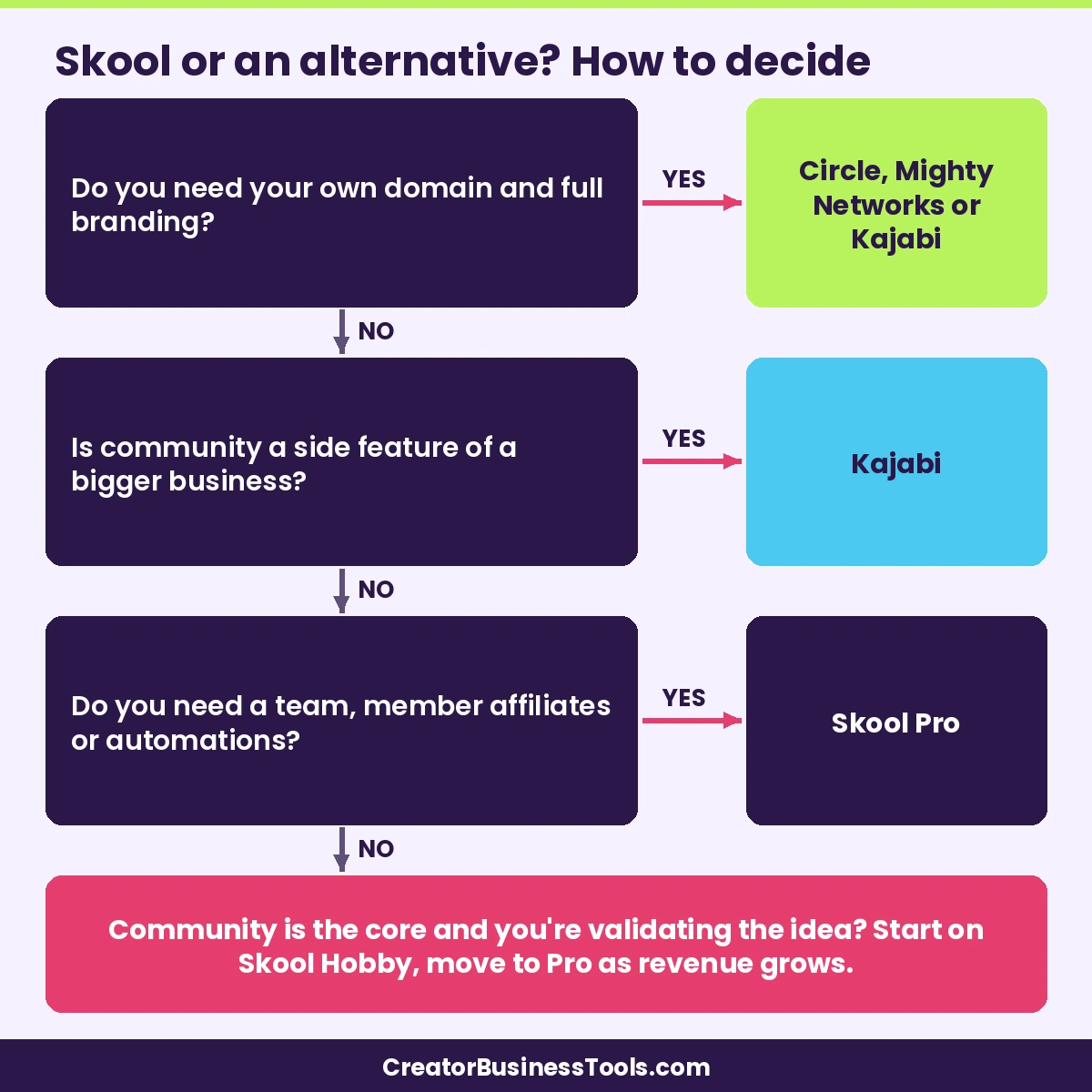
- Is community the core of your offer? If yes, Skool or Circle are natural fits. If community is a side feature of a bigger business, consider Kajabi.
- Do you need your own domain and branding? If that’s a must-have, look at Circle, Mighty Networks, or Kajabi.
- Do you already have email and a website? Skool pairs well with existing tools. If you have neither, an all-in-one like Kajabi may save you money overall.
- How much will you charge, and to how many members? Estimate your monthly revenue and compare transaction fees, not just subscription prices.
- Will you run live calls? Skool includes native calls on both plans. Check streaming limits on other platforms.
- Do you need a team? Skool’s Hobby plan allows one admin; Pro allows more.
- Do you want members to refer others? Skool’s member affiliates require Pro.
- Use the free trial with real content. Build your About page, upload one course module, and schedule one event before you decide.
Still comparing the big three? Our Circle vs Skool vs Mighty Networks guide goes deeper on features and fees.
FAQ
Is Skool worth it for coaches?
For many coaches, yes. Skool puts your community, courses, calendar, and live calls in one simple space, and gamification helps keep members engaged. If you need heavy branding, email marketing, or funnels, you’ll likely need other tools alongside it, or a different platform.
How much does Skool cost?
Skool has two plans. Hobby costs under $10/month, and Pro falls in the $50–$100/month range. Paying yearly lowers both. Transaction fees apply to sales on both plans, and they’re much lower on Pro.
Does Skool have a free plan?
No. Skool doesn’t offer a free-forever plan for community owners, but both plans start with a free trial. You can also run a free community for your members on either paid plan.
What’s the difference between Skool Hobby and Pro?
Both include unlimited members, courses, videos, and live calls. Pro adds a much lower transaction fee, multiple admins, member affiliates, webinars, a branded skool.com URL, and automation plugins like AutoDM and Zapier.
Can I use my own domain with Skool?
Skool’s pricing page lists a custom URL on Pro, which lets you claim a branded skool.com address. Using your own separate domain isn’t listed. If that’s essential, confirm with Skool or consider Circle, Mighty Networks, or Kajabi.
Does Skool take a cut of my sales?
Skool charges a transaction fee on each sale: a higher percentage on Hobby and a much lower one on Pro, plus a small fixed fee per transaction. If you turn on Growth Boost, Skool also takes a share of revenue from members it brings you.
Can I sell courses on Skool without a subscription community?
Yes. You can run a free group and sell individual courses with one-time “Buy now” pricing, or charge a one-time fee to join the group.
Does Skool have a mobile app?
Yes. Skool has official apps for iOS and Android, with the community feed, courses, calendar, chat, and push notifications.
The bottom line
Skool does one thing really well: it gives coaches and course sellers a simple, engaging home for a paid community, with courses, live calls, and gamification built in. Start on Hobby if you want low fixed costs while you validate your idea. Move to Pro once your revenue, team, or affiliate plans make the lower transaction fee and extra tools worth it. If you need your own domain, full branding, or built-in email and funnels, Circle, Mighty Networks, or Kajabi may suit you better.
The easiest way to find out is to try Skool free, set up your About page and first course, and see how your members respond.