
beehiiv Review: Is It Right for Your Paid Newsletter?
Disclosure: This post contains affiliate links. If you buy through them, we may earn a commission at no extra cost to you. How we make money.
If you want to turn your writing into a paid newsletter, beehiiv is probably on your shortlist. It’s built specifically for newsletters, and it bundles paid subscriptions, an ad network, a referral program, and a website builder into one platform. But it’s not the only option, and its pricing changes with the size of your list, so it’s worth understanding what you’ll actually get and pay before you commit.
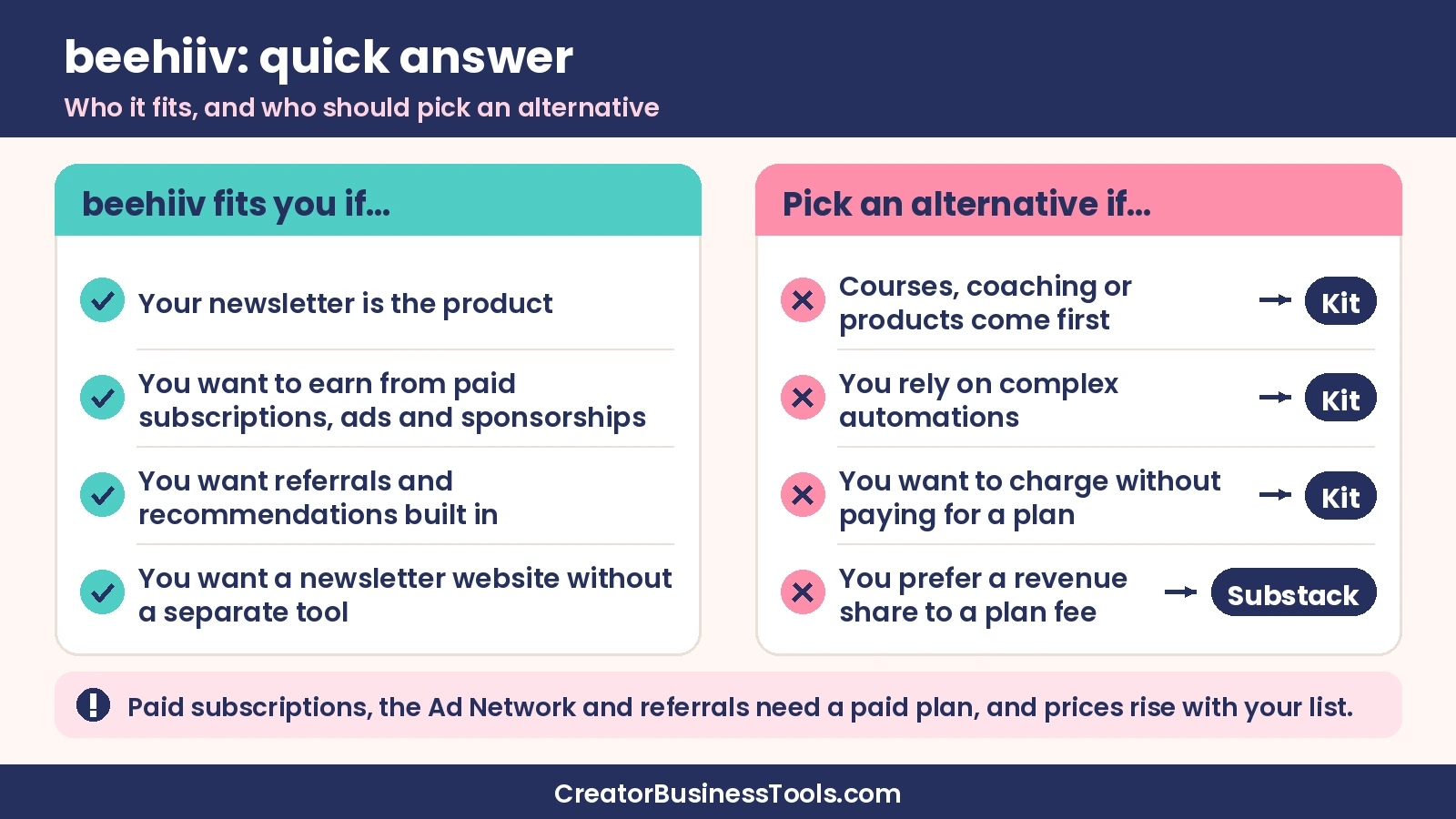
Here’s the short answer: beehiiv is one of the strongest choices for creators who want to build a newsletter as a business. Its free plan is good for getting started, and its paid plans add the monetization and growth tools that matter most: paid subscriptions with no platform cut, the beehiiv Ad Network, and a built-in referral program. The main tradeoffs are that monetization starts on a paid plan and costs rise as your list grows. If your newsletter mainly supports courses, coaching, or digital products and you need deep automations, Kit may fit better.
Below, we cover beehiiv’s pricing by band, its key features, a detailed beehiiv vs Kit comparison, alternatives, and who should choose it.
beehiiv at a glance
| Category | What beehiiv offers |
|---|---|
| Best for | Creators building a newsletter as the main product, especially paid or ad-supported newsletters |
| Free plan | Yes, up to 2,500 subscribers, with unlimited sends and no credit card required |
| Paid plans | Lite and Pro, priced by subscriber count; Enterprise is custom |
| Price band (small list) | Lite under $100/month; Pro roughly $100–$150/month |
| Platform cut of paid subscriptions | None; you pay Stripe’s standard processing fee |
| Monetization | Paid subscriptions, Ad Network, paid recommendations, digital products, and sponsorship tools on Pro |
| Growth tools | Recommendation network on all plans; referral program on paid plans |
| Website | Website builder on every plan; custom domains on paid plans |
| Also included | Podcast hosting, community, and digital products on every plan, with limits by tier |
beehiiv pricing
beehiiv has three self-serve plans plus Enterprise. Paid plan prices depend on how many subscribers you have, so the cost rises as your list grows. Paying yearly saves up to about 20% compared with monthly billing.
Free
The Free plan costs nothing, has no time limit, and doesn’t require a credit card. It covers up to 2,500 subscribers with unlimited email sends, email templates, landing pages, the website builder, the recommendation network, and API access. You get one publication, one team seat, and a 30-day analytics window.
The key limit for paid newsletter creators: Free doesn’t include paid subscriptions, the Ad Network, or the referral program. It’s a place to start and build your list, not to monetize.
Lite
Lite is beehiiv’s entry paid plan. For a small list, it sits under $100/month. Around 10,000 subscribers, it’s in the $100–$150/month range, and at 100,000 subscribers, it’s roughly $400–$500/month. Lite supports up to 100,000 subscribers.
Lite unlocks the core money-making tools: paid subscriptions (one paid tier), the Ad Network, paid recommendations, metered paywalls, coupons, the referral program, automations, A/B testing, audience polls, surveys, and custom domains. You also get more seats, publications, and a 12-month analytics window.
Pro
Pro is the plan beehiiv labels most popular. For a small list, it’s roughly $100–$150/month. Around 10,000 subscribers, it’s in the $200–$250/month range, and at 100,000 subscribers, it’s roughly $600–$700/month. Pro supports up to 250,000 subscribers.
Pro adds unlimited paid tiers, paid trials, group subscriptions, a sponsorship storefront, the option to remove beehiiv branding, webinars and coaching, order bumps and upsells for digital products, dynamic content, unlimited automations, unlimited webhooks, more team seats, priority support, and unlimited analytics history.
Enterprise
Enterprise is custom-priced and adds things like SSO, dedicated IPs, a customer success manager, and concierge onboarding. Most individual creators won’t need it.
Fees to know: beehiiv says it takes 0% of your paid subscription and digital product revenue. You pay only Stripe’s standard processing fee on each transaction. That’s a meaningful difference from platforms that take a percentage of your subscription income.
Free trial: Lite and Pro include a free trial with no credit card required, so you can explore paid features before you pay.
Key features
Paid subscriptions
Paid subscriptions are the heart of a paid newsletter. On Lite, you can offer one paid tier, use metered paywalls that let readers sample content before subscribing, and run coupons and promo codes. Pro allows unlimited tiers, paid trials, and group subscriptions, which is useful for selling team or company plans.
Because beehiiv doesn’t take a cut, your main costs are your plan and Stripe’s fees. As your paid subscriber base grows, that structure tends to work in your favor compared with revenue-share platforms.
The beehiiv Ad Network
The Ad Network connects your newsletter with advertisers, so you can earn from sponsored placements without finding every sponsor yourself. It’s available on Lite and above. On Pro, the sponsorship storefront also gives you a place to sell sponsorships directly.
Ad income depends heavily on your audience size, niche, and engagement, so treat it as a bonus revenue stream rather than a guaranteed number.
Referral program and recommendations
Growth tools are one of beehiiv’s biggest strengths. Every plan, including Free, includes the recommendation network, where newsletters recommend each other to new subscribers. Paid plans add paid recommendations, where you can earn or pay for subscribers through recommendations.
The built-in referral program, available on Lite and up, lets readers earn rewards for sharing your newsletter. Lite supports a limited number of referral milestones, while Pro allows unlimited milestones. For many newsletter creators, a referral program is one of the most cost-effective ways to grow.
Website builder
Every beehiiv plan includes a website builder, website templates, hosting, subscribe forms, and a link-in-bio page. Your newsletter archive lives on your site, which helps with discovery and gives readers a reason to subscribe. Paid plans add the advanced website builder, custom domains, more custom pages, and site redirects. Pro adds controls like a custom robots.txt and AI bot control.
Automations
Lite includes up to 10 live custom automations, with triggers like sign-ups, form submissions, segments, tags, paid subscription purchases and cancellations, and product purchases. Pro removes the limit and adds click-triggered automations, A/B splits, and advanced conditions. That covers welcome sequences, paid upgrade nudges, and re-engagement flows. It’s capable, though it isn’t as central to the product as automations are in Kit.
Podcast, community, and digital products
beehiiv includes podcast hosting, a community space, and digital products on every plan, with limits that grow by tier. The community includes channels, member profiles, direct messages, moderation, and a mobile web app. Digital products support one-time purchases, a customer library, and refunds, with discount codes and pay-what-you-want pricing on Lite and above.
These extras make beehiiv more of a creator business platform than a pure email tool. That said, if courses are your main product, a dedicated course platform or an email tool built around course launches may still fit better.
Analytics and support
All plans include campaign analytics and subscriber metrics. The analytics lookback window grows from 30 days on Free to 12 months on Lite and unlimited history on Pro. Support moves from an AI agent on Free to standard support on Lite and priority support on Pro.
beehiiv vs Kit
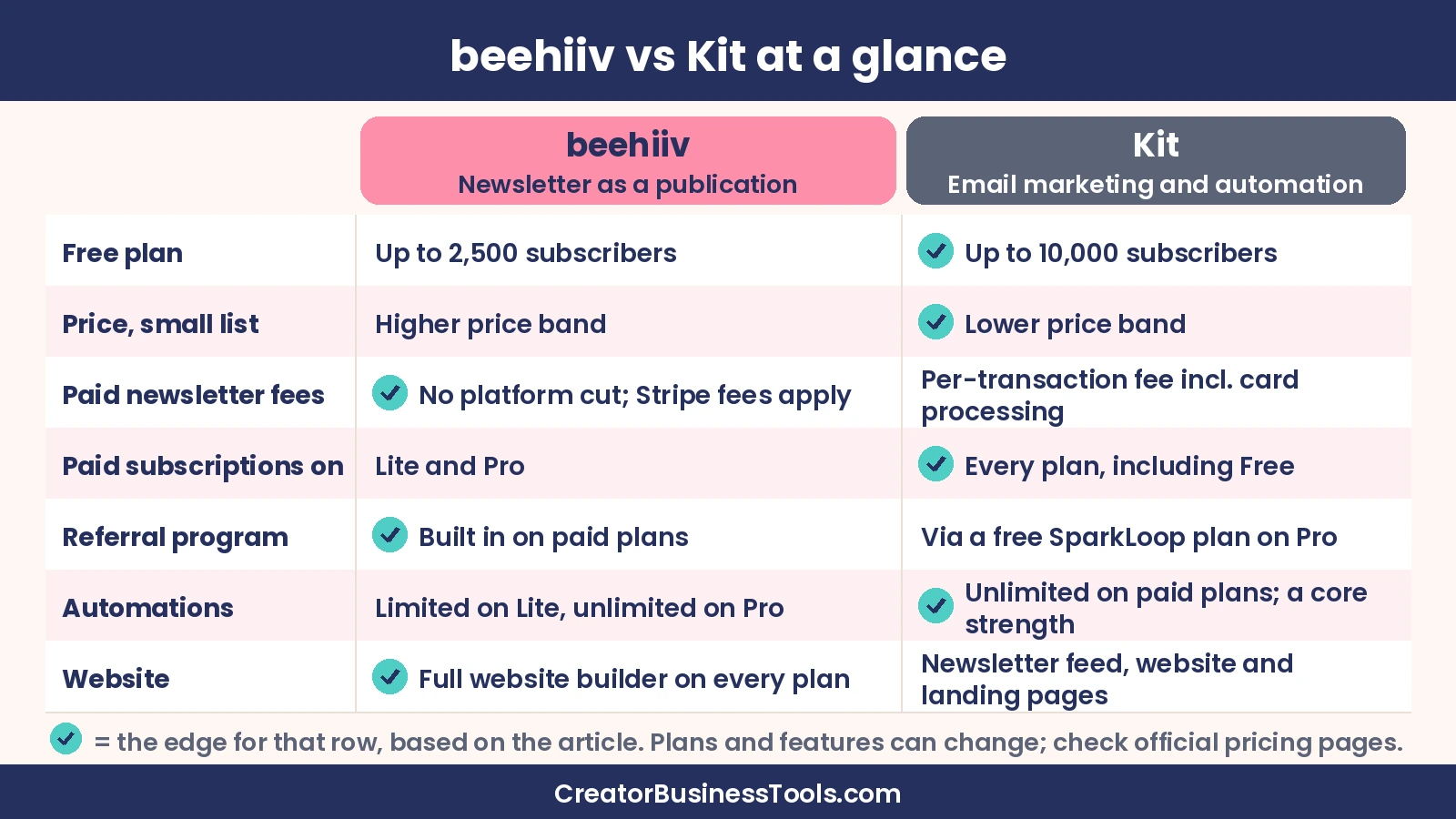
Kit, formerly ConvertKit, is the platform beehiiv is most often compared with. Both serve creators, but they start from different places. beehiiv is built around the newsletter as a publication and business. Kit is built around email marketing and automation for creators who sell products, courses, and services.
| Category | beehiiv | Kit |
|---|---|---|
| Free plan | Up to 2,500 subscribers | Up to 10,000 subscribers |
| Entry paid plan (small list) | Lite, under $100/month | Creator, $30–$40/month |
| Upper plan (small list) | Pro, roughly $100–$150/month | Pro, $65–$80/month |
| Paid newsletter fees | 0% platform cut; Stripe fees apply | Per-transaction fee that includes card processing |
| Paid subscriptions available on | Lite and Pro | Every plan, including Free |
| Ad network | beehiiv Ad Network on paid plans | Newsletter sponsorship tools |
| Referral program | Built in on paid plans | Via a free SparkLoop plan on Pro |
| Automations | Limited on Lite, unlimited on Pro | Unlimited visual automations and sequences on paid plans |
| Website | Full website builder on every plan | Newsletter feed and website, plus landing pages |
| Free trial | Free trial on Lite and Pro | 14-day free trial on paid plans |
Pricing
Kit’s free plan covers far more subscribers than beehiiv’s, and its paid plans start in a lower price band for small lists. beehiiv’s paid plans cost more at the same list size, but they bundle more publishing and monetization tools. If budget is tight and you have a few thousand subscribers, Kit is usually cheaper. If you’ll use beehiiv’s Ad Network, referral program, and website, the extra cost can pay for itself.
Monetizing a paid newsletter
Both platforms let you charge for a newsletter. Kit allows paid newsletters even on its free plan, which is attractive when you’re just starting. However, Kit charges a per-transaction fee that includes card processing, while beehiiv takes no platform cut and you pay only Stripe’s processing fee. At small revenue levels, the difference is minor. As your paid revenue grows, beehiiv’s structure keeps more in your pocket.
beehiiv also gives you more ways to earn from the newsletter itself, including the Ad Network, a sponsorship storefront on Pro, paid recommendations, and multiple paid tiers. Kit also offers newsletter sponsorship tools, plus paid recommendations on its paid plans, so both platforms support sponsorship and recommendation income.
Growth
beehiiv’s referral program is built in on paid plans, and its recommendation network is available to everyone. Kit offers free recommendations on every plan and paid recommendations on paid plans, and its Pro plan includes a free SparkLoop plan for referrals. If you want a native referral program at a lower tier, beehiiv has the edge.
Automation and selling products
Kit is stronger if your newsletter is a funnel for courses, coaching, or digital products. Its visual automations, sequences, tagging, and segmentation are core to the product, and paid plans include unlimited automations. beehiiv’s automations are useful but lighter, especially on Lite. If you’re a course creator, our guide to the best email marketing for course creators goes deeper on this.
Publishing and design
beehiiv feels like a publishing platform. Its website builder, newsletter archive, podcast hosting, and community make it easy to build a media-style brand. Kit focuses on landing pages, forms, and email design, with a newsletter feed and website for your content. If you’re a writer, artist, or designer who wants a polished publication, beehiiv usually suits better. For a broader look at email tools for visual creators, see our guide to the best email marketing for creatives.
Which should you choose?
Choose beehiiv if your newsletter is the product and you want to grow and monetize it with subscriptions, ads, and referrals. Choose Kit if your newsletter supports a business built on courses, coaching, or products, and automation matters more than publishing features.
beehiiv review: the verdict
beehiiv is built for creators who want their newsletter to be a business. Its free plan is solid for building an early audience, and its paid plans add paid subscriptions with no platform cut, an ad network, a referral program, and a full website. Podcast hosting, community, and digital products on every plan add even more value.
Keep in mind: Paid subscriptions, the Ad Network, and the referral program require a paid plan, and prices rise with your subscriber count. Removing beehiiv branding, unlimited paid tiers, and unlimited automations require Pro. Automations are lighter than in email-first tools like Kit.
Best for: Writers and creators launching a paid or ad-supported newsletter, publishers who want growth tools built in, and creators who want a newsletter website without a separate tool.
Not ideal for: Course creators and coaches who rely on complex automations, or creators who want to charge for a newsletter without paying for a plan.
Start with beehiiv’s free plan
beehiiv alternatives
- Kit: The best alternative if your newsletter supports courses, coaching, or digital products. Its free plan is generous, and its automations are a core strength. See Kit’s plans.
- Substack: Free to start, but it takes a share of your paid subscription revenue instead of charging a monthly plan fee. It’s a simple option if you’d rather not manage a paid plan, though that revenue share grows as your income grows.
- Ghost: An open-source publishing platform for websites, newsletters, and paid memberships. It suits creators who want a blog-first publication with control over their site design.
- MailerLite: An email marketing tool with landing pages, automations, and paid newsletter subscriptions. It’s a practical option if you mainly need email marketing rather than beehiiv’s publishing tools.
⚠️ Before you decide: beehiiv’s paid plan prices change with your subscriber count, and plans, features, and fees can change at any time. Check beehiiv’s official pricing page with your actual list size, and confirm which features are on the plan you’re considering. Ad income and referral results vary widely by niche and audience.
How to choose a paid newsletter platform
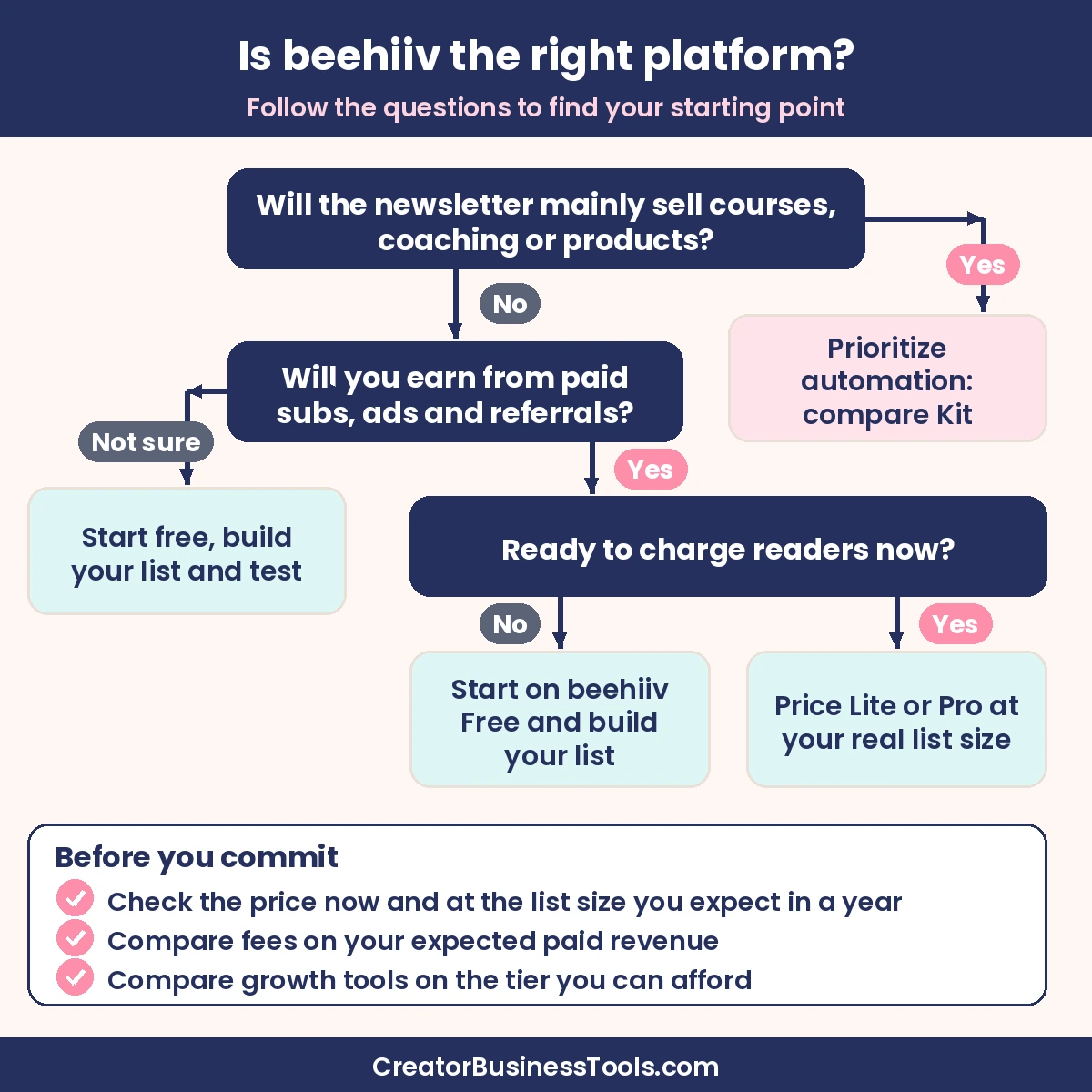
- Decide how you’ll make money. If you’ll earn mainly from paid subscriptions and ads, beehiiv’s tools are built for that. If the newsletter sells courses or coaching, prioritize automation.
- Price it at your real list size. beehiiv’s paid plans depend on subscriber count. Check the price at your current size and at the size you expect in a year.
- Compare fees on paid revenue. beehiiv takes no platform cut, Kit charges a per-transaction fee, and Substack takes a revenue share. Estimate what each would cost at your expected paid revenue.
- Look at growth tools. If referrals and recommendations are part of your plan, compare what each platform includes on the tier you can afford.
- Think about your website. If you want a full newsletter website and archive, beehiiv includes one on every plan.
- Start free and test. Build your first issues on a free plan, then upgrade when you’re ready to monetize.
FAQ
Is beehiiv free?
Yes. beehiiv’s Free plan has no time limit and covers up to 2,500 subscribers with unlimited email sends, a website, and the recommendation network. Paid subscriptions, the Ad Network, and the referral program require a paid plan.
Does beehiiv take a cut of paid subscriptions?
No. beehiiv says it takes 0% of paid subscription and digital product revenue. You pay Stripe’s standard processing fee.
How does beehiiv pricing work?
beehiiv’s Lite and Pro plans are priced by subscriber count, so the price rises as your list grows. Paying yearly saves up to about 20%.
Is beehiiv better than Kit?
For a newsletter-first business with paid subscriptions, ads, and referrals, beehiiv is often the better fit. For a creator business built on courses or products with heavy automation, Kit is usually better.
Can I move from Kit or Substack to beehiiv?
beehiiv has a dedicated migration page and a migration guide for creators moving from other platforms. Plan the move carefully if you have paid subscribers, and follow beehiiv’s current migration guide and help docs.
Does beehiiv have a referral program for readers?
Yes. The built-in referral program is available on Lite and Pro, with unlimited referral milestones on Pro.
The bottom line
beehiiv is one of the best platforms for creators who want to launch and grow a paid newsletter. It combines paid subscriptions with no platform cut, an ad network, referral and recommendation tools, and a full website in one place. Start on the free plan, grow your list, and upgrade to Lite when you’re ready to charge. If your newsletter mainly supports courses or coaching and you need deep automation, compare it with Kit before deciding.
Explore beehiiv’s plans and price them at your current list size to see where you’d start.
Launching a podcast alongside your newsletter? See our Riverside vs Zoom for podcast recording guide.