
Best Email Marketing for Course Creators: 5 Tools for Launches
Disclosure: This post contains affiliate links. If you buy through them, we may earn a commission at no extra cost to you. How we make money.
Your email list is the most reliable sales channel you’ll ever have as a course creator. Social reach rises and falls, but a subscriber who joined for your free workshop can become a student next month and a coaching client next year. The right email platform makes that journey automatic.
Course creators need more than pretty newsletters, though. You need to tag people by what they downloaded and bought, run launch sequences with deadlines, sell digital products, and keep your email tool in sync with your course platform. This guide compares five email marketing tools through that lens, using each company’s official pricing and feature pages.
Plans and features change often, so always confirm the current details on each provider’s site.
Quick picks
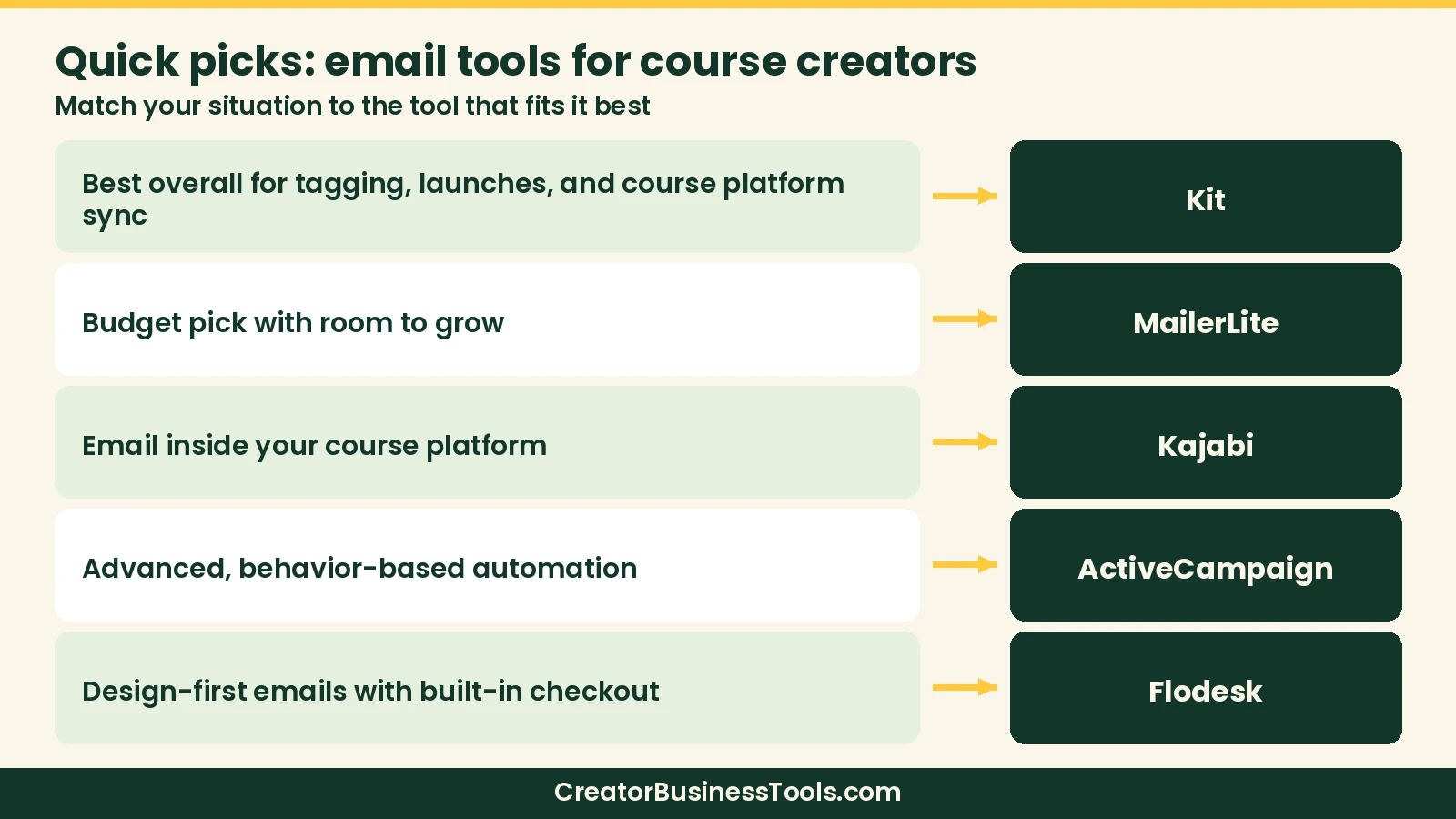
- Best overall for course creators: Kit, Free plan available; paid plans Under $50/month to start
- Best budget pick with room to grow: MailerLite, Free plan available; paid plans Under $30/month to start
- Best if you want email inside your course platform: Kajabi, $100–$200/month to start (includes the full course platform)
- Best for advanced, behavior-based automation: ActiveCampaign, Under $50/month to start; more for automation-heavy tiers
- Best design-first option with built-in checkout: Flodesk, Under $30/month to start; $50–$60/month for full checkout tools
Comparison at a glance
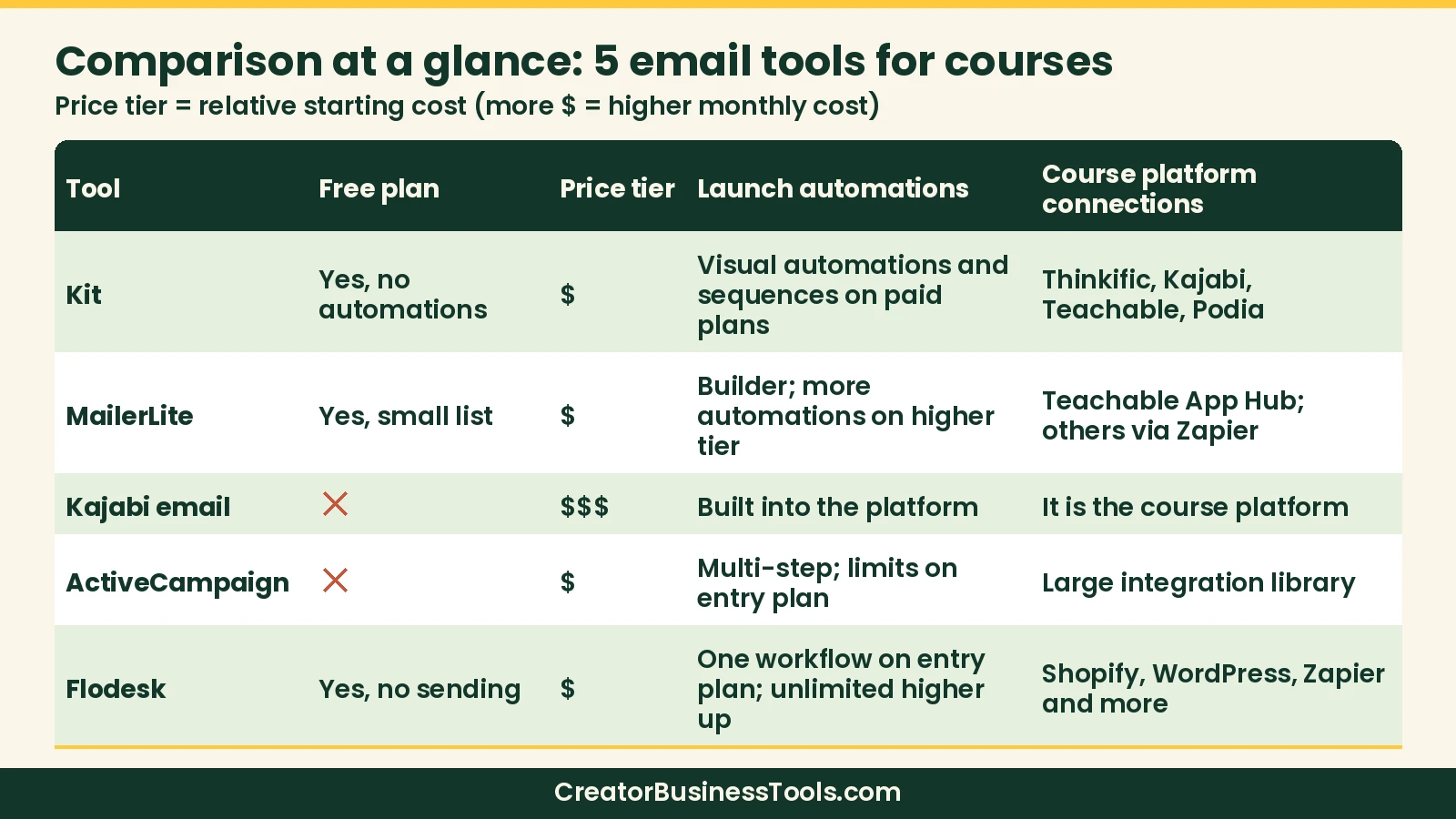
| Tool | Free plan | Starting price band | Tags and segments | Launch automations | Sell products | Course platform connections |
|---|---|---|---|---|---|---|
| Kit | Yes (no automations) | Under $50/month | Yes | Visual automations and sequences on paid plans | Digital products, subscriptions, paid newsletters | Native apps or integrations for Thinkific, Kajabi, Teachable, Podia |
| MailerLite | Yes (small list) | Under $30/month | Groups (tags) and segments | Automation builder; more automations on higher tier | Digital products, bookings, paid newsletters | Teachable App Hub; others via Zapier and similar tools |
| Kajabi email | No | $100–$200/month | Yes | Built into the platform | Courses, coaching, memberships, downloads | It is the course platform |
| ActiveCampaign | No (free trial) | Under $50/month | Yes, plus site tracking | Multi-step automations; limits on entry plan | Via integrations (e.g., Stripe, Shopify) | 1,000+ integrations |
| Flodesk | Yes (no sending) | Under $30/month | Yes | One workflow on entry plan; unlimited higher up | Checkout, sales pages, payment plans on top plan | Shopify, WordPress, Zapier and more |
Why these comparison columns matter
Course creators don’t pick an ESP the same way a newsletter writer does. The columns above map to launch and sales workflows:
- Free plan shows whether you can grow a list before paying. Watch what’s excluded—automations, sending, or list size caps often hide on free tiers.
- Starting price band is the paid floor at a small list size. Most tools scale with subscribers, so also check the band you expect in 12 months.
- Tags and segments let you exclude buyers, nurture warm leads, and run separate paths for webinar attendees versus cold subscribers.
- Launch automations cover welcome sequences, cart-open/close series, and branching when someone buys mid-launch.
- Sell products matters if you want to sell a mini-course, template pack, or paid newsletter without leaving the ESP.
- Course platform connections decide whether a Thinkific, Teachable, Kajabi, or Podia purchase can tag a subscriber and start an onboarding sequence automatically.
If a column is a hard requirement for your next launch, filter the list before you fall for templates or a low sticker price.
What course creators actually need from an email tool
A newsletter tool and a course-business email tool are not the same thing. Before you compare prices, check for these four jobs:
- Tagging and segmentation. Tag subscribers by lead magnet, webinar attendance, purchase, and course progress so buyers stop getting pitched the course they already own.
- Launch automations. A good launch needs a welcome sequence, a cart-open series, deadline reminders, and a separate path for buyers. Visual automation builders make this much easier.
- Selling directly from email. Some platforms let you sell a mini-course, template, or paid newsletter without sending people to another checkout.
- Course platform integration. When someone buys on Thinkific, Teachable, Kajabi, or Podia, your email tool should know about it and react automatically.
Pricing for most email tools scales with subscriber count, so a tool that’s cheap at 500 subscribers can look very different at 10,000.
The 5 best email marketing tools for course creators
1. Kit: Best overall for course creators
Kit (formerly ConvertKit) is built around creators who sell what they know. Its tagging system, visual automation builder, and email sequences line up neatly with how courses are launched: opt-in, nurture, open cart, close cart, onboard buyers.
Why it fits course creators
- Free plan for growing your list. Kit’s free plan covers a large subscriber count with unlimited broadcasts, tagging, segmentation, and digital product sales. Automations and sequences require a paid plan.
- Launch-ready automations. Paid plans unlock visual automations, sequences, and rules, so you can move someone from “webinar registrant” to “buyer” without manual tagging.
- Course platform connections. Kit lists a Thinkific app that syncs purchase data and student progress, a Kajabi app that syncs purchases and offers, plus Teachable and Podia integrations.
- Built-in commerce. Sell digital products, recurring subscriptions, and paid newsletters straight from Kit.
Keep in mind: The free plan doesn’t include automations or sequences, which most launches depend on. Paid pricing rises with your list size, and the Kajabi app requires a higher Kajabi plan or Kajabi’s API add-on.
Best for: Course creators and coaches who plan to run regular launches and want deep tagging plus a direct link to their course platform.
Not ideal for: Creators who need free-plan automations, or who want a design-first builder above tagging depth and course-platform sync.
2. MailerLite: Best budget pick with room to grow
MailerLite offers a lot of tooling for a low monthly price. Every paid plan includes the full feature set; you pay more only as your list and sending volume grow.
Why it fits course creators
- Groups and segments. Unlimited interest groups (MailerLite’s version of tags) and dynamic segments on every plan.
- Automation builder. A visual builder with e-commerce triggers. The higher tier unlocks unlimited automations and multiple triggers per workflow.
- Selling tools. Sell digital products, bookings, paid newsletters, and recurring subscriptions.
- Course integrations. Teachable offers a MailerLite app in its App Hub. MailerLite lists Thinkific and Kajabi connections through tools like Zapier.
Keep in mind: The free plan has a small subscriber cap and only a few automations. The entry paid tier limits how many automations and digital products you can run at once, so busy launch calendars may push you up a tier.
Best for: Budget-conscious creators who want solid automations and selling tools without a big monthly bill.
Not ideal for: Creators who need deep native course-platform sync beyond Teachable’s App Hub, or very large automation trees on the cheapest paid tier.
3. Kajabi: Best if you want email inside your course platform
Kajabi isn’t a standalone email tool. It’s an all-in-one course platform with email marketing built in. Every plan includes unlimited marketing emails, and your contact limit rises by tier.
Why it fits course creators
- No syncing required. Purchases, course access, tags, and emails share one contact record, so your launch emails always know who bought.
- Funnels and pages included. Unlimited landing pages and funnels sit right next to your email tools.
- One bill. Course hosting, coaching, community, website, and email in a single subscription.
Keep in mind: You can’t buy Kajabi’s email on its own, so it only makes sense if you’re also hosting your courses on Kajabi. Some advanced automation features are reserved for higher tiers.
Best for: Creators who want to run courses, coaching, and email from one dashboard and are ready for a higher monthly price.
Not ideal for: Creators who only need email and already host courses elsewhere—you can’t buy Kajabi email alone.
If you’re comparing Kajabi with a funnel builder, our guide covers ClickFunnels vs Kajabi email limits. For a lower-cost all-in-one, see systeme.io’s free plan with built-in email.
4. ActiveCampaign: Best for advanced, behavior-based automation
ActiveCampaign is a marketing automation platform first. It offers 950+ automation recipes, site and link tracking, tags, custom fields, and 1,000+ integrations, including Stripe, PayPal, and Calendly.
Why it fits course creators
- Deep automation. Multi-step automations with branching based on email activity, site visits, and purchases.
- Behavior tracking. Site tracking helps you follow up with people who viewed your sales page but didn’t buy.
- Room to scale. Higher tiers add landing pages, predictive sending, and conditional content.
Keep in mind: The entry plan limits automations to a handful of actions each and includes one user, which is tight for a real launch. There’s no free plan, and the learning curve is steeper than creator-focused tools.
Best for: Established course businesses with complex funnels, multiple offers, and someone on the team who enjoys building automations.
Not ideal for: Solo creators on their first launch who want a simple creator-focused UI and a free plan.
5. Flodesk: Best design-first option with built-in checkout
Flodesk is known for polished, designer-style templates. For course creators, the interesting part is its top plan, which adds checkouts, sales pages, payment plans, subscriptions, and abandoned cart automations.
Why it fits course creators
- Unlimited sends on every paid plan, priced by active subscriber count.
- Checkout built in on the middle and top plans, with no extra Flodesk transaction fee (standard Stripe processing applies).
- Workflows for welcome and nurture sequences, unlimited from the middle plan up.
Keep in mind: The entry plan allows only one workflow, and the free plan doesn’t send email. Course platform integrations are lighter than Kit’s, so check your platform before you commit.
Best for: Creators who sell a few digital products or a signature course and want beautiful emails with simple, built-in checkout.
Not ideal for: Creators who need robust native course-platform apps (Thinkific/Kajabi/Teachable depth) or unlimited workflows on the entry plan.
Also worth a look: beehiiv
If your newsletter itself is the product, with sponsorships, a paid subscription tier, or a referral program, beehiiv is built for that kind of growth and monetization. It’s less focused on course-launch automations than Kit, so it fits newsletter-first creators best. Read our beehiiv review for the details.
If beautiful, on-brand emails matter more to you than launch automations, see our guide to the best email marketing for creatives and artists.
Caveats before you choose
⚠️ Email platforms change plans, subscriber caps, and feature tiers often. This roundup is based on each company’s official pricing pages and help docs, not hands-on testing. Most tools price by subscriber count, so check the exact cost for your list size, and confirm that your course platform integration supports the triggers you need before you migrate.
Also confirm deliverability expectations, double opt-in rules, and what happens to automations if you downgrade. Migrating a list is usually easy; migrating years of tags, segments, and visual automations is not. If you sell through your course platform, verify the exact purchase and progress triggers—not just that an integration exists.
How to choose an email platform for your course business
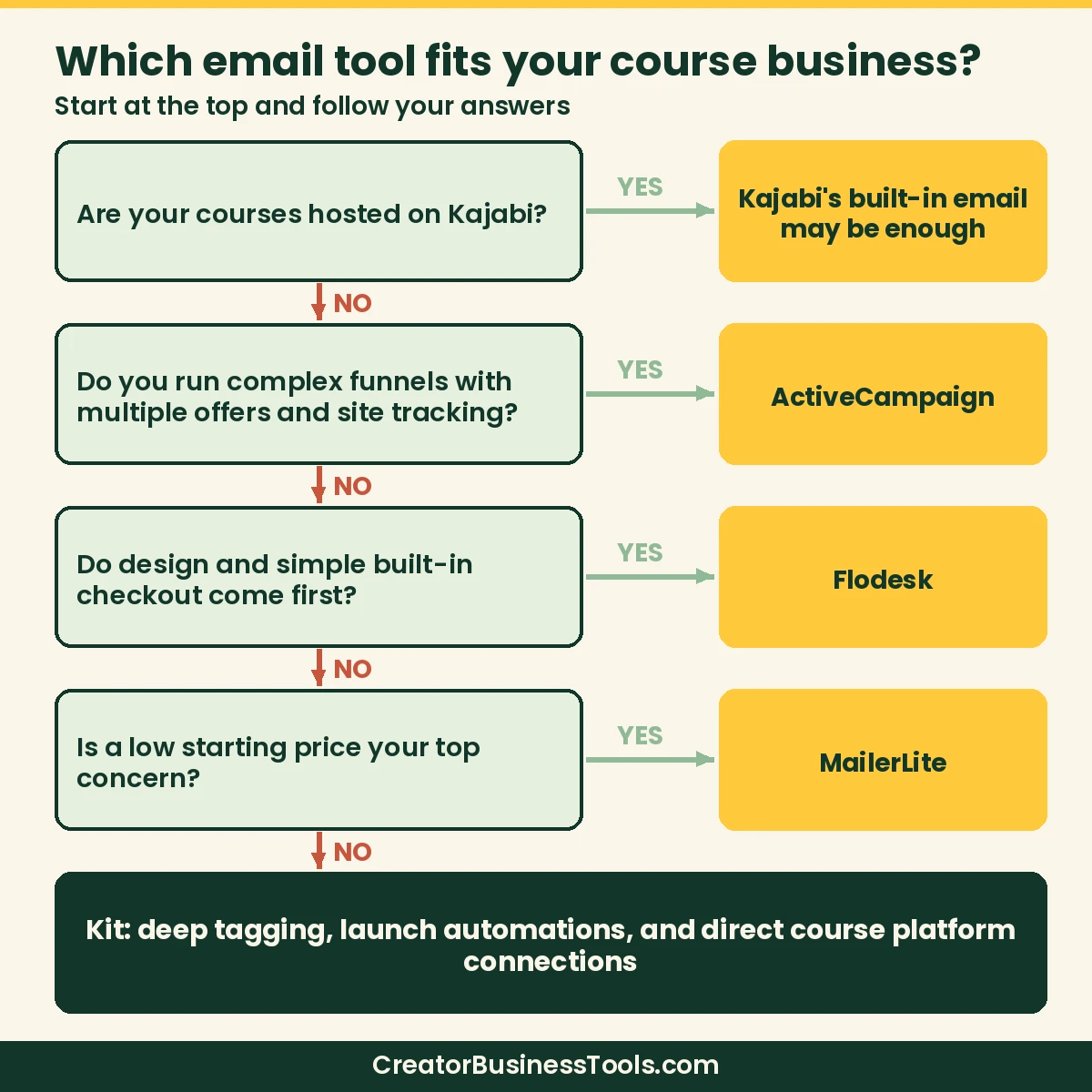
- Start with your course platform. If you’re on Kajabi, its built-in email may be enough. On Thinkific, Teachable, or Podia, favor a tool with a direct integration.
- Map one launch. Write down every email and tag in your next launch. If you need branching, deadlines, and buyer exclusions, make sure the plan you’re pricing includes automations.
- Price your list at 12 months out. Check the cost at your current size and at the size you expect next year.
- Decide where checkout lives. Selling small products from your email tool can be convenient; selling full courses usually belongs on your course platform.
- Count your team. Some entry plans limit user seats.
- Use the free plan or trial for one real sequence. Build your welcome sequence before deciding.
- Audit your current tags. If your list is a single undifferentiated blob, pick a tool you’ll actually use for tagging—features you ignore don’t help launches.
- Check compliance basics. Confirm unsubscribe handling, physical address requirements, and spam policies before you import a large list.
- Plan the handoff with your course platform. Decide which system owns the buyer record after purchase so you don’t send “buy now” emails to people who already enrolled.
FAQ
What is the best email marketing platform for course creators?
For most course creators, Kit is a strong default thanks to its tagging, visual automations, and direct course platform integrations. MailerLite is a great lower-cost alternative, and Kajabi users may not need a separate tool at all.
Is there a free email marketing tool for course creators?
Yes. Kit and MailerLite both offer free plans. Kit’s free plan supports a large list but excludes automations; MailerLite’s free plan includes a few automations but caps subscribers at a small number.
Do I need a separate email tool if I use Kajabi?
Usually not. Kajabi includes email marketing with unlimited marketing emails. Some creators still pair Kajabi with Kit, which offers a Kajabi app on higher Kajabi plans.
Which email tool works best with Thinkific or Teachable?
Kit lists integrations with both, including a Thinkific app that syncs student progress. MailerLite connects to Teachable through Teachable’s App Hub and to Thinkific through tools like Zapier.
Can I sell my course directly from an email platform?
Some tools, like Kit, MailerLite, and Flodesk, can sell digital products. For full courses with lessons and student logins, you’ll still want a course platform.
Kit vs MailerLite for course launches—which should I pick?
Choose Kit if tagging, visual automations, and native course-platform connections matter most. Choose MailerLite if you want a lower starting price and solid automations, and you’re fine connecting some platforms through Zapier or similar tools.
Will my email cost jump when my list grows?
Usually yes. Most of these tools price by active subscribers (Kajabi prices by contacts inside the course platform instead). Estimate cost at today’s list size and at the size you expect after two launches.
Can I use Flodesk or Kit to sell my full course?
You can sell digital products from several of these tools, but a full course with lessons, progress, and student logins still belongs on a course platform. Use the ESP for lead magnets, launches, and smaller offers.
What happens if I outgrow my free plan mid-launch?
Upgrade before cart open if you need automations or higher sending limits. Switching plans mid-sequence is stressful; build and test the full launch path on the plan you’ll use when money is on the line.
Do I need ActiveCampaign if I’m just starting?
Probably not. ActiveCampaign shines when you have multiple offers, site tracking, and complex branching. Most first-course creators are better served by Kit or MailerLite until the funnel complexity justifies the learning curve.
The bottom line
For most course creators, Kit is the best place to start: generous free plan, launch-ready automations on paid plans, and direct connections to the major course platforms. Choose MailerLite if budget matters most, Kajabi if you’d rather run email inside your course platform, ActiveCampaign if your funnels are getting complex, and Flodesk if design and simple built-in checkout come first.
Pick the tool that fits your course platform and your next launch, then build one real sequence before you move your whole list.