
Best Etsy SEO Tools: eRank vs EverBee vs Alura vs Marmalead
Disclosure: This post contains affiliate links. If you buy through them, we may earn a commission at no extra cost to you. How we make money.
Finding the best Etsy SEO tools can feel harder than writing the listings themselves. Every tool promises better keywords, more views and more sales, but they focus on different jobs: some help you pick tags, some help you research what to sell, and some try to run your whole shop. In this guide, we compare five options side by side, from free built-in Etsy reports to paid research suites, so you can choose the one that fits your shop size and budget.
Quick verdict: For most small Etsy shops, eRank is the easiest place to start, with a generous free plan and low-cost upgrades focused on keywords and listing audits. EverBee is stronger for product research, Alura suits sellers who want an all-in-one growth suite, and Marmalead fits sellers who mainly want keyword scoring. Etsy’s own Stats and Search Analytics are free and worth checking no matter which tool you pick.
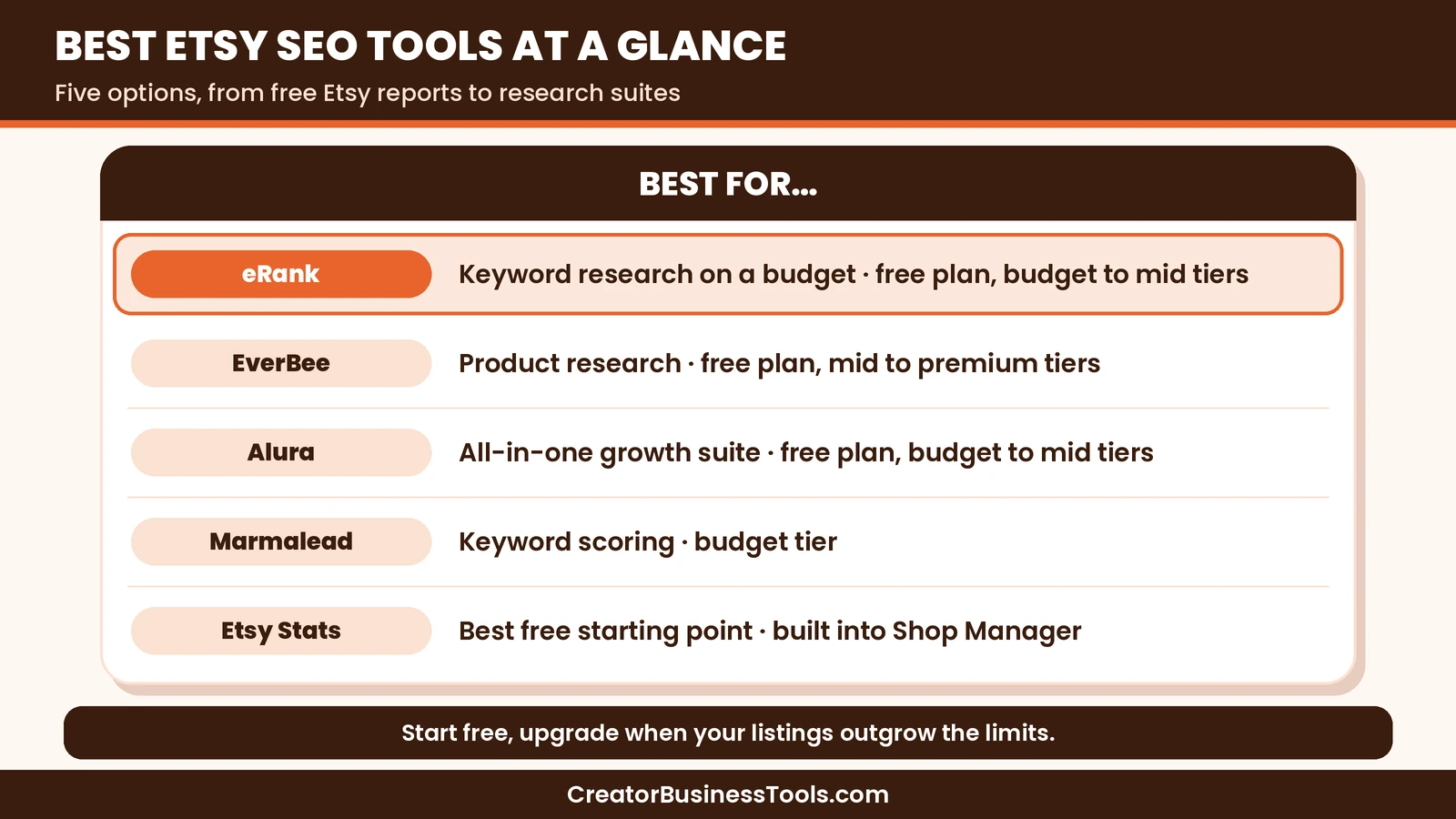
Quick picks
- Best overall for keyword research on a budget: eRank. eRank
- Best for researching what to sell next: EverBee, with sales and revenue estimates for listings.
- Best all-in-one growth suite: Alura, which adds tools such as A/B tests, email marketing and Etsy Ads optimization on higher plans.
- Best for simple keyword scoring: Marmalead, with its MarmaMeters for search volume, engagement and competition.
- Best free starting point: Etsy’s own Stats and Search Analytics, built into Shop Manager.
Best Etsy SEO tools at a glance
| Tool | Best for | Free option | Paid price tier | Standout feature |
|---|---|---|---|---|
| eRank | Keyword research and listing audits | Yes, with daily limits | budget to mid-range | Keyword data, listing audits and rank checks in one place |
| EverBee | Product research | Yes, with a small keyword allowance | mid-range to premium | Sales and revenue estimates on listings |
| Alura | All-in-one shop growth | Yes, with daily limits | budget to mid-range | A/B tests, email marketing and Etsy Ads tools |
| Marmalead | Keyword scoring | Not confirmed | budget | MarmaMeters for volume, engagement and competition |
| Etsy Stats and Search Analytics | Checking real performance | Built in | Free | Your own search queries, impressions and positions |
What does an Etsy SEO tool actually do?
Before comparing the best Etsy SEO tools, it helps to know what they can and can’t change. According to Etsy’s help center, when a shopper searches, Etsy’s system scans titles, tags and attributes for listings that match the search and the shopper’s profile, then uses that information and more to show the most relevant listings. Etsy also notes that search results are unique to each shopper.
That means no tool can control your ranking directly. What a good Etsy SEO tool can do is help you:
- Find the words shoppers actually use, so your titles, tags and attributes match real searches.
- Spot gaps in your listings, such as unused tags, weak titles or missing details.
- Understand competition, so you can target phrases where a smaller shop has a realistic chance.
- Track changes over time, so you can see whether an update helped.
- Research products, so you can decide what to make or design next.
Some tools lean toward the first three jobs, while others lean toward product research. Knowing which job matters most for your shop makes the choice much easier.
How we compared these tools
This is a research-based comparison. We reviewed each tool’s official pricing page, feature descriptions and plan limits, along with Etsy’s own help articles on Stats and Search Analytics. We didn’t rely on third-party claims about accuracy, because each company calculates its data differently and none of them gets search data directly from every Etsy shopper.
We compared the tools on five points:
- Keyword research depth: suggestions, scores, trends and seasonality.
- Listing optimization: audits, grades and AI writing help.
- Product and competitor research: sales estimates and shop tracking.
- Free plan usefulness: whether a new seller can get real value before paying.
- Price tier: what you get as you move up the plans.
Plan details and limits can change, so we recommend checking each official pricing page before you subscribe.
1. eRank: best overall for keyword research on a budget
eRank is one of the most widely used Etsy SEO tools, and its official site says it’s trusted by millions of Etsy sellers. Its focus is practical: find better keywords, check how your listings are set up and keep an eye on competitors.
Key features from eRank’s official pages:
- Keyword research with trend data for more than a dozen marketplaces, including Etsy, Amazon and eBay.
- Keyword ideas on paid plans, to expand a single phrase into a list of options.
- Listing audits that check your listings against Etsy’s guidelines and flag issues.
- Rank checks that show what an average Etsy buyer sees in search results and where your listings rank.
- Competitor monitoring, including estimated daily sales tracking for Etsy shops.
- Traffic insights that show which keywords and platforms are sending visitors to your connected shop.
- An AI Listing Helper with a small daily allowance on the free plan.
Pricing tier: eRank has a free plan with no time limit and no card required, plus three paid tiers. The lower paid plans sit in the budget tier, and the top plan for multi-shop sellers sits in the mid-range tier. Each step up raises your daily keyword lookups, listing audits, connected listings and monitored competitors.
Who it’s for: New and growing sellers who want solid keyword data without a big monthly bill. The free plan is enough to learn the basics and test a few keywords each day, and the first paid tier lifts the limits enough for regular listing work.
Limitations to consider: eRank’s interface packs in a lot of reports, which may feel busy at first. Its product research is lighter than EverBee’s, so sellers who mainly want to find new product ideas may want to pair it with another tool.
For a deeper look, see our eRank review.
2. EverBee: best for product research
EverBee works mainly as a Chrome extension that adds data to Etsy pages as you browse. It’s built around one question: what is already selling on Etsy, and could you make something similar but better?
Key features from EverBee’s official pages:
- Product analytics with views, reviews and favorites on the free plan, and sales, revenue and conversion rate estimates on paid plans.
- Keyword research with a Keyword Score, limited on the free plan and unlimited on paid plans.
- Trends and growth rates for individual listings on paid plans.
- A Tag Analyzer to see which tags listings use.
- AI Actions with a monthly allowance on Growth and unlimited use on Business.
- Store connections, MCP access and saved favorites for keywords, shops and listings.
Pricing tier: EverBee’s Hobby plan is free with no card required. Its Growth plan sits in the mid-range tier, and its Business plan sits in the premium tier. The free plan is the way to test it before paying.
Who it’s for: Sellers who are still deciding what to sell, or who want to validate a product idea before investing time in designs or materials.
Limitations to consider: EverBee is a product research tool first. If you mainly need listing audits and rank tracking, eRank or Alura covers those jobs more directly. It’s also one of the higher-priced options in this list once you move beyond the free plan.
We compare it in more detail in our EverBee review.
3. Alura: best all-in-one growth suite
Alura goes beyond keyword research. Its plans combine research tools with marketing and optimization features, aiming to be a single dashboard for running and growing an Etsy shop.
Key features from Alura’s official pages:
- Keyword and product searches with daily limits that rise by plan.
- AI listing optimization and monthly AI credits.
- Research databases of products and shops, with a sample on the free plan and full access on Growth and above.
- A/B tests for listings on Growth and Professional.
- An analytics suite with historical data on higher plans.
- Marketing tools, including Pinterest marketing, email marketing, customer follow-ups and Etsy Ads optimization.
- A profit calculator and Chrome extension on every plan, including the free one.
- Multiple shop connections on the Professional plan.
Pricing tier: Alura offers a free plan plus three paid tiers. Basic and Growth sit in the budget tier, and Professional sits in the mid-range tier. Its pricing page offers monthly or yearly billing, so check which one the listed prices refer to.
Who it’s for: Sellers who want keyword research plus marketing tools in one place, especially those who already promote their shop on Pinterest or by email.
Limitations to consider: With so many features, Alura can be more than a brand-new seller needs. Several tools rely on AI credits and feature-specific limits, so it’s worth checking which limits apply to the features you’d use most.
4. Marmalead: best for keyword scoring
Marmalead takes a focused approach to Etsy SEO. Instead of trying to do everything, it concentrates on helping you judge which keywords are worth using and how your listings measure up.
Key features from Marmalead’s official pages:
- Storm, which generates scored keyword suggestions from a starting phrase.
- MarmaMeters, simple bar-style scores for search volume, engagement and competition.
- Keyword seasonality and forecasting, to plan listings around shopping peaks.
- Side-by-side keyword comparison.
- Pricing charts that show bargain, mid-range and premium price ranges in a market.
- Listing grades with SEO factors and sales factors, such as photo use and description readability.
- AI tools that critique descriptions and suggest FAQs.
- Multiple shop connections.
Pricing tier: Marmalead sits in the budget tier. Its pricing page shows plans billed over longer periods, plus a one-time lifetime option. We couldn’t confirm a free plan on its official pricing page.
Who it’s for: Sellers who want a clean, focused keyword tool and like simple scores more than large data tables.
Limitations to consider: Marmalead doesn’t emphasize product research or competitor sales estimates in the way EverBee and eRank do. Sellers who prefer to pay month to month should check the available billing options before signing up.
5. Etsy Stats and Search Analytics: best free starting point
Before paying for any tool, it’s worth using the data Etsy already gives you. These reports show how real shoppers found your listings, which no outside tool can fully match.
What Etsy’s built-in tools show, according to Etsy’s help center:
- Shop Stats: Under “How shoppers found you,” choosing Etsy search shows the search terms people used to find your listings.
- Search Analytics: Found in Shop Manager under Marketing, it lists the search queries that led to your listings, with impressions, average position, visits, conversion rate, orders and revenue for each query.
Pricing tier: Free, included with your Etsy shop.
Who it’s for: Every Etsy seller. Even if you use eRank, EverBee, Alura or Marmalead, your own Stats are a reliable way to check whether a change worked.
Limitations to consider: Etsy’s reports only show data for your own listings and searches you already appear in. They won’t suggest new keywords you aren’t ranking for, show competitor data or help you research new products. That’s where third-party tools add value.
Pricing comparison
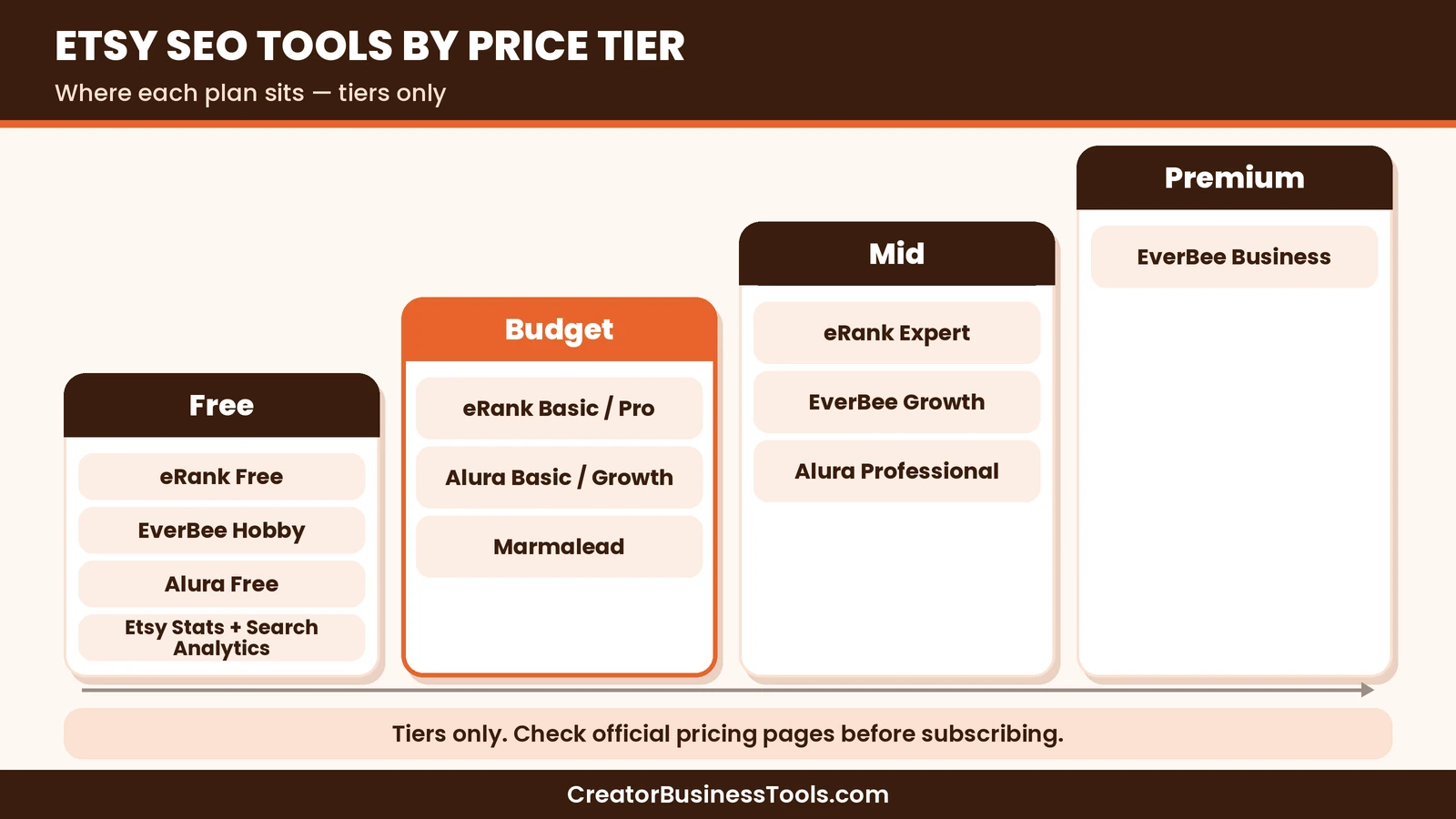
| Tool | Free plan | Entry paid tier | Top paid tier | What grows as you upgrade |
|---|---|---|---|---|
| eRank | Yes | budget | mid-range | Keyword lookups, audits, competitors, connected listings |
| EverBee | Yes | mid-range | premium | Product data, keywords, AI Actions, store connections |
| Alura | Yes | budget | mid-range | Searches, AI credits, A/B tests, analytics history, shops |
| Marmalead | Not confirmed | budget | budget (plus a lifetime option) | Longer billing periods |
| Etsy Stats and Search Analytics | Built in | Free | Free | Not applicable |
A simple way to read this table: if you want to keep costs low while you learn, eRank and Alura give you the most room on free and low-cost plans. If product research is your main goal and you’re ready to invest more, EverBee’s paid plans unlock its most useful data.
Feature comparison
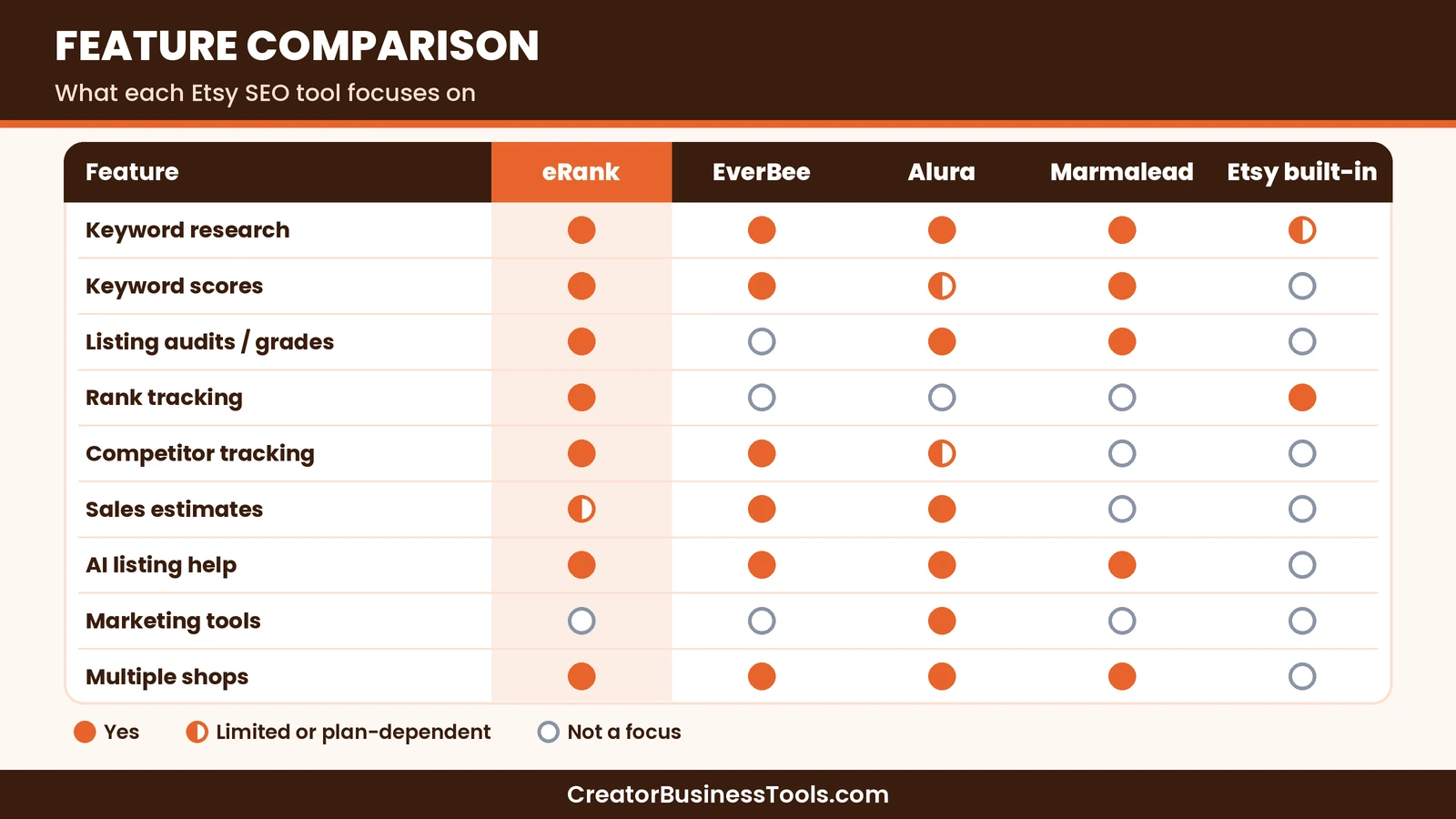
| Feature | eRank | EverBee | Alura | Marmalead | Etsy built-in |
|---|---|---|---|---|---|
| Keyword research | Yes | Yes | Yes | Yes | Your own queries only |
| Keyword scores or meters | Yes | Keyword Score | Plan-dependent | MarmaMeters | No |
| Listing audits or grades | Yes | No | AI optimization | Letter grades | No |
| Rank tracking | Rank checks | No | Not a focus | Not a focus | Average position |
| Competitor tracking | Yes | Shop favorites | Shop analyses | Not a focus | No |
| Sales estimates | Daily estimates for shops | Yes, on paid plans | Research databases | No | Your own sales only |
| AI listing help | AI Listing Helper | AI Actions | AI credits | Description critique and FAQs | No |
| Marketing tools | No | No | Pinterest, email, Etsy Ads | No | No |
| Multiple shops | Yes, by plan | Store connections | Professional plan | Yes | One shop |
Which Etsy SEO tool should you choose?
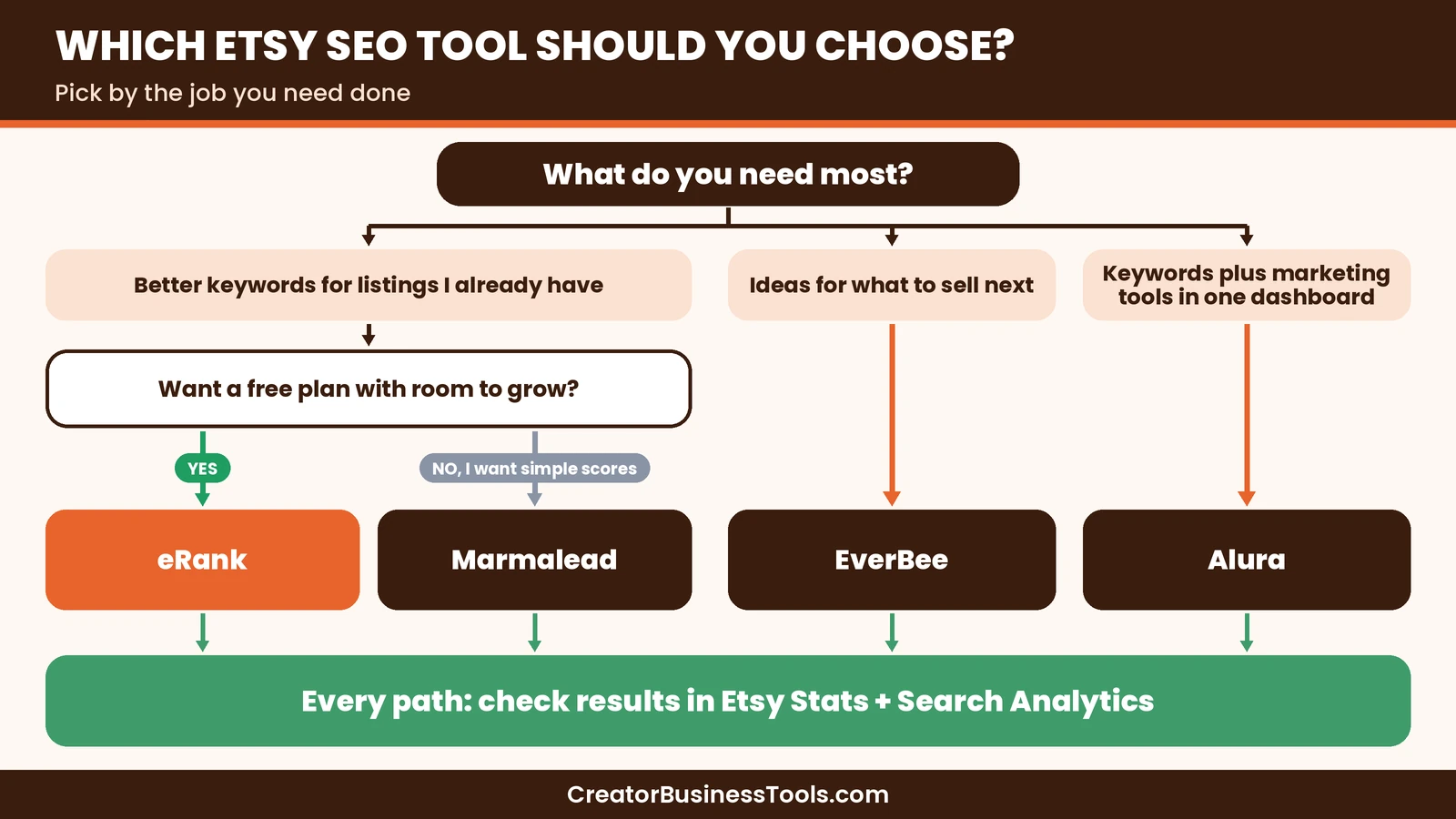
Here’s how we’d match each tool to common situations:
- You’re opening your first shop: Start with Etsy’s built-in reports and eRank’s free plan. Together, they cover your own performance and basic keyword research without any cost.
- You have listings but views are flat: eRank’s listing audits and rank checks, or Marmalead’s listing grades, can help you find weak titles and tags.
- You’re not sure what to make next: EverBee’s product analytics are designed for this job.
- You promote your shop outside Etsy: Alura’s Pinterest and email tools may replace separate apps.
- You run several shops: Look at eRank’s top plan, EverBee’s Business plan, Alura Professional or Marmalead, all of which mention multiple shops.
You don’t need more than one paid tool to start. Many sellers can pair one third-party tool with Etsy’s free reports and get most of the value.
A simple Etsy SEO workflow using these tools
Tools work best when you use them in a repeatable routine. Here’s a straightforward process that fits any of the options above:
- Check your own data first. Open Search Analytics and note the queries where you get impressions but few visits. These are listings that appear in search but may need a stronger title or photo.
- Research related phrases. Use your chosen tool to find longer, more specific phrases related to your best queries. Specific phrases often face less competition.
- Update titles, tags and attributes. Put your clearest, most relevant phrase near the start of the title, use all available tags and fill in attributes, since Etsy’s help center says its system scans all three.
- Audit the rest of the listing. Use a listing audit or grade to catch missing tags, thin descriptions or unused photo slots.
- Give changes time. Track impressions, visits and orders in Etsy’s reports over the following weeks before making another round of edits.
- Repeat for your next listing. Small, steady improvements across many listings tend to matter more than one big overhaul.
Common mistakes to avoid
- Chasing the biggest keywords. Broad phrases may have high search volume, but a new shop may struggle to appear for them. Specific phrases are often a better starting point.
- Treating tool numbers as exact. Each tool estimates search volume and sales differently, so use the numbers to compare options rather than as precise counts.
- Copying a competitor’s tags word for word. Research competitors for ideas, but choose words that describe your own product accurately.
- Ignoring photos and descriptions. Etsy says search considers more than tags, and shoppers still need a reason to click and buy.
- Paying for features you won’t use. Start with a free plan and upgrade only when you hit a limit that slows you down.
FAQ
Do I need a paid Etsy SEO tool?
Not necessarily. Etsy’s own Stats and Search Analytics, plus a free plan from eRank, EverBee or Alura, can be enough for a new shop. A paid plan makes more sense once you’re updating listings regularly and hitting daily limits.
Which Etsy SEO tool has a useful free plan?
It depends on your goal. eRank’s free plan is a good fit for keyword research and listing audits with daily limits, EverBee’s free plan is aimed at basic product research, and Alura’s free plan includes a sample of its research databases and a profit calculator.
Is eRank or EverBee better?
eRank leans toward keyword research and listing optimization, while EverBee leans toward product research. We cover this in detail in our eRank and EverBee reviews.
Can an Etsy SEO tool promise higher rankings?
No. Etsy’s search results depend on many factors and are personalized for each shopper. Tools can help you choose better words and spot listing issues, but rankings and sales depend on your products, photos, prices and reviews too.
How often should I update my Etsy keywords?
There’s no fixed rule. A practical approach is to review your Search Analytics regularly, update listings that get impressions but few visits, and revisit seasonal products ahead of their peak periods.
Bottom line
For a deeper look at one all-in-one option, see our Alura review.
The best Etsy SEO tools are the ones that match the job you need done. For most small shops, eRank is the easiest place to start, with a free plan and affordable upgrades for keyword research, listing audits and rank checks. EverBee is the stronger choice for product research, Alura suits sellers who want marketing tools in the same dashboard, and Marmalead works well for focused keyword scoring. Whatever you choose, keep checking Etsy’s own Stats and Search Analytics to see what’s working.
Start with one tool, improve a few listings and build from there.
Free checklist: Get our one-page “Etsy Listing SEO Checklist” covering titles, tags, attributes and photos. Contact us to request a copy.
Pricing and features from official vendor pages, last checked October 25, 2026.