
Gumroad Alternatives: 5 Better Platforms for Selling Digital Products
Disclosure: This post contains affiliate links. If you buy through them, we may earn a commission at no extra cost to you. How we make money.
If you’re looking for Gumroad alternatives, you’re probably weighing one big question: is it better to pay a share of every sale, or a predictable monthly fee? Gumroad is simple to start with, but as your sales grow, per-sale fees can add up, and you may want more control over your store, email list or product types. In this guide, we compare five Gumroad alternatives for selling digital products, from all-in-one stores to tip-and-shop pages, so you can find the one that fits how you sell.
Quick verdict: Sellfy is our top pick for creators who sell steadily and want a full storefront with no platform transaction fees, built-in email marketing and print-on-demand. Payhip is the most flexible option if you want to start free and move to lower fees later. Podia suits course creators and coaches, Lemon Squeezy fits software and subscription sellers who want tax handling done for them, and Ko-fi works well for creators who earn from tips and memberships alongside a small shop.
Quick picks
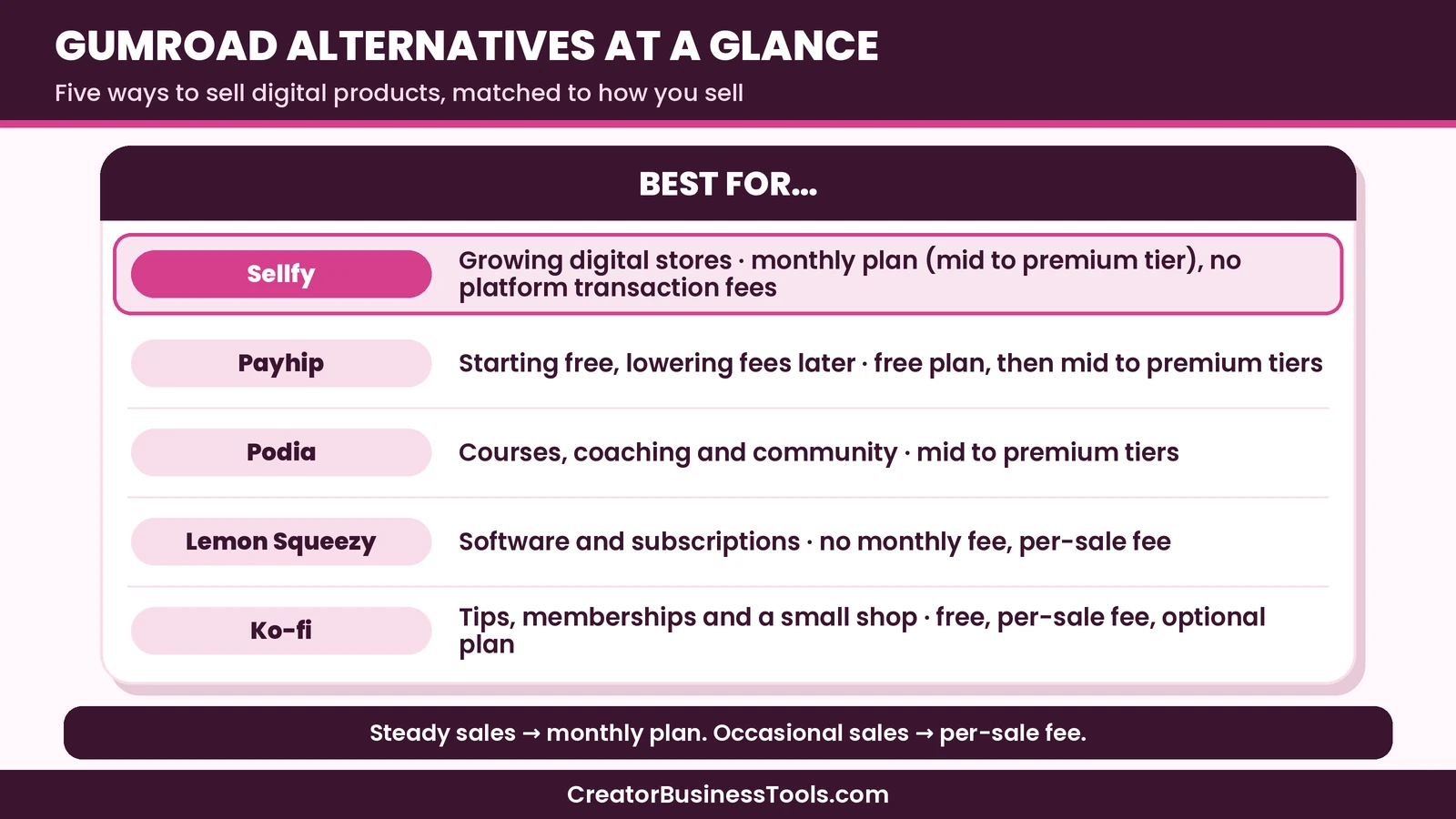
- Best overall for growing digital stores: Sellfy. Sellfy
- Best for starting free and lowering fees later: Payhip, which keeps the same features on every plan.
- Best for courses, coaching and community: Podia.
- Best for software, license keys and subscriptions: Lemon Squeezy, which acts as your merchant of record.
- Best for tips, memberships and a small shop: Ko-fi.
Why creators look for Gumroad alternatives
Gumroad is a well-known platform for selling digital products, e-books, courses and memberships. According to its official pricing page, it doesn’t charge a monthly fee. Instead, it takes a percentage of each sale plus a small fixed fee, with a higher share when new customers find you through its Discover marketplace. Gumroad also acts as a merchant of record, which means it handles sales tax collection and remittance in the regions where it has tax obligations.
That model works well for many creators, especially when sales are occasional. Common reasons creators compare other options include:
- Per-sale fees at higher volume. When you sell regularly, a flat monthly plan may cost less overall than a percentage of every sale.
- Store design and branding. Some creators want a more customizable storefront on their own domain.
- Built-in marketing. Features such as email campaigns, upsells and cart abandonment emails vary widely between platforms.
- Product types. Selling print-on-demand merch, live coaching or community access may call for a different platform.
- How payouts work. Some platforms send money straight to your PayPal or Stripe account, while others pay out on a schedule.
None of these make Gumroad a poor choice. They simply mean the right platform depends on how and how much you sell.
Gumroad alternatives at a glance
| Platform | Best for | Pricing model | Price tier | Tax handling | Payouts |
|---|---|---|---|---|---|
| Sellfy | Growing digital and merch stores | Monthly plan, no platform transaction fees | mid-range to premium | VAT and tax settings you manage | Direct to PayPal or Stripe |
| Payhip | Starting free, lowering fees later | Free plan or monthly plans with lower or no transaction fees | Free to premium | Collects and remits EU/UK VAT and US/Canadian sales tax | Deposited after each sale |
| Podia | Courses, coaching and community | Monthly plan, transaction fee on the entry plan only | mid-range to premium | Sales tax features included | Through Stripe or PayPal |
| Lemon Squeezy | Software and subscriptions | Per-sale fee, no monthly fee | Per-sale | Merchant of record | Bank or PayPal on a schedule |
| Ko-fi | Tips, memberships and small shops | Free with a per-sale service fee, optional fixed-fee plan | Free to budget | Not a focus on official pages | Direct to PayPal or Stripe |
| Gumroad (for reference) | Simple digital sales | Per-sale fee, higher for marketplace sales | Per-sale | Merchant of record | Bank or PayPal, by country |
How we compared these platforms
This is a research-based comparison. We reviewed each platform’s official pricing page, feature pages and help articles, and we compared them on:
- Cost structure: monthly fees, platform transaction fees and sales limits.
- Product types: digital downloads, subscriptions, courses, physical products and print-on-demand.
- Marketing tools: email, upsells, cart abandonment, special offers and affiliate programs.
- Taxes and payouts: whether the platform handles sales tax and how you get paid.
- Ease of setup: whether you need a separate website.
Payment processors such as Stripe and PayPal charge their own fees on most of these platforms, so we focus on what each platform itself charges. Plans and fees can change, so we recommend checking the official pricing pages before you switch.
1. Sellfy: best overall for growing digital stores
Sellfy is an all-in-one store built for creators. It lets you sell digital downloads, subscriptions, physical products and print-on-demand merch from one storefront, and its official pricing page states that it charges no transaction fees on any plan.
Key features from Sellfy’s official pages:
- No platform transaction fees on all plans. You still pay standard PayPal or Stripe processing fees.
- Unlimited products, with generous file size limits for digital products.
- Built-in email marketing with monthly email credits that grow by plan.
- Print-on-demand products alongside digital and physical items.
- Instant payouts sent directly to your PayPal or Stripe account after each purchase.
- No website required. You can sell from your Sellfy store, share links on social media, or embed buy buttons and widgets on an existing site.
- Custom domain, store themes and custom code on every plan.
- Growth features on Business and above, including product upselling, cart abandonment emails, an affiliate program and removal of Sellfy branding.
Pricing tier: Sellfy’s Starter plan sits in the mid-range tier, and its Business and Premium plans sit in the premium tier, with monthly or yearly billing. Each plan has a yearly sales limit. If you go over it, Sellfy expects you to upgrade, and its FAQ notes that an overage fee may apply if you don’t. Sellfy also has a refund policy, which is detailed on its pricing page.
Who it’s for: Creators with steady sales who want a branded store, built-in email and the option to add merch, without paying a share of each sale to the platform.
Limitations to consider: Sellfy’s plans are paid from the start, so it may cost more than a per-sale platform if you only make a handful of sales. Unlike Gumroad, Payhip and Lemon Squeezy, it provides tax settings rather than acting as a merchant of record, so you may need to manage some tax obligations yourself.
For a deeper look, see our Sellfy review.
[Start your store with Sellfy](https://sellfy.com/)2. Payhip: best for starting free and lowering fees later
Payhip’s pricing is easy to follow: every plan includes all features, unlimited products and unlimited revenue. The only difference is how much you pay monthly versus per sale.
Key features from Payhip’s official pages:
- Three plans with the same features: a free plan with a transaction fee, a mid-tier plan with a lower fee, and a top plan with no transaction fee.
- Many product types: digital downloads, online courses with quizzes and certificates, memberships, coaching and physical products.
- Tax handling: Payhip says it automatically collects, reports and remits EU/UK VAT and US/Canadian sales tax on your behalf.
- Fast payouts: sales are deposited after each completed transaction.
- Selling tools such as product bundles, license key delivery, payment plans, cross-sell order bumps and abandoned cart recovery.
- A built-in marketplace for digital products, plus free migration help from Payhip’s team.
- A store builder with free custom domain connection and embeds for existing websites.
Pricing tier: Free to start, with paid plans in the mid-range and premium tiers. PayPal and Stripe fees apply on all plans.
Who it’s for: Creators who want a low-risk start. You can begin on the free plan, then move to a paid plan once your sales make the lower fee worthwhile.
Limitations to consider: On the free plan, Payhip’s per-sale fee means it works much like Gumroad’s model. Creators who want built-in print-on-demand may prefer Sellfy.
For a deeper look at plans, fees, and who Payhip fits, see our Payhip review.
3. Podia: best for courses, coaching and community
Podia is an all-in-one platform for creators who sell more than downloads. Its plans combine a website, online store, courses, community and email marketing.
Key features from Podia’s official pages:
- Online courses, digital downloads, coaching and events, including live and in-person events.
- Community spaces for members.
- A website and blog with landing pages and a custom domain.
- Podia Email, with a set number of subscribers included by plan.
- Sales tax features and support for multiple currencies.
- Affiliate marketing and upsells on the mid-tier plan and above.
- Migration help to move products from another platform.
Pricing tier: Podia’s entry plan sits in the mid-range tier and includes a transaction fee. Its higher plans sit in the premium tier with no Podia transaction fees. Podia offers monthly or yearly billing.
Who it’s for: Course creators, coaches and educators who want their website, products, community and email in one place.
Limitations to consider: If you only sell a few downloadable files, Podia may include more than you need. Email is included only up to a subscriber limit per plan, so larger lists may need an add-on.
4. Lemon Squeezy: best for software and subscriptions
Lemon Squeezy is designed for digital products, with a strong focus on software, subscriptions and recurring billing. Like Gumroad, it charges per sale rather than monthly.
Key features from Lemon Squeezy’s official pages:
- Merchant of record: Lemon Squeezy says it takes on tax collection, calculation and filing liability on your behalf.
- Subscriptions and recurring billing, with weekly, monthly or yearly options, upgrades and downgrades.
- License key management for software and apps.
- Secure digital downloads with signed and throttled links.
- Checkout links and embeds you can use on any website, plus a hosted store with a custom domain.
- Recovery tools for abandoned carts and failed payments.
- Email marketing, free up to a subscriber threshold and paid beyond it.
Pricing tier: No monthly fee for ecommerce features. Lemon Squeezy takes a percentage of each sale plus a small fixed fee, and its pricing page notes that some payments may incur additional fees.
Who it’s for: Software makers, template sellers and anyone running subscriptions who wants tax compliance handled for them.
Limitations to consider: Lemon Squeezy pays out on a schedule rather than instantly. Creators who mainly sell art prints, merch or courses with community features may find other platforms a more natural fit.
5. Ko-fi: best for tips, memberships and a small shop
Ko-fi started as a way for fans to tip creators, and it now supports memberships and a shop for physical and digital products as well.
Key features from Ko-fi’s official pages:
- Tips and crowdfunding goals from supporters.
- Memberships with supporter-only posts.
- A shop for digital and physical products, plus custom work requests from fans.
- Payments sent directly to your own PayPal or Stripe account.
- Buttons and widgets to add Ko-fi to other sites, plus integrations such as Discord and stream alerts.
Pricing tier: Ko-fi is free to join. According to its help center, a service fee applies to shop sales and memberships, while one-off tips can be fee-free depending on your settings. An optional fixed monthly subscription in the budget tier removes the service fee.
Who it’s for: Artists, writers, streamers and podcasters who earn mainly from fan support and want a simple shop on the same page.
Limitations to consider: Ko-fi isn’t built as a full storefront. Sellers who need advanced store design, upsells or email campaigns may outgrow it.
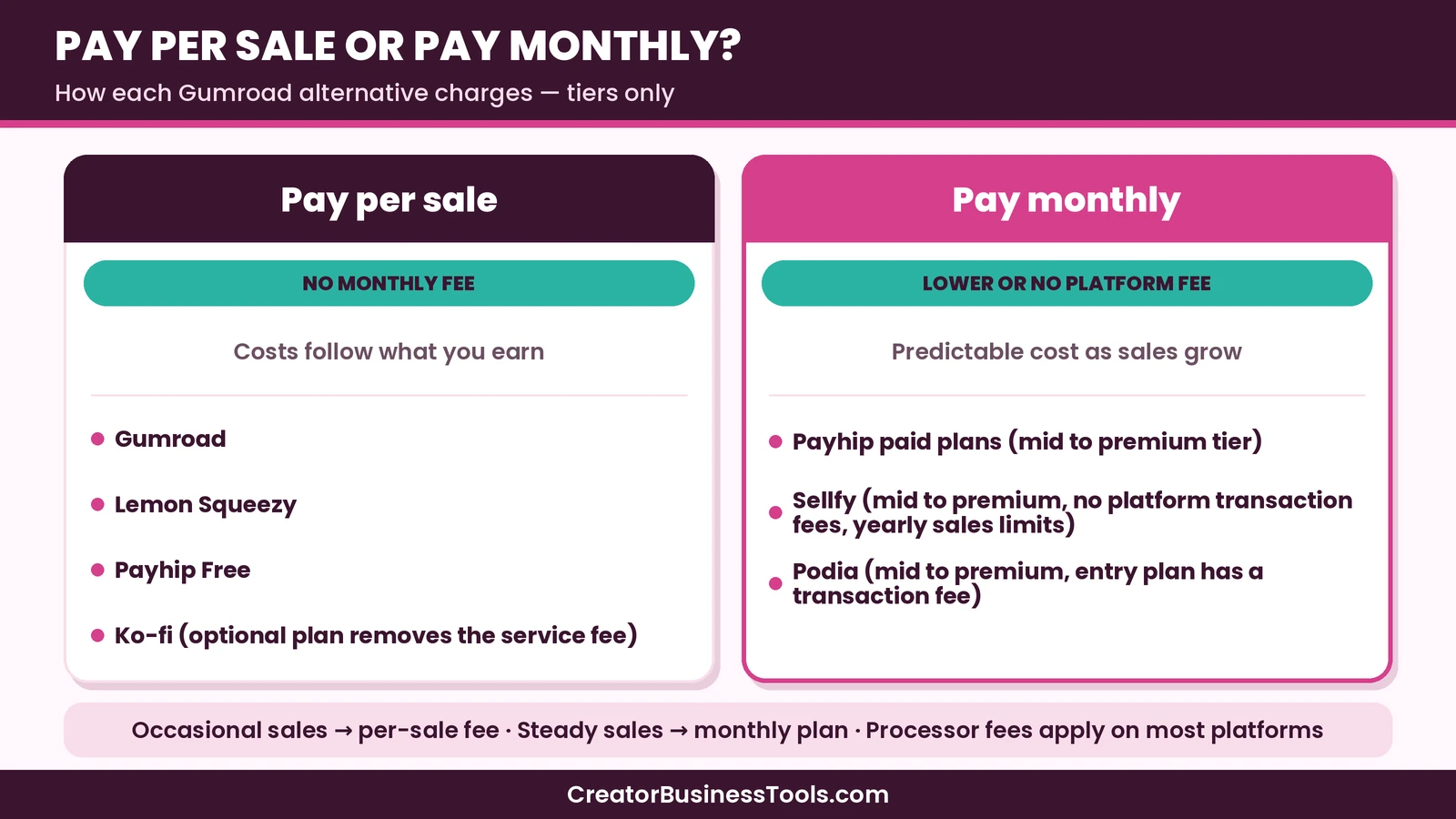
Pricing comparison
| Platform | Monthly fee | Platform transaction fee | Sales limits | Free option |
|---|---|---|---|---|
| Sellfy | mid-range to premium | None | Yearly sales limit per plan | Paid plans only |
| Payhip | Free to premium | Lower on higher plans, none on the top plan | None stated | Free plan |
| Podia | mid-range to premium | Entry plan only | None stated | Paid plans only |
| Lemon Squeezy | None for ecommerce | Per-sale fee | None stated | Free to start |
| Ko-fi | Free, optional budget plan | Service fee unless on the fixed plan | None stated | Free to join |
| Gumroad | None | Per-sale fee, higher for marketplace sales | None stated | Free to start |
A simple rule of thumb: if your sales are small or irregular, a per-sale model keeps costs tied to what you earn. Once your sales become steady, it’s worth working out whether a monthly plan with no platform transaction fees, such as Sellfy or Payhip’s top plan, would cost less overall.
Feature comparison
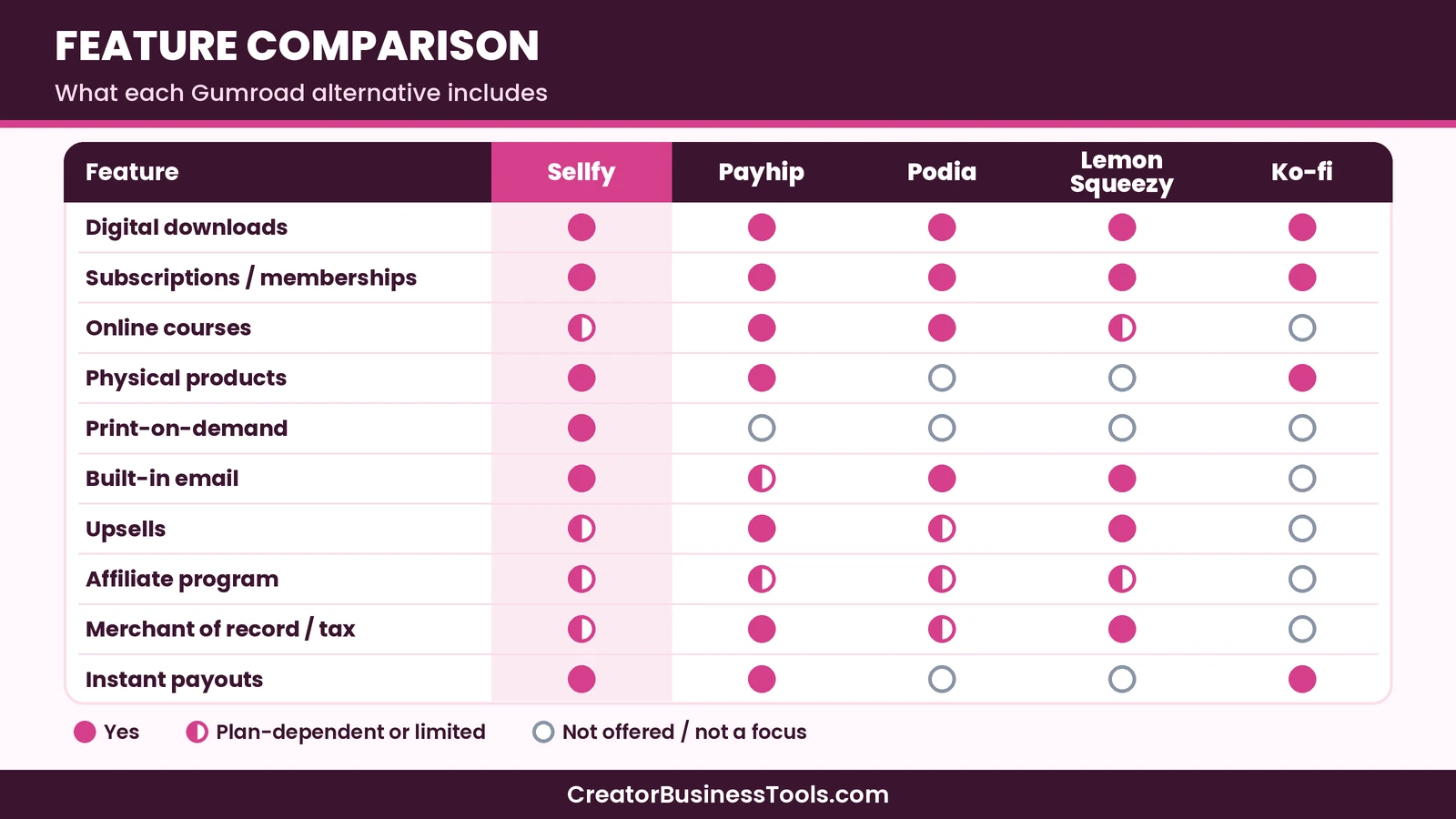
| Feature | Sellfy | Payhip | Podia | Lemon Squeezy | Ko-fi |
|---|---|---|---|---|---|
| Digital downloads | Yes | Yes | Yes | Yes | Yes |
| Subscriptions or memberships | Yes | Yes | Yes | Yes | Yes |
| Online courses | Not a focus | Yes | Yes | Not a focus | No |
| Physical products | Yes | Yes | Not a focus | No | Yes |
| Print-on-demand | Built in | No | No | No | No |
| Built-in email marketing | Yes, with credits | Marketing tools; check email features | Yes, by subscriber count | Yes, free up to a limit | No |
| Upsells | Business and above | Cross-sell order bumps | Mid-tier and above | Bundles and upsells | No |
| Affiliate program for your products | Business and above | Check feature list | Mid-tier and above | Check feature list | No |
| Tax handling | Tax settings | Collects and remits key taxes | Sales tax features | Merchant of record | Not a focus |
| Payout timing | Instant to PayPal or Stripe | After each sale | Through your processor | On a schedule | Direct to PayPal or Stripe |
Which Gumroad alternative should you choose?
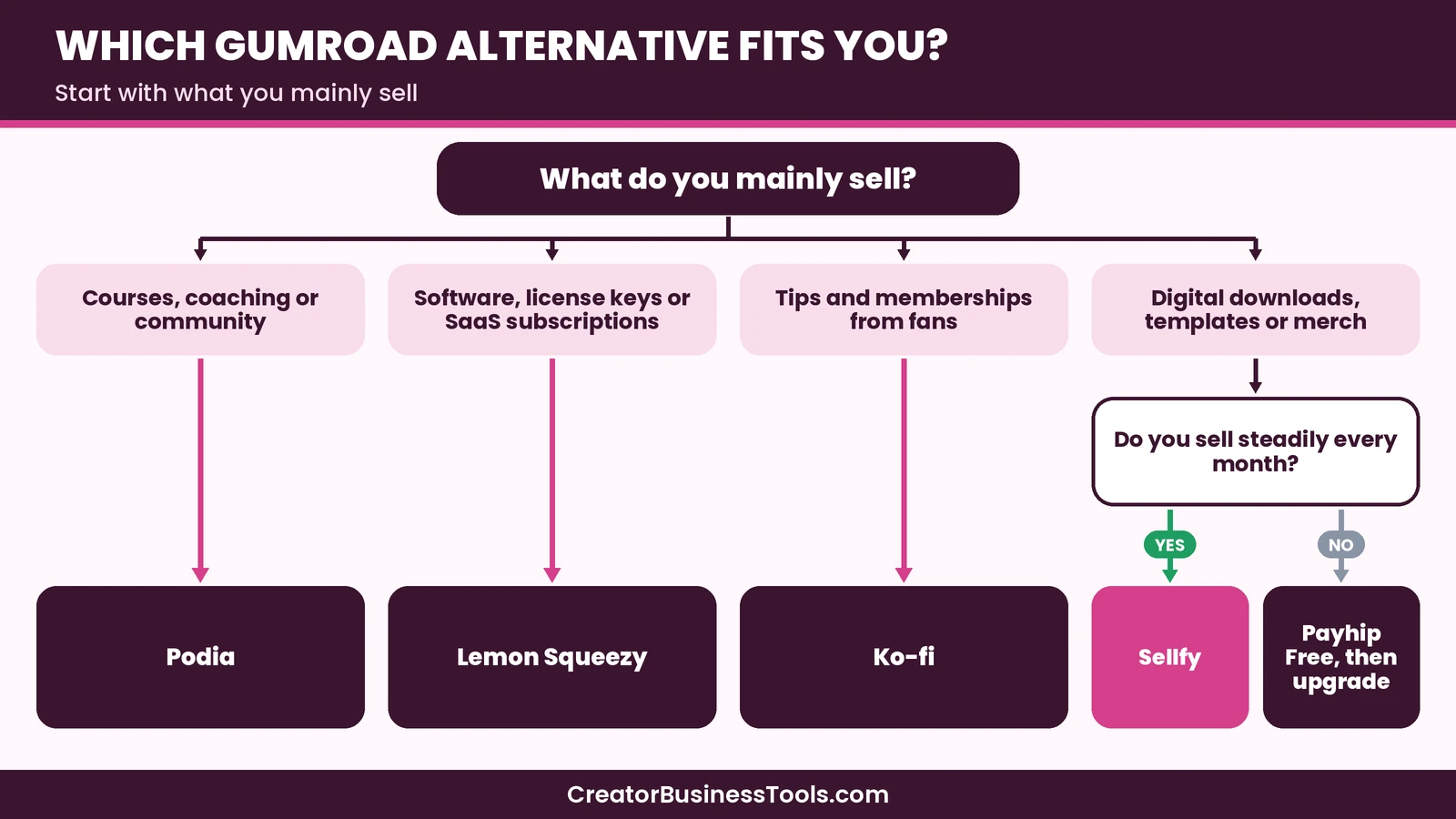
Here’s how we’d match each platform to common situations:
- You sell templates, printables or presets every month: Sellfy gives you a branded store, email marketing and no platform transaction fees.
- You’re just testing a product idea: Payhip’s free plan lets you start with no monthly cost, then switch to a paid plan as sales grow.
- You teach or coach: Podia combines courses, coaching, community and a website.
- You sell software or run subscriptions: Lemon Squeezy’s license keys and merchant of record setup are built for this.
- You have a fan community: Ko-fi keeps tips, memberships and a small shop on one page.
How to switch from Gumroad without losing sales
Moving platforms takes some planning. Here’s a simple process that works for any of the options above:
- List your products and customers. Export your product details and customer list from Gumroad so you have a full record.
- Rebuild your best sellers first. Set up your top products on the new platform, test the checkout and download delivery, and confirm the files open correctly.
- Check migration help. Sellfy, Payhip and Podia all mention migration help on their official pages, which may save time.
- Update every link. Replace old product links in your social bios, website, emails and video descriptions.
- Tell your audience. Send a short email so past buyers know where to find updates and new products.
- Keep the old store briefly. Leave your Gumroad products available for a short overlap period so no customer hits a dead link, then archive them.
Common mistakes to avoid
- Comparing monthly fees only. Add up monthly fees, platform fees and payment processor fees based on your realistic sales.
- Ignoring sales limits. Some plans cap yearly sales, so check where your store is likely to land.
- Overlooking taxes. Platforms that act as a merchant of record handle more of the tax work for you, while others give you settings to manage it yourself.
- Choosing more features than you need. An all-in-one platform is helpful only if you’ll use its courses, community or email tools.
- Forgetting about payouts. If cash flow matters, check whether money arrives instantly or on a schedule.
FAQ
What is the best Gumroad alternative?
It depends on how you sell. For steady digital product sales, Sellfy is our top pick because it has no platform transaction fees and includes email marketing. For a free start, Payhip is a strong option.
Is there a free Gumroad alternative?
Yes. Payhip has a free plan, and Lemon Squeezy and Ko-fi are free to start. Each charges a fee on sales instead of a monthly fee.
Which Gumroad alternative handles sales tax?
Lemon Squeezy acts as a merchant of record, and Payhip says it collects and remits EU/UK VAT and US/Canadian sales tax. Podia includes sales tax features, while Sellfy provides tax settings for you to manage.
Can I sell physical products on these platforms?
Sellfy, Payhip and Ko-fi support physical products, and Sellfy also offers print-on-demand. Lemon Squeezy focuses on digital products.
Do I need a website to use these platforms?
No. Each platform gives you a store or page you can share directly. Sellfy, Payhip and Lemon Squeezy also let you embed products or checkout on an existing website.
Bottom line
The right choice among Gumroad alternatives comes down to how much and what you sell. If you sell digital products steadily, Sellfy is our top pick, with no platform transaction fees, built-in email marketing, print-on-demand and instant payouts. Payhip is a low-risk way to start free, Podia fits course creators and coaches, Lemon Squeezy suits software and subscription sellers, and Ko-fi works well for fan-supported creators.
Pick the platform that matches your products today, and leave room to grow.
[Open your store with Sellfy](https://sellfy.com/)Free checklist: Get our one-page “Launch Your First Digital Product” checklist covering pricing, delivery tests and promotion. Contact us to request a copy.
Pricing and features from official vendor pages, last checked October 25, 2026.