
Instagram DM Automation: ManyChat Pricing vs Linktree
Disclosure: This post contains affiliate links. If you buy through them, we may earn a commission at no extra cost to you. How we make money.
If people already comment “LINK” or “GUIDE” under your posts, you’re sitting on a lead list you’re not collecting yet. Instagram DM automation turns those comments and messages into instant replies, captured emails, and follow-ups that run while you sleep.
Quick verdict: For most creators and small businesses, ManyChat is the default tool for Instagram DM automation. Start on the free plan to test one comment-to-DM flow. Move to Pro when you want to send leads into your email tool, because that’s where ManyChat’s email and CRM integrations live.
Quick picks
| If you are… | Start with | Why |
|---|---|---|
| Testing your first comment-to-DM flow | ManyChat Free | Free, no credit card, a small number of live triggers to try the idea |
| Sending a freebie link to a growing audience | ManyChat Essential | Unlimited automations, no ManyChat branding, Google Sheets sync |
| Building an email list from Instagram | ManyChat Pro | Email, SMS, and CRM integrations (Kit, Mailchimp, ActiveCampaign and more) |
| Running a team inbox across many channels | ManyChat Business | All eligible channels, multi-user inbox, priority support |
| Just needing one link in your bio | Linktree | A different job: a simple landing page for your profile link |
What Instagram DM automation actually does
DM automation is a set of rules: when someone does X, send them Y. The “X” is a trigger, such as a comment with a keyword, a direct message, or a comment during a Live. The “Y” is a private message with a link, a question, or a button.
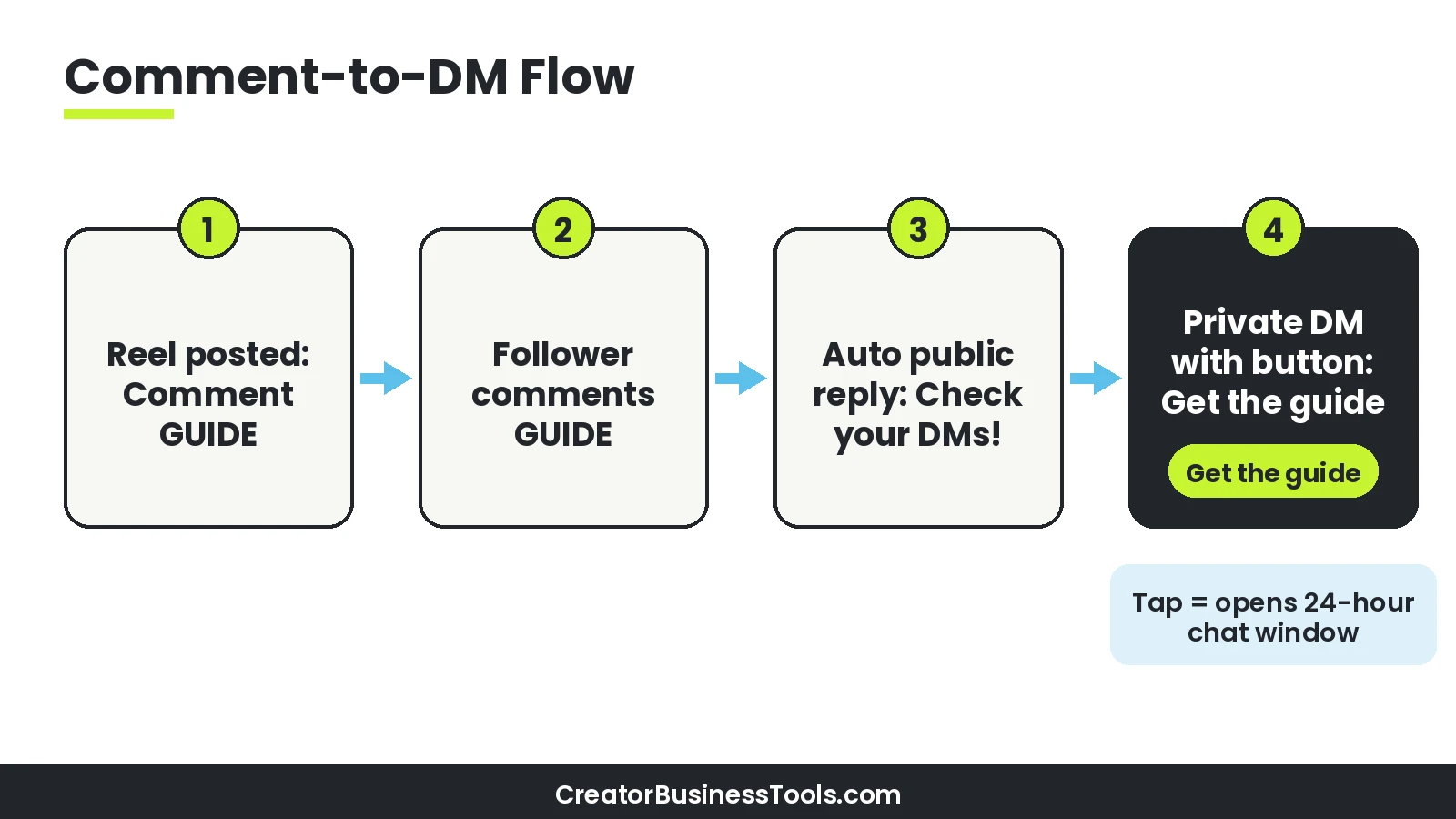
The most popular pattern is comment-to-DM. You post a Reel that says “Comment GUIDE and I’ll send it to you.” Every matching comment gets an automatic private reply with the link.
The building blocks
- Triggers: comments on a post or Reel, comments on a Live, or a keyword someone sends you by DM.
- Messages: the private reply, plus optional buttons and quick replies.
- Actions: tagging the contact, saving their answers, or sending data to another tool.
- Follow-up: once a person taps a button or replies, you can keep the conversation going.
Why it matters for creators
Manual DMs don’t scale. A Reel that takes off can bring hundreds of comments in a day, and each one is a person asking for something.
Automation answers them immediately, which keeps momentum while interest is high. It also lets you capture an email address, so your audience isn’t only living inside one app.
How ManyChat’s Instagram triggers work
ManyChat’s help center documents several Instagram triggers. Here’s what each one is for.
| Trigger | What starts it | Good for |
|---|---|---|
| Post and Reel comments | A comment on a specific post, any post, or your next post | Freebie delivery, lead magnets, launch links |
| Keywords (User sends a message) | A word or phrase sent to you by DM | “Send me PRICES”, “COLLAB”, “HELP” requests |
| Live comments | Comments during an Instagram Live | Sending replays, offers, or sign-up links after a Live |
Comment triggers: the options that matter
- Which posts: choose one specific post or Reel, any post, or the next post or Reel you publish. ManyChat notes you can run only one “next post” automation at a time.
- Which comments: include certain keywords, exclude certain words, or respond to any comment.
- Public reply: you can add up to three custom public replies that ManyChat rotates so the thread doesn’t look robotic.
- Opening DM: an optional first message that asks the person to tap a button before you send more.
The 24-hour rule in plain English
ManyChat explains that a private reply to a comment doesn’t automatically opt the person into your DM list. The 24-hour messaging window opens only after they interact, for example by replying or tapping a button.
That’s why many flows start with a simple “Want the link? Tap below” button. The tap opens the conversation, and then the real content arrives.
Keyword triggers and AI intent matching
Keyword triggers work across Instagram, Facebook Messenger, WhatsApp, Telegram, and SMS, according to ManyChat’s help center. You can match exact words or phrases.
There’s also an option to describe the intention behind a message instead of listing every keyword. ManyChat AI then tries to match incoming messages to that description, which helps when people phrase the same request in different ways.
Tips for choosing trigger words
- Pick a word people wouldn’t type by accident, like “GUIDE5” instead of “yes.”
- Use one keyword per offer so you can tell which post performed.
- Put the keyword in the caption, on screen, and in a pinned comment.
- Test the flow from a second account before you publish.
Turning DMs into email subscribers
Comment-to-DM is great for delivering a link. The real win is capturing an email so you can follow up off Instagram.
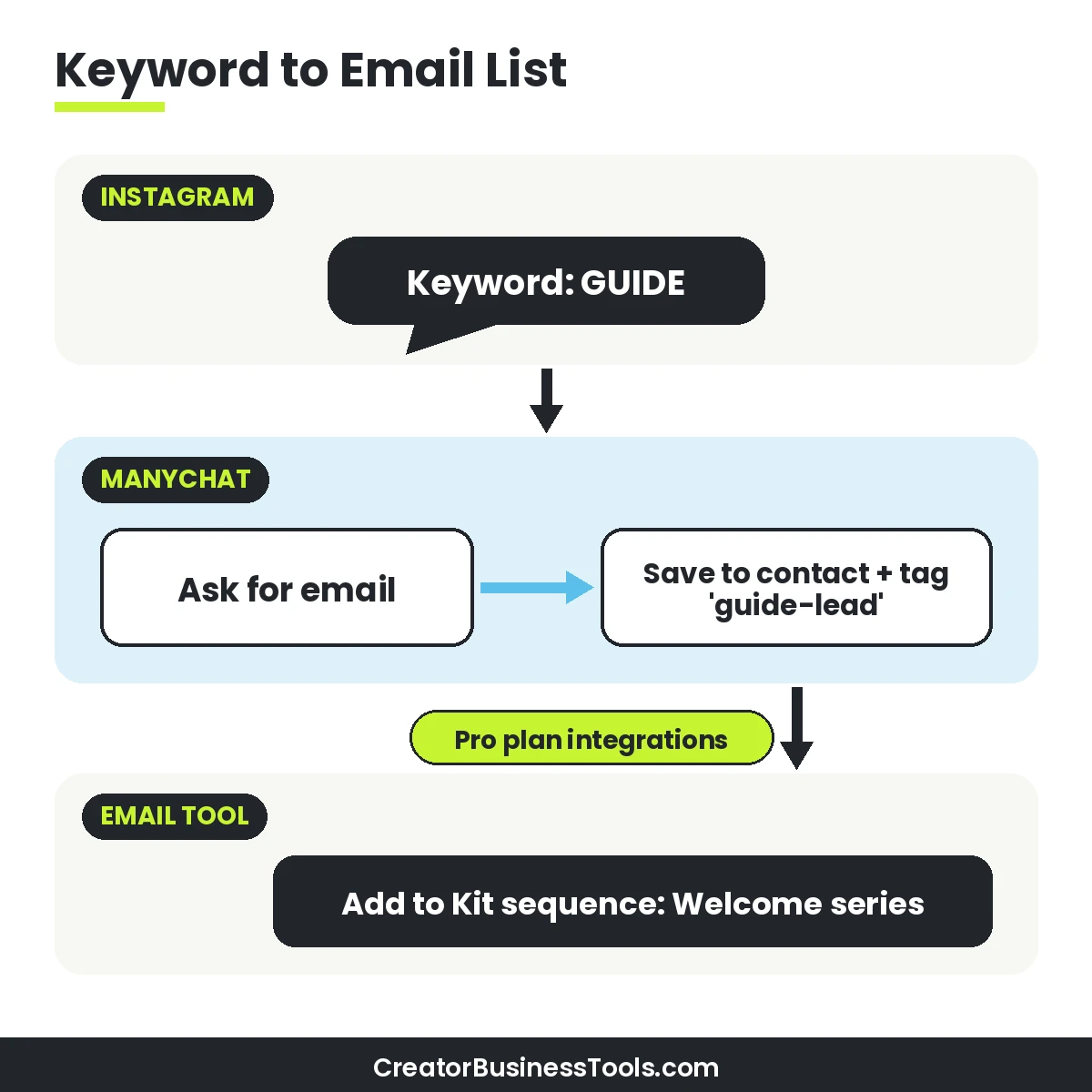
ManyChat can ask for an email inside the chat and store it on the contact. On Pro, you can pass it to an email platform. ManyChat’s integration directory lists Kit, Mailchimp, ActiveCampaign, Flodesk, Klaviyo, and HubSpot, plus Google Sheets, Zapier, Make, and its own API.
Example: the Kit integration
ManyChat’s Kit integration offers actions to add a contact to a form, add a contact to a sequence, add a tag, and get a contact’s data. In practice, that means a follower who asks for your checklist can land directly in a Kit welcome sequence. For connecting more tools beyond the built-in integrations, see Make vs Zapier.
If you’re still choosing an email platform, see our guide to the best email marketing for course creators, or our roundup of email marketing tools for creators with a visual brand.
A simple lead-capture checklist
- One clear offer per post (checklist, template, mini-course, short video lesson).
- A button that opens the conversation before you ask for anything.
- A short email question with a one-line reason (“so I can send the PDF”).
- A tag that records which post the lead came from.
- A connected email sequence that delivers the promised item.
- A follow-up message or email a few days later with your next step.
Essential vs Pro for list building
ManyChat’s help center describes Essential as including lead capture, tags, Google Sheets sync, and unlimited automations. Pro adds integrations with email, SMS, CRM, and commerce tools, along with AI-powered automation and API access.
So if a spreadsheet is enough, Essential can work. If you want contacts to flow straight into Kit or Mailchimp, plan for Pro.
ManyChat pricing
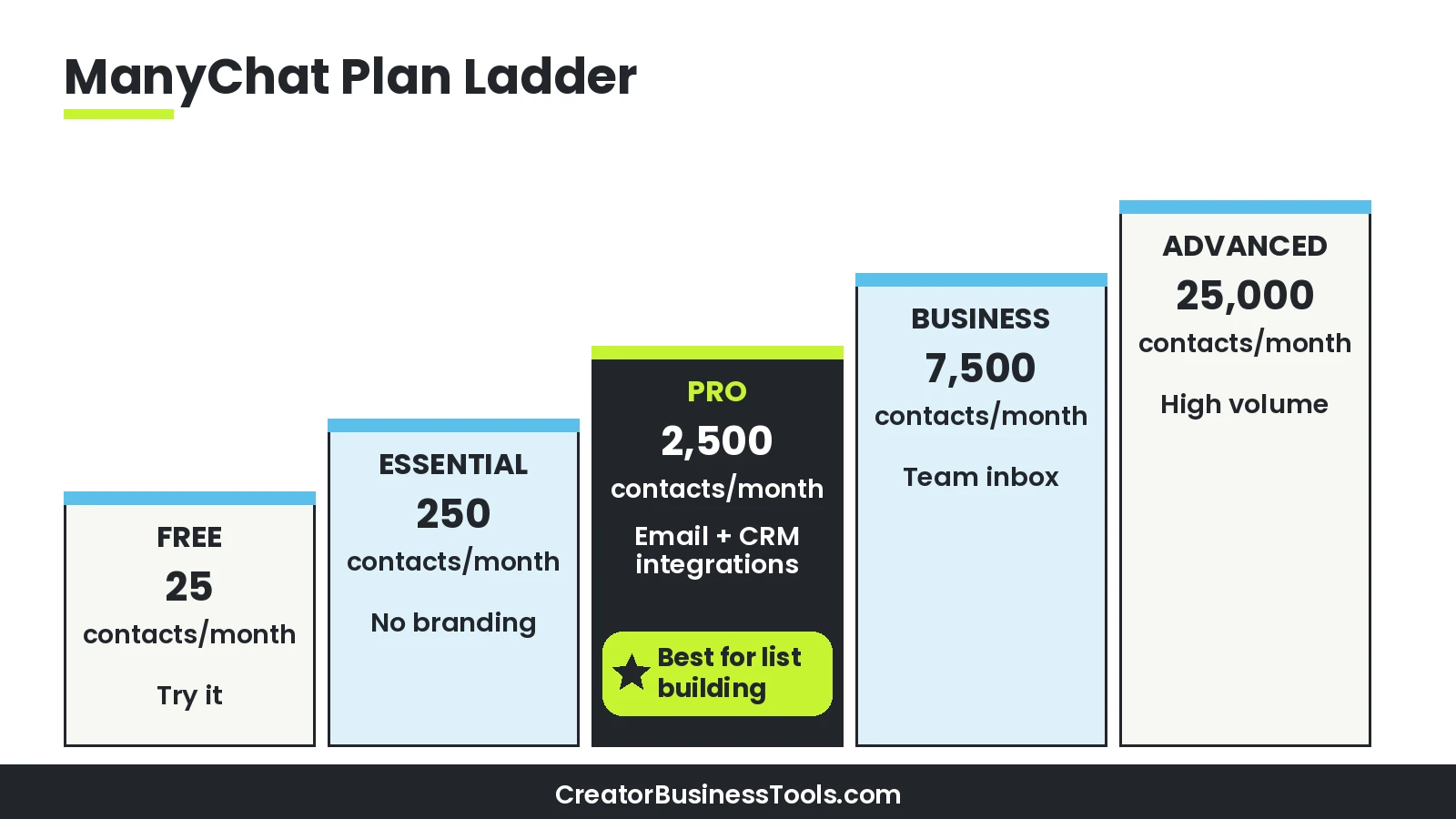
ManyChat prices by active contacts, which the pricing page defines as real people you interact with during a monthly billing period. One person counts once per month no matter how many messages you exchange.
Annual billing lowers the monthly equivalent on every paid plan. Prices are shown before tax and can vary by billing country, so treat the tiers below as a guide.
| Plan | Price tier | Active contacts / month | Channels | Users | Highlights |
|---|---|---|---|---|---|
| Free | Free | 25 | 2 | 1 | Templates, up to 4 live triggers, basic inbox, ManyChat branding |
| Essential | Budget ($) | 250 | 2 | 2 | Unlimited automations, scheduled messages, no branding |
| Pro | Mid ($$) | 2,500 | 3 | 3 | Broadcasting, AI-powered conversations, Inbox AI, ManyChat AI |
| Business | Upper-mid ($$$) | 7,500 | All eligible | 5 | Multi-user inbox, automation insights, priority support |
| Advanced | Premium ($$$$) | 25,000 | All eligible | 10 | Highest volume, priority support |
What happens if you go over?
According to ManyChat’s pricing FAQ, automations don’t shut off when you pass your contact limit. You pay a small overage fee per extra active contact instead.
You get notifications as you approach the limit, and you can set an overage threshold. If you upgrade within the same billing cycle, overage fees incurred so far are forgiven.
Refunds and switching
- The Free plan doesn’t require a credit card.
- Paid plans can be upgraded any time; downgrades take effect at the next billing period.
- Annual plans can’t be downgraded until the annual term ends.
- ManyChat’s FAQ says you can get a refund if you cancel within 30 days of buying a plan.
WhatsApp messages cost extra
WhatsApp works differently from Instagram. ManyChat’s WhatsApp pricing guide explains that Meta charges per message for certain categories, and those charges are deducted from your ManyChat Wallet without a ManyChat markup.
Rates depend on the message type and the recipient’s country. If WhatsApp is your main channel, budget for both the ManyChat plan and Meta’s messaging fees.
Which plan should you pick?
- Validating the idea: Free, with one comment-to-DM flow on your best-performing post format.
- Steady freebie delivery under a few hundred people a month: Essential.
- Growing an email list or running WhatsApp broadcasts: Pro.
- A team answering DMs together: Business.
- Very high monthly volume: Advanced, or compare overage costs against Business first.
ManyChat vs Linktree: different jobs
People often compare these two because both sit next to your Instagram bio. In reality, they solve different problems, and many creators use both.
Linktree is a link-in-bio page: one link that opens a mini landing page with your other links, sign-up forms, and products. ManyChat is a conversation tool: it responds to comments and DMs and moves people through a chat.
| Question | ManyChat | Linktree |
|---|---|---|
| Main job | Automated replies to comments and DMs | A landing page behind your bio link |
| Where it lives | Inside Instagram DMs (plus other chat channels) | A web page people visit from your profile |
| How people find it | They comment or message you | They tap your bio link |
| Lead capture | Ask for an email inside the chat | Email and phone sign-ups on the page (listed on the Free plan) |
| Email tool connections | Kit, Mailchimp, ActiveCampaign and more (Pro) | Mailing list integrations (listed on Pro) |
| Instagram auto-replies | Core feature on every plan | Listed on Linktree’s Premium plan |
| Price tier | Free, then budget ($) to premium ($$$$) tiers | Free, then budget ($) to mid ($$) tiers |
When Linktree is enough
- You mostly want one tidy page with your latest video, shop, and newsletter link.
- Your audience finds you through your profile rather than through comments.
- You rarely get repeated DM requests for the same thing.
When ManyChat is the better fit
- Your Reels and posts regularly ask people to comment a keyword.
- You answer the same DM questions over and over.
- You want to collect emails without sending people off Instagram first.
- You also use WhatsApp, Messenger, or other chat channels to talk to leads.
Using both together
A common setup is Linktree in the bio for people browsing your profile, and ManyChat for people who engage with a specific post. They cover different entry points, so they don’t really compete.
One note: Linktree’s Premium plan lists Instagram auto-replies. If you only need occasional auto-replies and already pay for Linktree Premium, check whether that covers your needs before adding another tool.
ManyChat review: strengths and trade-offs
What stands out
- Built for Instagram first: comment, keyword, and Live triggers are documented in detail.
- Meta Business Partner: ManyChat states it’s an official Meta Business Partner and a TikTok partner.
- Multi-channel: the pricing page lists Instagram, WhatsApp, Messenger, TikTok, Telegram, Email, and SMS.
- Integrations where creators need them: Kit, Mailchimp, Flodesk, ActiveCampaign, HubSpot, Google Sheets, Zapier, and Make.
- Low-risk start: a free plan with no card required.
Keep in mind: Costs scale with active contacts, so a viral post can push you into overage. Email and CRM integrations sit on Pro, not Essential. WhatsApp messages carry Meta’s per-message fees on top of your plan.
Best for: Creators, coaches, and small businesses who already get comments and DMs and want to turn them into email subscribers or sales conversations.
Not ideal for: Accounts with very little engagement yet, or anyone who only needs a simple link page.
Five automations worth building first
- Freebie delivery: “Comment GUIDE” → button → link to your lead magnet.
- Email capture: freebie flow plus an email question that sends the contact to your email tool.
- FAQ responder: a keyword like “PRICES” or “HOURS” that sends a short answer and a link.
- Live follow-up: comments during a Live trigger a DM with the replay or offer link.
- Story reply nudge: a keyword in your Story (“DM me READY”) that starts a short qualifying chat.
Before you go live
- Test every flow from a second account.
- Check that links open correctly on mobile.
- Keep the first message short and human.
- Track which keyword came from which post using tags.
- Review your active contact count after the first week.
How to measure whether it’s working
You don’t need a complex dashboard to know if DM automation is paying off. Track a few simple numbers each week and compare posts that use a keyword with posts that don’t.
| Metric | What it tells you | Where to look |
|---|---|---|
| Keyword comments per post | Whether your call to action is clear | Instagram post comments |
| Button taps vs comments | Whether your opening DM feels worth tapping | Tags in ManyChat |
| Emails captured | Whether the offer is strong enough to share an email | Your email tool or Google Sheet |
| Active contacts this month | How close you are to your plan’s allowance | ManyChat billing |
If comments are high but taps are low, rewrite the opening DM. If taps are high but emails are low, make the reason to share an email clearer or the freebie more specific.
Caveats before you commit
- Plan prices, contact limits, and features change. Check ManyChat’s official pricing page before you buy.
- Prices can vary by billing country and exclude tax.
- WhatsApp messaging fees are charged separately based on Meta’s rates.
- Automation should feel like help, not spam. Only message people who engaged with you, and follow Instagram’s rules.
- This guide is based on official product information, not on account-specific results. Your results depend on your content and offer.
How to choose an Instagram DM automation setup
- Count your demand. How many people comment or DM you about the same thing each month? That number guides your plan choice.
- Pick one offer. Start with a single freebie or link rather than a whole menu.
- Decide where leads go. A spreadsheet works on Essential. An email platform needs Pro.
- Check your channels. If WhatsApp matters, budget for Meta’s messaging fees.
- Start free, then upgrade on evidence. Move up a plan when you hit real limits, not before.
- Keep your bio link separate. Use Linktree or a simple page for profile visitors, and DM automation for post engagement.
FAQ
Is ManyChat free?
Yes, there’s a free plan with a small monthly active contact allowance, up to four live triggers, and ManyChat branding. No credit card is needed.
What counts as an active contact?
A real person you interact with in a monthly billing period through automations, AI, broadcasts, or the inbox. One person counts once per month.
Can ManyChat send leads to Kit or Mailchimp?
Yes. ManyChat lists integrations with Kit, Mailchimp, ActiveCampaign, Flodesk, Klaviyo, and HubSpot. Its help center places email and CRM integrations on the Pro plan.
Does ManyChat work with WhatsApp?
Yes. WhatsApp is one of the listed channels, and ManyChat’s Pro plan page mentions WhatsApp broadcasts and automations. Meta’s per-message fees apply.
Is ManyChat a Linktree alternative?
Not really. Linktree is a link-in-bio page; ManyChat automates conversations in DMs. Many creators use both.
What if a paid plan isn’t right for me?
Start on the free plan to test your flow. ManyChat’s pricing FAQ also describes a refund window after purchase. Check the official pricing page for current terms.
Will automation get my account in trouble?
ManyChat states it’s an official Meta Business Partner. Keep messages relevant, respond only to people who engaged, and avoid spammy behavior.
Bottom line
Instagram DM automation is the simplest way to turn comments into conversations and conversations into subscribers. ManyChat is built for exactly that job, with a free plan to test the idea.
Start with one comment-to-DM flow. When you’re ready to send leads into your email platform, Pro is the plan that unlocks those integrations. Keep Linktree, or any link page, for profile visitors, since it handles a different job.