
Make vs Zapier for Creators: Pricing, Credits, Which to Pick
Disclosure: This post contains affiliate links. If you buy through them, we may earn a commission at no extra cost to you. How we make money.
Your email platform, community, and payment processor all work fine alone. The headaches start when you copy buyers from one to another by hand. Make and Zapier both fix that, but they price and build automations differently.
Quick verdict: Choose Make if you like a visual canvas, want multi-step workflows on a small budget, and don’t mind learning how credits work. Choose Zapier if you want the simplest setup and a pricing model that doesn’t charge for checking new data. Most solo creators can start on Make’s Core plan and only move to Pro or Teams when a specific need appears.
Quick picks
| If you… | Pick | Why |
|---|---|---|
| Want to try automation for free | Make Free or Zapier Free | Make gives more monthly usage; Zapier’s free plan is limited to two-step Zaps |
| Run a few multi-step workflows on a budget | Make Core | Unlimited active scenarios and minute-level scheduling at a low entry price |
| Depend on automations for launches and need faster runs | Make Pro | Priority execution, custom variables, full-text log search |
| Share automations with a team or VA | Make Teams | Teams and roles, shareable scenario templates |
| Want the most straightforward setup | Zapier Professional | Multi-step Zaps, webhooks, and a simple trigger-action model |
| Want the lowest monthly bill for steady workflows | Pabbly Connect Standard | Triggers and internal steps like filters and formatters don’t use tasks; budget ($) entry tier. See our Pabbly Connect review |
Make vs Zapier at a glance
| Category | Make | Zapier |
|---|---|---|
| Builder style | Visual canvas of connected modules (scenarios) | Step-by-step list of a trigger and actions (Zaps) |
| Billing unit | Credits: most module actions use 1 credit | Tasks: each successful action uses a task |
| Does checking for new data cost usage? | Reading or searching data counts as credits | No; Zapier says polling never uses tasks |
| Free logic steps | Router and error handlers don’t use credits | Filter, Formatter, Paths, Delay and more don’t use tasks |
| Free plan | 1,000 credits/month, limited active scenarios, 15-minute minimum interval | 100 tasks/month, two-step Zaps |
| Entry paid plan band | Budget ($) (Core, smallest credit tier) | Mid ($$) (Professional, smallest task tier) |
| Team plan band | Mid ($$) (Teams, smallest credit tier) | Premium ($$$) (Team, smallest task tier) |
| App library | Thousands of pre-built apps | Thousands of app integrations |
| Creator apps (Kit, Circle, Stripe) | All three listed | All three listed |
| Running out of usage | Scenarios pause; buy extra credits or upgrade | Optional pay-per-task billing, otherwise Zaps pause |
How each tool thinks about automation
Make: scenarios on a canvas
In Make, an automated workflow is called a scenario. Make describes it as a flow that triggers when it receives data from one app, transforms it, and sends it to another.
You build it on a visual canvas, connecting modules with lines. Routers let one trigger branch into several paths, which helps when different products need different follow-ups.
Zapier: Zaps as a checklist
In Zapier, a workflow is a Zap: one trigger plus one or more actions. You build it top to bottom, step by step.
That linear format is easy to read and quick to set up. Paths and filters add logic when you need it.
Which style suits you?
- Visual thinkers who like to see the whole flow at once often prefer Make.
- Checklist thinkers who want the fewest decisions often prefer Zapier.
- Budget-conscious builders with multi-step workflows usually find Make’s entry plans cheaper.
Example: connecting Kit, Circle, and Stripe
Here’s a common creator workflow. Someone buys your course through Stripe, and you want them tagged in Kit and invited to your Circle community.
Make lists apps for Kit, Circle, and Stripe. Zapier lists Kit, Circle, and Stripe too. Check each app page for the exact triggers and actions available before you design your flow.
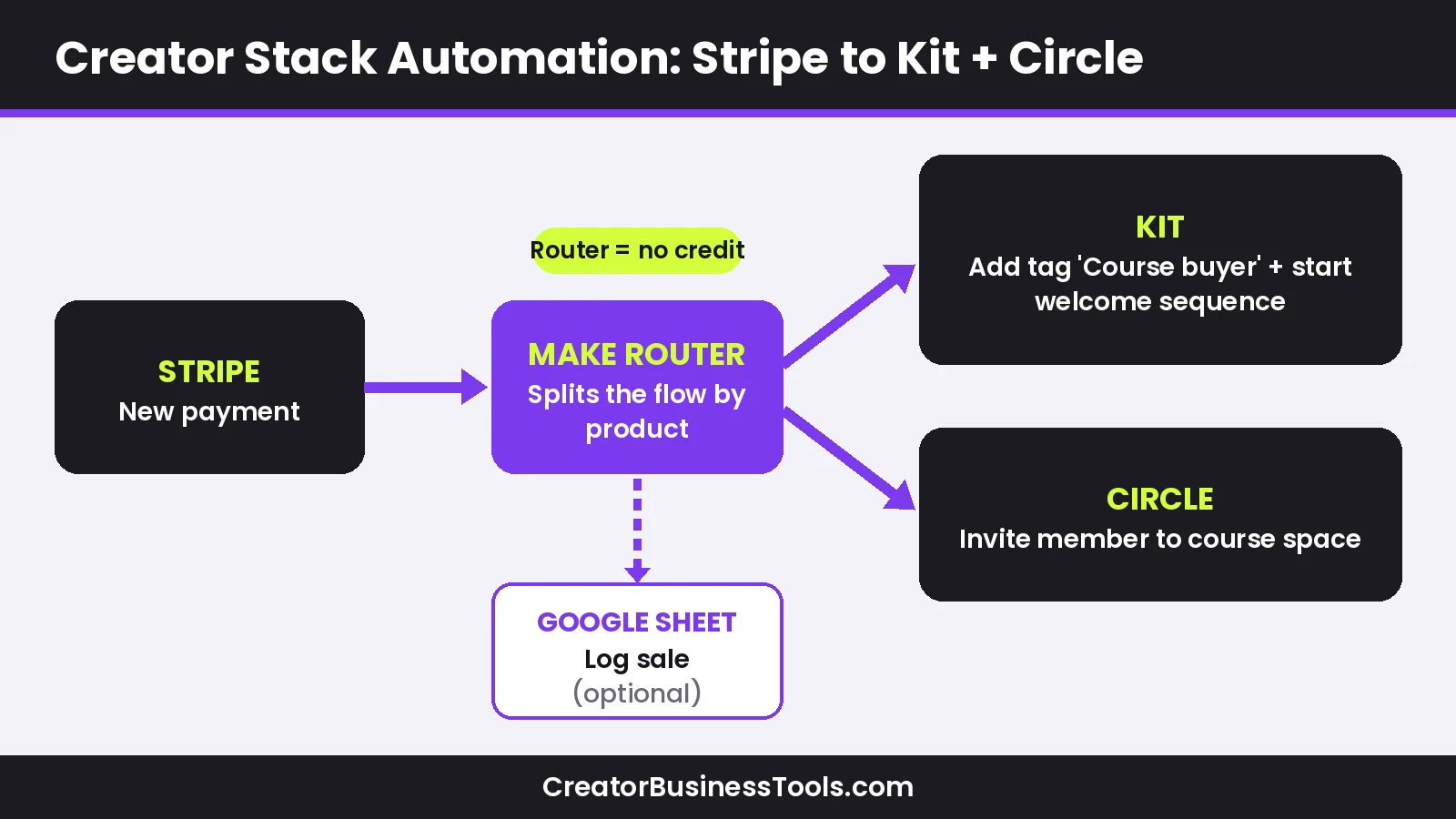
The example scenario, step by step
- Trigger: a new successful payment in Stripe.
- Router: split the flow by product, so each course gets its own follow-up.
- Email: add the buyer to Kit with a tag for that product.
- Community: invite the buyer to the matching Circle space.
- Optional log: add a row to a spreadsheet for your records.
If you’re still choosing tools for this stack, see our guides to the best email marketing for course creators and Circle vs Skool vs Mighty Networks.
How many credits would that use?
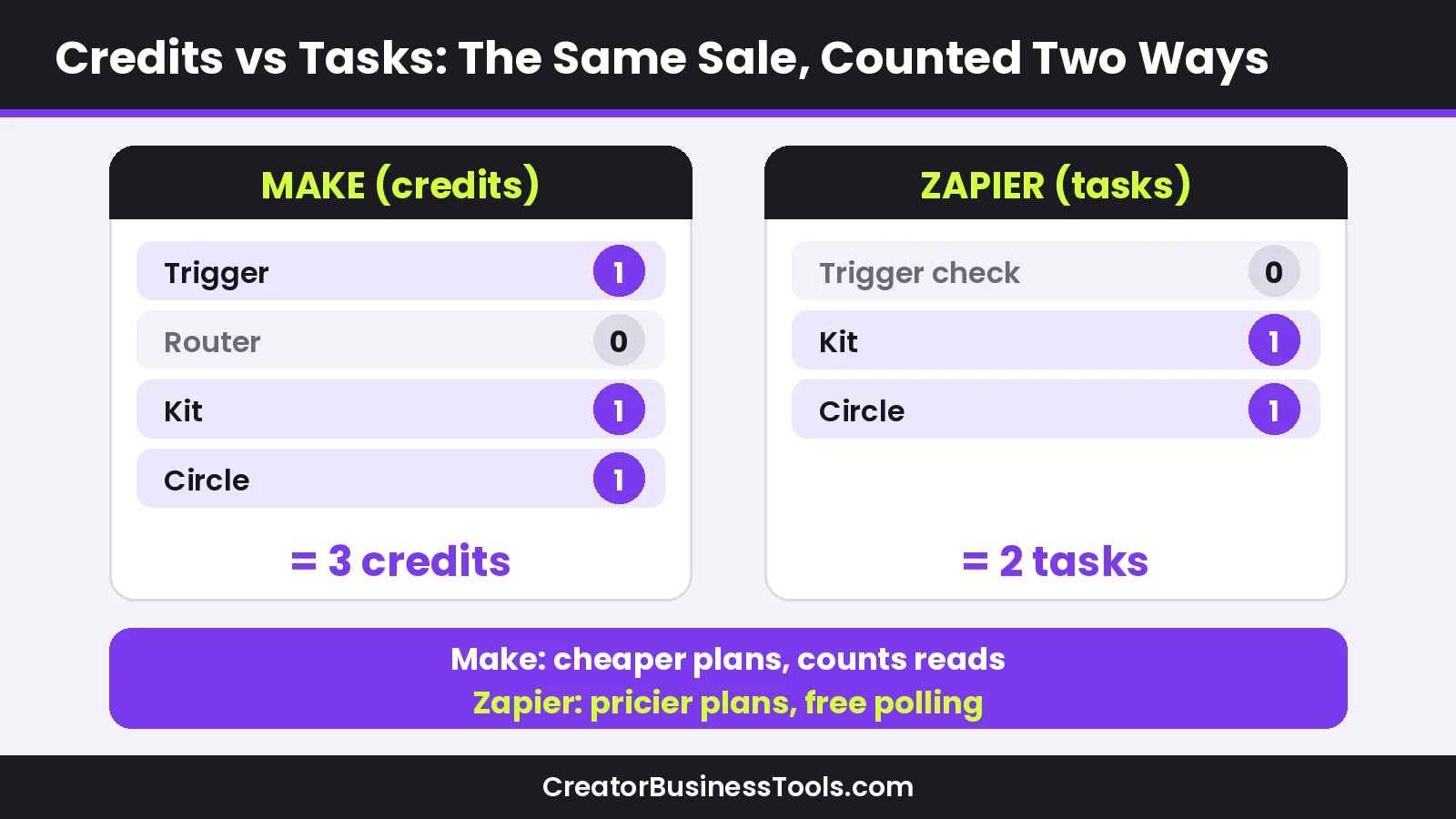
Make counts one credit for most module actions, and the router doesn’t count. A run with a trigger, a Kit action, and a Circle action would use roughly three credits, plus one for an optional spreadsheet row.
On Zapier, tasks count successful actions, and the trigger check itself doesn’t use tasks. The same flow would use about two or three tasks per sale, depending on your steps.
Other creator automations worth building
- New email subscriber → add to a spreadsheet or CRM.
- New community member → tag them in your email tool.
- Refund in Stripe → remove a tag or access.
- New Instagram DM lead from a chat tool → add to your email list (Make lists a ManyChat app, for example; see our Instagram DM automation guide).
- Weekly digest → collect new posts and send a summary.
Make pricing and credits, explained by band
Make bills in credits. Make’s pricing page states that each module action, such as adding a spreadsheet row or fetching data, counts as one credit, and some advanced AI features may use more.
You choose a monthly credit amount, starting at 10,000 credits on paid plans, and the price rises as you add credits. Make’s FAQ says paying annually in advance is cheaper than paying monthly.
| Plan | Price tier (smallest credit tier) | What you add | Who it’s for |
|---|---|---|---|
| Free | Free | 1,000 credits/month, limited active scenarios, 15-minute minimum interval | Testing your first scenario |
| Core | Budget ($) | Unlimited active scenarios, scheduling down to the minute, Make API access | Most solo creators |
| Pro | $ (upper end) | Priority execution, custom variables, full-text execution log search | Business-critical automations |
| Teams | Mid ($$) | Teams and team roles, create and share scenario templates | Creators with a team or VA |
| Enterprise | Custom | Enterprise apps, custom functions, 24/7 enterprise support | Larger organizations |
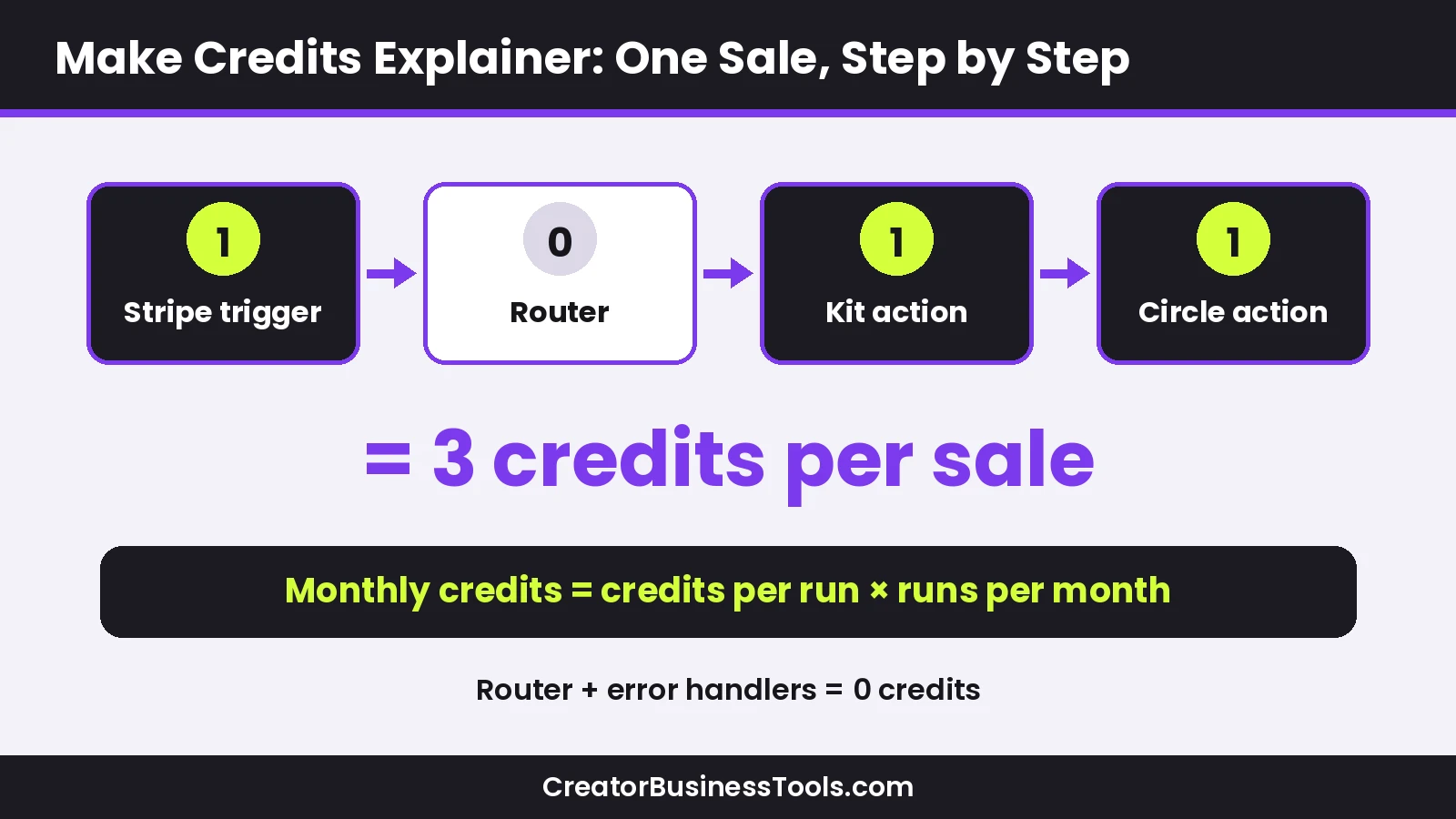
What counts as a credit
Make’s FAQ lists actions that use credits, including:
- Reading data from an app or webhook.
- Searching, creating, updating, or deleting data in an app.
- Transforming data with built-in tools.
- Aggregating or iterating rows of data.
Router modules and error handler modules don’t count. A single run can use anything from two credits to thousands, depending on how much data it processes.
Watch out for polling
Because reading data counts as a credit, a scenario that checks an app very frequently can use credits even when nothing new happens. Where an app supports instant triggers or webhooks, those are usually more efficient.
Zapier takes the opposite approach. Its pricing FAQ says it never charges a task to check for new data, only when an action completes.
What happens when you run out
Make says your scenarios stop until credits are added again, with notifications at 75% and 90% of usage. Incoming webhooks are queued up to your storage allowance and processed once you resume.
You can upgrade, buy extra credits in bundles of 1,000 or 10,000, or turn on automatic extra-credit purchases on Core, Pro, and Teams. Unused credits expire at the end of the term.
Quick credit estimate checklist
- Count the modules in each scenario (skip routers).
- Multiply by how many times it runs per month.
- Add a buffer for launch weeks and big sales days.
- Check how often polling triggers run.
- Pick the credit tier that covers your total with room to spare.
Usage math for a typical creator month
Prices aside, it helps to estimate usage in credits and tasks. The table below uses the Stripe → Kit → Circle example, with Make counting the trigger and each action, and Zapier counting only successful actions.
| Monthly sales | Make credits (about 3 per sale) | Zapier tasks (about 2 per sale) | Fits in |
|---|---|---|---|
| 50 | About 150 | About 100 | Make Free; Zapier Free only if the Zap stays two-step |
| 300 | About 900 | About 600 | Make Free (tight); Zapier paid plan |
| 1,000 | About 3,000 | About 2,000 | Make Core (10,000-credit tier); Zapier paid plan |
Polling and extra steps raise these numbers, so treat them as a floor. Remember that Zapier’s free plan only supports two-step Zaps, so a flow with two actions needs a paid plan.
Free plans compared in detail
| Limit | Make Free | Make Core | Zapier Free |
|---|---|---|---|
| Monthly usage | 1,000 credits | 10,000+ credits | 100 tasks |
| Active workflows | Limited active scenarios | Unlimited active scenarios | Unlimited Zaps |
| Workflow length | Multi-step | Multi-step | Two-step only |
| Scheduling | Every 15 minutes at most | Down to every minute | See plan details |
| Max run time | 5 minutes | 40 minutes | See plan details |
| Execution log storage | 7 days | 30 days | See plan details |
Common setup mistakes to avoid
- Using a frequent polling schedule when an instant trigger is available.
- Forgetting to handle refunds, so former buyers keep access.
- Building one giant scenario instead of a few small, testable ones.
- Skipping a test purchase before a launch.
- Not naming workflows clearly, which makes troubleshooting slow later.
When Make Pro or Teams actually makes sense
Most creators don’t need more than Core at first. Here’s an honest look at when upgrading pays off.
| Situation | Stay on Core | Consider Pro | Consider Teams |
|---|---|---|---|
| A few automations, not time-sensitive | Yes | No | No |
| Launches where delays hurt sales or access | Maybe | Yes, for priority execution | If others also manage it |
| Many scenarios sharing the same settings | Manual updates | Yes, custom variables help | Yes |
| Frequent troubleshooting of failed runs | Basic logs | Yes, full-text log search | Yes |
| A VA or team member builds automations | Shared login (not ideal) | Possible | Yes, team roles and shared templates |
| Processing larger files | Up to 100 MB | Up to 250 MB | Up to 500 MB |
Pro: for automations your business depends on
Make’s pricing page describes Pro as being for advanced automation and high-performance execution. Priority scenario execution helps during busy periods, which matters if a delayed welcome email or community invite would confuse a new buyer.
Custom variables let you change a value once and have it apply across scenarios. Full-text execution log search helps you find the run that failed for a specific customer.
Teams: for creators who delegate
Teams adds team roles and the ability to create and share scenario templates. If a VA or operations person builds or maintains automations, this keeps access organized instead of everyone sharing one login.
If you work alone, Teams probably isn’t worth it yet.
Zapier pricing in brief
Zapier bills by tasks: each successful action uses one, and some actions may use more. Annual billing lowers the monthly price.
| Plan | Price tier (smallest task tier) | Key features |
|---|---|---|
| Free | Free | 100 tasks/month, two-step Zaps, Tables and Forms |
| Professional | Mid ($$) | Multi-step Zaps, unlimited Premium apps, webhooks, AI fields |
| Team | Premium ($$$) | 25 users, shared Zaps and folders, shared app connections, SAML SSO |
| Enterprise | Contact sales | Unlimited users, advanced admin controls |
What doesn’t use Zapier tasks
According to Zapier’s pricing FAQ, these built-in tools don’t count as tasks:
- Filter, Formatter, and Paths.
- Delay, Looping, Sub-Zap, and Digest.
- Zapier Tables and Zapier Forms.
Hitting your task limit
Zapier emails you as you approach your limit. If you turn on pay-per-task billing, your Zaps keep running at a higher per-task rate; otherwise they pause until the next usage period.
AI features on both platforms
Both companies are building AI into their products. Make’s pricing page lists Maia by Make for building automations through conversation and Make AI Agents (in beta), plus an MCP server.
Zapier’s pricing page lists Zapier Copilot on the free plan, AI fields on Professional, and Zapier MCP. On both platforms, AI steps can affect usage, so check how they’re counted before building heavily on them.
Make review summary
- Visual canvas that shows the whole workflow at once.
- Low entry price for multi-step automations.
- Generous free plan for testing.
- Routers for branching without extra credits.
Keep in mind: Credits count reads and searches, so polling-heavy scenarios can add up. The canvas takes some learning, and higher tiers are only worth it for specific needs.
Best for: Creators connecting email, community, and payment tools who want flexible workflows on a budget.
Not ideal for: Anyone who wants the simplest possible setup and never wants to think about usage units.
For a deeper look at Make on its own, read our full Make review. If you’re also weighing a self-hostable option, see Make vs n8n.
Zapier review summary
- Simple, linear builder that’s quick to learn.
- Polling doesn’t use tasks, and many built-in tools are free of task charges.
- Large app library with the main creator tools covered.
Keep in mind: Entry paid plans cost more than Make’s, and multi-step Zaps require a paid plan.
Best for: Creators who value ease of use and predictable task counting over the lowest price.
Not ideal for: Complex, branching workflows on a tight budget.
Caveats before you commit
- Prices depend on your credit or task tier and billing period. Check Make’s and Zapier’s official pricing pages before you buy.
- App integrations change. Confirm the exact triggers and actions on each app page before designing a workflow.
- Make’s unused credits expire at the end of the term.
- Test every automation with a real purchase or sign-up before a launch.
- This guide is based on official product information, not hands-on benchmarks.
How to choose between Make and Zapier
- Map one workflow on paper. List the trigger and every step.
- Check the app pages. Make sure both tools support the triggers and actions you need for Kit, Circle, Stripe, or your stack.
- Estimate usage. Count credits for Make or tasks for Zapier per run, then multiply by monthly volume.
- Consider your learning style. Visual canvas or linear checklist?
- Start free. Build your first workflow on a free plan before paying.
- Upgrade on evidence. Move to Make Pro or Teams only for priority runs, shared access, or easier troubleshooting.
FAQ
Is Make cheaper than Zapier?
At the entry level, Make’s paid plans start in a lower price tier than Zapier’s. Your real cost depends on how many credits or tasks your workflows use.
What is a Make credit?
Make’s billing unit. Most module actions use one credit; routers and error handlers use none.
Does Zapier charge for checking new data?
No. Zapier says polling never uses tasks; only successful actions do.
Can Make connect Kit, Circle, and Stripe?
Yes, Make lists apps for all three. Check each app page for the triggers and actions you need.
Do I need Make Pro?
Only if you need priority execution, custom variables, or full-text log search. Many solo creators are fine on Core.
When is Make Teams worth it?
When someone else, such as a VA, builds or manages your automations and you want team roles and shared templates.
Is there a free plan for each?
Yes. Make’s free plan includes 1,000 credits per month; Zapier’s includes 100 tasks per month with two-step Zaps.
Do unused Make credits roll over?
No. Make’s FAQ says credits expire at the end of the term, and extra credits follow the same rule.
Will I lose data if my Make credits run out mid-launch?
Scenarios pause, but Make says incoming webhooks are queued up to your allowance and processed once credits are added. Polling scenarios search for records since their last successful run.
Can I move my workflows from Zapier to Make later?
Each tool uses its own builder, so plan to rebuild each workflow rather than import it. Mapping your steps on paper first makes the move much faster.
What about community platforms like Skool?
If you’re comparing communities before automating them, our Skool review covers that platform in detail.
Bottom line
Make and Zapier both connect your creator tools so buyers and subscribers flow through without manual work. Make is the budget-friendly, visual choice and suits multi-step flows across Kit, Circle, and Stripe. Zapier is the simpler choice with friendlier task counting.
Start free, build one workflow that saves you real time, and upgrade only when you hit a clear limit.