
Squarespace vs Webflow vs Framer: Which Website Builder Fits You?
Disclosure: This post contains affiliate links. If you buy through them, we may earn a commission at no extra cost to you. How we make money.
Squarespace and Webflow both build professional websites, but they feel very different to use. Squarespace is the “make it look good this weekend” option. Webflow is the “control every pixel and content structure” option.
Framer sits between them for design-led portfolios. This guide helps photographers, designers, coaches, and creators pick by situation, not by hype.
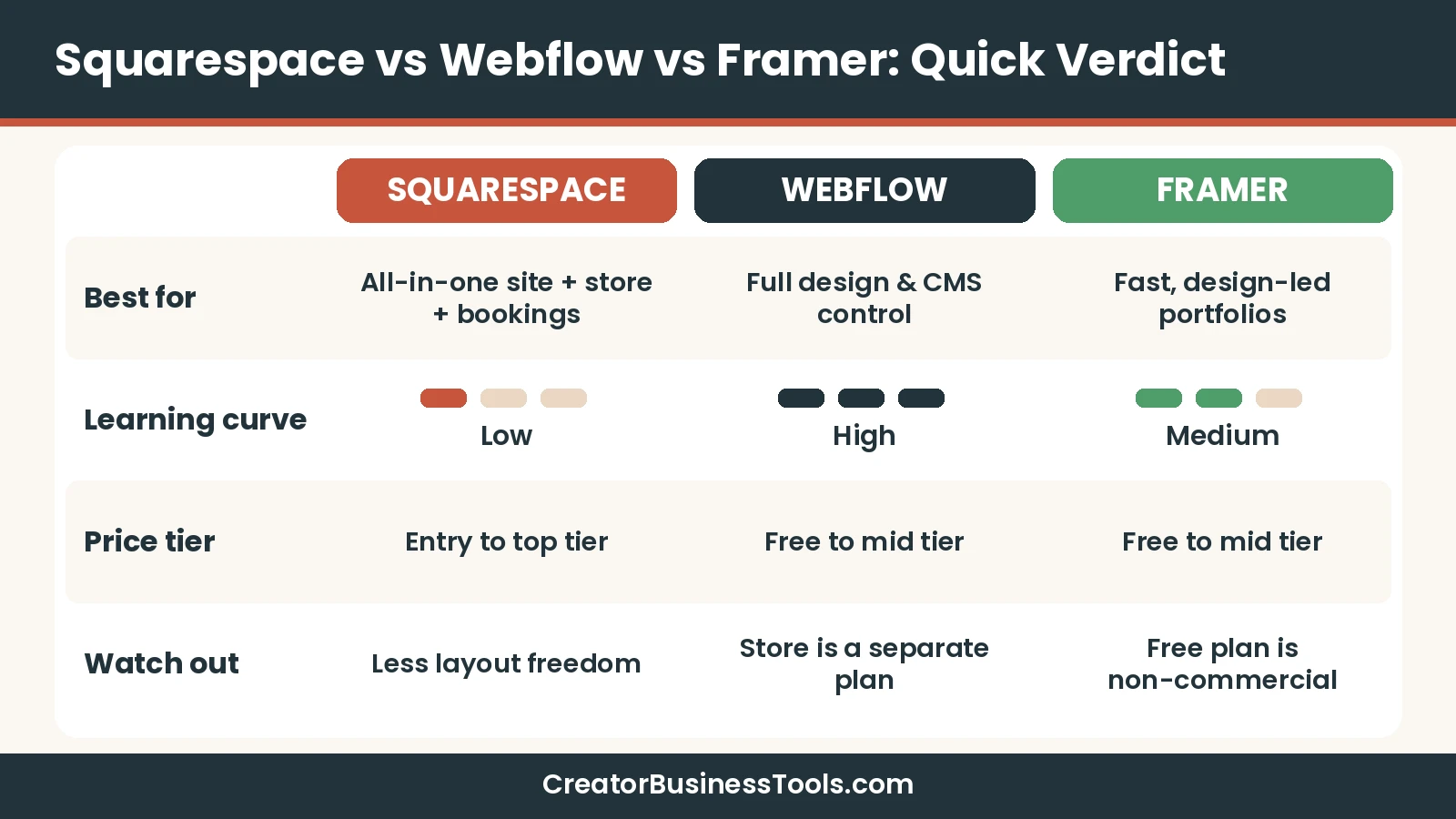
Quick verdict: Choose Squarespace if you want the easiest path to a polished portfolio, a small store, or a coaching site with booking. Choose Webflow if design control and structured content matter more than setup speed. Choose Framer if you think like a designer and want a fast, visual portfolio without Webflow’s learning curve.
Quick picks
| If you are… | Pick | Why |
|---|---|---|
| A photographer who wants a beautiful portfolio fast | Squarespace | Designer templates, drag-and-drop editing, hosting included |
| A coach selling booked sessions | Squarespace + Acuity Scheduling | Acuity is Squarespace’s own scheduling product and embeds with a block |
| A creator selling prints, presets, or merch | Squarespace Core or higher | 0% online store transaction fee from Core up |
| A designer who wants pixel-level control and a real CMS | Webflow | Visual control over structure, CMS on Premium, advanced interactions |
| A designer who wants a fast, modern portfolio | Framer | Design-tool feel, simple publishing, low-cost Basic plan |
Squarespace vs Webflow at a glance
The core trade-off is simple. Squarespace gives you guardrails, and Webflow gives you freedom. Guardrails help you launch faster; freedom helps you build something unique.
| Factor | Squarespace | Webflow | Framer |
|---|---|---|---|
| Ease of use | Easiest of the three | Steepest learning curve | Moderate, feels like a design tool |
| Design control | Template-based with drag-and-drop | Highest, close to front-end development | High, canvas-based |
| Free plan | No (free trial only) | Yes, on a Webflow subdomain | Yes, for non-commercial use |
| Selling products | Built into every paid plan | Separate Ecommerce plans | Not listed on the pricing page |
| Courses and memberships | Built in, with a plan-based fee | Not a core feature | Not a core feature |
| Booking | Acuity Scheduling (Squarespace-owned) | Embed an outside tool | Embed an outside tool |
| Price tier for a typical creator site | $ to $$ | $ to $$ | $ to $$ |
Ease of use vs design control
This is the decision that matters most. Every other difference flows from it.
Squarespace: guardrails that help you ship
Squarespace starts you from designer templates. You then edit with its drag-and-drop editor, which Squarespace calls Fluid Engine, on version 7.1 sites.
You can move blocks freely within sections, but the overall system keeps fonts, colors, and spacing consistent. That is exactly what most photographers and coaches want. You spend time on your work, not on layout math.
- Hosting, SSL, and mobile optimization are included on every plan.
- Every plan includes SEO tools and 24/7 customer support.
- Bandwidth and storage are listed as unlimited on all plans.
- Custom CSS is available on all plans; full JavaScript and code injection start at Core.
Webflow: freedom with a learning curve
Webflow exposes the building blocks of a web page: containers, layouts, classes, and styles. If you understand how websites are structured, that is powerful. If you don’t, it can feel slow at first.
The payoff is control. Webflow offers a real CMS on its Premium plan, interactions built with GSAP, and clean control over SEO settings.
- Best when you want a site no template could produce.
- Best when your content is structured, like case studies, blog posts, or a resource library.
- Expect to spend real time learning before you launch.
Framer: the designer’s shortcut
Framer feels closer to a design tool than a site builder. Many designers find it quicker than Webflow for a portfolio or landing page.
It is not the focus of this guide. For the full head-to-head, read our Framer vs Webflow guide.
Feature comparison for creators
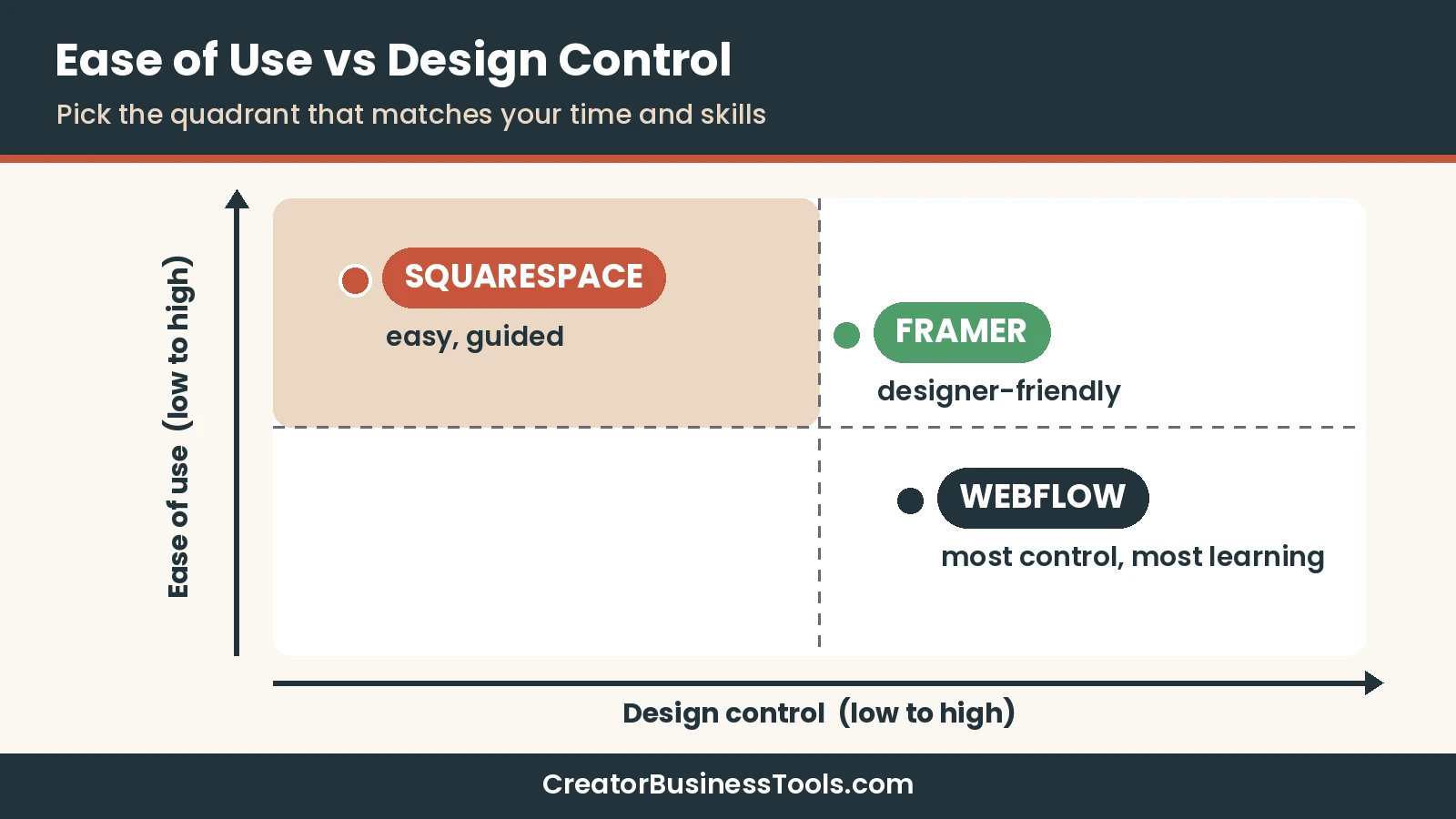
Here is how the three compare on features creators actually use. “Built in” means the official pricing page lists it on paid plans.
| Feature | Squarespace | Webflow | Framer |
|---|---|---|---|
| Custom domain | All paid plans (free domain for the first year on annual plans) | Basic and up | Paid plans |
| Blog / CMS | Built in | CMS on Premium | CMS collections on Basic and Pro |
| Online store | All paid plans, unlimited products | Ecommerce plans (separate) | Not listed |
| Courses, memberships, paid content | All paid plans, with a plan-based fee | Not listed | Not listed |
| Invoices | Free on all plans | Not listed | Not listed |
| Email list forms | Newsletter and form blocks; Mailchimp integration from Core | Forms; unlimited submissions on paid site plans | Forms |
| Advanced animations | Limited | Yes (GSAP-powered interactions) | Yes |
| Team editing | 2 contributors on Basic, unlimited from Core | Paid seats | Paid editors, free viewers |
Squarespace pricing guide
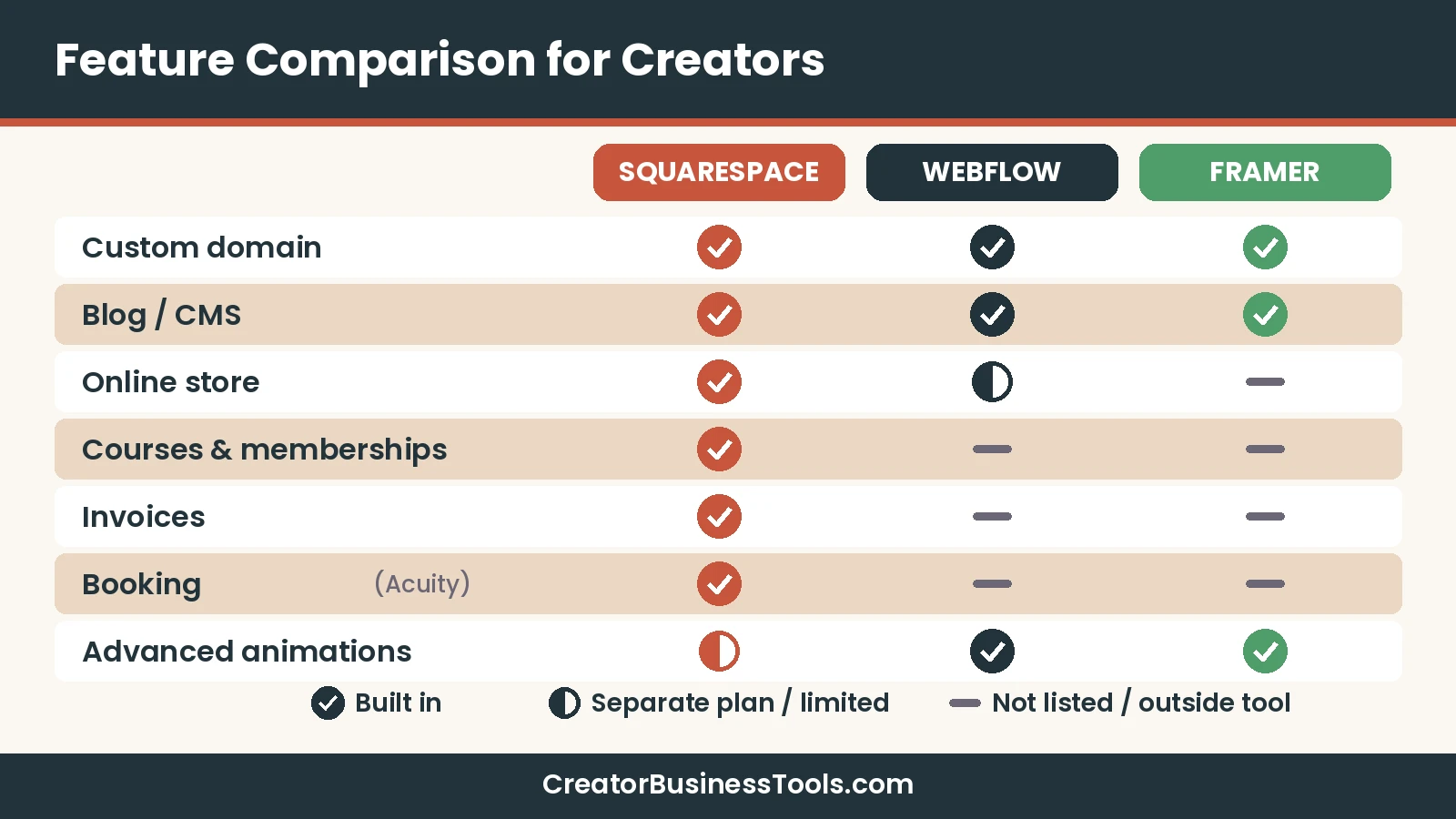
Squarespace has four paid plans: Basic, Core, Plus, and Advanced. There is no free plan, but every site starts with a free trial, and annual billing costs less than monthly.
| Plan | Price tier | Store transaction fee | Courses and memberships fee | Best for |
|---|---|---|---|---|
| Basic | $ | 2% | 7% | Portfolios with occasional sales |
| Core (Recommended) | $$ | 0% | 5% | Creators who sell regularly or need code and marketing tools |
| Plus | $$ | 0% | 1% | Growing digital-product and membership sellers |
| Advanced | $$$ | 0% | 0% | High-volume sellers who want the lowest fees |
Which Squarespace plan fits you
Basic works for a portfolio site with a contact form and the odd print sale. It allows two contributors and 30 minutes of video hosting. The trade-off is the 2% online store transaction fee and the 7% fee on digital content and memberships.
Core is the plan Squarespace labels “Recommended,” and for many creators it is the sensible default. The store fee drops to 0%, and you unlock code injection, promotional pop-ups, discounts, payment plans, and Mailchimp and Zapier integrations.
Plus makes sense once paid content is a real revenue line. The digital content fee drops to 1%, card rates are lower, and you get reserved carts with a countdown timer for limited releases.
Advanced is for sellers with steady volume. Both transaction fees go to 0%, card processing rates are the lowest, and video hosting is unlimited.
The math that decides Basic vs Core
If you sell anything regularly, compare the plan price gap with the fees you would pay on Basic. A photographer selling a handful of prints a year can stay on Basic. A coach selling a monthly membership will usually save money on Core or Plus once sales add up.
- Sell rarely → Basic.
- Sell physical or digital products every month → Core.
- Sell memberships or courses as a main income stream → Plus.
- Sell at high volume and want the lowest processing rates → Advanced.
Squarespace payment and fee notes
Squarespace Payments has its own card processing rates on top of plan fees. Those rates get lower on Plus and Advanced, according to the official pricing page.
Automated tax calculation starts at Core and charges a small per-transaction fee. Check the official pricing page for current rates before you choose.
Webflow pricing in short
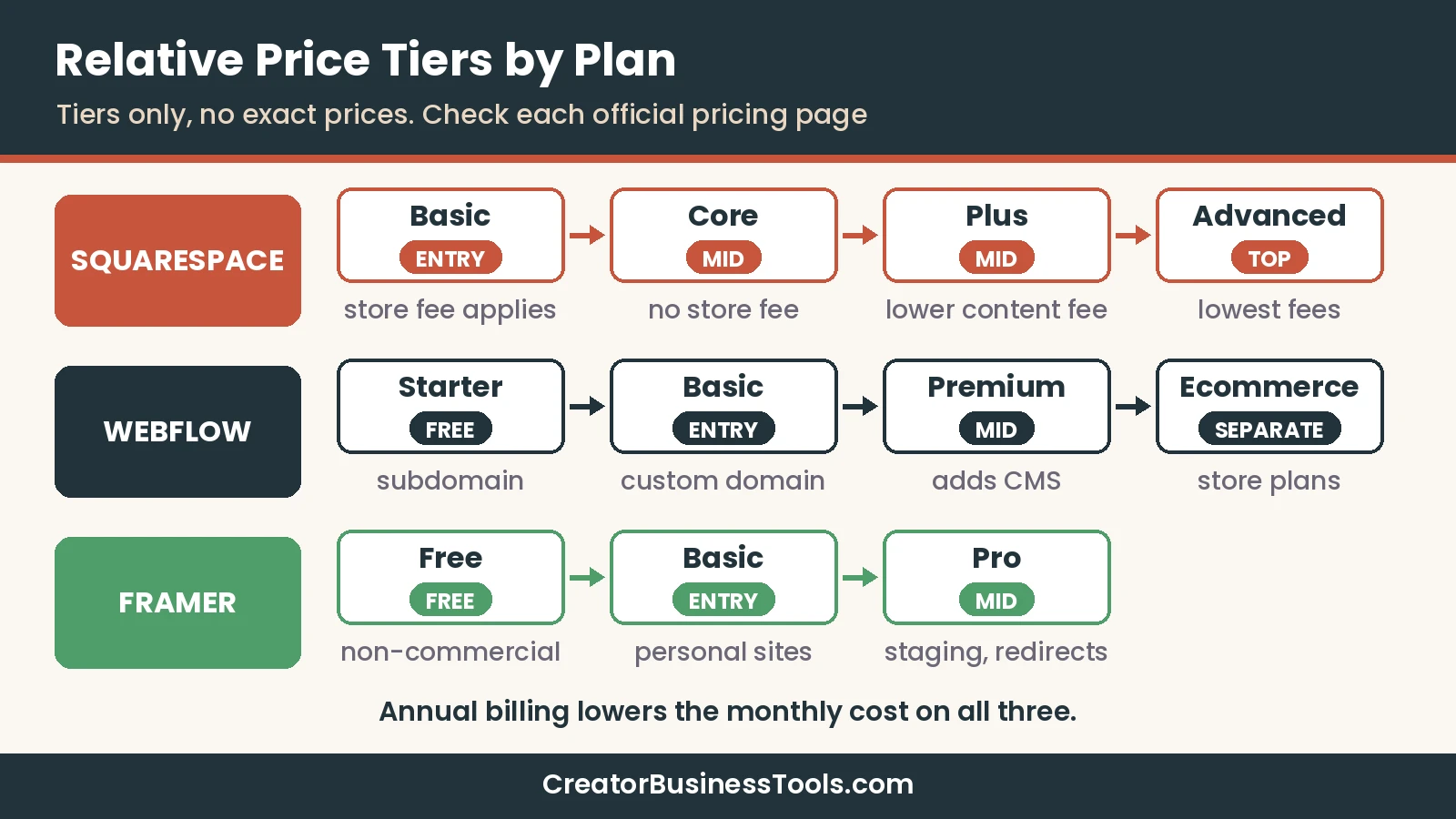
Webflow’s site plans are Starter (free), Basic, and Premium. Basic gives you a custom domain without a CMS. Premium adds the Webflow CMS, site search, and form file uploads.
Selling products requires a separate Ecommerce plan, and the entry Ecommerce plan includes a transaction fee. Webflow also has Workspace plans for staging and collaboration, which is a separate bill from the site plan.
For plan-by-plan detail, read our Webflow pricing guide.
Best website builder for photographers
Photographers usually need three things: big, fast-loading images, an easy way to update galleries, and a simple way to get booked or sell prints.
| Photographer need | Best fit | Why |
|---|---|---|
| Launch a portfolio this week | Squarespace | Designer templates and guided editing |
| Sell prints or digital downloads | Squarespace | Store built into every paid plan |
| Book shoots and take deposits | Squarespace + Acuity | Scheduling with payments through Stripe, Square, PayPal, or Venmo |
| Fully custom, editorial-style portfolio | Webflow or Framer | More layout and animation freedom |
| Free test site before paying | Webflow or Framer | Both offer free plans; Squarespace offers a trial |
For most working photographers, Squarespace is the practical choice. It handles galleries, store, and bookings in one account, and you won’t need a developer to update it.
Pick Webflow or Framer if your portfolio itself is a design statement. That’s common for creative directors and designers more than for wedding or portrait photographers.
Photographer portfolio checklist
- A home page that shows your best 6–12 images, not your whole archive.
- Separate galleries by service (weddings, portraits, brands).
- A clear “Book” or “Inquire” button on every page.
- A pricing or packages page, even if it says “starting at.”
- An about page with your face on it.
- A contact form that sends inquiries to your email list or CRM.
- Image alt text for accessibility and SEO.
Squarespace for coaches: Acuity Scheduling
If you sell 1:1 sessions, booking is the heart of your site. This is where Squarespace has a clear structural advantage.
Acuity Scheduling is owned by Squarespace. Squarespace acquired Acuity, and it later brought its own “Squarespace Scheduling” product under the Acuity name. You can use Acuity on its own or embed it on a Squarespace site with the Scheduling block, without code.
| Acuity plan | Price tier | Key features for coaches |
|---|---|---|
| Starter | $ | 1 calendar, payments, email reminders, custom intake forms |
| Standard | $$ | Up to 6 calendars, text reminders, packages and memberships, gift certificates |
| Premium | $$$ | Up to 36 calendars, hide Acuity branding, custom API and CSS |
Acuity also integrates with Zoom and Google Meet for online sessions. That makes it a natural fit for coaches who run calls rather than in-person sessions.
Coach booking flow checklist
- Create one appointment type per offer (discovery call, single session, package).
- Add intake questions so you know the client before the call.
- Take payment or a deposit at booking.
- Turn on email reminders to reduce no-shows.
- Embed the scheduler on your “Work with me” page.
- Send new clients into your email tool after booking. Our email marketing for creatives guide covers good options.
Webflow and Framer can embed an outside scheduler as well. The difference is that with Squarespace, the site and the booking tool come from the same company and share an account.
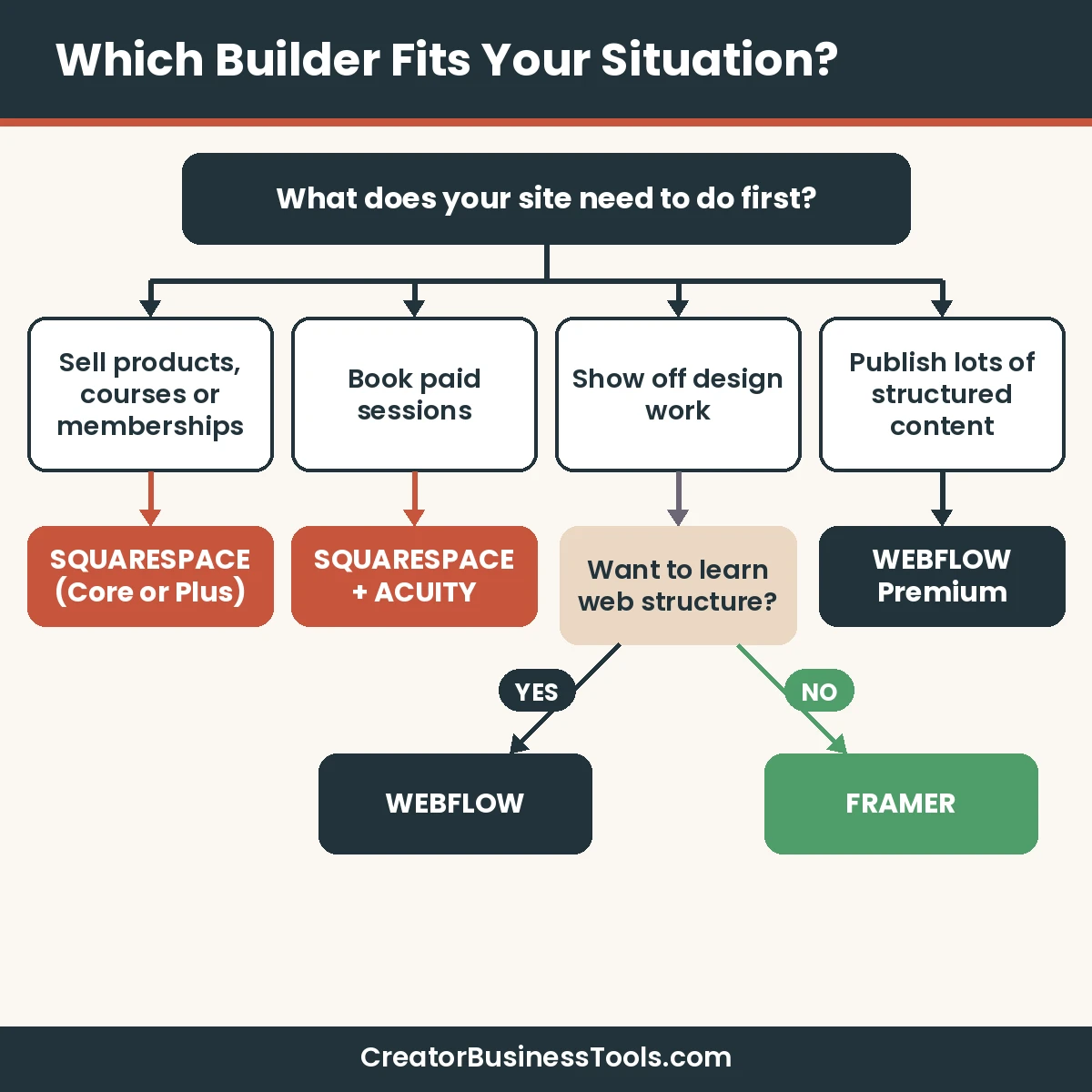
Which builder fits your situation?
Situation 1: You’re a photographer with a small print shop
Go with Squarespace. Start on Basic if sales are occasional, and move to Core once you sell every month.
Situation 2: You’re a coach selling sessions and a signature program
Go with Squarespace plus Acuity. If your program is a full online course, compare dedicated course platforms in our Kajabi vs Teachable guide before building it inside your website.
Situation 3: You’re a designer whose portfolio is the pitch
Go with Framer if you want speed. Go with Webflow if you want deep structural control and a CMS for case studies.
Situation 4: You publish a lot of content
Webflow’s CMS is built for structured, repeatable content. Squarespace’s blog is simpler and fine for regular posts, but less flexible for custom content types.
Situation 5: You need to test before paying
Webflow and Framer both have free plans. Squarespace offers a free trial with no credit card required, so you can still build before you buy.
Squarespace review
Squarespace is an all-in-one platform for websites, stores, content sales, and invoices. Its biggest strength is that most creators can launch without help.
- Designer templates and drag-and-drop editing.
- Store, invoicing, and gift cards on every paid plan.
- Courses, memberships, and paid content with plan-based fees.
- Built-in contact list and newsletter blocks.
- Owns Acuity Scheduling for bookings.
Keep in mind: There is no free plan, and Basic carries transaction fees on store sales and paid content.
Best for: Photographers, coaches, and creators who want one tool for their site, store, and bookings.
Not ideal for: Designers who want complete layout freedom or complex custom content structures.
Webflow review
Webflow is a visual website platform that gives you developer-level control without writing code. It suits people who care how every section is built.
- Fine-grained visual control over layout and styles.
- A real CMS on the Premium site plan.
- Interactions powered by GSAP.
- A free Starter plan on a Webflow subdomain.
Keep in mind: Selling products needs a separate Ecommerce plan, and collaboration features sit in separate Workspace plans.
Best for: Designers and content-heavy creators who want maximum control.
Not ideal for: Beginners who want to launch in a weekend.
Framer review
Framer is a design-first site builder with a free plan for non-commercial use and low-cost paid plans. It is popular with designers for portfolios and landing pages.
- Canvas-based editing that feels like a design tool.
- Free plan to experiment; custom domains on paid plans.
- CMS collections on Basic and Pro.
- Staging, redirects, and branching on Pro.
Keep in mind: The free plan is meant for non-commercial use, and online store features are not listed on the pricing page.
Best for: Designers who want a fast, modern portfolio.
Not ideal for: Creators who need a built-in store, courses, or booking.
Before you choose
- Prices and plan features change. Confirm the current details on each official pricing page before you subscribe.
- Transaction and card processing fees can matter more than the plan price if you sell a lot.
- Moving between builders means rebuilding your design. Pick the one you can live with for a few years.
- Free plans and trials have limits, so check what you can publish before you invest time.
How to choose in 6 steps
- List what your site must do in the first 90 days: show work, sell, book, or publish.
- Be honest about your time. If you have one weekend, lean Squarespace.
- Check selling needs. If you sell, compare Squarespace store fees against Webflow’s Ecommerce plans.
- Check booking needs. Coaches should weigh the Squarespace + Acuity combo first.
- Build a test page. Use a trial or free plan to build your home page before you commit.
- Pick billing. Annual billing costs less per month on all three, so switch once you’re sure.
Launch checklist (any builder)
- Custom domain connected.
- Home, about, work/services, and contact pages live.
- Clear call to action on every page.
- Email signup form connected to your email tool.
- SEO titles and descriptions set for key pages.
- Mobile layout checked on a real phone.
- Analytics turned on.
FAQ
Is Squarespace easier than Webflow?
Yes, for most people. Squarespace uses templates and a guided drag-and-drop editor, while Webflow exposes web structure and styles for more control.
Is Webflow better than Squarespace for design?
Webflow gives you more design control. Squarespace gives you polished templates with less freedom but much faster setup.
What is the best website builder for photographers?
For most working photographers, Squarespace, because galleries, a store, and booking through Acuity live in one ecosystem. Designers building an editorial portfolio may prefer Framer or Webflow.
Does Squarespace have a free plan?
No. Squarespace offers a free trial with no credit card required, then paid plans.
Which Squarespace plan should I choose?
Basic for simple portfolios, Core for regular selling and marketing tools, Plus for growing course or membership sales, and Advanced for high-volume sellers.
Is Acuity Scheduling part of Squarespace?
Yes. Squarespace owns Acuity Scheduling. You can use Acuity on its own or add it to a Squarespace site with the Scheduling block.
Can I sell products on Webflow?
Yes, with a separate Ecommerce plan. A standard site plan does not include a store.
Where does Framer fit?
Framer is a design-first builder that suits portfolios and landing pages. See our Framer vs Webflow guide for a full comparison.
Bottom line
Squarespace vs Webflow comes down to ease versus control. If you want to launch quickly and sell or take bookings, Squarespace is the practical pick, especially with Acuity for coaches.
If your site needs to be a custom design project, Webflow gives you the most control, and Framer gives designers a faster route. Start with the job your site must do, then choose the tool that does it with the least friction.