
Best LMS for Coaches: 6 Platforms for Programs and Courses
Disclosure: This post contains affiliate links. If you buy through them, we may earn a commission at no extra cost to you. How we make money.
Coaching doesn’t scale when every client needs a live hour with you. That’s why so many coaches package their method into a program: recorded lessons, live group calls, a community for accountability, and maybe a few one-on-one sessions on top. To deliver that well, you need a learning platform (an LMS) that handles more than video.
This guide compares six platforms that coaches use to sell and deliver programs. We focus on what matters for coaching specifically: live sessions, cohorts, community, payment plans, and how much of your business each tool can run. Everything here is based on official pricing pages and help docs.
Looking for a budget course platform for your first course? Teachery is a flat-fee option worth comparing with the six below.
Quick picks
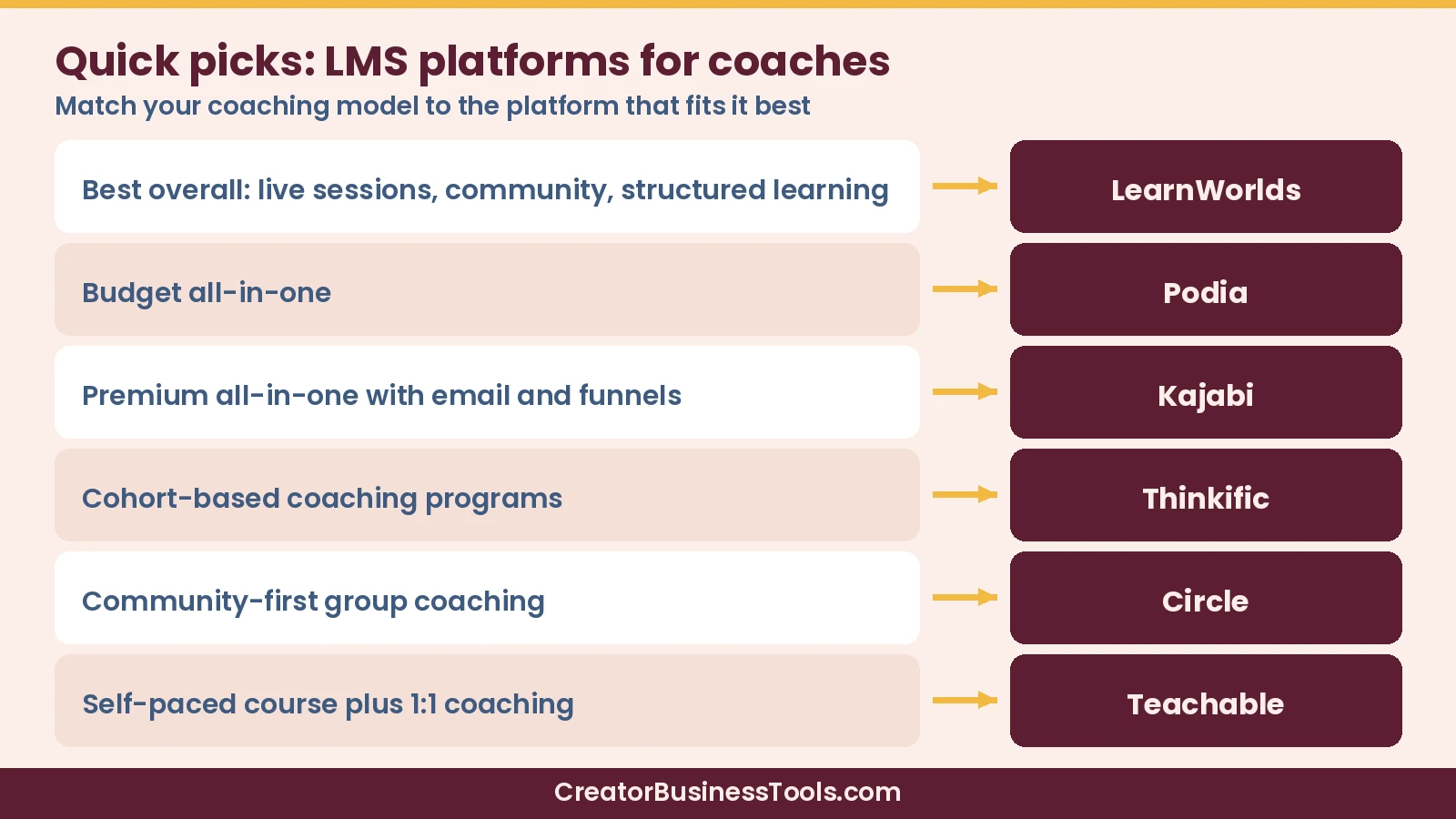
- Best overall for coaches: LearnWorlds, Under $30/month to start (per-sale fee); $80–$100/month without it
- Best budget all-in-one: Podia, Under $50/month to start
- Best premium all-in-one: Kajabi, $100–$200/month to start
- Best for cohort-based coaching programs: Thinkific, Under $60/month to start; coaching tools on the $80–$110/month tier
- Best community-first platform for group coaching: Circle, Under $100/month to start (annual billing)
- Best low-cost option for self-paced courses plus 1:1 coaching: Teachable, Under $50/month to start
Comparison at a glance
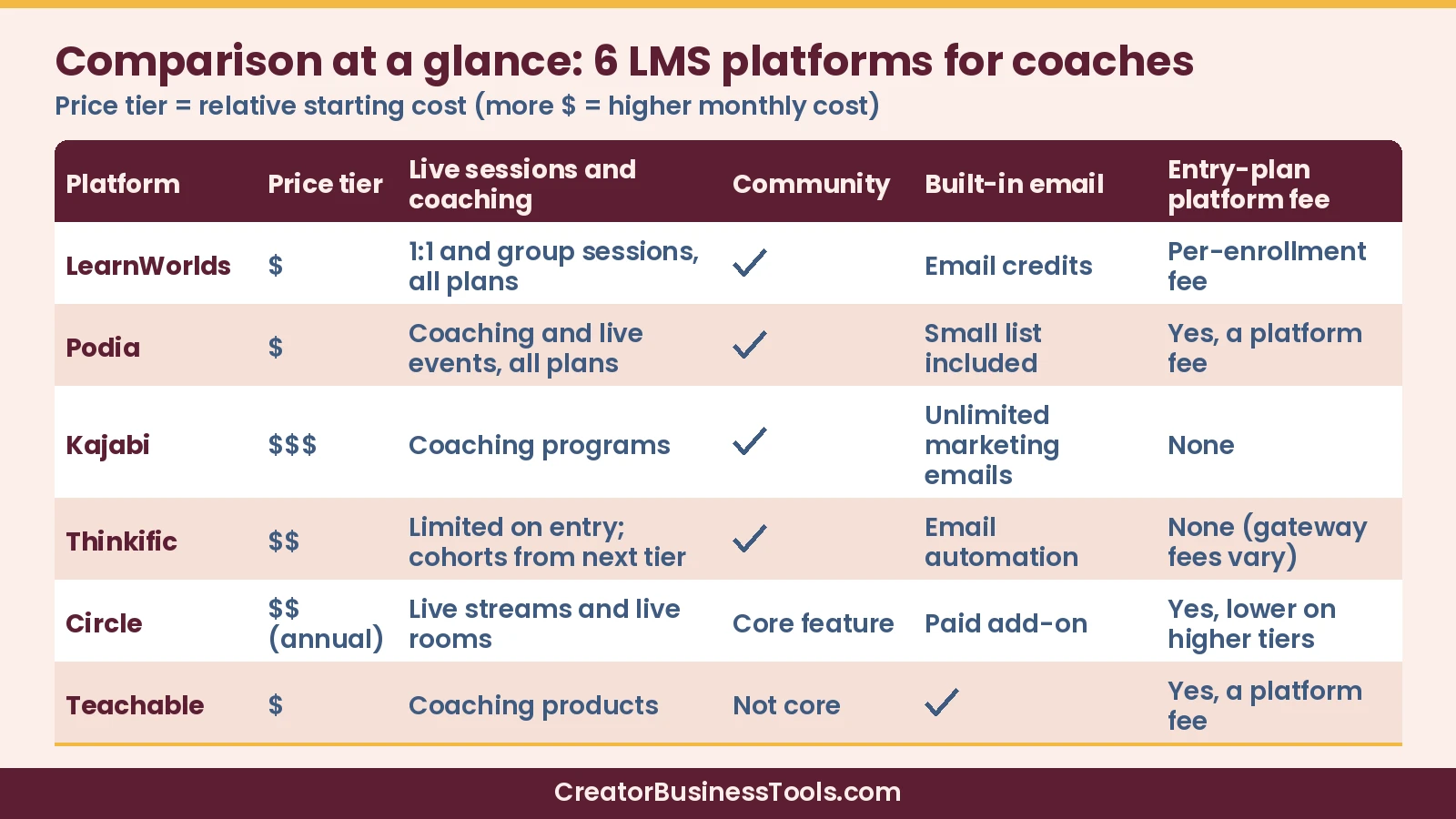
| Platform | Starting price band | Live sessions and coaching | Community | Built-in email | Platform fee on entry plan |
|---|---|---|---|---|---|
| LearnWorlds | Under $30/month | Live 1:1 and group sessions on all plans | Yes | Email credits (limits vary by plan) | Per-enrollment fee |
| Podia | Under $50/month | Coaching and live events on all plans | Yes | Yes, small list included | Yes |
| Kajabi | $100–$200/month | Coaching programs | Yes | Yes, unlimited marketing emails | No |
| Thinkific | Under $60/month | Limited on entry plan; cohorts and booking from next tier | Yes | Email automation | No (gateway fees vary) |
| Circle | Under $100/month | Live streams and live rooms | Core feature | Paid add-on | Yes (lower on higher tiers) |
| Teachable | Under $50/month | Coaching products | Not a core feature | Yes | Yes |
Why these comparison columns matter
Coaches shortlist LMS tools differently from course-only creators. The columns above map to how a coaching program actually runs:
- Starting price band is your monthly floor before clients enroll. Pair it with any platform or enrollment fees so the “cheap” plan doesn’t cost more at real sales volume.
- Live sessions and coaching cover group calls, 1:1 bookings, and whether those tools sit on the entry plan or a mid tier.
- Community is where accountability and peer support live between calls—often the difference between a course dump and a coaching container.
- Built-in email shows whether nurture and onboarding stay in-platform or need a separate ESP (or a paid email add-on).
- Platform fee on entry plan catches percentage or per-enrollment fees that only show up after you start selling.
If live calls and community are non-negotiable, filter on those columns first; price alone will mislead you.
What coaches need from an LMS
Course creators can get by with video hosting and a checkout. Coaches usually need a few extra pieces:
- Live sessions: group calls, one-on-one bookings, or webinars tied to the program.
- Cohorts and pacing: dripped lessons and assignments so a group moves through the material together.
- Community: a place for clients to ask questions, share wins, and stay accountable between calls.
- Flexible payments: payment plans and subscriptions make higher-ticket programs easier to buy.
- Email and funnels: a way to nurture leads into discovery calls and enrollments.
No platform is perfect at all five. The right pick depends on which ones you can’t live without.
How coaches usually shortlist platforms
Most coaches don’t need every LMS feature on day one. A practical shortlist looks like this: pick two platforms that cover your must-haves (live sessions, community, or all-in-one marketing), price a realistic first year including fees, then build one module and one checkout in each free trial. If a platform makes onboarding clients feel clumsy during that pilot, it will feel worse at scale.
Also decide whether your next 12 months are about validating one offer or running a full catalog. Validation favors lower entry plans (even with platform fees). A growing catalog favors clearer product limits, payment plans, and email/community under one roof.
The 6 best LMS platforms for coaches
1. LearnWorlds: Best overall for coaches
LearnWorlds checks more coaching boxes at a lower starting price than most platforms here. Every plan includes live one-on-one and group sessions, a built-in community, an AI course builder, and unlimited video hosting. The second tier removes per-enrollment fees and adds subscriptions, memberships, payment plans, certificates, and SCORM uploads. The top self-serve tier adds full white-labeling and automation triggers.
That mix works well for coaches who blend recorded lessons with live calls, and especially for those who certify clients or want quizzes and interactive video to track progress.
Keep in mind: The entry plan charges a fee on each paid enrollment, and you sell through your own Stripe or PayPal account. Built-in email is credit-based, so heavy email marketers may still pair it with a dedicated email tool. The dashboard is more feature-dense than simpler tools.
Best for: Coaches and trainers who want live sessions, community, and structured learning in one place without a premium price.
Not ideal for: Coaches who want the simplest possible storefront, or who prefer not to connect Stripe/PayPal themselves and manage a fuller LMS interface.
2. Podia: Best budget all-in-one
Podia keeps things simple. Every plan includes courses, coaching, community, digital downloads, live and in-person events, a website, landing pages, and built-in checkout with sales tax collection for jurisdictions you register (Podia helps collect tax at checkout; remittance stays your responsibility).
For a coach who wants to sell a signature program, a few coaching sessions, and a paid community without stitching tools together, Podia covers a lot of ground at a lower monthly price.
Keep in mind: The entry plan charges a platform transaction fee on sales. Built-in email includes only a small number of subscribers per plan, so a growing list means paying for more.
Best for: Solo coaches who want an easy, affordable all-in-one setup.
Not ideal for: Coaches with large email lists who need unlimited marketing email without add-on subscriber packs, or who need deep LMS assessments and SCORM.
3. Kajabi: Best premium all-in-one
Kajabi is built to run an entire expert business. Coaching programs, courses, communities, memberships, email marketing, landing pages, funnels, and checkout all live in one account, and Kajabi says it takes no revenue share on any plan.
A lead can opt in on a landing page, get a nurture sequence, buy your program, and land in your community without any connectors. Higher tiers add more contacts, more products and communities, and a branded mobile app.
Keep in mind: It costs noticeably more than the other options from day one. Some advanced features are reserved for higher tiers, so check the plan comparison before choosing.
Best for: Established coaches with an audience who want email, funnels, and delivery under one roof and are comfortable with a premium price.
Not ideal for: New coaches validating a first offer on a tight budget, or anyone who only needs course hosting without email and funnels.
Weighing Kajabi against a funnel builder? Read Kajabi vs ClickFunnels for selling courses. If the price is the sticking point, see systeme.io vs Kajabi for budget course creators.
4. Thinkific: Best for cohort-based coaching programs
Thinkific gives you unlimited courses on every plan, plus a built-in community. The real coaching tools start on its second tier: live cohorts, unlimited Zoom sessions, bookable calendars, attendance tracking, graded assignments, payment plans, and memberships.
That combination suits structured programs where a group starts together, attends live calls, and submits work along the way. Thinkific also offers a long free trial.
Keep in mind: The entry plan limits coaching and webinar products, so most coaches will want the next tier up. A branded mobile app is a paid add-on.
Best for: Coaches running group programs with set start dates, live calls, and assignments.
Not ideal for: Coaches who need full live-cohort and booking tools on the cheapest plan, or a branded app without an add-on.
5. Circle: Best community-first platform for group coaching
Circle starts from community and adds courses, live events, live streams, and payments on top. Members are unlimited on every plan.
If your coaching value comes from group interaction, such as masterminds, accountability groups, or memberships, Circle puts that front and center. Courses sit inside the same space your members already visit.
Keep in mind: Circle charges a transaction fee that shrinks on higher tiers. Its email tool is a paid add-on, and the course tools are lighter than dedicated LMS platforms.
Best for: Coaches whose programs revolve around community, masterminds, or memberships.
Not ideal for: Coaches whose primary product is a deep self-paced curriculum with advanced assessments—course tools are lighter than dedicated LMS platforms.
6. Teachable: Best low-cost option for self-paced courses plus 1:1 coaching
Teachable is a course-first platform with coaching products, built-in email marketing, iOS and Android student apps, and payments that handle U.S. sales tax and international VAT.
It’s a sensible starting point if your offer is mostly a self-paced course with optional one-on-one sessions.
Keep in mind: The entry plan charges a transaction fee, and every self-serve plan caps how many products you can publish. Community isn’t a core feature.
Best for: New coaches selling a self-paced course with add-on coaching.
Not ideal for: Coaches whose program depends on built-in community, cohorts, or a large catalog without hitting product caps.
Caveats before you choose
⚠️ Course and coaching platforms update plans, limits, and fees often. This roundup is based on each company’s official pricing pages and help docs, not hands-on testing. Watch for platform transaction fees on entry plans, per-enrollment fees, and add-on costs (email, branded apps, extra seats). Confirm current details on each vendor’s site before you buy.
Also confirm whether tax tools collect only or also file/remit (most collect; remittance stays on you). Check live-session limits, attendance tools, and whether payment plans require a mid tier. If you run cohorts, verify drip, assignments, and seat management on the exact plan you’re pricing—not the marketing homepage.
How to choose an LMS for your coaching business
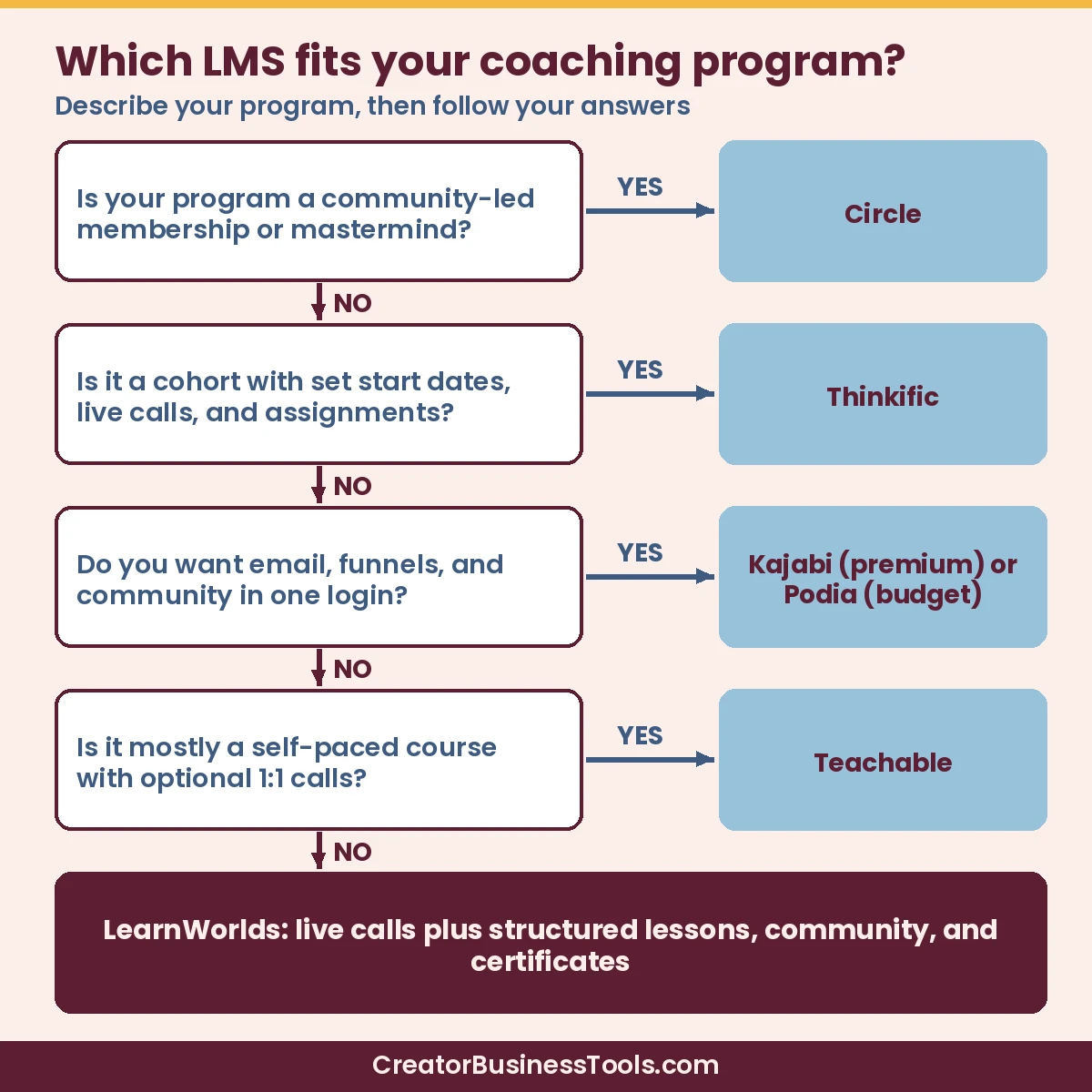
- Describe your program in one sentence. Live calls plus structured lessons? Cohort with assignments? Community-led membership? Self-paced course with calls? That points you toward LearnWorlds, Thinkific, Circle, or Teachable.
- Decide how much you want under one roof. If you want email, funnels, and community in the same login, compare Podia and Kajabi.
- Price your real year. Add plan cost, transaction or enrollment fees on expected sales, and add-ons like extra email subscribers.
- Check live session tools. Confirm whether booking calendars, Zoom links, and attendance tracking are on the plan you’re pricing.
- Plan for payment plans. Higher-ticket coaching sells better with installments; several platforms reserve them for mid tiers.
- Run a pilot during the free trial. Build one module, one live session, and one checkout before committing.
- Decide who owns the client relationship. If community chat is where clients hang out daily, favor Circle or a strong built-in community. If email and funnels drive enrollment, favor Kajabi or Podia.
- Stress-test checkout for high-ticket offers. Payment plans, order bumps, and tax collection matter more when your program is a few thousand dollars than when it’s a low-priced mini-course.
- Check student mobile experience. If clients consume lessons between sessions on their phones, confirm apps or mobile web quality before you migrate content.
FAQ
What is the best LMS for coaches?
For most coaches, LearnWorlds offers the best balance of live sessions, community, and structured learning for the price. Podia is the simplest budget all-in-one, Kajabi is the premium choice for running your whole business, Thinkific shines for cohorts, and Circle for community-led coaching.
Is there an LMS for coaches with no transaction fees?
Kajabi says it takes no revenue share. Thinkific doesn’t add a platform fee when you use its built-in payments, and LearnWorlds, Teachable, and Podia drop their platform fees on higher tiers. Card processing fees always apply.
Can I run live group coaching calls inside an LMS?
Yes. LearnWorlds, Podia, Thinkific (from its second tier), and Circle all list live sessions or events as built-in features. Kajabi includes coaching programs as a product type.
Do I need a separate community platform?
Not necessarily. LearnWorlds, Podia, Kajabi, Thinkific, and Circle all include community features. Teachable creators often add a separate tool.
What’s the cheapest way to start?
LearnWorlds, Podia, and Teachable all have entry plans under $50/month, but each charges some kind of platform or enrollment fee at that level. Run the math with your expected sales.
Kajabi vs LearnWorlds for coaches—what’s the difference?
Kajabi is the premium all-in-one: email, funnels, coaching products, and community under one roof at a higher monthly price and no platform revenue share. LearnWorlds starts lower, emphasizes live sessions, community, quizzes, and interactive learning, and sells through your connected Stripe or PayPal—with a per-enrollment fee on the entry plan.
Can I run a high-ticket coaching program on Podia or Teachable?
Yes, if your delivery model fits. Podia works well when coaching, community, and a simple site should share one checkout. Teachable fits self-paced courses plus coaching products, but community and catalog caps may push you elsewhere as you grow. For complex cohorts with assignments, also compare Thinkific and LearnWorlds.
Do I still need Zoom if my LMS has live sessions?
Often yes. Many platforms schedule or embed live sessions and still rely on Zoom, Google Meet, or similar for the actual video room. Confirm what is native versus integrated on your plan.
Is Circle an LMS or a community platform?
Circle is community-first with courses and live features added on. Choose it when the group experience is the product. Choose a dedicated LMS when structured lessons, assessments, and certificates are the core.
How should I compare total cost across these platforms?
Add (1) monthly or annual plan price, (2) platform or per-enrollment fees at your expected sales, (3) email add-ons or extra subscribers, and (4) branded app or seat add-ons. The cheapest plan is rarely the cheapest year.
The bottom line
For most coaches, LearnWorlds is the best overall pick: live sessions, community, and structured learning on every plan, with room to grow into certificates and white-labeling. Choose Podia for a simple, budget-friendly all-in-one, Kajabi if you want a premium platform that also runs your email and funnels, Thinkific for cohort programs, Circle if community is the heart of your coaching, and Teachable if you’re starting with a self-paced course and a few one-on-one sessions.
Start a free trial with your actual program outline, and choose the platform that makes your clients’ experience feel easiest.