
Best Social Media Scheduler for Creators: Buffer vs Later
Disclosure: This post contains affiliate links. If you buy through them, we may earn a commission at no extra cost to you. How we make money.
Posting every day on four platforms is a full-time job if you do it by hand. A social media scheduler lets you batch a week of content in one sitting and let it go out on schedule. For most creators, the shortlist comes down to Buffer and Later.
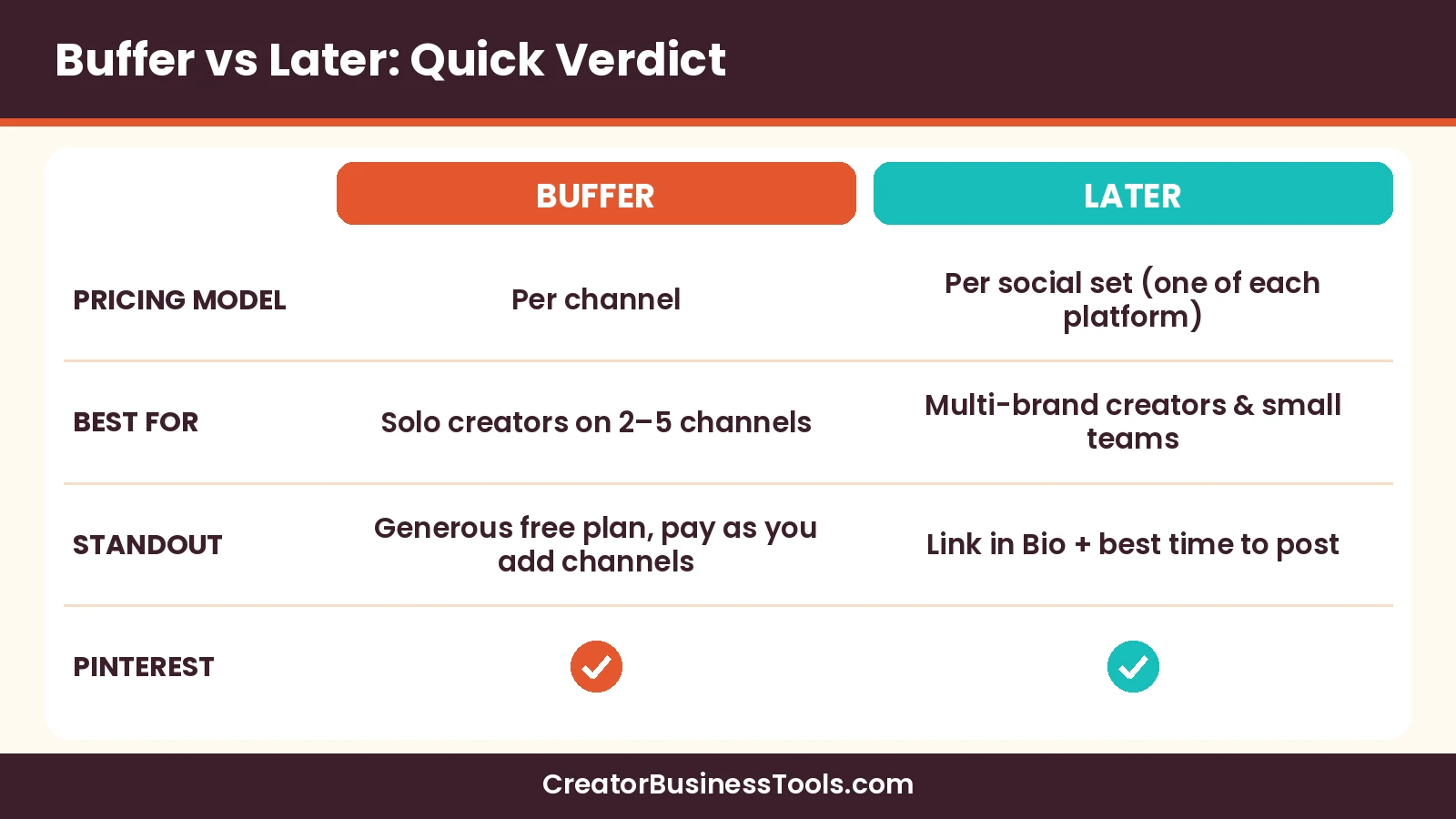
Quick verdict: Buffer is the best social media scheduler for most creators who post to a few channels and want to pay only for what they use. Later suits creators who manage several brands or want bundled extras like Link in Bio and longer analytics history. Both support Pinterest, Instagram, TikTok, and more.
Quick picks
| If you… | Pick | Why |
|---|---|---|
| Are just starting and post to up to three channels | Buffer Free | Free plan for up to three channels with a small queue per channel |
| Post regularly to a few channels as a solo creator | Buffer Essentials | Unlimited scheduled posts, first comment scheduling, hashtag manager |
| Work with an assistant or need approvals | Buffer Team | Unlimited team members, access levels, approval workflows |
| Run one brand across many platforms and want Link in Bio | Later Starter | One social set with one profile per platform, Link in Bio |
| Manage two brands with collaboration and a social inbox | Later Growth | Two social sets, approvals, social inbox, longer analytics |
What to look for in a social media scheduler
Before comparing tools, decide what you actually need. These five factors matter most for creators.
- Platforms: does it support every channel you use, including Pinterest?
- Pricing model: per channel, or per bundle of profiles?
- Post limits: how many posts can you queue at once or per month?
- Collaboration: will an assistant or client need access?
- Analytics: how far back can you see performance?
Buffer vs Later
Here’s the head-to-head comparison based on each company’s pricing page.
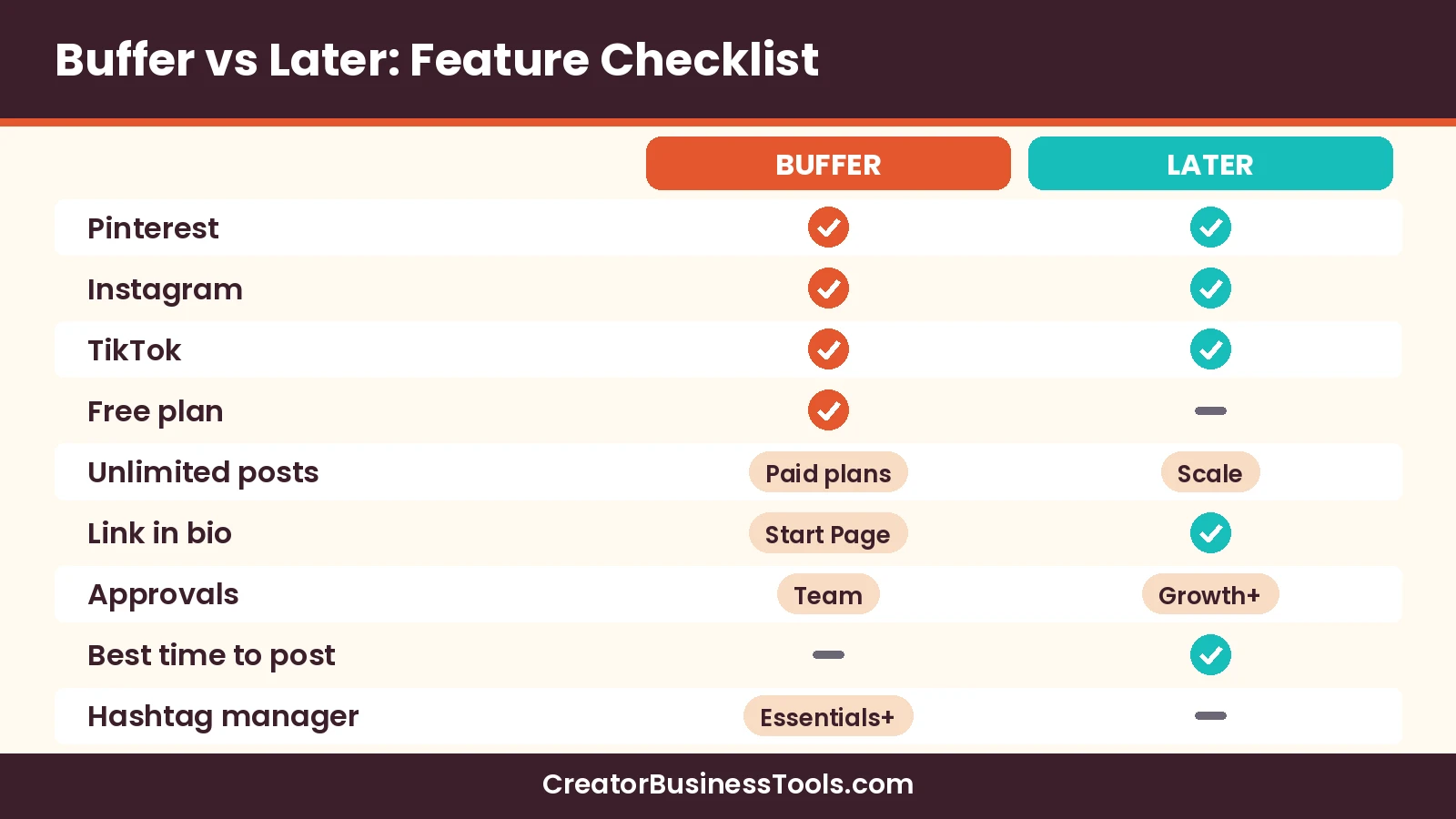
| Category | Buffer | Later |
|---|---|---|
| Pricing model | Per channel | Per social set (one profile of each supported platform) |
| Free option | Free plan, up to 3 channels | No free plan |
| Entry paid tier | $ (per-channel pricing) | $$ (per social set) |
| Team tier | $–$$ (per-channel pricing) | $$–$$$ (Growth) |
| Post limits | 10 queued per channel on Free; unlimited on paid plans | 30 per profile per month on Starter; 180 on Growth; unlimited on Scale |
| Users | 1 on Free and Essentials; unlimited on Team | 1 on Starter, 2 on Growth, 4 on Scale |
| Platforms | Instagram, TikTok, Pinterest, YouTube, LinkedIn, Threads, Facebook, X, Bluesky, Mastodon, Google Business Profile, Substack | Instagram, Facebook, TikTok, Pinterest, LinkedIn, YouTube, Threads, Snapchat |
| Link in bio | Start Page (counts as a channel) | Link in Bio included |
| Analytics history | 30 days on Free; unlimited on paid plans | Up to 3 months, 1 year, or 2 years by plan |
| AI tools | AI Assistant on all plans | AI credits by plan |
| Approvals | Team plan | Growth and Scale |
Pricing model: the biggest difference
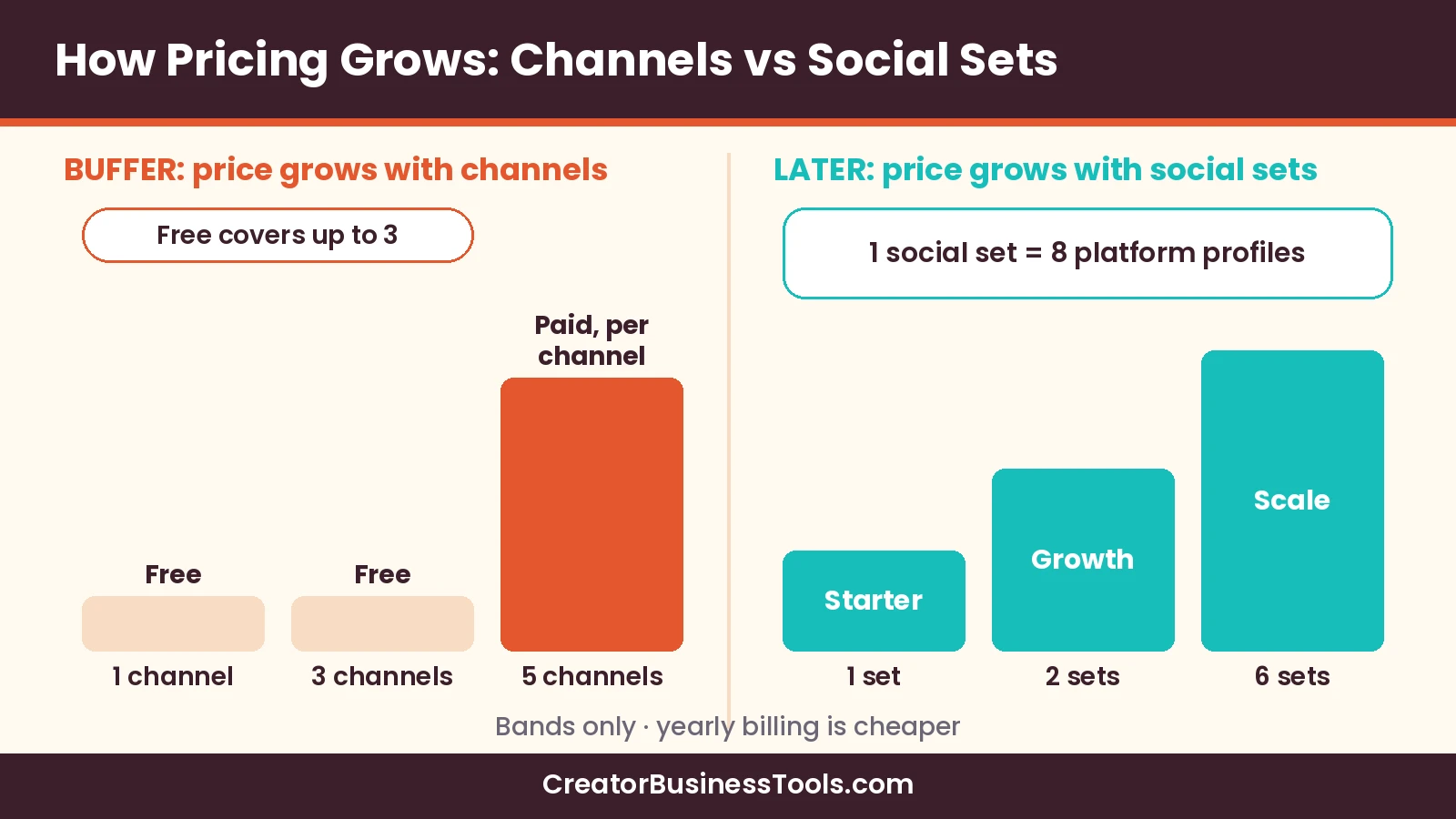
Buffer charges per channel. If you use Instagram, Pinterest, and TikTok, you pay for three channels and nothing more.
Later charges per social set, which Later defines as one profile each of Instagram, Facebook, TikTok, Pinterest, LinkedIn, YouTube, Threads, and Snapchat. That’s good value if you use many platforms for one brand.
Post limits
Buffer’s paid plans include unlimited scheduled posts per channel. The free plan allows 10 queued posts per channel at a time, which you can refill as posts go out.
Later limits posts per profile per month: 30 on Starter, 180 on Growth, and unlimited on Scale. Daily posters on one platform should check whether Starter is enough.
Collaboration
Buffer’s Team plan adds unlimited team members, access levels, and content approval workflows. Later’s Growth plan includes two users, approvals, and custom roles, with extra users available.
Analytics
Buffer keeps 30 days of insights on Free and unlimited history on paid plans, with reports and custom UTM parameters from Essentials. Later’s analytics history grows by plan, from up to three months on Starter to up to two years on Scale.
Extras that stand out
- Buffer: first comment scheduling, hashtag manager, channel groups, browser extension, and reminder notifications for Instagram, TikTok, and YouTube.
- Later: Link in Bio, best time to post for Instagram, Facebook, and TikTok, Instagram Reels audio, and on Growth, a social inbox and UGC collection.
Buffer vs Later pricing
| Plan | Price tier | What you get |
|---|---|---|
| Buffer Free | Free | Up to 3 channels, 10 queued posts per channel, 1 user |
| Buffer Essentials | $ (per-channel pricing) | Unlimited scheduled posts, advanced analytics, hashtag manager, first comment |
| Buffer Team | $–$$ (per-channel pricing) | Everything in Essentials plus unlimited users, access levels, approvals, branded reports |
| Later Starter | $$ (per social set) | 1 social set, 1 user, 30 posts per profile per month, Link in Bio |
| Later Growth | $$–$$$ | 2 social sets, 2 users, 180 posts per profile per month, social inbox, approvals |
| Later Scale | $$$ (high) | 6 social sets, 4 users, unlimited posts, competitive benchmarking |
Both companies offer lower effective monthly prices on yearly billing. Where a tier spans two levels, the lower level reflects yearly billing and the higher level reflects monthly billing.
Which is cheaper for you?
- One to three channels: Buffer is usually cheaper, and Free may cover you.
- Four or five channels for one brand: compare Buffer Essentials across all channels with Later Starter.
- Two brands: Later Growth bundles two social sets, while Buffer charges for every channel.
- A team: Buffer Team adds unlimited users per channel; Later adds users by plan.
Buffer features creators use most
Buffer’s pricing page lists a long set of features. These are the ones that matter most for a solo creator’s weekly routine.
| Feature | What it does | Plans |
|---|---|---|
| Queue and visual calendar | Line up posts and see your schedule across weeks or months | All plans |
| Ideas and board view | Store content ideas and organize them in kanban-style columns | All plans (100 ideas on Free) |
| Browser extension | Add content to your queue from any web page | All plans |
| AI Assistant | Refine and repurpose your content | All plans |
| First comment scheduling | Schedule a first comment on Instagram, Facebook, or LinkedIn posts | Essentials and Team |
| Hashtag manager | Save and reuse hashtag sets | Essentials and Team |
| Channel groups | Select several channels at once when scheduling | Essentials and Team |
| Turn comments into posts | Turn a comment exchange into a new post | All plans |
Later features creators use most
Later’s plans are built around social sets and add more brand-level tools as you move up.
- Link in Bio: included from Starter, so your bio link can point to recent posts.
- Best time to post: suggestions for Instagram, Facebook, and TikTok.
- Instagram Reels audio: listed on Starter.
- Smart scheduling with future trends: listed on Growth.
- Approvals and collaboration: internal and external reviewers on Growth.
- Social inbox and UGC collection: on Growth.
- Competitive benchmarking and brand mentions: on Scale.
Cost scenarios in plain English
Because the two tools price differently, the cheaper option depends on your setup.
| Your setup | Buffer | Later |
|---|---|---|
| Instagram + Pinterest, posting a few times a week | Free may cover it | Starter |
| Instagram + Pinterest + TikTok, posting daily | Essentials for three channels | Starter, if 30 posts per profile per month is enough |
| Six platforms for one brand | Essentials for six channels | Starter covers one profile on each platform |
| Two brands with an assistant | Team for every channel | Growth with two social sets and two users |
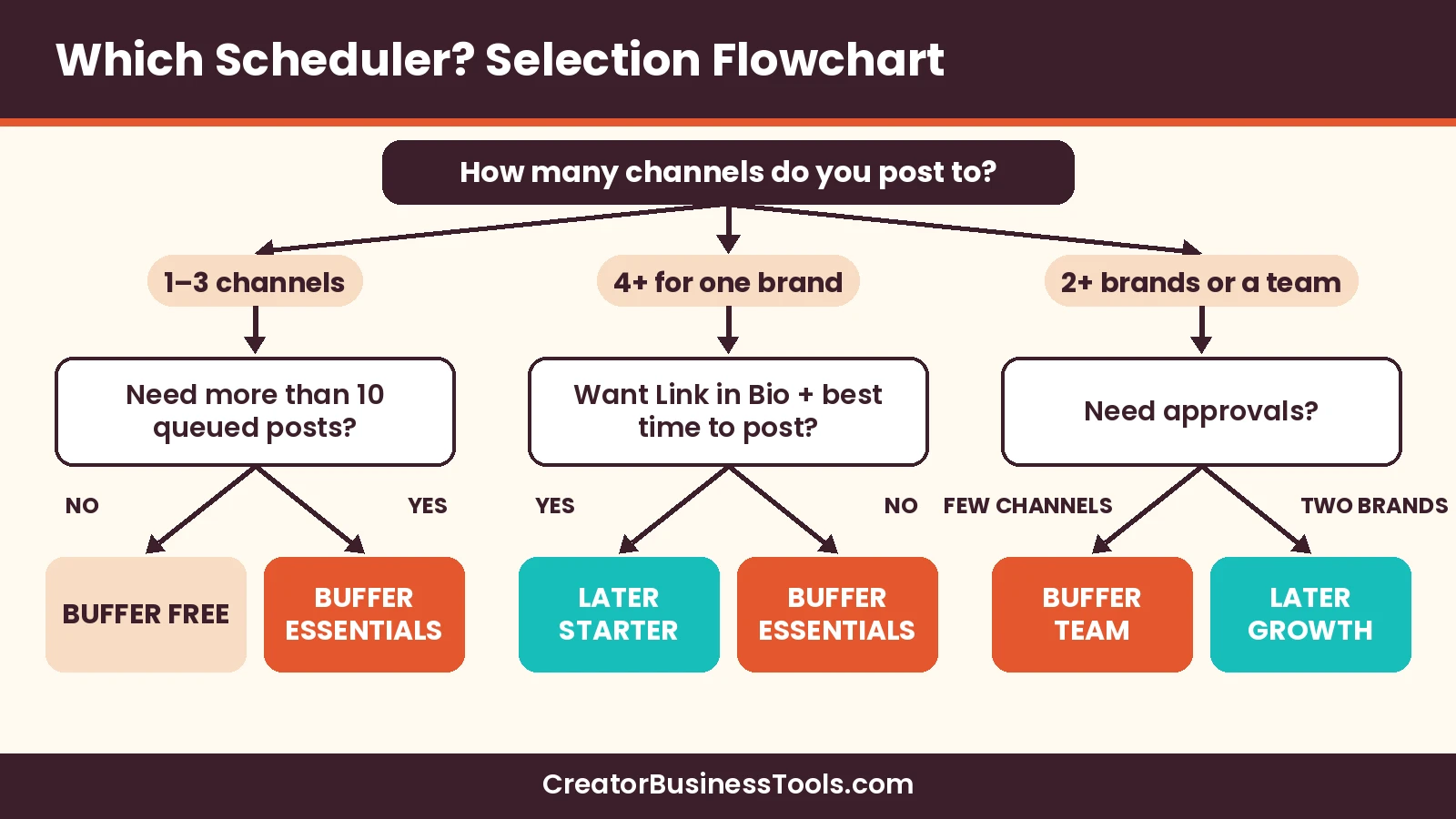
Selection flowchart
Platform-by-platform notes
Every platform has quirks. Here’s what each tool’s pricing page highlights for the platforms creators use most.
| Platform | Buffer | Later |
|---|---|---|
| First comment scheduling, custom video covers, reminder notifications | Best time to post, Reels audio, Link in Bio | |
| TikTok | Custom video covers, reminder notifications | Best time to post |
| Supported channel | Included in every social set | |
| YouTube | Supported, with reminder notifications | Included in every social set |
| Threads, X, Bluesky, Mastodon | Threaded posts (unlimited on paid plans) | Threads included in every social set |
| LinkedIn and Facebook | Supported, with first comment scheduling | Included in every social set |
If one platform drives most of your business, check that tool’s help center for the exact post types it supports before you commit.
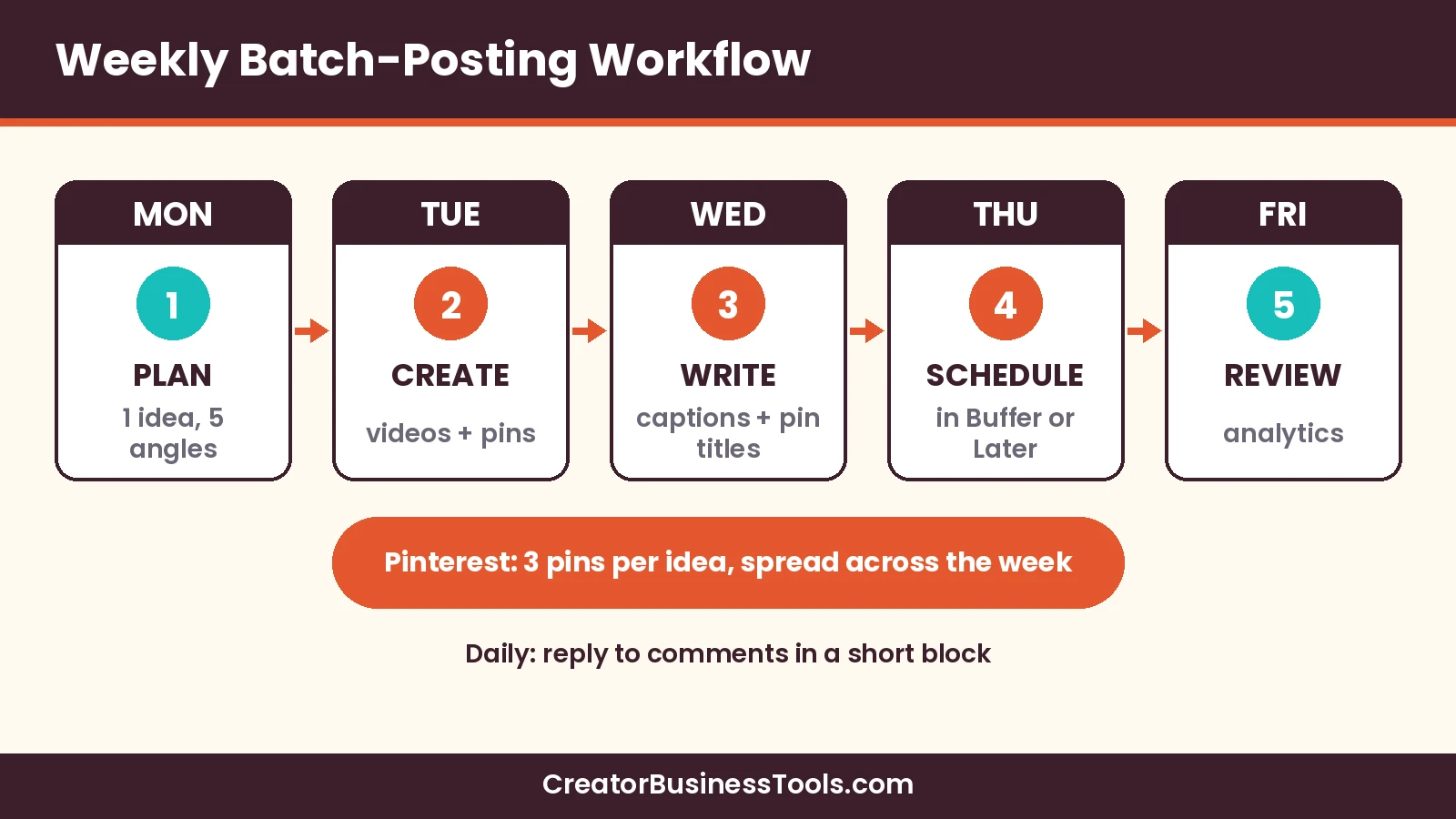
Weekly batch-posting workflow (including Pinterest)
For a visual planner with flat per-client pricing, see our Pallyy review.
Batching means creating a week of content in one block of time, then scheduling it all at once. Here’s a workflow that works in either tool.
| Day | Task | Time block |
|---|---|---|
| Monday | Plan: pick one core idea and five angles for the week | 30 minutes |
| Tuesday | Create: shoot videos, design graphics and pins | 2 hours |
| Wednesday | Write: captions, pin titles, descriptions, and links | 1 hour |
| Thursday | Schedule: load everything into your scheduler | 45 minutes |
| Daily | Engage: reply to comments for 15 minutes | 15 minutes |
| Friday | Review: check what performed and note next week’s ideas | 20 minutes |
Step 1: plan one idea, many formats
Start with a single topic, such as a tutorial or a tip from your course. Turn it into a short video, a carousel, a text post, and two or three pins.
Step 2: create in one sitting
Batch similar tasks together. Record all videos at once, then design all graphics and pins at once.
If designing pins is the slow part of batching, Pin Generator can turn a blog URL into pin designs you then schedule in Buffer or Later.
Step 3: write captions and pin copy
Write captions for each platform’s audience. For Pinterest, write a clear pin title and a descriptive description with the words people search for, and link to the page you want them to visit.
Step 4: schedule the week
- Load posts into the queue or calendar for each channel.
- Spread pins across the week rather than posting them all at once.
- Use first comment scheduling (Buffer Essentials and up) for links or hashtags where it fits.
- For platforms that need finishing in the app, use reminder notifications (Buffer) and post natively when prompted.
Step 5: engage and review
Scheduling frees time for replies. Both tools include ways to reply to comments in one place, through Buffer’s community inbox or Later’s social inbox on Growth.
At the end of the week, check analytics and note which formats worked. Feed those ideas into next Monday’s plan.
Pinterest batch checklist
- Two or three pin designs per idea.
- Keyword-rich pin titles and descriptions.
- A link to a specific page, not just your home page.
- Pins spread across several days.
- A board chosen for each pin.
Common batching mistakes
- Scheduling the same caption on every platform without adjusting it.
- Posting all pins on one day instead of spreading them out.
- Forgetting to check the queue after a holiday or launch change.
- Never replying to comments because everything is automated.
- Skipping the weekly review, so the same weak formats repeat.
Connecting social to your email list
Social reach is borrowed; your email list is yours. If Instagram is your main channel, our Instagram DM automation guide shows how to turn comments into sign-ups. Link pins and bio links to a sign-up page, and see our guide to the best email marketing for creatives for tools that make that easy. Course creators can also check our best email marketing for course creators guide.
When Buffer Team is worth it
Team costs more per channel than Essentials, so upgrade only for a real reason. These are the situations where it makes sense.
- An assistant drafts posts and you want to approve them before they go live.
- You need access levels so a contractor can’t change account settings.
- You share branded reports with sponsors or clients.
- More than one person needs to log in, since Essentials includes one user.
If you work alone and approve your own posts, Essentials covers the same scheduling and analytics features for less.
Buffer review summary
- Pay per channel, so you only pay for what you use.
- Free plan for up to three channels.
- Unlimited scheduled posts on paid plans.
- Wide platform support, including Pinterest, Bluesky, Threads, and Substack.
Keep in mind: Costs add up channel by channel, and the free plan’s queue is small. A Start Page counts as a channel.
Best for: Solo creators and small teams posting to a handful of channels.
Not ideal for: Creators managing many brands across every platform, where bundled pricing may work out cheaper.
Later review summary
- Social sets that bundle one profile per platform.
- Link in Bio included on every plan.
- Best time to post suggestions and Reels audio.
- Collaboration and social inbox on Growth.
Keep in mind: There’s no free plan, and Starter limits posts per profile per month.
Best for: Creators with several platforms per brand, or creators managing two or more brands.
Not ideal for: Creators who only need one or two channels on a tight budget.
Caveats before you commit
- Prices, post limits, and supported platforms change. Check the official pricing pages before you buy.
- Some platforms may require finishing a post in the native app; check each tool’s support for your formats.
- Per-channel and per-set pricing behave differently as you grow, so recalculate when you add channels.
- This guide is based on official product information, not hands-on testing.
How to choose a social media scheduler
- List your channels. Count every platform and profile you post to.
- Count your posts. Estimate posts per profile per month.
- Decide on teammates. Will an assistant or client need access or approvals?
- Compare pricing models. Per channel (Buffer) versus per social set (Later).
- Check extras. Link in bio, best time to post, first comments, analytics history.
- Start small. Schedule one real week before committing to a bigger plan.
FAQ
What is the best social media scheduler for creators?
For most solo creators on a few channels, Buffer offers the best balance of price and features. Later is strong for multi-platform or multi-brand creators.
Does Buffer schedule Pinterest pins?
Yes. Pinterest is one of Buffer’s supported channels.
Does Later support Pinterest?
Yes. Pinterest is part of every Later social set.
Is Buffer free?
Buffer has a free plan for up to three channels, with up to 10 queued posts per channel.
Does Later have a free plan?
No. Later’s pricing page lists paid plans only.
How does Buffer pricing work?
You pay per connected channel, and yearly billing lowers the price.
What is a Later social set?
One profile each of Instagram, Facebook, TikTok, Pinterest, LinkedIn, YouTube, Threads, and Snapchat.
Which tool is better for teams?
Buffer Team includes unlimited team members and approvals. Later Growth includes two users plus approvals, with extra users available.
Which tool has better analytics?
Buffer gives unlimited history on paid plans, with reports and UTM settings. Later’s history depends on the plan and adds competitive benchmarking on Scale.
Can I schedule Instagram Reels and TikTok videos?
Both tools list Instagram and TikTok support. Buffer offers reminder notifications for finishing posts natively when needed, and Later lists Reels audio on Starter.
Does a link-in-bio page cost extra?
Later includes Link in Bio on every plan. Buffer offers a Start Page, which counts as one channel toward your plan.
How long does a weekly batch session take?
It depends on your formats, but grouping planning, creating, writing, and scheduling into separate blocks usually makes the week far more predictable than posting day by day.
Bottom line
The best social media scheduler for creators is the one that matches how many channels you use and how you work. Buffer wins for most solo creators thanks to per-channel pricing and a free plan. Later wins when you post one brand across many platforms or manage several brands.
Pair either one with a weekly batch routine, including Pinterest, and you’ll spend less time posting and more time creating.