
Pallyy Review: A Per-Client Social Media Scheduler for Freelancers and Small Agencies
Disclosure: This post contains affiliate links. If you buy through them, we may earn a commission at no extra cost to you. How we make money.
Posting consistently on Instagram, TikTok, Pinterest, and LinkedIn is hard enough for your own brand. Doing it for clients, with approvals, comments, and reports, is a whole other job. Pallyy is a social media scheduler from Australia that prices by client rather than by channel, which makes it interesting for freelancers, small agencies, and multi-brand creators. This Pallyy review covers what each plan includes, how the social set model works, and who should choose something else. We based it on Pallyy’s official pricing page and product pages.
Quick verdict: Pallyy is a strong, good-value scheduler for freelancers and small agencies that manage several brands, thanks to flat per-client pricing, client approvals without extra seats, and a built-in social inbox. Solo creators can start on a small free plan and move to the budget Pro plan. If you only post to one or two channels and never need approvals, a per-channel tool may cost less.
Quick picks
- Best way to start: Pallyy Free, with one social set and a small monthly allowance of image posts. Pallyy
- Best for solo creators and one brand: Pallyy Pro, with unlimited scheduled posts, analytics, a social inbox, and link in bio pages.
- Best for freelancers with a few clients: Pallyy Pro plus extra social sets, one per client.
- Best for small agencies: Pallyy Agency, with ten social sets, three team seats, and custom reports.
- Best for multi-location brands: Pallyy Scale, with thirty social sets and ten seats.
Pallyy at a glance
| Item | What Pallyy offers |
|---|---|
| What it is | A social media scheduler with calendar, inbox, analytics, and approvals |
| Plans | Free, Pro, Agency, Scale |
| Price tiers | Free, budget, mid-range, premium |
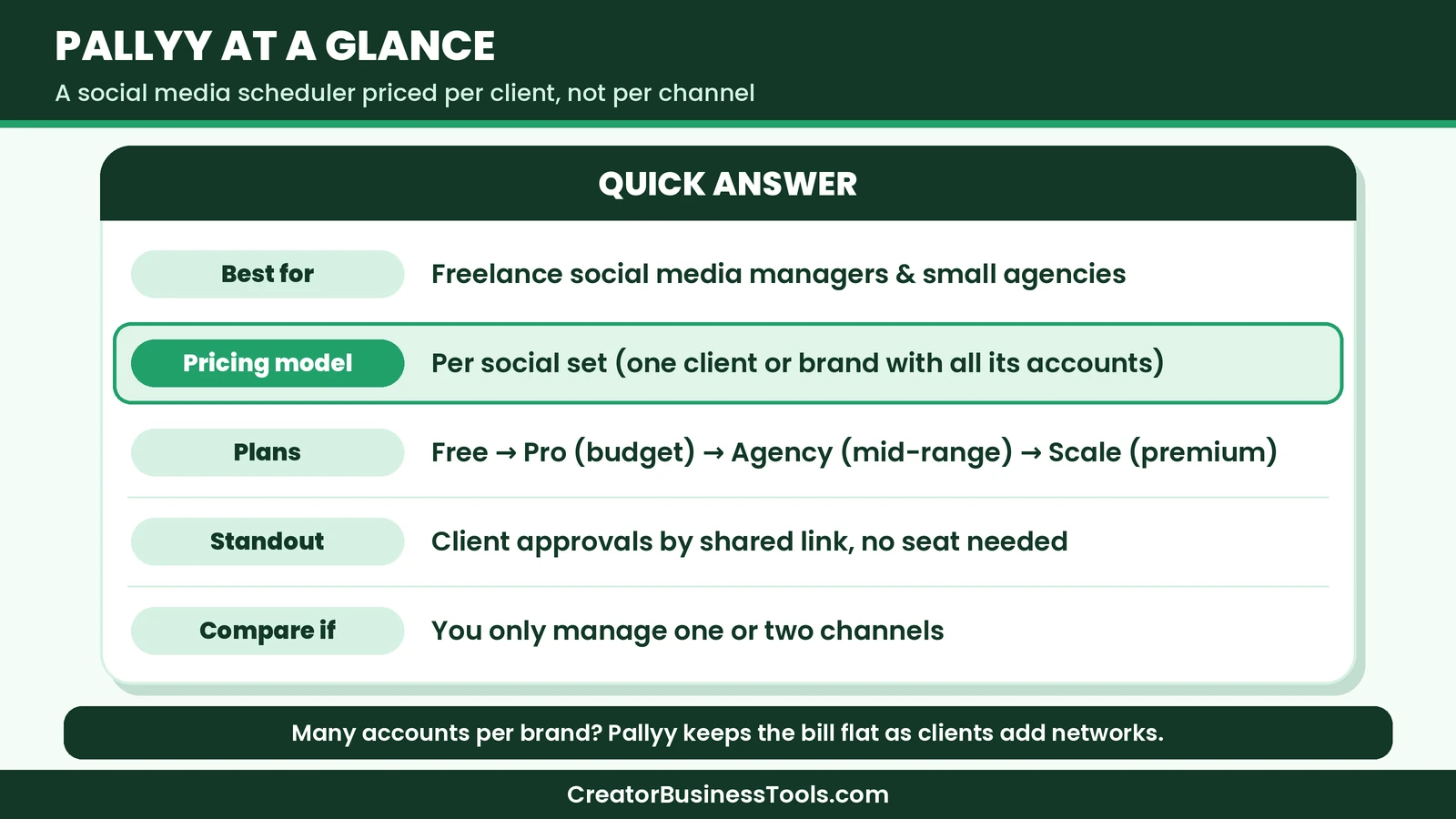
| Pricing model | Per social set (one per client or brand), not per channel |
| Networks | Instagram, Facebook, LinkedIn, TikTok, Pinterest, Google Business Profile, YouTube, X, Threads, Bluesky |
| Accounts per set | Up to eleven |
| Approvals | Clients approve via shared calendar link, no account needed |
| Inbox | Comments, DMs, and reviews from major networks on paid plans |
| Analytics | Instagram, Facebook, and LinkedIn, with long retention on paid plans |
| Extras | Link in bio pages, AI captions, post ideas, API access |
What is Pallyy?
Pallyy started as an Instagram planning tool and has grown into a full scheduler for agencies and multi-brand businesses. Its core idea is the social set. A social set holds every profile one client or brand owns, such as their Instagram, Facebook page, TikTok, and Pinterest account, with its own calendar, inbox, and analytics. You pay per set, not per profile, so adding another network for an existing client does not raise your bill.
That model is the main reason to look at Pallyy. Many schedulers charge per channel, which can add up fast when each client has four or five accounts.
Pallyy review: the features that matter
Visual calendar and queue scheduling
Each social set has a drag-and-drop calendar showing every channel. You can schedule individual posts at set times or use queue scheduling with saved posting times on paid plans. Calendar notes, recurring notes, and Google Calendar import help you plan campaigns around launches and holidays.
Publishing across networks
Pallyy publishes through each platform’s official API, including Instagram Reels, carousels, and Stories, so posts go live automatically. Paid plans support video, carousels, Reels, first comments, collaborators, product tags, and location tags for Instagram. The Free plan is limited to image posts.
Client approvals without extra seats
This is one of Pallyy’s best features for freelancers. You share a client’s calendar as a link. The client previews upcoming posts, leaves comments, and approves or rejects each one, with no Pallyy account and no seat. Approved posts publish at their scheduled times. Pro and higher plans include approval workflows, post comments, and post history.
Social inbox
On paid plans, the inbox gathers Instagram DMs and comments, Facebook messages, comments, and reviews, LinkedIn comments, TikTok comments, and Google reviews. Filters, labels, user assignment, and bulk actions help teams keep conversations under control.
Analytics and reports
Pallyy offers analytics for Instagram, Facebook, and LinkedIn. Paid plans keep years of history, while the Free plan keeps a short window. Agency and Scale add custom reports and report export, which is useful for monthly client reporting.
Link in bio pages and AI help
Paid plans include a bio link page with buttons, an image grid, styling, and insights. There are also AI-generated captions and post ideas, which can help when you are writing for several brands in different voices.
Pallyy pricing explained
Pallyy’s pricing is easy to understand once you think in social sets.
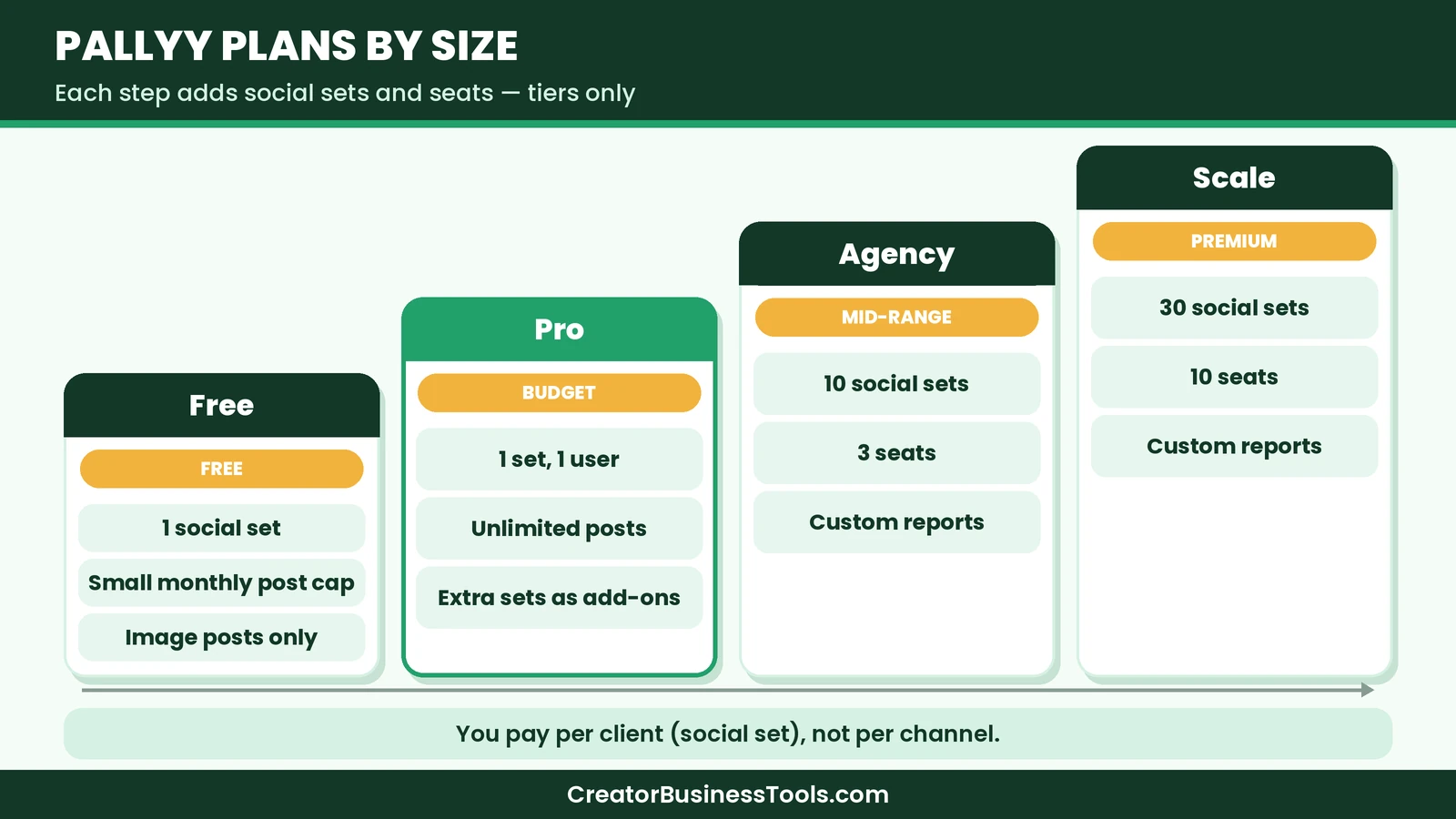
- Free: one social set, a small monthly cap on scheduled posts, and image posts only. Good for testing the calendar.
- Pro: budget tier. One social set, one user, unlimited scheduled posts, analytics, inbox, approvals, link in bio, and AI captions. You can add extra social sets for a small flat monthly fee each.
- Agency: mid-range tier. Ten social sets, three team seats, custom reports, and shared sets. Extra seats are available for a small monthly fee each.
- Scale: premium tier. Thirty social sets and ten seats, for growing agencies and multi-location brands.
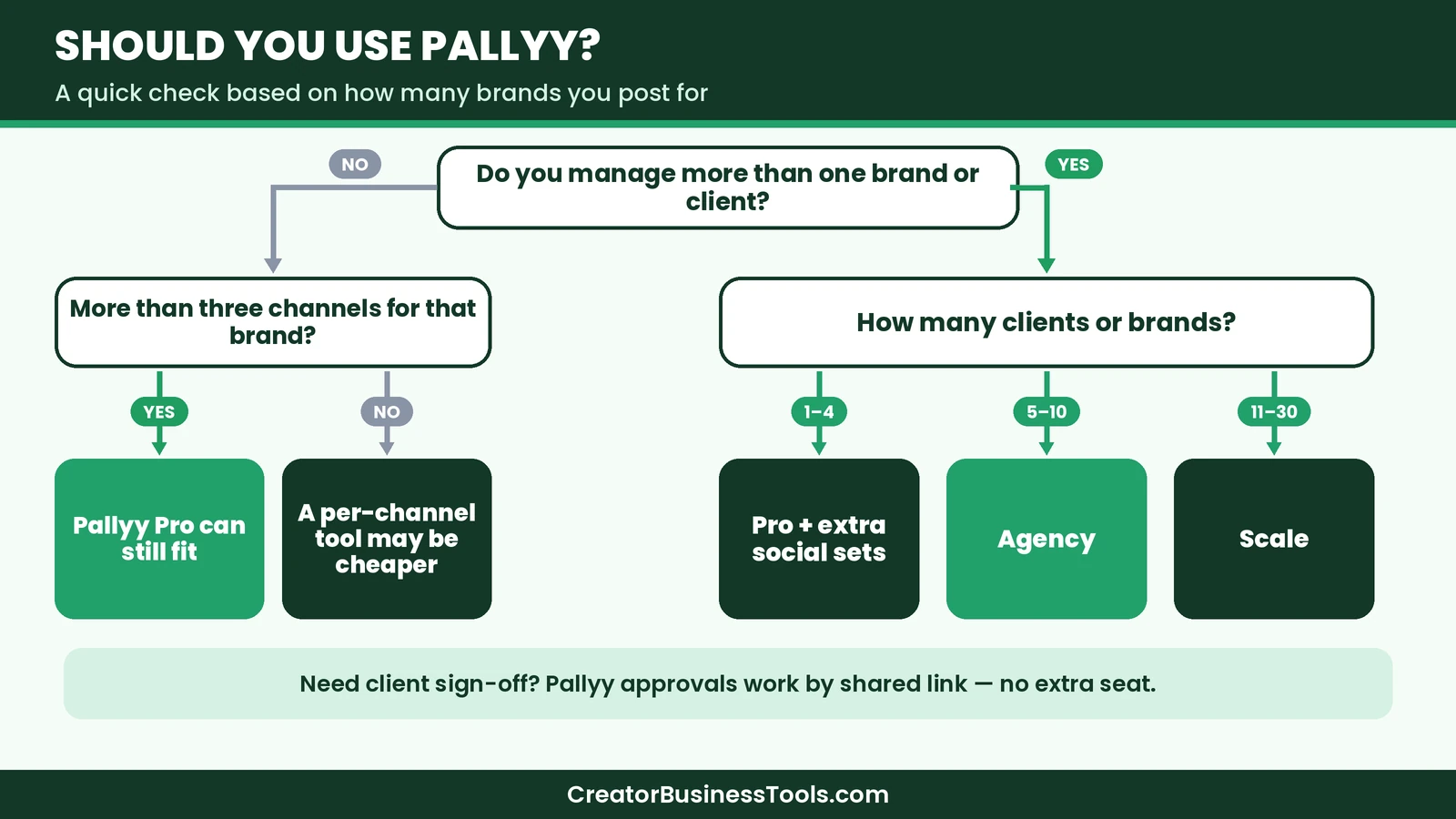
Paid plans are available with monthly or yearly billing. For a freelancer with a few clients, Pro plus extra sets is often enough. Once you reach about five clients, Pallyy’s own guidance suggests the Agency plan becomes the better fit.
Who Pallyy is best for
- Freelance social media managers handling several small business clients.
- Small agencies that need approvals, custom reports, and a few team seats.
- Multi-location businesses such as cafes, clinics, gyms, or real estate teams, with one social set per location.
- Creators with several brands, such as a blog, a shop, and a personal account, who want each kept separate.
- Instagram-first planners who like grid previews and visual calendars.
Who might want something else
- Solo creators with one or two channels who never need approvals may find a per-channel scheduler cheaper.
- Pinterest-heavy bloggers who want Pinterest-specific features such as smart scheduling and pin design tools may prefer a dedicated Pinterest tool.
- Teams that need deep analytics on every network, since Pallyy’s analytics focus on Instagram, Facebook, and LinkedIn.
- Large enterprises that need advanced compliance and listening features.
How Pallyy compares with other schedulers
| Tool | Pricing model | Price tier | Approvals | Best for |
|---|---|---|---|---|
| Pallyy | Per social set (client) | Free to premium | Shared link, no seat needed | Freelancers and small agencies |
| Buffer | Per channel | Free, then budget per channel | On the Team plan | Solo creators and growing teams |
| Later | Per plan with set limits | Budget to premium | On higher plans | Visual Instagram and TikTok planning |
| Tailwind | Per plan | Budget to mid-range | Limited | Pinterest-first bloggers |
We go deeper on the most common matchup in our Pallyy vs Buffer guide, and we compare two other popular options in our guide to the best social media scheduler for creators, Buffer vs Later.
A typical week in Pallyy
To picture how Pallyy fits into real work, here is what a normal week might look like for a freelancer managing four small business clients.
On Monday, you open each client’s social set and review last week’s analytics. You note which posts earned the most saves and comments, and you jot ideas in calendar notes. On Tuesday, you batch-create content. You upload images and videos to each set’s media library, write captions with help from AI caption suggestions, and drop posts into the queue so they fill the saved posting times.
On Wednesday, you send each client a single approval link. They open the shared calendar on their phone, leave a comment on one caption, and approve the rest. You make the small change, and everything is ready to publish automatically. Through the rest of the week, you check the inbox once or twice a day to reply to comments, DMs, and Google reviews. At the end of the month, Agency users can build a custom report for each client and export it.
That rhythm is where Pallyy shines. Planning, approvals, publishing, engagement, and reporting all happen in one place, organized by client.
Team access and permissions
On the Agency and Scale plans, you can invite teammates and freelancers. Access is granted per social set. You put a client’s sets in a team and invite the right person, and they only see those clients. That is helpful if you work with a part-time designer or a junior community manager and want to keep other client accounts private.
Pro includes a single user, so it suits solo freelancers. If you need even one helper with their own login, the Agency plan is the natural step.
Media library and storage
Each plan includes a media library with folders, an image cropper, and Unsplash import. Storage and file size limits grow with each plan. The Free plan has a small allowance and no video uploads, while paid plans support video and much larger files. Agencies can also clone folders across social sets, which helps when several locations of the same business share brand assets.
Example setups and which plan fits
| Your situation | Suggested plan | Why |
|---|---|---|
| One personal brand, testing scheduling | Free | One set and a few image posts a month |
| One brand posting video and Reels | Pro | Unlimited posts, video, inbox, analytics |
| Freelancer with two to four clients | Pro plus extra sets | Flat add-on per client, single user |
| Agency with five to ten clients and helpers | Agency | Ten sets, three seats, custom reports |
| Franchise or multi-location brand | Scale | Thirty sets and ten seats |
Because each extra network inside a set costs nothing more, the difference between Pallyy and per-channel tools grows as each client adds more accounts.
What we would like to see improved
No tool is perfect, and a fair Pallyy review should mention a few gaps. First, analytics are strongest for Instagram, Facebook, and LinkedIn. If TikTok, YouTube, or Pinterest analytics are central to your reporting, you may still need each platform’s native insights. Second, the Free plan is quite tight, with a small post cap and no video, so it works more as a preview than a long-term home. Third, Pro includes only one user, which means the jump to Agency comes as soon as you add a teammate. None of these are deal-breakers for the audience Pallyy targets, but they are worth knowing before you commit.
Getting clients comfortable with approvals
If your clients are used to approving posts by email, the shared calendar link may be new to them. A short explanation helps. Tell them they will receive one link each week, that they can tap any post to see a preview, and that a comment or an approval is all you need. Most clients appreciate seeing posts in context on a calendar, and the process usually becomes faster than email after a couple of weeks.
Pros and cons
Pros
- Pricing per client, not per channel
- Clients approve posts without an account or seat
- Social inbox for comments, DMs, and reviews
- Supports ten major networks, including Pinterest, TikTok, Threads, and Bluesky
- Custom reports on Agency and Scale
- Link in bio pages and AI captions included on paid plans
Cons
- Free plan is limited to one set, a small post cap, and images only
- Pro includes only one user
- Analytics focus on Instagram, Facebook, and LinkedIn
- Fewer Pinterest-specific tools than a dedicated Pinterest scheduler
A small story from our team
Before we used a scheduler with approvals, we helped a friend’s small bakery with their Instagram. Every week we sent draft captions by email, screenshots by text message, and then waited. Feedback came back in three places, and once we published a post with an old caption because the newest note was buried in a chat thread. A shared approval link would have saved us that embarrassment, and it is the feature we would look at first if we were managing clients again.
How to get started with Pallyy
- Sign up for the Free plan and connect one brand’s accounts as your first social set.
- Schedule a week of image posts to get comfortable with the calendar.
- Move to Pro when you need video, carousels, unlimited posts, or the inbox.
- Add one social set per client, or switch to Agency once you reach several clients.
- Share each client’s calendar link for approvals.
- Set up monthly reports for clients on Agency or Scale.
Tips for using Pallyy well
- Name social sets clearly. Use the client or brand name so teammates never post to the wrong account.
- Use queue times. Save posting times per set so each client has a steady rhythm.
- Batch approvals. Send one approval link per week rather than one per post.
- Label posts. Labels for campaigns or content pillars make reporting easier.
- Watch the inbox daily. Quick replies to comments and reviews often matter more than one extra post.
Pallyy and Pinterest
Pallyy can schedule posts to Pinterest alongside Instagram, TikTok, and other networks from the same calendar. For creators who repurpose Instagram graphics as pins, that is convenient. If Pinterest is your main traffic channel and you publish many pins a day, you may also want a Pinterest-specific tool. For balanced multi-network posting, Pallyy covers Pinterest well enough for most small brands.
Is Pallyy worth it?
For freelancers and small agencies, yes. The per-client pricing, approvals without extra seats, and social inbox make Pallyy one of the better-value schedulers for client work. Solo creators should compare it with per-channel tools, since Pallyy’s advantages grow with the number of brands you manage.
FAQ
Is Pallyy free? Yes, Pallyy has a Free plan with one social set and a limited number of image posts each month.
What is a social set? A group of profiles for one client or brand, with its own calendar, inbox, and analytics. You pay per set rather than per profile.
Does Pallyy support Pinterest and TikTok? Yes. Pallyy schedules to Instagram, Facebook, LinkedIn, TikTok, Pinterest, Google Business Profile, YouTube, X, Threads, and Bluesky.
Do clients need a Pallyy account to approve posts? No. Clients approve through a shared calendar link without a seat.
Can I add teammates on Pro? Pro includes one user. Agency includes three seats, and Scale includes ten.
Can I change plans later? Yes, you can upgrade or change plans as your client list grows, and cancel any time.
Conclusion: our Pallyy review in a nutshell
Pallyy is a smart pick if you schedule for more than one brand. Flat per-client pricing, approvals by shared link, and a built-in inbox make it easy to run several accounts without paying for every profile. Start free, move to Pro for your own brand or first clients, and step up to Agency when your roster grows. Check Pallyy
Related guides: Pin Generator Review · Pin Generator vs Tailwind · Pallyy vs Buffer · Tailwind Review
Get our free content calendar template
Want to plan a month of posts in one sitting? Join our email list for a free content calendar template with weekly themes, caption prompts, and a simple approval checklist for client work. Contact us to request a copy.
Pricing and features from official vendor pages, last checked October 25, 2026.