
Divi vs Elementor: Which WordPress Page Builder Fits Creators Best?
Disclosure: This post contains affiliate links. If you buy through them, we may earn a commission at no extra cost to you. How we make money.
Divi vs Elementor is one of the most common questions WordPress creators ask before building a site. Both are visual page builders, both let you design without code, and both have large communities. But they are priced in very different ways, and they suit different kinds of creators.
This guide compares Divi and Elementor on pricing, features, ease of use, design systems, AI tools, and long-run cost. It’s based on each company’s official pricing pages, product pages, and release notes, not on hands-on benchmarks or sponsored claims.
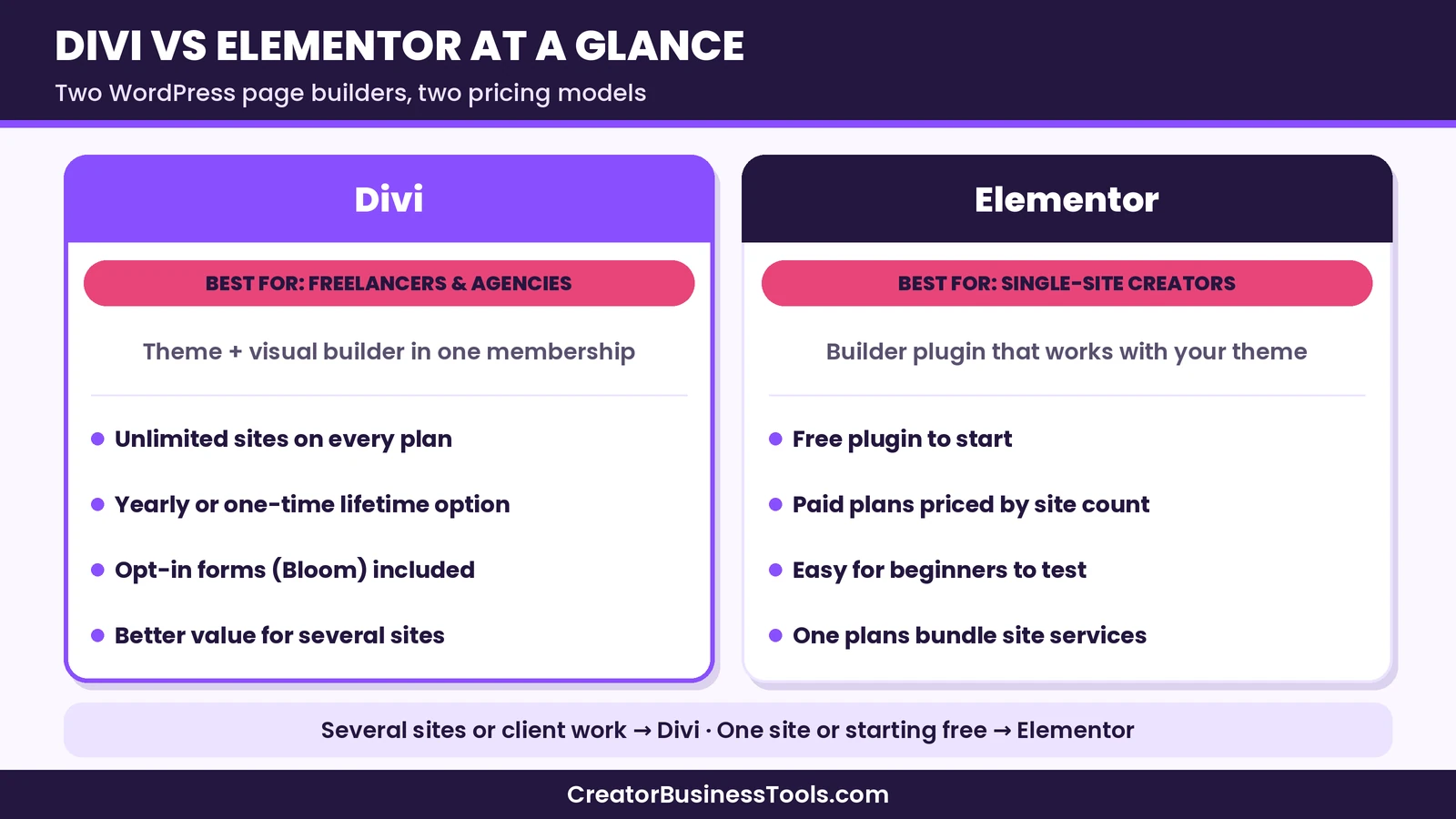
Quick verdict: If you build more than one or two WordPress sites, or you want to pay once and stop thinking about renewals, Divi is usually the better fit, because every Divi plan covers unlimited websites. If you run a single site, want to start with a free plugin, or prefer a builder that sits on top of the theme you already use, Elementor is a flexible and well-supported choice.
Quick picks
Divi links in this article are affiliate links: if you buy through them, we may earn a fee from Elegant Themes at no extra cost to you.
- Best for several sites or client work: Divi, because one membership covers unlimited websites. See Divi’s plans
- Best for paying once: Divi Lifetime, a one-time plan with ongoing updates and support. See the lifetime plan
- Best for starting free: Elementor’s free plugin, then a single-site Pro plan if you need more. See Elementor
- Best for one professional or store site: Elementor Advanced Solo, which unlocks the full Pro feature set for one site.
Divi links on this page are affiliate links.
Divi vs Elementor at a glance
| Divi | Elementor | |
|---|---|---|
| What it is | WordPress theme and visual builder (plus a builder plugin for other themes) | Builder plugin that works with your theme |
| Free version | No free plan | Yes, free Editor plugin |
| Paid pricing model | Yearly or one-time lifetime | Yearly, priced by number of sites |
| Sites per plan | Unlimited on every plan | One, three, 25, or unlimited, depending on plan |
| Entry price tier | Budget (yearly) | Free, then budget |
| Design system | Design variables, presets, components | Classes, Variables, Components (Atomic Editor) |
| AI tools | Divi AI and AI Agent (Pro services) | AI features in the One plans |
| Hosting included | No | No (Elementor Host is sold separately) |
| Extras in the membership | Extra theme, Bloom, Monarch, Divi Dash | Image optimization, accessibility, email deliverability in One plans |
What is Divi?
Divi is a WordPress theme and visual page builder from Elegant Themes. You design pages directly on the front end, drag in modules, and style them with a large set of design options. A Divi membership also includes the Extra theme, the Bloom opt-in plugin, the Monarch social sharing plugin, and the Divi Builder plugin, which lets you use the builder with a different theme.
The big difference is licensing. Every Divi plan allows use on unlimited websites, so one membership can cover your own site, a side project, and client sites. You can pay yearly or buy a one-time lifetime plan.
Divi 5 is a ground-up rebuild of the builder. Elegant Themes replaced the old shortcode system, moved to a block-based storage format, introduced a new developer API, and redesigned the interface so you can rearrange panels and switch between light and dark modes. Recent updates added a page manager, a preview mode, reusable components, multi-select editing, and an icon manager.
What is Elementor?
Elementor is a page builder plugin for WordPress. You install it alongside your theme and design pages in a drag-and-drop editor. There’s a free version of the Editor on the WordPress plugin directory, which covers the basics: containers, headings, text, images, buttons, and other core widgets.
Paid Pro plans add the Theme Builder, more widgets, forms, popups, dynamic content, custom code, and WooCommerce widgets, depending on the plan. Pricing depends mainly on how many sites you need. The newer Elementor One plans bundle the Pro editor with extra services such as AI generation, image optimization, accessibility tools, cookie consent, email deliverability, and site management, powered by a monthly pool of credits.
Elementor’s version 4 introduced the Atomic Editor. New installations start with Atomic Elements, Classes, Variables, and Components turned on, while existing sites can switch them on when they’re ready and mix new elements with older widgets on the same page.
Divi vs Elementor pricing
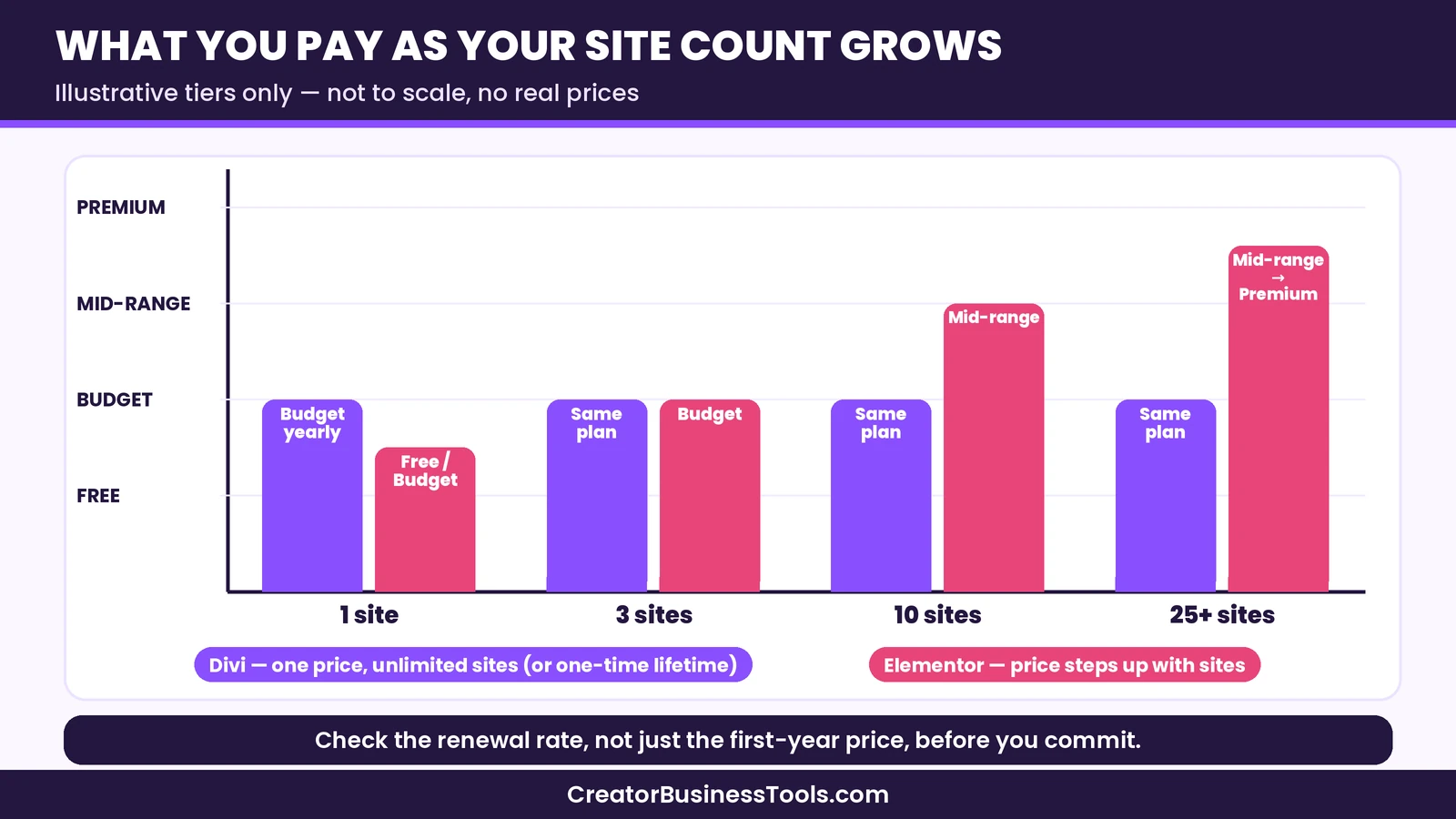
Pricing is where these two builders differ most. Divi charges one price regardless of how many sites you build. Elementor charges by the number of sites, with a free plugin at the bottom.
| Plan | Billing | Sites | Price tier | Notes |
|---|---|---|---|---|
| Divi | Yearly | Unlimited | Budget | Divi, Extra, Bloom, Monarch, Divi Dash |
| Divi Pro | Yearly | Unlimited | Mid-range | Adds Divi AI, Divi Cloud, VIP support, team seats |
| Divi Lifetime | One-time | Unlimited | Mid-range (once) | Lifetime updates and support, no Pro services |
| Divi Lifetime + Pro | One-time plus yearly services | Unlimited | Mid-range (once) plus yearly services | Pro services can be cancelled separately |
| Elementor Free | Free | Any | Free | Core editor and widgets |
| Elementor Essential | Yearly | One | Budget | No popups, custom code, or ecommerce features |
| Elementor Advanced Solo | Yearly | One | Budget | Full Pro feature set |
| Elementor Advanced | Yearly | Three | Budget | Full Pro feature set |
| Elementor Expert | Yearly | 25 | Mid-range | Full Pro feature set |
| Elementor One | Yearly | One | Mid-range | Pro editor plus credit-based services |
| Elementor One Agency | Yearly | Unlimited | Premium | Pro editor plus a large credit pool |
How the price scales
For a single site, the two are close. Elementor’s single-site plans sit in the budget tier, and so does a yearly Divi plan. Elementor also gives you a free plugin, which Divi does not.
The picture changes as you add sites. Elementor’s plans step up from one site to three, then to 25, then to unlimited on the One Agency plan. Divi stays the same price whether you build one site or fifty. That’s why Divi is popular with freelancers and small agencies who build sites for clients.
Lifetime vs yearly
Divi is one of the few major builders with a one-time lifetime plan. You pay once and keep access to updates and support. If you choose a yearly plan and later cancel, Elegant Themes says you can keep using the themes you have already downloaded, but you lose access to new updates and support after your term ends.
Elementor’s paid plans are yearly only, and Elementor states that subscriptions renew at list price. Check the current price and renewal terms on Elementor’s pricing page before you commit.
For a deeper look at the long-run math, see our Divi review, which walks through one-site and multi-site cost scenarios. If neither builder feels right, our Elementor alternatives guide compares Beaver Builder, Bricks, Thrive Architect and the block editor too.
[See Divi's plans](https://www.elegantthemes.com/gallery/divi/)Feature comparison
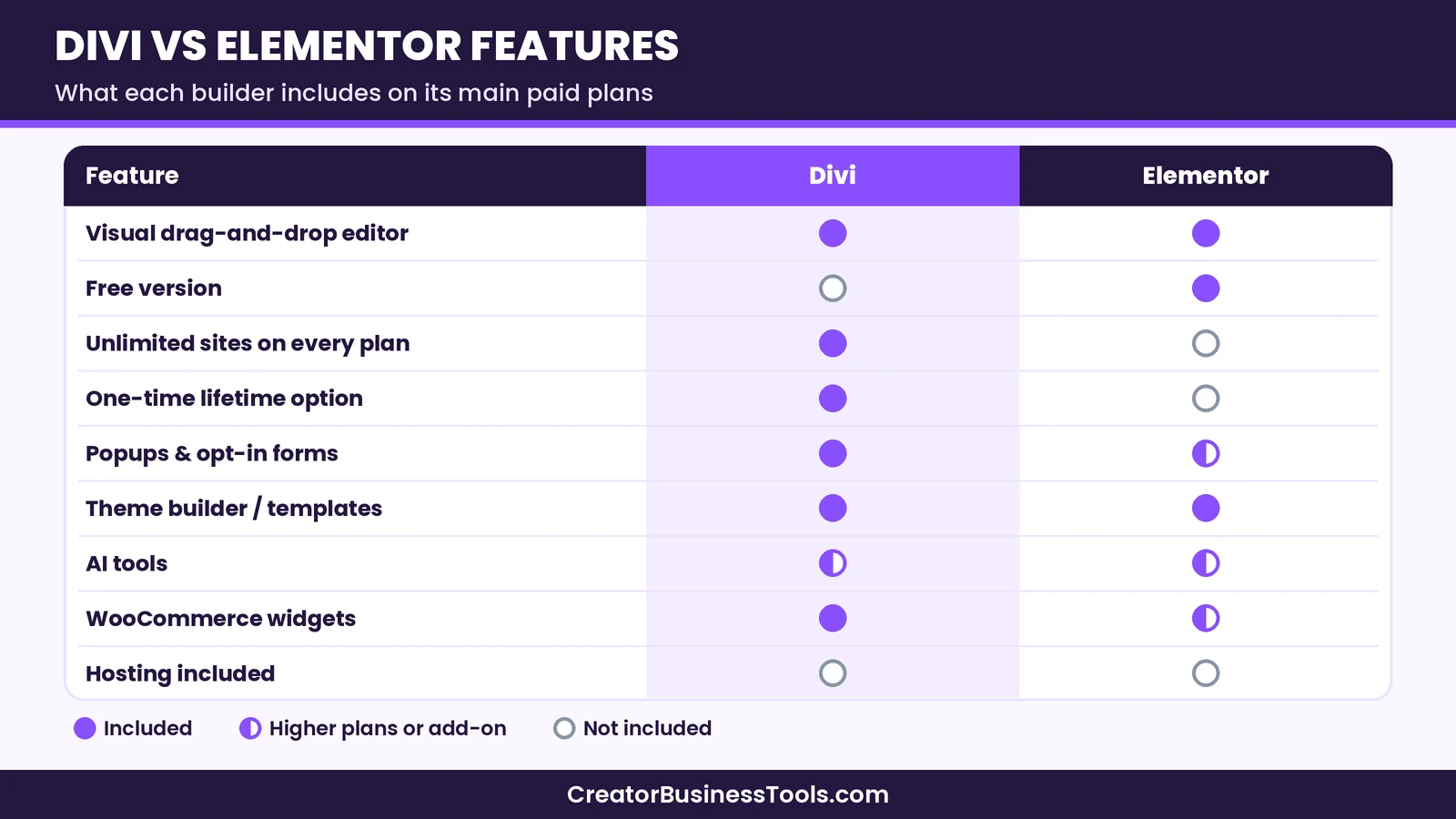
Both builders cover the essentials: visual editing, responsive controls, templates, a theme builder, forms, and WooCommerce support. The differences are in how they organize design work and what’s bundled.
| Feature | Divi | Elementor |
|---|---|---|
| Visual front-end editing | Yes | Yes |
| Theme builder (headers, footers, templates) | Included | Pro plans |
| Popups | Via Bloom and builder features | Advanced Solo and above |
| Forms | Contact form modules, Bloom opt-ins | Form widget on Pro plans (submissions managed from Advanced Solo up) |
| WooCommerce building | Ecommerce modules | Advanced Solo and above |
| Design variables | Yes | Yes (Atomic Editor) |
| Reusable styles | Presets | Classes |
| Reusable components | Yes | Yes (Atomic Editor) |
| Pre-made layouts | Large layout library and Quick Sites | Website and section templates |
| AI tools | Divi AI and AI Agent (Pro services) | AI features in One plans |
| Team collaboration | Divi Teams seats (Pro) | Collaborative Notes from Advanced Solo up |
| Multi-site management | Divi Dash | Site management in One plans |
Design systems
Both builders now push you toward a design system rather than styling each element by hand. Divi 5 uses design variables for colors, fonts, and sizes, plus presets that you can stack and reuse across modules. Its global modules have become components, which you can nest and update in one place.
Elementor’s Atomic Editor uses Classes for reusable styles, Variables for shared values, and Components for reusable blocks. A Design System panel manages Classes and Variables together. One limitation to note: Classes and Variables apply to the new Atomic Elements, not to older widgets, although Elementor offers some syncing with its older global colors and fonts.
If you like working in a CSS-like way, both are now a good fit. Elementor’s Classes feel closer to traditional CSS, while Divi’s presets feel closer to stored style settings.
Templates and quick starts
Divi offers a large library of pre-made layouts and a Quick Sites feature that generates a complete starter website with real content. That can speed things up when you need a full site quickly.
Elementor provides website templates, landing pages, and pre-designed sections, and you can store your own designs as templates to reuse later.
AI tools
Divi AI is part of the Pro services. It can write and improve content, generate images, create code fine-tuned for Divi modules, and build layouts. Divi also has an AI Agent in the visual builder that can make changes from plain-language instructions.
Elementor’s AI features sit in the One plans and draw from a monthly pool of credits shared with image optimization, accessibility fixes, and email delivery. Elementor also introduced an in-editor assistant that can help generate layouts, components, classes, and variables.
If AI tools matter to you, compare how each one is metered. Divi Pro describes its layout, text, image, and code generation as unlimited, with agent usage handled separately. Elementor’s credits reset each month and don’t roll over.
Ecommerce
Both builders work with WooCommerce. Divi includes ecommerce modules for product pages, carts, and checkout. Elementor’s WooCommerce widgets start on the Advanced Solo plan, so the Essential plan is not the right fit for a store.
Ease of use
Elementor is often the easier first step. Its free plugin lets you learn the editor without paying, and the interface follows a familiar pattern: a widget panel on one side and your page on the other. The Atomic Editor adds new concepts, such as Classes and Variables, but you can keep using simpler widgets while you learn.
Divi has a reputation for a steeper start, mainly because it offers so many design settings. Divi 5’s customizable interface, page manager, and preview mode aim to make day-to-day work faster. Once you learn how presets and variables work, building consistent pages can be quick.
In short, Elementor may feel friendlier in the first hour, while Divi can feel efficient once you’ve built a few pages.
Performance and lock-in
Speed depends on more than your builder. Your hosting, images, caching, and plugins matter a lot. Both companies have invested in leaner output: Divi 5 dropped shortcodes and was rebuilt on a new foundation, and Elementor says its Atomic Elements render with fewer wrapper layers for cleaner output.
Lock-in is worth thinking about. With any visual builder, pages are built in that builder’s format. If you switch later, you’ll usually need to rebuild layouts. Divi 5 stores content in a block-based format, which Elegant Themes says opens possibilities for compatibility with the WordPress block editor. Plan to stay with whichever builder you pick for a while.
Good hosting helps either builder. If you’re choosing a host, our SiteGround review and Kinsta vs WP Engine comparison can help.
Pros and cons
| Pros | Cons | |
|---|---|---|
| Divi | Unlimited sites on every plan, one-time lifetime option, extra themes and plugins included, strong design system in Divi 5 | No free version, many settings to learn, AI tools require Pro services |
| Elementor | Free plugin to start, works with almost any theme, large template library, Atomic Editor design system | Priced by site count, Essential plan lacks key features, renewals at list price |
Prices, plan names, and limits change. Check the official Divi and Elementor pricing pages before you buy, and check the renewal terms for the plan you choose.
Who should choose Divi?
- Freelancers and agencies. Unlimited sites on every plan means you don’t need to buy a new license for each client.
- Creators with several projects. A blog, a portfolio, and a shop can all run on one membership.
- People who prefer paying once. The lifetime plan removes yearly renewals for the core builder.
- Creators who want opt-ins built in. Bloom is included for email opt-in forms.
Who should choose Elementor?
- Single-site creators. If you only need one site, Elementor’s single-site plans are priced competitively.
- Beginners. The free plugin lets you learn before you pay.
- People who like their current theme. Elementor works as a plugin with your existing theme.
- Creators who want bundled site services. The One plans combine the editor with image optimization, accessibility, and email delivery.
If Elementor sounds like the better fit, visit Elementor to compare its current plans.
How to choose between Divi and Elementor
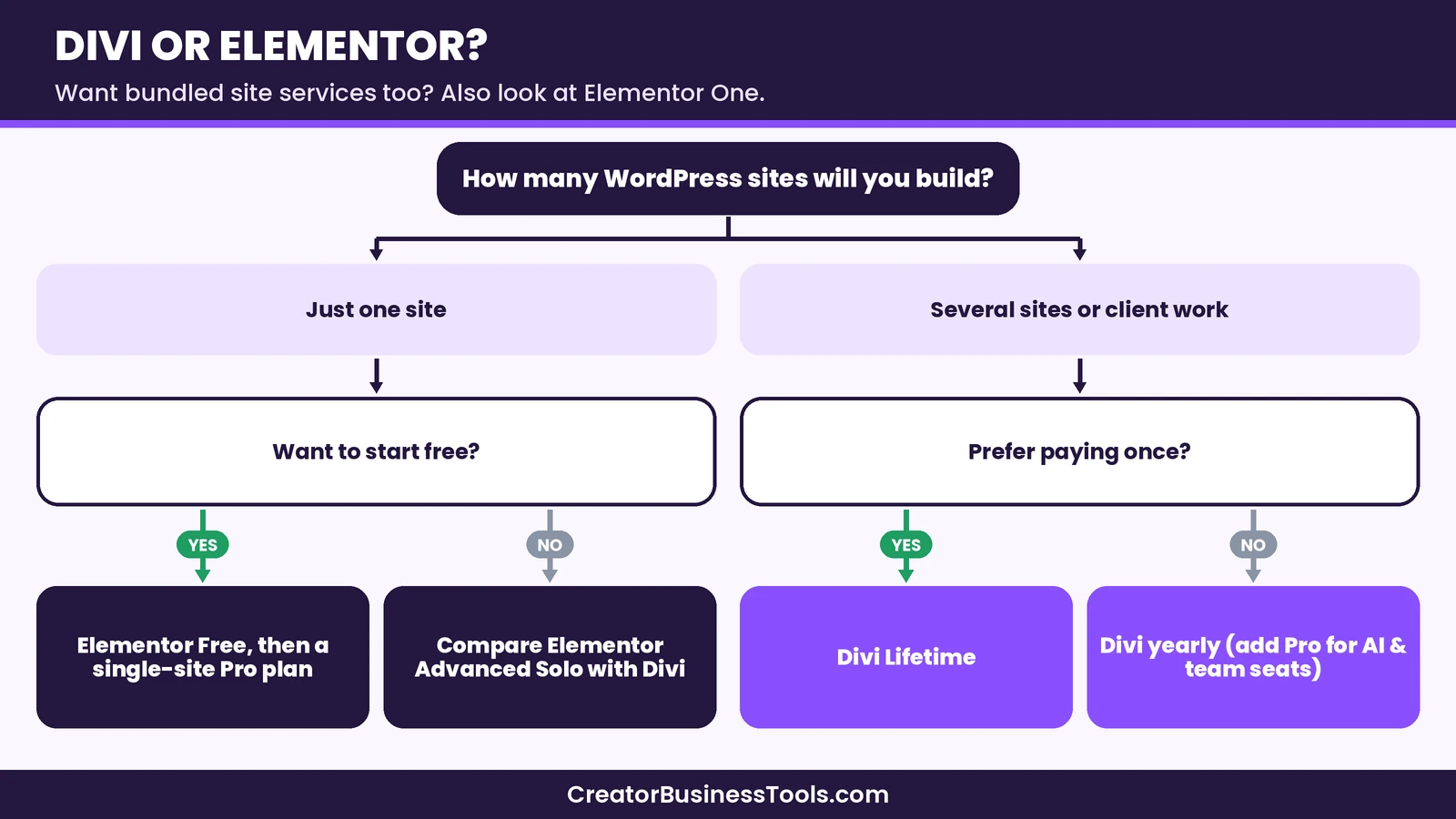
Answer four questions:
- How many sites will you build? One site points toward Elementor. Several sites point toward Divi.
- Do you want to start free? If yes, try Elementor’s free plugin first.
- Do you prefer paying once? If yes, look at Divi Lifetime.
- Do you need AI tools? Compare Divi Pro with Elementor One, and check how each meters usage.
A hypothetical example
Here is a hypothetical case to make the choice concrete. Picture a freelance designer who builds small business sites. She has six clients and expects to add a few each year. With a per-site pricing model, each new client means checking whether her plan still covers enough sites, and eventually moving to a higher tier. With Divi, her membership already covers every new site, so the cost doesn’t grow with her client list.
Now picture a hobby blogger with one site who mainly wants nicer landing pages. He could start with Elementor’s free plugin, learn the editor, and upgrade to a single-site Pro plan only if he needs the Theme Builder or forms. For him, paying for unlimited sites would add little.
Common mistakes to avoid
- Comparing one price point only. Look at renewal terms and how the cost changes as you add sites.
- Buying the cheapest Elementor plan for a store. Essential doesn’t include ecommerce features or popups.
- Ignoring hosting. Neither builder includes hosting, and a slow host can undo good design.
- Switching builders mid-project. Moving pages between builders usually means rebuilding them.
- Paying for AI you won’t use. Start with the core plan and add AI later if you need it.
FAQ
Is Divi better than Elementor?
Neither is better for everyone. Divi tends to be a better fit for people who build several sites or want a lifetime option. Elementor tends to suit single-site creators and people who want to start with a free plugin.
Does Divi cost less than Elementor?
For one site, the two land in a similar budget tier. For several sites, Divi usually costs less, because every Divi plan covers unlimited websites, while Elementor’s price rises with the number of sites.
Does Elementor have a free version?
Yes. The free Elementor Editor is available on the WordPress plugin directory. Pro features such as the Theme Builder and advanced widgets require a paid plan.
Does Divi have a free version?
No. Divi doesn’t offer a free plan. Check the refund policy on the official Elegant Themes site before you buy.
Can I use Divi on unlimited websites?
Yes. Elegant Themes says every Divi plan allows use on unlimited websites, including client sites.
Does either builder include hosting?
No. Both work with any compatible WordPress host. Elementor sells hosting separately, and Elegant Themes also offers a separate hosting option.
Can I switch from Elementor to Divi?
You can, but pages built with one builder usually need to be rebuilt in the other. Plan the switch for a redesign rather than moving page by page.
Which builder has better AI tools?
Both offer AI for writing, images, code, and layouts. Divi’s AI comes with the Pro services. Elementor’s AI uses monthly credits in the One plans. Choose based on how you’ll use it and how each is metered.
Does Divi work on WordPress.com?
Elegant Themes says its products work on the WordPress.com Business plan, which allows third-party themes and plugins. They also work on self-hosted WordPress.
Is Divi good for beginners?
It can be. There are many settings, so expect a learning curve, but pre-made layouts and Quick Sites help beginners get a full site up quickly.
Which is better for a WooCommerce store?
Both can work. Divi includes ecommerce modules on every plan. With Elementor, choose Advanced Solo or higher, since Essential lacks ecommerce features.
Bottom line: Divi vs Elementor
In the Divi vs Elementor decision, the number of sites you’ll build matters most. If you build several sites, work with clients, or want to pay once, Divi is usually the stronger fit thanks to unlimited sites and a lifetime option. If you need one site and want to start free, Elementor is a flexible, well-supported path.
Divi links below are affiliate links.
[Get Divi](https://www.elegantthemes.com/gallery/divi/)Free checklist: Not sure which builder fits your next project? Get our free Page Builder Decision Checklist, with the questions to ask about site count, renewals, hosting, and AI before you buy. Contact us to request a copy.