
Elementor Alternatives: 5 WordPress Page Builders Compared for Creators
Disclosure: This post contains affiliate links. If you buy through them, we may earn a commission at no extra cost to you. How we make money.
[Elementor](https://elementor.com/) is the page builder many WordPress creators start with. It has a free plugin, a huge template library, and a drag-and-drop editor that feels familiar after a few minutes.But plenty of creators go looking for Elementor alternatives once their needs grow. Maybe you now run several sites, you want a one-time price instead of renewals, or you’d like a lighter setup with fewer plugins. This guide compares five Elementor alternatives for creators, bloggers and freelancers: Divi, Beaver Builder, Bricks, Thrive Architect, and the WordPress block editor.
It’s based on each company’s official pricing and product pages, not on hands-on benchmarks or sponsored claims.
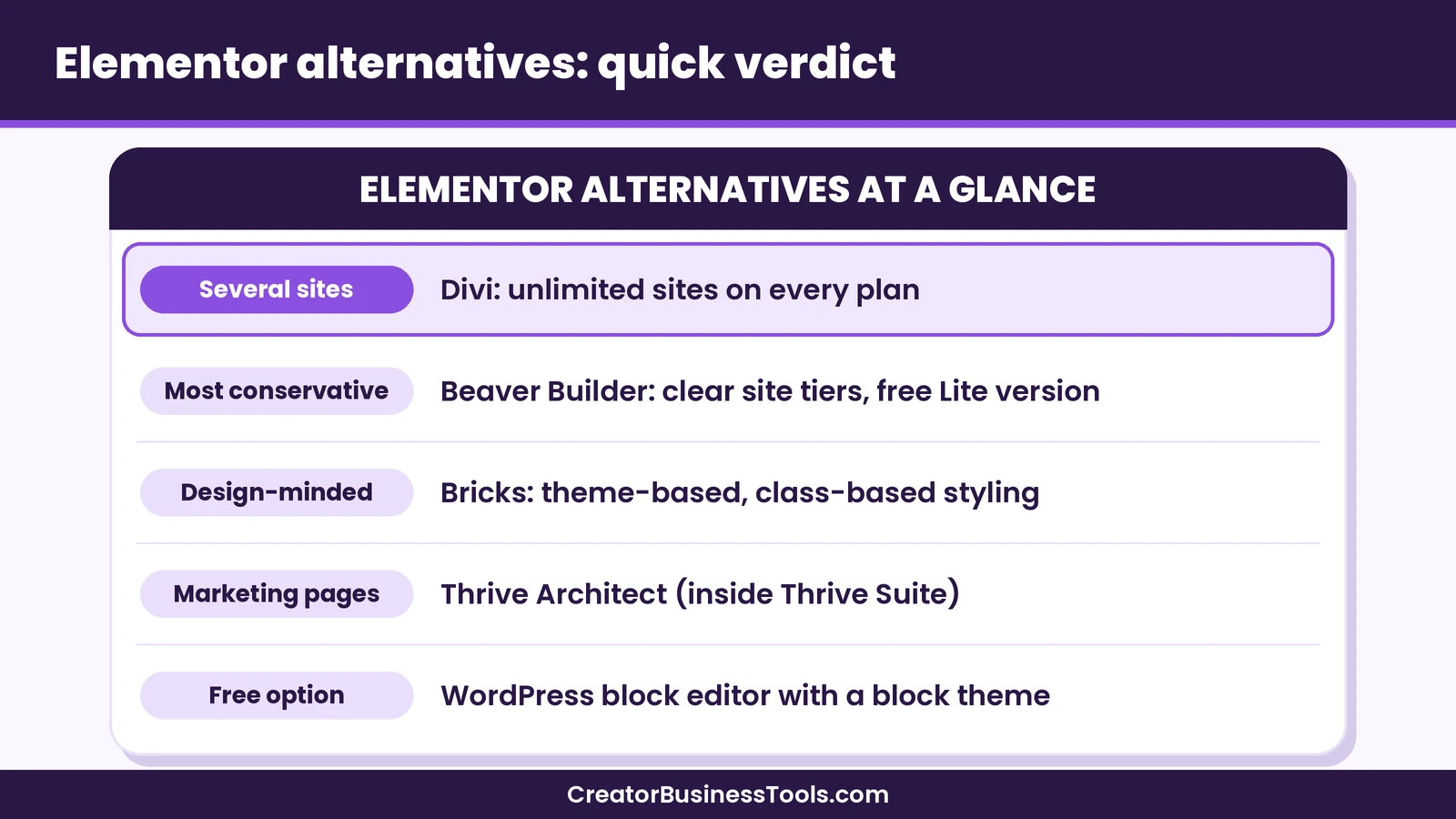
Quick verdict: For most creators who build more than one WordPress site, Divi is the strongest value among Elementor alternatives, because every Divi plan covers unlimited websites and there’s a one-time lifetime option. Beaver Builder suits people who want a stable, conservative builder with clear site tiers. Bricks appeals to design-minded builders who want a theme-based tool with class-based styling. Thrive Architect makes sense if you want landing pages and opt-in tools in one bundle. And the free WordPress block editor is worth a fresh look if your site is simple.
Quick picks
- Best overall value for creators with several sites: Divi, which includes unlimited website use on every plan. Divi
- Best if you want a one-time payment: Divi Lifetime, or Bricks’ lifetime plan if you prefer a theme-based builder.
- Best for a cautious, stable workflow: Beaver Builder, with a free Lite version to test first.
- Best for landing pages and lead capture in one bundle: Thrive Architect, as part of Thrive Suite.
- Best free option: the WordPress block editor with a block theme.
Elementor alternatives at a glance
| Builder | Type | Sites covered | Price tier | One-time option |
|---|---|---|---|---|
| Elementor (baseline) | Plugin | Free plugin, then 1 to unlimited by plan | Free to premium | No |
| Divi | Theme + builder | Unlimited on every plan | Budget to mid-range | Yes |
| Beaver Builder | Plugin + theme + Themer | 1, 3, 50 or unlimited | Budget to premium | No |
| Bricks | Theme-based builder | 1, 3 or unlimited | Budget to premium | Yes |
| Thrive Architect | Plugin inside Thrive Suite | Up to five sites | Mid-range to premium | No |
| WordPress block editor | Built into WordPress | Unlimited | Free | Not needed |
Why creators look for Elementor alternatives
Elementor is a capable tool, so switching is rarely about one missing feature. It’s usually about fit. These are the most common reasons we see in how the plans are structured.
Per-site licensing adds up
Elementor’s paid plans are priced by the number of sites. A single-site plan is affordable, but if you run a blog, a shop and a portfolio, or you build sites for clients, you’ll need a higher tier. Builders that include unlimited sites, like Divi, can change the math quickly.
Feature gating on the entry plan
Elementor’s entry plan leaves out several tools that creators often want, such as the popup builder, custom code and eCommerce widgets, according to Elementor’s pricing page. You get those on the higher plans. If you need them on several sites, the cost climbs again.
Renewals versus one-time pricing
Elementor subscriptions renew every year, so check the renewal price before you buy. If you’d rather pay once and stop thinking about renewals, Divi and Bricks both sell lifetime licenses.
Credits and bundles
Elementor One bundles the editor with extras like AI generation, image optimization and email delivery, powered by a monthly credit pool. That’s useful for some people, but if you only want a page builder, a simpler license might suit you better.
Preference for a lighter setup
Some creators simply want fewer plugins, or they want to build with WordPress’s own blocks so their content isn’t tied to a third-party builder. That’s where the block editor comes in.
How we compared these page builders
We looked at five things for each Elementor alternative, using official sources only:
- Pricing structure: yearly or one-time, and how the price scales with the number of sites.
- Site coverage: how many live sites each plan allows.
- Theme building: whether you can design headers, footers and templates, not just page content.
- Creator features: things like forms, popups, eCommerce support and AI tools.
- What happens if you stop paying: whether your sites keep working.
We don’t claim speed test results or personal project experience. Where a detail couldn’t be confirmed on an official page, we left it out.
1. Divi: best value for creators with several sites
Divi is a WordPress theme and visual builder from Elegant Themes. Its biggest difference from Elementor is the license: every Divi plan includes unlimited website use, for yourself or for clients.
What you get
- A no-code visual builder with a library of pre-built layouts and content elements.
- A theme builder for headers, footers and templates.
- A design system with class-based presets and global variables.
- Divi Quick Sites, which generates a starter site for you.
- eCommerce modules for WooCommerce stores.
- Divi Dash, a dashboard for managing updates and plugins across your sites.
Plans
Divi comes in a yearly plan in the budget tier, a Divi Pro plan in the mid-range tier, and a one-time Divi Lifetime license. Divi Pro adds Divi AI, Divi Cloud storage, VIP support and team seats. Elegant Themes also sells Lifetime plus Pro, which pairs the one-time license with a yearly fee for the Pro services.
If you cancel a yearly plan, Elegant Themes says your account stays active for the rest of the term, and you can keep using the themes you’ve already downloaded. You lose access to new updates and support.
Where it runs
Divi works on self-hosted WordPress, and Elegant Themes says it also works on the WordPress.com Business plan, which allows third-party themes and plugins. Hosting isn’t included.
Best for: creators and freelancers who build more than one site, and anyone who dislikes renewals.
Not ideal for: people who only need one simple page and are happy with a free tool.
For a deeper look, see our Divi review or our head-to-head Divi vs Elementor comparison. Divi
2. Beaver Builder: best for a stable, conservative workflow
Beaver Builder is a drag-and-drop page builder plugin with a conservative, site-tier license structure. Every plan includes the page builder, the Beaver Builder Theme, and the Beaver Themer add-on for headers, footers and archive templates.
What you get
- Front-end drag-and-drop editing with premium modules and templates.
- WooCommerce support.
- Beaver Builder AI on the plans above Starter.
- Multisite support on Professional and Unlimited, and white labeling on Unlimited.
Plans
Beaver Builder has four yearly plans based on site count: one site, three sites, fifty sites, or unlimited. The tiers run from budget to premium. There’s no monthly billing, but there is a free Lite version on WordPress.org and a live demo, so you can try the editor before you buy. Staging sites don’t count toward the limit.
Best for: freelancers who want predictable site tiers and a builder with a long track record.
Not ideal for: creators who want a one-time price, or who need unlimited sites on a small budget.
3. Bricks: best for design-minded builders
Bricks is a theme-based visual builder for self-hosted WordPress. It leans toward people who care about structure and performance, with class-based styling and the option to add custom CSS, JavaScript, PHP and HTML. Bricks also says you don’t need to be a developer to use it.
What you get
- Every feature on every plan, including a query loop builder, menu builder, popup builder and WooCommerce builder.
- A large set of built-in elements for layouts and content.
- Use on your own and client sites, with local and staging sites excluded from the limit.
Plans
Bricks offers yearly plans for one site, three sites or unlimited sites, plus a one-time Ultimate Lifetime license for unlimited sites. The yearly plans sit in the budget to mid-range tiers, and the lifetime plan is in the premium tier. There’s no downloadable free version, but you can try Bricks in an online playground.
If you cancel, Bricks says you can still edit your sites, but you won’t receive updates or support.
Best for: builders who like a structured, developer-friendly approach and want an unlimited-site or lifetime option.
Not ideal for: absolute beginners who want lots of ready-made templates and hand-holding.
4. Thrive Architect: best for landing pages and lead capture
Thrive Architect is the page builder inside Thrive Suite. It’s aimed at people who build pages to convert visitors, such as sales pages, webinar pages and opt-in pages. The suite also includes Thrive Theme Builder, Thrive Leads for opt-in forms, Thrive Quiz Builder, Thrive Apprentice for courses, and more.
What you get
- A visual page builder focused on marketing pages.
- A theme builder with companion themes and templates.
- List-building and quiz tools in the same bundle.
- Use on up to five websites.
Plans
Thrive’s pricing page shows Thrive Suite on a yearly or quarterly subscription. The yearly plan sits in the mid-range to premium tier, so check the renewal price before you buy. Thrive Suite needs a self-hosted WordPress.org site, so it doesn’t work on WordPress.com.
If you don’t renew, Thrive says your pages and forms keep working, but support, updates and premium templates need an active license.
Best for: course creators, coaches and bloggers who want a page builder plus opt-in forms and quizzes from one company.
Not ideal for: people building many client sites, because of the five-site limit.
5. WordPress block editor: best free option
The block editor is built into WordPress, so it costs nothing extra. With a block theme, the Site Editor lets you design the whole site with blocks, including headers, footers and templates. You can also reuse block patterns and change styles across the site from one place.
What you get
- Blocks for text, images, columns, buttons and more.
- Block patterns you can insert and customize.
- Global styles for colors, typography and layout.
- Templates and template parts in the Site Editor.
The trade-off is design control. You’ll get fewer ready-made widgets than a commercial builder, and some layouts may need a block plugin or custom CSS.
Best for: bloggers and creators with simple sites who want to stay close to WordPress itself.
Not ideal for: anyone who needs advanced popups, complex dynamic layouts or a large template library out of the box.
Elementor alternatives pricing compared
| Builder | Entry tier | Multi-site tier | One-time option | If you stop paying |
|---|---|---|---|---|
| Elementor | Free plugin, then budget | Mid-range to premium | No | Paid features need an active plan |
| Divi | Budget (unlimited sites) | Budget (same plan) | Mid-range one-time | Downloaded themes keep working, no updates |
| Beaver Builder | Budget (one site) | Mid-range to premium | No | Active license needed for updates and support |
| Bricks | Budget (one site) | Mid-range (unlimited) | Premium one-time | Sites stay editable, no updates |
| Thrive Suite | Mid-range to premium | Up to five sites | No | Pages keep working, no updates |
| Block editor | Free | Free | Not needed | Not applicable |
How the price scales
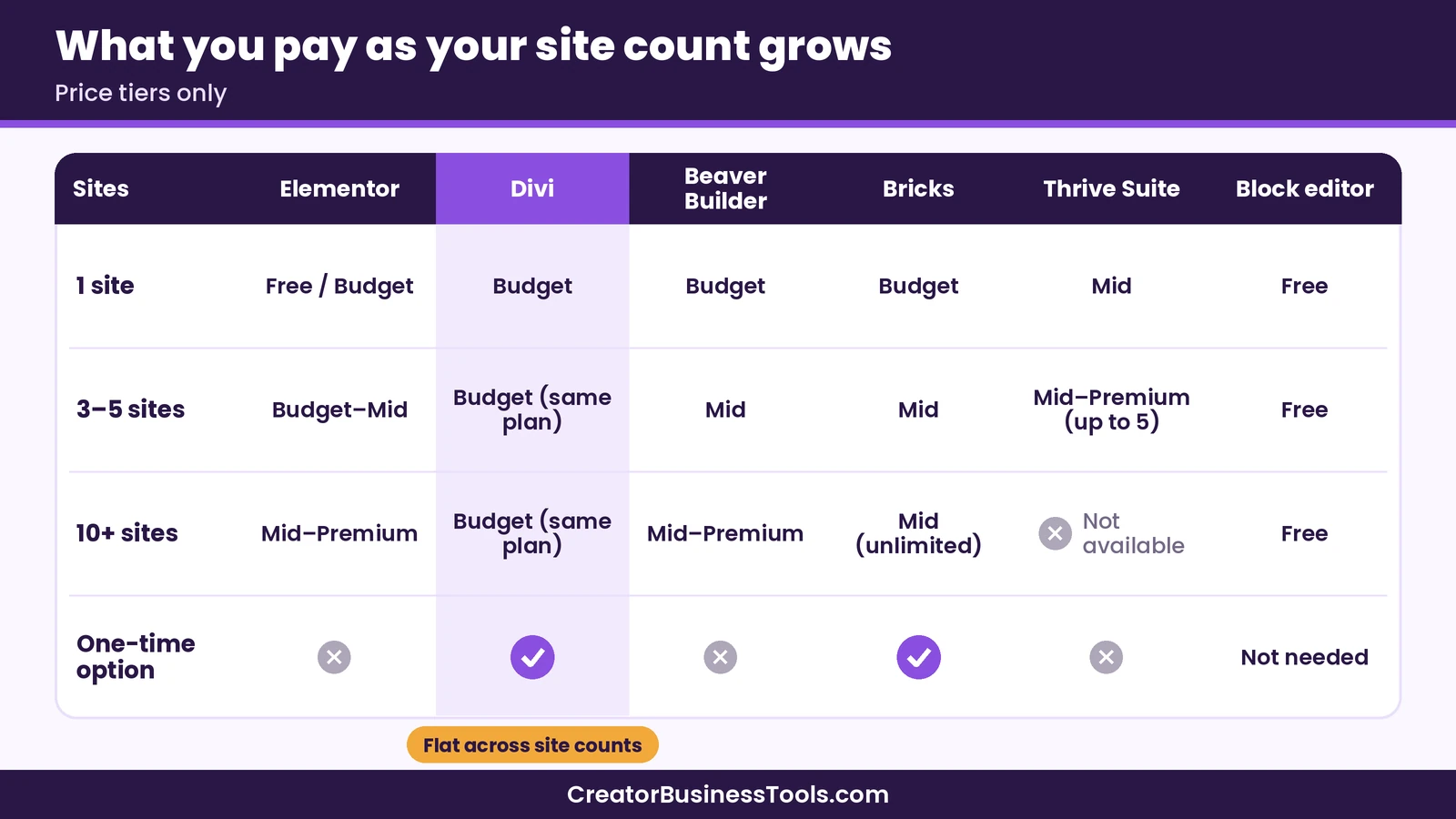
The biggest pricing difference among these Elementor alternatives is how they handle site count.
- One site: Elementor’s entry plan, Beaver Builder Starter and Bricks Starter all sit in the budget tier. Divi’s yearly plan is also in the budget tier, but it isn’t limited to one site.
- Three to five sites: Elementor, Beaver Builder and Bricks each have a small-agency tier. Thrive Suite covers up to five sites.
- Ten or more sites: this is where Divi stands out, because the same budget plan still covers every site. Bricks Agency also covers unlimited sites in the mid-range tier.
- Long term: one-time licenses from Divi and Bricks can cost less over several years than any yearly plan, as long as you keep using the tool.
Prices change, so check each official pricing page before you buy. See Divi’s plans
Feature comparison
| Feature | Elementor | Divi | Beaver Builder | Bricks | Thrive Architect | Block editor |
|---|---|---|---|---|---|---|
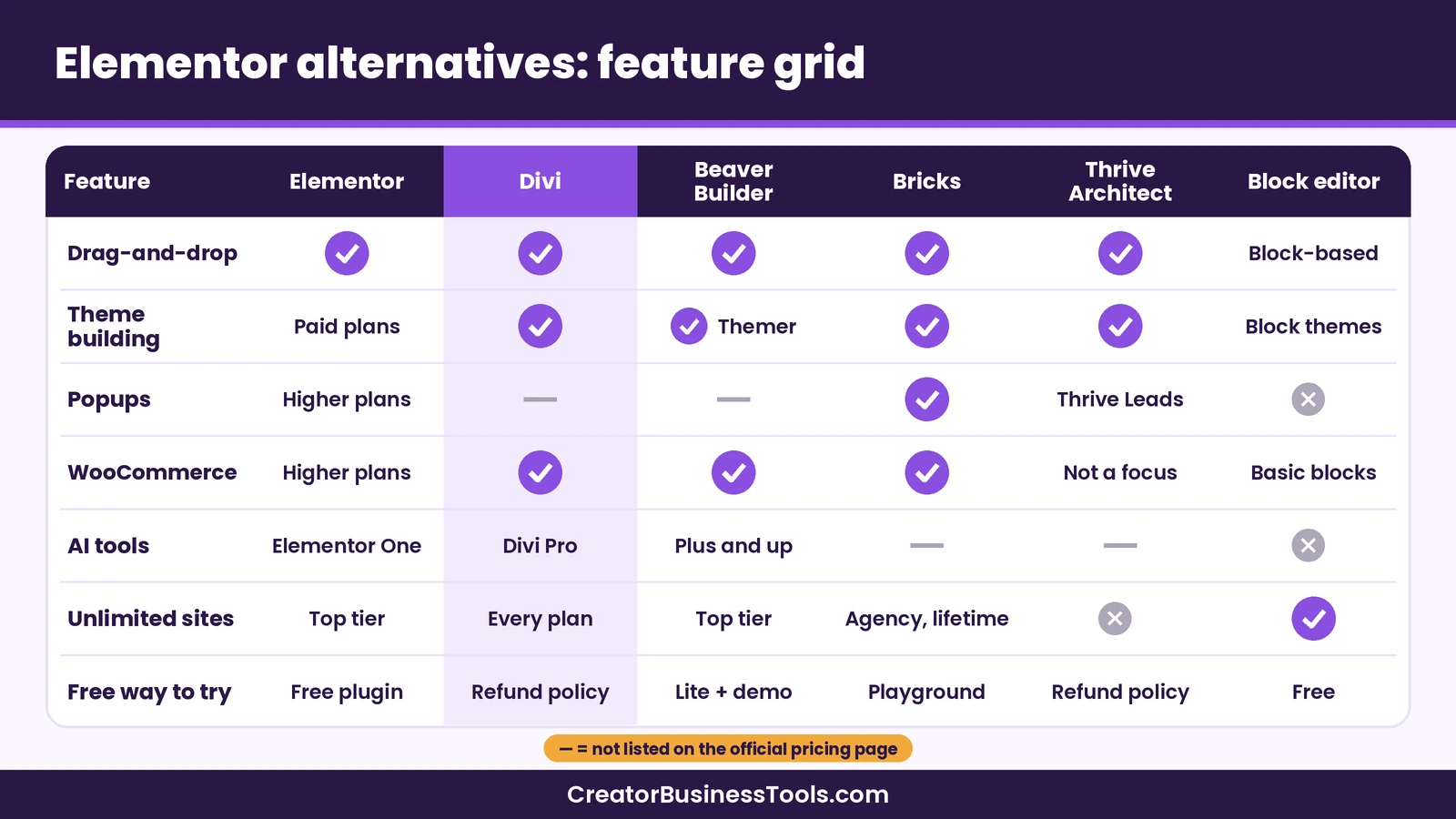
| Visual drag-and-drop | Yes | Yes | Yes | Yes | Yes | Block-based |
| Theme building | Paid plans | Yes | Yes (Themer) | Yes | Yes (Theme Builder) | With block themes |
| Popup builder | Higher plans | Not listed | Not listed | Yes | Via Thrive Leads | No |
| WooCommerce tools | Higher plans | Yes | Yes | Yes | Not a focus | Basic blocks |
| AI tools | One plans | Divi Pro | Plus and above | Not listed | Not listed | No |
| Unlimited sites | Top tier only | Every plan | Top tier only | Agency and lifetime | No | Yes |
| Free way to try | Free plugin | Refund policy | Lite version and demo | Online playground | Refund policy | Free |
When Elementor is still the right choice
Switching isn’t worth it for everyone. Elementor may still be the better fit if:
- You run one site and the free plugin covers what you need.
- You rely on a specific Elementor add-on or template kit.
- You want AI, image optimization and email delivery bundled into one subscription with Elementor One.
- Your client already uses Elementor and expects you to keep it.
In those cases, the cost and effort of rebuilding pages may outweigh the savings. Visit Elementor to check its current plans.
Before you switch builders: Pages built with one page builder generally don’t transfer cleanly to another. Plan to rebuild your key pages, keep a full backup, and test on a staging site first. Check each tool’s refund policy on its official site before you buy.
How to switch away from Elementor
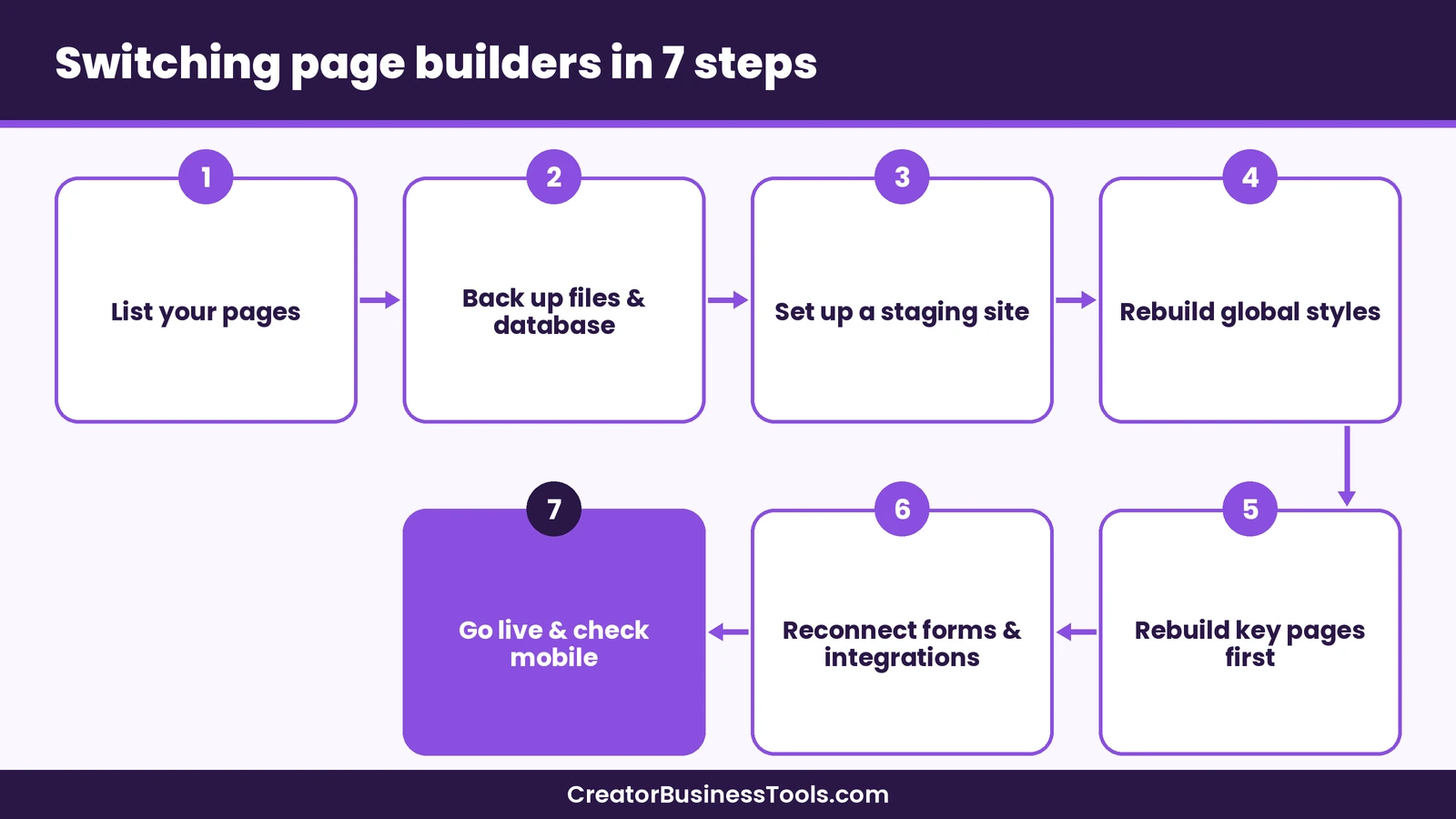
If you decide to move, a calm, staged approach keeps your site online while you rebuild.
- List your pages. Write down every page built with Elementor, and mark the ones that matter most, such as your home page, sales pages and opt-in pages.
- Back up the site. Make a full backup of files and the database before you change anything.
- Set up staging. Copy the site to a staging environment. Many hosts include this; see our SiteGround review and Kinsta vs WP Engine comparison for examples.
- Install the new builder on staging. Rebuild your global elements first: header, footer, colors and fonts.
- Rebuild key pages. Start with the pages that bring in money or subscribers.
- Check forms and integrations. Reconnect email tools, payment buttons and tracking.
- Go live and monitor. Push staging to live, then check your pages on mobile and desktop.
A hypothetical example
Imagine a creator with a blog, a printable shop and a portfolio, all on Elementor’s single-site plans. Moving to a builder with unlimited sites, like Divi, could replace three separate renewals with one plan. The work is the rebuild, so they might start with the blog’s home page and opt-in page, then move the shop and portfolio over a few weekends.
How to choose the right Elementor alternative
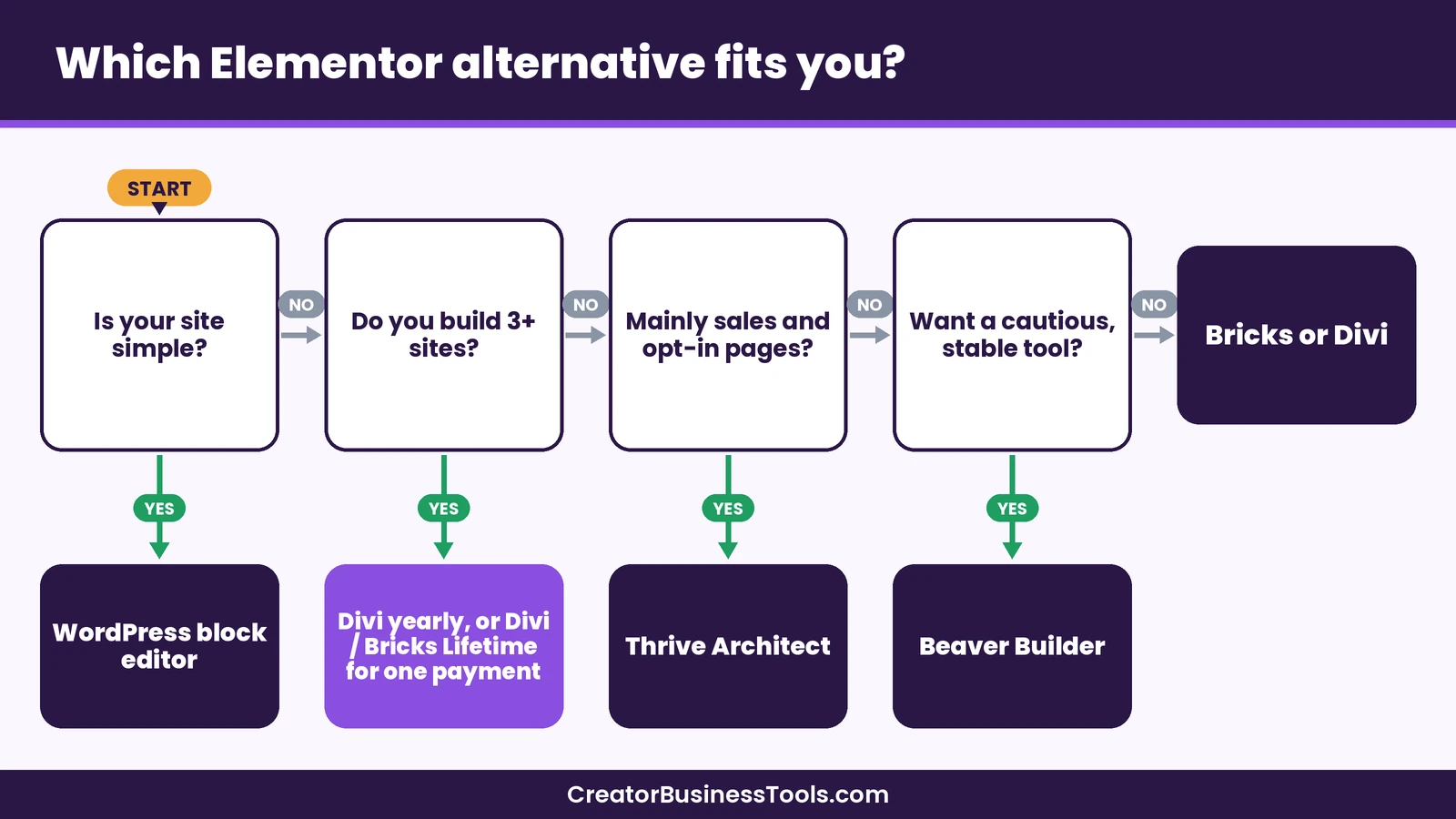
- Count your sites. If you build three or more, prioritize unlimited-site plans like Divi or Bricks Agency.
- Decide on yearly or one-time. If you plan to stay for years, a lifetime license can lower long-run cost.
- List must-have features. Popups, WooCommerce, AI or theme building can rule tools in or out.
- Check where you host. Thrive and Bricks need self-hosted WordPress. Divi also lists the WordPress.com Business plan.
- Try before you commit. Use free versions, demos, playgrounds or refund policies to test the editor.
Common mistakes when choosing a page builder
- Choosing on price alone. A cheap single-site plan can cost more than an unlimited plan once you add sites.
- Ignoring renewals. Look at the renewal price, not only the price you pay at checkout.
- Stacking builders. Running two page builders on one site can make it heavier and harder to maintain.
- Skipping staging. Rebuilding on a live site risks broken pages for visitors.
- Forgetting forms. Check that your opt-in forms still send subscribers to your email tool after switching.
FAQ
What is the best free Elementor alternative?
The WordPress block editor is the main free option, because it’s built into WordPress. Beaver Builder also has a free Lite version on WordPress.org.
Which Elementor alternative is cheapest for many sites?
Divi includes unlimited sites on every plan, including its budget yearly plan. Bricks Agency also covers unlimited sites in the mid-range tier.
Is there an Elementor alternative with a one-time price?
Yes. Divi Lifetime and Bricks Ultimate Lifetime are both one-time licenses, according to their official pricing pages.
Can I move my Elementor pages to another builder automatically?
In most cases, no. Layouts built with one builder usually need to be rebuilt in another. Plan the rebuild on a staging site.
Do these Elementor alternatives include hosting?
No. Divi, Elementor, Beaver Builder, Bricks and Thrive Suite are WordPress tools, so you’ll need hosting separately.
Is Divi better than Elementor?
It depends on your situation. Divi tends to be better value if you run several sites or want a one-time price. Elementor may suit you better if one free or single-site plan covers your needs.
Bottom line
Choosing between Elementor alternatives depends on how many sites you run and how you like to pay. For most creators with more than one site, Divi offers the strongest value, with unlimited sites on every plan and a one-time lifetime option. Beaver Builder suits a cautious workflow, Bricks suits design-minded builders, Thrive Architect suits marketing pages, and the block editor is a solid free choice for simple sites.
Start by counting your sites, then test the editor before you rebuild anything.
[See Divi plans and pricing](https://www.elegantthemes.com/gallery/divi/)Free checklist: Get our one-page “Switching Page Builders” checklist with backup, staging and rebuild steps. Contact us to request a copy.
Pricing and features from official vendor pages, last checked October 24, 2026.