
GetResponse vs Kit vs MailerLite for Course Creators
Disclosure: This post contains affiliate links. If you buy through them, we may earn a commission at no extra cost to you. How we make money.
Kit and GetResponse both help creators grow an email list and sell. They take very different routes: Kit focuses on email for creators, while GetResponse bundles email with webinars, a website builder, and a course creator on its higher plan. MailerLite sits alongside both as a lower-cost option.
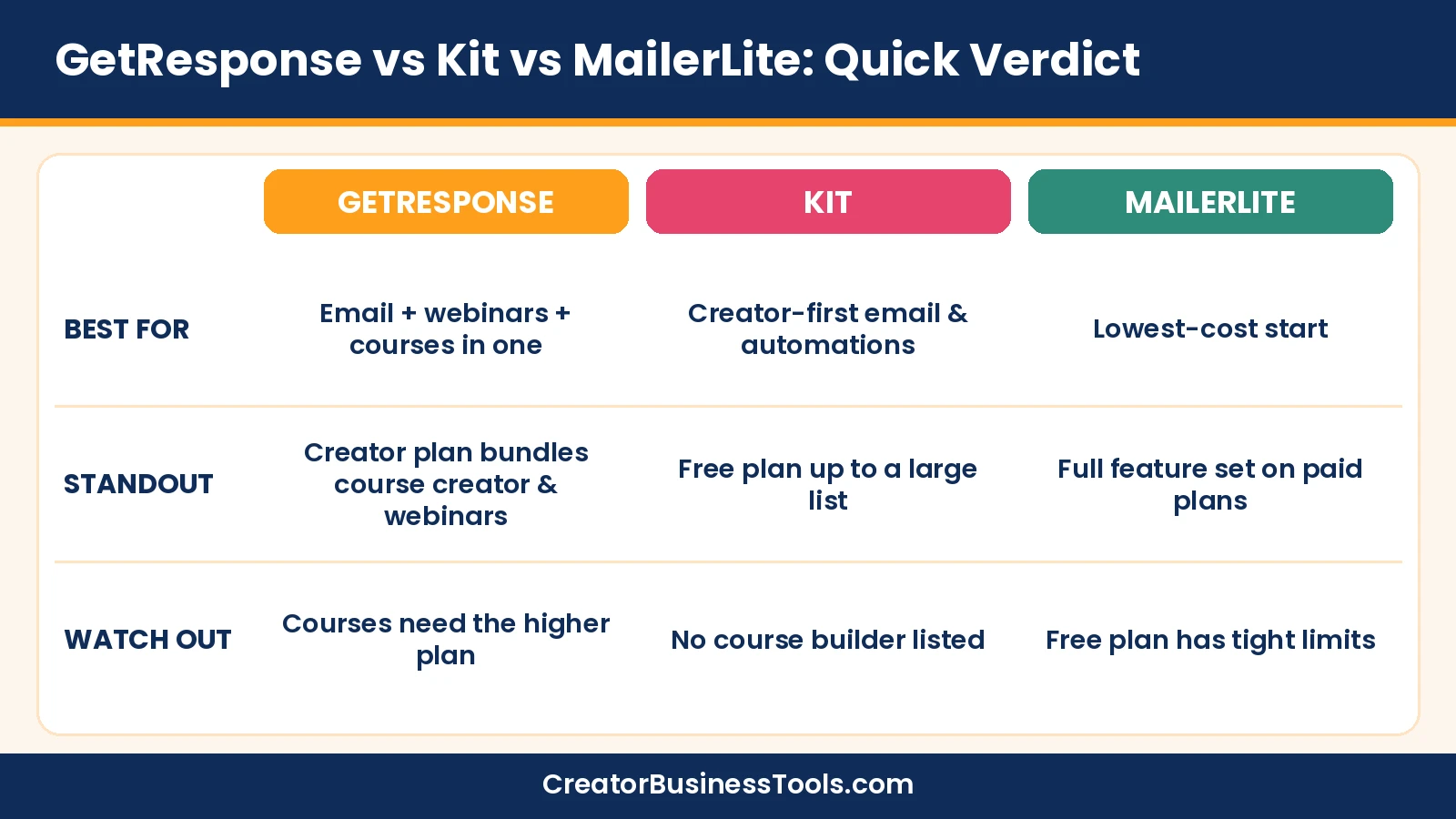
Quick verdict: Choose GetResponse if you want email, webinars, and courses in one account, and the Creator plan’s features match what you sell. Choose Kit if email is the center of your business and you want a generous free plan plus creator-focused automations. Choose MailerLite if budget comes first and your list is still small.
Quick picks
| If you… | Pick | Why |
|---|---|---|
| Sell courses and run webinars and want fewer tools | GetResponse Creator | Webinars, website builder, and course creator on one plan |
| Sell products and need funnels and cart recovery, but host courses elsewhere | GetResponse Marketer | Unlimited automations, sales funnels, abandoned cart recovery |
| Want the best free plan to start a creator newsletter | Kit Free | Free up to a large subscriber count, with unlimited broadcasts |
| Need automated sequences and integrations for launches | Kit Creator | Unlimited visual automations and sequences, apps and integrations |
| Are on a tight budget with a small list | MailerLite | Low entry price, every paid plan gets the full feature set |
| Want an easy all-in-one starter tool with 24/7 phone support | AWeber Lite | Free plan for small lists, then a budget ($) paid tier with landing pages, automations, and selling; see our AWeber review |
GetResponse vs Kit vs MailerLite at a glance
| Category | GetResponse | Kit | MailerLite |
|---|---|---|---|
| Core focus | Email plus marketing and selling tools | Email for creators | Simple, affordable email marketing |
| Free option | No long-term free plan | Free plan up to 10,000 subscribers | Free plan up to 250 subscribers |
| Monthly sends | Unlimited on all listed plans | Unlimited broadcasts | Capped on Free and Comfort; unlimited on Power |
| Automations | 1 workflow on Starter; unlimited on Marketer and Creator | Unlimited visual automations on Creator | 3 on Free, 50 on Comfort, unlimited on Power |
| Landing pages and forms | Landing page builder, signup forms, popups | Unlimited landing pages and forms | Limited by plan; unlimited on Power |
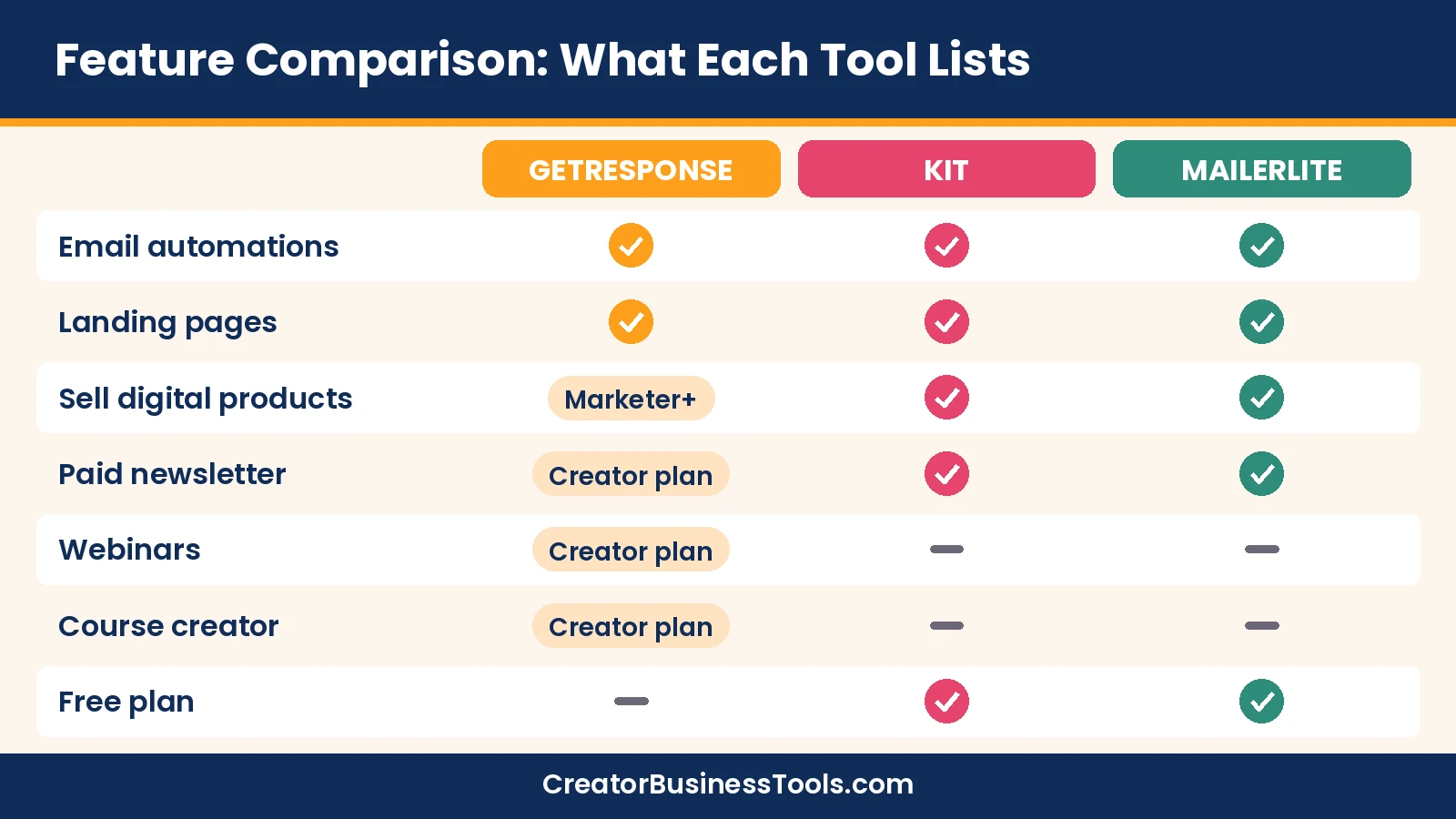
| Courses | Course creator on Creator plan | Not listed on the pricing page | Not listed on the pricing page |
| Webinars | Creator plan | Not listed | Not listed |
| Paid newsletter | Premium newsletter subscriptions (Creator) | Paid newsletter features listed | Paid newsletters listed |
| Selling digital products | Sales funnels and promo codes (Marketer and up) | Digital products and subscriptions, even on Free | Digital products and bookings, limited by plan |
GetResponse pricing guide: Starter vs Marketer vs Creator
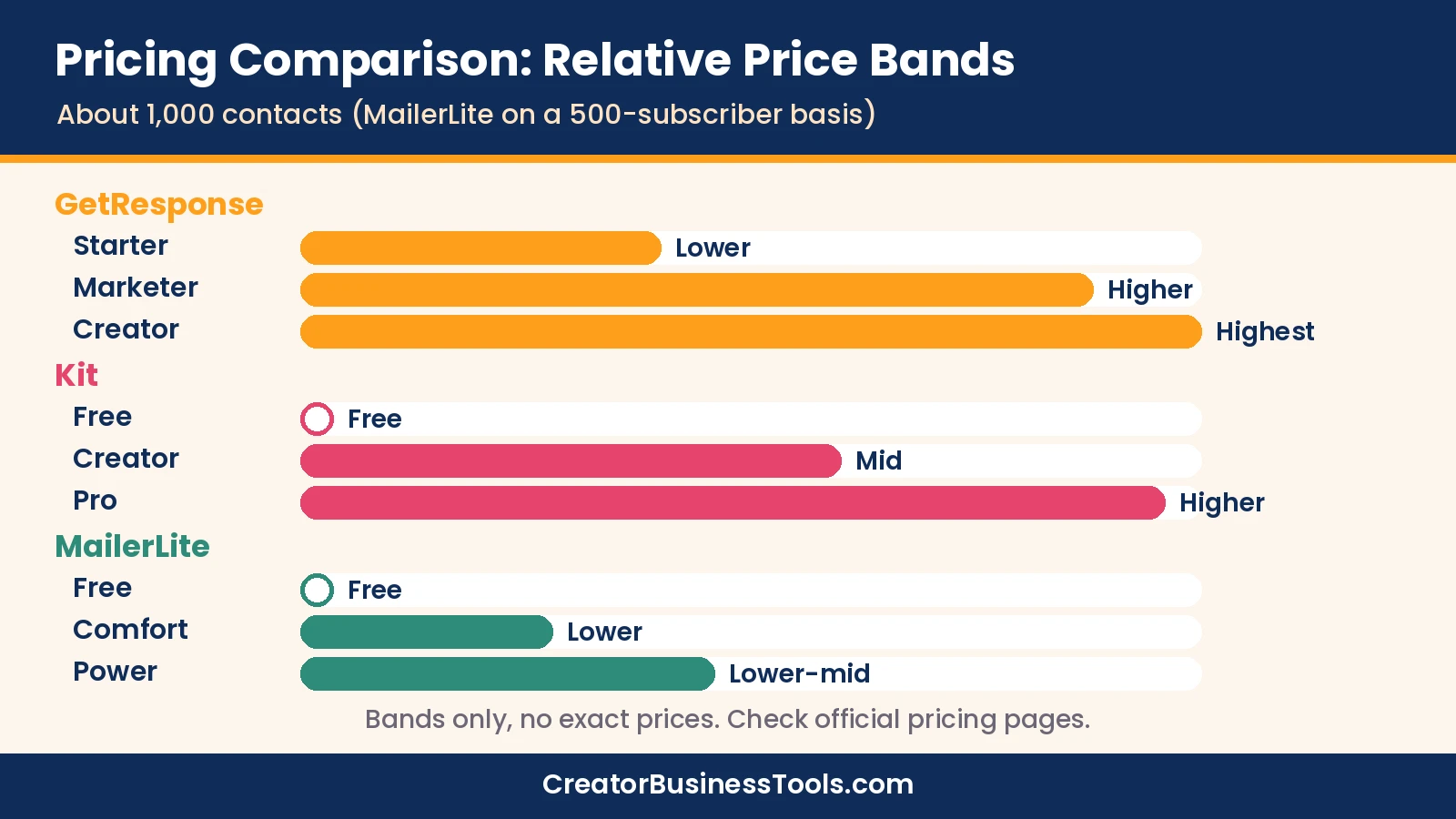
GetResponse prices by list size and offers monthly or yearly billing, with a discount for paying yearly. The relative price tiers below assume a list of about 1,000 contacts.
| Plan | Price tier (about 1,000 contacts) | Key additions | Fits |
|---|---|---|---|
| Starter | $ (low) | Unlimited sends, AI content generators, welcome series, 1 custom automation, landing pages, forms | Newsletter-first creators |
| Marketer | $$ (mid) | Unlimited automations, advanced segmentation, abandoned cart recovery, sales funnels, promo codes and revenue reports, web push | Creators selling products with funnels |
| Creator | $$–$$$ (mid to high) | Everything in Marketer plus webinars, website builder, course creator, premium newsletter subscriptions | Course creators who want an all-in-one |
| Enterprise | Custom | Dedicated IP and sending domain, SSO, SMS, transactional emails | Larger businesses |
GetResponse labels Marketer as its most popular plan on the pricing page. Popular doesn’t mean right for you, so use the checklists below.
When Marketer fits a course creator
- You already host your course on a dedicated platform and just need strong email marketing around it.
- You want unlimited automation workflows for launches, onboarding, and re-engagement.
- You sell through sales funnels and want abandoned cart recovery and promo codes.
- You don’t run webinars, or you already use a separate webinar tool.
When Creator fits a course creator
- You want to host a course inside GetResponse using its course creator. The pricing page lists it with up to 500 students on Creator.
- You run webinars as part of your sales process.
- You want a website builder and premium newsletter subscriptions in the same account.
- Replacing two or three separate tools would cost more than the step up from Marketer.
When neither is the right call
- If your course business needs advanced student management, a larger student base, or community features, a dedicated course platform may fit better. Our Kajabi vs Teachable comparison covers that route.
- If you only send a weekly newsletter, Starter or a free plan elsewhere is likely enough.
Honest math on the upgrade
The gap between Marketer and Creator is one price tier. If you’d otherwise pay separately for webinars and course hosting, Creator can simplify your stack. If you already pay for those tools and are happy with them, Marketer is the cleaner choice.
Kit pricing in brief
Kit’s pricing page shows three plans priced by subscriber count, with a discount for yearly billing. Its Free plan covers up to 10,000 subscribers.
| Plan | Price tier (about 1,000 subscribers) | Key features |
|---|---|---|
| Free | Free | Unlimited landing pages, forms and broadcasts; tagging and segmentation; sell digital products and subscriptions |
| Creator | $$ (mid) | Unlimited visual automations and sequences, remove Kit branding, SMS marketing, apps and integrations, RSS campaigns |
| Pro | $$$ (high) | Subscriber Signals, engagement analytics, unlimited users, deliverability reporting, newsletter referral system |
What Kit does especially well
- Generous free plan for building a list before you earn from it.
- Visual automations and unlimited sequences on Creator.
- Selling digital products and subscriptions built into the platform.
- Free migrations, according to its pricing page.
For a wider look at email tools, see our guide to the best email marketing for course creators.
MailerLite pricing in brief
MailerLite’s current plans are Free, Comfort, and Power, and its pricing page says every paid plan gets the full feature set. You pay more for a bigger list or more sending.
| Plan | Price tier (about 500 subscribers) | Key limits |
|---|---|---|
| Free | Free (up to 250 subscribers) | Capped monthly emails, 3 automations, 1 website and 1 landing page |
| Comfort | $ (low) | Capped monthly emails, 50 automations, 10 sites and landing pages, remove MailerLite logo |
| Power | $–$$ (low to mid) | Unlimited emails, automations, landing pages, and forms; multiple automation triggers |
If you’re a designer, photographer, or other visual creator, our guide to the best email marketing for creatives compares design-friendly options.
GetResponse vs Kit: the head-to-head
This is the comparison most readers search for. Here’s how they differ for creators who sell.
Philosophy
GetResponse describes its Creator plan as everything you need to create, market, and monetize your knowledge. Kit positions itself as email marketing built for creators.
In practice, GetResponse adds more tools around email, while Kit goes deeper on email-first creator features.
Starting cost
Kit’s free plan lets you build a sizable list at no cost. GetResponse doesn’t offer a long-term free plan with the same depth.
If you’re pre-revenue, Kit’s free plan is easier on the budget.
Automations
Both offer unlimited automation workflows on their mid-tier plans: Marketer or Creator on GetResponse, and Creator on Kit. GetResponse Starter is limited to one custom workflow.
Selling
Kit lets you sell digital products and subscriptions even on its free plan. GetResponse adds sales funnels, abandoned cart recovery, and promo codes from Marketer upward.
Courses and webinars
This is GetResponse’s clearest advantage. Its Creator plan lists webinars and a course creator, while Kit’s pricing page doesn’t list either.
Head-to-head summary
| Factor | Edge | Why |
|---|---|---|
| Free start | Kit | Free plan up to 10,000 subscribers |
| All-in-one for courses | GetResponse | Course creator and webinars on Creator |
| Email-first creator features | Kit | Sequences, visual automations, referral system on Pro |
| Ecommerce-style tools | GetResponse | Funnels, cart recovery, promo codes |
| Low-cost upgrade path | Kit | Creator plan sits in a lower price tier than GetResponse Creator |
Which tool fits your situation?
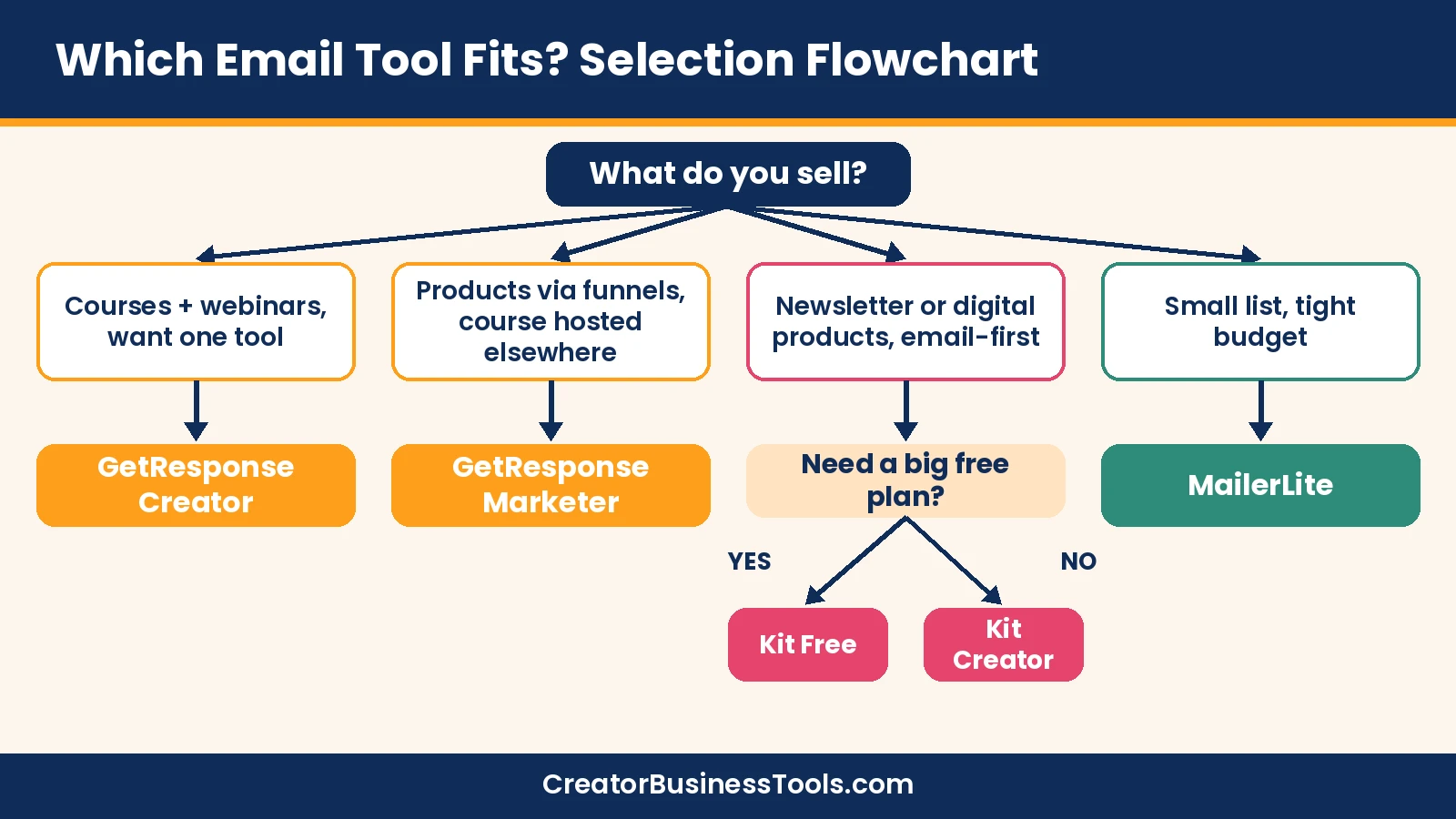
Real decisions usually come down to a specific situation. Here are five common ones and the plan that tends to fit.
“I’m launching my first course and have a small list.” Start with Kit Free or MailerLite Free to build the list, and host the course on a course platform. Move to a paid email plan once you need more automations.
“I run monthly webinars that sell my program.” GetResponse Creator lists webinars alongside email and a course creator, so it can replace several tools at once.
“I sell templates and digital downloads.” Kit’s free plan already lists selling digital products and subscriptions. GetResponse Marketer adds funnels and cart recovery if you sell through a multi-step checkout.
If you want a dedicated storefront for those downloads instead of selling from your email tool, Sellfy is a store builder for creators that supports digital, subscription and physical products and says it takes no transaction fees on sales within your plan.
“I write a paid newsletter.” All three list paid newsletter features in some form. Compare how each handles subscriptions at your list size before you decide.
“I have a team or an assistant.” Kit Pro lists unlimited users, and MailerLite Power lists unlimited user seats. Check GetResponse’s plan details for user limits.
Selection flowchart
Decision checklist
- Do I host my course inside my email tool, or on a course platform?
- Do I run webinars every month?
- How many subscribers will I have in six months?
- Do I need a free plan right now?
- How many automated sequences will I run?
- Do I need sales funnels and cart recovery?
Three example stacks for course creators
The right email tool depends on the rest of your stack. Here are three common setups and where each email platform fits.
| Stack | Email tool | Course hosting | Webinars | Number of tools |
|---|---|---|---|---|
| All-in-one | GetResponse Creator | GetResponse course creator | GetResponse webinars | One |
| Email-first | Kit Creator | A dedicated course platform | A separate webinar tool, if needed | Two or three |
| Budget starter | MailerLite | A dedicated course platform | A separate webinar tool, if needed | Two or three |
| Funnel seller | GetResponse Marketer | A dedicated course platform | A separate webinar tool, if needed | Two or three |
Trade-offs of one tool vs several
- One tool: fewer logins, one bill, and contacts stay in one place.
- Several tools: you can pick the best option for each job, but you’ll connect them with integrations.
- Switching cost: the more you build inside one platform, the more work it takes to move later.
A simple launch email plan you can run on any of the three
Whichever tool you pick, a course launch usually follows the same rhythm. Here’s a plan that works with automations on GetResponse, Kit, or MailerLite.
- Lead magnet sign-up: a form or landing page delivers a free resource and tags the subscriber.
- Welcome sequence: three to five emails that introduce you and the problem your course solves.
- Warm-up content: a mini-lesson, case study, or live session invite.
- Open cart: an announcement email with what’s included and who it’s for.
- Reminder emails: answer common questions and objections.
- Close cart: a clear deadline email.
- Onboarding: buyers move to a separate sequence; non-buyers return to your regular newsletter.
What you need from your email tool for this plan
- Forms or landing pages for the lead magnet.
- Tags or segments to separate buyers and non-buyers.
- At least two automated sequences running at once.
- A way to sell or link to checkout.
- Optional: webinars for the warm-up phase.
GetResponse Starter’s single custom automation can feel tight for this plan, which is one reason Marketer or Creator suit launches better. Kit Creator and MailerLite’s paid plans offer more automations.
Switching tools: a migration checklist
Moving your list is easier when you plan the steps. Use this checklist whichever direction you’re moving.
- Export subscribers with their tags or groups.
- Recreate forms and replace embed codes on your website.
- Rebuild welcome and evergreen sequences before importing.
- Set up your sending domain and authentication in the new tool.
- Import subscribers and check that tags carried over.
- Send a test email to yourself and a small segment first.
- Keep the old account for a short overlap in case you need to recover anything.
GetResponse review summary
- All-in-one Creator plan with webinars, website builder, and course creator.
- Unlimited sends on all listed plans.
- Marketer plan for funnels, segmentation, and cart recovery.
- Free custom domain on yearly plans, per the pricing page.
Keep in mind: Course and webinar features sit on the higher Creator plan, and Starter has only one custom automation.
Best for: Course creators and small online businesses who want email, webinars, and a course in one account.
Not ideal for: Creators who want a long-term free plan or only send a simple newsletter.
Kit review summary
- Free plan that grows with you up to 10,000 subscribers.
- Creator-focused automations and sequences.
- Built-in selling of digital products and subscriptions.
Keep in mind: Kit’s pricing page doesn’t list a course builder or webinars, so you’d pair it with other tools.
Best for: Newsletter writers and creators who treat email as their main channel.
Not ideal for: Anyone who wants courses and webinars inside the same tool.
MailerLite review summary
- Low entry price and a full feature set on paid plans.
- Websites and landing pages included, with limits by plan.
- Paid newsletters and digital products listed.
Keep in mind: The free plan has tight subscriber and sending limits, and Comfort caps monthly emails.
Best for: Budget-focused creators with smaller lists.
Not ideal for: Creators who want built-in webinars or course hosting.
Caveats before you commit
- Prices depend on list size and billing period and change often. Check each official pricing page before you buy.
- Price bands here assume about 1,000 contacts for GetResponse and Kit and about 500 for MailerLite.
- Feature names and plan limits can change; confirm the exact features you need.
- This guide is based on official product information, not hands-on deliverability tests.
How to choose
- Decide where your course lives. Inside your email tool, or on a course platform?
- List the tools you’d replace. Webinars, website, and course hosting can make GetResponse Creator worth it.
- Estimate your list size. All three price by audience size.
- Check automations. Starter-level plans may limit workflows.
- Start small. Build one sequence before committing to a bigger plan.
- Plan for migration. Kit mentions free migrations; check what each tool offers if you’re switching.
FAQ
Is GetResponse better than Kit for course creators?
If you want to host a course and run webinars in the same tool, GetResponse Creator lists both. If your course lives elsewhere and email is your focus, Kit is a strong fit.
Do the Marketer and Creator plans really exist?
Yes. GetResponse’s pricing page lists Starter, Marketer, Creator, and Enterprise.
Does Kit have a course builder?
Kit’s pricing page doesn’t list one. It lists selling digital products and subscriptions.
Is MailerLite cheaper than both?
At small list sizes, MailerLite’s paid plans sit in lower price tiers. Compare at your own list size.
How many students can I have on GetResponse Creator?
The pricing page lists the course creator with up to 500 students on Creator. Enterprise adds student management.
Can I move my list from one tool to another?
Yes, all three let you bring subscribers in. Kit specifically advertises free migrations.
Which plan does GetResponse mark as most popular?
The pricing page labels Marketer as most popular. For course creators, the better question is whether you need the webinars and course creator that only Creator adds.
Can I pay yearly to save money?
All three offer yearly billing at a lower effective monthly price than monthly billing, according to their pricing pages.
Bottom line
GetResponse and Kit serve different kinds of creators. GetResponse is the all-in-one choice when webinars and courses belong in your email tool, and Creator is the plan that makes that real. Kit is the email-first choice with an outstanding free plan.
MailerLite remains the budget pick for smaller lists. Choose based on what you sell and which tools you want to replace, not on headline prices alone. If you’re weighing a newsletter-first platform too, our beehiiv review covers that option.
See GetResponse plans · See Kit plans · See MailerLite plans