
Make vs n8n: Which Automation Tool Fits Your Creator Business?
Disclosure: This post contains affiliate links. If you buy through them, we may earn a commission at no extra cost to you. How we make money.
Make vs n8n is the automation question that comes up once a creator business outgrows copy-and-paste. Both tools connect your email platform, community, payment processor, and spreadsheets so customer data moves on its own. But they’re built for different people: Make is a hosted, no-code platform, while n8n leans toward technical builders and can run on your own server.
A friend who runs a small online yoga membership asked me about exactly this. Her developer cousin had offered to “just set up n8n on a server” for her, and it sounded generous. Her first question to me wasn’t about features at all. It was, “Who fixes it when he’s on vacation?” That question sits at the heart of this comparison, and it’s a good one to keep in mind as you read.
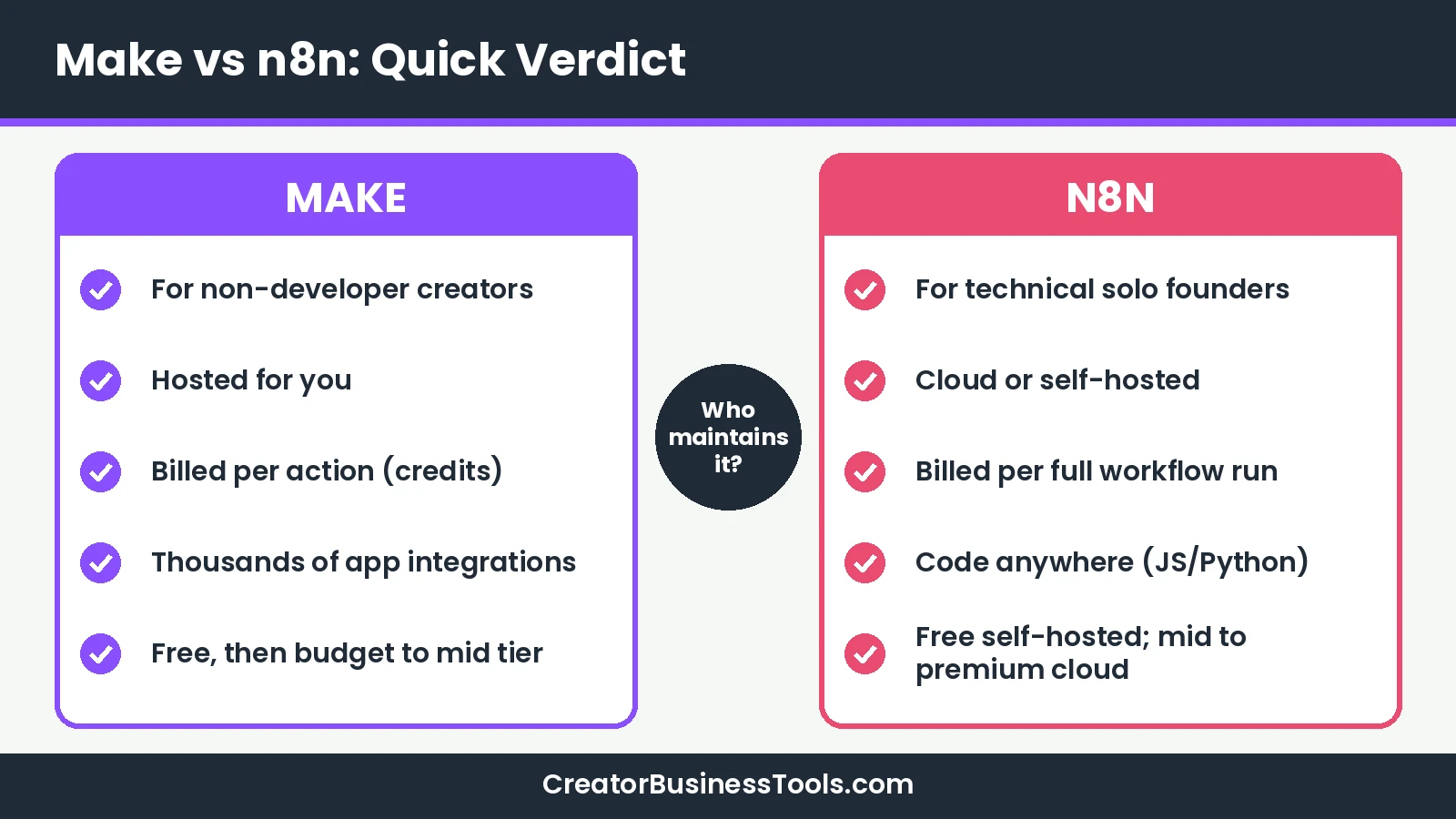
Quick verdict: Choose Make if you’re a non-developer creator who wants a hosted, visual tool with a budget entry price and a large app library. Choose n8n if you’re a technical solo founder who wants per-run billing, code-friendly workflows, or the option to self-host. If nobody on your team is comfortable maintaining a server, Make or n8n Cloud is usually the safer path.
Quick picks
- Best for non-developer creators: Make, with a visual canvas, hosted infrastructure, and a budget entry plan. Try Make free
- Best for technical founders who want control: n8n self-hosted Community Edition, free to run apart from server costs.
- Best middle ground: n8n Cloud, if you like n8n’s per-run billing but don’t want to manage a server. See n8n plans
- Best for the simplest possible setup: neither; see our Make vs Zapier guide.
Make vs n8n at a glance
| Product | Best for | Key strength | Main drawback | Price tier |
|---|---|---|---|---|
| Make | Non-developer creators and solo business owners | Hosted visual canvas with thousands of app integrations | Credits count every action, including reads and loops | Free, then $ to $$ |
| n8n Cloud | Technical founders who don’t want to run servers | Billed per full workflow run; code-friendly | No free cloud plan; entry plan sits in a higher tier | $$ to $$$ |
| n8n self-hosted (Community Edition) | Founders comfortable with servers and updates | Free software with almost the full feature set | You handle setup, security, backups, and upgrades | Free (plus your hosting costs) |
| Pabbly Connect | Budget-focused bloggers with steady multi-step workflows | Triggers and internal steps don’t use tasks | Smaller app library; step-list builder instead of a visual canvas | Free, then $ to $$ |
Feature snapshot
| Feature | Make | n8n |
|---|---|---|
| Hosting | Hosted by Make (cloud only) | n8n Cloud or self-hosted |
| Billing unit | Credits: most module actions use 1 credit | Executions: one full workflow run = 1 execution |
| Free option | Free plan with a monthly credit allowance | Free self-hosted Community Edition; cloud trial only |
| Builder | No-code visual canvas | Visual editor with code steps anywhere |
| Custom code | Code app (JavaScript or Python), billed in credits | JavaScript or Python steps in workflows |
| Pre-built integrations | Thousands of apps | 500+ integrations, plus HTTP requests for any API |
| AI features | Maia by Make, Make AI Agents, MCP server | AI Agent node, MCP server and client nodes, Assistant |
Three criteria that decide Make vs n8n
When creators ask me which automation tool to pick, three questions usually settle it:
- Who runs the infrastructure? A hosted tool means someone else handles servers, updates, and uptime. Self-hosting means that someone is you.
- How are you billed? Paying per action and paying per workflow run reward different kinds of automations.
- How steep is the learning curve, and are your apps covered? The tool you can confidently fix during a launch beats the one with the longest feature list.
Let’s take them one at a time.
Criterion 1: Hosted vs self-hosted
Make: hosted, nothing to maintain
Make is a cloud platform. You sign up, connect your apps, and build. Make handles the servers, updates, and scaling, which is a big part of why it suits non-technical creators. The trade-off is that you can’t run Make on your own infrastructure.
n8n: your choice of cloud or your own server
n8n gives you two paths. n8n Cloud is fully managed: n8n’s own docs say it needs no installation and no technical expertise, and n8n handles hosting, updates, and scaling. Self-hosted n8n runs on infrastructure you provide, set up through npm, Docker, or a server, and n8n’s docs are clear that installation, configuration, and maintenance are your responsibility.
The self-hosted Community Edition is free and includes almost the complete feature set. According to n8n, it doesn’t include features like workflow and credential sharing, projects, SSO, Git-based version control, and environments; those need a paid plan. Registering your Community Edition with an email unlocks a few extras, such as folders and debugging tools, at no cost.
Two practical notes for creators:
- Licensing: self-hosted n8n is distributed under n8n’s Sustainable Use License, which permits use for your own internal business purposes. If you plan to offer n8n to clients as a service, read the license carefully first.
- Data location: n8n says data on its hosted plans is stored in the EU, on servers in Frankfurt. Self-hosting lets you choose where data lives.
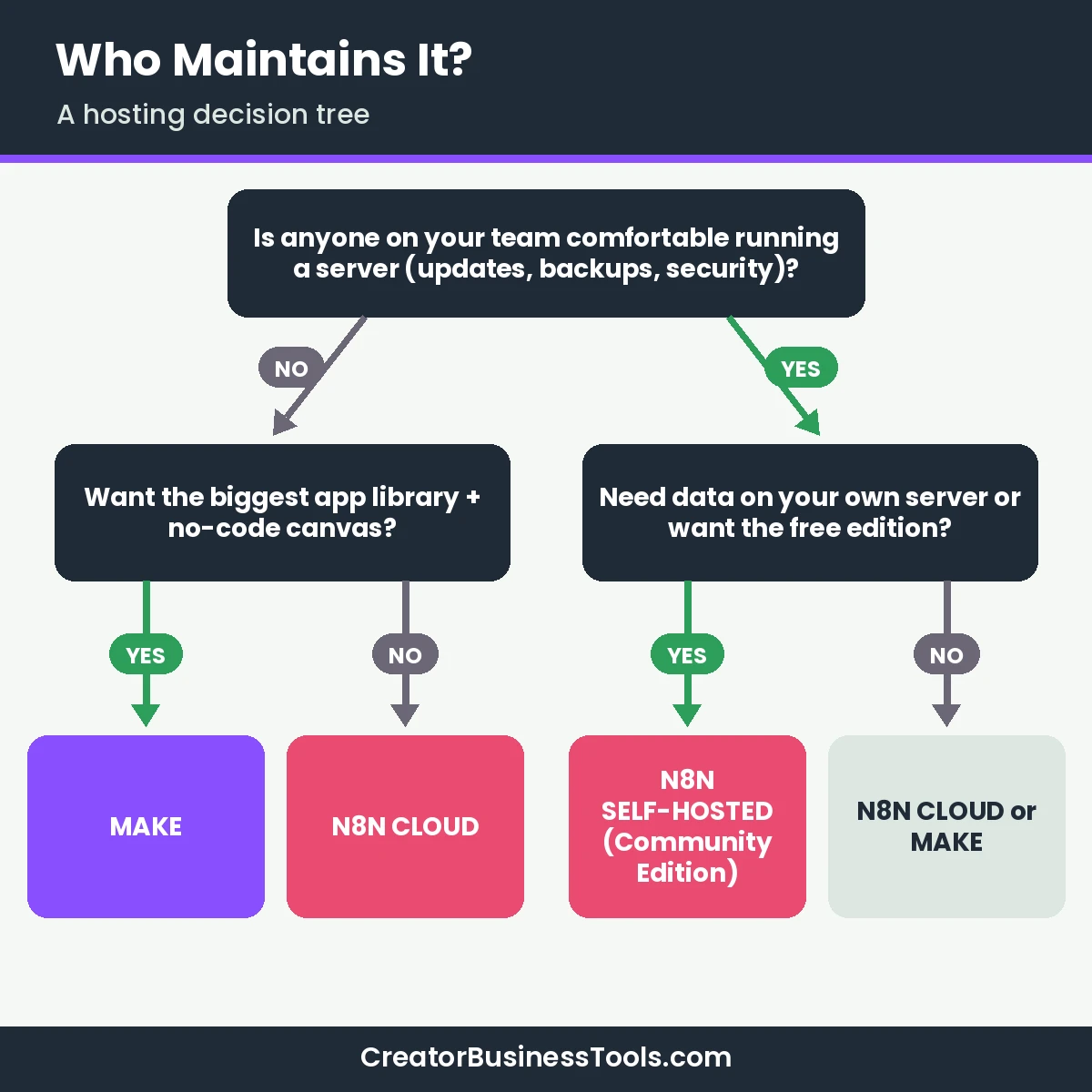
What it means for you: if your answer to “Who fixes it when something breaks?” is “me, and I don’t know Docker,” pick a hosted option. Self-hosting is a real advantage only when someone can maintain it.
Criterion 2: Pricing models in tiers
Here’s where the two tools differ most. We use price tiers rather than exact prices: $ = budget, $$ = mid-range, $$$ = premium.
How Make charges: credits per action
Make bills in credits. Its pricing page says each module action, such as reading a record or adding a spreadsheet row, typically uses one credit, and some advanced AI features may use more. Reading, searching, transforming, and iterating over data all count. Router and error handler modules don’t.
Paid plans start at a base monthly credit amount, and the price rises as you add credits. Annual billing is cheaper than monthly.
How n8n charges: executions per full run
n8n’s cloud plans are priced by executions. n8n defines an execution as a single run of your entire workflow, regardless of how many steps it has or how much data it processes. Every plan includes unlimited users, unlimited workflows, and every integration; plans differ in monthly executions, concurrent executions, and features.
| Plan | Price tier (smallest allowance) | What you get |
|---|---|---|
| Make Free | Free | Monthly credit allowance, limited active scenarios, 15-minute minimum interval |
| Make Core | $ | Unlimited active scenarios, scheduling to the minute, Make API |
| Make Pro | $ (upper end) | Priority execution, custom variables, full-text log search |
| Make Teams | $$ | Team roles, shared scenario templates |
| n8n Community Edition | Free (plus hosting) | Self-hosted, almost the full feature set, no sharing or projects |
| n8n Cloud Starter | $$ | Monthly execution allowance, 5 concurrent executions, AI agent nodes |
| n8n Cloud Pro | $$ to $$$ | Higher execution allowance, more concurrency, admin roles, workflow history |
| n8n Business | $$$ | SSO, Git version control, multiple environments |
Usage math for a typical creator workflow
Picture a buyer-onboarding workflow with four steps: a payment trigger, then actions that tag the buyer in your email tool, invite them to your community, and log the sale in a spreadsheet. On Make, each run uses roughly four credits. On n8n, each run is one execution.
| Runs per month | Make usage (about 4 credits per run) | n8n usage (1 execution per run) | Likely fit |
|---|---|---|---|
| 500 | About 2,000 credits | 500 executions | Make Core (smallest tier) or n8n Starter / self-hosted |
| 2,000 | About 8,000 credits | 2,000 executions | Make Core (smallest tier) or n8n Starter |
| 8,000 | About 32,000 credits | 8,000 executions | Make Core with more credits or n8n Pro |
For short, simple workflows like this one, Make’s entry tier usually costs less, because its budget plan includes a generous credit allowance. The balance shifts for long or data-heavy workflows. A weekly digest that loops through hundreds of community posts would use credits for every item at every step on Make, but it still counts as one execution per run on n8n.
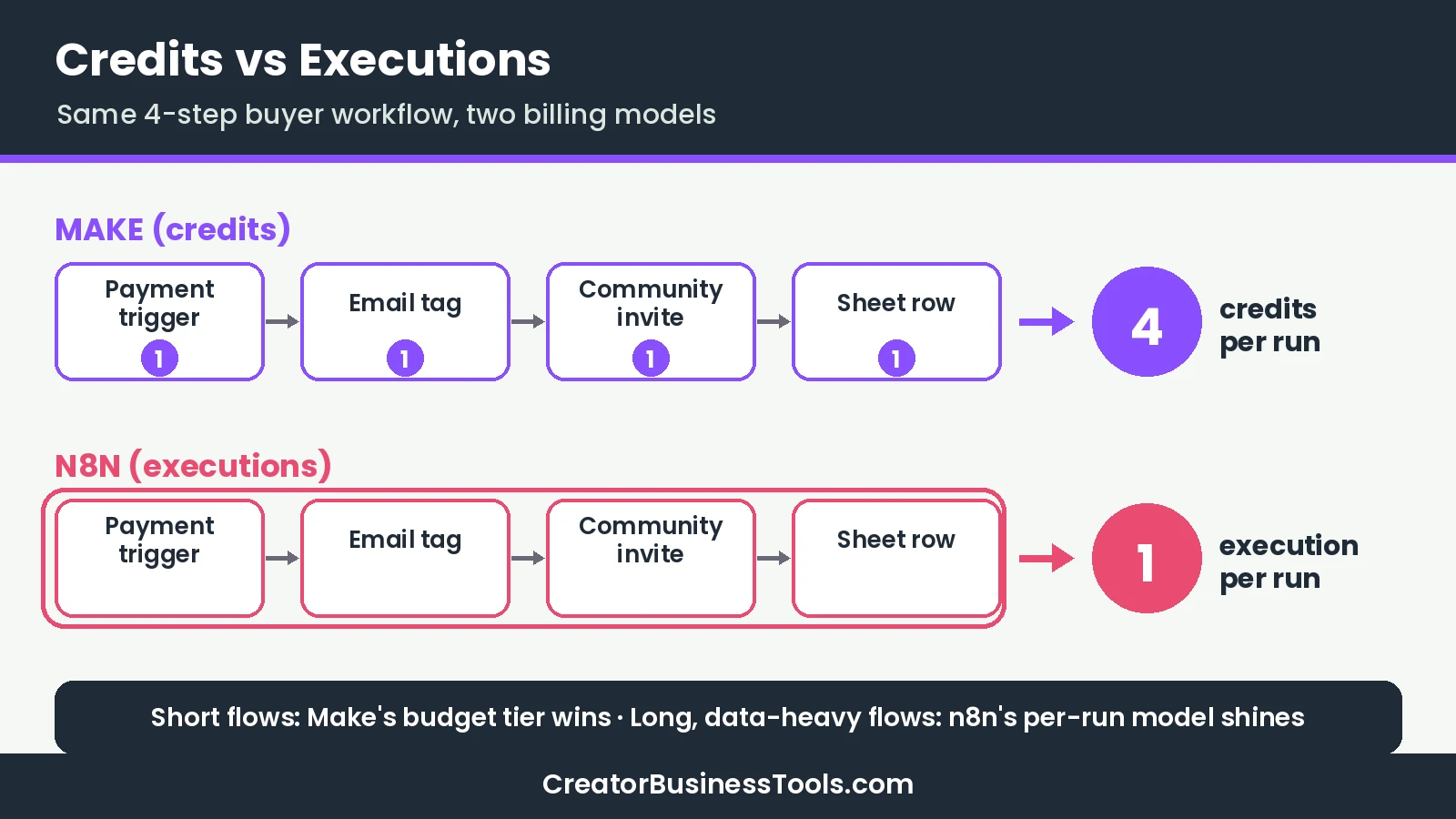
What it means for you: count your steps and runs before you choose. Many small, simple automations favor Make. A few long workflows that process lots of data favor n8n.
Don’t forget the hidden costs of self-hosting
A free Community Edition isn’t the same as free automation. You’ll pay for a server, and you’ll spend time on updates, backups, monitoring, and security patches. For a technical founder, that may be a fair trade. For a creator whose time is better spent making content, a hosted plan often costs less overall.
Criterion 3: Learning curve and integrations
Building in Make
Make is designed for no-code users. You drag modules onto a canvas, connect them with lines, and map data between steps with a point-and-click panel. Routers and filters handle branching. There’s still a learning curve around data mapping and loops, but Make offers Make Academy, a free eLearning hub, plus templates and a help center.
Building in n8n
n8n also uses a visual editor, but it’s aimed at technical teams. Its homepage pitches “code when you need it, UI when you don’t”: you can write JavaScript or Python anywhere in a workflow, call any API with HTTP request nodes, import cURL commands, and re-run single steps while debugging. That flexibility is a gift if you’re comfortable with code, and a hurdle if terms like JSON and API keys make you nervous.
n8n’s community forum is large and active, and its docs are thorough. Expect to lean on them more than you would with Make.
Integrations for the creator stack
Make lists thousands of pre-built app integrations, including Kit, Circle, Stripe, and ManyChat. n8n lists 500+ integrations, including ConvertKit (Kit), Stripe, MailerLite, and Gumroad. We couldn’t find a dedicated Circle page in n8n’s integration directory, so you’d likely connect Circle through n8n’s HTTP Request node and Circle’s API. Confirm this before you commit if your community runs on Circle.
If you’re still choosing a community platform, see Circle vs Skool vs Mighty Networks.
What it means for you: if your stack is mostly mainstream creator apps and you want ready-made connectors, Make has the edge. If you’re happy wiring APIs yourself, n8n’s smaller library matters less.
AI and agent features
Both platforms are investing in AI, so here’s only what each lists on its official pages.
Make lists Maia by Make for building automations and AI agents through conversation, Make AI Agents (which Make says are available on all plans and built on the same visual canvas), an AI Toolkit, AI apps, and a Make MCP Server for connecting AI tools to your scenarios.
n8n lists an AI Agent node and AI steps, MCP Server Trigger and MCP Client nodes, human approval for tool calls, and an Assistant that uses a monthly credit allowance on cloud plans. n8n’s Starter plan also mentions AI models you can use without your own API keys. On self-hosted n8n, the Assistant works with your own key.
On both platforms, AI steps can affect your usage, so check how they’re counted before building heavily on them.
Pros and cons
Make
Pros
- Hosted platform with nothing to install or maintain.
- No-code visual canvas suited to non-developers.
- Budget entry plan with unlimited active scenarios.
- Thousands of pre-built app integrations for the creator stack.
- Free plan for building and testing a real scenario.
Cons
- Every action uses credits, including reads and loops, so data-heavy flows add up.
- Runs only as a hosted cloud platform, with no self-hosted edition listed.
- Unused credits expire at the end of the term.
Best for: non-developer creators, coaches, and small online businesses connecting mainstream apps.
See Make’s plans and start free
For a deeper look at Make on its own, read our Make review.
n8n
Pros
- Billed per full workflow run, which can suit long, data-heavy automations.
- Free self-hosted Community Edition with almost the full feature set.
- JavaScript and Python steps anywhere in a workflow.
- Unlimited users and workflows on every plan.
- Choice of cloud or self-hosting, including control over where data lives.
Cons
- Self-hosting requires technical skills and ongoing maintenance.
- No free cloud plan; the cloud entry plan sits in a higher price tier than Make’s.
- Fewer pre-built integrations, so some apps need API work.
- Steeper learning curve for non-developers.
Best for: technical solo founders and developer-friendly teams who want control, code, or self-hosting.
Which should you choose?
| If you are… | Pick | Why |
|---|---|---|
| A course creator with no coding background | Make | Hosted, visual, and covers mainstream creator apps |
| A coach running a few simple automations | Make Free or Core | Low price tier and an easy start |
| A technical founder comfortable with Docker | n8n self-hosted | Free software and full control |
| A technical founder who’d rather not run servers | n8n Cloud | Per-run billing without maintenance |
| Processing large lists or long workflows | n8n | One execution per run, regardless of steps |
| A creator with a VA who builds automations | Make Teams | Team roles and shared templates in a no-code tool |
Where does Zapier fit?
If neither tool feels simple enough, Zapier is the usual third option. It trades a higher price tier for a very approachable builder. We cover that matchup in Make vs Zapier for Creators.
A simple way to decide
- Answer the maintenance question. If nobody can maintain a server, cross off self-hosted n8n.
- List your apps. Check each tool’s integration pages for the triggers and actions you need.
- Count steps and runs. Estimate Make credits (steps × runs) and n8n executions (runs).
- Try both for free. Build one workflow on Make’s free plan or n8n’s cloud trial.
- Pick the one you could fix during a launch. Confidence beats features.
Before you commit
- Prices depend on your credit or execution allowance and billing period. Check both official pricing pages before you buy.
- Self-hosting adds server costs and maintenance time that don’t appear on any pricing page.
- Confirm that each app you rely on has the triggers and actions you need, especially community platforms.
- n8n’s cloud trial ends after a set period, and n8n says it deletes trial workspaces that aren’t upgraded, so download any workflows you want to keep.
- This comparison is based on official product information, not hands-on benchmarks.
FAQ
Is n8n cheaper than Make?
It depends on your workflows. Make’s entry plan sits in a lower price tier, and short automations use few credits. n8n can be more economical for long, data-heavy workflows because it counts one execution per run. Self-hosted n8n is free software, but you pay for hosting and maintenance.
Is n8n free?
The self-hosted Community Edition is free to use under n8n’s Sustainable Use License. n8n Cloud has no free plan, only a trial.
Is Make easier than n8n?
For non-developers, generally yes. Make is built as a no-code tool, while n8n is aimed at technical teams and invites code when you need it.
Can I self-host Make?
Make runs as a hosted cloud platform. Its Enterprise plan lists an on-prem agent for reaching local networks, but the platform itself is run by Make. If self-hosting is a requirement, n8n is the option in this comparison.
Which has more integrations?
Make lists thousands of pre-built apps; n8n lists 500+ and lets you call almost any API with HTTP request nodes.
Do both support AI agents?
Yes. Make lists Make AI Agents and Maia by Make; n8n lists an AI Agent node, MCP nodes, and an Assistant.
Can I move workflows from Make to n8n later?
Each tool uses its own format, so plan to rebuild rather than import. Mapping each workflow’s steps on paper first makes a move much faster.
Which is better for a Kajabi or Teachable business?
Check each tool’s integration directory for your course platform first. If you’re still choosing one, see Kajabi vs Teachable.
Bottom line
The Make vs n8n decision comes down to who you are and who maintains the system. Make is the friendlier choice for non-developer creators: hosted, visual, and in a budget price tier, with thousands of ready-made app connections. n8n is the stronger fit for technical solo founders who value per-run billing, code, or self-hosting, and who have the skills or help to keep it running.
Start with the maintenance question, count your steps and runs, and build one real workflow on a free plan or trial before you pay.
Free checklist: Not sure which workflow to automate first? Grab our free Creator Automation Starter Checklist, a one-page guide to the five automations that save creators the most time and the questions to ask before choosing any tool. Contact us to request a copy.