
Pabbly Connect Review: A Cheaper Zapier Alternative for Bloggers?
Disclosure: This post contains affiliate links. If you buy through them, we may earn a commission at no extra cost to you. How we make money.
Automation saves bloggers hours, until the monthly bill arrives. If you’ve looked at Zapier’s pricing and winced, you’ve probably seen Pabbly Connect pitched as the budget alternative.
This Pabbly Connect review explains how the tool works, how its task counting differs, what it costs in broad tiers, and how it compares with Zapier and Make. It’s based on official pricing and product pages, not on hands-on benchmarks.
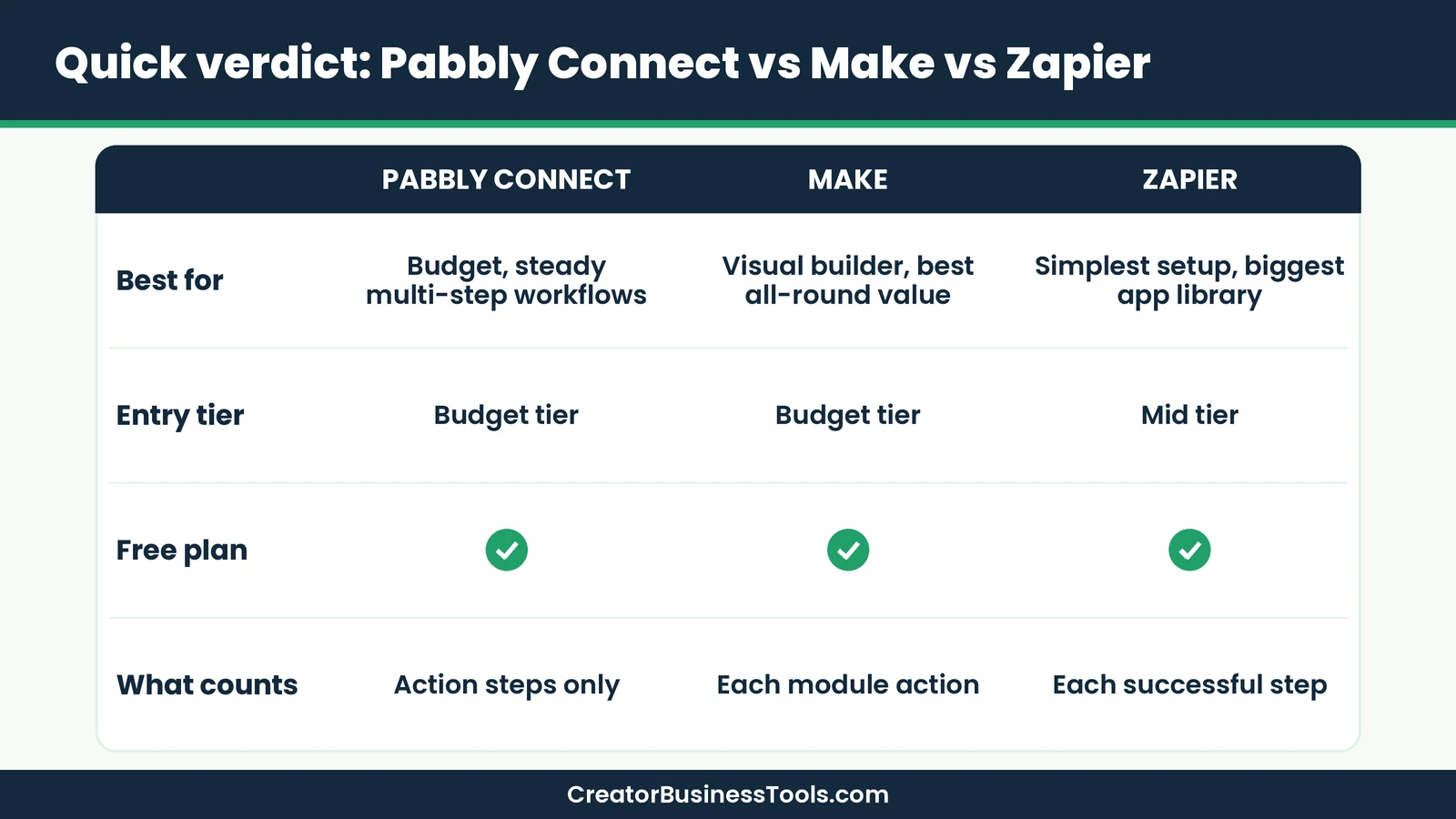
Quick verdict: Pabbly Connect is a strong value pick for bloggers who run steady, multi-step automations and want low monthly costs, because triggers and internal steps don’t count against your task allowance. Make is the best all-round alternative if you want a polished visual builder with a free plan and room to grow. Zapier is the simplest and has the biggest app library, but it sits in a higher price tier.
Quick picks
- Best for low monthly cost: Pabbly Connect Standard. See Pabbly Connect’s plans
- Best all-round automation tool for creators: Make, with a visual canvas and a free plan. Try Make free
- Best for the simplest setup: Zapier, if ease matters more than price.
Pabbly Connect at a glance
| Item | What Pabbly Connect offers |
|---|---|
| What it is | No-code automation tool that connects apps |
| Integrations | 2,000+ apps |
| Plans | Free, Standard, Unlimited |
| Price tier | Free, then $ (Standard) and $$ (Unlimited) |
| What counts as a task | Action steps only; triggers and internal steps are free |
| Billing | Monthly, or multi-year for a lower rate |
| Refunds | Money-back guarantee |
| Security | SOC 2 Type 2 and ISO 27001:2022 certified |
What is Pabbly Connect?
Pabbly Connect is a no-code automation platform. It moves data between apps, such as sending new form entries to a spreadsheet or adding buyers to your email list, without copy-and-paste.
Each automation is a workflow with one trigger and one or more actions. When the trigger happens, like a new WooCommerce order, the actions run automatically.
Pabbly says it supports 2,000+ apps, and it publishes a large library of tutorial videos to help you build workflows.
How Pabbly Connect counts tasks
This is the heart of Pabbly’s pitch. According to its pricing page, only action steps use tasks.
- Triggers are free. The step that starts a workflow doesn’t count.
- Internal steps are free. Filters, routers, formatters, iterators, delays, schedules, and the email parser don’t count.
- Polling is free. Pabbly calls each check for new data an operation and doesn’t charge for operations.
Pabbly’s own example: sending a lead from a Facebook Lead Ad to Mailchimp is one task; sending it to Mailchimp and then Google Sheets is two tasks.
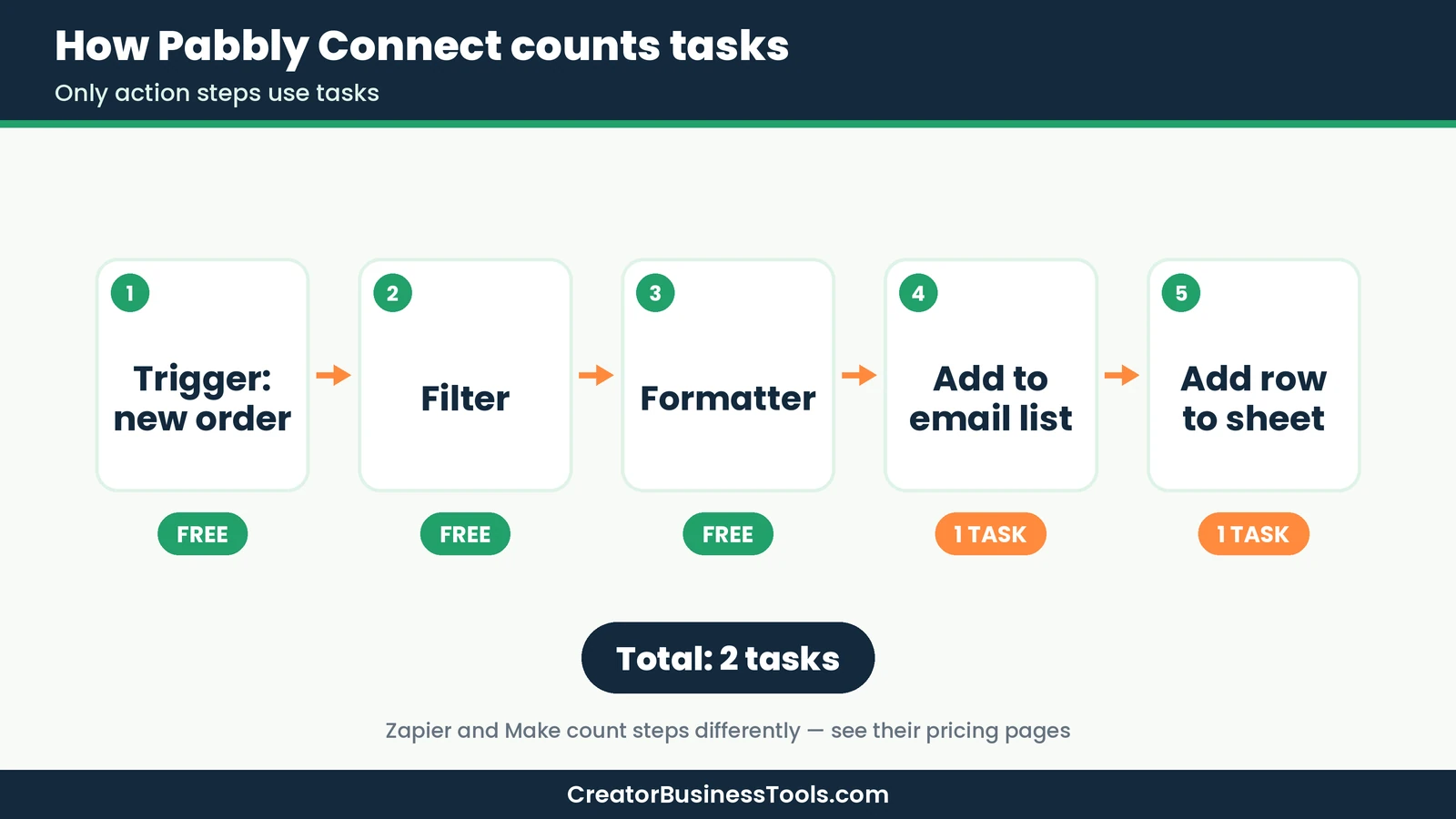
Zapier also excludes triggers and its built-in tools from task counts, while Make counts most module actions, including reading and transforming data, but not routers and error handlers. The real difference shows up in workflows with lots of data reads and formatting.
Pabbly Connect features
Workflow building
- Multi-step workflows on paid plans
- Unlimited path routers to send data down different branches
- Filters, so workflows run only when conditions match
- Delay and scheduling steps
- Iterator for processing lists one item at a time
Data tools
- Formatters for text, numbers, dates, and currency
- Email parser to pull details out of incoming emails
- JavaScript and Python code steps
- Custom variables
Reliability and teamwork
- Instant webhooks for real-time triggers
- Re-execute workflows manually, or set auto re-executions for failed steps
- Human-in-the-loop approval steps
- Shared folders, plus team members on the Unlimited plan
- Two-factor authentication
AI features
Pabbly lists an AI Assistant for building intelligent assistants inside workflows, and MCP servers for running workflow actions from AI clients.
Support and learning resources
Pabbly publishes a large library of video tutorials that walk through specific app connections, which helps if you learn by watching. Failed steps can be re-run manually or automatically, so a temporary app outage doesn’t have to mean lost data.
On the account side, Pabbly offers a money-back guarantee, and it says you cancel a subscription by contacting its support team rather than with a button in the dashboard. That’s worth knowing before you sign up.
For security-conscious users, Pabbly states it holds SOC 2 Type 2 and ISO 27001:2022 certifications and supports two-factor authentication.
Pabbly Connect pricing explained
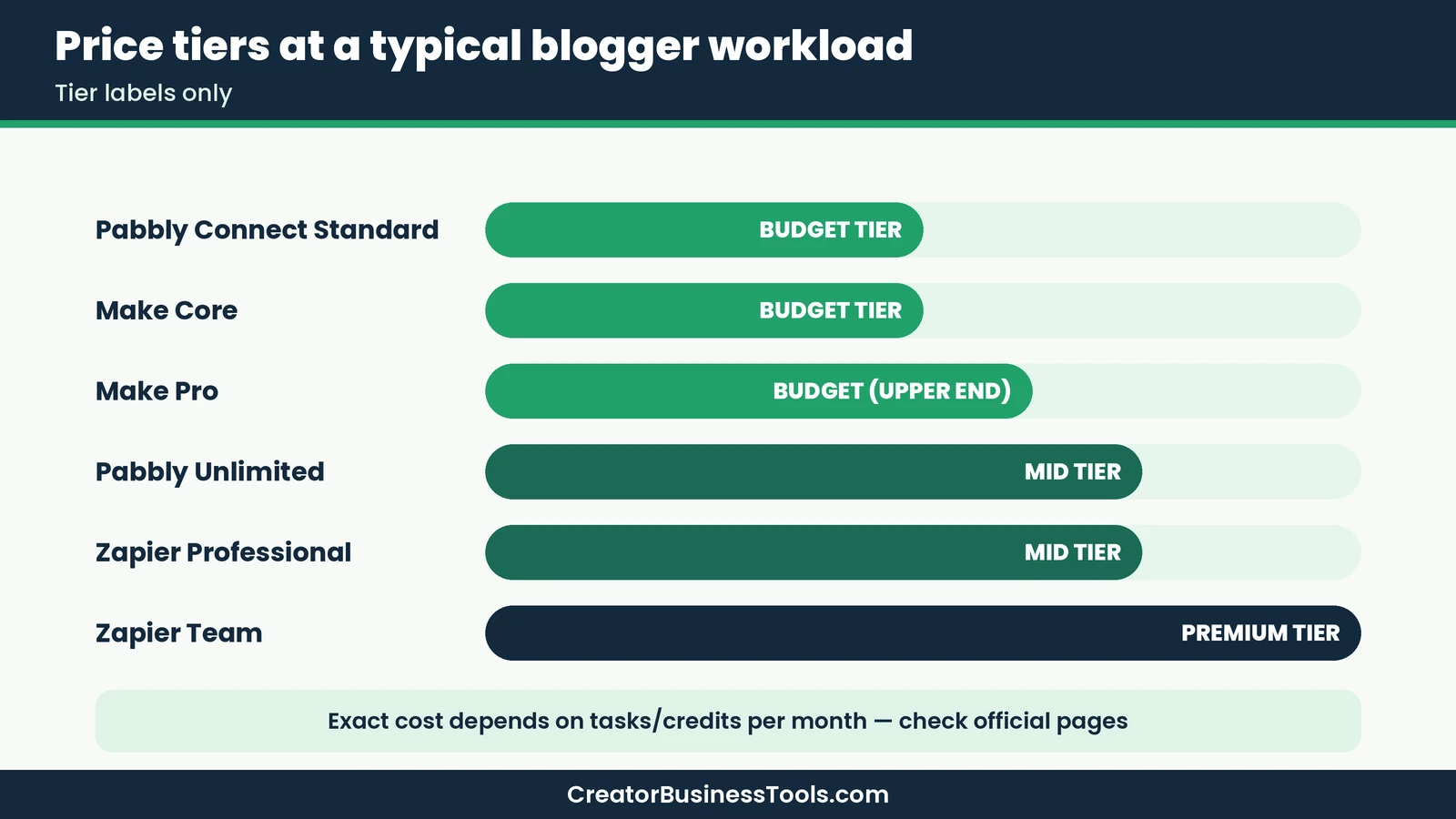
Pabbly sells plans by monthly task allowance. Longer billing commitments lower the effective monthly price.
| Plan | Price tier | Tasks | Notes |
|---|---|---|---|
| Free | Free | Small monthly allowance | Up to 2 workflows with 2 steps each; no credit card |
| Standard | $ | 10,000 per month | Multi-step workflows; no team members |
| Unlimited | $$ | Unlimited | Unlimited team members and all features |
Billing details
- Longer terms cost less per month. Pabbly offers yearly and multi-year billing at lower monthly rates.
- Team features need Unlimited. Standard doesn’t include team members.
- Refunds. Pabbly offers a money-back guarantee on new purchases.
- Cancel anytime. Pabbly says you can cancel a subscription by contacting support.
What about lifetime deals?
Pabbly has offered one-time-payment plans alongside its subscriptions. Availability and terms can change, so check Pabbly’s official pricing page for current options before you decide. If you do consider one, read the support and upgrade terms carefully, because they differ from the subscription plans.
Pabbly Connect vs Zapier vs Make
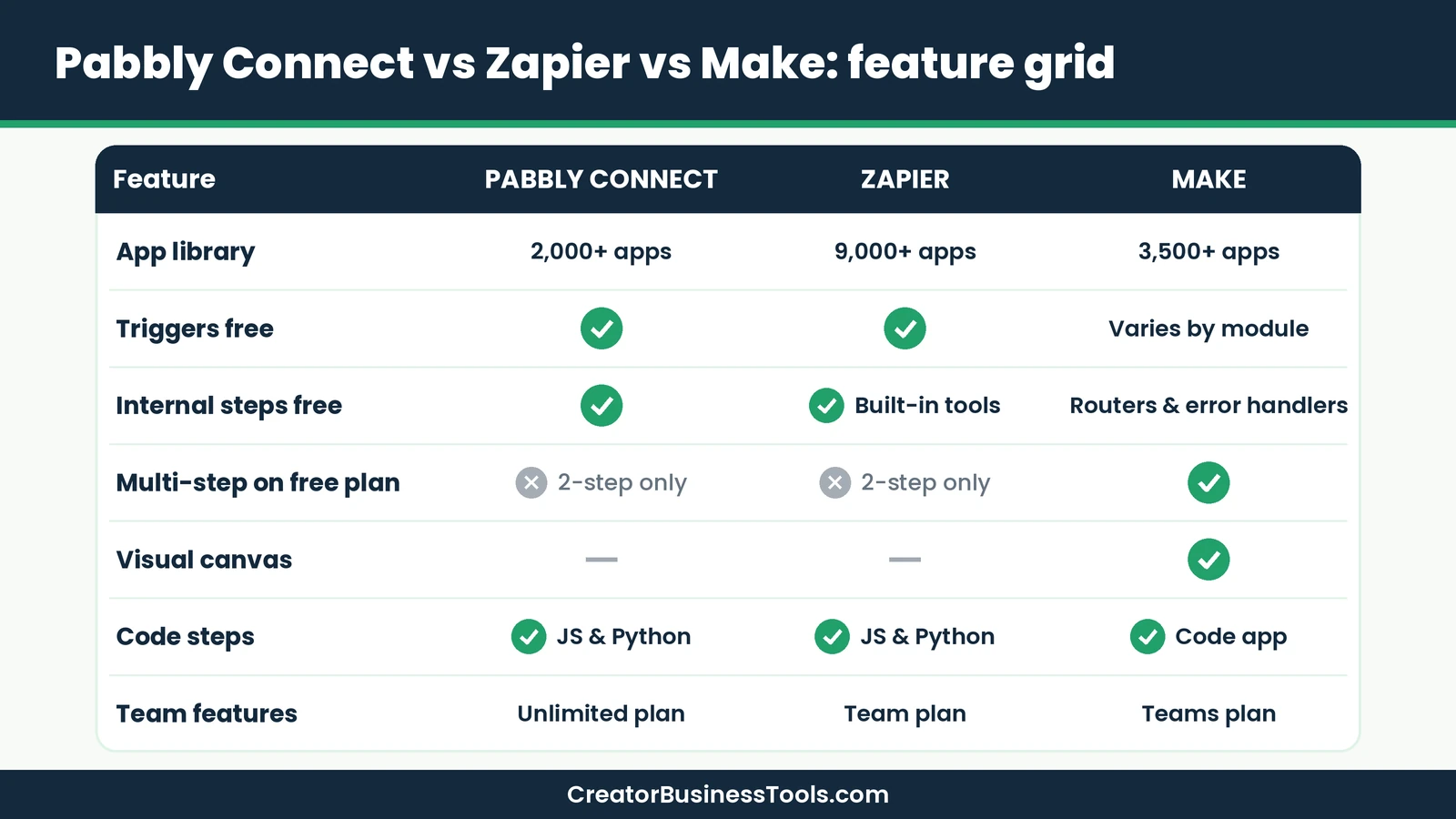
Here’s how the three compare on the points bloggers care about most. For the full Make vs Zapier breakdown, see our Make vs Zapier guide.
| Feature | Pabbly Connect | Zapier | Make |
|---|---|---|---|
| App library | 2,000+ | 9,000+ | 3,500+ |
| Billing unit | Tasks (action steps) | Tasks (successful steps) | Credits (module actions) |
| Triggers counted? | No | No | Varies by module |
| Routers and filters | ✓ Free, not counted | ✓ Paid plans, not counted | ✓ Including Free plan; routers not counted |
| Free plan | ✓ 2-step | ✓ 2-step | ✓ Multi-step, limited active scenarios |
| Entry paid tier | $ | $$ | $ |
| Builder style | Step list | Step list | Visual canvas |
| Code steps | ✓ JavaScript & Python | ✓ JavaScript & Python | ✓ Code app |
Pabbly Connect: best for predictable, low bills
Pabbly’s model rewards workflows with lots of filtering and formatting, since those steps are free. If your automations are steady and mostly use popular apps, Standard can cover a lot of work at a low tier.
Keep in mind: Its app library is smaller than Zapier’s or Make’s, so confirm your apps are supported first.
Make: best all-round value for creators
Make combines a visual canvas, a free plan that supports multi-step scenarios, and an entry paid plan in a budget tier. Routers and error handlers don’t use credits, and paid plans add unlimited active scenarios and scheduling down to the minute.
It’s the tool we recommend most often to creators who want flexibility without Zapier-level prices. Read our full Make review for details.
Keep in mind: Make counts reads, searches, and loops as credits, so very frequent polling adds up.
Zapier: best for the simplest setup
Zapier lists 9,000+ apps and a very approachable builder. Triggers, polling, and built-in tools like Filter and Formatter don’t use tasks, and it offers a free trial of the paid plan (Professional).
Keep in mind: Paid plans sit in a higher price tier, and the free plan only supports two-step Zaps.
Pros and cons of Pabbly Connect
| Pros | Cons |
|---|---|
| Triggers, internal steps, and polling don’t use tasks | Smaller app library than Zapier or Make |
| Low entry tier with a large task allowance | Team members only on Unlimited |
| Routers, filters, and code steps included | Step-list builder is less visual than Make |
| Money-back guarantee | Free plan limited to two 2-step workflows |
| SOC 2 Type 2 and ISO 27001 certified | Cancellation is handled by emailing support |
Best for: bloggers and creators with steady, multi-step automations who want the lowest monthly cost.
Not ideal for: anyone who needs niche apps, a visual canvas, or the largest integration library.
Before you choose an automation tool
- Check that every app you use is supported, with the exact triggers and actions you need.
- Each tool counts usage differently. Estimate your monthly tasks or credits before picking a plan.
- Prices and plan terms change. Confirm current pricing on each official page.
- Test every workflow with a real sign-up or order before relying on it.
- This review is based on official information, not hands-on benchmarks.
5 things every blogger should automate
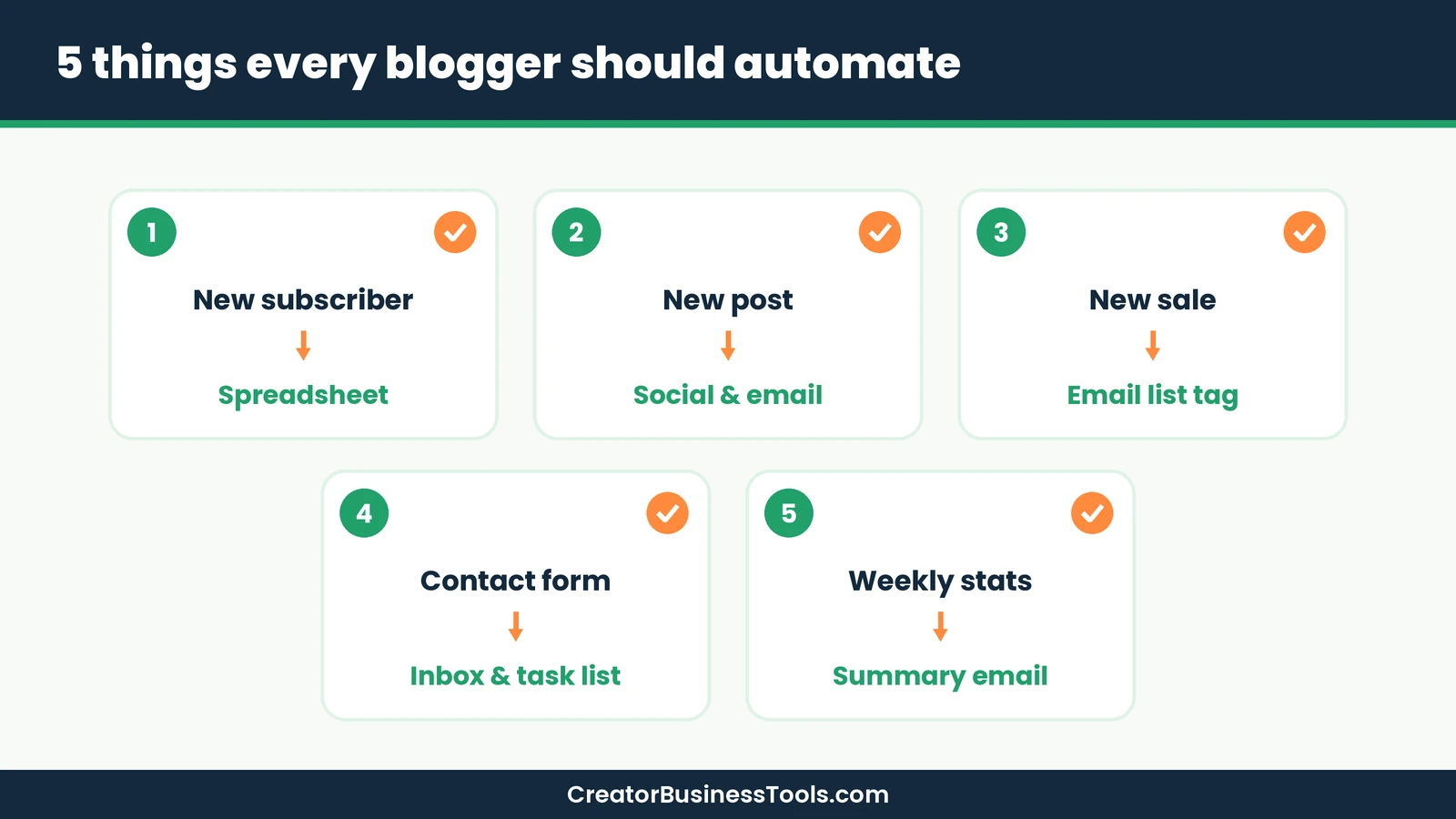
- New subscriber log. When someone joins your list, add them to a spreadsheet so you can track growth by source.
- New post promotion. When you publish, send the post to your email tool or a social scheduler automatically.
- Buyer tagging. When a sale happens in your store, tag the buyer in your email tool and start an onboarding sequence.
- Contact form routing. Send form entries to your inbox and a task list so nothing gets lost.
- Weekly summary. Collect the week’s new subscribers or sales and email yourself a digest.
All three tools can handle these. With Pabbly, the filters and formatting steps inside them don’t use tasks; with Make, routers don’t use credits.
Automation planning checklist
- ☐ List every app in your workflow
- ☐ Confirm each app is supported on your chosen tool
- ☐ Count action steps per run
- ☐ Estimate runs per month
- ☐ Pick a plan with headroom
- ☐ Test with real data
Worked example: estimating your monthly tasks
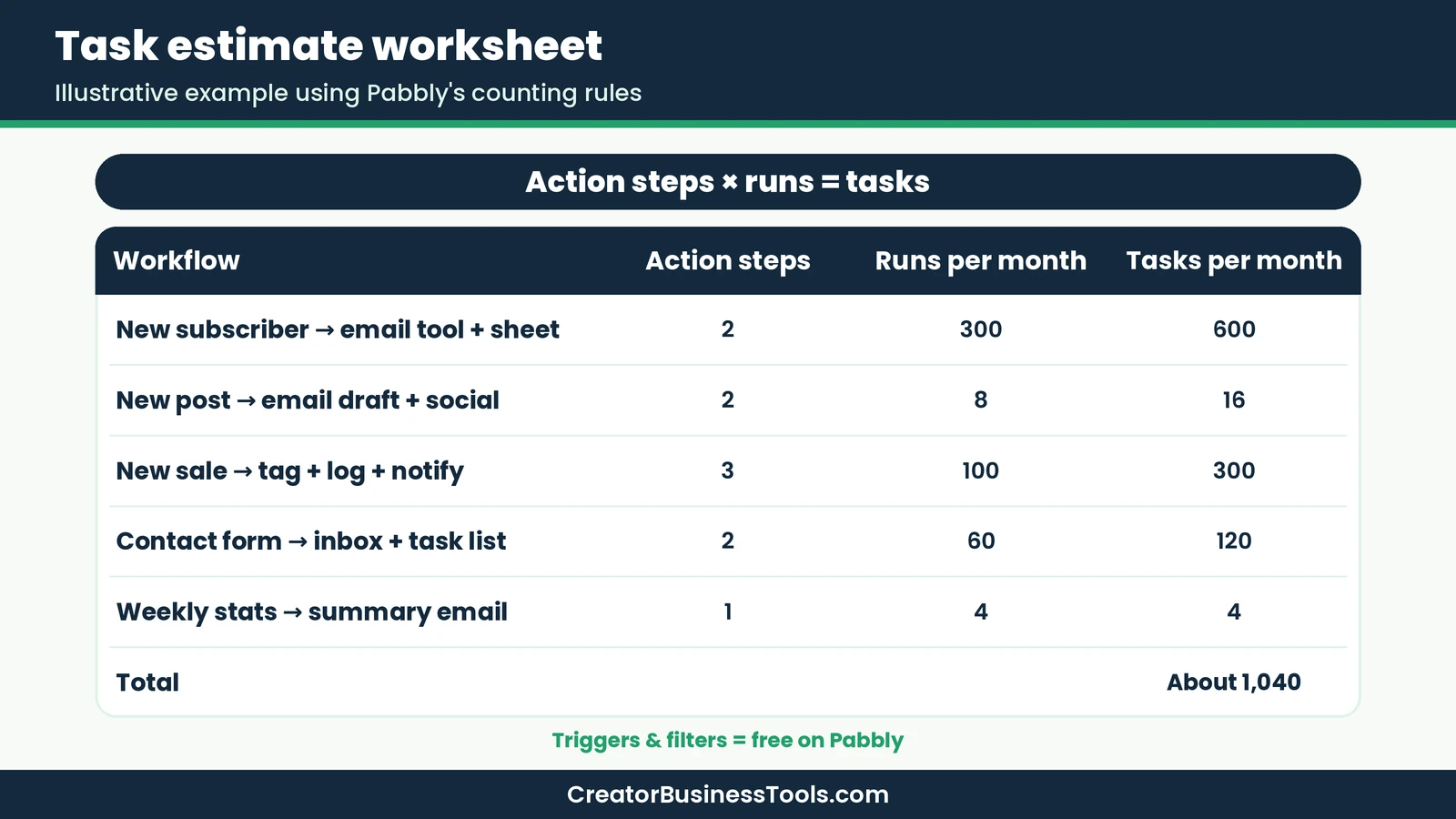
Before picking a plan, put rough numbers on your workflows. Here’s an illustrative estimate for a mid-sized blog using Pabbly’s counting rules, where only action steps count. Your numbers will differ, so swap in your own.
| Workflow | Steps that count | Runs per month | Tasks per month |
|---|---|---|---|
| New subscriber → email tool + spreadsheet | 2 actions (trigger and filter are free) | 300 | 600 |
| New post → email draft + social scheduler | 2 actions | 8 | 16 |
| New sale → tag buyer + log to sheet + notify you | 3 actions | 100 | 300 |
| Contact form → inbox + task list | 2 actions | 60 | 120 |
| Weekly stats → summary email | 1 action (schedule trigger is free) | 4 | 4 |
| Total | About 1,040 |
In this example, the blog uses roughly a tenth of the Standard plan’s 10,000 monthly tasks, leaving plenty of room to grow. The Free plan’s small allowance and two-step limit wouldn’t cover it, so this blogger would need a paid plan.
How the same workload looks on Zapier and Make
- Zapier also skips triggers and built-in tools like Filter and Formatter, so the task count would be similar, but its paid plans sit in a higher price tier at the same volume.
- Make counts module actions, including reads, searches, and data transformations, so the same workflows would usually use more credits than Pabbly uses tasks. A modest workload like this one can still fit an entry paid plan, so run the estimate with Make’s credit rules before deciding.
The takeaway: the cheapest tool depends on how your workflows are built, not just the headline price tier.
How to choose: Pabbly Connect, Make, or Zapier
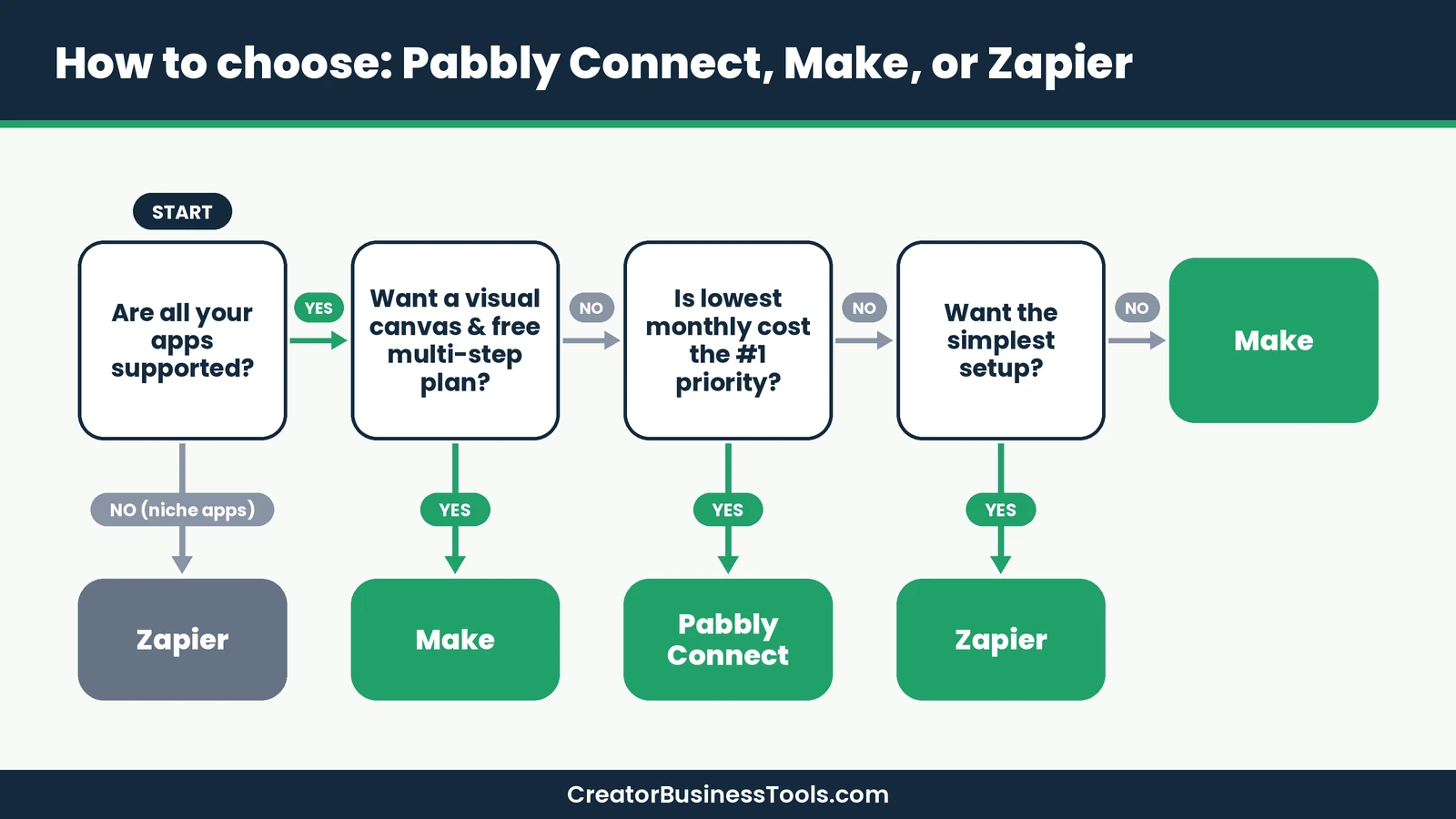
- Check app support first. If a key app is missing, the cheapest tool is useless.
- Estimate usage. Count action steps per run and runs per month.
- Pick your builder style. Visual canvas (Make) or step list (Pabbly, Zapier).
- Compare at your volume. A tool that’s cheap at low volume may not stay cheapest as you grow.
- Start free. All three have free plans, so build one real workflow before paying.
Who should pick which tool
| Reader | Suggested tool | Why |
|---|---|---|
| Blogger with steady, simple workflows on a tight budget | Pabbly Connect Standard | Large task allowance at a low tier |
| Creator connecting email, community, and payments | Make Core | Visual multi-step flows at a budget tier |
| Creator with a VA or small team | Make Teams or Pabbly Unlimited | Team features |
| Beginner who wants the easiest setup | Zapier | Simplest builder and largest app library |
| Technical founder who wants to self-host | See our Make vs n8n guide | Self-hosting options compared |
If self-hosting appeals to you, our Make vs n8n comparison covers that route.
How to move from Zapier to Pabbly Connect or Make
Switching tools doesn’t have to be risky if you go one workflow at a time.
- List your current Zaps. Write down each trigger, action, and filter, plus how often it runs.
- Check app coverage. Confirm that every app, and the exact trigger or action you use, exists on the new tool.
- Start with a low-stakes workflow. Rebuild something like a spreadsheet log first, not your checkout flow.
- Test with sample data. Keep the Zap live while you test, then switch off the Zap and turn on the new workflow the same day to avoid duplicate emails.
- Move critical workflows last. Payments, buyer tagging, and course access deserve extra testing.
- Recount usage after a month. Compare actual task or credit use with your estimate and adjust your plan.
If you’re leaning toward Make, its free plan lets you rebuild a multi-step workflow before paying, which makes this test run easy. Try Make free
Common mistakes when switching from Zapier
- Assuming every app exists. Check integrations before migrating.
- Rebuilding everything at once. Move one workflow, test it, then move the next.
- Ignoring how usage is counted. Recount tasks or credits for each workflow on the new tool.
- Forgetting error handling. Turn on re-execution or error alerts.
- Cancelling too early. Keep the old tool until the new workflows run cleanly.
FAQ
Is Pabbly Connect free?
Yes. Pabbly Connect has a free plan with a small monthly task allowance, up to two workflows of two steps each, and no credit card required.
What counts as a task in Pabbly Connect?
Only action steps. Triggers and internal steps like filters, routers, and formatters don’t count, according to Pabbly’s pricing page.
Is Pabbly Connect cheaper than Zapier?
For typical multi-step workflows, Pabbly’s entry plan sits in a lower price tier than Zapier’s paid plans. Compare at your own monthly volume.
Pabbly Connect vs Make: which is better?
Pabbly suits budget-focused users with steady workflows. Make offers a visual canvas, a free multi-step plan, and a larger app library, which makes it the better all-round choice for many creators.
Does Pabbly Connect have a lifetime deal?
Pabbly has offered one-time-payment plans. Check its official pricing page for what’s currently available and the terms.
Can I get a refund?
Yes. Pabbly offers a money-back guarantee. Check its refund policy for the exact window before you buy.
Does Pabbly Connect support code?
Yes. Paid plans include JavaScript and Python code steps.
Can my team use Pabbly Connect?
Team members are available on the Unlimited plan, not Standard.
How many apps does Pabbly Connect integrate with?
Pabbly says it supports 2,000+ apps. That’s fewer than Zapier’s 9,000+ or Make’s 3,500+, so check your specific apps first.
Is Pabbly Connect secure?
Pabbly states it holds SOC 2 Type 2 and ISO 27001:2022 certifications and offers two-factor authentication.
Does Pabbly Connect have AI features?
Pabbly lists an AI Assistant and MCP servers, which let AI clients run workflow actions.
Can I cancel Pabbly Connect anytime?
Pabbly says you can cancel anytime by contacting its support team, and new purchases come with a money-back guarantee.
Bottom line
Pabbly Connect is a genuine budget alternative to Zapier, especially for bloggers whose workflows lean on filters and formatting. Its free internal steps and low entry tier make monthly costs predictable.
Make is the best all-round pick for most creators, combining a visual builder, a free multi-step plan, and budget pricing. Zapier remains the easiest option if you’ll pay more for simplicity. Start with the free plans, build one workflow, and upgrade only when you hit a real limit.
Try Make free · See Pabbly Connect’s plans
Free checklist: Not sure what to automate first? Get our free Blogger Automation Starter Checklist, a one-page list of five workflows and the questions to ask before paying for any tool. Contact us to request a copy.
Pricing and features from official vendor pages, last checked October 18, 2026.