
Guides / Sales funnels & all-in-one
SamCart Review for Course Creators: Checkout, AI Tools and Plans Explained (vs ThriveCart)
Disclosure: This post contains affiliate links. If you buy through them, we may earn a commission at no extra cost to you. How we make money.
You’ve planned your online course. Now you need a way to sell it, take payments and give students access.
SamCart is a checkout and selling platform that covers all three. It adds AI tools that help draft your sales copy, design your pages and even outline your course.
This SamCart review looks at it from a course creator’s point of view: what you get, which plan fits, and how it compares with ThriveCart.
It’s based on SamCart’s official pricing and product pages, not on hands-on testing.
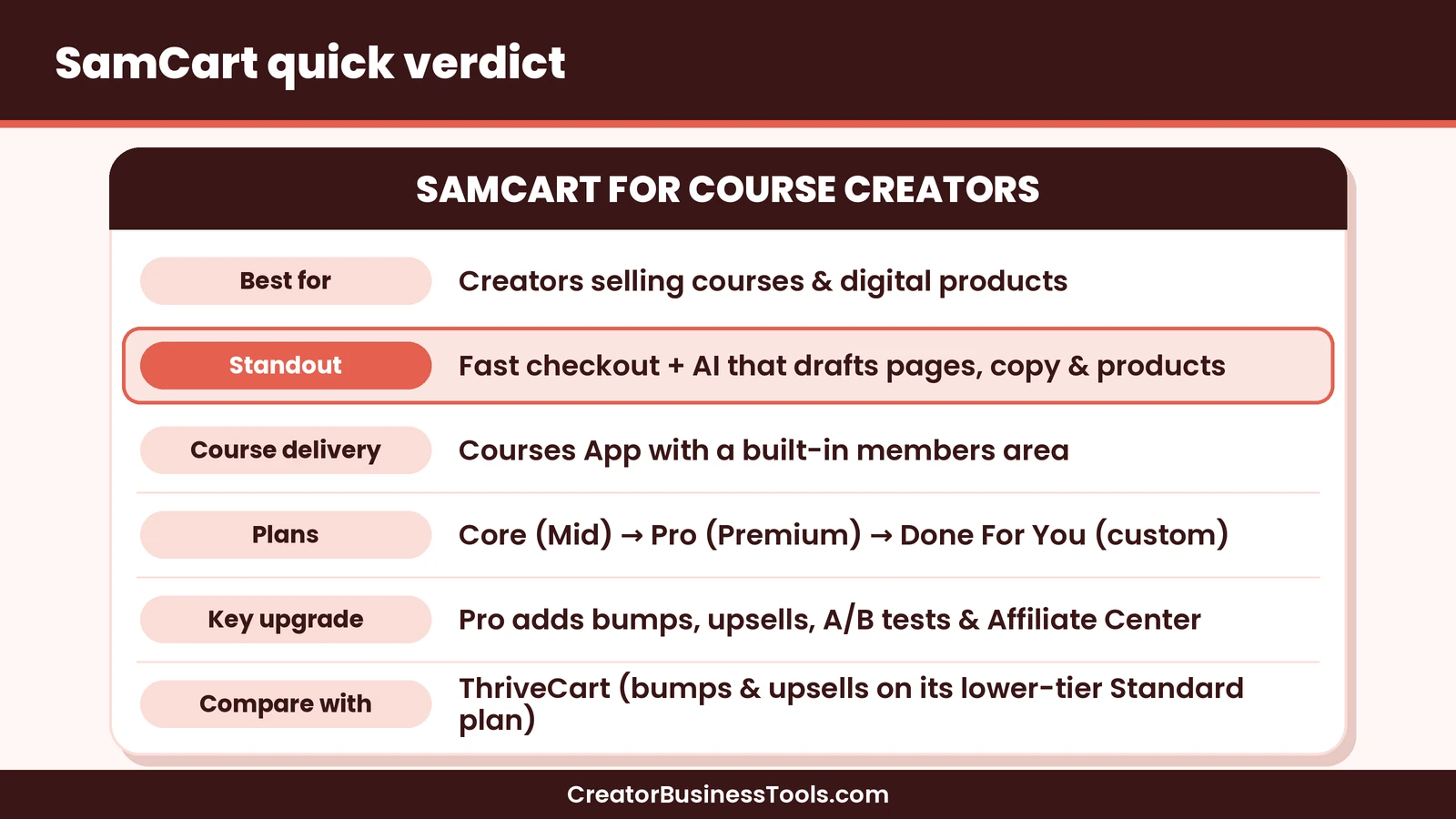
Quick verdict: SamCart is a good fit for course creators who want a fast, polished checkout plus AI help building their offer. Core covers pages, checkout and a courses app. Pro adds the revenue tools most launches need: order bumps, 1-click upsells, A/B testing and an affiliate center. If you want those tools at a lower monthly tier, ThriveCart is the main alternative.
Quick picks
- Best for most new course creators: SamCart Core. See SamCart’s plans
- Best for launches with upsells and affiliates: SamCart Pro.
- Best for hands-off setup: SamCart Done For You.
- Best lower-tier alternative for bumps and upsells: ThriveCart.
What is SamCart?
SamCart is a digital business platform built around checkout. You create a product, build a sales page and checkout, and take payments.
For course creators, it covers the whole path from page to purchase to access.
| Area | What SamCart offers |
|---|---|
| Pages | Sales pages, microsites, link-in-bio pages and opt-in pages |
| Checkout | CheckoutOS, its mobile-first checkout |
| Payments | Cards, PayPal, Venmo, Apple Pay, Google Pay and buy now, pay later |
| Courses | Courses App with a built-in members area |
| AI tools | AI assistant for sales copy, page design and product design |
| Recovery | Cart abandonment emails and follow-ups |
| Customers | Customer portal for subscriptions, cards and purchases |
| Integrations | Native integrations for email, membership and CRM tools |
You can sell digital products, courses, services, subscriptions and physical goods. Products are unlimited on both main plans.
Who SamCart is for
- First-time course creators who want pages, checkout and course access in one place.
- Creators who want AI help drafting sales copy and designing pages.
- Coaches and consultants selling packages or subscriptions.
- Digital product sellers with ebooks, templates or guides.
- Growing teams who need several seats (Pro).
It’s less of a fit if you need built-in email marketing. SamCart connects to email tools rather than replacing them.
SamCart pricing explained
SamCart has two self-serve plans and one custom plan. SamCart advertises a discount for yearly billing compared with paying monthly. There’s also a free trial, so check the current details on SamCart’s pricing page.
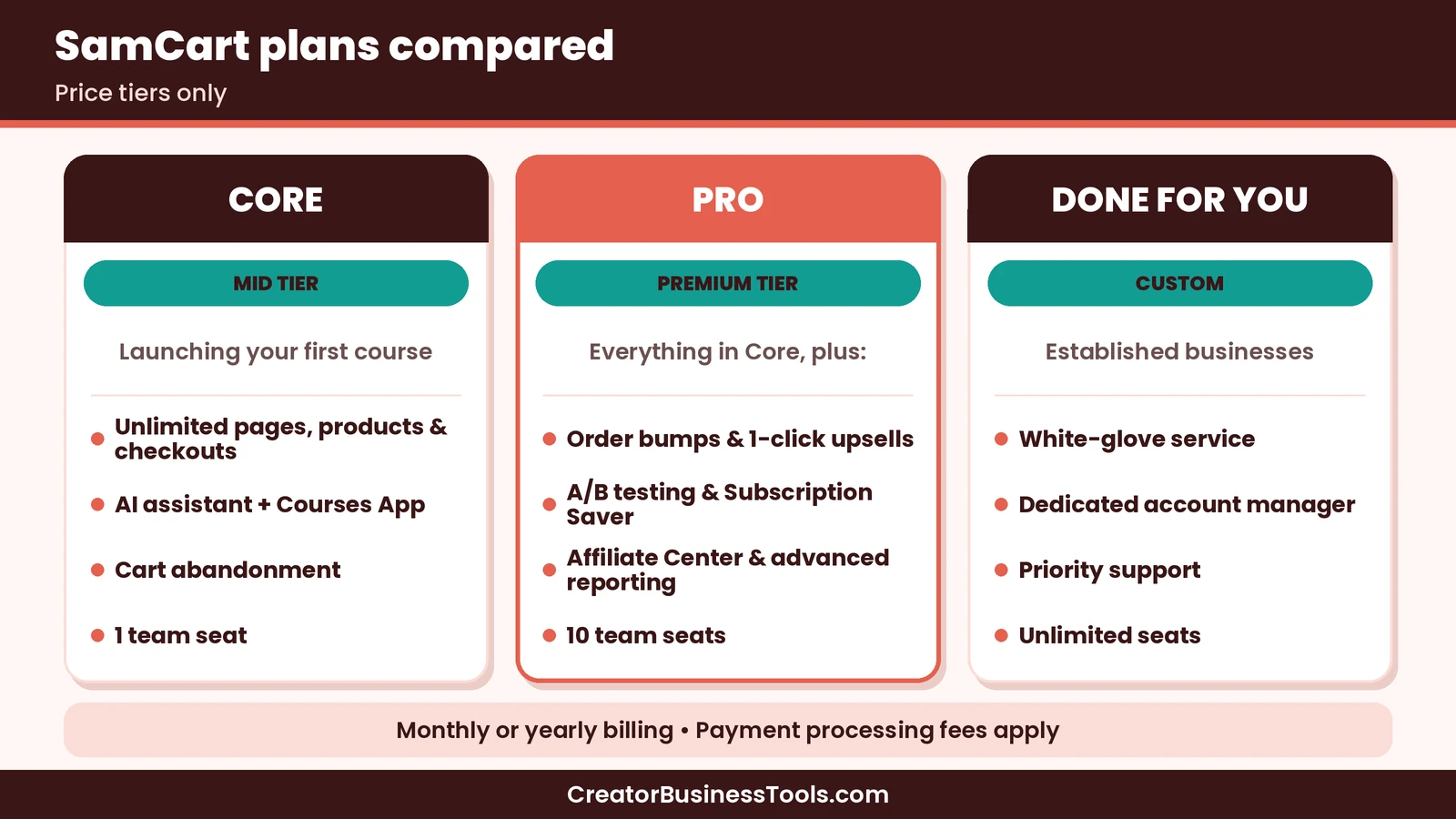
| Plan | Price tier | Best for | Highlights |
|---|---|---|---|
| Core | $$ | Launching your first course | Unlimited pages, products and checkouts; AI assistant; Courses App; cart abandonment; 1 team seat |
| Pro | $$$ | Growing launches | Everything in Core, plus order bumps, 1-click upsells, A/B testing, Subscription Saver, Affiliate Center, advanced reporting; 10 team seats |
| Done For You | Custom | Established businesses | White-glove service, dedicated account manager, priority support, unlimited seats |
SamCart also offers dedicated live support as a paid add-on for any paid plan.
Payment fees
SamCart says there are no added fees on SamPay, its payment option. Standard payment processing fees still apply, so check SamCart’s pricing page for the current rates.
Core or Pro?
Choose Core if you’re launching your first course and want to keep costs down. You get everything you need to sell and deliver.
Choose Pro when you’re ready to grow order value. Order bumps and 1-click upsells are Pro features, and so are A/B testing and the affiliate center.
A simple rule: start on Core, then move to Pro once you have a proven offer worth optimizing.
Key features for course creators
CheckoutOS
SamCart’s checkout is built to be fast and mobile-first. Stored cards and digital wallets cut down on typing, which matters when most buyers are on their phones.
AI assistant
SamCart’s AI assistant, Sam, can write sales copy, design pages and design digital products like ebooks and course outlines.
For a new creator, this can turn a blank page into a first draft quickly. You’ll still want to edit the copy in your own voice. SamCart lists AI usage as “Limited” on Core and “Unlimited” on Pro, but it doesn’t publish the exact Core allowance, so check with SamCart if you plan to lean on AI heavily.
Courses App and members area
You can host and sell courses inside SamCart with a built-in members area. Students buy and get access in one place, without a separate course platform. SamCart’s pricing page doesn’t detail extras like quizzes or certificates, so check its product pages if you need them.
Video hosting is included, with limits on Core and unlimited on Pro.
Order bumps and 1-click upsells (Pro)
An order bump is a small add-on offered at checkout, like a workbook. A 1-click upsell is a bigger offer shown right after purchase, like a coaching call.
Both can raise your average order value without new traffic.
Subscription Saver (Pro)
If you sell a membership, Subscription Saver tries to recover failed payments with smart retries and customer outreach.
Affiliate Center (Pro)
Run your own affiliate program. Past students and partners can promote your course for a share of sales.
Integrations
SamCart’s Integration Engine connects natively with email, membership and CRM tools. On Pro, you also get custom integrations through Zapier, API access and webhooks.
Tracking is built in too. You can add pixels for Facebook Ads, Google Analytics and Google Tag Manager, and Pro adds marketing analytics such as UTM tracking and a referral report.
Reporting
Both plans include business reporting on revenue, sales, orders and traffic. Pro adds advanced reports, including offers, tax and lifetime value (LTV) reports. These help you see which offers actually drive revenue.
Custom domains and branding
You can sell on your own domain, so your checkout matches your brand. Checkout branding lets you customize colors, fonts and styling across every checkout.
How to launch an online course with SamCart
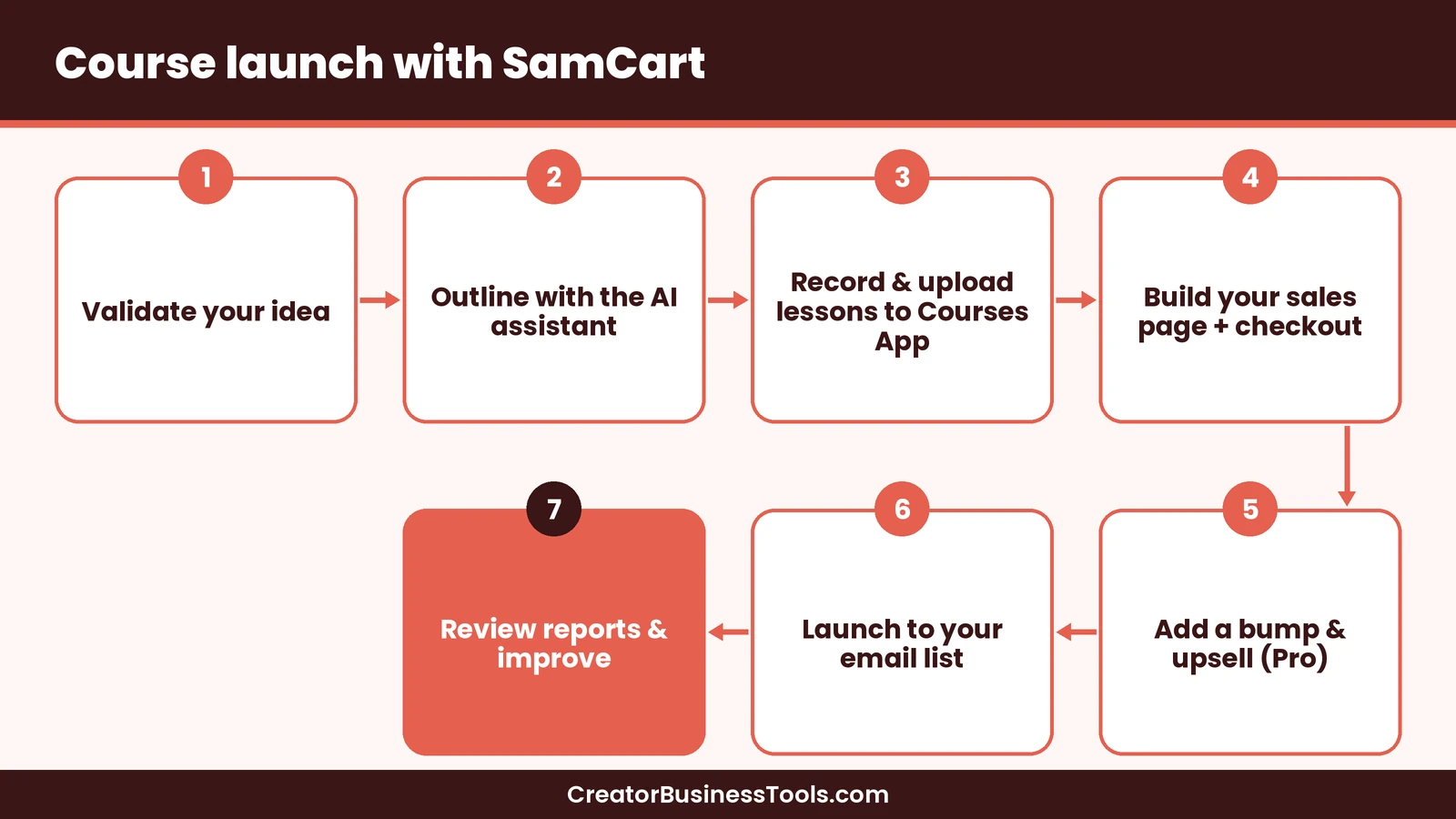
- Validate your idea. Ask your audience what they struggle with. A short survey or a few conversations can confirm demand.
- Outline your course. Use the AI assistant to draft an outline, then shape it around the result your students want.
- Create your lessons. Record short videos and upload them to the Courses App.
- Build your sales page and checkout. Start from an AI draft, then edit the copy so it sounds like you.
- Set your payment options. Offer pay-in-full and a payment plan if your course is higher priced.
- Add a bump and an upsell (Pro). A workbook as a bump and a group call as an upsell are common pairings.
- Connect your email tool so buyers are tagged and get your welcome sequence.
- Launch to your list. Email is usually the strongest launch channel for creators.
- Review your reports and improve one thing at a time.
How to price your first course
Your checkout can only convert a price that makes sense to buyers. A few simple guidelines help:
- Price the outcome, not the hours. A short course that solves a painful problem can be worth more than a long one.
- Look at what similar courses cost in your niche, then decide where you want to sit.
- Offer a payment plan for higher-priced courses. It lowers the barrier to buying.
- Keep your bump small and related. A workbook, template pack or checklist works well.
- Make the upsell a clear next step, such as a group call or an advanced module.
- Test once you have traffic. On Pro, A/B testing lets you compare prices or headlines.
What your sales page needs
Whether the AI drafts it or you write it, a course sales page usually needs:
| Section | Purpose |
|---|---|
| Headline | The result students get |
| Problem | Why the reader is stuck today |
| Course outline | What’s inside, module by module |
| About you | Why you’re the right teacher |
| Proof | Student results or testimonials, once you have them |
To collect testimonials with Senja for that proof section, start with their free plan. | Price and options | Pay-in-full and payment plan | | FAQ | Answers to common objections |
A quick hypothetical example
Imagine a hypothetical yoga teacher launching a beginner course. They use the AI assistant to outline eight modules and draft the sales page. They upload lessons to the Courses App and launch to their email list on Core.
After a successful first launch, they move to Pro. They add a printable practice journal as an order bump and invite past students to promote the course through the affiliate center.
SamCart vs ThriveCart
On a tighter budget, a free-to-start store like Payhip can be enough for simple digital downloads.
Our ThriveCart review compares the two platforms side by side, along with Kajabi. Here we take a narrower angle: which one fits each stage of a course launch?
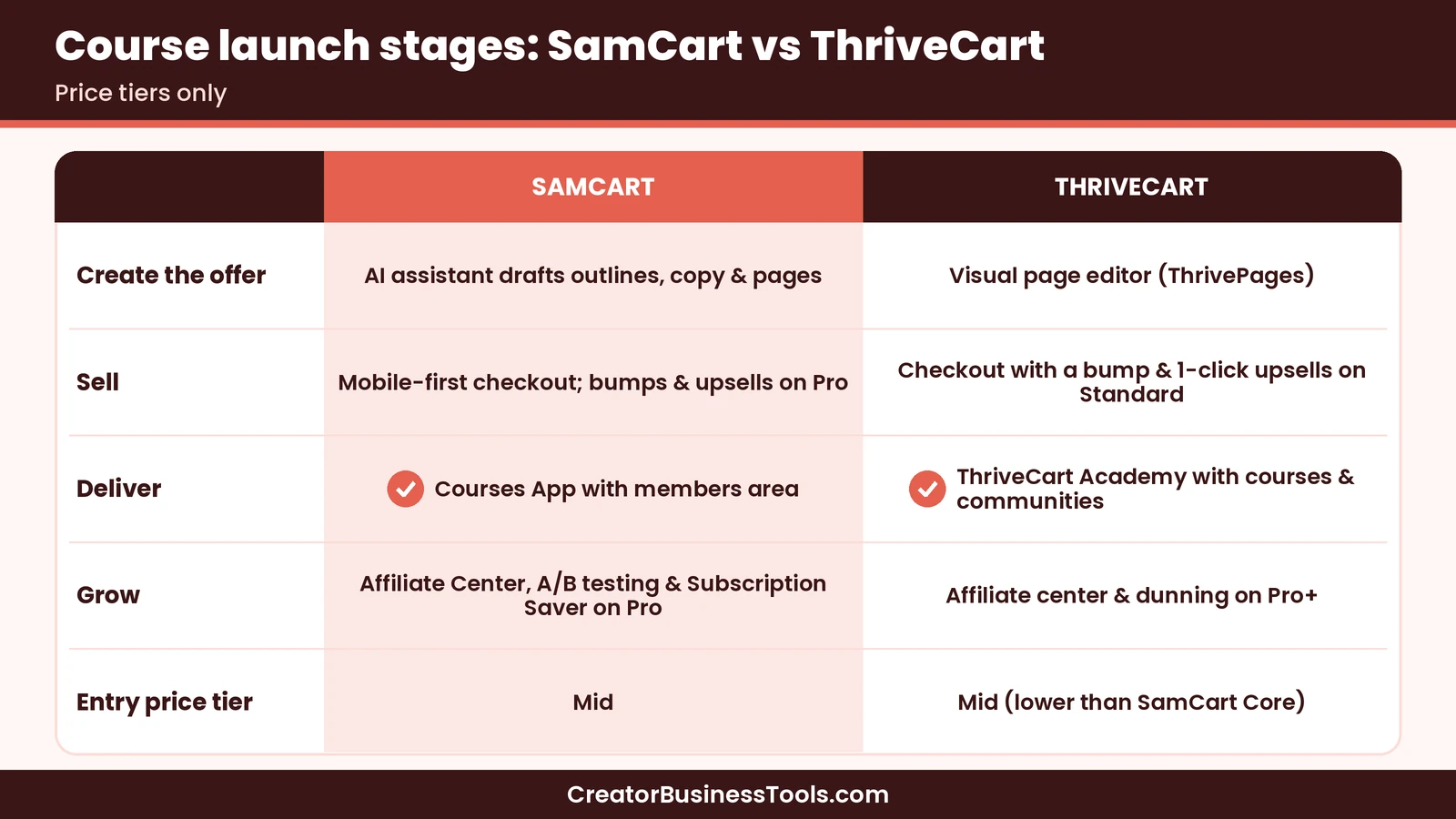
| Launch stage | SamCart | ThriveCart |
|---|---|---|
| Create the offer | AI assistant drafts outlines, copy and pages | Visual page editor (ThrivePages); no headline AI builder |
| Sell | Mobile-first checkout; bumps and upsells on Pro | Checkout with a bump and 1-click upsells on Standard |
| Deliver | Courses App with members area | ThriveCart Academy with courses and communities |
| Grow | Affiliate Center, A/B testing and Subscription Saver on Pro | Affiliate center and dunning on Pro+ |
| Entry price tier | $$ | $$ (lower than SamCart Core) |
Stage 1: Creating your offer
SamCart’s biggest difference is AI. If you’re staring at a blank sales page, its assistant can draft the copy, design the page and outline the course.
ThriveCart gives you a visual editor but expects you to bring the words. If you’re a confident writer, that matters less.
Stage 2: Selling
Both have strong checkouts and payment plans. The gap is in revenue tools. ThriveCart includes a bump offer and 1-click upsells on its entry plan. On SamCart, those are Pro features at a higher tier.
Stage 3: Delivering the course
Both host courses. ThriveCart Academy adds communities, which suits cohort courses with group discussion. SamCart’s Courses App keeps delivery simple inside one dashboard.
Stage 4: Growing
Both offer an affiliate center on their higher self-serve plan. SamCart Pro also includes 10 team seats, useful once you hire help.
Our take
- Want AI to help build your first launch: SamCart Core.
- Want bumps and upsells at the lowest tier: ThriveCart Standard.
- Running a community-based cohort course: ThriveCart.
- Scaling with a team and affiliates: SamCart Pro.
How SamCart fits different course creators
| Creator type | Recommended plan | Why |
|---|---|---|
| First-time course creator | Core | Pages, checkout, Courses App and AI help |
| Coach selling a program | Core | Payment options and a customer portal |
| Creator with a proven course | Pro | Bumps, upsells and A/B testing |
| Membership owner | Pro | Subscription Saver for failed payments |
| Creator with a team | Pro or Done For You | More seats, or a fully managed setup |
Is SamCart worth it?
SamCart is worth it if it replaces several tools for you: a page builder, a checkout and a course host. Bundling them reduces setup work and moving parts.
Its AI tools add value if writing sales copy slows you down. For many new creators, the hardest part of a launch is the sales page, not the course itself.
The Pro upgrade pays off when you have steady sales. A bump or upsell on every order adds revenue without needing more traffic, and the affiliate center lets others bring buyers to you.
It’s harder to justify if you only need a basic checkout, or if you want bumps and upsells on a tight budget. In that case, ThriveCart’s entry plan includes them at a lower tier.
SamCart pros and cons
Pros
- Fast, mobile-first checkout with many payment options
- AI assistant drafts copy, pages and digital products
- Courses App with a built-in members area
- Unlimited pages, products and checkouts on both plans
- No added fees on SamPay
- Customer portal reduces support requests
Cons - Order bumps, upsells and A/B testing need Pro
- Higher entry tier than ThriveCart
- No built-in email marketing
- AI usage and video hosting are limited on Core
Best for: course creators who want a polished checkout, a members area and AI help building their offer.
Not ideal for: creators on a tight budget who need bumps and upsells from day one, or anyone wanting built-in email marketing.
Before you sign up: check SamCart’s pricing page for current plan prices, annual savings, trial terms and payment processing rates. Features and limits can change.
Common course launch mistakes
Building before validating. Confirm that people want your course before you record every lesson.
Publishing AI copy unedited. AI drafts are a starting point. Add your stories, voice and specific results.
Too many offers at once. One course, one bump and one upsell are plenty for a first launch.
Skipping the welcome email. Connect your email tool so new students know exactly where to start.
Not reviewing results. Check conversion and order value after each launch, then improve one thing.
SamCart setup checklist
Before your first launch, run through this list:
- Product created with a clear name and price
- Payment plan option set, if you offer one
- Course lessons uploaded and in the right order
- Sales page edited in your own voice
- Email tool connected and tagging buyers
- Cart abandonment emails turned on
- Tracking pixels added
- Test purchase completed on mobile and desktop
How to get started with SamCart
- Start a free trial on Core from SamCart’s pricing page. See SamCart’s plans
- Create your first product and upload your course into the Courses App.
- Use the AI assistant to draft your sales page, then edit it.
- Connect your payment option and email tool.
- Run a test purchase to check the student experience.
- Launch, then upgrade to Pro when you’re ready for bumps and upsells.
FAQ
How much does SamCart cost?
SamCart Core sits in a mid price tier, and Pro sits in a higher tier. Done For You is custom priced. Annual billing saves money. Check SamCart’s pricing page for current prices.
Does SamCart have a free trial?
Yes, SamCart offers a free trial. Check its pricing page for the current terms.
Can I host courses on SamCart?
Yes. The Courses App includes a built-in members area, so you don’t need a separate course platform.
Does SamCart charge fees on sales?
SamCart says there are no added fees on SamPay. Payment processing fees still apply.
Is SamCart better than ThriveCart?
It depends on your priority. SamCart leads on AI tools. ThriveCart includes bumps and upsells at a lower entry tier and adds communities to its course platform.
Does SamCart include email marketing?
No. SamCart connects with email tools through its integrations, and Pro adds Zapier, API access and webhooks.
Can I sell physical products too?
Yes. SamCart supports digital products, courses, services, subscriptions and physical goods.
Can I use my own domain?
Yes. SamCart supports custom domains so you can sell under your own brand.
Can I offer payment plans?
Yes. SamCart supports payment plans and subscriptions, and its checkout also accepts buy now, pay later options.
Can I add team members?
Core includes 1 team seat and Pro includes 10. Done For You includes unlimited seats.
Can I change plans later?
SamCart’s FAQ covers upgrading and downgrading. Check its pricing page for the current details.
Bottom line
SamCart is a strong choice for course creators who want selling and delivery in one place. Its AI assistant helps you get from idea to sales page faster.
Start on Core for your first launch, then move to Pro when order bumps, upsells and affiliates can grow your revenue. See SamCart’s plans
If you want those revenue tools at a lower tier, read our ThriveCart review.
Contact us to request a copy.
Pricing and features from official vendor pages, last checked October 22, 2026.