
Guides / Sales funnels & all-in-one
ThriveCart Review: Checkout, Funnels and Course Hosting for Creators (vs SamCart & Kajabi)
Disclosure: This post contains affiliate links. If you buy through them, we may earn a commission at no extra cost to you. How we make money.
If you sell courses, ebooks, templates or coaching, your checkout page does a lot of heavy lifting. It needs to look trustworthy, take payments smoothly, and ideally raise your order value with upsells.
ThriveCart is a checkout and sales platform built for exactly that. It adds sales funnels, subscription tools and a course and community platform called ThriveCart Academy.
This ThriveCart review explains what’s included, how its pricing works, who it suits, and how it compares with SamCart and Kajabi.
It’s based on ThriveCart’s official pricing and product pages, not on hands-on testing.
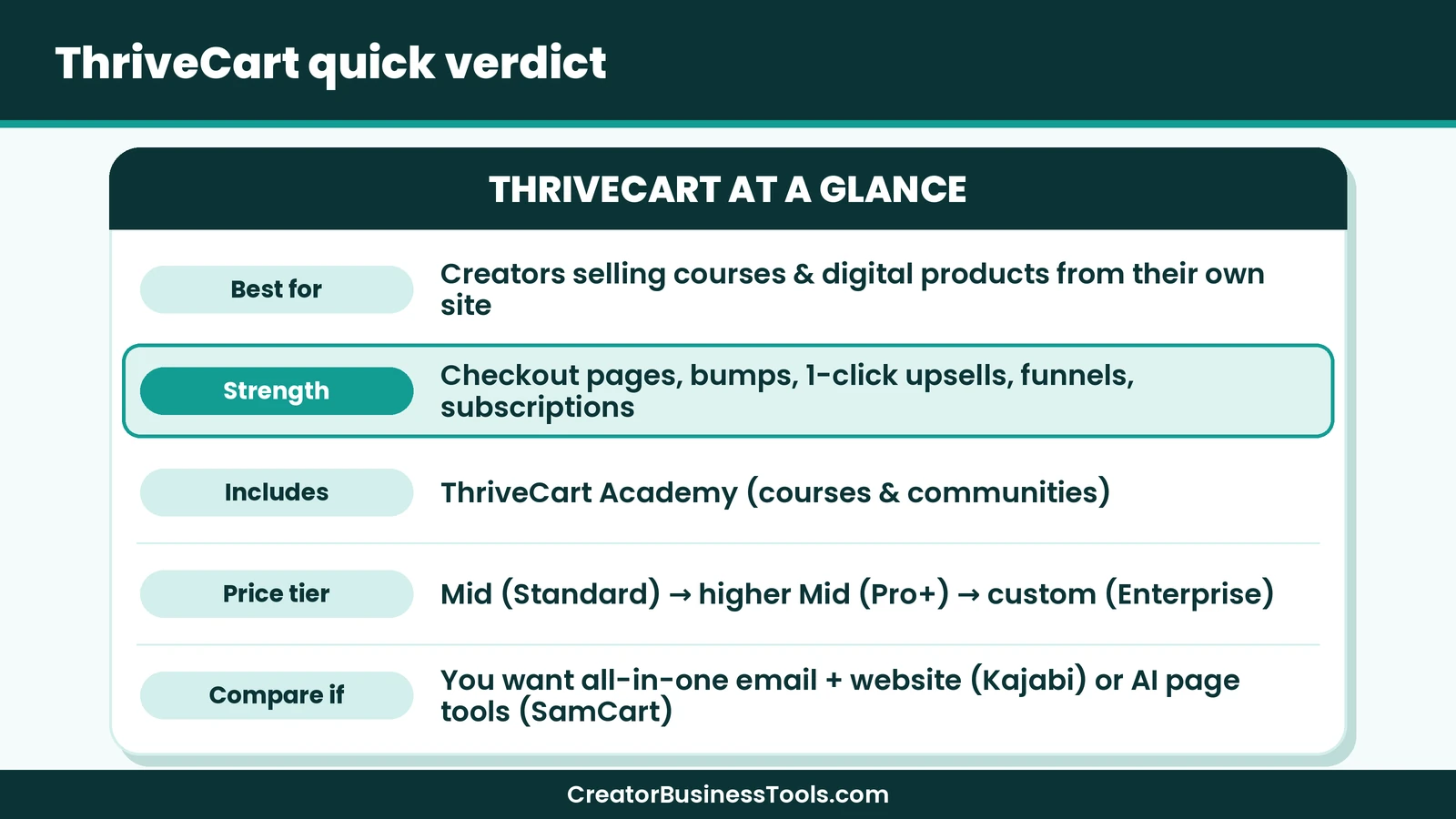
Quick verdict: ThriveCart is a strong fit for creators who already have a website or audience and want a powerful checkout, upsells and funnels, with course hosting included. Its monthly plans sit in a lower price tier than Kajabi’s. If you want an all-in-one platform with email, website and community in one place, Kajabi covers more. If you want a checkout-first tool with built-in AI, SamCart is the closest alternative.
Quick picks
- Best checkout tool for most creators: ThriveCart Standard. See ThriveCart’s plans
- Best for scaling with affiliates and advanced subscriptions: ThriveCart Pro+.
- Best checkout-first alternative with AI tools: SamCart.
- Best all-in-one platform with email and website: Kajabi.
What is ThriveCart?
ThriveCart is a sales platform for online businesses. Its core is the checkout: customizable cart and checkout pages that you can link to or embed from your own site.
Around that core, ThriveCart adds tools to raise order value and keep subscribers:
| Area | What ThriveCart offers |
|---|---|
| Checkout | Customized cart and checkout pages, checkout in 100+ countries |
| Order value | Bump offers, 1-click upsells and downsells, A/B split testing |
| Funnels | Unlimited products and funnels, funnel automation, ThrivePages visual editor |
| Payments | Buy now pay later, split pay, pay-as-you-like and subscription billing |
| Recovery | Abandoned cart recovery and retention offers before subscribers cancel |
| Taxes | Sales tax automation |
| Courses | ThriveCart Academy for courses and communities |
| Integrations | 100+ direct integrations, including Stripe, PayPal, ConvertKit, Mailchimp, ActiveCampaign and Zapier |
There’s no ThriveCart platform fee on sales, per ThriveCart, so ThriveCart doesn’t take a cut of your revenue. Payment processors such as Stripe and PayPal still charge their own fees, and some features may carry separate charges, so check the details for the tools you use.
Who ThriveCart is for
- Course creators who want checkout, upsells and course hosting together.
- Digital product sellers who sell ebooks, templates or presets from their own site.
- Coaches who sell packages, payment plans or subscriptions.
- Membership owners who need subscription tools like retention offers and dunning.
- Creators with affiliates who want to run their own affiliate program (Pro+).
It’s less of a fit if you have no website, email list or audience yet and want one platform to build all of that from scratch.
ThriveCart pricing explained
ThriveCart offers monthly and annual subscription plans: Standard, Pro+ and a custom Enterprise plan. Annual billing costs less per month than paying monthly. ThriveCart has also offered a lifetime option; check its site for current availability and price if that interests you.
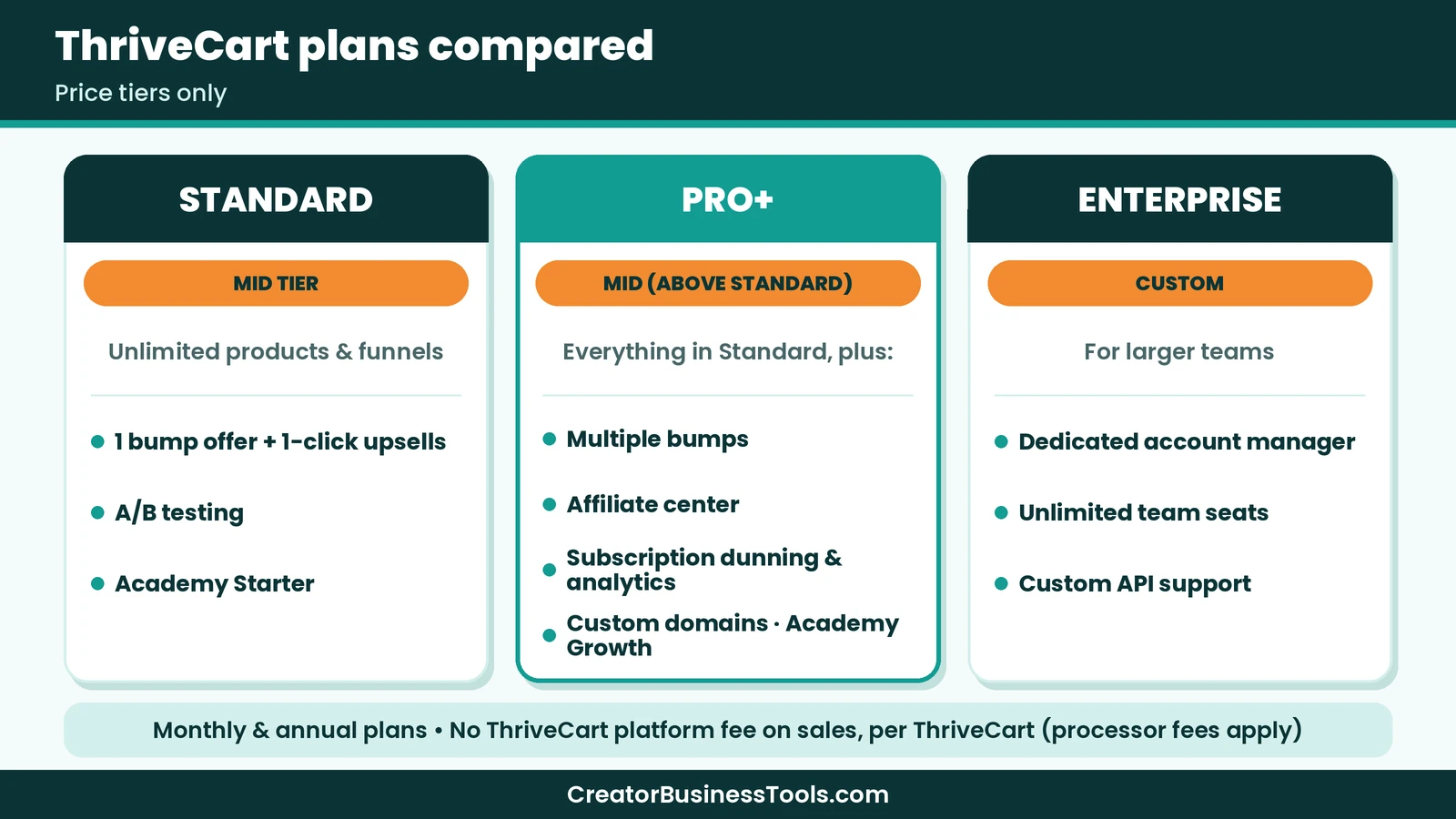
| Plan | Price tier | Highlights | ThriveCart Academy |
|---|---|---|---|
| Standard | $$ | Checkout pages, 1 bump offer, 1-click upsells and downsells, A/B testing, cart recovery, sales tax automation | Starter: unlimited courses and students, communities up to a set member limit, video storage |
| Pro+ | $$ (higher than Standard) | Adds multiple bumps, crypto payments, coupon analytics, UTM tracking, subscription upgrades and dunning, affiliate center, custom branding and domains, multi-user permissions | Growth: larger community limits, unlimited communities, custom domains, more video storage |
| Enterprise | Custom | Adds dedicated account manager, unlimited team seats, custom API support | Scale: unlimited members and storage, white-label branding |
Standard or Pro+?
Standard covers what most creators need to start: a branded checkout, a bump offer, upsells, funnels and course hosting.
Pro+ adds tools that matter as you grow. The affiliate center lets you recruit partners to sell for you. Subscription dunning and analytics help reduce failed payments and churn. Multiple bump offers and custom domains help with larger product lines.
A practical approach is to start on Standard and move to Pro+ when you need affiliates or advanced subscription tools.
What about the lifetime option?
ThriveCart has offered a lifetime option alongside its monthly and annual plans. Check its site for current availability and price before you decide.
Key features in more detail
Checkout pages
ThriveCart’s checkouts come in modal, single-page and multi-step layouts that you can match to your brand. Customers can pay with cards and, depending on your processor, options like buy now, pay later.
Bump offers and 1-click upsells
A bump offer is a small add-on at checkout, such as a workbook alongside a course. A 1-click upsell appears after purchase and lets buyers add another product without re-entering card details.
These are among the most effective ways to raise average order value, and they’re built in.
Funnels and ThrivePages
ThriveCart lets you build unlimited products and funnels. ThrivePages is its visual editor for creating your sales funnel in one place, without extra tools.
Subscriptions
ThriveCart includes subscription billing, plus newer tools: Anchored Subscriptions charge every subscriber on the same day of the month, Subscription Bumps add a subscription at checkout, and Retention Offers show an offer before a subscriber cancels.
ThriveCart Academy
Every plan includes a ThriveCart Academy plan for courses and communities. Standard includes the Academy Starter plan, with unlimited courses and students, quizzes, certificates, gamification and video hosting with a storage cap. Pro+ includes the Growth plan, which raises community limits, allows unlimited communities, adds custom domains and increases video storage. Enterprise includes the Scale plan with unlimited members and white-label branding.
Integrations
ThriveCart connects directly with email tools like ConvertKit, Mailchimp, ActiveCampaign and AWeber, plus Zapier and webhooks for anything else.
How to sell digital products from your own website
Add social proof on your sales page — add testimonials with Senja.
Prefer a free plan instead of a one-time fee? See Payhip.
One of ThriveCart’s biggest strengths is letting you sell from your own site instead of a marketplace. Here’s a simple setup.
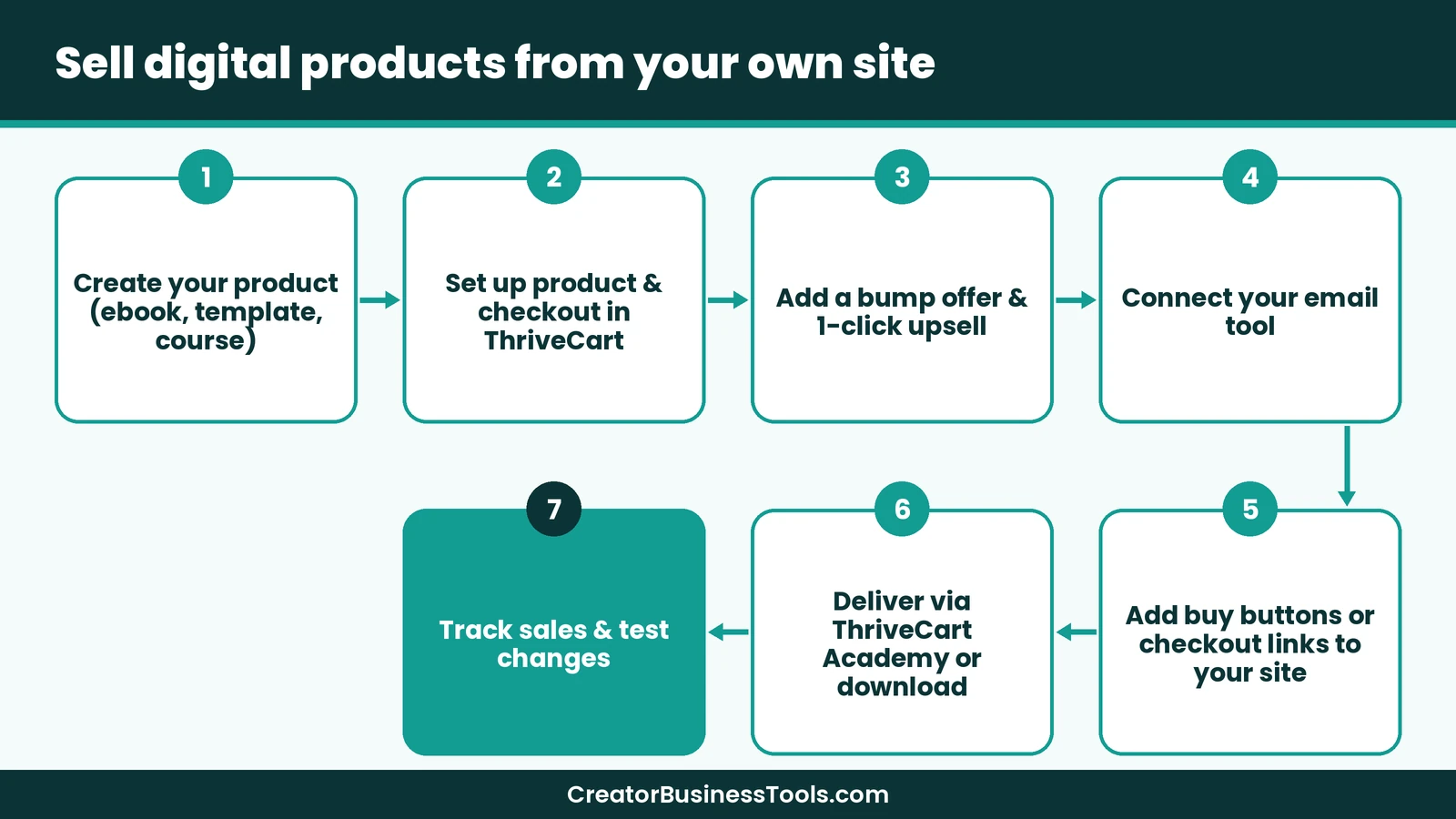
Step 1: Create your product. Finish your ebook, template pack or course. Write a short, clear description of who it’s for and what they’ll get.
Step 2: Set up the product and checkout. Add the product in ThriveCart, choose a one-time price, payment plan or subscription, and design your checkout page.
Step 3: Add a bump and an upsell. Offer a small, related add-on at checkout, and a bigger upgrade after purchase. Keep both relevant to the main product.
Step 4: Connect your email tool. Send buyers to your email list automatically, so you can deliver onboarding emails and future offers.
Step 5: Add checkout links to your site. Place buy buttons on your sales page, blog posts and resource page. ThriveCart checkouts can be linked to or embedded.
Step 6: Deliver the product. Host courses in ThriveCart Academy, or deliver downloads after purchase.
Step 7: Track and test. Watch conversion rates and use A/B testing to try different headlines, prices or bump offers.
Pricing your digital product
Your checkout can only convert a price that makes sense to buyers. A few simple rules help:
- Anchor with value. Explain the outcome your product delivers, not just its page count or video hours.
- Offer a payment plan for higher-priced courses. ThriveCart supports split pay, which can make a larger purchase easier.
- Use bumps for small, related add-ons and upsells for bigger upgrades.
- Test one change at a time. A/B test price points or bump offers, then keep the winner.
Why sell from your own site?
- You control the customer relationship, including email addresses.
- You avoid marketplace fees and competition from similar products on the same page.
- You own your branding, from sales page to checkout.
- You can build funnels with upsells and follow-ups that marketplaces don’t allow.
The trade-off is traffic. Marketplaces bring buyers to you. On your own site, you need to bring traffic through SEO, Pinterest, social media or email.
A quick hypothetical example
Imagine a hypothetical designer who sells a Canva template pack. Their blog posts about Instagram content link to a sales page with a ThriveCart checkout.
At checkout, a bump offer adds a caption guide. After purchase, a 1-click upsell offers a larger template bundle. Every buyer joins their email list for the next launch.
Keep in mind: ThriveCart doesn’t build your audience or website for you. You’ll need a site or landing page, an email tool and a traffic source. Payment processor fees from Stripe or PayPal apply to your sales.
How ThriveCart fits different creators
| Creator type | What they sell | How ThriveCart helps |
|---|---|---|
| Course creator | Online courses and cohorts | Checkout, payment plans and course hosting in Academy |
| Template or ebook seller | Digital downloads | Branded checkout, bump offers and upsells |
| Coach | Packages and payment plans | Split pay, subscriptions and retention offers |
| Membership owner | Monthly access | Anchored subscriptions, dunning and analytics (Pro+) |
| Creator with partners | Products promoted by affiliates | Affiliate center and automated payouts (Pro+) |
Imagine a hypothetical fitness coach who sells a 6-week program. They offer pay-in-full or a payment plan at checkout, add a meal-plan bump, and host the program in ThriveCart Academy. Later, they invite past clients to promote the program through the affiliate center on Pro+.
Is ThriveCart worth it?
For creators who already have traffic, ThriveCart can pay for itself through higher order values. A well-chosen bump offer or upsell adds revenue to sales you’d make anyway.
The value is strongest when you’d otherwise pay for several tools: a checkout tool, a course host and a funnel builder. ThriveCart bundles all three.
It’s weaker value if you have no audience yet. In that case, your first priority is traffic and an email list, and an all-in-one platform or a simple storefront may be a better first step.
ThriveCart vs SamCart vs Kajabi
These three platforms all help creators sell online, but they’re built around different centers. ThriveCart and SamCart are checkout-first. Kajabi is an all-in-one platform.
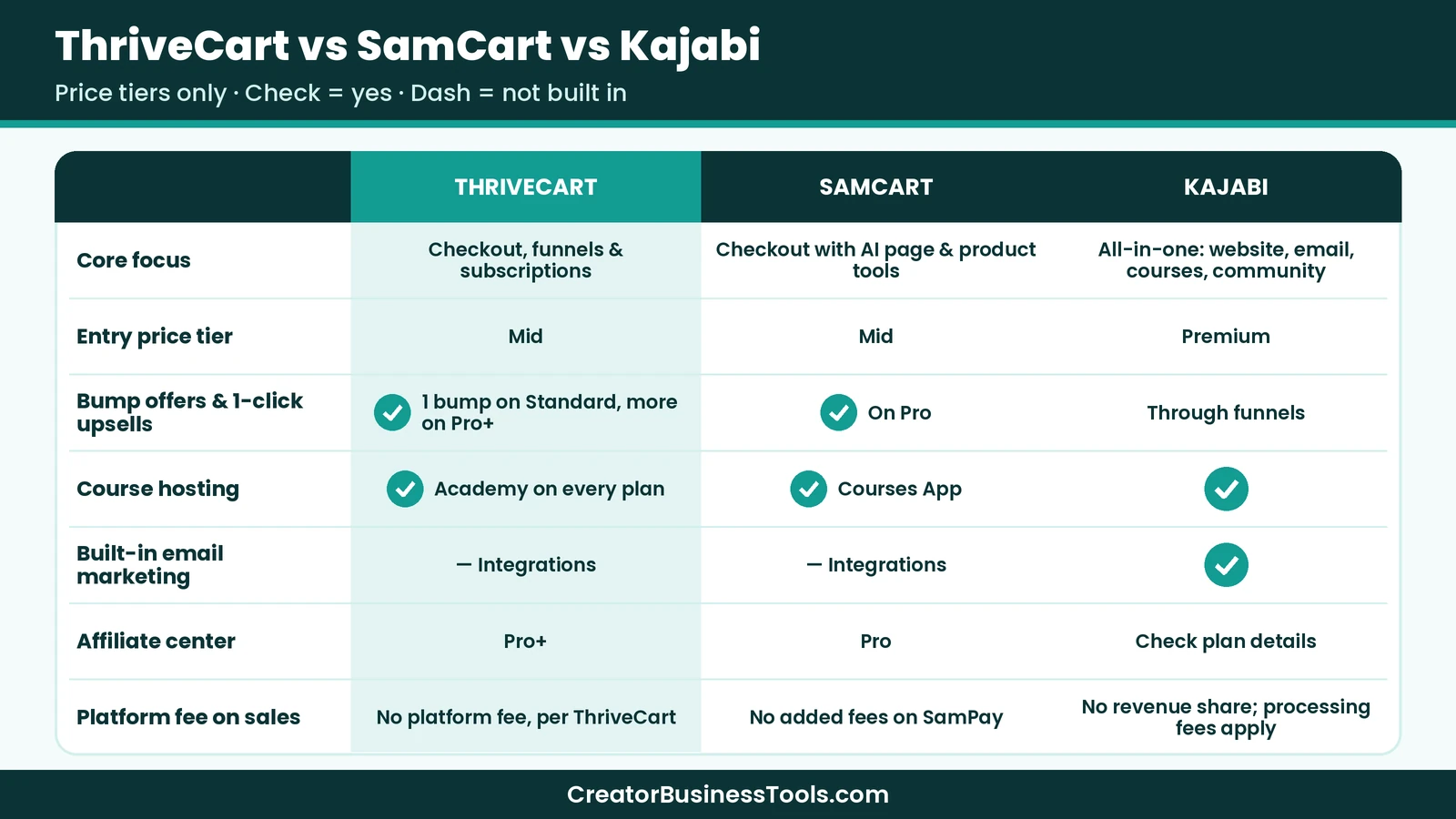
| ThriveCart | SamCart | Kajabi | |
|---|---|---|---|
| Core focus | Checkout, funnels and subscriptions | Checkout with AI-powered page and product tools | All-in-one: website, email, courses, community |
| Entry price tier | $$ | $$ | $$$ |
| Bump offers and 1-click upsells | Yes (1 bump on Standard, multiple on Pro+) | On Pro | Through funnels |
| Course hosting | ThriveCart Academy on every plan | Courses App | Yes |
| Built-in email marketing | Integrations | Integrations | Yes |
| Affiliate center | Pro+ | Pro | Check plan details |
| Platform fee on sales | No ThriveCart platform fee on sales, per ThriveCart (processor fees apply) | No added fees on SamPay | No revenue share; processing fees apply |
| Team seats | Multi-user permissions on Pro+ | 1 on Core, 10 on Pro | Admin users by plan |
When SamCart is the better pick
SamCart is the closest alternative to ThriveCart. Its Core plan includes unlimited pages, products and checkouts, an AI assistant, a courses app and cart abandonment.
Its AI tools can draft sales copy and design pages and digital products. If you want AI help building your offers, SamCart leans into that more. Note that upsells, order bumps and A/B testing are on SamCart’s Pro plan, which sits in a higher price tier. Our SamCart review walks through its plans and AI tools in detail.
When Kajabi is the better pick
Kajabi is an all-in-one platform. It includes your website, email marketing, landing pages, funnels, courses and community.
If you don’t have a website or email tool yet and want everything in one place, Kajabi can replace several tools. Its plans start at a higher price tier, but Kajabi argues that it replaces several separate subscriptions.
When ThriveCart is the better pick
Choose ThriveCart if you already have a website and email tool and want a powerful checkout with bumps, upsells and subscription tools at a lower monthly tier than Kajabi.
Its bundled course and community platform also means you may not need a separate course host.
Our take
- Already have a site and list, want a strong checkout: ThriveCart.
- Want AI help building pages and products: SamCart.
- Starting from scratch and want everything in one place: Kajabi.
ThriveCart pros and cons
Pros
- Powerful checkout with bump offers, 1-click upsells and A/B testing
- Unlimited products and funnels
- Course and community hosting through ThriveCart Academy on every plan
- Advanced subscription tools, including retention offers
- Lower monthly price tier than Kajabi
- 100+ direct integrations
Cons - No built-in email marketing; you’ll need a separate tool
- Doesn’t build your website or audience
- Affiliate center and advanced subscription tools need Pro+
- Lifetime option availability and price need checking on its site
Best for: creators with a website or audience who sell courses, digital products, coaching or memberships and want a strong checkout and funnels.
Not ideal for: beginners who need a website, email marketing and checkout all in one platform.
Common checkout mistakes to avoid
Too many fields. Ask only for what you need. Every extra field can lose buyers.
Irrelevant bump offers. A bump should feel like a natural add-on, not a random extra.
No email connection. If buyers don’t land on your email list, you lose your best future customers.
Ignoring mobile. Many buyers check out on phones. Preview your checkout on a small screen.
Surprising buyers with the total. Show taxes, payment-plan totals and subscription terms clearly before the buyer clicks pay. Clear terms build trust and reduce refund requests.
Never testing. Small changes to headlines, prices or bumps can make a real difference. Use A/B testing.
How to get started with ThriveCart
- Choose a plan based on whether you need affiliates and advanced subscriptions. See ThriveCart’s plans
- Connect Stripe or PayPal.
- Create your first product and checkout page.
- Add a bump offer and an upsell.
- Connect your email tool.
- Link the checkout from your website and start sending traffic.
FAQ
How much does ThriveCart cost?
ThriveCart offers monthly and annual plans: Standard, Pro+ and custom Enterprise. Standard sits in a lower monthly tier than Kajabi’s plans. Check ThriveCart’s site for current prices.
Does ThriveCart still offer a lifetime deal?
ThriveCart has offered a lifetime option. Check its site for current availability and price.
Does ThriveCart take a cut of my sales?
There’s no ThriveCart platform fee on sales, per ThriveCart. Your payment processor, such as Stripe or PayPal, still charges its own fees.
Can I host courses on ThriveCart?
Yes. Every plan includes a ThriveCart Academy plan with unlimited courses and students, plus communities.
Is ThriveCart better than SamCart?
Both are checkout-first. ThriveCart includes bumps and upsells on its entry plan and bundles course hosting. SamCart leans into AI tools for building pages and products.
Is ThriveCart better than Kajabi?
They serve different needs. ThriveCart focuses on checkout and funnels at a lower monthly tier. Kajabi is all-in-one, with website and email built in, at a higher tier.
Does ThriveCart work with my email tool?
ThriveCart lists 100+ direct integrations, including ConvertKit, Mailchimp, ActiveCampaign, AWeber and GetResponse, plus Zapier and webhooks for other tools.
Do I need a website to use ThriveCart?
It helps. ThriveCart provides checkout pages and funnel pages, but most creators link to it from their own website, blog or email list.
Bottom line
ThriveCart is a strong checkout and sales platform for creators who sell from their own site. Bumps, upsells, funnels, subscription tools and course hosting come together in one product.
If you already have an audience and want to raise the value of every sale, ThriveCart is worth a close look. See ThriveCart’s plans
Starting from zero? Compare Kajabi’s all-in-one plans first.
Contact us to request a copy.
Pricing and features from official vendor pages, last checked October 21, 2026.