
Sellfy vs Shopify: Which Store Fits Digital Creators?
Disclosure: This post contains affiliate links. If you buy through them, we may earn a commission at no extra cost to you. How we make money.
If you sell digital products, you’ve probably narrowed your options to a creator-focused store or a full eCommerce platform. Sellfy vs Shopify is one of the clearest versions of that choice.
Sellfy is built for creators who sell downloads, subscriptions and print-on-demand merch. Shopify is a general eCommerce platform that can sell almost anything, including digital products through a free app. This guide compares Sellfy vs Shopify on pricing structure, fees, digital product features, marketing tools and growth, so you can pick the one that fits what you sell.
It’s based on each company’s official pricing and product pages, not on hands-on tests or invented case studies.
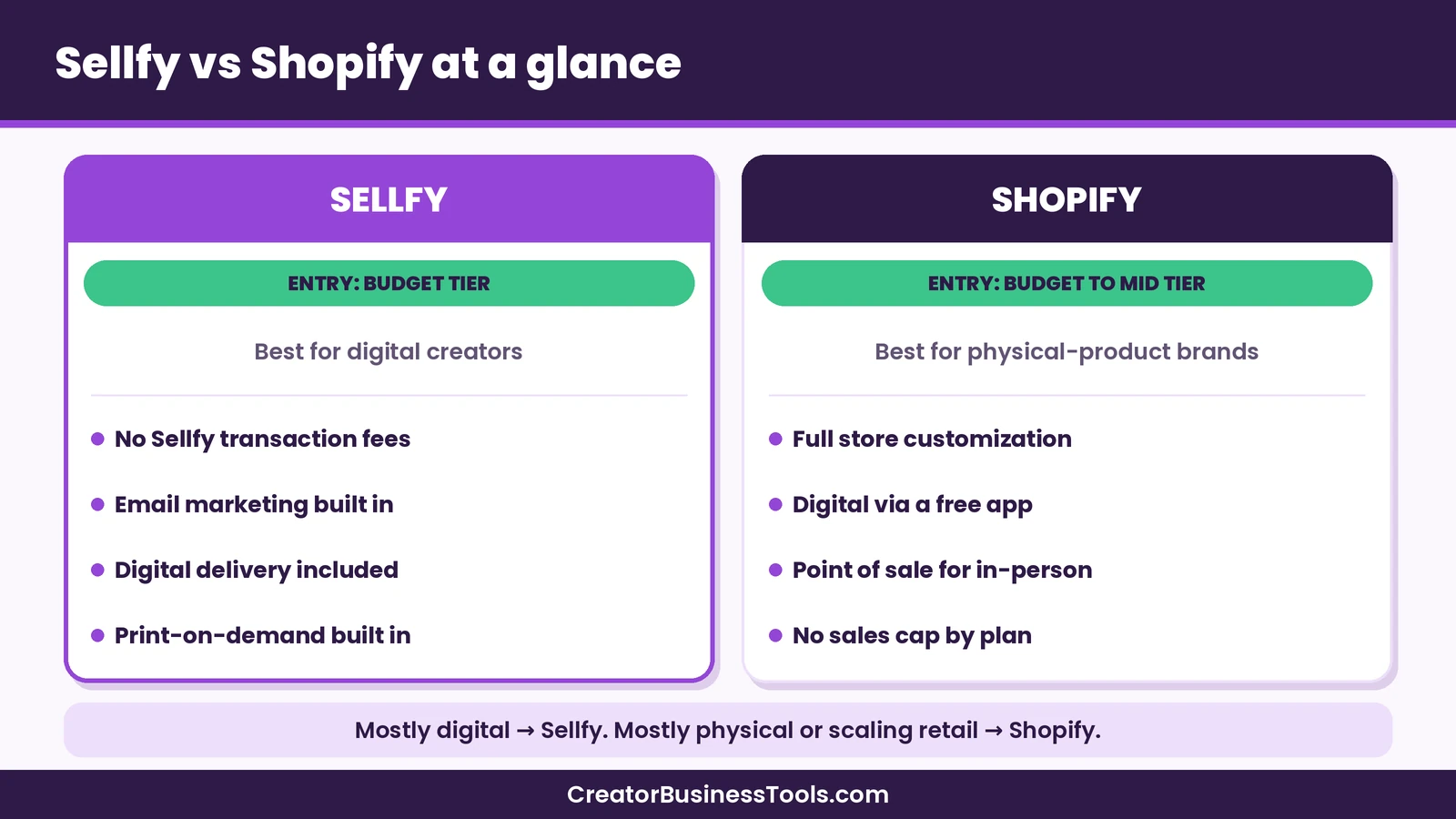
Quick verdict: For creators who mainly sell digital products, Sellfy is the simpler and more affordable choice, with no Sellfy transaction fees, built-in email marketing and digital delivery included. Shopify is the stronger choice if you sell lots of physical products, want a fully customized store, or plan to grow into a larger eCommerce business with in-person sales.
Quick picks
- Best for selling digital downloads and subscriptions: Sellfy. Sellfy
- Best for print-on-demand merch without inventory: Sellfy, which includes print-on-demand fulfillment.
- Best for a large catalog of physical products: Shopify.
- Best for selling online and in person: Shopify, with its point-of-sale tools.
- Best if you don’t want a separate website: Sellfy, which gives you a store page plus buy buttons you can embed.
Sellfy vs Shopify at a glance
| Sellfy | Shopify | |
|---|---|---|
| Built for | Creators selling digital, subscription and POD products | Businesses selling physical and digital products |
| Entry price tier | Budget | Budget to mid-range |
| Platform transaction fee | None from Sellfy | Extra fee if you don’t use Shopify Payments |
| Digital delivery | Built in | Free Digital Products app |
| Email marketing | Built in, with monthly credits | Separate Shopify apps or tools |
| Print-on-demand | Built in | Through third-party apps |
| Store customization | Simple themes and settings | Deep theme and app ecosystem |
| Sales limits | Yearly sales cap per plan | No sales cap by plan |
| Point of sale | No | Yes |
What is Sellfy?
Sellfy is an all-in-one store for creators. You can sell digital downloads, subscriptions, physical products and print-on-demand merch from one storefront. It’s designed so you can open a store without building a full website, and you can also add buy buttons or embedded products to an existing site.
Key features from Sellfy’s official pages:
- Unlimited products on every plan.
- Digital delivery with download limits and PDF stamping to discourage sharing.
- Built-in email marketing with monthly email credits.
- Print-on-demand with multiple fulfillment centers.
- Instant payouts to your PayPal or Stripe account.
- Upsells, cart abandonment emails and an affiliate program on Business and above.
- Integrations such as Google Analytics, Zapier and webhooks.
For a full breakdown, see our Sellfy review.
What is Shopify?
Shopify is a hosted eCommerce platform for businesses of every size. It includes hosting, SSL and a free myshopify.com domain, plus themes, a checkout, and a large app store. You can sell online, through social channels, with a Buy Button on another site, and in person with Shopify POS. Shopify also includes Sidekick, its AI assistant.
Shopify doesn’t focus on digital products by default. To sell downloads, you install Shopify’s free Digital Products app. It lets you attach files or links to products, set access limits such as download limits, deliver files by email, and offer digital and physical versions of the same product.
Sellfy vs Shopify pricing
| Plan level | Sellfy | Shopify |
|---|---|---|
| Entry | Starter (budget) | Basic (budget to mid-range) |
| Middle | Business (mid-range) | Grow (mid-range) |
| Top | Premium (premium tier) | Advanced (premium) |
| What scales the price | Your yearly sales | Features, staff and lower card rates |
How the price scales
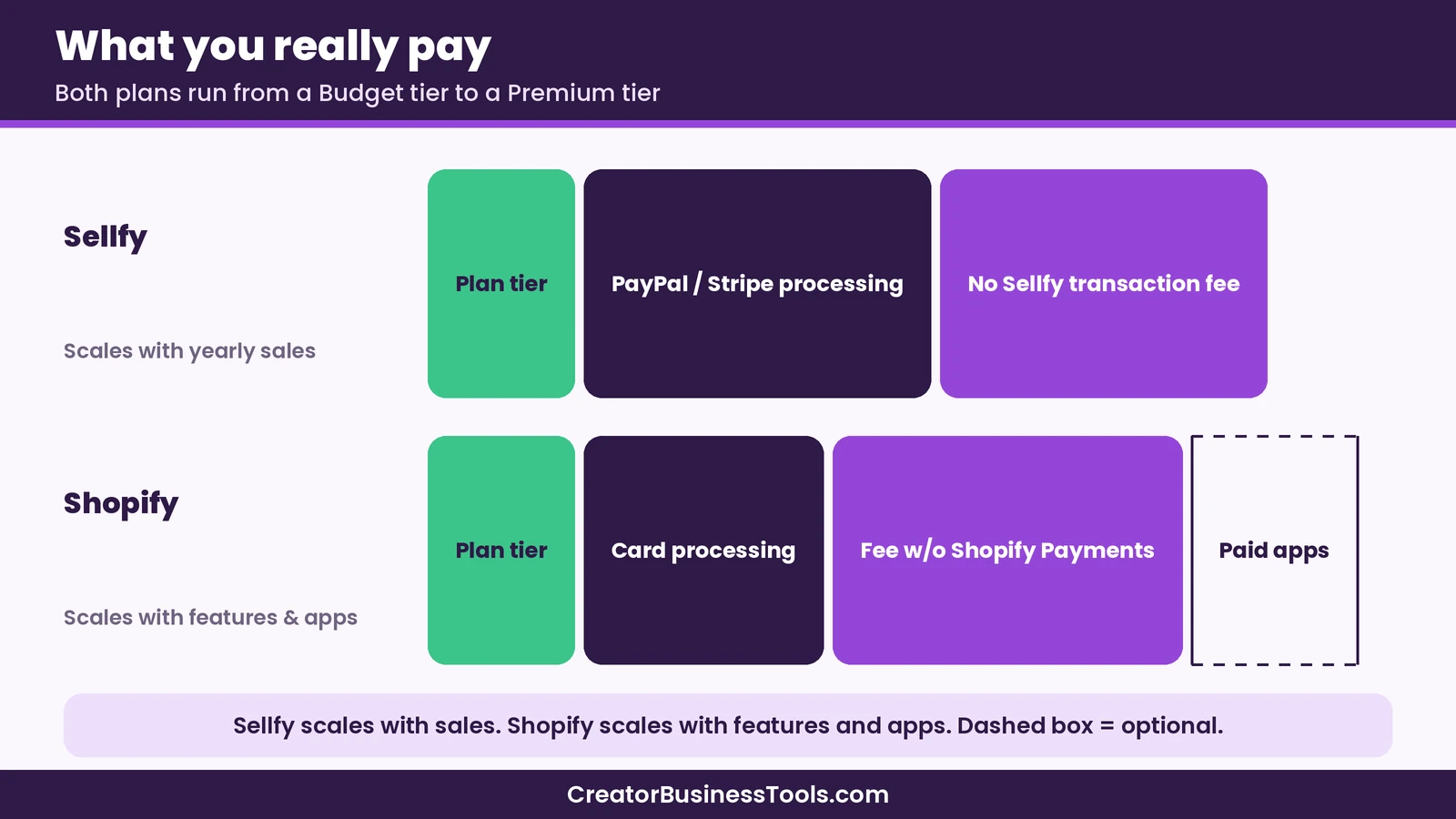
Sellfy and Shopify scale in different ways, and that’s the most important pricing difference in Sellfy vs Shopify.
- Sellfy scales with your sales. Each Sellfy plan has a yearly sales limit. When your store grows past it, you move up a plan. If you go over the limit and don’t upgrade, Sellfy says it charges an overage fee on extra sales.
- Shopify scales with features. Higher Shopify plans add features and lower online card rates, but they aren’t tied to a sales cap.
- Payment fees apply to both. With Sellfy, you pay standard PayPal or Stripe processing fees, but no Sellfy transaction fee. With Shopify, you pay card processing fees, and Shopify adds an extra transaction fee if you use a third-party payment provider instead of Shopify Payments. Shopify Payments is available only in certain countries, so check whether it’s available where you live.
- Apps add up on Shopify. Many Shopify stores add paid apps for email, reviews or upsells, so the total cost can be higher than the plan alone.
Check both official pricing pages before you decide, because plans and limits can change. See Sellfy’s plans
Feature comparison
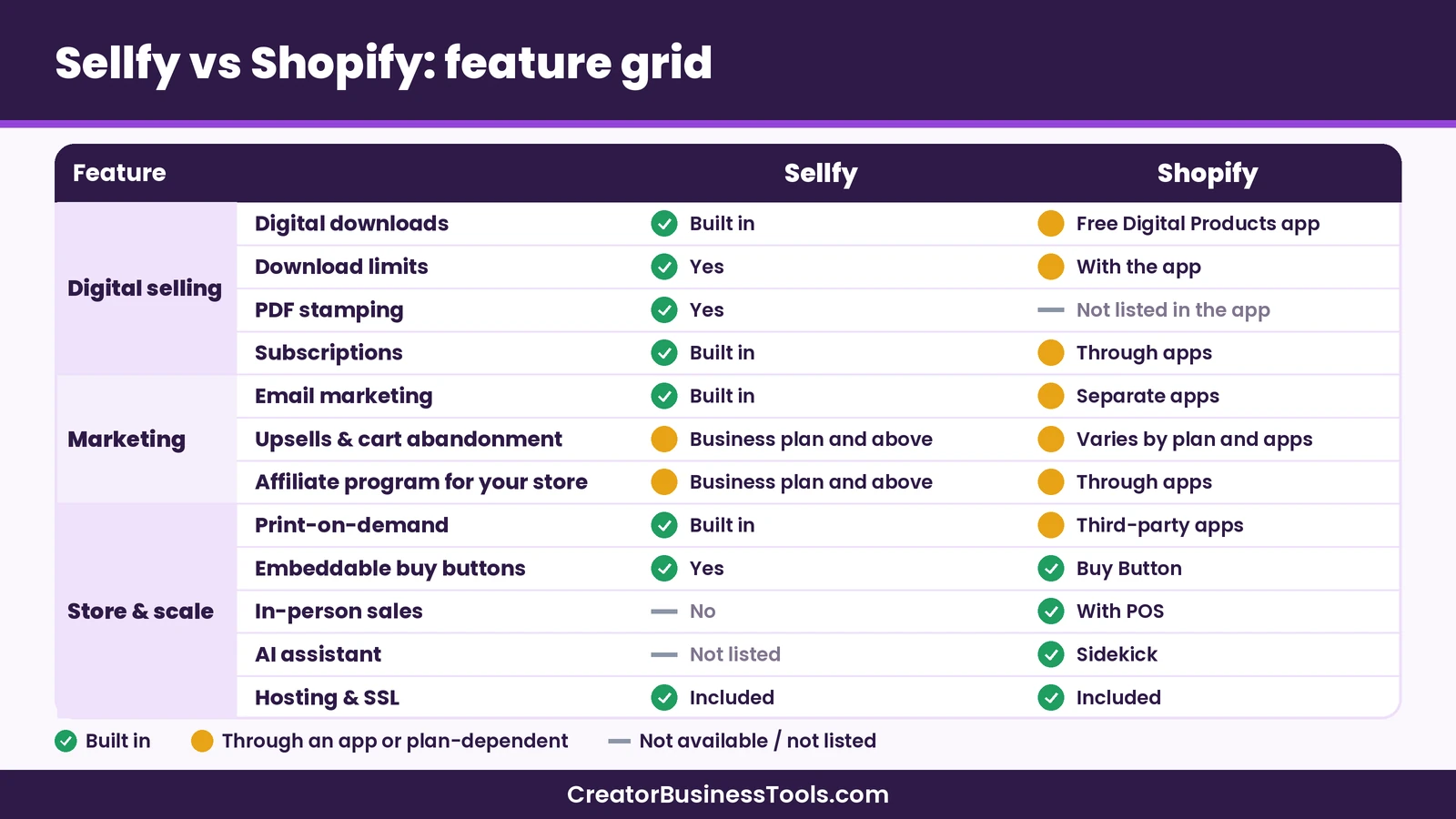
| Feature | Sellfy | Shopify |
|---|---|---|
| Digital downloads | Built in | Free Digital Products app |
| Download limits | Yes | Yes, with the app |
| PDF stamping | Yes | Not listed in the app |
| Subscriptions | Built in | Through apps |
| Print-on-demand | Built in | Through third-party apps |
| Email marketing | Built in | Separate apps |
| Upsells and cart abandonment | Business and above | Varies by plan and apps |
| Affiliate program for your store | Business and above | Through apps |
| Embeddable buy buttons | Yes | Yes, with Buy Button |
| In-person sales | No | Yes, with POS |
| AI assistant | Not listed | Sidekick |
| Hosting and SSL | Included | Included |
When Sellfy wins
- You sell mostly digital products. Digital delivery, download limits and PDF stamping are built in, so there’s nothing extra to install.
- You want email marketing in the same place. Sellfy includes email credits, so you can send product updates and launches without another tool.
- You want print-on-demand without managing inventory. Sellfy’s POD lets you add merch next to your digital products.
- You prefer a simple setup. A Sellfy store can be ready with fewer decisions about themes and apps.
- You don’t want a separate website. A Sellfy store page, plus embeddable buy buttons, can be enough.
When Shopify wins
- You sell lots of physical products. Shopify’s inventory, shipping and checkout tools are built for this.
- You want full design control. Shopify’s themes and app store give you far more customization options.
- You sell in person. Shopify POS connects online and in-person sales.
- You expect high sales volume. Shopify plans aren’t tied to sales caps, so growth doesn’t force an upgrade by itself.
- You need specialized features. Shopify’s app ecosystem covers nearly every eCommerce niche.
Digital product delivery compared
Delivery is where the Sellfy vs Shopify gap is clearest for creators.
Sellfy treats digital products as a core feature. You upload a file, set a price, and Sellfy handles delivery after checkout. Each plan sets a file size limit, and each product can hold multiple files, which helps if you sell bundles such as a template pack with a guide. Download limits restrict how many times a buyer can download a file, and PDF stamping adds buyer details to PDF files, which can discourage casual sharing.
Shopify handles delivery through its free Digital Products app. The app attaches files or links to a product, sends them by email after purchase, and lets you set access limits. It also supports digital and physical variants of the same product, so you could sell a printed workbook and a downloadable version on one product page. That flexibility is useful for brands that mix formats.
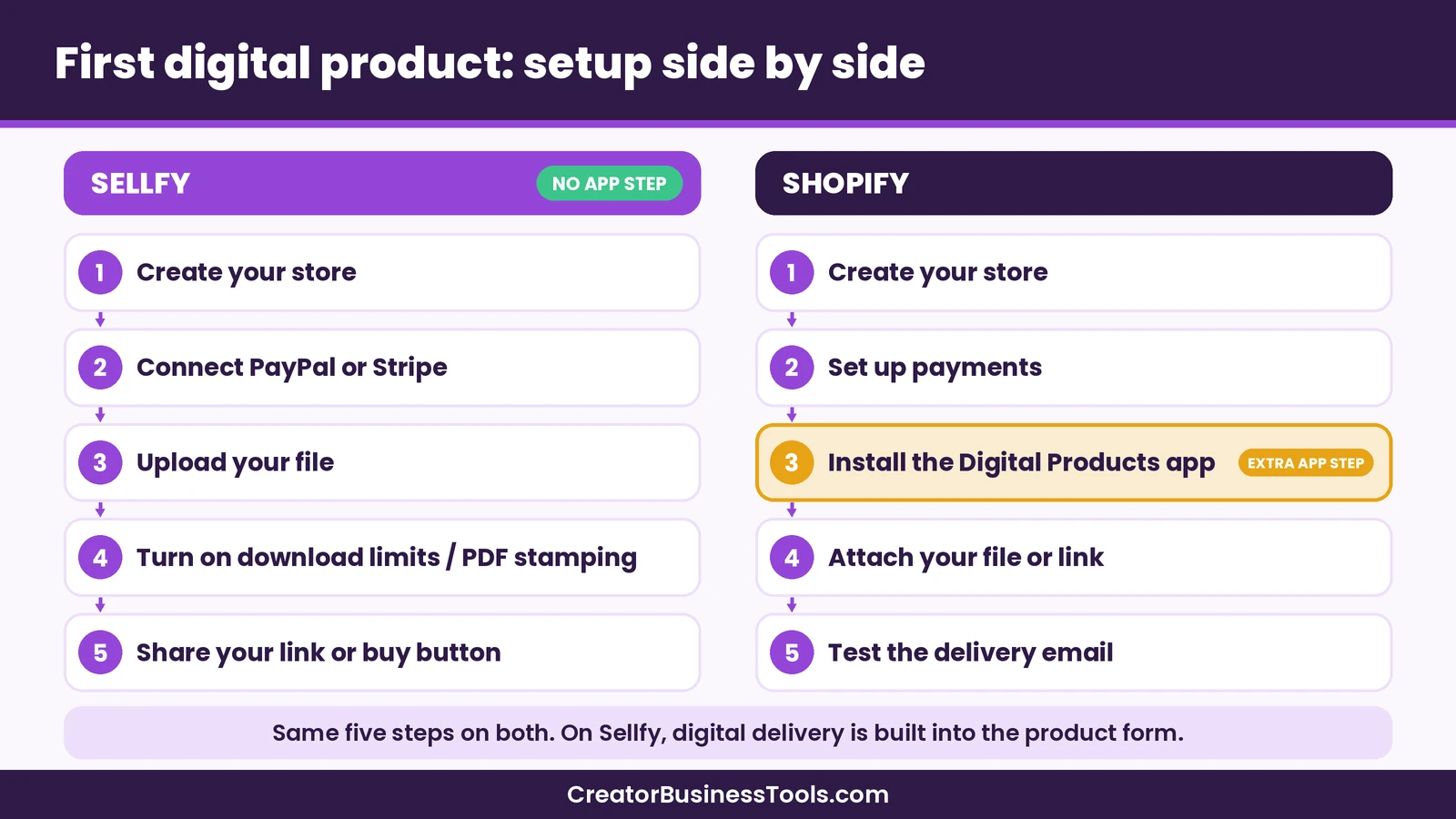
The practical difference is setup. On Sellfy, digital delivery is part of the product form. On Shopify, it’s one more app to install and configure, though it comes from Shopify itself.
Marketing tools compared
Both platforms help you sell, but they take different approaches.
Sellfy includes email marketing inside the store, with a monthly allowance of email credits that grows with each plan. You can send newsletters and product announcements to your customers without connecting another service. On the Business plan and above, you also get upsells at checkout, cart abandonment emails, and an affiliate program so your fans can promote your products.
Shopify gives you a strong checkout and many marketing channels, and it relies on its app store for much of the rest. Email marketing, advanced upsells, loyalty programs and affiliate tools are usually added through apps, some free and some paid. That means more choice, but also more decisions and potentially more monthly costs.
If you want one place for products and email, Sellfy is simpler. If you want to pick specialized tools for each marketing task, Shopify gives you more room.
Store design and customization
Sellfy offers a clean storefront with customization options for colors, layout and branding. It’s designed to look professional quickly without design work. On Business and above, you can remove Sellfy branding from your store. You can also skip the storefront entirely and embed products or buy buttons on a site you already run, which keeps buyers on your own pages.
Shopify is built for customization. You can choose from many themes, edit layouts with its theme editor, and add sections and apps to change how your store works. For brands that want a distinctive store with complex navigation, collections and filters, Shopify offers far more control.
Payments and payouts
Sellfy connects to PayPal and Stripe and sends payments to your account instantly, according to Sellfy’s pricing page. Because the money goes straight to your payment provider, you don’t wait for a platform payout schedule.
Shopify uses Shopify Payments where it’s available, which lets you accept cards without a separate payment provider and reduces the extra transaction fee to zero. In countries where Shopify Payments isn’t offered, you’ll connect a third-party provider and pay Shopify’s additional transaction fee on top of processing fees. This is worth checking early, because it changes the cost comparison.
Pros and cons
Sellfy
Pros
- Built for digital creators, with delivery tools included.
- No Sellfy transaction fees.
- Email marketing and print-on-demand built in.
- Simple store setup with no website required.
Cons
- Yearly sales limits on each plan.
- Fewer customization options than Shopify.
- Upsells and the affiliate feature start on the Business plan.
Shopify
Pros
- Handles physical, digital and in-person sales.
- Large theme and app ecosystem.
- No sales caps tied to plans.
- Hosting, SSL and a free myshopify.com domain included.
Cons
- Digital selling needs an app.
- Paid apps can raise the total cost.
- An extra transaction fee applies without Shopify Payments.
Before you sign up: Check whether Shopify Payments is available in your country, since that affects Shopify’s fees. For Sellfy, compare your expected yearly sales with each plan’s limit. Review each platform’s refund and billing terms on its official site.
How to set up your first digital product
Whichever platform you pick, the first product follows a similar path.
On Sellfy:
- Create your store and choose a theme.
- Connect PayPal or Stripe to receive payouts.
- Add a digital product, upload the file and set a price.
- Turn on download limits or PDF stamping if you want them.
- Share your store link or embed a buy button on your site.
On Shopify:
- Create your store and pick a theme.
- Set up payments, ideally with Shopify Payments if it’s available to you.
- Install the free Digital Products app.
- Create a product and attach your file or link in the app.
- Set access limits and test the delivery email.
Who should use Sellfy or Shopify?
| You are… | Better fit | Why |
|---|---|---|
| A designer selling templates or printables | Sellfy | Digital delivery and PDF stamping built in |
| A musician or video creator selling downloads | Sellfy | Large file limits and simple storefront |
| A creator adding merch to digital products | Sellfy | Print-on-demand built in |
| A brand with a physical-product catalog | Shopify | Inventory, shipping and themes |
| A shop that also sells at markets or events | Shopify | Point of sale |
| A business planning to scale retail | Shopify | No plan sales caps and a large app store |
How to choose between Sellfy and Shopify
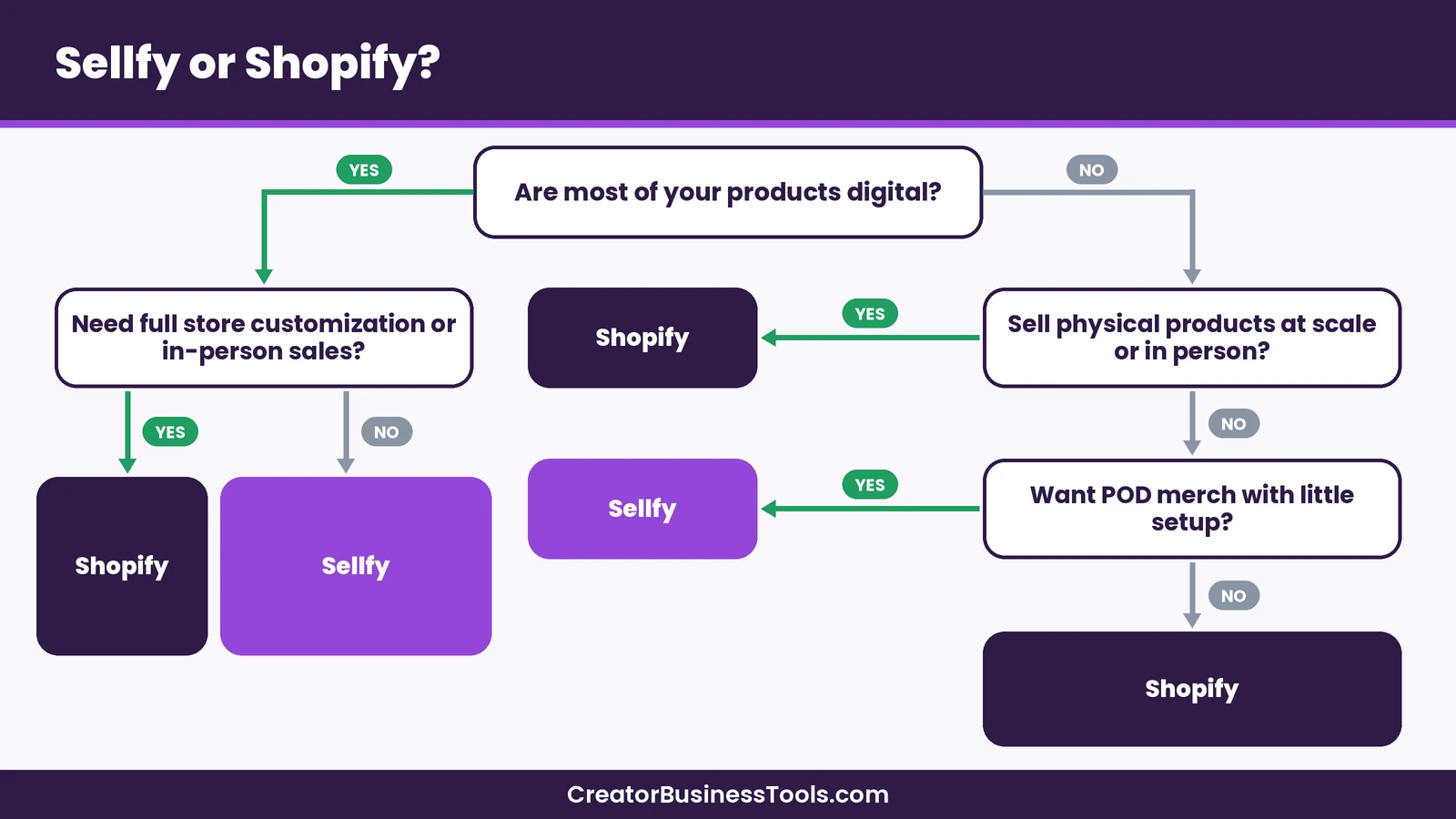
- Look at what you sell. Mostly digital points to Sellfy. Mostly physical points to Shopify.
- Estimate your yearly sales. Compare it with Sellfy’s plan limits.
- Check your payment options. Find out whether Shopify Payments works in your country.
- Count the extras. List the apps you’d need on Shopify for email, upsells or subscriptions.
- Think about the next stage. If you plan a big physical catalog or retail presence, Shopify may save a migration later.
A hypothetical example
Imagine a creator who sells planner printables and wants to add a mug and a tote bag with the same design. On Sellfy, they could sell the printables with PDF stamping and add the merch through print-on-demand from the same store. On Shopify, they would install the Digital Products app and a print-on-demand app. Both can work, but Sellfy needs fewer moving parts for this kind of shop.
Switching from one to the other
If you start on one platform and outgrow it, plan the move carefully:
- Export your product list and customer data where the platform allows it.
- Re-upload digital files and test delivery before announcing the change.
- Update your buy buttons and links on your website, social profiles and emails.
- Tell existing customers how to access past purchases.
Sellfy says its Premium plan includes a product migration service, which can help if you move to Sellfy with a large catalog.
Common mistakes
- Comparing only the plan price. Add payment fees and any apps you’ll need.
- Ignoring Sellfy’s sales limits. Choose a plan that fits your expected yearly sales.
- Assuming Shopify Payments is available. Check your country first.
- Overbuilding too early. A simple store can be enough until you have steady sales.
- Forgetting delivery tests. Buy your own product once to check the download email.
FAQ
Is Sellfy cheaper than Shopify?
For many digital creators, Sellfy’s entry plan sits in a lower tier than Shopify’s, and Sellfy includes digital delivery and email marketing. Shopify can cost more once you add apps.
Can Shopify sell digital products?
Yes. Shopify’s free Digital Products app lets you attach files or links to products and deliver them by email.
Does Sellfy charge transaction fees?
Sellfy says it charges no transaction fees. You still pay standard PayPal or Stripe processing fees, and an overage fee can apply if you pass your plan’s sales limit without upgrading.
Can I sell physical products on Sellfy?
Yes. Sellfy supports physical products and print-on-demand, though Shopify offers more tools for large physical catalogs.
Do I need a website to use Sellfy?
No. Sellfy gives you a store page, and you can also embed products or buy buttons on a site you already have.
Which is better for beginners?
For digital-first creators, Sellfy is usually simpler to set up. Shopify offers more options, which can mean more setup decisions. You might also compare checkout tools in our ThriveCart review and SamCart review.
Bottom line
In Sellfy vs Shopify, the right choice comes down to what you sell. If most of your products are digital, Sellfy is the simpler, creator-focused option, with digital delivery, email marketing and print-on-demand in one place and no Sellfy transaction fees. If you’re building a physical-product brand, want full customization or sell in person, Shopify is the more flexible platform.
Start with the products you sell today, and pick the platform that keeps your setup simple.
[Start your Sellfy store](https://sellfy.com/)Free checklist: Get our one-page “Launch Your First Digital Product” checklist covering pricing, delivery tests and promotion. Contact us to request a copy.
Pricing and features from official vendor pages, last checked October 24, 2026.