
Thrive Suite Review: Is the WordPress Toolkit Worth It?
Disclosure: This post contains affiliate links. If you buy through them, we may earn a commission at no extra cost to you. How we make money.
If you run a course, coaching business, or newsletter on WordPress, your plugin list probably keeps growing. A page builder, a form tool, a quiz plugin, a course plugin, a testimonial plugin.
Thrive Suite promises to replace that pile with one bundle built for conversions. This Thrive Suite review explains what’s inside, how pricing works, who it fits, and how its page builder, Thrive Architect, compares with Elementor.
It’s based on Thrive Themes’ official pricing and product pages, not on hands-on benchmarks.
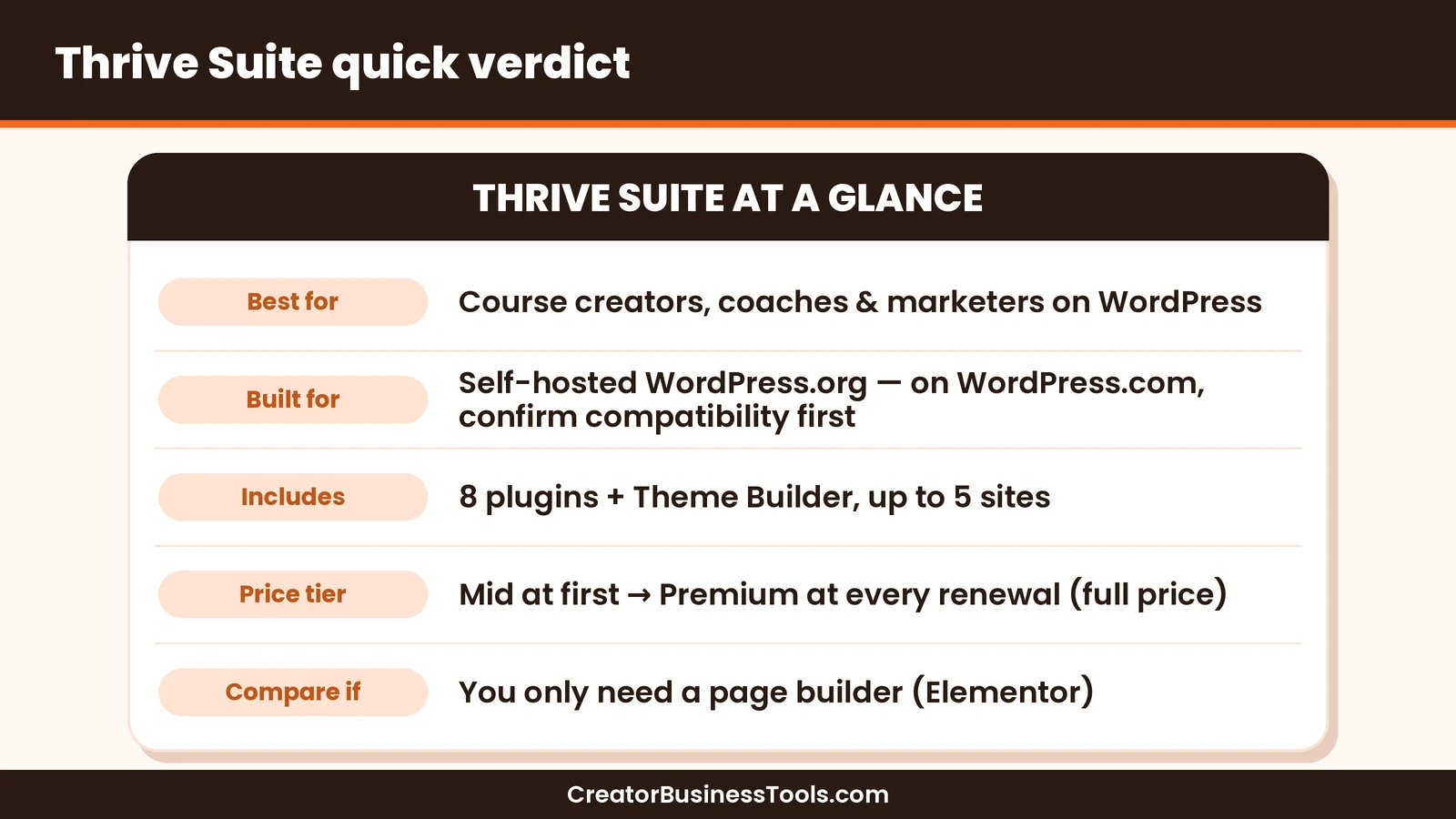
Quick verdict: Thrive Suite is a strong value for creators who sell courses, coaching, or digital products on a self-hosted WordPress.org site and want landing pages, opt-in forms, quizzes, A/B testing, and a course builder from one company. It’s built for self-hosted WordPress, so WordPress.com users should check Thrive’s current compatibility notes first. If you only need a flexible page builder, Elementor’s free plugin or a single Elementor Pro plan may be enough.
Quick picks
- Best all-in-one toolkit for WordPress creators: Thrive Suite. See Thrive Suite’s plans
- Best if you only want a conversion-focused page builder: Thrive Architect on its own.
- Best free page builder to start with: Elementor’s free plugin.
- Best for designers building many client sites: Elementor’s multi-site Pro plans.
Thrive Suite at a glance
| Item | What Thrive Suite offers |
|---|---|
| What it is | A bundle of conversion-focused WordPress plugins plus a theme builder |
| Platform | Built for self-hosted WordPress.org; WordPress.com users should check Thrive’s compatibility notes |
| What’s included | 8 plugins, Thrive Theme Builder, and premium templates |
| Sites | Up to 5 websites |
| Price tier | $$ for the first year, $$$ at renewal |
| Billing | Yearly or quarterly subscription, cancel anytime |
| Support | 24/5 support and Thrive University training |
| Guarantee | Money-back guarantee |
What is Thrive Suite?
Thrive Suite is a set of WordPress plugins from Thrive Themes, sold as one subscription. Every tool focuses on one goal: turning visitors into leads and customers.
Instead of stitching together plugins from different companies, you get tools designed to work together. A quiz can feed an opt-in form, a landing page can promote a course, and a countdown can support a launch.
It’s built for business owners who want control without hiring a developer.
That focus shapes everything. Templates are designed around actions like signing up, booking a call, or buying, rather than just looking good. If your website’s job is to grow an email list and sell an offer, that’s a useful starting point.
It also means the suite has a learning curve. There are many tools, and you’ll get the most from them if you add them one at a time as your business needs them.
Thrive Suite is built for self-hosted WordPress
This is the most important thing to know before you buy. Thrive Suite runs on self-hosted WordPress.org, where you install WordPress on your own hosting account.
Thrive’s own pages aren’t fully consistent about WordPress.com, so if your blog lives there, check Thrive’s current compatibility notes before you buy. Moving to self-hosted WordPress is the safe route.
If you’re choosing a host, our Kinsta vs WP Engine comparison covers two managed WordPress options.
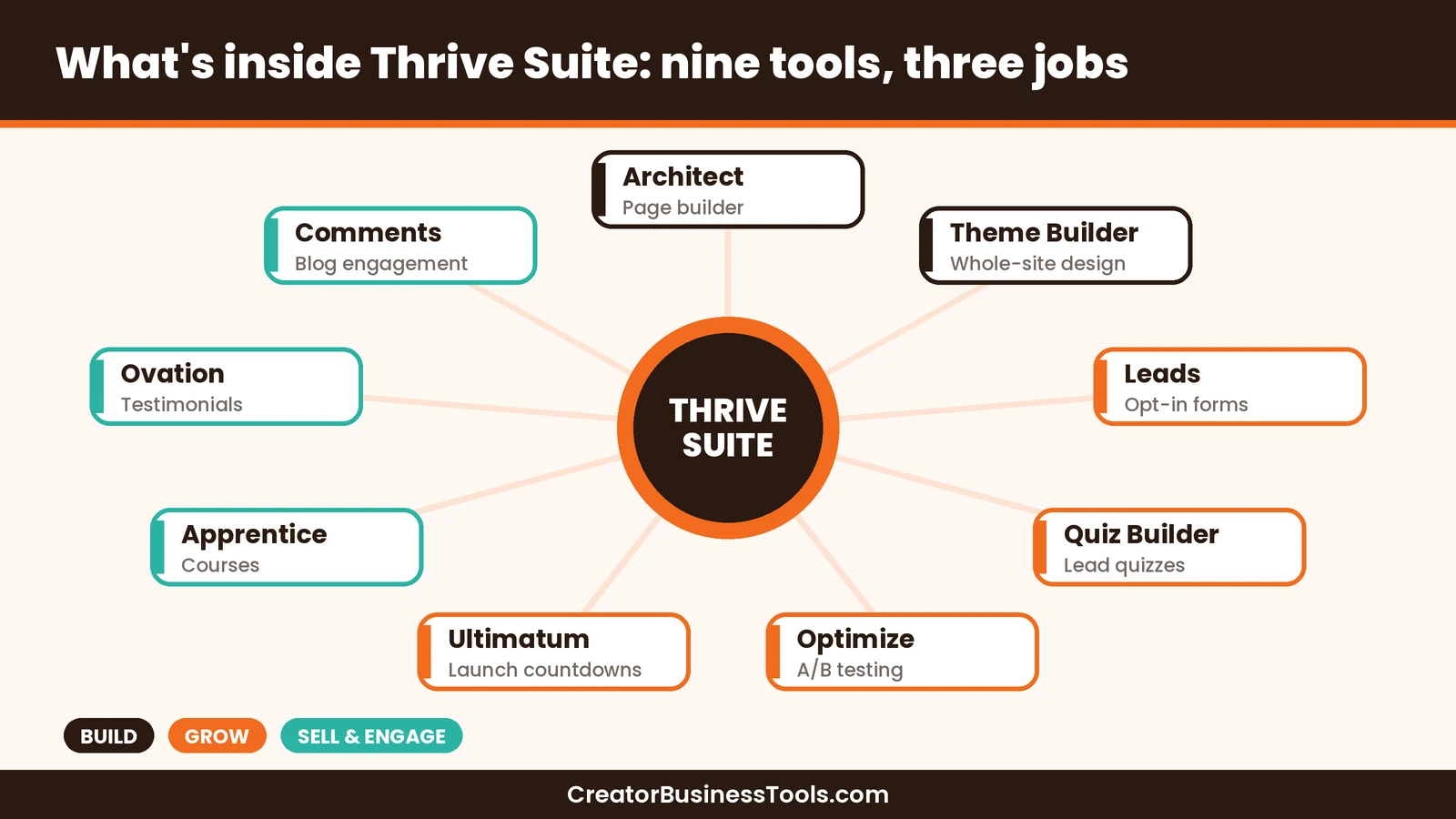
What’s inside Thrive Suite
| Tool | What it does | Creator use case |
|---|---|---|
| Thrive Architect | Drag-and-drop page builder | Sales pages, landing pages, and blog layouts |
| Thrive Theme Builder | Customize headers, footers, blog layouts, and templates | Build your whole site design |
| Thrive Leads | Opt-in forms and list-building | Grow your email list |
| Thrive Quiz Builder | Interactive quizzes | Turn quiz takers into segmented leads |
| Thrive Apprentice | Online course and membership builder | Sell and deliver courses |
| Thrive Optimize | A/B testing for landing pages | Test headlines and offers |
| Thrive Ultimatum | Countdown and scarcity campaigns | Launches and limited offers |
| Thrive Ovation | Testimonial collection and display | Social proof on sales pages |
| Thrive Comments | Upgraded comments | Engagement on blog posts |
Key features for creators
Landing pages and sales pages
Thrive Architect is the heart of the suite. Thrive says it includes hundreds of conversion-focused templates and a visual drag-and-drop editor.
It includes elements like forms, testimonials, calls to action, and countdown timers, plus conditional display to personalize content.
List building
Thrive Leads handles opt-in forms, so you can grow your email list without a separate form tool. Thrive lists integrations among its features, so you can connect forms to your email marketing service.
If you’re still choosing an email platform, see our guide to email marketing for course creators.
Quizzes
Thrive Quiz Builder lets you create quizzes that capture leads and help you understand what your audience needs. For coaches, a quiz is a natural way to start a conversation.
Courses and memberships
Thrive Apprentice lets you build and sell online courses on your own site. That keeps your students, content, and branding under your control.
A/B testing
Thrive Optimize adds split testing to your landing pages. You can test headlines, layouts, and offers to see which version converts better.
Launch tools and social proof
Thrive Ultimatum creates countdown campaigns for launches. Thrive Ovation collects and displays testimonials.
Thrive Suite pricing explained
Thrive Suite is a subscription, not a one-time purchase. You can pay yearly or quarterly, and you can change plans or cancel anytime.
| Option | Price tier | What you get | Best for |
|---|---|---|---|
| Thrive Suite, yearly (first year) | $$ | All 8 plugins, Theme Builder, up to 5 sites | Creators ready to commit |
| Thrive Suite, yearly (renewal) | $$$ | Same as above, at the full price | Ongoing use |
| Thrive Suite, quarterly | Similar to the full yearly price over a year | Same bundle, smaller payments | Testing cash flow |
| Thrive Architect only | $$ | Page builder for 1 site | Page building only |
How the price works
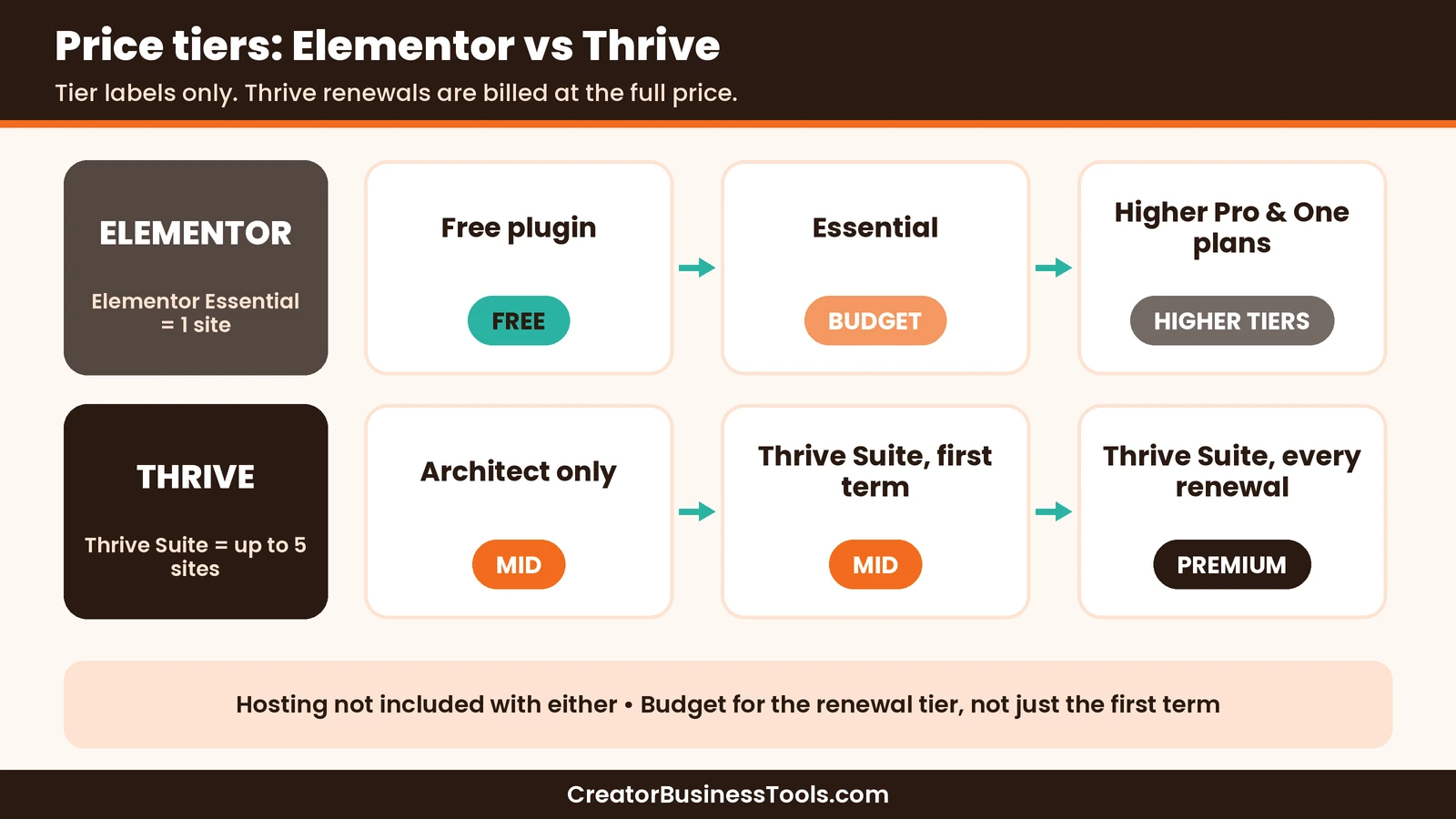
- The first year is cheaper. Thrive shows a special introductory price on the yearly plan.
- Renewals are at full price. Thrive states that all annual renewals are at the full price, so budget for the higher amount.
- Quarterly spreads the cost. Over a full year, it adds up to roughly the regular yearly price.
- One subscription covers up to 5 sites. That’s useful if you run a main site plus a course or niche site.
- There’s a money-back guarantee. Check Thrive’s terms for the exact conditions.
What happens if you stop paying?
Thrive says what you’ve built keeps working if you don’t renew. Your pages and forms stay live.
However, support, updates, and premium templates need an active license. Thrive’s Architect page also says you can’t create or edit content with Thrive Architect after your subscription expires.
If you restart later, you’ll pay the current price.
Thrive Architect vs Elementor
Elementor is the page builder most WordPress users compare with Thrive Architect. Both are visual, drag-and-drop builders, but they’re aimed at slightly different people.
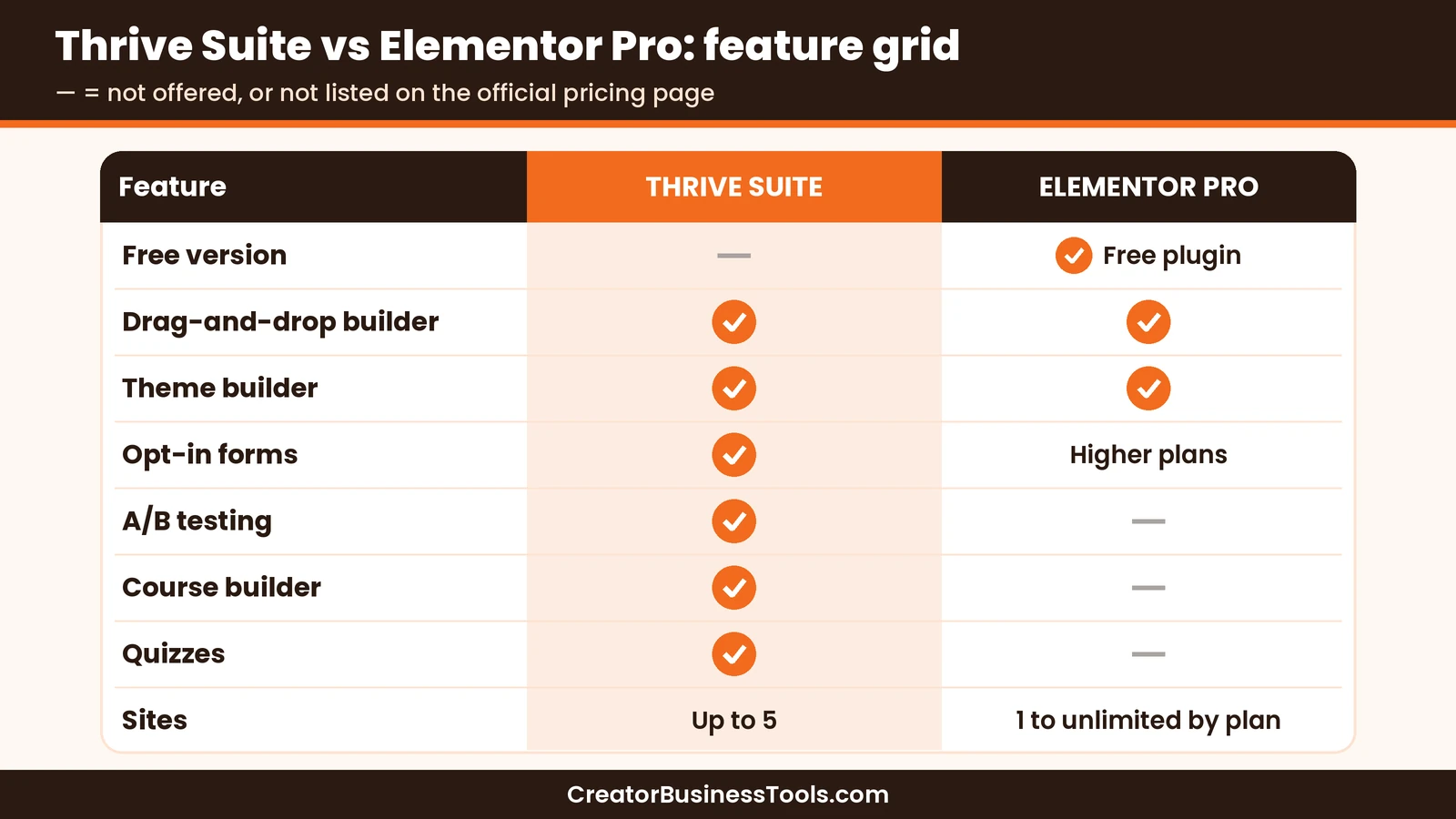
| Feature | Thrive Architect (in Thrive Suite) | Elementor |
|---|---|---|
| Free version | No | Yes, a free editor plugin |
| Entry paid tier | $$ (Architect only) | $ (Essential, 1 site) |
| Focus | Conversions for marketers and creators | General website design |
| Theme building | With Thrive Theme Builder (in the suite) | Theme Builder on Pro plans |
| Forms and popups | Thrive Leads in the suite | Form builder on all Pro plans; form submissions and popup builder from Advanced Solo up |
| A/B testing | Thrive Optimize in the suite | Not listed on its pricing page |
| Courses and quizzes | Thrive Apprentice and Quiz Builder in the suite | Not listed on its pricing page |
| Multi-site options | Up to 5 sites with Thrive Suite | Plans from 1 site up to unlimited |
| Hosting included | No | No (Elementor Host is a separate service) |
When Thrive Architect wins
Thrive wins when your website is a marketing machine. If you need landing pages, opt-in forms, quizzes, a course platform, and A/B testing, the suite covers them in one subscription.
That can mean fewer plugins from different vendors to manage and update.
When Elementor wins
Elementor wins on flexibility and entry cost. Its free plugin lets you start without paying, and its Pro plans scale from a single site up to unlimited sites for agencies.
It’s a strong choice if your main need is design, or if you build many client sites.
Elementor’s higher plans, called One, also bundle extras such as AI tools, image optimization, and accessibility features.
The bottom line on this matchup
Pick Elementor if you need a page builder. Pick Thrive Suite if you need a page builder plus the tools to capture leads and sell courses.
Thrive Architect alone vs the full suite
Thrive sells Thrive Architect on its own as a single-site yearly subscription. So should you buy just the builder or the whole suite?
| If you need… | Choose |
|---|---|
| A conversion-focused page builder for one site | Thrive Architect only |
| Landing pages plus split testing on one site | Thrive Architect and Thrive Optimize bundle |
| Full theme control, opt-ins, quizzes, and courses | Thrive Suite |
| Tools for more than one site | Thrive Suite, which covers up to 5 |
Thrive’s own FAQ makes the same point. Architect alone makes sense for a single site that only needs a visual builder. The suite makes sense once you want to customize your theme, build your list, sell courses, or run launches.
One more detail: Thrive Architect can’t customize headers, footers, or blog layouts by itself. That’s the job of Thrive Theme Builder, which comes with the suite.
Thrive Suite review: pros and cons
| Pros | Cons |
|---|---|
| Many marketing plugins in one subscription | Built for self-hosted WordPress.org; WordPress.com support needs checking |
| Built specifically for conversions | Renewals cost more than the introductory year |
| Includes a course builder and quizzes | No free version |
| A/B testing included | Editing with Architect stops if you don’t renew |
| Covers up to 5 sites | Hosting is not included |
| Money-back guarantee | Many tools to learn at once |
Keep in mind: Budget for the renewal price, not just the first year.
Best for: course creators, coaches, and marketers on self-hosted WordPress who want lead generation and course tools in one place.
Not ideal for: WordPress.com users who haven’t confirmed compatibility, people who only need a simple website, and agencies building many client sites.
Before you buy
- Thrive Suite is built for self-hosted WordPress.org. On WordPress.com, check Thrive’s current compatibility notes first.
- Hosting is separate. Choose a reliable WordPress host first.
- Renewals are at the full price, so plan for the higher amount after the first year.
- If you stop paying, you can’t keep editing with Thrive Architect.
- Prices and plans change. Check Thrive’s pricing page before you buy.
How to set up Thrive Suite
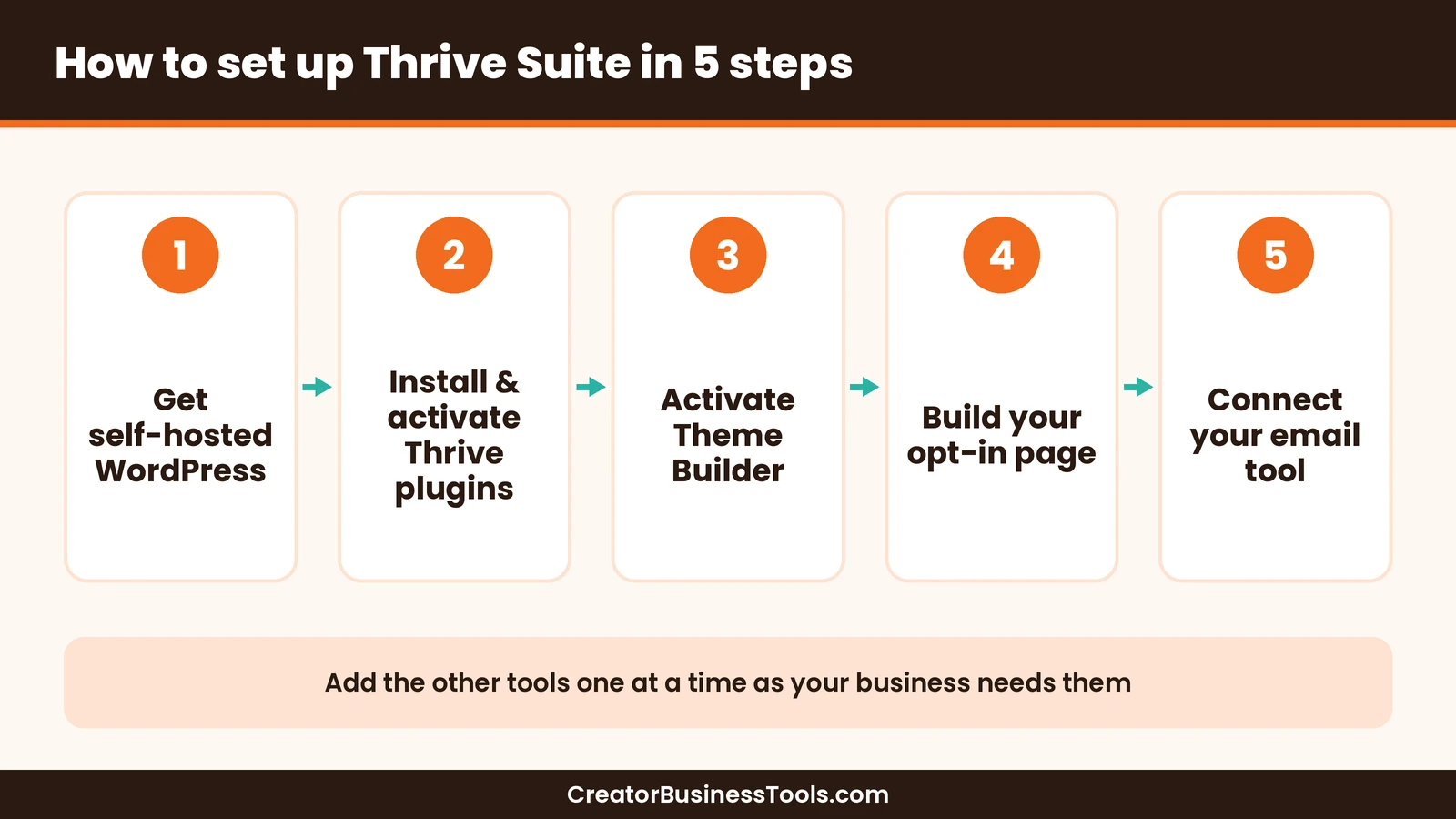
- Get self-hosted WordPress. Pick a host and install the free WordPress software on your domain.
- Install and activate the Thrive plugins. Download them from your Thrive account and activate your license on your site.
- Set up Thrive Theme Builder. Choose a template and set your fonts, colors, and logo.
- Build your first landing page. Start from a template in Thrive Architect.
- Connect your email marketing tool. Use Thrive Leads to capture subscribers.
Launch checklist
- ☐ Self-hosted WordPress installed
- ☐ Theme Builder template chosen
- ☐ Home, about, and opt-in pages built
- ☐ Email tool connected
- ☐ Lead magnet delivered automatically
- ☐ One A/B test planned
An example: a coach’s lead funnel with Thrive Suite
Imagine a career coach who wants more discovery calls. Here’s how the suite could support that.
- A quiz built with Thrive Quiz Builder asks what’s holding the reader back.
- An opt-in form from Thrive Leads sends results by email.
- A landing page built with Thrive Architect invites readers to a free workshop.
- A countdown from Thrive Ultimatum adds a deadline to the workshop sign-up.
- Testimonials from Thrive Ovation build trust on the sales page.
- A course in Thrive Apprentice delivers the paid program.
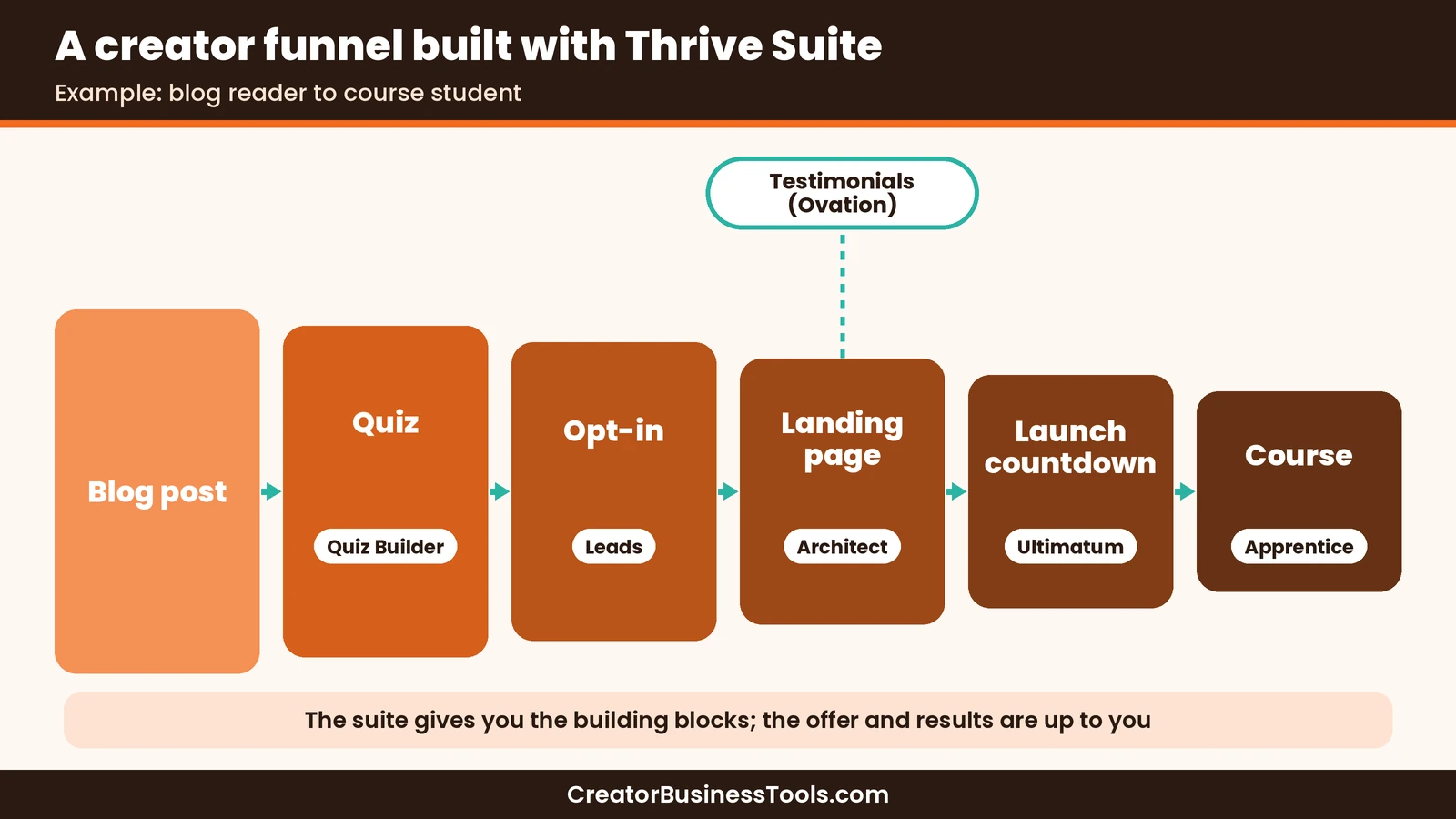
The suite doesn’t create the offer or guarantee results. It gives you the building blocks in one place.
Who should use Thrive Suite?
| Reader | Recommendation | Why |
|---|---|---|
| Course creator on WordPress.org | Thrive Suite | Course builder, landing pages, and opt-ins together |
| Coach who books calls | Thrive Suite | Quizzes, forms, and sales pages in one bundle |
| Blogger who wants a nicer design | Elementor free or Thrive Architect only | You may not need the full suite |
| Agency with many client sites | Elementor multi-site plans | Plans scale beyond 5 sites |
| WordPress.com user | Check compatibility first | Thrive Suite is built for self-hosted WordPress |
How to choose a WordPress toolkit
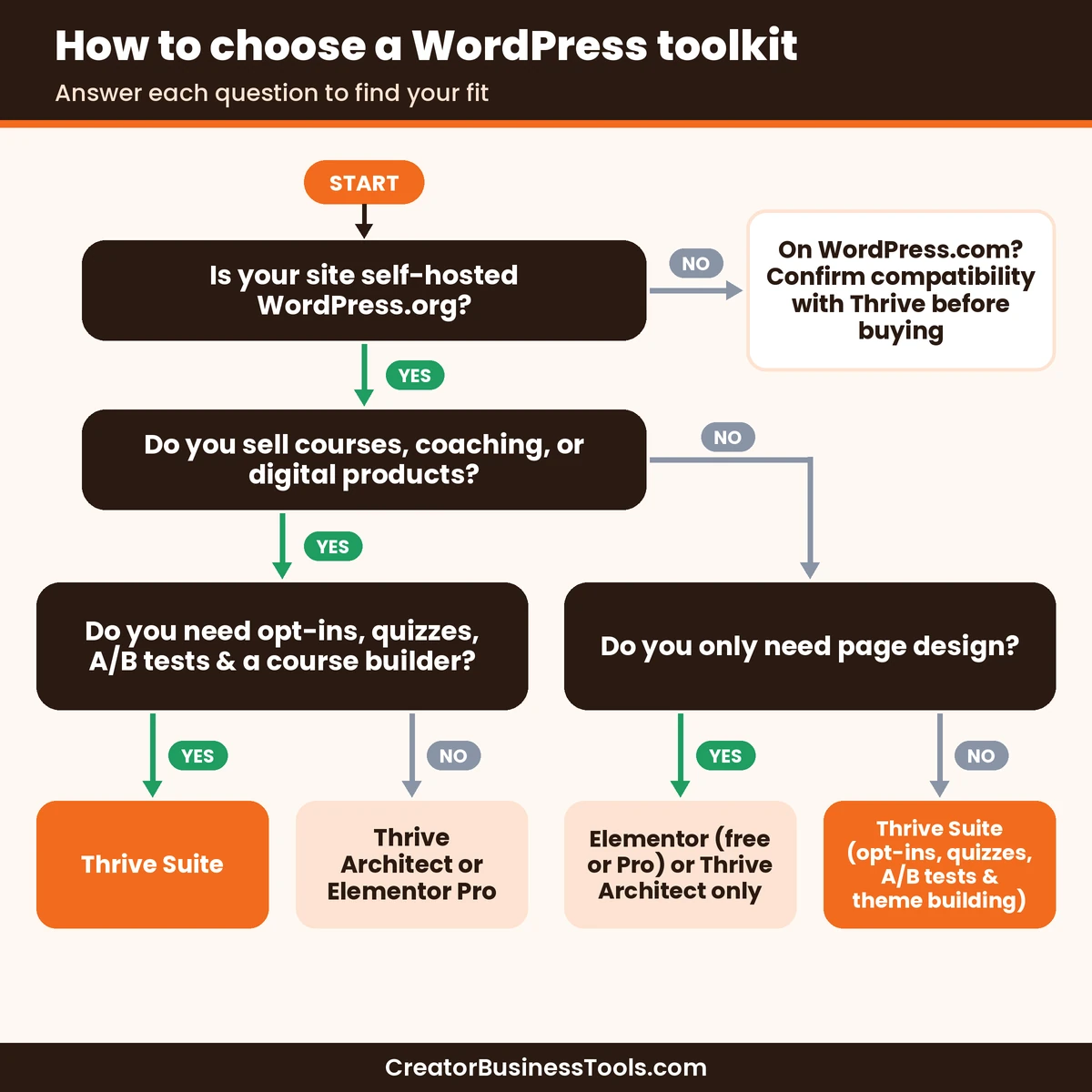
- Confirm your platform. Thrive is built for self-hosted WordPress.org; on WordPress.com, check with Thrive first.
- List the jobs. Pages only, or pages plus leads, quizzes, and courses?
- Count your sites. Thrive Suite covers up to 5.
- Budget for renewal. Look past the first-year price.
- Use the guarantee wisely. Build a real page during the money-back window.
Support and training
Thrive Suite includes support from Thrive’s team on weekdays, around the clock, and access to Thrive University training. Thrive also publishes a large library of tutorials and help articles.
Support and updates are available while your subscription is in good standing. That’s another reason to treat Thrive Suite as an ongoing cost rather than a one-time purchase.
For beginners, the training is a real plus. The suite has many tools, and learning them one at a time is easier with guided tutorials.
Switching from another page builder
If you already use another builder, plan the switch carefully.
- Expect to rebuild key pages. Pages made with one builder generally need to be rebuilt in another.
- Start with your most important pages. Your home page, opt-in page, and sales page matter most.
- Keep your old builder active until the new pages are live and tested.
- Avoid running two builders long-term. It adds complexity and more updates to manage.
Common mistakes to avoid
- Buying for a WordPress.com site without checking. Confirm compatibility with Thrive first.
- Installing every plugin at once. Start with Architect, Leads, and Theme Builder.
- Forgetting the renewal price. Plan for the full price after year one.
- Mixing too many page builders. Pick one builder per site to keep things simple.
- Skipping testing. Use Thrive Optimize to test your key pages.
FAQ
Does Thrive Suite work on WordPress.com?
Thrive Suite is built for self-hosted WordPress.org sites. Thrive’s official pages differ on WordPress.com support, so check Thrive’s current compatibility notes before buying for a WordPress.com site.
Is Thrive Suite a one-time purchase?
No. It’s a yearly or quarterly subscription, and you can cancel anytime.
How many sites can I use Thrive Suite on?
Up to 5 websites with one Thrive Suite subscription.
Can I buy Thrive Architect alone?
Yes. Thrive sells Thrive Architect as a single-site yearly subscription, and also in a bundle with Thrive Optimize.
What happens if I cancel?
Your pages and forms keep working, but support, updates, premium templates, and editing with Thrive Architect need an active subscription.
Is Thrive Architect better than Elementor?
It depends on your goal. Thrive Architect is built for conversions and fits best within Thrive Suite, while Elementor is a flexible general-purpose builder with a free version.
Does Thrive Suite include hosting?
No. You need your own WordPress hosting.
Does Thrive Suite offer a guarantee?
Yes, Thrive offers a money-back guarantee. Check its pricing page for the current terms.
Not on WordPress? Senja is a solid non-WordPress alternative for collecting testimonials.
Bottom line
Thrive Suite is a smart bundle for creators who sell on self-hosted WordPress and want landing pages, opt-ins, quizzes, A/B testing, and courses from one company. The first-year price makes it easy to try, but plan for the full renewal price.
If you only need a page builder, Elementor’s free plugin or Thrive Architect alone may be enough. If you want the whole toolkit, Thrive Suite is worth a close look.
Free checklist: Get our free WordPress Creator Funnel Checklist, a one-page plan for your opt-in page, lead magnet, and launch. Contact us to request a copy.
Pricing and features from official vendor pages, last checked October 19, 2026.