
ActiveCampaign vs HubSpot: Which Marketing Platform Fits a Small Creator Business?
Disclosure: This post contains affiliate links. If you buy through them, we may earn a commission at no extra cost to you. How we make money.
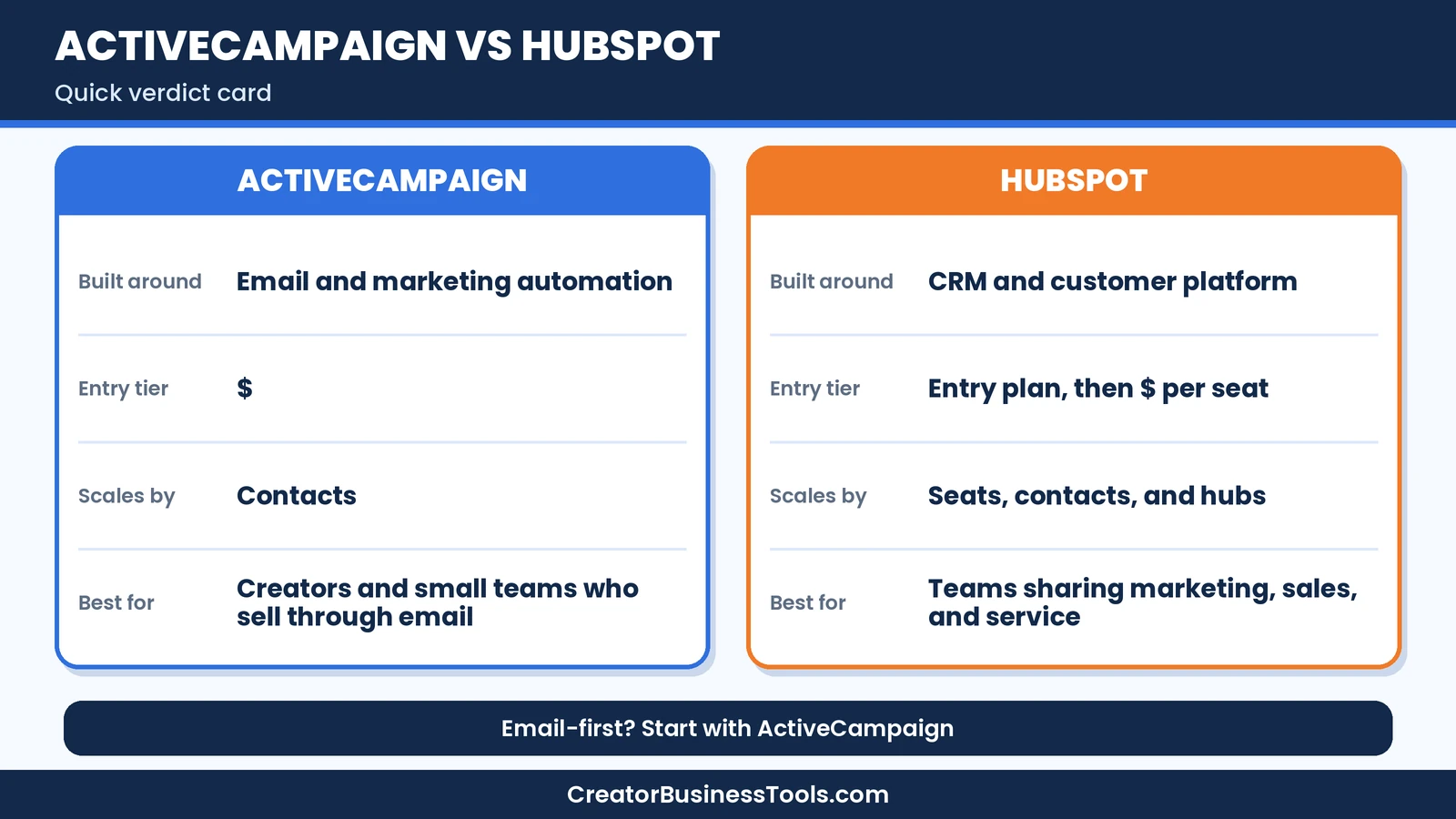
This ActiveCampaign vs HubSpot comparison is for creators, coaches, and small businesses deciding which platform should run their email marketing and customer follow-up. Both tools can send newsletters and automated sequences, but they are built around different centers of gravity. ActiveCampaign is an email and marketing automation platform that adds CRM features as you grow. HubSpot is a customer platform built around a CRM, with marketing, sales, service, and content tools sold as separate hubs.
We compared the two using their official pricing pages and feature tables, not a deliverability test. If your business runs on email sequences and you want deep automation at a modest price tier, ActiveCampaign is usually the closer fit. If you need one shared system for marketing, sales, and support teams, HubSpot deserves a serious look.
Quick verdict: ActiveCampaign tends to suit solo creators and small teams who want powerful email automation without enterprise-level pricing, since its plans start in a low tier and scale by contacts. HubSpot tends to suit growing teams that want marketing, sales, and service on one CRM, and that can budget for its higher tiers and required onboarding on advanced plans. If your main job is turning subscribers into buyers through email, start with ActiveCampaign.
Quick picks
- Best for email-first creators and coaches: ActiveCampaign Plus, with landing pages, cross-channel marketing, and an optional CRM add-on.
- Best for getting your first automations live on a tight budget: ActiveCampaign Starter, if email-only automation with a capped number of actions is enough for now.
- Best for advanced personalization: ActiveCampaign Pro, with predictive sending, conditional content, and attribution.
- Best for teams that need one CRM for marketing, sales, and support: HubSpot, starting with its free plan or Starter tier and moving up as the team grows.
ActiveCampaign vs HubSpot at a glance
| Item | ActiveCampaign | HubSpot (Marketing Hub) |
|---|---|---|
| Core focus | Email and marketing automation, with CRM add-ons | CRM-based customer platform with separate hubs |
| Free plan | No lasting free plan listed | Yes, for up to two users |
| Paid plans | Starter, Plus, Pro, Enterprise | Starter, Professional, Enterprise |
| Price tier (small list) | $ to $$$ | $ (Starter) to $$$$$ (Enterprise) |
| How price scales | Contact count, with set user seats per plan | Seats on Starter; included core seats plus marketing contacts on higher plans |
| Required onboarding fee | Not listed | Yes, one-time, on Professional and Enterprise |
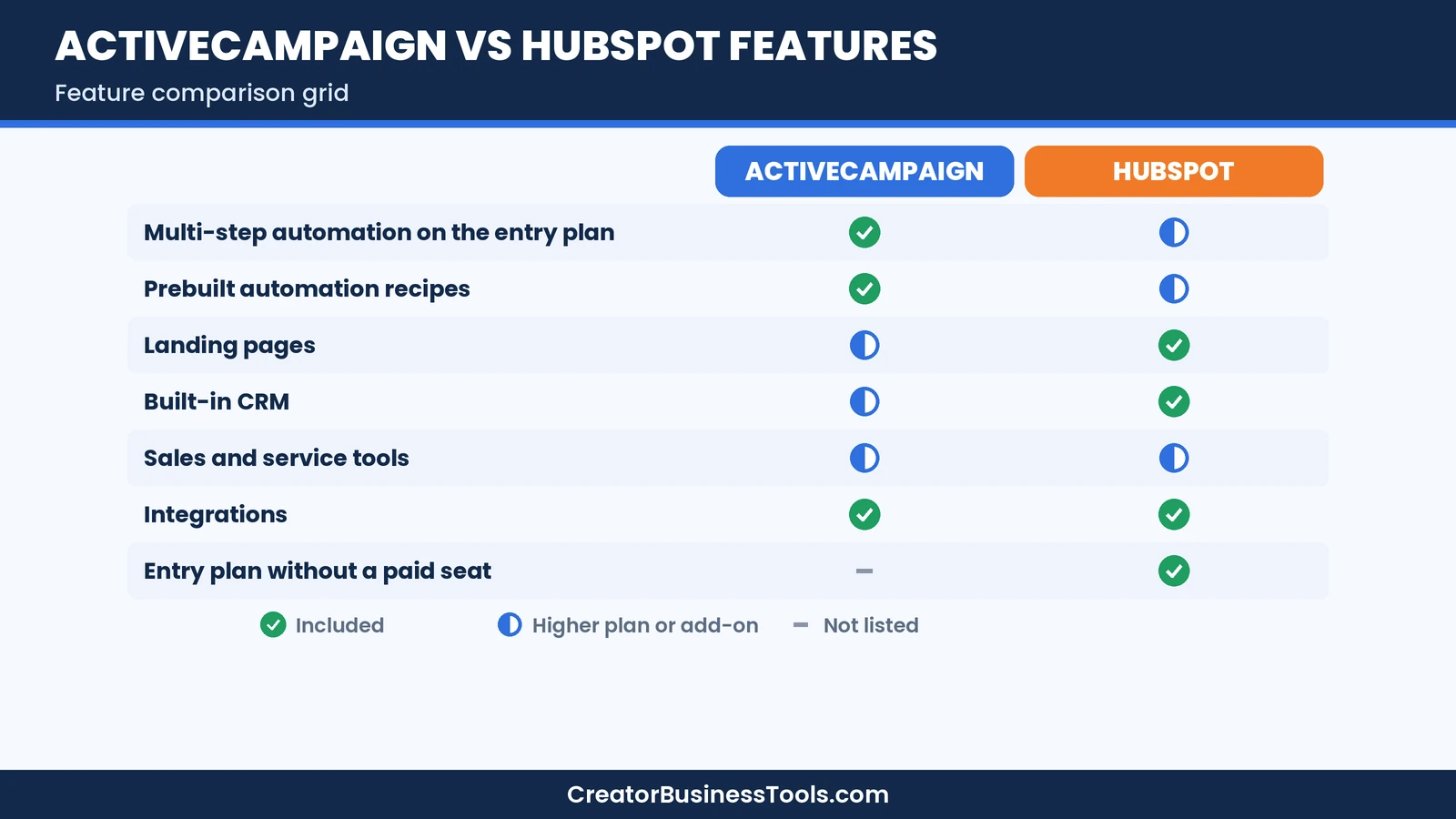
| Automation | Multi-step automation on every plan; unlimited actions from Plus | Limited on Free and Starter; full workflows from Professional |
| Integrations | 1,000+ | 2,000+ |
What is ActiveCampaign?
ActiveCampaign is a marketing automation platform best known for its visual automation builder. Every plan includes multi-step marketing automation, more than 950 prebuilt automation recipes, site and link tracking, A/B testing, and scheduled, RSS-triggered, and date-based campaigns.
The plans stack features as you move up. Starter covers email campaigns and your first automations. Plus adds cross-channel marketing, generative AI for content and images, landing pages, site messages, and access to an Enhanced CRM add-on with pipelines, deal records, and account records. Pro adds predictive sending, conditional content, advanced segmentation, and attribution. Enterprise adds single sign-on, custom objects, premium CRM integrations such as Salesforce, a dedicated account team, and an uptime SLA.
For a plan-by-plan breakdown, see our ActiveCampaign pricing guide. For another head-to-head, see ActiveCampaign vs Mailchimp.
What is HubSpot?
HubSpot describes itself as a customer platform. At its center is a free CRM, and around it sit separate products, called hubs, for marketing, sales, service, content, data, and revenue operations. You can buy one hub or bundle several.
For this comparison we focus on Marketing Hub, the product that competes most directly with ActiveCampaign. Marketing Hub has a free plan, a Starter plan priced per seat, and Professional and Enterprise plans that include a set number of core seats. The Professional and Enterprise plans also list a required one-time onboarding fee, which is an important budget line for small teams.
HubSpot’s strength is that marketing data, sales pipelines, and support tickets can live in the same record. If several people in your business touch the same customer, that shared view can be worth a lot.
ActiveCampaign vs HubSpot pricing
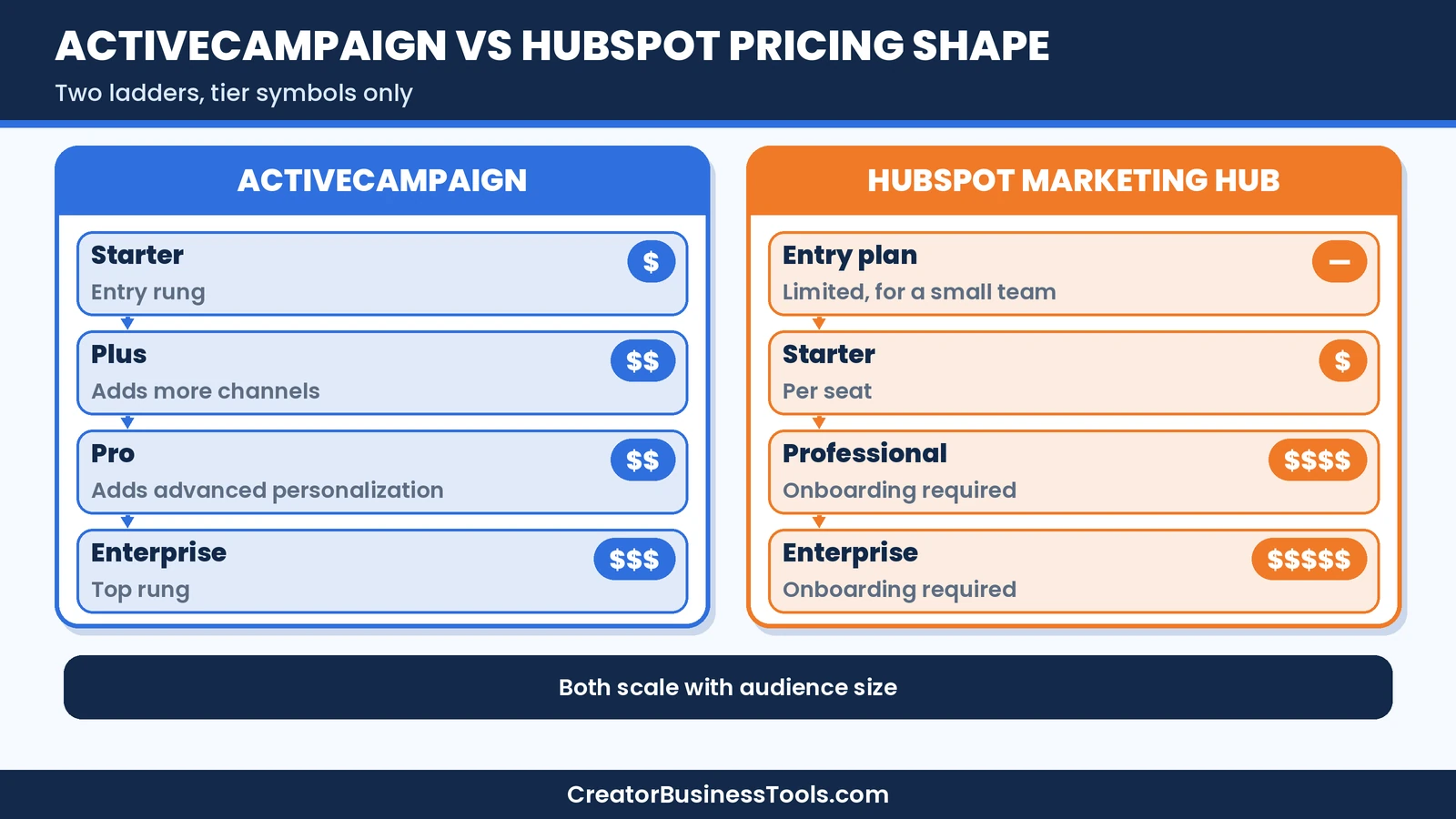
Both platforms price by audience size, but in different ways. ActiveCampaign prices each plan by the number of contacts and includes a fixed number of users per plan. HubSpot prices Starter per seat and prices Professional and Enterprise as a base package with included seats and marketing contacts, plus add-ons.
| Plan | Price tier (small list) | Users | Who it fits |
|---|---|---|---|
| ActiveCampaign Starter | $ | 1 | First automations, email only |
| ActiveCampaign Plus | $$ | 1 | Creators who want landing pages and cross-channel marketing |
| ActiveCampaign Pro | $$ | 3 | Personalization and attribution |
| ActiveCampaign Enterprise | $$$ | 5 | Larger teams with complex data |
| HubSpot Free | Free | Up to 2 | Testing the CRM and basic email |
| HubSpot Starter | $ per seat | Per seat | Small teams starting on one CRM |
| HubSpot Professional | $$$$ plus onboarding fee | 3 core seats included | Teams running omni-channel campaigns |
| HubSpot Enterprise | $$$$$ plus onboarding fee | 5 core seats included | Larger marketing organizations |
What drives the bill on each platform
- Contacts. ActiveCampaign’s price rises with your contact count on every plan. HubSpot’s higher plans include a base number of marketing contacts, and adding more raises the price.
- Seats. ActiveCampaign includes one user on Starter and Plus, three on Pro, and five on Enterprise. HubSpot Starter is priced per seat, while Professional and Enterprise include core seats and charge for extras.
- Onboarding. HubSpot lists a required one-time onboarding fee for Professional and Enterprise. ActiveCampaign lists onboarding and migration support on its plans without a separate required fee.
- Add-ons. ActiveCampaign sells Enhanced CRM and WhatsApp messaging as add-ons. HubSpot sells extra hubs, seats, contacts, and credits for its AI features.
The practical takeaway: for a solo creator or a two-person team that mainly needs email automation, ActiveCampaign usually sits in a lower price tier. HubSpot’s Starter tier is approachable, but the jump to Professional, where full automation workflows begin, is steep for a small business.
Email marketing and automation compared
This is where the two tools differ most for creators.
ActiveCampaign automation
Automation is ActiveCampaign’s home turf. Even Starter includes multi-step automation, multiple triggers, ecommerce automation, and the AI-powered automation builder, although Starter limits each automation to five actions and keeps it to email. From Plus upward, actions are unlimited and automations can span channels.
Every plan also includes the library of 950+ automation recipes, so you can begin from a welcome series, a lead-magnet delivery flow, or an abandoned-cart sequence instead of a blank canvas. Business goals let you mark a conversion point inside an automation, and the number of active goals grows with each plan.
HubSpot automation
HubSpot’s free plan includes one automated email action, and Starter raises that to up to ten automated actions. Full automation, with unlimited actions and omni-channel workflows, starts on Professional, which lists up to 300 workflows. Enterprise raises that ceiling and adds behavioral events and predictive lead scoring.
In short, if you want branching sequences that react to clicks, tags, and purchases without moving to an upper tier, ActiveCampaign offers more automation depth at its entry levels.
Email sending limits
| Plan | Monthly email send limit |
|---|---|
| ActiveCampaign Starter and Plus | 10 times your contact limit |
| ActiveCampaign Pro | 12 times your contact limit |
| ActiveCampaign Enterprise | 15 times your contact limit |
| HubSpot Free | A fixed monthly cap, with HubSpot branding |
| HubSpot Starter | 5 times your marketing contact tier |
| HubSpot Professional | 10 times your marketing contact tier |
| HubSpot Enterprise | 20 times your marketing contact tier |
If you email your list several times a week, those multipliers matter. ActiveCampaign’s entry plans allow more sends relative to list size than HubSpot Starter.
CRM and sales features
HubSpot was built around its CRM, so contact records, companies, deals, and activity timelines are at the core of every plan. If your business has a sales team, or if you plan to add Sales Hub or Service Hub later, everything connects to the same database.
ActiveCampaign takes a different route. Every plan includes contact profiles, custom fields, and tags. From Plus, you can add Enhanced CRM, an add-on with pipeline management, deal records, and account records, plus sales engagement tools. Enterprise adds premium integrations with outside CRMs such as Salesforce and Microsoft Dynamics.
For a coach booking discovery calls or a creator selling a few high-ticket packages, ActiveCampaign’s add-on CRM is often enough. For a business where several salespeople manage deals all day, HubSpot’s CRM-first design is the more natural fit.
Landing pages, forms, and other channels
- Forms. Both platforms include forms. ActiveCampaign Starter offers standard and inline forms, and higher plans add more form types and branding control.
- Landing pages. ActiveCampaign includes landing pages from Plus. HubSpot Marketing Hub includes landing pages and lists a broader content toolset through its separate Content Hub.
- Site messages and live chat. ActiveCampaign adds site messages from Plus. HubSpot includes live chat, with HubSpot branding on the free plan.
- Ads. ActiveCampaign Plus and above include Google, Facebook, and LinkedIn audience features. HubSpot includes ad management across plans, with more audiences on higher tiers.
- Messaging. ActiveCampaign offers WhatsApp messaging as an add-on. HubSpot lists a WhatsApp integration with monthly message limits on its upper plans.
Integrations and AI
ActiveCampaign lists 1,000+ integrations, an API and webhooks, Zapier, and connections to Claude and ChatGPT through MCP on every plan. Its standard ecommerce integrations cover Shopify, Square, and WooCommerce, with premium options such as BigCommerce and Shopify Plus on upper plans. Every plan includes a pool of Active Intelligence credits for AI features.
HubSpot lists 2,000+ integrations in its marketplace and offers AI agents for prospecting, customer support, and content, powered by HubSpot Credits that come with each paid plan.
If you already automate across apps with a tool like Make, both platforms connect well. Our Make vs Zapier guide explains how creators wire these tools together.
Support and onboarding
ActiveCampaign lists email and chat support on every plan, with priority support on Pro and Enterprise, plus onboarding and migration support. Enterprise adds a dedicated account team.
HubSpot offers support that varies by plan, and its Professional and Enterprise plans require a paid onboarding package. That onboarding can be valuable for a team rolling out a full CRM, but it is a real upfront cost to plan for.
ActiveCampaign vs HubSpot: pros and cons
| ActiveCampaign pros | ActiveCampaign cons |
|---|---|
| Deep automation from the entry plan | No lasting free plan listed |
| 950+ automation recipes on every plan | Starter caps actions per automation and is email-only |
| Price scales mainly with contacts | CRM pipelines require an add-on |
| Generous send limits relative to list size | Users per plan are limited on lower tiers |
| HubSpot pros | HubSpot cons |
|---|---|
| Free plan for up to two users | Full automation starts on Professional |
| CRM-first design shared across teams | Professional and Enterprise require an onboarding fee |
| Separate hubs for sales, service, and content | Higher tiers sit in a high price band |
| 2,000+ integrations | Free plan emails carry HubSpot branding |
Before you sign up
- Check each pricing page at your real contact count, since both platforms scale with audience size.
- On HubSpot, add the required onboarding fee to your budget if you are considering Professional or Enterprise.
- On ActiveCampaign, confirm whether you need the Enhanced CRM add-on before choosing a plan.
- Only import contacts who opted in to hear from you.
Who should choose ActiveCampaign?
ActiveCampaign tends to fit best when these are true:
- ✅ Email is your main sales channel, and you want automations that react to tags, clicks, and purchases.
- ✅ You are a solo creator, coach, or small team, so a few user seats are enough.
- ✅ You want landing pages and cross-channel messages without moving to an enterprise tier.
- ✅ You may add a light CRM later for discovery calls or packages.
| Reader | Suggested plan | Why |
|---|---|---|
| Blogger starting automations | Starter | Email-only automation at an entry tier |
| Course creator or coach selling through email | Plus | Landing pages, unlimited actions, optional CRM |
| Creator with a large, segmented list | Pro | Predictive sending and conditional content |
| Business with complex data needs | Enterprise | SSO, custom objects, dedicated team |
For more options in this space, see our guide to the best email marketing for course creators.
Who should choose HubSpot?
HubSpot tends to fit best when these are true:
- ✅ Several people share customer records across marketing, sales, and support.
- ✅ You want a free CRM to start and a clear path to sales and service tools.
- ✅ You can budget for Professional and its onboarding when you need full automation.
- ✅ You value a large integration marketplace and built-in AI agents.
How to choose between ActiveCampaign and HubSpot
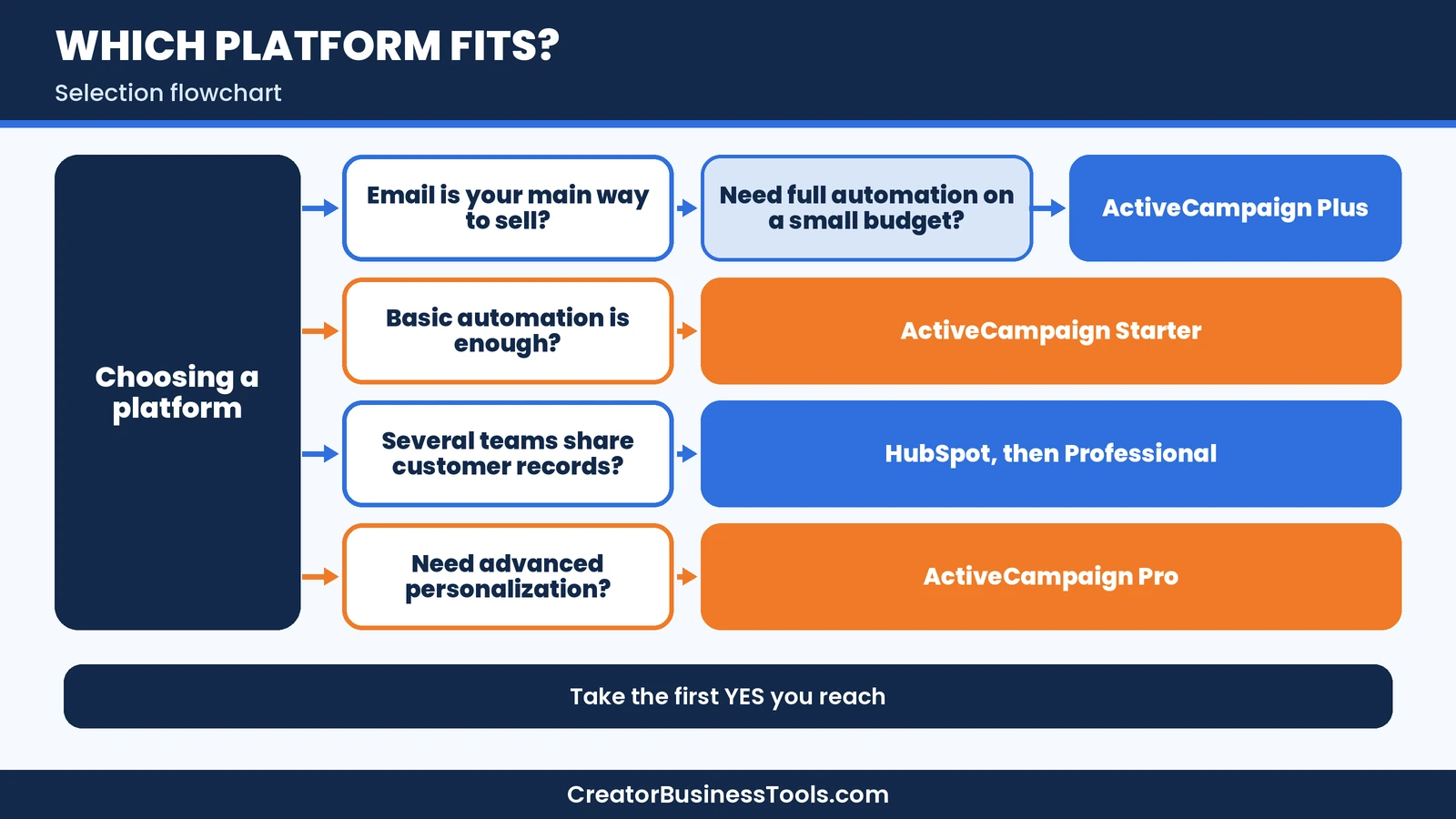
- Name your main channel. If revenue flows through email sequences, weight automation depth heavily.
- Count the people who need access. One or two users point toward ActiveCampaign’s lower plans; a shared team points toward HubSpot.
- Estimate your list in twelve months. Both platforms grow with your audience, so price your future list, not today’s.
- Add every fee. Include add-ons, extra seats, and HubSpot’s required onboarding on upper plans.
- Build one real workflow first. Recreate your welcome sequence or lead-magnet flow before committing.
Moving from one platform to the other
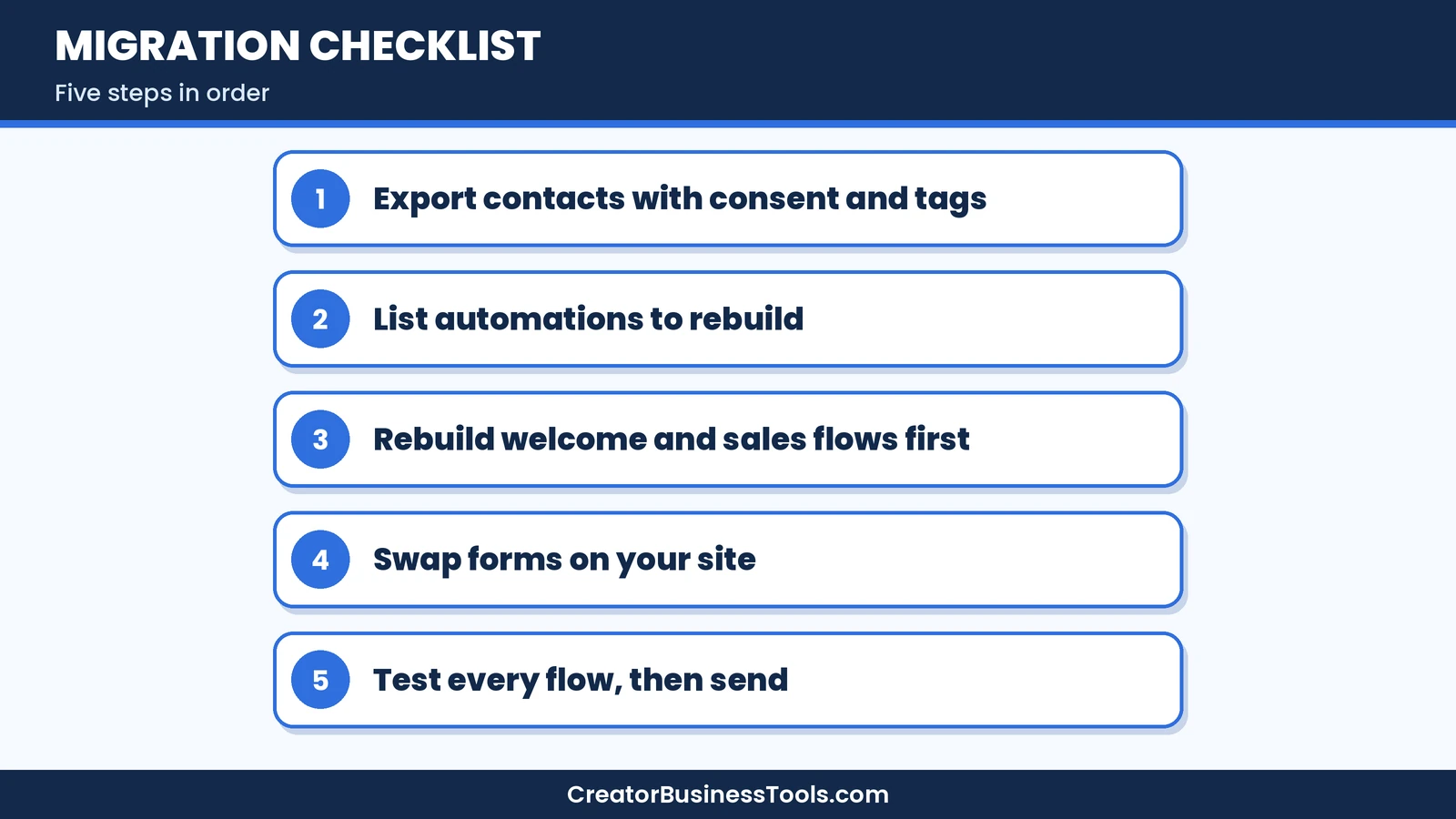
Switching email platforms is mostly about planning. Export your contacts with their consent records and tags, list the automations you need to rebuild, and recreate your most important flows first. ActiveCampaign lists onboarding and migration support on its plans, so ask its team before rebuilding everything yourself.
If you are moving to HubSpot, its onboarding packages on Professional and Enterprise are designed to guide this process. In either direction, warm up your sending gradually and test every automation with your own address before switching your forms.
Email workflows creators often build first
Whichever platform you choose, a few workflows usually pay off early:
- Lead-magnet delivery. Send the freebie, tag the subscriber by interest, and start a short welcome series.
- Welcome series. Three to five emails that introduce your best content and, later, your offer.
- Sales sequence. A short series for a course, coaching package, or digital product, stopping when someone buys.
- Abandoned checkout follow-up. A reminder when a buyer starts checkout but does not finish, where your store integration supports it.
- Re-engagement. A check-in for subscribers who have not opened in a while, followed by list cleanup.
ActiveCampaign’s recipe library covers many of these patterns out of the box. On HubSpot, most of these multi-step flows need Professional to run without action limits.
FAQ
Which costs less, ActiveCampaign or HubSpot?
For most small lists, ActiveCampaign’s plans sit in a lower price tier than HubSpot’s Professional and Enterprise plans. HubSpot Starter is in a comparable entry tier, but full automation on HubSpot begins at Professional, which also requires an onboarding fee.
Does HubSpot have a free plan?
Yes. HubSpot Marketing Hub lists a free plan for up to two users, with a monthly email cap and HubSpot branding on emails.
Does ActiveCampaign have a CRM?
Every ActiveCampaign plan includes contact profiles, tags, and custom fields. From Plus, you can add Enhanced CRM for pipelines, deals, and accounts.
Which is better for automation?
ActiveCampaign offers multi-step automation and 950+ recipes on every plan, with unlimited actions from Plus. HubSpot’s full automation workflows start on Professional.
Which is better for a sales team?
HubSpot’s CRM-first design and separate Sales Hub make it a natural fit when several salespeople manage deals. ActiveCampaign can work for small teams through its CRM add-on.
Can I connect either tool to Make or Zapier?
Yes. Both platforms list integrations with Zapier and broad app marketplaces, and ActiveCampaign also lists an API and webhooks on every plan.
Can I switch later?
Yes. You can export contacts and rebuild automations on the other platform. Plan the move around your most important workflows.
Bottom line
In the ActiveCampaign vs HubSpot decision, the deciding question is what sits at the center of your business. If email automation drives your sales and you are a solo creator or small team, ActiveCampaign gives you deep automation, generous send limits, and a path to CRM features at a lower price tier. If several teams need one shared customer record and you can budget for HubSpot’s upper plans and onboarding, HubSpot’s CRM-first platform is the stronger structural fit.
For most creators, coaches, and course sellers we write for, ActiveCampaign is the more practical place to start.
Free checklist: Want a head start? Get our free Email Automation Starter Checklist, a one-page plan for your lead magnet, welcome series, and first sales sequence. Contact us to request a copy.