
Divi vs Avada: Which WordPress Builder Fits Your Sites and Budget?
Disclosure: This post contains affiliate links. If you buy through them, we may earn a commission at no extra cost to you. How we make money.
This Divi vs Avada comparison is for bloggers, creators, and freelancers choosing an all-in-one WordPress theme and visual builder. Both products have been popular choices for building full WordPress sites without code, and both bundle a visual builder, a large layout library, and WooCommerce design tools. The biggest differences are in how they charge, how many sites you can build, and what extra tools come with the higher plans.
We compared them using official pricing and feature pages, not a speed benchmark or a hands-on build. If you manage several sites or plan to build sites for clients, Divi’s unlimited-site license is hard to overlook. If you run one site and want built-in marketing and store tools, Avada’s Pro plan is worth comparing.
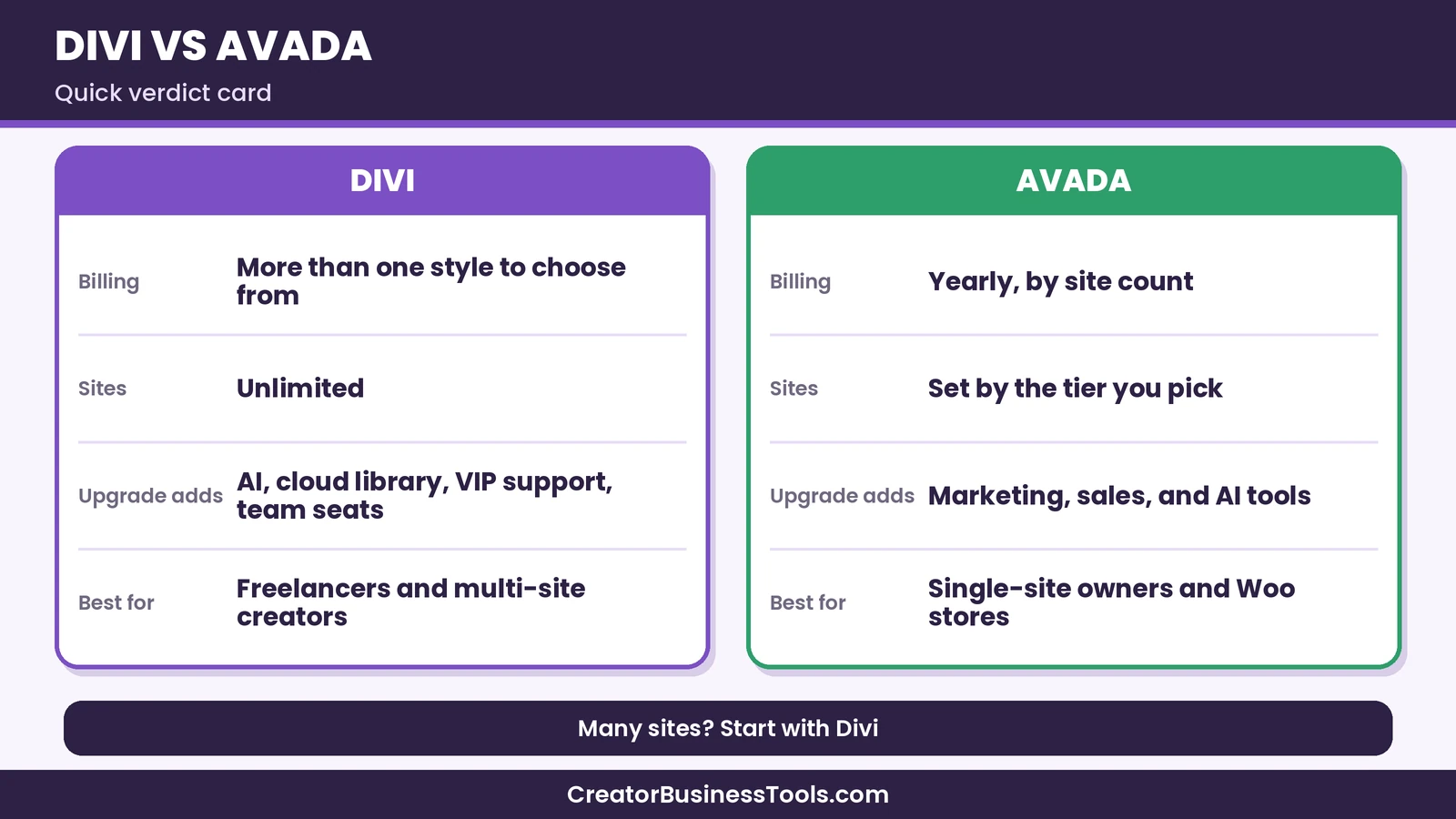
Quick verdict: Divi tends to suit creators and freelancers who want one license for unlimited websites, a large layout library, and the option of a one-time payment instead of a yearly subscription. Avada tends to suit site owners with a small number of sites who want marketing and WooCommerce sales tools built into the theme, and who are comfortable with yearly pricing that scales by site count. If you expect to build more than a handful of sites, start with Divi.
Quick picks
- Best for freelancers and multi-site creators: Divi, with unlimited website usage on every plan.
- Best for people who prefer paying once: Divi Lifetime, a one-time purchase with unlimited sites and no recurring subscription for the core builder.
- Best for web designers who want AI and team tools: Divi Pro, which adds Divi AI, Divi Cloud, VIP support, and team seats.
- Best for a single WooCommerce store that wants built-in marketing tools: Avada One Pro on the single-site tier.
Divi vs Avada at a glance
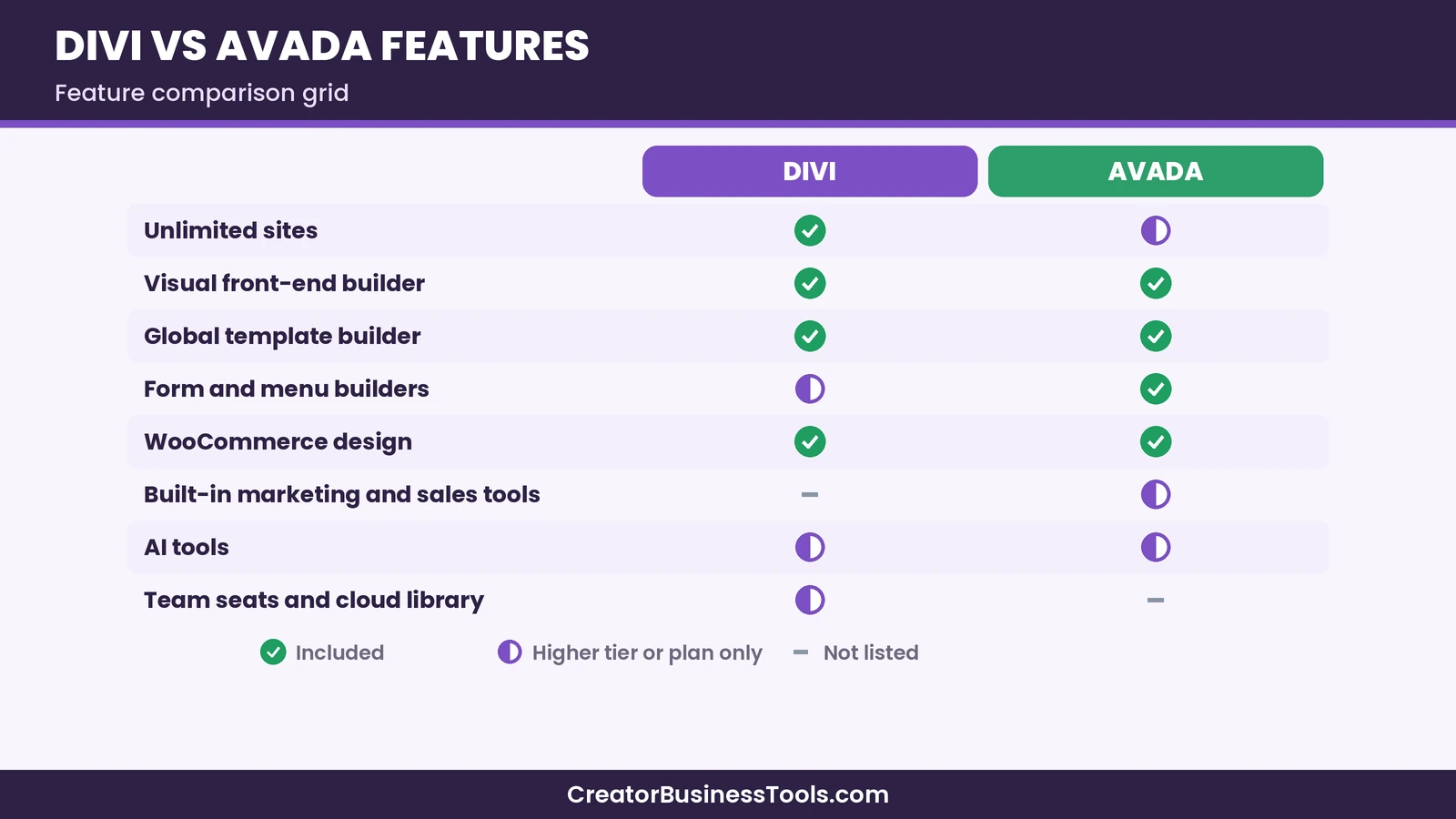
| Item | Divi | Avada |
|---|---|---|
| Maker | Elegant Themes | ThemeFusion |
| Pricing model | Yearly membership or one-time lifetime purchase | Yearly Avada One subscription; Avada Classic sold separately on Envato |
| Sites included | Unlimited on every plan | By tier: 1, 5, 50, or 1,000 sites |
| Entry price tier | $ per year | $ per year |
| Upgrade plan adds | AI, cloud storage, VIP support, team seats | Marketing, sales, and AI tools |
| Layout library | 2,000+ layouts | 110+ prebuilt websites and 600+ Studio items |
| WooCommerce design | Yes, through the builder | Yes, with a dedicated WooCommerce builder |
| Extra products | Extra theme, Bloom opt-ins, Monarch sharing | Form, mega menu, and off-canvas builders |
What is Divi?
Divi is a WordPress theme and visual page builder from Elegant Themes. You design pages on the live front end, start from a large library of prebuilt layouts, and use the Theme Builder to design headers, footers, and templates for posts, archives, and product pages. The current generation is Divi 5.
A Divi membership also includes the company’s other themes and plugins: the Extra magazine theme, Bloom for email opt-in forms, and Monarch for social sharing. Divi Dash, a site manager for updates, themes, plugins, and users across your websites, is included as well.
The Divi Pro upgrade adds a set of services aimed at web professionals: Divi AI for generating layouts, text, images, and code; Divi Cloud for storing your layouts and templates; Divi VIP for faster support; and Divi Teams for inviting team members. Elegant Themes also lists a Divi AI Agent that builds sites from natural-language prompts inside the Visual Builder.
For a full single-product look, read our Divi review.
What is Avada?
Avada is a WordPress website builder from ThemeFusion that has long been sold on the Envato marketplace. Its newer product, Avada One, is a yearly subscription sold directly from Avada’s site, while Avada Classic remains available on Envato as a one-time purchase.
Avada One includes a Live Visual Builder with 120+ design and layout elements, a Layout Builder, Form Builder, Mega Menu Builder, Off-Canvas Builder, a WooCommerce Builder, a Setup Wizard, and a Performance Wizard. You can import more than 110 prebuilt websites and 600+ Avada Studio content blocks, and every registered website gets a free staging copy.
The Pro plan adds three groups of tools: marketing features such as A/B testing, visitor analytics, and email campaigns; WooCommerce sales features such as abandoned cart recovery, wishlists, and product comparison; and AI tools inside the builder and dashboard with a monthly pool of AI credits.
Divi vs Avada pricing
Pricing is where these two products separate most clearly.
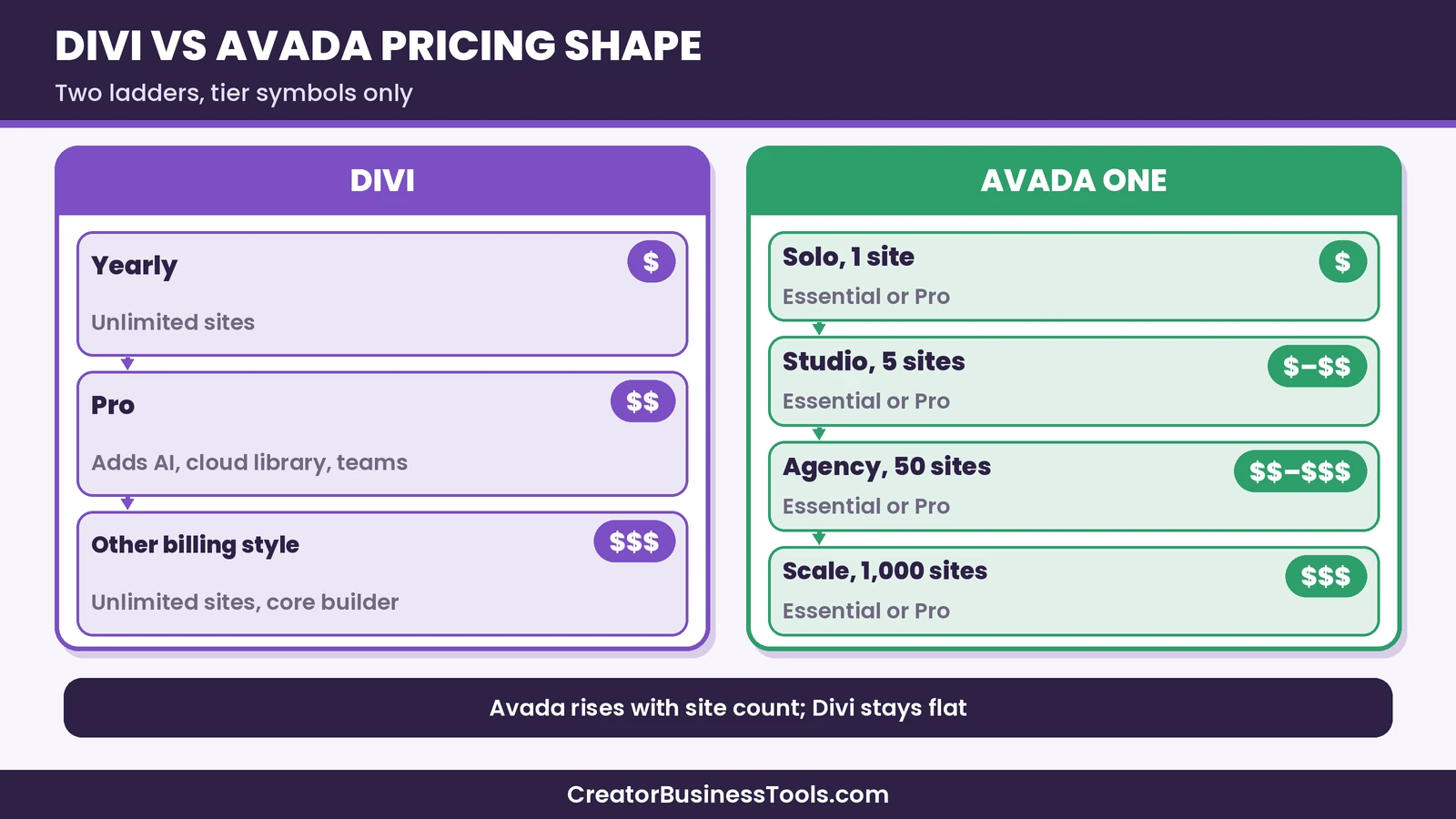
| Plan | Price tier | Sites | What you get |
|---|---|---|---|
| Divi Yearly | $ per year | Unlimited | Divi, Extra, Bloom, Monarch, Divi Dash, updates, support |
| Divi Pro | $$ per year | Unlimited | Everything above, plus Divi AI, Cloud, VIP, Teams |
| Divi Lifetime | $$$ once | Unlimited | Divi for life with no recurring subscription |
| Avada One Essential, Solo | $ per year | 1 | Builder, prebuilt sites, Studio, WooCommerce builder, support |
| Avada One Pro, Solo | $ per year | 1 | Essential, plus marketing, sales, and AI tools |
| Avada One, Studio | $ to $$ per year | 5 | Essential or Pro features on five sites |
| Avada One, Agency | $$ to $$$ per year | 50 | Essential or Pro features on fifty sites |
| Avada One, Scale | $$$ per year | 1,000 | Essential or Pro features at scale |
How the cost plays out
- One site. For a single blog or store, Avada’s Solo tier and Divi Yearly sit in a similar low tier. Avada Pro Solo adds marketing and sales tools at a slightly higher tier.
- A few sites. Once you run five sites, Avada moves to its Studio tier, while Divi’s price stays the same.
- Client work. Freelancers who build many client sites benefit most from Divi’s unlimited license, since Avada’s price climbs with each site tier.
- Paying once. Divi offers a lifetime option for the core builder. Avada One is subscription-only, though Avada Classic is still sold as a one-time purchase on Envato.
Our Divi pricing guide breaks down each Divi plan in more detail.
What happens when a subscription ends?
Avada states that your websites keep working if your Avada One subscription ends. What stops is access to updates, support, patches, prebuilt website and Studio imports, and, on Pro, the AI, marketing, and sales features. Campaigns and emails set up through Avada’s marketing tools no longer work in their full scope.
Divi Yearly works on a similar principle for updates and support, while Divi Lifetime removes the renewal question for the core builder entirely. Pro services on any Divi plan are billed yearly and can be cancelled separately.
Builder experience and design tools
Both products use a front-end visual builder, so you design on the page as visitors will see it.
Divi
- Live visual editing with a large set of modules.
- Theme Builder for global headers, footers, and templates.
- 2,000+ prebuilt layouts to start pages quickly.
- Quick Sites and the AI Agent for generating starter sites.
- Divi Marketplace for third-party modules, layouts, and child themes.
Avada
- Live Visual Builder with 120+ design and layout elements.
- Layout Builder for global templates such as headers, footers, and archives.
- Dedicated Form Builder, Mega Menu Builder, and Off-Canvas Builder.
- More than 110 prebuilt websites and 600+ Avada Studio blocks.
- Setup Wizard and Performance Wizard to guide configuration.
Avada’s dedicated builders for forms, menus, and off-canvas panels mean fewer extra plugins for those jobs. Divi’s strengths are its layout library, its marketplace, and the bundled Bloom and Monarch plugins.
WooCommerce and selling
Both products can design WooCommerce shop, product, cart, and checkout pages.
Avada goes further on its Pro plan with sales features built for WooCommerce stores: abandoned cart recovery, wishlists, product comparison, price-drop alerts, and review reminders. For a store owner who would otherwise buy several separate plugins, that bundle is a real consideration.
Divi handles WooCommerce through its builder and Theme Builder templates, and you add store extras through plugins or the Divi Marketplace. If you sell digital products rather than physical goods, a dedicated store such as Sellfy may be simpler than either option.
Marketing and AI tools
Avada One Pro includes marketing tools inside your site: A/B testing with revenue analytics, visitor analytics and journeys, email campaigns, contacts and lists, and smart links. It also includes AI chat in the builder and dashboard, on-brand writing, and image generation and editing, with a monthly allowance of AI credits.
Divi’s approach splits these jobs. Bloom covers email opt-in forms, and you connect it to the email service you already use. Divi AI, part of Divi Pro, generates layouts, text, images, and code, with Elegant Themes listing unlimited generation for those features, excluding AI Agent usage.
If you already use a dedicated email platform, Divi plus your existing tool keeps things separate and flexible. If you want analytics and email campaigns inside WordPress, Avada Pro bundles them.
Support and site management
Divi lists around-the-clock support for members, and Divi VIP, part of Divi Pro, promises faster responses for members and their teams. Divi Dash lets you manage updates, plugins, and users across many sites from one screen.
Avada provides ticket-based support through a My Avada account, along with a help center of documentation files and video tutorials. My Avada is also where you manage your subscription and registered sites, and local or staging sites do not count toward your tier.
Divi vs Avada: pros and cons
| Divi pros | Divi cons |
|---|---|
| Unlimited sites on every plan | AI, cloud library, and VIP support need Divi Pro |
| One-time lifetime option | Store extras often come from plugins or the marketplace |
| Large layout library and marketplace | No built-in email campaign tool |
| Extra, Bloom, and Monarch included | Many options can take time to learn |
| Avada pros | Avada cons |
|---|---|
| Dedicated form, menu, and off-canvas builders | Price rises with the number of sites |
| WooCommerce sales tools on Pro | Avada One is subscription-only |
| Marketing analytics and email campaigns on Pro | Pro tools stop working fully if you cancel |
| Free staging copy for registered sites | Support is ticket-based |
Before you buy
- Count the live sites you will run in the next year, since Avada prices by site tier and Divi does not.
- Decide whether you need built-in marketing and store tools or prefer separate plugins.
- Check each pricing page for the latest plan details before purchasing.
- Test on a staging site before switching a live site from one builder to another.
Divi vs Avada for common creator scenarios
Most readers fall into one of a few situations. Here is how the two builders line up for each, based on the plan structures above.
| Scenario | Leaning | Why |
|---|---|---|
| A single hobby blog that may stay small | Either | Divi Yearly and Avada Essential Solo sit in a similar low tier |
| A blogger planning a second or third niche site | Divi | Unlimited sites keep the price flat as you add projects |
| A freelancer building client sites | Divi Pro | Unlimited sites, team seats, and a shared cloud library |
| A single WooCommerce store owner | Avada One Pro | Cart recovery, wishlists, and marketing tools built in |
| A small studio managing dozens of sites | Compare both | Divi stays flat; Avada’s Agency tier bundles Pro tools per site |
| Someone who dislikes subscriptions | Divi Lifetime | One payment for the core builder |
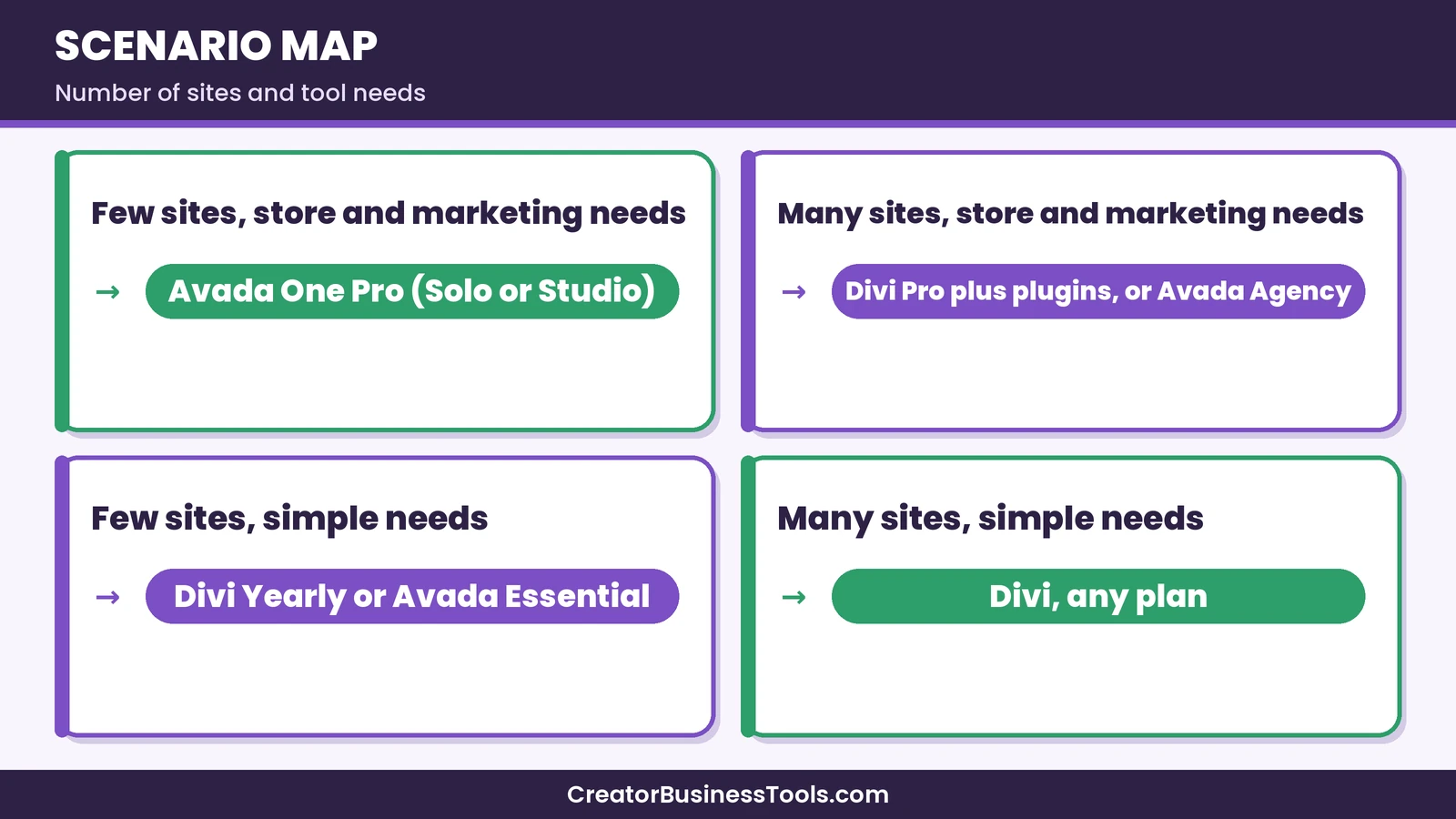
The pattern is consistent: the more sites you run, the more Divi’s flat pricing helps; the more you want store and marketing tools inside a single site, the more Avada’s Pro plan is worth comparing.
Who should choose Divi?
Divi tends to fit best when these are true:
- ✅ You build or plan to build several sites, including client sites.
- ✅ You like the idea of paying once for the core builder.
- ✅ You want a large layout library and a marketplace of add-ons.
- ✅ You already use a separate email platform and only need opt-in forms.
| Reader | Suggested plan | Why |
|---|---|---|
| Blogger with one or two sites | Divi Yearly | Low tier, unlimited sites if you add more |
| Long-term site owner | Divi Lifetime | No recurring cost for the core builder |
| Freelancer or small agency | Divi Pro | AI, cloud library, VIP support, team seats |
Divi is also compared with other builders in our Divi vs Elementor guide and our roundup of Elementor alternatives.
Who should choose Avada?
Avada tends to fit best when these are true:
- ✅ You run one site, or a small number of sites, for the foreseeable future.
- ✅ You run a WooCommerce store and want sales tools such as cart recovery and wishlists built in.
- ✅ You want A/B testing and email campaigns inside WordPress.
- ✅ You prefer dedicated builders for forms, mega menus, and off-canvas panels.
How to choose between Divi and Avada
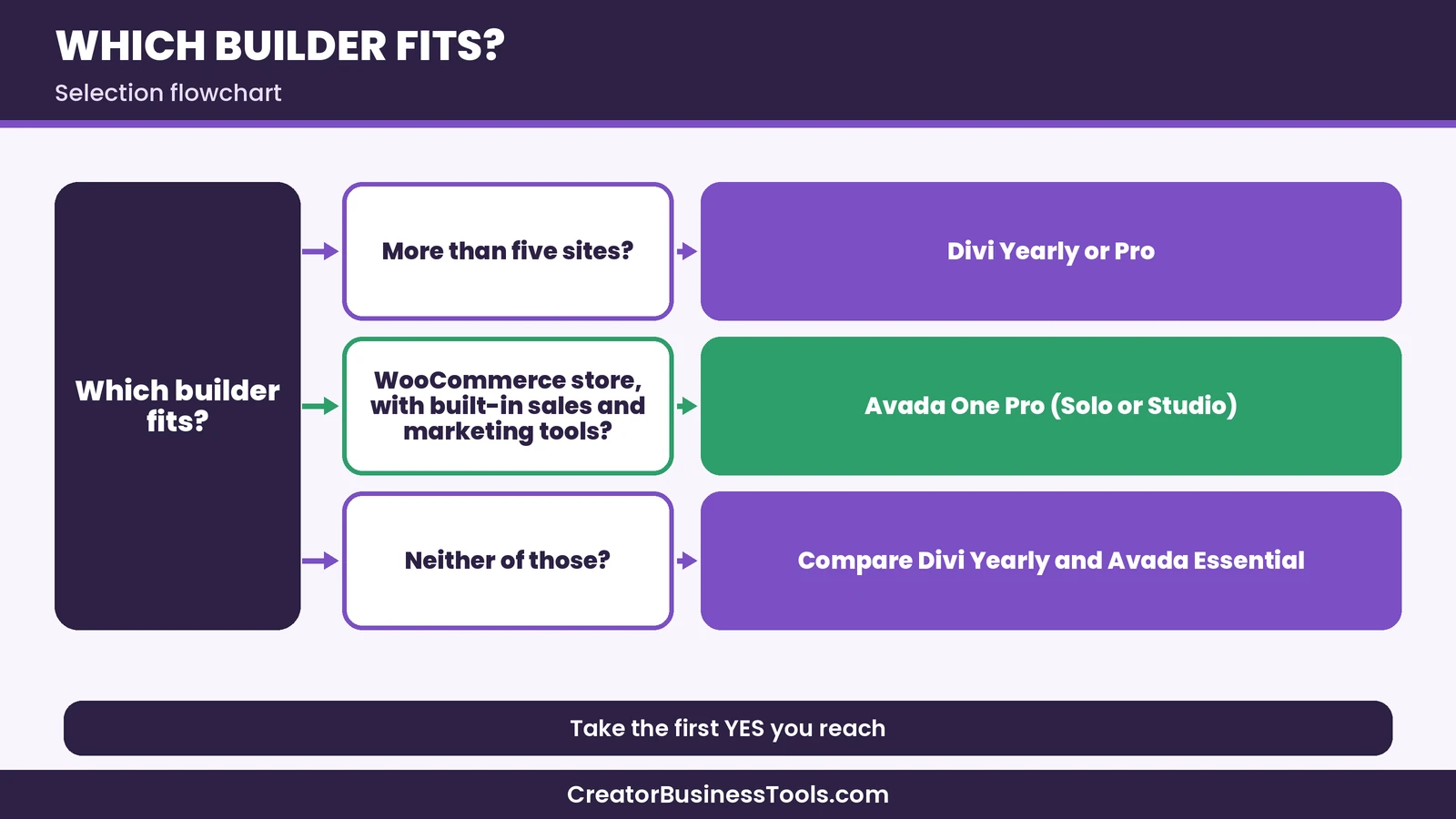
- Count your sites. This single number often decides the comparison.
- Choose a payment style. Yearly for both, or a one-time option for Divi.
- List the plugins you would replace. Avada Pro covers marketing and store tools; Divi includes opt-in and social sharing plugins.
- Check your team needs. Divi Pro adds team seats and a shared cloud library.
- Build one page on staging. Recreate your homepage before committing to either builder.
Switching builders safely
Moving a site from one theme builder to another usually means rebuilding page layouts, because each builder stores designs in its own format. Plan the move like a small redesign:
- Back up the site and work on a staging copy.
- List every page template you need: home, blog post, archive, product, and checkout.
- Rebuild global templates first, such as headers and footers, then key pages.
- Check forms, menus, and store pages before going live.
- Keep the old theme installed until you have reviewed every important page.
FAQ
Is Divi or Avada better for beginners?
Both offer prebuilt layouts and a visual builder. Avada’s Setup Wizard guides first-time setup, while Divi’s large layout library and AI tools help you start pages quickly. Try a staging build with each.
Can I use Divi on unlimited sites?
Yes. Every Divi plan includes unlimited website usage.
How many sites can I use Avada on?
Avada One prices by tier: one, five, fifty, or one thousand live sites. Local, development, and staging sites do not count.
Does Divi have a one-time payment option?
Yes. Divi Lifetime is a one-time purchase for the core builder on unlimited sites. Pro services remain a yearly add-on.
Is Avada still available as a one-time purchase?
Avada states that Avada Classic remains available on Envato as a one-time purchase, while Avada One is a yearly subscription.
Which is better for WooCommerce?
Both design WooCommerce pages. Avada Pro adds built-in store tools such as abandoned cart recovery and wishlists; with Divi, you typically add those through plugins.
What happens to my site if I cancel?
Avada says your sites keep working after an Avada One subscription ends, but updates, support, imports, and Pro features stop. With Divi Lifetime, the core builder stays licensed for life.
Bottom line
In the Divi vs Avada decision, the number of sites you run matters most. Divi gives you unlimited sites on every plan, a choice between yearly and one-time payment, and a large layout library, which makes it a strong fit for freelancers and creators with several projects. Avada One prices by site count and bundles marketing, WooCommerce sales, and AI tools into its Pro plan, which can suit a single store owner who wants those tools inside WordPress.
For most creators and freelancers we write for, Divi is the more flexible place to start.
Free checklist: Want a smoother build? Get our free WordPress Site Launch Checklist, a one-page plan for your theme setup, key pages, and pre-launch checks. Contact us to request a copy.