
Make Shopify Automation: Make vs Shopify Flow for Your Store
Disclosure: This post contains affiliate links. If you buy through them, we may earn a commission at no extra cost to you. How we make money.
Make Shopify automation lets you connect your store to the rest of your business: spreadsheets, email tools, accounting apps, AI writing tools, Pinterest, and thousands of other apps. Instead of copying orders into a sheet or retyping product details, you build a scenario once and let it run.
But Shopify already includes its own automation app, Shopify Flow. So the real question for most store owners is when Flow is enough and when Make is worth adding. This guide explains what Make can do with Shopify, how it compares with Shopify Flow, what each costs, and seven workflows worth setting up first. It’s based on Make’s and Shopify’s official pages.
Quick verdict: Use Shopify Flow for automations that stay inside your store, such as tagging orders, hiding sold-out products, or alerting staff. Use Make when your automation needs to reach apps outside Shopify, such as Google Sheets, your email tool, accounting software, AI tools, or Pinterest, or when you want branching, error handling, and a visual view of every step. Many stores use both.
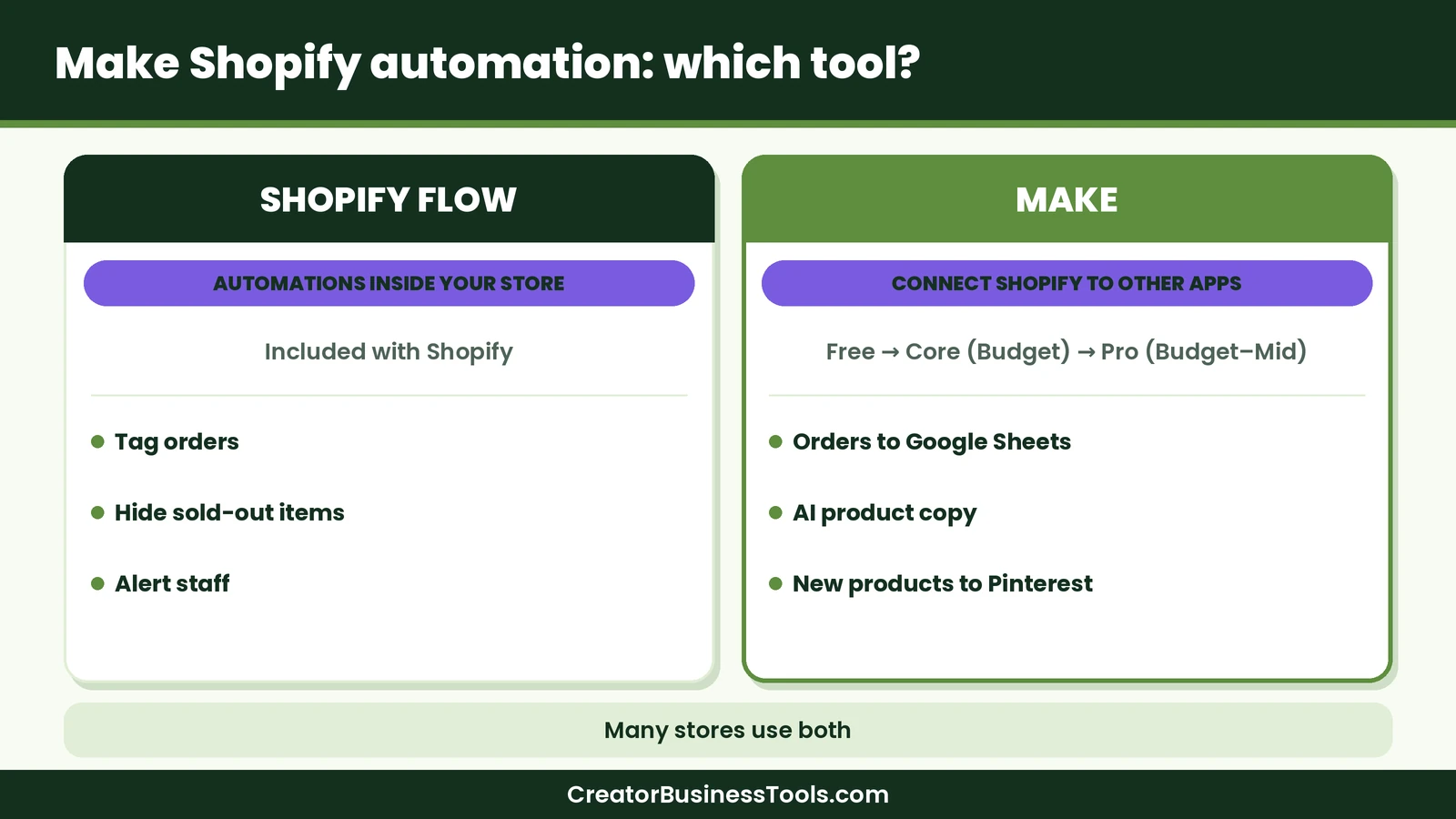
Quick picks
- Best for connecting Shopify to other apps: Make, with a verified Shopify app and thousands of other apps in the same scenario. Try Make
- Best for simple in-store rules: Shopify Flow, which is free and built into Shopify.
- Best for AI-assisted product content: Make, using templates that send product details to an AI model and update your listings.
- Best for Shopify Plus stores with complex internal processes: Shopify Flow, which adds advanced options on higher plans.
What Make can do with Shopify
Make’s Shopify app is verified, which means Make builds and maintains it. It includes 27 modules, so you can both react to store events and change store data.
Triggers
- Watch orders: Start a scenario when an order is created or updated.
- Watch products: Start a scenario when a product is created or updated.
- Watch events: Start a scenario when a selected Shopify event happens.
- Watch events (advanced): React to a wider range of store events.
Actions
- Orders: Search, get, create, and update orders.
- Products and variants: Search, get, create, and update products, plus get, create, and update variants.
- Customers: Search, get, create, and update customers.
- Inventory: Adjust or update inventory levels.
- Fulfillment: Get a fulfillment order and create a fulfillment.
- Blog articles: Search and create articles.
- API calls: Make a GraphQL API call for anything the prebuilt modules don’t cover.
Because a Make scenario can contain any number of apps, a single Shopify trigger can update a spreadsheet, send an email, post to Slack, and create an invoice in one run.
How to connect your store
Make’s help documentation lists two ways to connect, and both need a paid Shopify account:
- Shopify (OAuth): You install the Make app in your Shopify admin and approve access. This is the simplest option for most stores.
- Shopify (Custom app): You create a custom app in Shopify and paste its Admin API access token into Make. This gives you tighter control over which permissions Make receives.
Make warns against creating several connections for the same store, because each new connection can overwrite the permissions of the previous one. Create one connection and reuse it across scenarios.
What is Shopify Flow?
Shopify Flow is Shopify’s own free automation app. It’s available on the Basic, Grow, Advanced, and Plus plans. You build a workflow from three parts:
- Triggers: The event that starts a workflow, such as an order being created or inventory changing.
- Conditions: Rules that decide whether the workflow continues.
- Actions: What Flow does next, such as adding a tag, hiding a product, or sending an internal email.
Flow can also run on a schedule, as often as every ten minutes or hourly, daily, weekly, or monthly. It can fetch lists of records with Get data actions, loop through them, and count or sum values. Shopify offers hundreds of templates, and you can ask Sidekick, Shopify’s AI assistant, to help build a workflow.
Flow works with a set of connected apps, including Asana, Google Sheets, Klaviyo, Slack, and Trello, and installed apps can add their own triggers and actions. Some options depend on your plan. The Send HTTP Request action, which lets Flow call outside services, is only available on Grow, Advanced, and Plus. Custom tasks from partner apps are limited to Plus.
Make vs Shopify Flow at a glance
| Item | Make | Shopify Flow |
|---|---|---|
| Built by | Make | Shopify |
| Main strength | Connecting Shopify to thousands of other apps | Automating tasks inside your store |
| Price tier | Free, then budget (Core), budget to mid-range (Pro), mid-range (Teams) | Free with eligible Shopify plans |
| Shopify plans supported | Any paid Shopify plan | Basic, Grow, Advanced, Plus |
| Outside apps | 3,500+ apps, plus HTTP and custom apps | Selected connectors and installed apps; HTTP requests on Grow and above |
| Builder | Visual canvas showing every step and its data | Trigger, condition, and action editor inside Shopify admin |
| Branching and errors | Routers, filters, and error handler modules | Conditions and paths |
| Scheduling | Down to the minute on paid plans | As often as every ten minutes |
| AI help | AI modules, AI agents, and Maia by Make | Sidekick can draft workflows |
| Best for | Multi-app workflows and reporting | Tags, alerts, and store rules |
The key difference: inside your store vs across your business
Shopify Flow lives in your Shopify admin and understands your store deeply. It can read order, product, customer, and inventory data and act on it without any setup beyond installing the app. For rules like “tag orders over a certain value” or “hide a product when it sells out,” it’s often the fastest route.
Make starts from the other direction. It treats Shopify as one app among thousands, and its strength is moving data between them. If a sale needs to reach a spreadsheet, an email platform, a bookkeeping tool, a project board, and a Slack channel, a single Make scenario can handle all of it, with routers sending different orders down different paths.
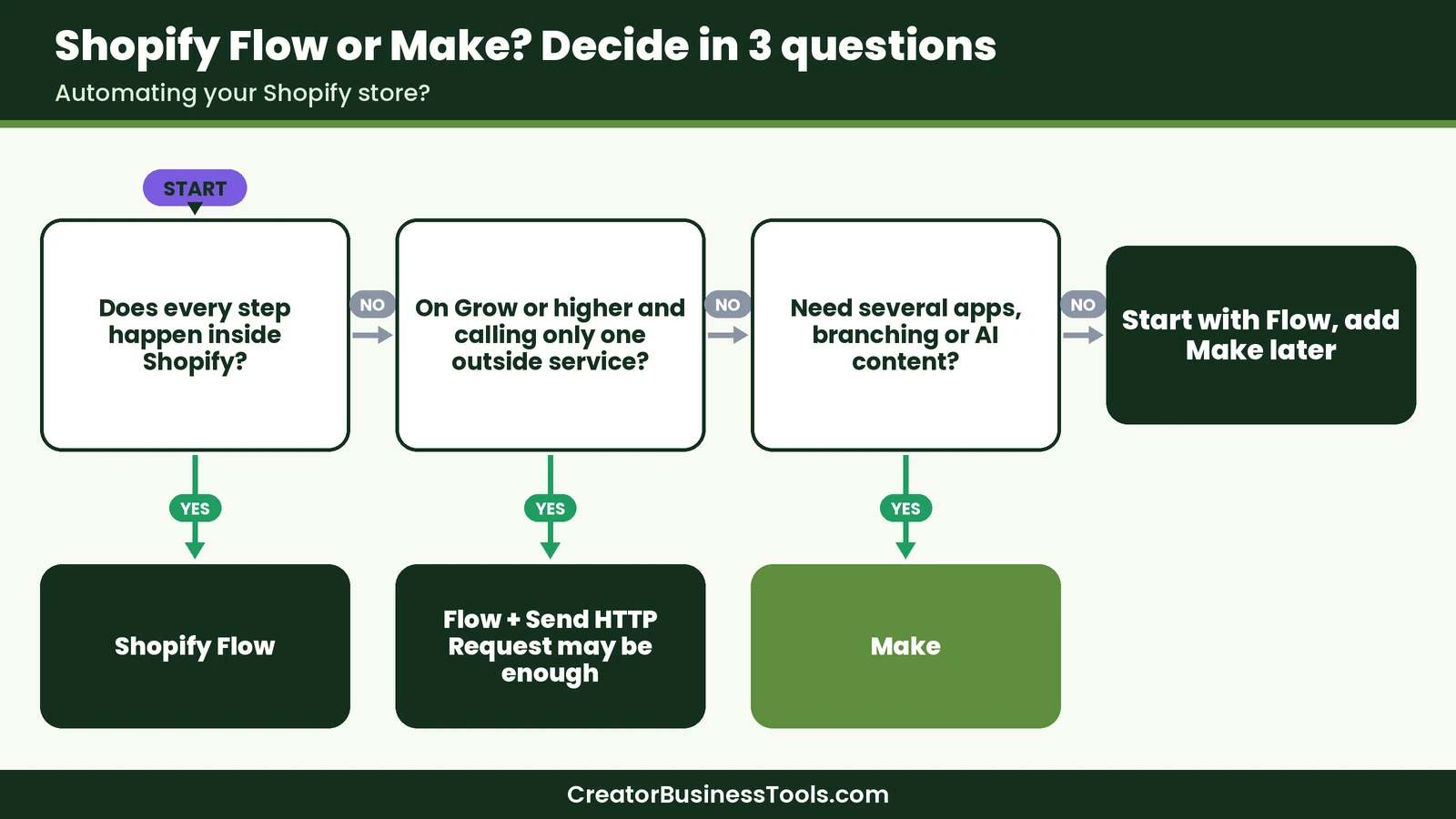
A useful rule of thumb: if every step of the workflow happens in Shopify, start with Flow. If any important step happens outside Shopify, Make is usually the better fit.
Make vs Shopify Flow pricing
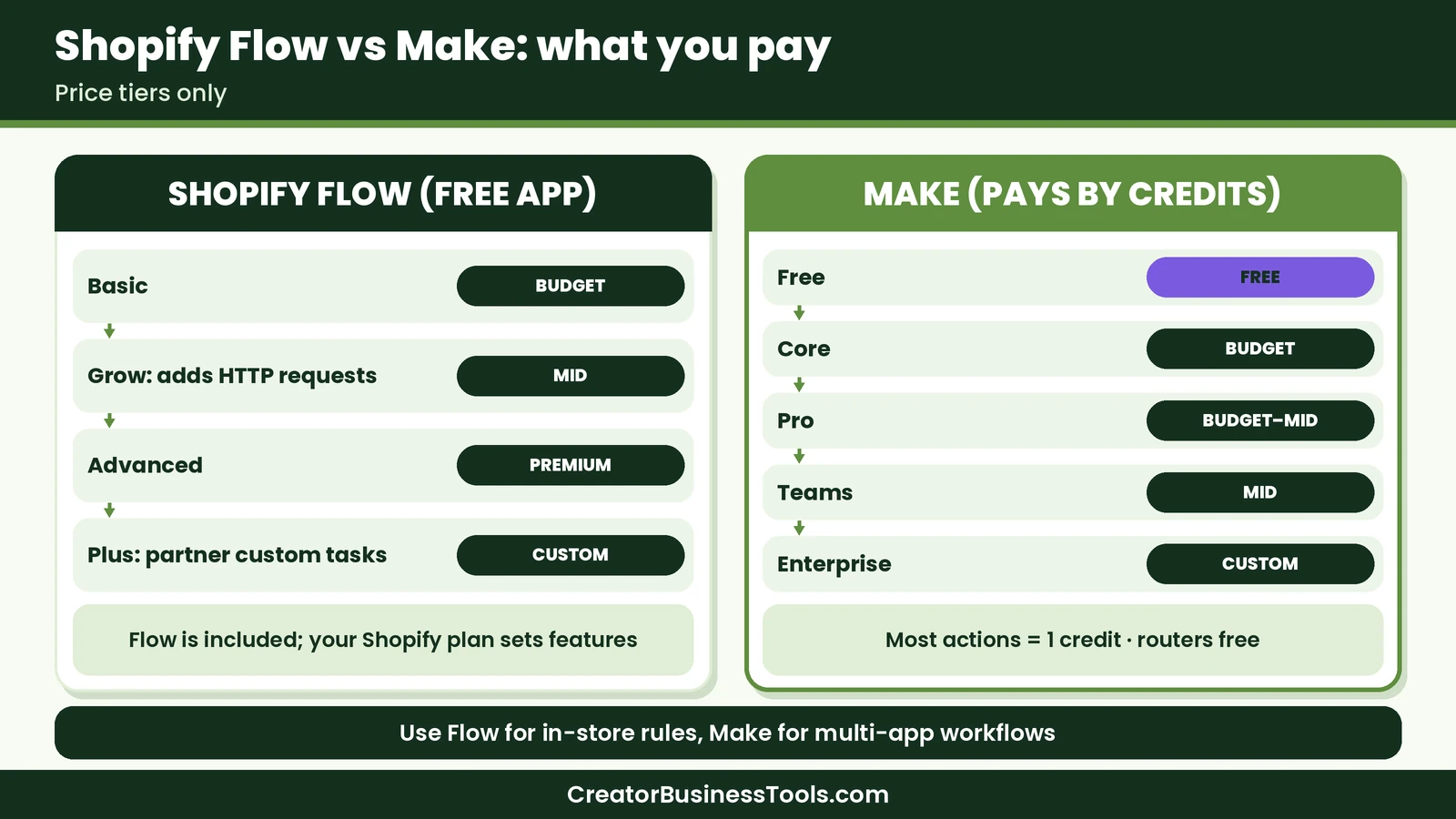
What Make costs
Make bills by credits. Each time a module performs an action, it uses credits, and most actions use one. Router and error handler modules don’t use credits.
- Free: A small monthly credit allowance, the visual builder, routers and filters, and scheduled runs at least 15 minutes apart.
- Core (budget): Unlimited active scenarios and scheduling down to the minute.
- Pro (budget to mid-range): Priority execution, custom variables, and full-text execution log search.
- Teams (mid-range): Team roles and shared scenario templates.
- Enterprise: Custom pricing with advanced security and support.
Paid plans scale with the number of credits you choose. A store with steady order volume should estimate credits per order. For example, a scenario that watches orders, adds a row to a sheet, and sends an email uses roughly three credits for each order it processes. See our Make pricing guide for details.
What Shopify Flow costs
Shopify Flow is free to install. You pay only for your Shopify plan, and the plan affects which Flow features you get. Shopify’s own plans run from Basic (budget) through Grow (mid-range) and Advanced (premium) to Plus (custom pricing). Usage limits for Flow follow your plan’s API limits.
Which costs less?
For automations that Flow can handle, Flow costs nothing extra. Make adds a cost only when you need what Flow can’t do, and its Free plan lets you test small workflows first. Many stores can stay on Make’s Free or Core plan if they filter out orders they don’t need to process.
Features compared
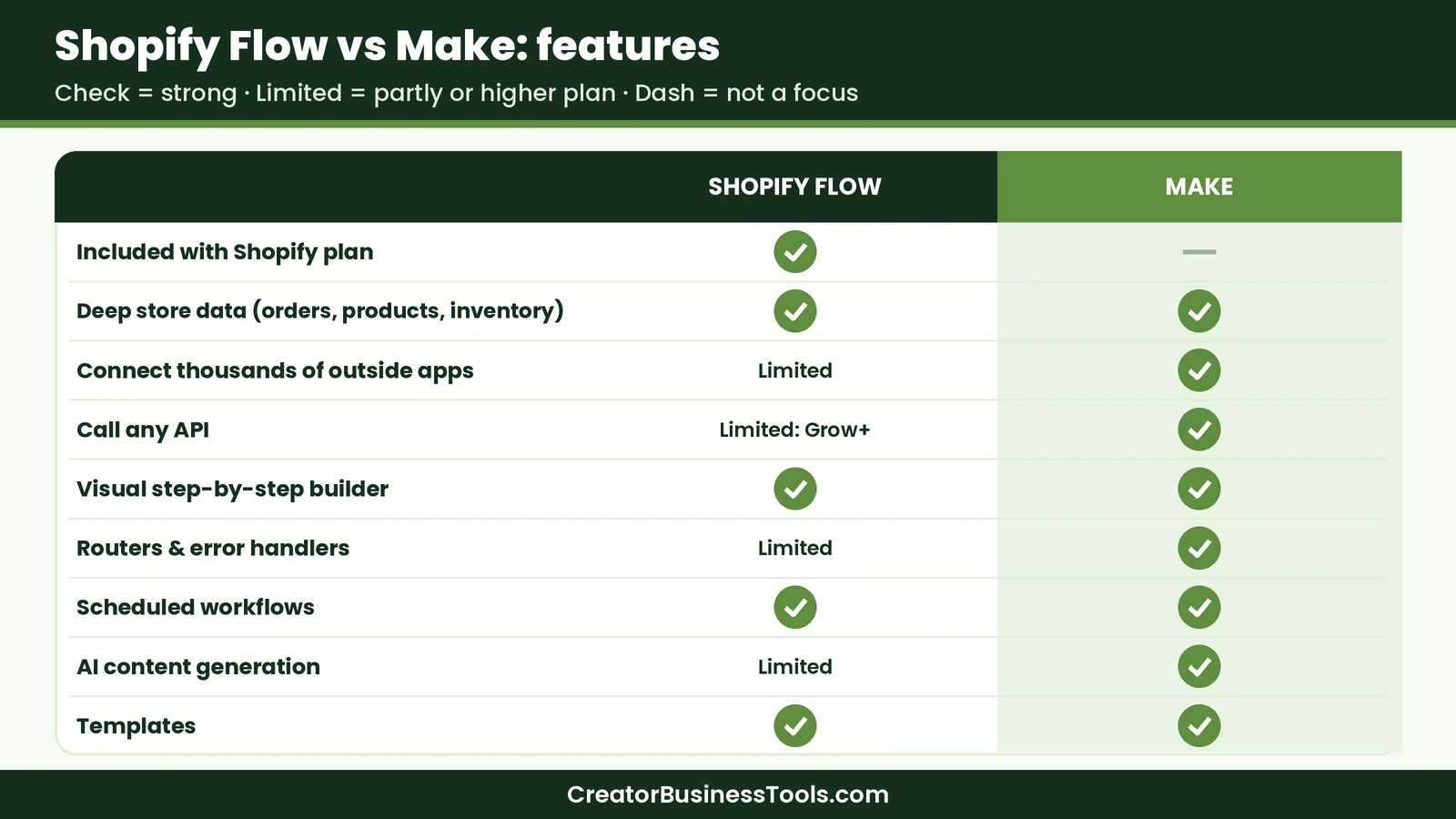
Connecting outside apps
This is Make’s biggest advantage. Make lists 3,500+ apps, and the HTTP module and Custom Apps feature cover services without a ready-made app. Shopify Flow has a solid set of connectors, and installed apps can add more, but calling an arbitrary outside service requires the Send HTTP Request action, which needs the Grow plan or higher.
Building and testing
Make’s canvas shows each module in order, the data passing between them, and the result of every run. Execution history helps you see exactly where something went wrong. Flow’s editor is simpler and lives inside Shopify, which many store owners find comfortable for short workflows.
Logic and error handling
Both tools support conditions. Make adds routers for multiple branches, iterators and aggregators for working with lists, and error handlers that can retry, skip, or stop when an app fails. Flow adds loops, counts, and sums for lists of up to 100 items fetched with Get data.
AI features
Make can send Shopify data to AI models through its AI modules and apps, such as generating product descriptions with OpenAI. Make’s template gallery includes a scenario for exactly that. For more advanced use, see our guide to Make AI agents. In Flow, Sidekick can help you draft workflows from a plain-language description.
7 Make Shopify automation ideas
These are hypothetical examples to show what’s possible. Start with one and add more once it runs smoothly.
- Paid orders to Google Sheets. Watch orders, filter to paid orders, and add a row with the order number, products, and totals. Make’s template gallery includes a version of this.
- AI product descriptions. When a product is created, send its title and attributes to an AI model, then update the product with a draft description for you to review.
- New products to Pinterest. When a product is published, create a Pinterest pin with its image and link. Make lists this as a template, and it suits stores that get traffic from Pinterest.
- Bulk product creation from a sheet. Add products and variants from Google Sheets rows so you can prepare a launch in a spreadsheet.
- Customer follow-up by order type. Use a router to send first-time buyers, repeat buyers, and wholesale customers to different email lists or tags in your email tool.
- Low-stock alerts across tools. Check inventory on a schedule and post a message to Slack, add a task to your project board, and email your supplier when stock runs low.
- Accounting handoff. Send order details to your bookkeeping app so income records stay up to date without manual entry.
Make vs Shopify Flow: pros and cons
Make pros and cons
Pros
- Connects Shopify to 3,500+ apps in one scenario
- Verified Shopify app covering orders, products, customers, inventory, and fulfillment
- Routers, filters, and error handlers for complex workflows
- Visual execution history that shows every step’s data
- Templates for common store workflows, including AI product copy and Pinterest pins
Cons - A separate subscription once you outgrow the Free plan
- Credit-based pricing needs some planning for high order volume
- More concepts to learn than Flow for simple in-store rules
Shopify Flow pros and cons
Pros
- Free and built into Shopify admin
- Deep access to store data without extra setup
- Hundreds of templates for common store tasks
- Sidekick can help draft workflows
Cons - Fewer outside connections, with HTTP requests limited to Grow and higher
- Some advanced options limited to Plus
- Less visibility into multi-app data flows than a dedicated automation tool
Who should use which
Choose Shopify Flow alone if you run a small catalog, your automations are mostly tags, alerts, and product visibility rules, and your other tools already sync with Shopify through their own apps.
Add Make if you keep reports in spreadsheets, sell across several channels, use an email or bookkeeping tool without a deep Shopify sync, want AI to draft product copy, or promote products on Pinterest. Make is also a good fit when one event needs to update several apps in a set order.
Use both if you want fast in-store rules and reliable connections to the rest of your business.
Can you use Make and Shopify Flow together?
Yes, and it’s often the best setup. Let Flow handle fast in-store rules, such as tagging, hiding products, and internal alerts. Let Make handle anything that leaves Shopify, such as reporting, email, accounting, content, and social posting.
One simple pattern: Flow adds a tag like “wholesale” to an order, and a Make scenario watching orders uses that tag in a filter or router to send the order down the right path. Each tool does what it’s best at, and you avoid duplicating logic.
Just make sure the two don’t fight each other. If Flow updates an order and Make also updates the same field, decide which tool owns that field.
How to start Make Shopify automation
- Create a free Make account. Test your first scenario without paying. Try Make
- Connect your store once. Choose the OAuth connection for simplicity or a custom app for tighter permissions.
- Pick one high-value workflow. Orders to a spreadsheet or follow-up emails are good first projects.
- Start from a template. Adjust it to your fields instead of building from scratch.
- Add filters early. Only process the orders or products you need, which saves credits.
- Test with a real order. Run the scenario once, check every module’s output, then turn it on.
- Add error handling. Decide what happens if an app is down, so orders aren’t silently missed.
For a deeper look at the platform, read our Make review. If you’re still choosing between automation tools, our Make vs Zapier comparison may help.
Common mistakes to avoid
- Creating several Shopify connections for one store. Make warns this can overwrite permissions. Reuse one connection.
- Watching every order when you need only some. Filters keep runs and credits under control.
- Letting two tools edit the same data. Decide whether Flow or Make owns each field.
- Publishing AI-written copy without review. Save AI drafts for a human check before they go live.
- Skipping error handlers. A failed step shouldn’t mean a lost order record.
FAQ
Does Make work with Shopify?
Yes. Make has a verified Shopify app with 27 modules for orders, products, variants, customers, inventory, fulfillment, blog articles, and API calls. It requires a paid Shopify account.
Is Shopify Flow free?
Yes. Shopify Flow is a free app on the Basic, Grow, Advanced, and Plus plans, although some actions depend on your plan.
Should I use Shopify Flow or Make?
Use Flow for automations that stay inside Shopify. Use Make when you need to connect Shopify to other apps, add branching and error handling, or generate content with AI.
Can Make create Shopify products automatically?
Yes. Make can create and update products and variants, for example from rows in Google Sheets or from data in another app.
How many credits does a Shopify scenario use?
It depends on the number of modules that run and how many records they process. Most module actions use one credit, and filters help you avoid unnecessary runs.
Can I use Make on Shopify’s Basic plan?
Make’s help documentation requires a paid Shopify account, and Basic is a paid plan. Check Make’s Shopify documentation for any app-specific requirements.
Bottom line
Make Shopify automation is the right move when your store’s work doesn’t stop at Shopify. Shopify Flow is free and handles in-store rules well, so use it for tags, alerts, and product visibility. Add Make when you want orders flowing into spreadsheets and accounting tools, follow-ups reaching your email platform, AI-drafted product copy, or new products posted to Pinterest. Start with one workflow on Make’s free plan and build from there.
Start free with Make
Free checklist: Not sure which store tasks to automate first? Get our free Automation Switch Checklist, a one-page worksheet for mapping your workflows, picking the right tool, and launching your first scenario safely. Contact us to request a copy.
Pricing and features from official vendor pages, last checked October 23, 2026.