
Make AI Agents Explained: How They Work and What They Cost
Disclosure: This post contains affiliate links. If you buy through them, we may earn a commission at no extra cost to you. How we make money.
Make AI Agents let you add an AI “decision-maker” to the automations you already build in Make. Instead of following a fixed path every time, an agent reads its instructions, looks at the incoming request, and chooses which tools to use to get the job done. For creators and small business owners, that opens up tasks that used to need a human eye, like sorting support emails or drafting replies from your FAQ.
This guide explains what Make AI Agents are, how they fit inside Make scenarios, how they use credits, and when a plain automation is the smarter choice. New to Make? Start with our Make review. We also compare Make’s approach with Zapier Agents and n8n, so you can see where each one fits.
Everything here is based on Make’s official product pages and help center, plus the official pages of the other tools we mention. We don’t claim hands-on benchmarks. We use price tiers ($ = budget, $$ = mid-range, $$$ = premium) instead of exact prices, because plans change and each pricing page is the place to confirm the final number.
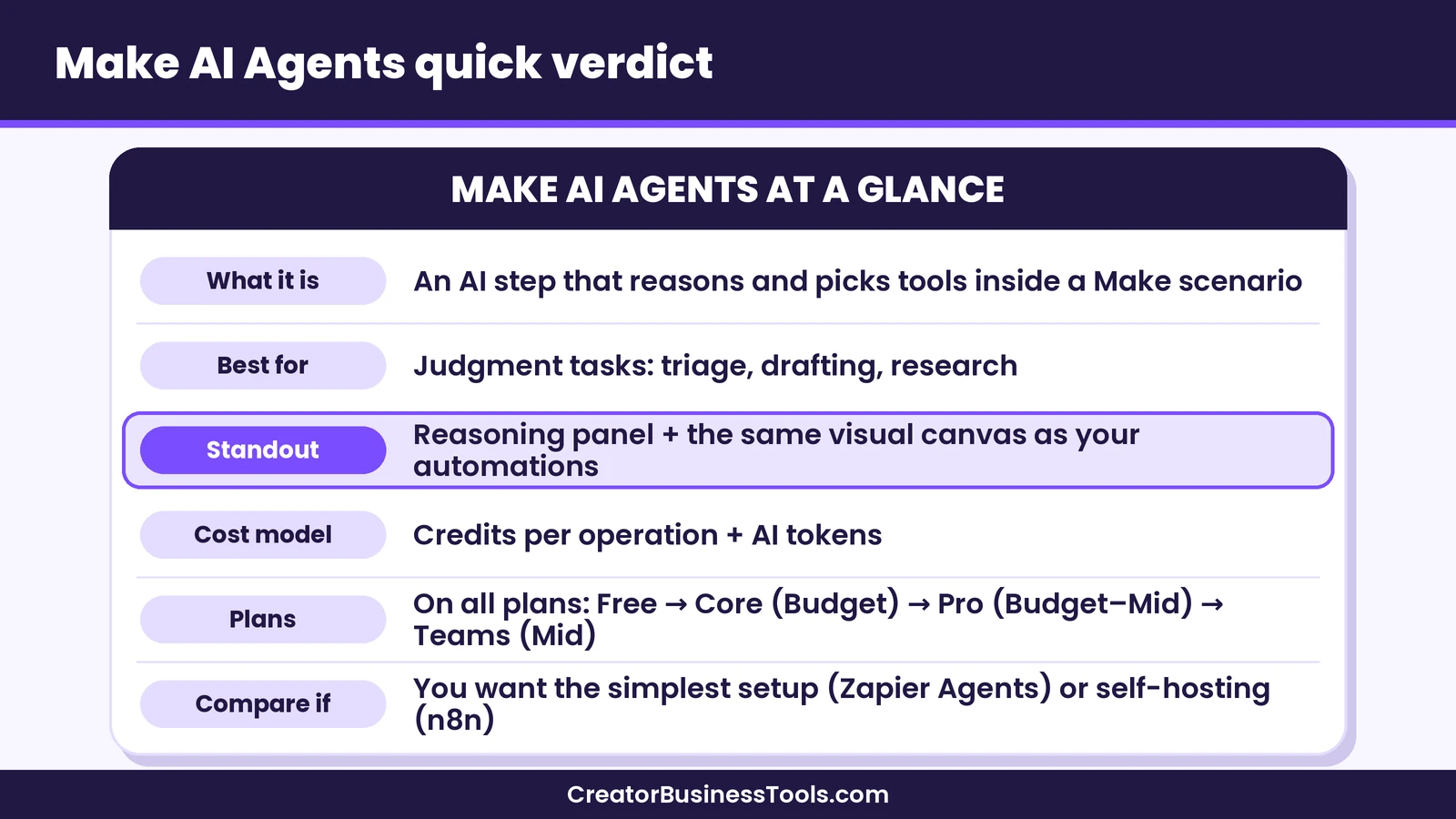
Quick verdict: Make AI Agents are a strong fit if you already use Make, or want to, and need AI judgment inside workflows that connect creator tools like Kit, Stripe, Teachable, Thinkific, or Circle. Agents live on the same visual canvas as your scenarios, show their reasoning step by step, and can be combined with fixed rules and manual approvals. If you want the simplest setup across the largest app directory, compare Zapier Agents. If you want self-hosting and per-run pricing, compare n8n.
Quick picks
- Best for creators who already automate in Make: Make AI Agents, because agents sit inside the scenarios you already run and can use any Make module as a tool. Try Make free
- Best for the quickest start with no workflow building: Zapier Agents, which you can describe in plain language and connect to a very large app directory.
- Best for technical teams that want to self-host: n8n, with its AI Agent node and a self-hosted Community Edition.
- Best for simple, repeatable tasks: A standard Make scenario without an agent. If the steps stay the same every run, you don’t need AI to decide them.
What Are Make AI Agents?
In Make’s help center, an AI agent is described as an AI system that independently performs tasks for you based on your instructions. In practice, Make AI Agents is an app you add to a scenario, the name Make uses for an automated workflow. The main module is called “Run an agent.”
A normal Make scenario is deterministic. You decide every step in advance: when a new Stripe payment arrives, add the buyer to Kit, then post a message in your community. The same input gives the same result each time.
An agentic scenario adds a step that can think. You give the agent a goal and a set of tools, and it decides which tools to use and in what order. Make’s product page sums up the difference neatly: a chatbot can respond, while an agent can take action by triggering real workflows.
Make also points out that agents complement fixed logic rather than replace it. You can keep the predictable parts of a workflow as regular modules and use the agent only for the step that needs judgment.
How Make AI Agents Work
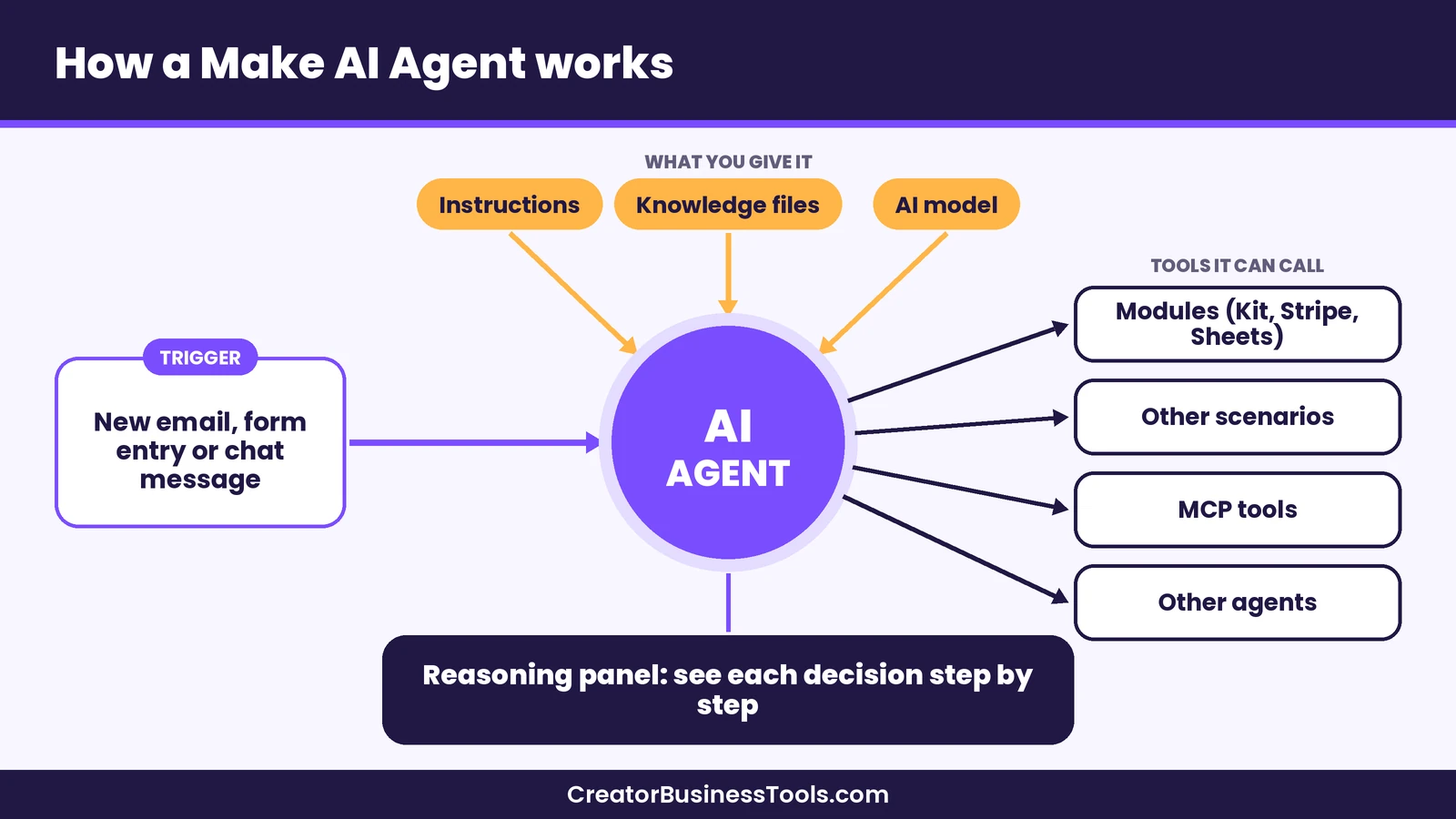
Make’s help center breaks an agent into a handful of building blocks. Understanding them makes setup much less intimidating.
- Large language model (LLM): The “brain” the agent uses to understand requests and make decisions.
- AI provider: The service that connects the agent to a model. Make lists providers such as OpenAI, Gemini, and Anthropic Claude. Make’s own AI Provider lets you use models without opening an account with a provider.
- Instructions: The agent’s job description, covering its role, goals, steps, and rules.
- Knowledge: Reference files the agent can search, such as your FAQ, brand guidelines, policies, or product glossary.
- Input: The new information the agent handles each time it runs, such as an email, a form entry, or a chat message.
- Tools: The actions the agent can take. In Make, tools can be modules, whole scenarios, MCP server tools, or even other agents.
- Files: Task-specific documents, like an email attachment the agent needs to read.
- Reasoning: A step-by-step view of the agent’s thinking, so you can see why it made each decision.
The Reasoning panel
Transparency is the feature Make emphasizes most. Its product page says you can see every decision an agent makes, step by step, in the Reasoning panel directly on the canvas. When an agent picks the wrong tool or misreads a request, that view helps you find the cause and adjust your instructions.
Guardrails and approvals
Make’s FAQ says you stay in control. You can set clear rules, add manual approvals, or stop the agent at specific points. That matters for anything that touches customers or money. A sensible pattern is to let the agent draft or classify, then route the result to a human before anything is sent or charged.
Reusable agents
Make describes agents as reusable building blocks. You can build an agent once and use it across multiple workflows instead of copying the same logic into every scenario.
Agent, AI App, or Standard Scenario?
Not every task needs an agent. Make’s help center offers a clear rule of thumb, and it’s one of the most useful things to read before you build.
| Approach | Use it when | Examples |
|---|---|---|
| Scenario with an AI agent | The task needs flexible reasoning, judgment calls, and variable inputs | Triage support tickets, screen applicants, research leads |
| Scenario with an AI app | AI generates content, but inputs and outputs follow set rules | Translate, transcribe, or summarize a document |
| Standard scenario | Fixed logic that gives the same output for the same input | Sync sales to a spreadsheet, process orders, update a CRM |
Make’s product page puts it simply: if a task just needs doing, use automation; if it needs thinking, use an agent.
Make also suggests choosing tasks you’d trust an intern to handle. It recommends avoiding agents for sensitive data, high-stakes financial or strategic decisions, and work with strict legal requirements. For a small business, that’s a practical boundary. Let the agent prepare, sort, and draft, and keep final decisions with a person.
What Can Creators and Small Businesses Build?
Make’s help center lists common agent examples, including customer support ticket triage, sales outreach, content marketing, market research, candidate screening, and SEO analysis. Here’s how those ideas translate to a creator business. These are hypothetical examples, not case studies.
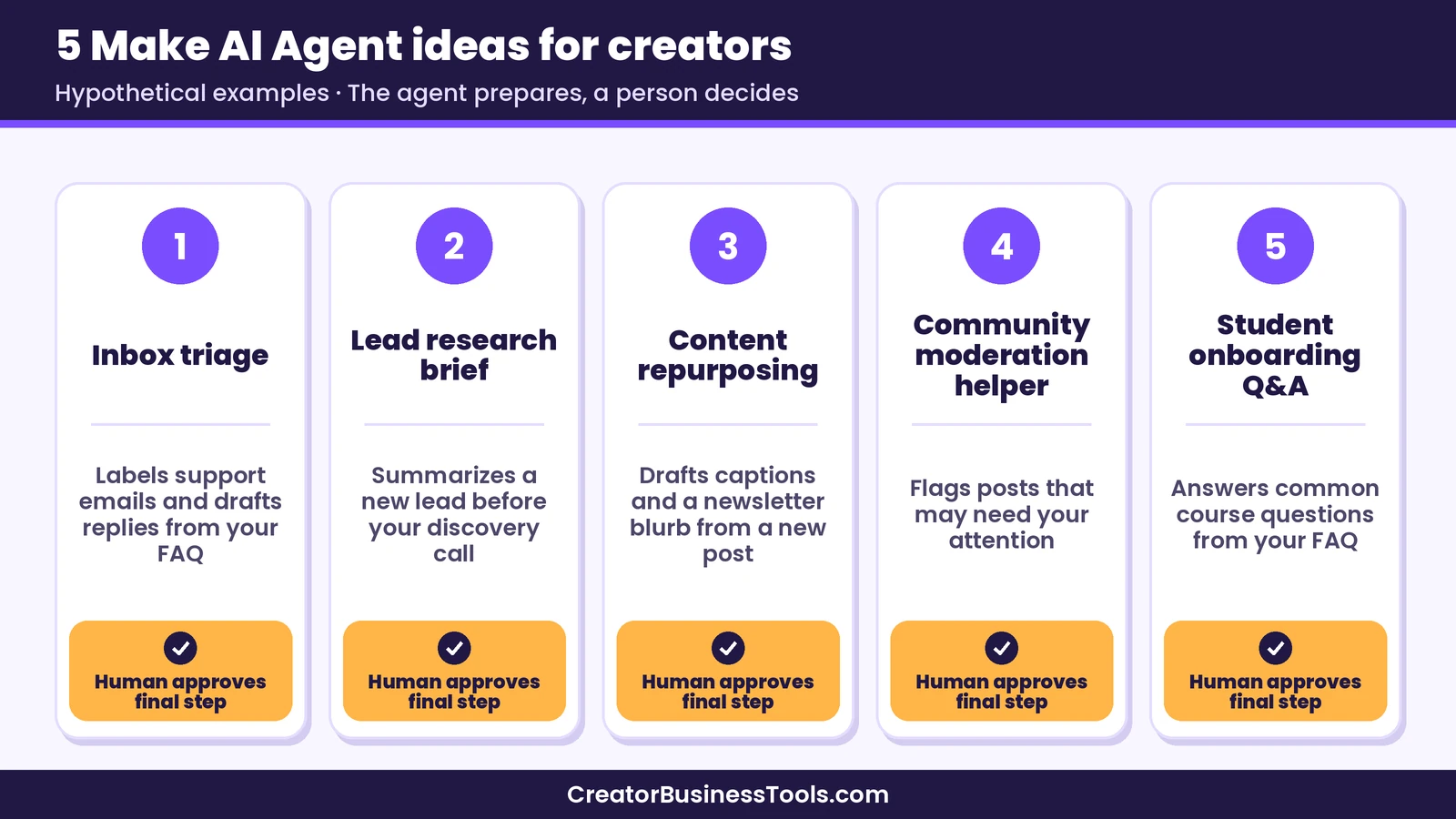
1. Inbox triage for a course creator. New support emails trigger the scenario. The agent reads each message, checks your course FAQ in its knowledge files, labels it as billing, access, or content, and drafts a reply. Refund or billing questions go to you for approval instead of being answered automatically.
2. Lead research for a coach. When someone books a discovery call, the agent gathers public information about their business, summarizes it into a short brief, and saves it to a spreadsheet or CRM so you walk into the call prepared.
3. Content repurposing. When you publish a new blog post, the agent reads it, follows your brand guidelines from its knowledge files, and drafts social captions and a newsletter blurb for you to review.
4. Community moderation helper. New posts in your community are checked against your guidelines. The agent flags posts that may need attention and sends you a summary, while you make the final call.
5. Student onboarding questions. A chat-based agent answers common “where do I find…” questions about your course, using your FAQ as knowledge, and hands off anything it can’t answer.
In each case, the agent can use Make’s regular app modules as tools. Make offers verified apps for creator platforms such as Teachable and Thinkific, which helps when an agent needs to look up a student or an order.
Explore Make AI Agents on the free plan
How to Build Your First Make AI Agent
Make’s help center walks through six steps. Here’s a condensed version.
- Plan the agent. Write down what it does, which tools it needs, what knowledge it should use, and what triggers it.
- Build the scenario. Create a scenario and add a trigger, such as a new email, form response, or spreadsheet row.
- Configure the agent. Add the “Run an agent” module, choose an AI provider and model, and write clear instructions.
- Add tools. Connect the modules, scenarios, or MCP tools the agent is allowed to use.
- Add knowledge. Upload reference files, like your FAQ or style guide.
- Test before going live. Chat with the agent or run the scenario with sample data, then review its reasoning.
If you’d rather not start from a blank canvas, Make’s Library of Agents offers ready-made agent scenarios you can adapt. Make also offers a free Academy course on building agents.
Tips for better instructions
- State the agent’s role in one sentence, then list its goals.
- Spell out what it must not do on its own, such as sending refunds or deleting records.
- Tell it when to stop and ask for approval.
- Give examples of good outputs, like a sample reply in your brand voice.
- Keep knowledge files focused. A short, accurate FAQ is more useful than a pile of old documents.
How Much Do Make AI Agents Cost?
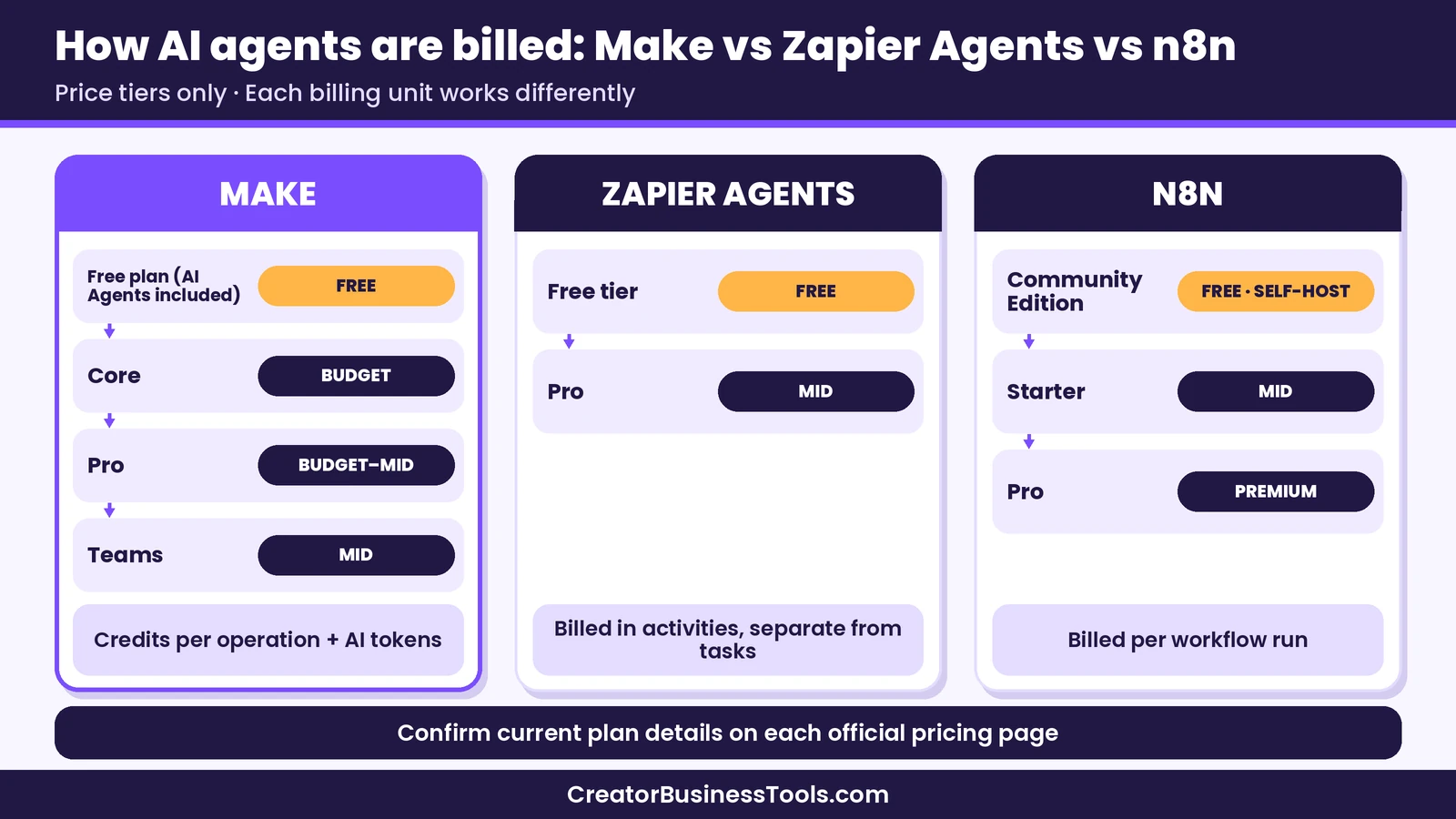
Make bills in credits. According to its pricing FAQ, most module actions use one credit, and some advanced features that use Make’s AI Provider can use more. Agents follow the same idea, with an extra layer for AI usage.
Make’s help center explains agent credit use like this:
- With Make’s AI Provider: Running an agent uses one credit per operation plus credits based on the AI tokens used.
- With your own AI provider connection: Running an agent uses one credit per operation, and you pay the provider directly for tokens. Custom provider connections are available on paid plans.
- Tools: Each tool the agent calls uses one credit per operation, plus credits based on AI tokens when you use Make’s AI Provider.
- Chat and input files: Chatting with an agent uses credits per operation for the agent and any tools it calls, and files you pass in use AI tokens based on their size and type.
- Knowledge files: Uploading and querying knowledge uses extra token-based credits, and document files add a small per-page token charge.
Make says AI Agents are available on all plans, including the free plan, through Make’s AI Provider. Paid plans start in the budget tier ($), and higher tiers add more credits and team features. Paying annually costs less than paying monthly. Make lists its agent app as an open beta, so functionality and pricing may change. Check the help center before you plan a big rollout.
Estimating your usage
Because agents decide which tools to call, their credit use can vary from run to run. A simple way to estimate:
- Count the regular modules in the scenario.
- Add the agent step and the average number of tools you expect it to call.
- Add a buffer for AI tokens, especially if inputs are long emails or documents.
- Multiply by how often the scenario runs each month.
Run a small batch of real examples first, then check Make’s credit usage view to see what each run actually used. For a full breakdown of plans, see our Make pricing guide.
Make AI Agents vs Zapier Agents vs n8n
Make isn’t the only automation platform with agents. Here’s how the three approaches compare, based on each company’s official pages.
| Product | Best for | Key strength | Main drawback | Price tier |
|---|---|---|---|---|
| Make AI Agents | Creators and small teams who want AI inside visual workflows | Agents on the same canvas as scenarios, with a Reasoning panel | Credits plus AI tokens can be harder to predict | Free plan, then $ to $$ |
| Zapier Agents | Beginners who want to describe an agent and go | Very large app directory and a guided, chat-based setup | Agents are billed separately from regular Zapier tasks | Free tier, then $$ |
| n8n | Technical teams that want control and self-hosting | AI Agent node, human approval for tool calls, self-hosted option | Steeper learning curve for non-developers | Free self-hosted, cloud $$ to $$$ |
Make AI Agents: pros and cons
Pros
- Agents are built, run, and debugged on the same canvas as your scenarios.
- The Reasoning panel shows each decision step by step.
- Tools can be any module, another scenario, MCP tools, or another agent.
- Available on all plans, so you can experiment before you pay.
- Verified apps for creator platforms like Teachable and Thinkific.
Cons
- AI token credits make costs vary from run to run.
- Custom AI provider connections need a paid plan.
- Some familiarity with Make scenarios helps before you build agents.
- The agent app is in open beta, so features and pricing may change.
Zapier Agents: pros and cons
Pros
- Zapier says its agents can work across more than 9,000 apps.
- Zapier Copilot helps you create agents in plain language.
- Agents can use knowledge sources and browse the web.
- Agent usage is measured in activities, so it doesn’t eat into your regular task allowance.
Cons
- Agents are a separate product with their own billing unit, which adds another budget line.
- Zapier caps how many activities a single agent run can use, so long tasks may pause and ask before continuing.
- Multi-step Zap workflows need a paid Zapier plan.
n8n: pros and cons
Pros
- The AI Agent node fits a judgment step inside a defined workflow.
- n8n’s plans include human approval for tool calls.
- You can self-host the Community Edition to keep data in-house.
- Cloud plans bill per workflow run, not per step.
Cons
- Better suited to technical users comfortable with nodes, APIs, and hosting.
- Self-hosting means you handle servers, updates, and security yourself.
- Paid cloud plans start in a higher price tier than Make’s entry plan.
For full head-to-head comparisons, see our Make vs Zapier and Make vs n8n guides. If you are weighing whole platforms rather than agent features, our Make alternatives and Zapier alternatives roundups cover more options.
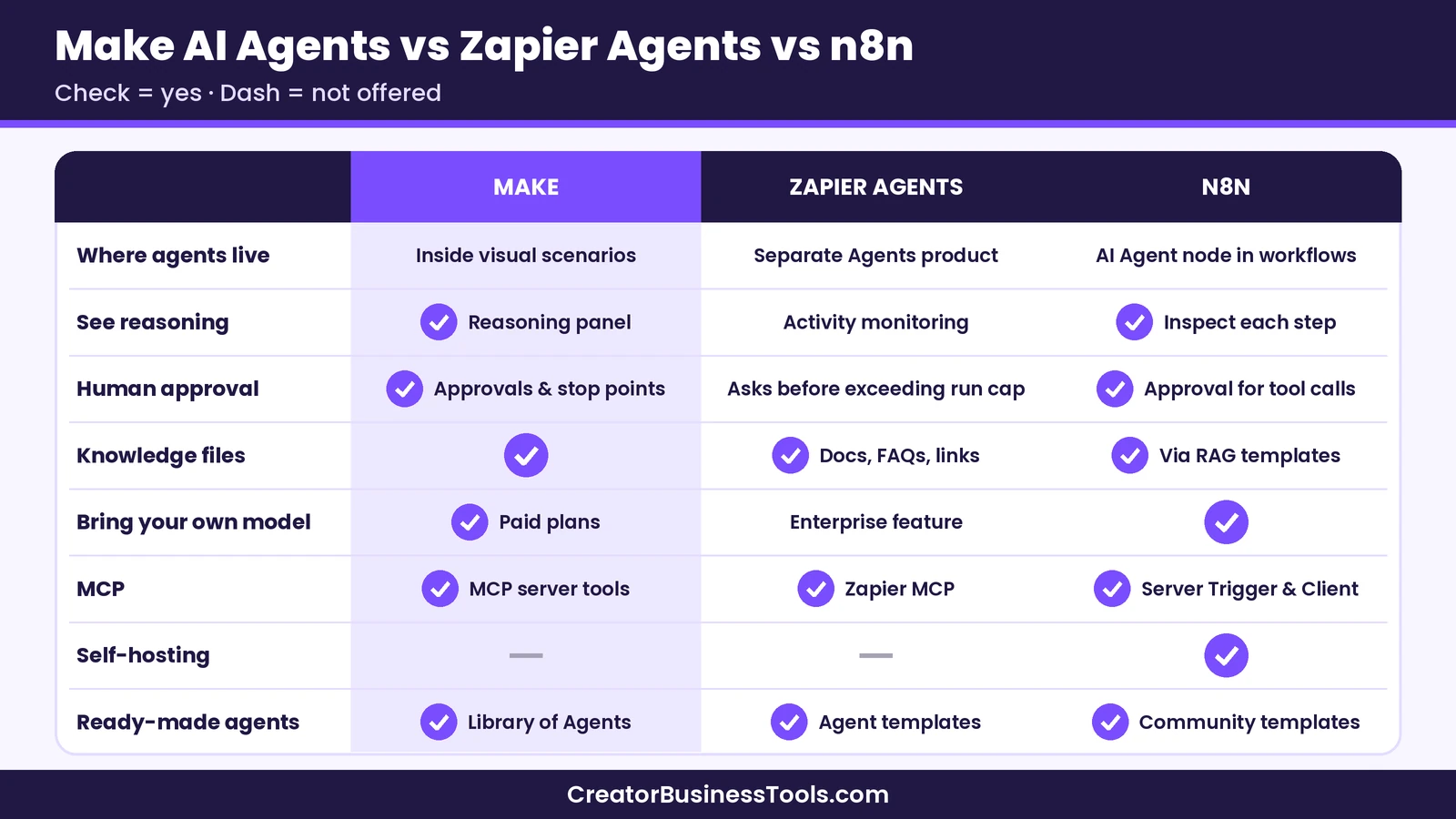
Feature Comparison
| Feature | Make AI Agents | Zapier Agents | n8n |
|---|---|---|---|
| Where agents live | Inside visual scenarios | Separate Agents product | AI Agent node inside workflows |
| See the agent’s reasoning | Reasoning panel on the canvas | Activity monitoring | Inspect each step and tool call |
| Human approval | Manual approvals and stop points | Agent asks before exceeding its run cap | Human approval for tool calls |
| Knowledge files | Yes | Yes (docs, FAQs, links) | Yes, through RAG workflow templates |
| Bring your own AI model | Paid plans | Enterprise feature for AI steps | Yes |
| MCP support | MCP server tools | Zapier MCP | MCP Server Trigger and Client |
| Self-hosting | Not offered on the pages we reviewed | No | Yes |
| Ready-made agents | Library of Agents | Agent templates | Community templates |
How to Choose the Right AI Agent Tool
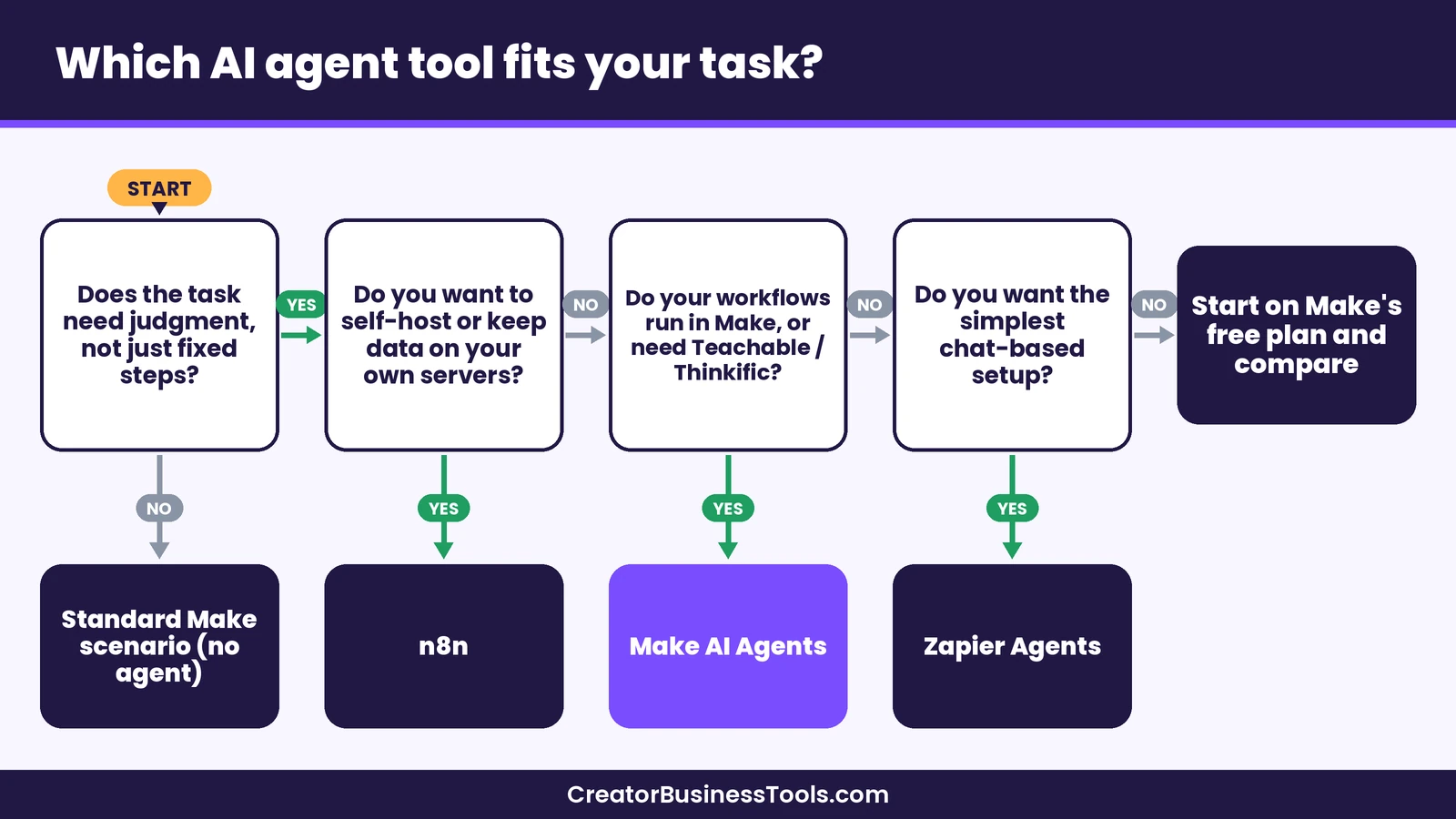
- Choose Make AI Agents if you want AI judgment inside visual workflows, value seeing the agent’s reasoning, and use creator tools that Make supports.
- Choose Zapier Agents if you want to describe an agent in plain language and need apps that only Zapier connects.
- Choose n8n if you have technical skills, want self-hosting, or prefer paying per workflow run.
- Skip agents entirely if your process is the same every time. A standard scenario is cheaper and more predictable.
Before you build an agent
- Write down the decision the agent will make and what a good result looks like.
- Decide which actions need a human to approve them.
- Start with low-risk tasks, like sorting and drafting, before anything customer-facing.
- Test with real examples and review the reasoning for each run.
- Check credit use after your first batch of runs, and confirm plan details on Make’s pricing page.
Common Mistakes to Avoid
- Using an agent for a fixed process. If the steps stay the same, a standard scenario does the job with fewer credits.
- Vague instructions. “Handle support” is too broad. “Label each email as billing, access, or content, then draft a reply using the FAQ” works much better.
- Giving the agent too many tools. Start with the few it needs. Fewer choices usually mean more consistent behavior.
- Skipping approvals. Anything that sends money, issues refunds, or emails customers should pass through a human first.
- Forgetting about tokens. Long emails and big documents use more AI tokens. Trim inputs when you can.
- Overloading knowledge files. Outdated or conflicting documents confuse the agent. Keep one clear source for each topic.
FAQ
Are Make AI Agents free?
Make says AI Agents are available on all plans, including the free plan, through Make’s AI Provider. Agent runs still use credits, so heavy use will need a paid plan.
Do I need coding skills to build a Make AI Agent?
No. Make says you build agents with its visual builder. Some familiarity with Make scenarios helps, since agents live inside them.
Can I use my own OpenAI or Claude account?
Yes, on paid plans. Make’s help center says paid plans can use custom AI provider connections, such as OpenAI and Anthropic Claude. In that case, you pay the provider for tokens.
What’s the difference between a Make AI Agent and ChatGPT?
ChatGPT responds to prompts. A Make AI Agent can take action by using tools, such as updating a spreadsheet, tagging a subscriber, or calling another scenario, inside an automated workflow.
How do I stop an agent from making a bad decision?
Use clear rules in the instructions, add manual approval steps before sensitive actions, and review the Reasoning panel during testing. Make also recommends avoiding agents for high-stakes decisions.
Bottom line
Make AI Agents bring AI judgment into the same visual workflows you use for everyday automation. They work best for tasks that need a little thinking, like sorting messages, drafting replies, or researching leads, while fixed steps stay as regular modules. The Reasoning panel and approval options make it easier to trust what an agent does, which matters when your business and your customers are on the line.
If you already automate with Make, or you run on creator tools like Kit, Stripe, Teachable, or Thinkific, Make AI Agents are well worth testing. Start on the free plan with one low-risk task, review the results, and grow from there. If you want a chat-first setup, compare Zapier Agents; if you want to self-host, compare n8n.
Free worksheet: Planning your first AI agent? Get our free AI Agent Planning Worksheet, a one-page template for defining the agent’s job, tools, knowledge, and approval points before you build. Contact us to request a copy.
Pricing and features from official vendor pages, last checked October 21, 2026.