
Make vs IFTTT: Which Automation Tool Fits Your Creator Business?
Disclosure: This post contains affiliate links. If you buy through them, we may earn a commission at no extra cost to you. How we make money.
Make vs IFTTT is a comparison between two very different ideas of automation. IFTTT connects one trigger to one action with a tap. Make lets you draw a whole workflow, with branches, filters, and many steps, on a visual canvas.
Both can save a creator hours. The question is which style of automation fits the work you actually do. This guide compares the two on pricing, app coverage, ease of use, and the kinds of creator workflows each handles well. It’s based on each company’s official pricing and product pages, not on sponsored claims.
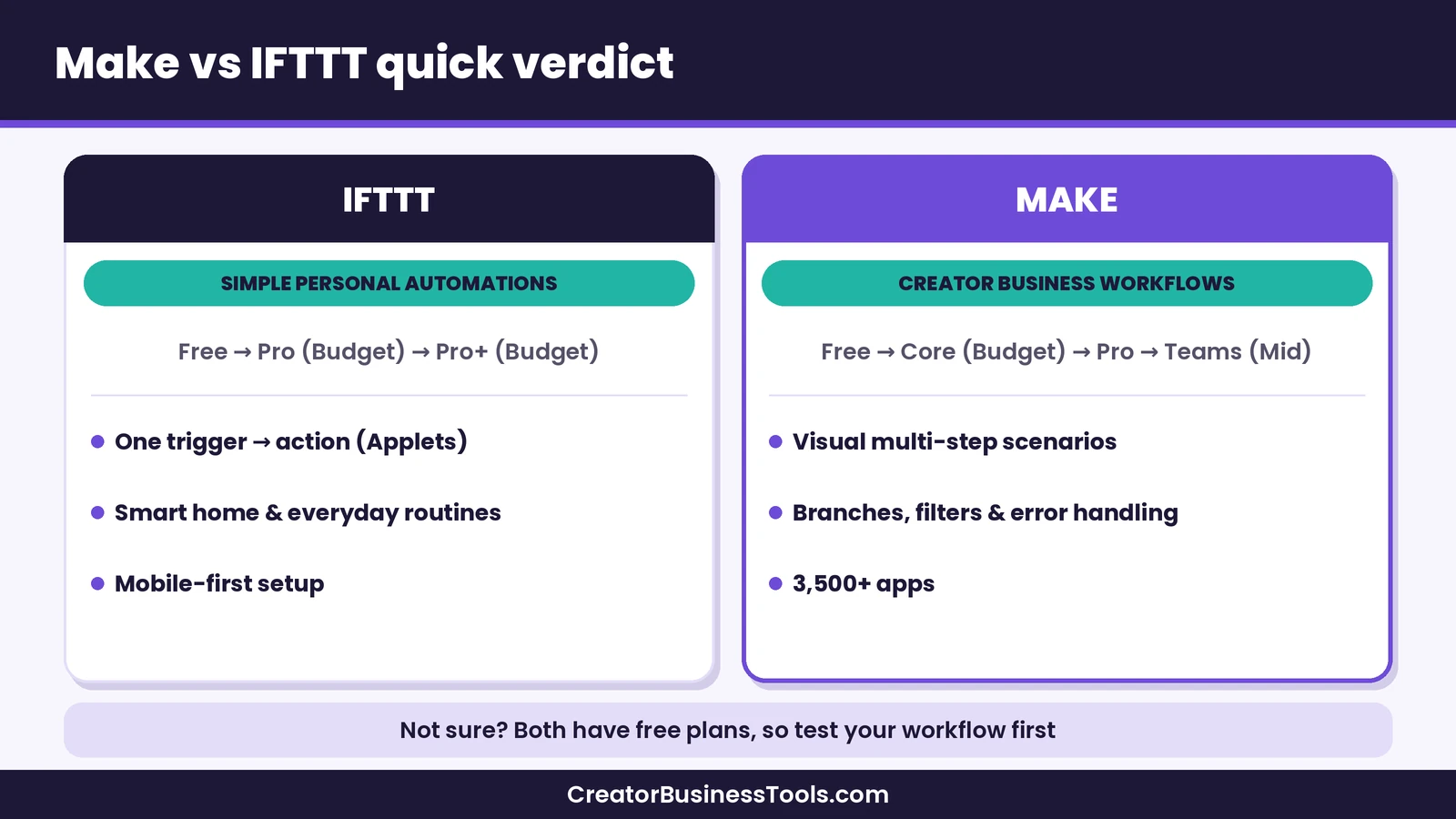
Quick verdict: Choose IFTTT if you want simple, personal “if this, then that” automations, such as smart home routines or cross-posting, and you value a low price tier and a mobile-first app. Choose Make if you run a creator business and need multi-step workflows that move data between your email tool, payment platform, course platform, and spreadsheets. Make’s free plan is a low-risk way to find out whether you need that extra power.
Quick picks
- Best for creator business workflows: Make, with multi-step scenarios, routers, filters, and thousands of ready-made templates. Try Make
- Best for simple personal automations: IFTTT Free or Pro, for a handful of one-step Applets.
- Best for smart home routines: IFTTT, whose Applets are built around devices and everyday routines.
- Best for growing teams: Make Teams, with team roles and shared scenario templates.
Make vs IFTTT at a glance
| Item | Make | IFTTT |
|---|---|---|
| Automation style | Visual scenarios with many steps, branches, and filters | Applets: a trigger plus one or more actions |
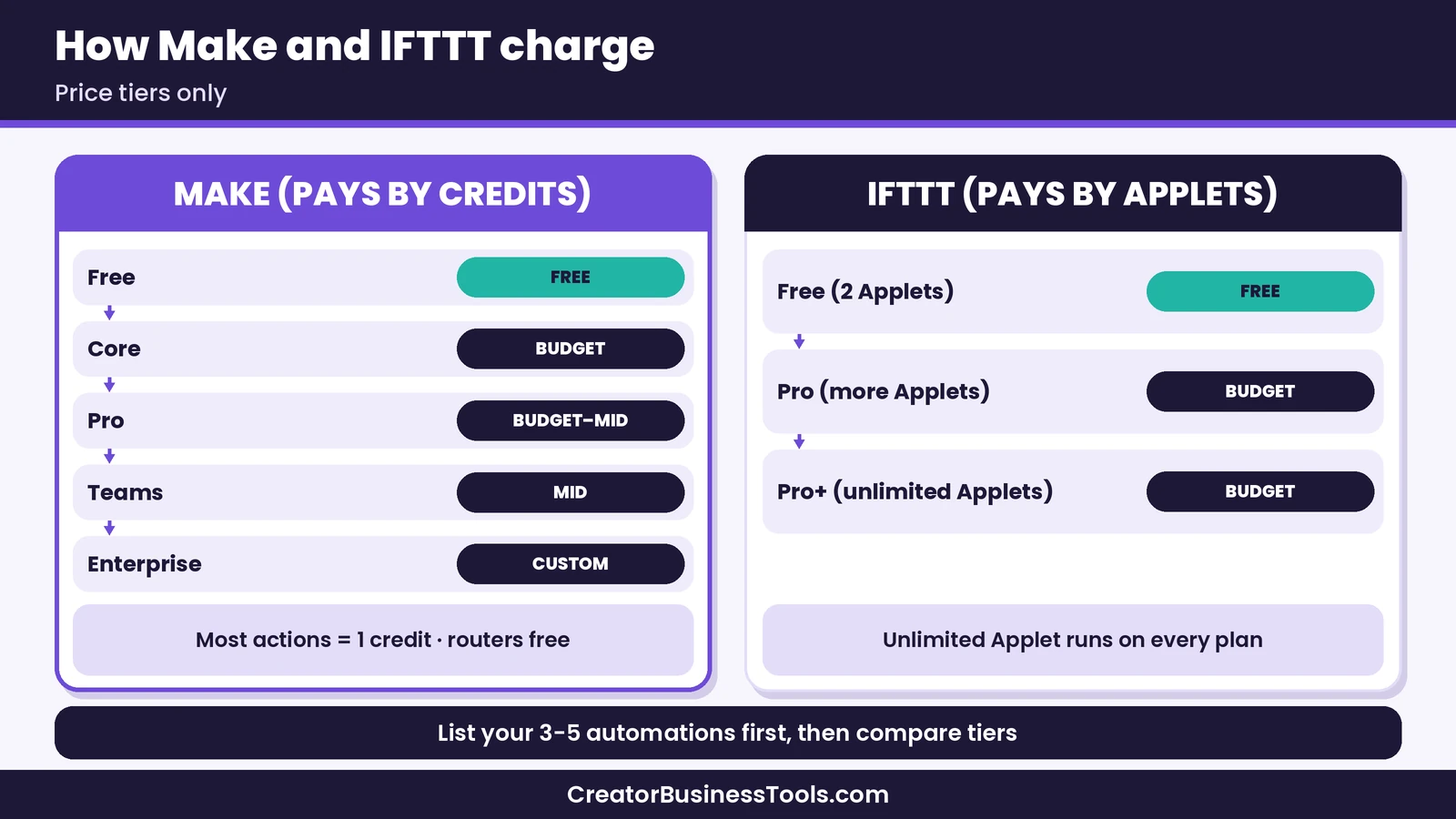
| Plans | Free, Core, Pro, Teams, Enterprise | Free, Pro, Pro+ |
| Price tier | Free, then $ (Core), $–$$ (Pro), $$ (Teams) | Free, then $ (Pro) and $ (Pro+) |
| Pricing model | Monthly credits; most module actions use one credit | Number of Applets; unlimited Applet runs |
| Free plan | Small monthly credit allowance, runs at least 15 minutes apart | Two Applets with standard speed |
| Apps | 3,500+ apps, plus custom apps for any public API | Over 1,000 services, plus webhooks on paid plans |
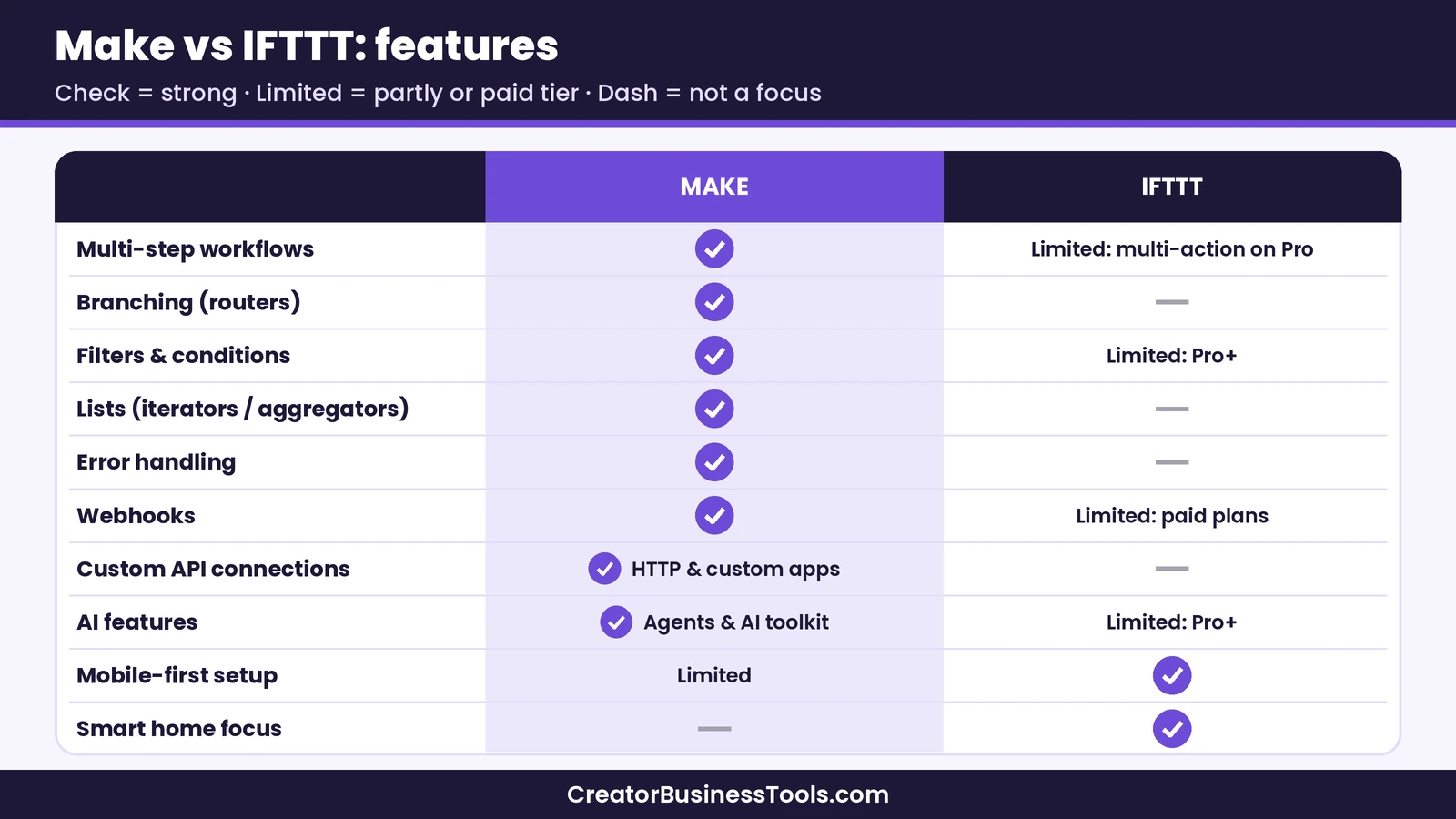
| Logic | Routers, filters, iterators, aggregators, error handlers | Queries and filters on Pro+ |
| AI | AI agents, AI toolkit, Maia conversational builder | AI services on Pro+ |
| Best for | Creators running a business on several tools | Individuals automating devices and simple tasks |
What is Make?
Make is a visual automation platform. You build a scenario by placing modules on a canvas and connecting them. A typical scenario starts with a trigger, such as a new sale or a new form response, and then passes that data through as many steps as you need.
Each module performs an action in an app: read a record, search for data, create a row, update a contact, or transform text. You can split a flow with a router, stop records that don’t match with a filter, loop through lists with an iterator, and combine results with an aggregator.
Make lists 3,500+ apps on its pricing page, and its Custom Apps feature lets you connect virtually any service that offers a public API. For creators, that covers the usual stack: email platforms such as Kit, payments through Stripe, community tools such as Circle, and course platforms such as Teachable and Thinkific, all of which have apps in Make’s integration directory.
If you want the full picture, our Make review covers the platform in depth.
What is IFTTT?
IFTTT stands for “If This Then That.” It was built to let anyone connect apps and devices without code. The core unit is the Applet: a trigger from one service and an action in another. When the trigger fires, the action runs.
IFTTT describes its most popular Applets as smart home routines, such as adjusting the temperature based on the weather or turning on a security system when you leave, plus social media Applets that cross-post content. You can turn on published Applets made by others or build your own in three steps: choose a trigger, choose an action, then name and finish the Applet.
IFTTT says it connects over 1,000 services. On the creator side, we found service pages for Kit, Stripe, YouTube, Instagram, TikTok, Pinterest, WordPress, Google Sheets, Gmail, Airtable, and Mailchimp, plus a Webhooks service for connecting other tools.
Make vs IFTTT pricing
The two tools charge for very different things, which matters more than the headline price tier.
How Make charges
Make bills by credits. Each time a module performs an action, it uses credits. Most actions use one credit, while some AI features that run on Make’s AI provider can use more. Router and error handler modules don’t use credits.
That means one scenario run might use two credits or thousands, depending on how many steps run and how many records pass through. If you run out, your scenarios pause until credits are added; incoming webhooks wait in a queue up to your plan’s limit.
- Free: A small monthly credit allowance, the visual builder, routers and filters, and a minimum interval of 15 minutes between scheduled runs.
- Core ($): Unlimited active scenarios, scheduling down to the minute, higher data transfer limits, and access to the Make API.
- Pro ($–$$): Everything in Core plus priority scenario execution, custom variables, and full-text execution log search.
- Teams ($$): Everything in Pro plus teams, team roles, and shared scenario templates.
- Enterprise: Custom pricing with enterprise apps, advanced security, and dedicated support.
Paid plans scale with the number of credits you choose, and annual billing costs less than monthly billing. For a deeper breakdown, see our Make pricing guide.
How IFTTT charges
IFTTT bills by the number of Applets you can have, not by how often they run. Every plan lists unlimited Applet runs.
- Free: Two Applets, standard Applet speed, published or DIY Applets, and the mobile app.
- Pro ($): A larger Applet allowance, the fastest Applet speeds, multi-action Applets, webhooks, higher rate limits, exclusive triggers and actions, and customer support.
- Pro+ ($): Unlimited Applets, everything in Pro, AI services, multiple accounts per service, queries and filters, prioritized support, and developer tools.
Which costs less?
For a few simple automations, IFTTT sits in a lower price tier, and run counts don’t matter. For a business process with many steps, the comparison flips: IFTTT doesn’t offer Make’s routers, iterators, or aggregators, so some workflows can’t be built there at any price.
A fair way to compare is to list the three to five automations you need, check whether each can be built as an Applet, and only then compare price tiers.
App coverage for creators
Both tools cover the big consumer apps, but they lean in different directions.
Make leans toward business tools. Its directory includes apps for email marketing, payments, CRMs, spreadsheets, project management, course platforms, and communities. Many apps include dozens of modules, so you can search, create, update, and watch records instead of only reacting to one event. The Notion app, for example, is verified and maintained by Make and offers triggers and actions for data source items, pages, and page content.
IFTTT leans toward consumer services and devices. It’s strong for phones, smart home gear, and social platforms. We found creator-relevant services such as Kit, Stripe, YouTube, and Google Sheets, but we didn’t find a Teachable service, so course creators should check their own platform in IFTTT’s directory before committing.
If an app is missing, both tools offer a fallback. Make has an HTTP module and Custom Apps for public APIs. IFTTT offers webhooks on its paid plans.
Ease of use
IFTTT is the easier of the two. Building an Applet is a short guided flow, and published Applets let you start in a tap. If your goal is “when I post on one platform, save the link to a spreadsheet,” IFTTT can handle it with little setup.
Make asks for more up front. You’ll learn what modules, mapping, and routers do, and you’ll test scenarios before turning them on. The reward is control: you can see each step, inspect the data that passed through it, and fix the exact module that failed.
Make softens the learning curve with a template gallery of thousands of pre-built scenarios, and with Maia by Make, which lets you describe an automation in plain language and build it through conversation.
Logic, branching, and error handling
This is where Make vs IFTTT stops being close.
Make scenarios can branch with routers, so one new sale can trigger a welcome email, a spreadsheet row, and a community invite at the same time. Filters let you send only certain records down a path, such as buyers of one product. Iterators and aggregators handle lists, such as every line item in an order. Error handler modules let you decide what happens when a step fails: ignore it, retry later, or stop the scenario.
IFTTT keeps things simpler on purpose. Pro adds multi-action Applets, so one trigger can do several things. Pro+ adds queries and filters, so you can refine when an Applet runs and pull extra data before acting. That’s useful, but it isn’t a full workflow builder.
AI features
Make has invested heavily in AI. Its pricing page lists AI agents you can build and manage inside Make, an AI toolkit for tasks such as summarizing or categorizing text, an AI content extractor for files, connections to hundreds of AI apps, and an MCP server so outside AI tools can trigger your scenarios. AI agents are available on all plans using Make’s AI provider, and paid plans can also connect your own model key.
IFTTT includes AI services on its Pro+ plan. They suit lightweight tasks inside an Applet rather than multi-step agent workflows. If AI is central to your plans, our guide to Make for course creators shows how AI steps fit into real creator scenarios.
Example workflows: which tool fits?
These are hypothetical cases to show where each tool shines.
- Cross-post a new video link to a spreadsheet log. One trigger, one action. IFTTT handles this well, and the free plan may be enough.
- Turn on a desk lamp when a livestream starts. A device routine. This is IFTTT’s home turf.
- New course sale → tag the buyer in your email tool → add them to your community → log the sale in a sheet. Several apps and steps. Make is the better fit.
- Weekly digest of new subscribers by lead magnet. This needs filtering and aggregation. Make is built for it.
- Route form responses to different follow-ups by answer. Branching logic points to Make.
Make vs IFTTT: pros and cons
Make pros and cons
Pros
- Multi-step scenarios with routers, filters, iterators, and aggregators
- 3,500+ apps plus custom apps for any public API
- Detailed execution history for troubleshooting
- Thousands of templates and a conversational builder
- Strong AI features, including agents on all plans
Cons
- Steeper learning curve than IFTTT
- Credit-based pricing takes some planning
- Free plan runs scheduled scenarios no more often than every 15 minutes
IFTTT pros and cons
Pros
- Very easy to set up, with published Applets to start from
- Unlimited Applet runs on every plan
- Low paid price tier
- Strong smart home and mobile support
Cons
- Free plan allows only two Applets
- Limited logic compared with a full workflow builder
- Fewer business and course platform integrations
- Queries, filters, and AI services require Pro+
How to choose between Make and IFTTT
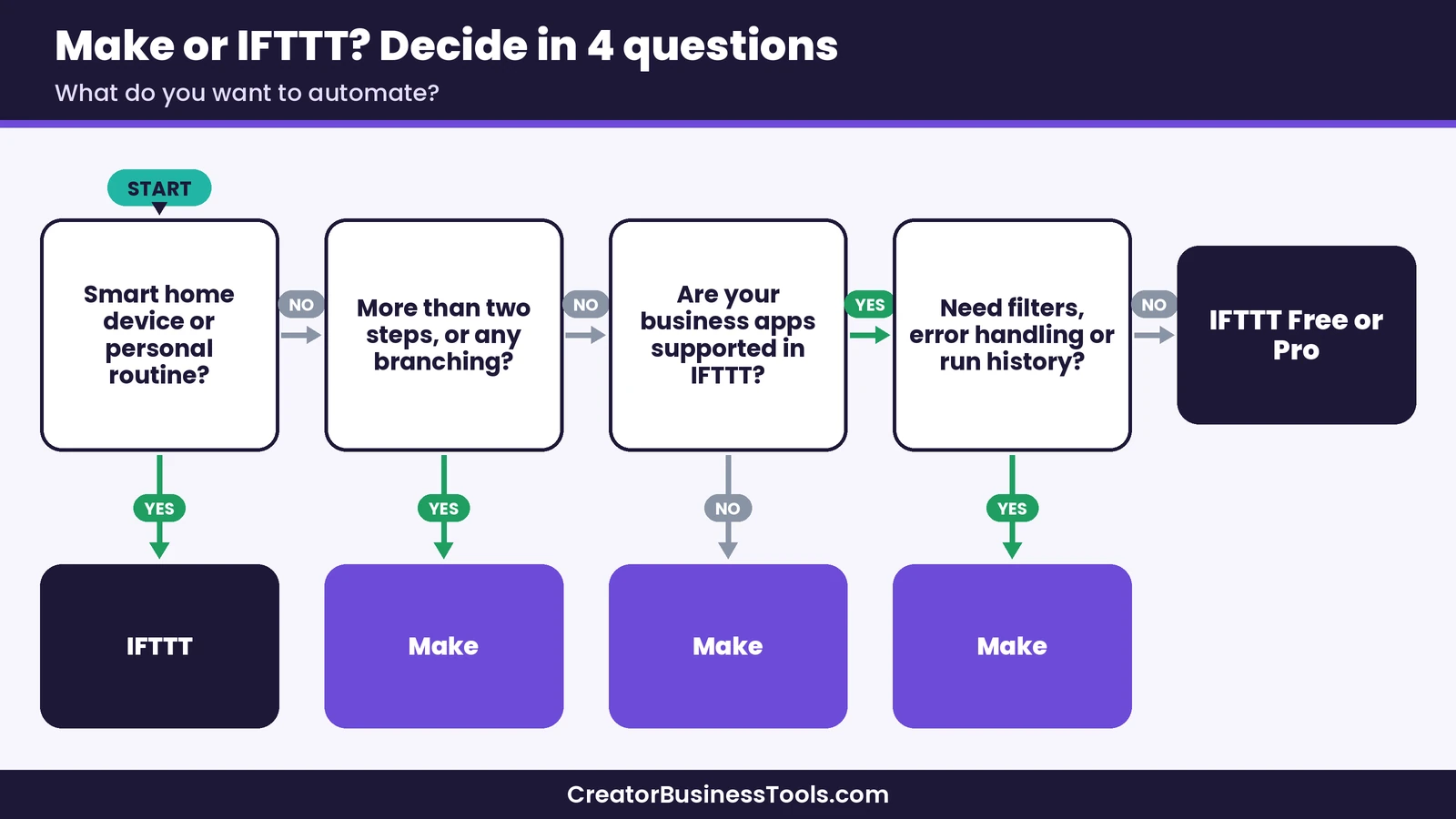
Use these questions as a quick filter.
- How many steps does your automation need? One or two steps point to IFTTT. Three or more, or any branching, point to Make.
- Is it personal or business? Smart home and personal routines suit IFTTT. Sales, students, subscribers, and clients suit Make.
- Are your apps supported? Check each tool’s directory for your email platform, payment tool, and course or community platform.
- How much will it run? If your automations run constantly but are simple, IFTTT’s unlimited runs are attractive. If they’re complex, estimate Make credits per run.
- Do you need to troubleshoot? If a broken automation would cost you sales, Make’s execution history and error handlers are worth the learning curve.
Can you use both?
Yes. Plenty of people keep IFTTT for phone and smart home routines and use Make for business workflows. The tools don’t conflict, and splitting them this way keeps your Make credits focused on the automations that earn money.
If you do use both, keep a simple list of what each automation does and which tool runs it. That makes it easy to find the right place when something needs changing.
How to start with Make
If Make looks like the better fit, a careful start keeps your credits and time in check.
- Sign up for the Free plan. It has no time limit, so you can learn without pressure. Try Make
- Pick one workflow that annoys you. A new sale or a new subscriber is a good first trigger.
- Start from a template. Search the gallery for your apps and adapt a scenario rather than building from scratch.
- Run it once and check each step. Look at the data each module received and produced.
- Add filters before going live. Filters stop records you don’t want, which also saves credits.
- Watch your credit usage. After a week of normal use, you’ll know whether the Free plan is enough or whether Core makes sense.
Common mistakes to avoid
- Choosing by price tier alone. A cheaper tool that can’t build your workflow costs more in manual work.
- Building a giant scenario first. Start with one small flow and add steps once it works.
- Ignoring polling intervals. On Make’s Free plan, scheduled runs are at least 15 minutes apart, which matters for time-sensitive alerts.
- Forgetting app permissions. Both tools need access to your accounts; review connections when you change passwords or team members.
- Skipping a test run. Test with a sample record before turning an automation on.
Other comparisons worth reading
If you’re still weighing options, our Make vs Zapier comparison covers the other big name in no-code automation. Zapier and Make both build multi-step workflows, so that comparison is about pricing model and interface rather than simple versus advanced.
FAQ
Is IFTTT cheaper than Make?
For a few simple automations, usually yes. IFTTT’s paid plans sit in a low price tier with unlimited runs. For complex workflows, Make can offer more value because IFTTT can’t build some multi-step processes at all.
Is Make harder to learn than IFTTT?
Yes. Make has more concepts to learn, such as modules, mapping, and routers. Templates and the Maia conversational builder help, but expect a short learning curve.
Can IFTTT do multi-step automations?
Partly. IFTTT Pro supports multi-action Applets, and Pro+ adds queries and filters. It doesn’t offer Make’s routers, iterators, aggregators, or error handlers.
Does Make have a free plan?
Yes. Make’s Free plan includes a monthly credit allowance, the visual builder, and routers and filters, with no time limit.
Which is better for creators, Make or IFTTT?
For a creator business with sales, students, and subscribers, Make is usually the better fit. For personal routines and simple cross-posting, IFTTT is enough.
Can I connect apps that aren’t listed?
On Make, you can use the HTTP module or Custom Apps for any service with a public API. On IFTTT, webhooks on paid plans can connect other tools.
Bottom line
The Make vs IFTTT choice comes down to complexity. IFTTT is a friendly, low-cost way to link one event to one action, and it shines for smart home routines and simple social automations. Make is a full visual workflow builder that can run the behind-the-scenes operations of a creator business, from sales to students to reporting.
If you only need a couple of quick automations, start with IFTTT. If you want your tools to work together as one system, Make is the stronger long-term choice, and its free plan lets you test that before you spend anything.
Free checklist: Not sure which tasks to automate first? Get our free Automation Switch Checklist, a one-page worksheet for mapping your workflows, picking the right tool, and launching your first scenario safely. Contact us to request a copy.
Pricing and features from official vendor pages, last checked October 22, 2026.