
Mangools Review: The Easiest SEO Tool for New Bloggers?
Disclosure: This post contains affiliate links. If you buy through them, we may earn a commission at no extra cost to you. How we make money.
Most new bloggers don’t need a giant SEO suite. You need to know which keywords people search for, which ones you can realistically rank for, and whether your posts are climbing.
Mangools is built around exactly that. Its best-known tool, KWFinder, is a keyword research tool with a reputation for being simple to read.
This Mangools review explains what you get, how the plans are structured, who it fits, and how it compares with SE Ranking and Semrush.
It’s based on Mangools’ official plans and product pages, not on hands-on benchmarks.
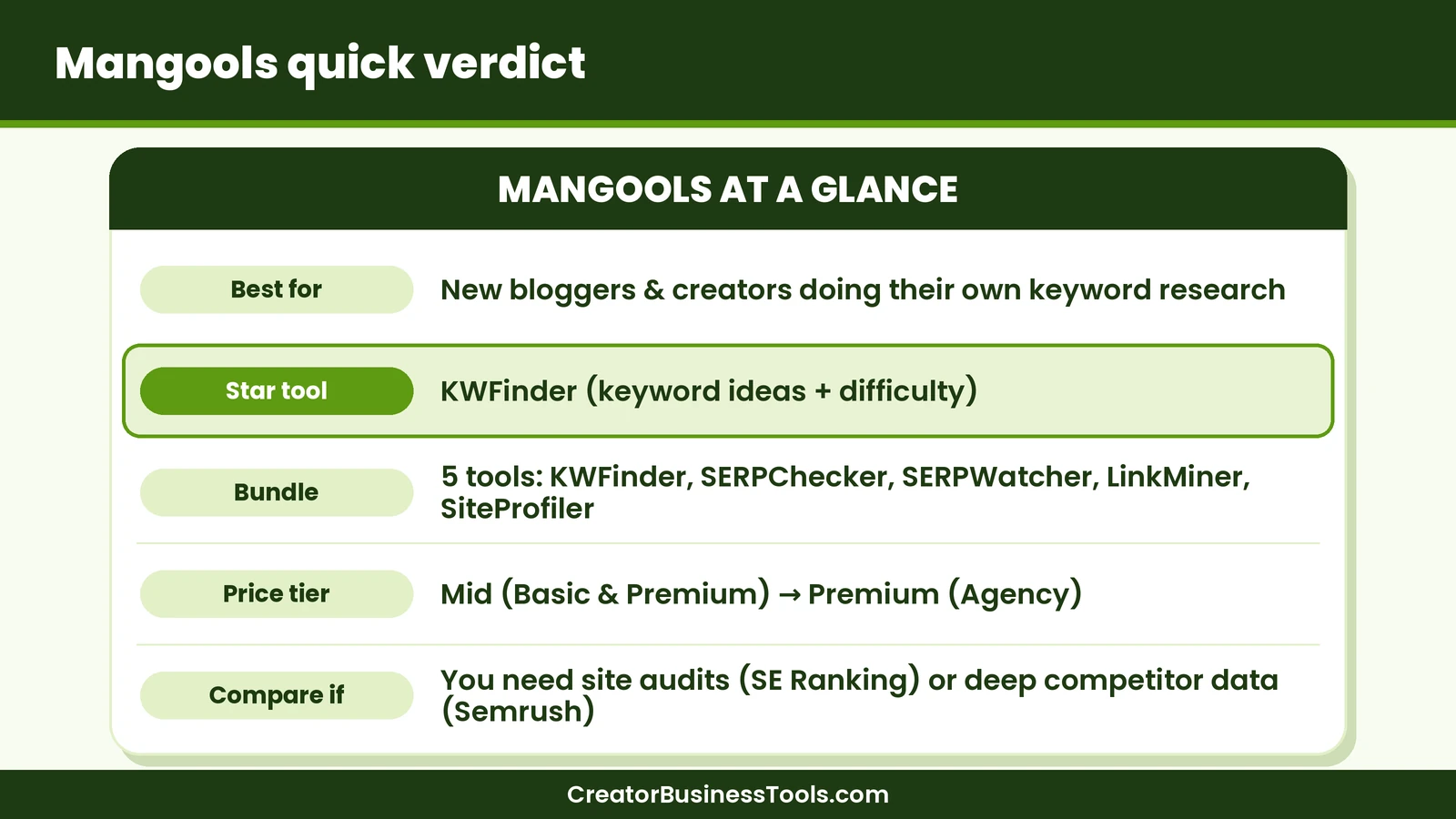
Quick verdict: Mangools is one of the easiest SEO tools for new bloggers and creators. KWFinder makes keyword research approachable, and the bundle adds SERP analysis, rank tracking, backlinks and site metrics. If you mainly need keyword ideas and a quick difficulty check, it’s a strong fit. If you want full site audits and deep competitor research, look at SE Ranking or Semrush instead.
Quick picks
- Best easy keyword tool for new bloggers: Mangools Basic. See Mangools’ plans
- Best for a small team or several sites: Mangools Premium, for more daily searches and extra seats.
- Best budget all-in-one with site audits: SE Ranking. See our SE Ranking review.
- Best for deep competitor research: Semrush. See our Semrush review.
What is Mangools?
Mangools is a bundle of five SEO tools sold under one subscription. Each tool covers one job.
| Tool | What it does | Why a new blogger cares |
|---|---|---|
| KWFinder | Keyword research: search volumes, keyword difficulty and keyword ideas | Find topics you can realistically rank for |
| SERPChecker | Analyzes the search results page for a keyword | See who already ranks and how strong they are |
| SERPWatcher | Tracks your rankings, with city-level localization | Check whether your posts are climbing |
| LinkMiner | Finds backlinks to any site | Spot link opportunities from competitors |
| SiteProfiler | Shows SEO metrics for any website | Size up a competitor at a glance |
The tools share one login and one limit system. You don’t need to install anything.
In practice, most beginners will spend nearly all their time in KWFinder and SERPWatcher. The other three tools are there when you need them, without a separate subscription.
Mangools also offers a set of free mini tools, including a SERP Simulator, a Reddit Threads finder, an AI Search grader and an SEO Content Optimizer.
Who Mangools is for
Mangools fits best when SEO is one part of your job, not your whole job.
- New bloggers who want to pick their first 20 to 50 post topics.
- Creators and coaches who blog to bring in email subscribers.
- Small niche sites where one person handles research and writing.
- Freelance writers who want a quick keyword check before pitching.
It’s a weaker fit for agencies that run technical audits for many clients, or for in-house SEO teams that need large data exports.
Mangools pricing explained
Mangools has three paid plans: Basic, Premium and Agency. You can pay monthly or annually, and annual billing costs noticeably less per month.
All three plans include all five tools. The difference is how much you can do each day and how many people can use the account.
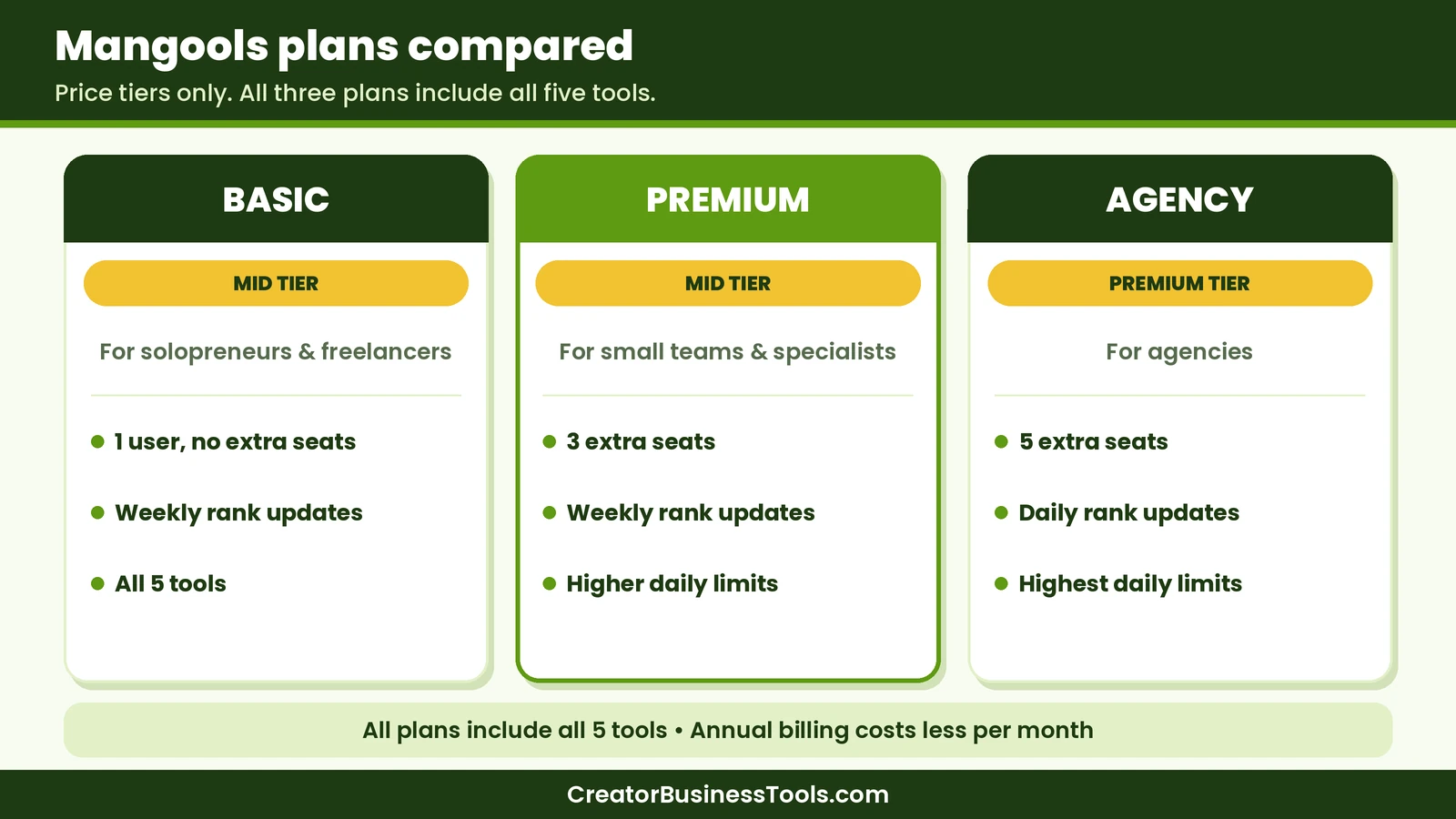
| Plan | Price tier | Keyword research | SERP analysis | Rank tracking | Extra seats |
|---|---|---|---|---|---|
| Basic | $$ | 100 requests / 24h | 100 requests / 24h | 200 keywords, weekly updates | None |
| Premium | $$ | 500 requests / 24h | 500 requests / 24h | 700 keywords, weekly updates | 3 |
| Agency | $$$ | 1.2k requests / 24h | 1.2k requests / 24h | 1.5k keywords, daily updates | 5 |
Two limits matter most for beginners.
Keyword research requests are how many times you can run a search in KWFinder per 24 hours. Mangools defines it as “how many times you can hit the search button.”
SERP analysis requests are used in SERPChecker, and Mangools says the same limit is used when evaluating keyword difficulty in KWFinder.
For one person writing a few posts a week, 100 of each per day is plenty. If two or three writers share an account, Premium makes more sense.
Basic also caps keyword suggestions per search, while Premium and Agency list them as unlimited. Backlink and site-analysis limits rise with each plan.
Mangools’ plans page also lists AI Search Watcher PRO and API and MCP access as included in the bundle. That’s useful later, but you won’t need it on day one.
Mangools offers a free account too. Its limits aren’t listed on the plans page, so treat it as a way to try the interface before you pay.
Key features for new bloggers
KWFinder: keyword ideas with a difficulty score
KWFinder is the heart of Mangools. Type a seed keyword, and it returns related keyword ideas with search volume and a keyword difficulty score.
That difficulty score is what makes it beginner-friendly. Instead of guessing, you can sort ideas by how hard they look to rank for and start with the easiest.
You can also look up keywords for a specific location and language, which helps if your readers are mostly in one country.
SERPChecker: who already ranks
Before you write, it helps to see the current top results. SERPChecker shows the ranking pages and their SEO metrics, and Mangools says it reports 49 metrics with SERP features.
For a beginner, the useful question is simple: are the top results big brands, or are there smaller blogs and forum threads you could beat?
SERPWatcher: are your posts climbing?
SERPWatcher tracks your rankings over time. On Basic and Premium, ranks update weekly. On Agency, they update daily.
Weekly updates are enough for most new blogs. Rankings move slowly in the first months, and checking daily often just adds stress.
LinkMiner and SiteProfiler
LinkMiner shows backlinks pointing to any site, so you can see where competitors earn links. SiteProfiler gives a quick overview of a site’s SEO metrics.
New bloggers usually lean on these less. They become useful once you start outreach or want to size up a competitor.
How to find low-competition keywords quickly
This is the part most new bloggers care about. Here’s a simple workflow you can follow in one sitting with KWFinder or any keyword tool.
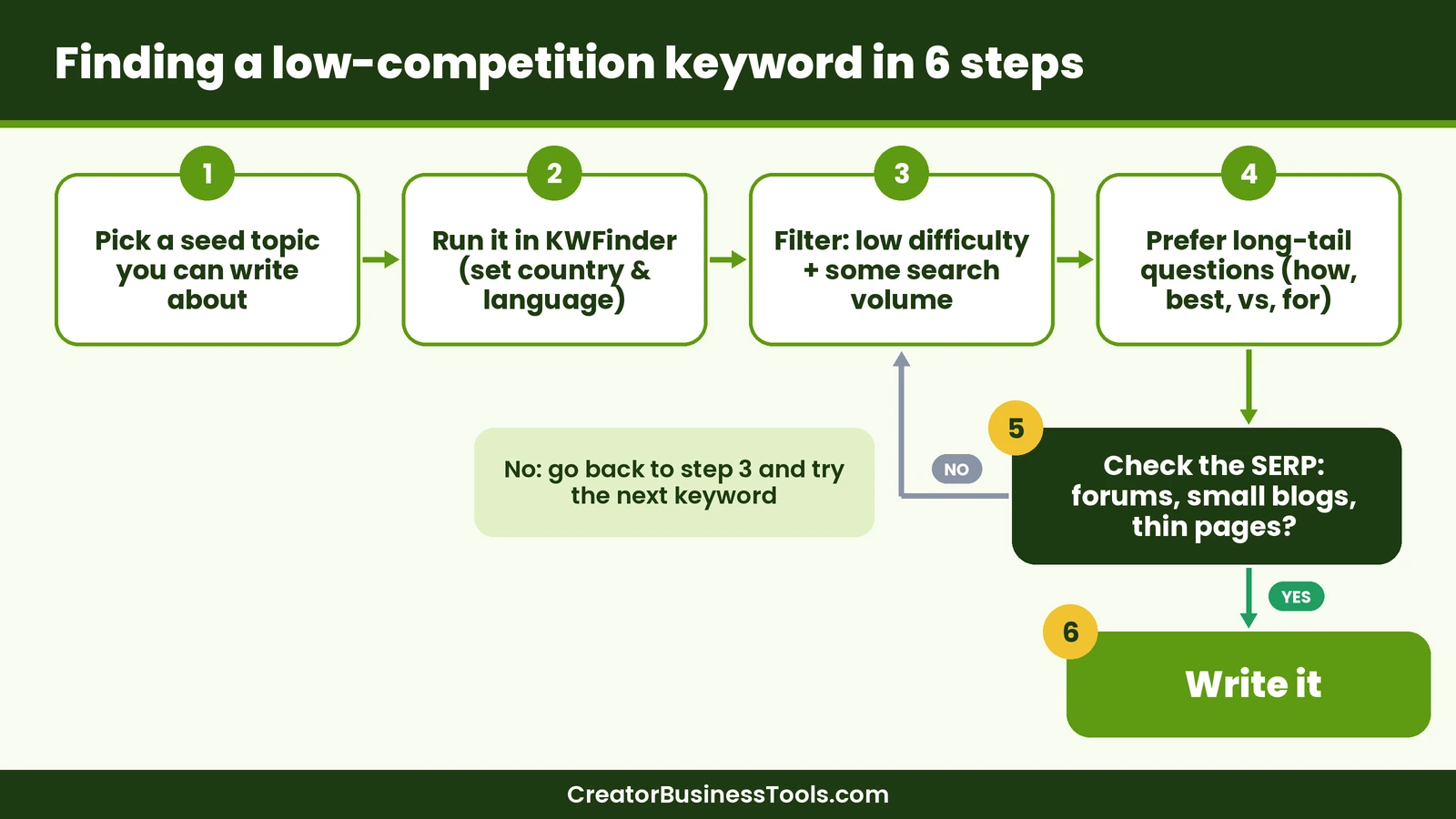
Step 1: Start with a topic you can write about well. Pick a seed keyword from your niche, such as “sourdough starter” or “Canva templates”. Your knowledge matters more than the tool.
Step 2: Run the seed and set your market. Choose the country and language your readers use. A keyword can be easy in one market and hard in another.
Step 3: Filter for low difficulty. Sort or filter by keyword difficulty and look at the easiest end of the list first. Keep only ideas with some search volume.
Step 4: Favor long-tail questions. Phrases with words like “how to”, “best … for …”, “vs” or “for beginners” tend to be more specific. Specific searches usually face fewer strong competitors.
Step 5: Check the actual results page. Open the SERP for your shortlisted keyword. Look for weak spots: forum threads, thin pages, outdated posts or small blogs in the top results.
Step 6: Match the search intent. If the top results are all step-by-step guides, write a guide. If they’re comparison posts, write a comparison. Don’t fight the format Google already rewards.
A quick example
Imagine a hypothetical craft blogger who wants to write about printable planners.
“Printable planner” alone is broad and competitive. Long-tail ideas like “printable meal planner for families” or “free printable budget planner for students” are narrower.
If KWFinder shows a low difficulty score and the top results include a forum thread and a couple of thin pages, that’s a strong first post candidate.
Build a simple keyword list
Or draft faster with an AI writer — see our Writesonic review.
Next, write optimized posts for each keyword with Frase.
Save your shortlisted keywords in a list or spreadsheet with four columns: keyword, difficulty, search volume and intent.
Aim for a mix. Write a few easy wins first, then add some medium-difficulty keywords once your site has a few posts and links.
When your keyword list is ready, the next step is drafting. Koala can turn those keywords into first-draft posts you then rewrite yourself.
Keep in mind: Keyword difficulty is an estimate, not a promise. A low score means the top results look beatable, not that you’ll rank automatically. Content quality, site authority and time still matter.
KWFinder vs SE Ranking vs Semrush
For content-brief tools that pair with keyword research, see Frase vs Surfer SEO.
These three tools often come up together. They overlap, but they’re built for different jobs. Here’s how they compare for a small blog.
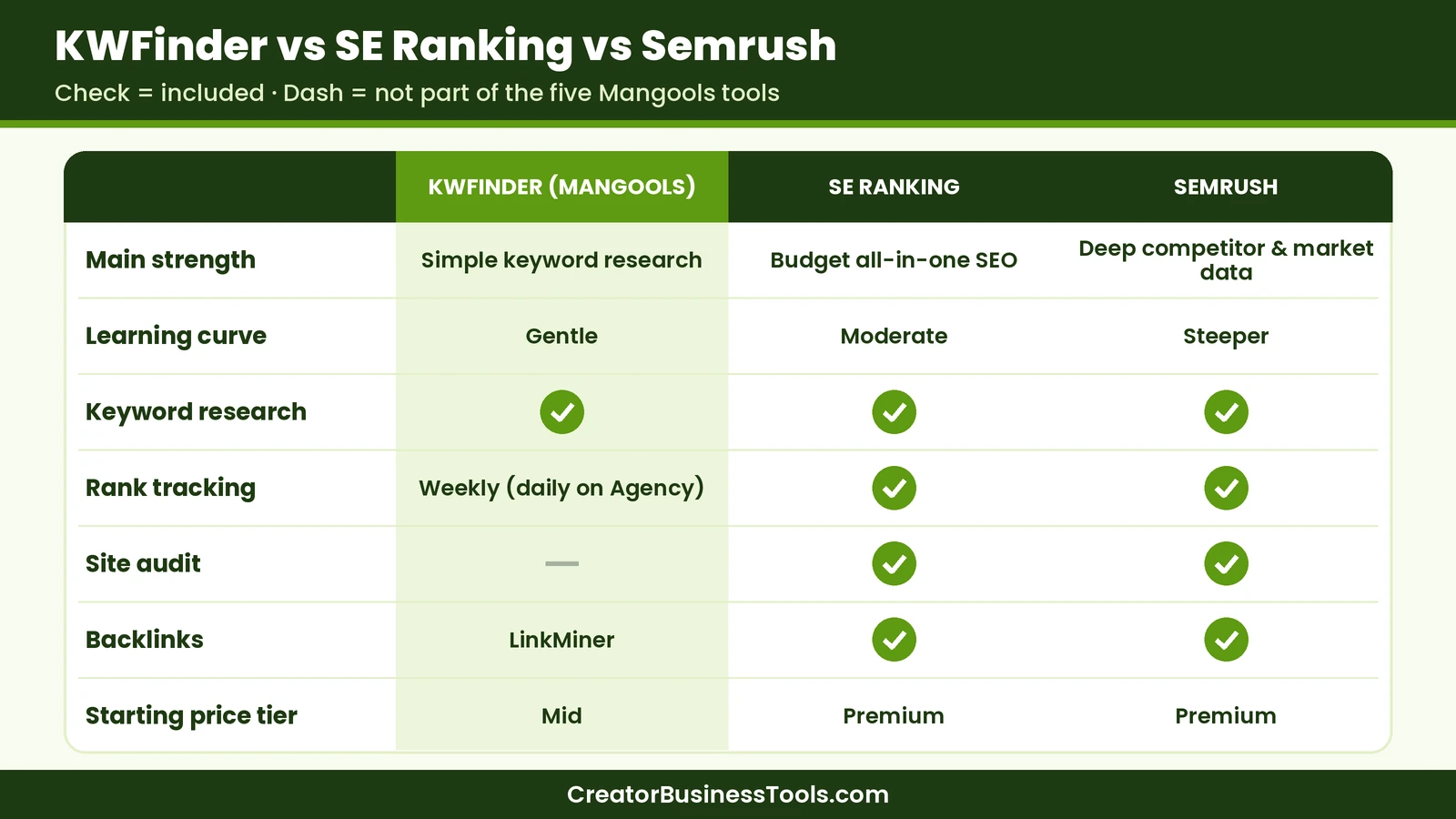
| KWFinder (Mangools) | SE Ranking | Semrush | |
|---|---|---|---|
| Main strength | Simple keyword research | Budget all-in-one SEO | Deep competitor and market data |
| Learning curve | Gentle | Moderate | Steeper |
| Keyword research | Yes, the core tool | Yes | Yes |
| Rank tracking | Weekly (daily on Agency) | Yes | Yes |
| Site audit | Not part of the five tools | Yes | Yes |
| Backlinks | LinkMiner | Yes | Yes |
| Starting price tier | $$ | $$$ | $$$ |
When KWFinder (Mangools) is the better pick
Choose Mangools if your main job is finding topics to write about. It keeps the screen focused on keyword ideas, volume and difficulty.
It’s also the lowest starting tier of the three, which matters when your blog doesn’t earn much yet.
When SE Ranking is the better pick
SE Ranking adds a site audit and broader tools, such as content and local features, at a price tier still below the biggest suites.
If you want one tool to check technical issues as well as keywords, SE Ranking is the natural step up. Read our SE Ranking review for details.
When Semrush is the better pick
Semrush is the deepest of the three for competitor research, market analysis and advertising data. It also has the steepest learning curve and a higher price tier.
It makes the most sense once SEO is a core revenue driver for your business. Our Semrush review covers when that point arrives.
Our take
For a brand-new blog, we’d start with KWFinder, publish consistently, and revisit the choice once you have traffic worth auditing.
Common keyword research mistakes to avoid
A tool only helps if you use it well. These are the mistakes we see new bloggers make most often.
Chasing volume over fit. A keyword with big search volume is tempting, but if the top results are huge brands, a new site rarely breaks in. Start smaller.
Ignoring intent. Someone searching “best budget planner app” wants a comparison, not a personal essay. Match the format the results already show.
Writing one post per tiny variation. “Printable meal planner” and “meal planner printable” usually belong in the same post. Group close variations together so your own posts don’t compete with each other.
Skipping the SERP check. A low difficulty score is a starting point. Always open the results and confirm they look beatable.
Expecting overnight results. New posts on new sites often take months to settle into their real positions. Judge your keyword choices over a quarter, not a week.
Never checking results. Add your key posts to rank tracking. If a post stalls for months, update it, improve it or link to it from newer posts.
How Mangools fits different creators
Different creators use keyword research in different ways. Here’s how Mangools lines up with a few common setups.
| Creator type | What they need | How Mangools helps |
|---|---|---|
| New hobby blogger | First topics that can rank | KWFinder difficulty + long-tail ideas |
| Course creator or coach | Posts that bring in email subscribers | Find “how to” and problem-based keywords |
| Pinterest-first creator | Blog posts that also rank in Google | Check which pin topics have search demand |
| Freelance writer | Quick checks before pitching | Fast searches and SERP overview |
| Small niche site owner | Steady list of low-competition topics | Daily request limits suit one person |
Imagine a hypothetical coach who blogs to grow an email list. Instead of writing about broad topics like “productivity”, they might use KWFinder to find narrower questions their clients actually search, then link each post to a free checklist.
That’s the sweet spot for Mangools: a focused list of topics that match what your audience is already typing into Google.
Is Mangools worth it?
For most new bloggers, Mangools is worth considering once you’re publishing regularly. The value comes from saving time on topic selection and avoiding posts that have little chance to rank.
If you publish one post a month, a free account or occasional research may be enough. If you publish weekly, a paid plan quickly pays for itself in time saved.
The main reason to look elsewhere is scope. If your site has technical SEO problems, or you’re competing in a crowded niche, a broader suite like SE Ranking or Semrush gives you tools Mangools doesn’t focus on.
Mangools pros and cons
Pros
- Beginner-friendly keyword research with a clear difficulty score
- Five SEO tools under one subscription, with one login
- Lowest starting price tier in this comparison
- Daily request limits that suit a solo blogger
- Free account to explore the interface
Cons
- No full technical site audit among the five tools
- Rank tracking updates weekly unless you pay for Agency
- Basic caps keyword suggestions per search
- Less depth for competitor and market research than Semrush
Best for: new bloggers, creators and small niche sites that want simple keyword research and rank tracking. Not ideal for: agencies running technical audits, or teams that need large exports and deep competitor data.
How to get started with Mangools
- Create a free account on
mangools.comand open KWFinder. - Run your first seed keyword and set your country and language.
- Shortlist 10 to 20 low-difficulty keywords using the workflow above.
- Choose a plan once you know you’ll use it weekly. Basic suits most solo bloggers. See Mangools’ plans
- Add your best posts to SERPWatcher so you can see whether they climb.
- Review your list monthly and add medium-difficulty keywords as your site grows.
FAQ
Is Mangools good for beginners?
Yes. Mangools is one of the most approachable SEO tools for beginners, mainly because KWFinder keeps keyword research simple and shows a difficulty score for each idea.
What’s the difference between Mangools and KWFinder?
KWFinder is one of the five tools inside Mangools. When you subscribe to Mangools, you get KWFinder plus SERPChecker, SERPWatcher, LinkMiner and SiteProfiler.
Is there a free version of Mangools?
Mangools offers a free account. Its usage limits aren’t listed on the plans page, so check them in the app before relying on it.
Which Mangools plan should a new blogger choose?
Basic is enough for most solo bloggers. Choose Premium if several people share the account or you need more daily searches.
Does Mangools do site audits?
A full technical site audit isn’t one of the five Mangools tools. If you need one, SE Ranking or Semrush is a better fit.
Is Mangools better than Semrush?
It depends on the job. Mangools is easier and starts at a lower price tier. Semrush goes much deeper for competitor and market research.
Can I cancel anytime?
Mangools says you can upgrade, downgrade or cancel at any time in your account, and your plan stays active until the end of the prepaid period.
Bottom line
Mangools is a simple, focused choice for new bloggers. KWFinder turns keyword research into a quick routine, and the bundle covers rank tracking and basic competitor checks.
If you’re picking your first topics and want a tool that won’t overwhelm you, start with Mangools Basic. See Mangools’ plans
Outgrow it later? SE Ranking and Semrush are the natural next steps.
Free checklist: Want a head start? Get our free Low-Competition Keyword Checklist, a one-page routine for finding keywords you can realistically rank for. Contact us to request a copy.
Pricing and features from official vendor pages, last checked October 20, 2026.