
Pin Generator Review: AI Pinterest Pins on Autopilot, Plans, and Who It Fits
Disclosure: This post contains affiliate links. If you buy through them, we may earn a commission at no extra cost to you. How we make money.
Pin Generator is a Pinterest marketing tool built around a simple idea: connect your blog or store once, then let AI design pins, write titles and descriptions, pick boards, and schedule fresh batches on a weekly or monthly rhythm. If you publish products, posts, or affiliate content and struggle to keep a steady pin cadence, that pitch is easy to understand.
This Pin Generator review explains what the product does, how its credit-based plans work, who it fits, and where it falls short. It is based on Pin Generator’s official website and pricing schema, not on sponsored claims or hands-on lab results.
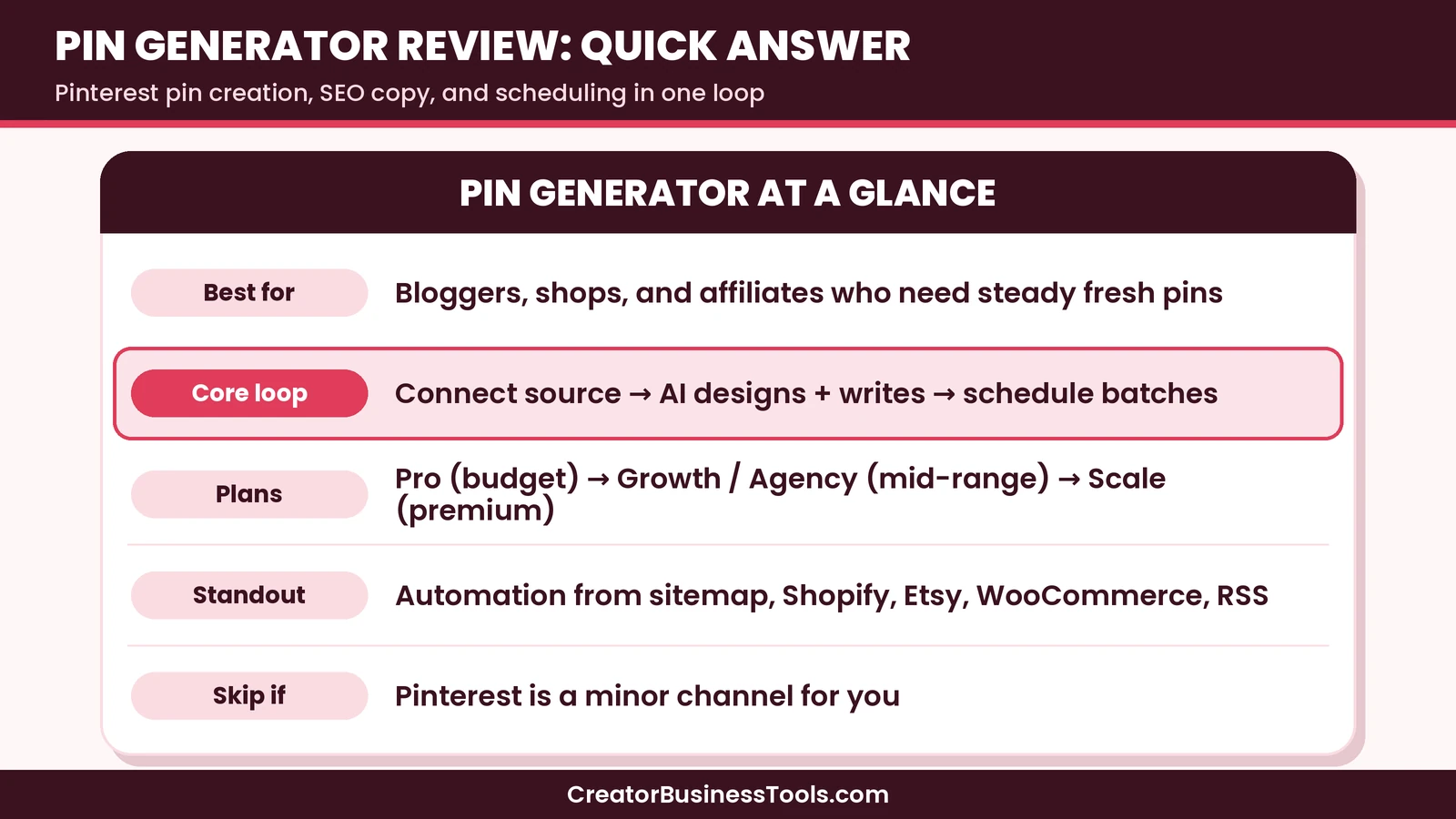
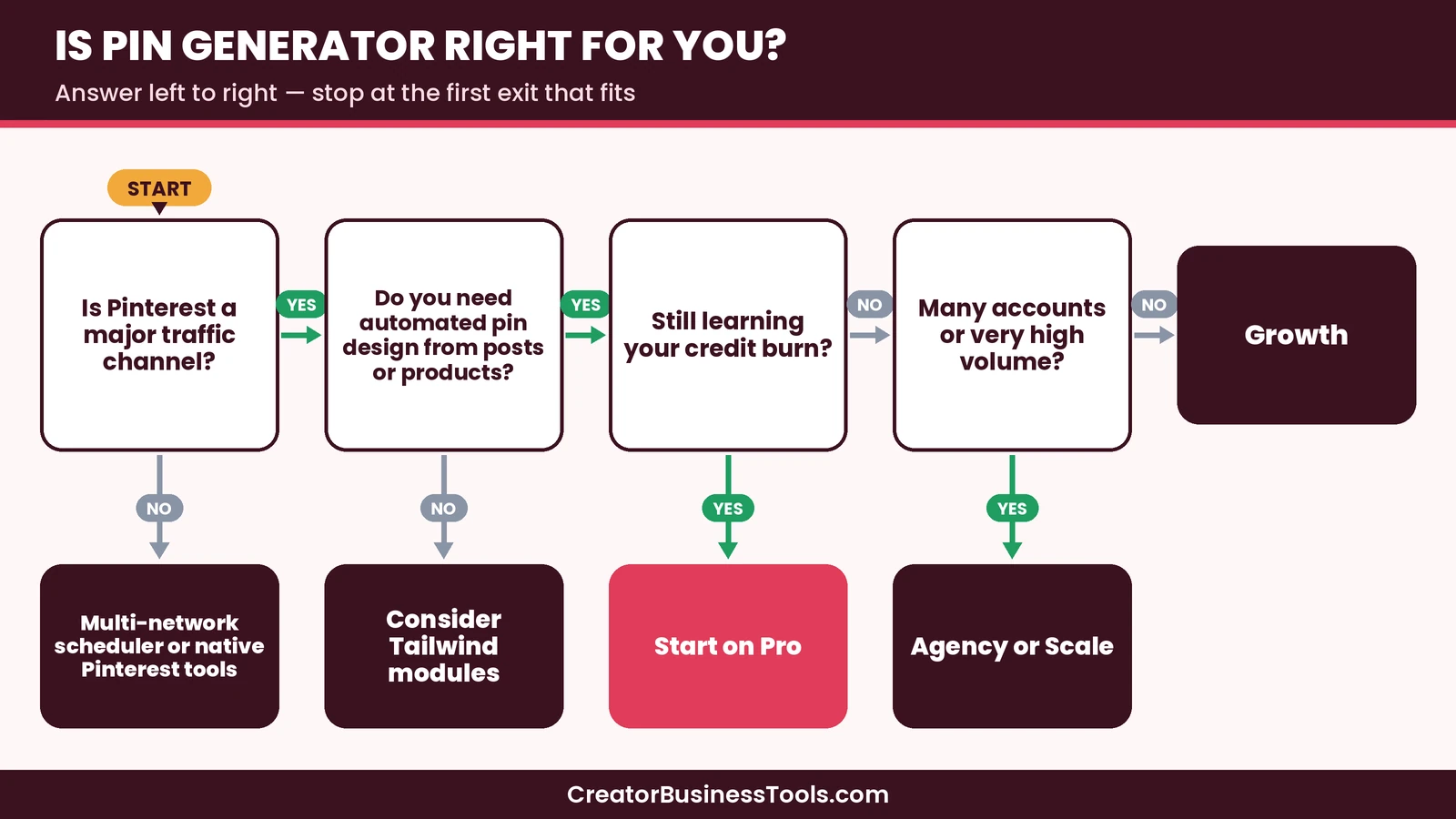
Quick verdict: Pin Generator is a strong fit when Pinterest traffic matters and you want pin creation, SEO copy, and scheduling in one automation loop. Start on Pro if you are testing the workflow for one site. Move to Growth when you want a higher daily pin volume. Look elsewhere if you mainly need a multi-network scheduler or light, manual pinning.
Quick picks
- Best for trying the full workflow: Pin Generator Pro, for one site and a modest monthly credit pool. See Pin Generator Pro
- Best for active blogs and stores: Pin Generator Growth, with a larger credit pool for higher daily volume. See Pin Generator Growth
- Best for agencies running many accounts: Agency or Scale, depending on how many pins you need each month. See Pin Generator Agency and Scale
- Best if you want scheduling plus Pinterest keyword research in a modular suite: Tailwind. See our Pin Generator vs Tailwind comparison and our Tailwind review.
- Best multi-client social scheduler alternative: Pallyy. See our Pallyy review.
Pin Generator links on this page are affiliate links.
Related guides: Pin Generator vs Tailwind · Tailwind Review · Pallyy Review · Pallyy vs Buffer
Pin Generator at a glance
| Details | |
|---|---|
| Product type | Pinterest pin creation, SEO copy, and scheduling automation |
| Best for | Bloggers, ecommerce, and affiliates who need consistent fresh pins |
| Price tier | Budget (Pro) to premium (Scale) |
| Billing | Monthly or longer billing cycles, credit-based |
| Sources | Website sitemap, Shopify, Etsy, WooCommerce, RSS, CSV |
| Standout | Set-and-forget batches with AI design, titles, boards, and scheduling |
| Not ideal for | Teams that need Instagram, LinkedIn, and X in the same tool |
What Pin Generator is
Pin Generator sits in a narrow but useful niche. It is not a general social media suite. It is a Pinterest-first system that turns URLs and product feeds into designed pins, then spaces those pins out at natural posting times.
The official site frames the workflow as a guided setup: pick how often a new batch should run, connect a content source, set a design profile, turn on keyword research if you want it, choose boards or let AI choose, and confirm. After that, new posts and products can join future batches automatically.
That focus matters. Tools like Buffer or Pallyy handle many networks. Pin Generator bets that Pinterest alone is worth a dedicated automation stack.
Core features
Automation and content sources
You can point Pin Generator at a website sitemap, Shopify, Etsy, WooCommerce, an RSS feed, or a CSV. That range covers most creator and shop setups. Weekly cadence creates a fresh batch every week. A longer cadence creates one larger batch about every four weeks. You choose pins per day for the schedule; the site stresses there is no hard daily cap beyond your credits.
AI design and brand profiles
Design profiles learn brand colors, style keywords, mood, and font feel from your site or images. You can generate fully AI images or use classic templates. Product reference images can become new creative for ecommerce. Preview pins are available before you commit, which lowers the risk of buying blind.
Titles, descriptions, alt text, and SEO
AI can write titles, descriptions, and alt text. Automatic SEO research pulls related and growing Pinterest terms for each URL, then writes the pin around a chosen phrase. That research uses credits per URL, so heavy catalogs should budget for it.
Scheduling and bulk editing
Once pins exist, you can bulk-edit a batch and schedule them across posting windows in your timezone. Board selection can be manual or AI-assisted per pin. Video pins are supported at a higher credit cost than static pins.
Chat and MCP access
The site also advertises chat-based control and MCP connections for compatible AI assistants. Treat that as an advanced option. Most owners will live in the automation wizard and batch editor first.
Pricing and credits
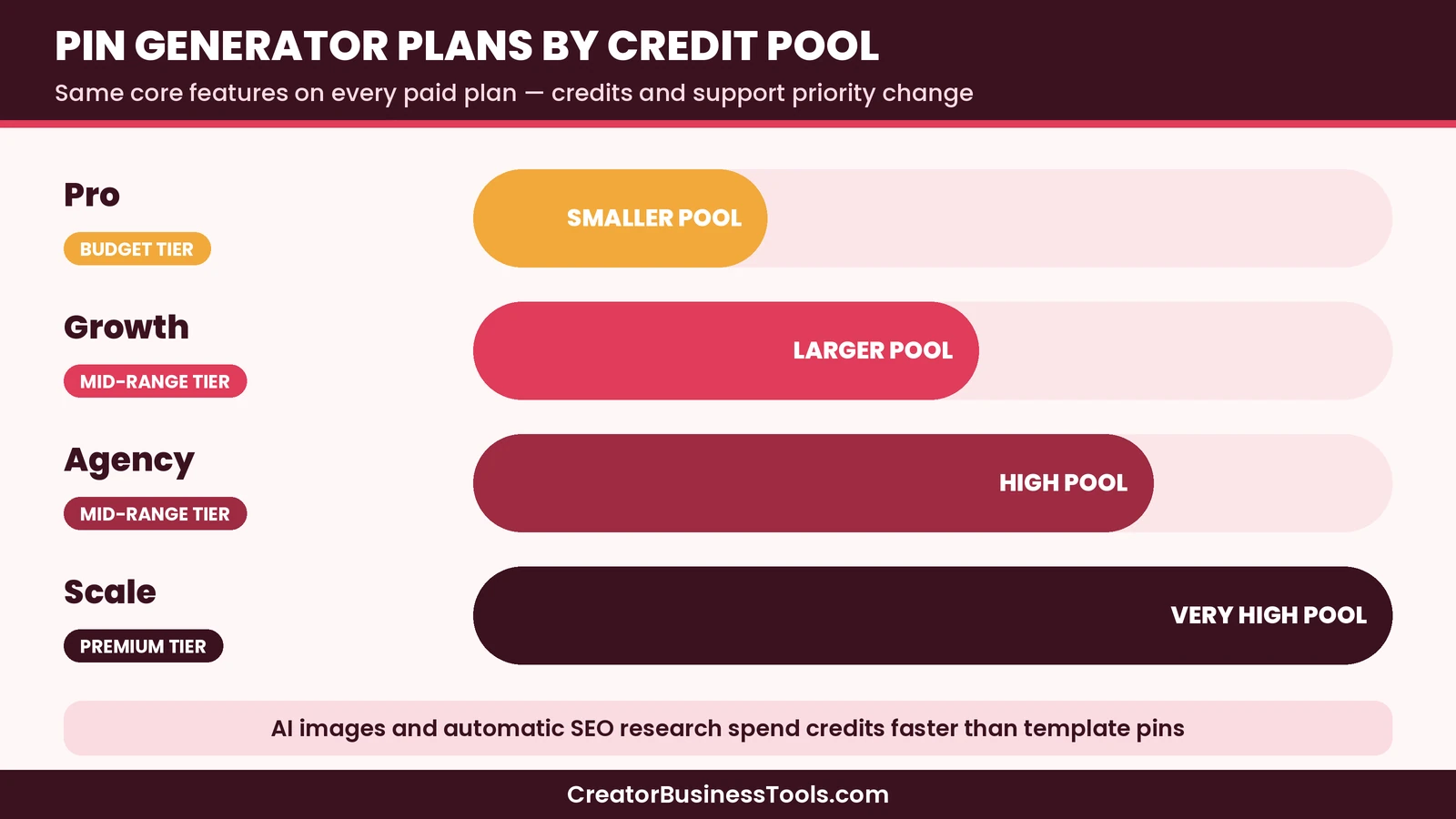
Pin Generator sells plans by monthly credit pools. Features are largely the same across paid tiers; what changes is how many credits you get and, on larger plans, support priority.
| Plan | Price tier | Credits (monthly) | Rough fit |
|---|---|---|---|
| Pro | Budget | Smaller pool | One site, learning the workflow |
| Growth | Mid-range | Larger pool | Active blogs and stores |
| Agency | Mid-range | High pool | Multi-account operators |
| Scale | Premium | Very high pool | Agencies and high-volume pinning |
Credits are spent by action. Downloading or scheduling a pin costs one credit. AI text costs a fraction of a credit. Alt text, SEO research, video pins, and AI images cost more, with higher-quality AI images costing the most. That means two accounts with the same plan can burn credits at very different rates depending on how often they regenerate AI images.
Free accounts include some credits. Exact free credit counts are not spelled out clearly on the public page, so check the account screen when you sign up.
Who Pin Generator is for
- Bloggers and affiliates who publish often and need many fresh pin creatives per URL
- Shopify, Etsy, and WooCommerce shops that want product pins without designing each one
- Small agencies that manage Pinterest for several brands and need high volume
- Creators who already know Pinterest works for them and want to remove design and scheduling friction
Who should skip it
- People who only pin a few times a week and are fine with Pinterest’s native scheduler
- Teams that need one tool for Instagram, LinkedIn, Facebook, and X together
- Buyers who want deep native analytics dashboards more than creation automation
- Anyone confused by credit math who prefers flat “pins per day” pricing with no image multipliers
Pros and cons
| Pros | Cons |
|---|---|
| End-to-end loop from source URL to scheduled pin | Credit costs vary a lot by AI image use |
| Strong store and sitemap integrations | Pinterest-only focus |
| Brand profiles and preview pins | Free credit details are vague on the public page |
| Weekly or monthly batch cadence | Not a full multi-network social suite |
| Clear plan ladder by volume | Heavy AI image use can empty a small plan quickly |
Setup walkthrough (what to expect)
Pin Generator’s public materials describe a nine-step setup wizard. In practice, the decisions that matter most are cadence, source, design profile, and whether automatic SEO is on.
- Cadence. Weekly batches favor active blogs and stores. A longer batch cycle favors evergreen catalogs that change slowly.
- Source. Sitemaps suit content sites. Shopify, Etsy, and WooCommerce suit product catalogs. RSS and CSV cover custom stacks.
- Design profile. Spend time here. Weak brand inputs produce generic pins that look like everyone else’s AI output.
- SEO research. Useful, but it spends credits per URL. Turn it on for money pages first, not for every archive URL on day one.
- Boards. AI board selection is convenient. Manual board maps still help when you have a strict niche architecture.
After the first scheduled batch, review creatives the way you would review ad variants: keep winners, drop weak templates, and adjust pins-per-day before you change plans.
Credits in real workflows
Credit math is the make-or-break detail in any honest Pin Generator review.
- Template-based pins that you schedule are relatively light on credits.
- AI text and alt text add a little.
- Automatic SEO research adds more per URL.
- AI images dominate spend, especially at higher quality settings.
A creator who mostly uses templates can live on a smaller plan. A creator who regenerates AI images for every product will climb the ladder faster. That is why we recommend starting on Pro even if competitor blogs brag about huge daily pin counts.
Integrations and adjacent tools
Pin Generator mentions Canva import, stock media, affiliate link bulk updates, and product catalog sync with Pinterest. Those extras matter when you already have a design system in Canva or need to rewrite outbound URLs after an affiliate network change.
It does not try to be your email platform, your Shopify theme, or your multi-network social inbox. Keep expectations narrow and it feels coherent. Stretch it into a full marketing suite and you will be disappointed.
Content strategy still matters
Automation cannot fix a vague niche, thin product pages, or boards that do not match search intent. Fresh pins help distribution. They do not invent a market. Before you buy any paid plan, write down:
- the audience you want Pinterest to send you
- the 10–20 URLs that deserve creative volume first
- the boards that map to those intents
- how you will judge success after a few weeks (engagement, outbound clicks, or assisted sales)
Without that list, Pin Generator becomes an expensive way to publish noise.
Support and learning curve
Paid plans include email support, with priority called out on higher tiers. The learning curve is milder than a full SEO suite: if you can connect a store and pick brand colors, you can run the wizard. The harder skill is reading Pinterest analytics and feeding that insight back into design profiles and board choices.
A hypothetical example
Here is a hypothetical case. Imagine a printable shop owner on Etsy who lists a few new products each week and knows Pinterest can drive buyers, but never has time to design twenty pins a day. She connects her Etsy catalog, builds a design profile from her brand colors, and runs a weekly automation at a moderate pins-per-day setting on Pro. After a month she reviews which products need more creative variety and either raises the pin rate or moves to Growth if credits run out early because she relies on AI images. The point is not a promised traffic number. The point is matching credit burn and cadence to a real publishing rhythm.
How it compares at a high level
Against Tailwind, Pin Generator leans harder into automated pin generation from feeds and sitemaps. Tailwind is modular: scheduling, Pinterest SEO, and engagement can be bought separately or as a bundle. If keyword research and SmartLoop-style boosting matter as much as creation, read our Pin Generator vs Tailwind guide.
Against Pallyy or Buffer, Pin Generator wins on Pinterest creative volume and loses on multi-network coverage. Freelancers managing client Instagram and Facebook accounts will usually want a broader scheduler.
Common mistakes to avoid
- Choosing a plan by pin-per-day marketing copy without counting AI image credits
- Turning on automatic SEO for every URL in a huge catalog on day one
- Skipping a low-volume test and buying Scale before you know your burn rate
- Expecting Instagram or TikTok scheduling inside the same product
- Treating automation as a substitute for a clear board and niche strategy
FAQ
Is Pin Generator the same as pingenerator.app?
No. This review covers pingenerator.com. The .app site is a separate product with different plans.
Does Pin Generator include a free plan?
New accounts get some credits on a free account. Ongoing volume still needs a paid plan.
Which plan should I start with?
Most single-site owners should start on Pro, measure credit use for a billing cycle, then move up only if they hit the ceiling.
Do AI images use more credits than templates?
Yes. AI image generation costs many more credits than scheduling a pin that uses a template or existing creative.
Can it sync Shopify or Etsy products?
Yes. Official materials list Shopify, Etsy, WooCommerce, sitemaps, RSS, and CSV as sources.
Is Pin Generator an official Pinterest partner?
The marketing site says it is an official Pinterest partner. Confirm current partner status on Pinterest’s own materials if that label matters to you.
Does it replace Tailwind?
Sometimes for creation-heavy workflows, not always for SEO research and engagement features. Compare them side by side before you switch.
Can agencies use one account for many clients?
Higher plans are aimed at multi-account volume. Confirm current profile limits in the product before you commit an agency workflow.
Pros for ecommerce vs blogs
Ecommerce catalogs benefit most from product sync and fresh creative for the same SKU. Blogs benefit most from sitemap or RSS pickup when new posts go live. Agencies benefit when they can standardize a design profile per client and reuse the same automation pattern.
If you sell physical products with strong photography, lean on product-reference AI carefully and compare results against template pins that keep the original photo. If you sell digital downloads, text-forward templates often read clearer on mobile Pinterest than busy AI scenes.
Analytics expectations
Pin Generator highlights outbound clicks and impressions in its marketing stories. Your operating reality should be simpler: check Pinterest Analytics weekly, note which URLs earn engagement and outbound clicks, and feed that list back into the next automation. Do not optimize for vanity pin counts alone.
Native Pinterest analytics remain the source of truth for distribution. Third-party creation tools help you publish; they do not replace platform analytics.
Security and access notes
Connecting Shopify, Etsy, or Pinterest means granting permissions. Use a dedicated Pinterest business account, review which staff seats can reconnect integrations, and revoke access when freelancers leave. Automation tools with store access deserve the same hygiene as your email platform.
Final buying checklist
- Confirm you are on pingenerator.com, not a lookalike domain
- Run a preview automation on real URLs
- Estimate monthly AI image count, not just pins per day
- Pick Pro unless you already know you need higher volume
- Schedule a 30-day review of credit burn and click results
- Keep Tailwind or Pallyy in mind only for jobs Pin Generator does not cover
Bottom line
Pin Generator is built for people who already believe Pinterest is worth the effort and want the design-and-schedule grind removed. The product is coherent: connect a source, set a brand profile, generate batches, and keep pins flowing. The main decision is credit math, not feature checkboxes. Start small, watch how AI images and SEO research affect your balance, then scale the plan to your real cadence.
Pin Generator links below are affiliate links.
[See Pin Generator's plans](https://pingenerator.com/pricing)Free checklist: Planning a Pinterest stack? Get our free Pinterest Tool Decision Checklist, covering cadence, credit burn, SEO research needs, and when a multi-network scheduler is enough. Contact us to request a copy.
Pricing and features from official vendor pages, last checked October 28, 2026.