
Pallyy vs Buffer: Per-Client or Per-Channel Pricing for Your Social Scheduling?
Disclosure: This post contains affiliate links. If you buy through them, we may earn a commission at no extra cost to you. How we make money.
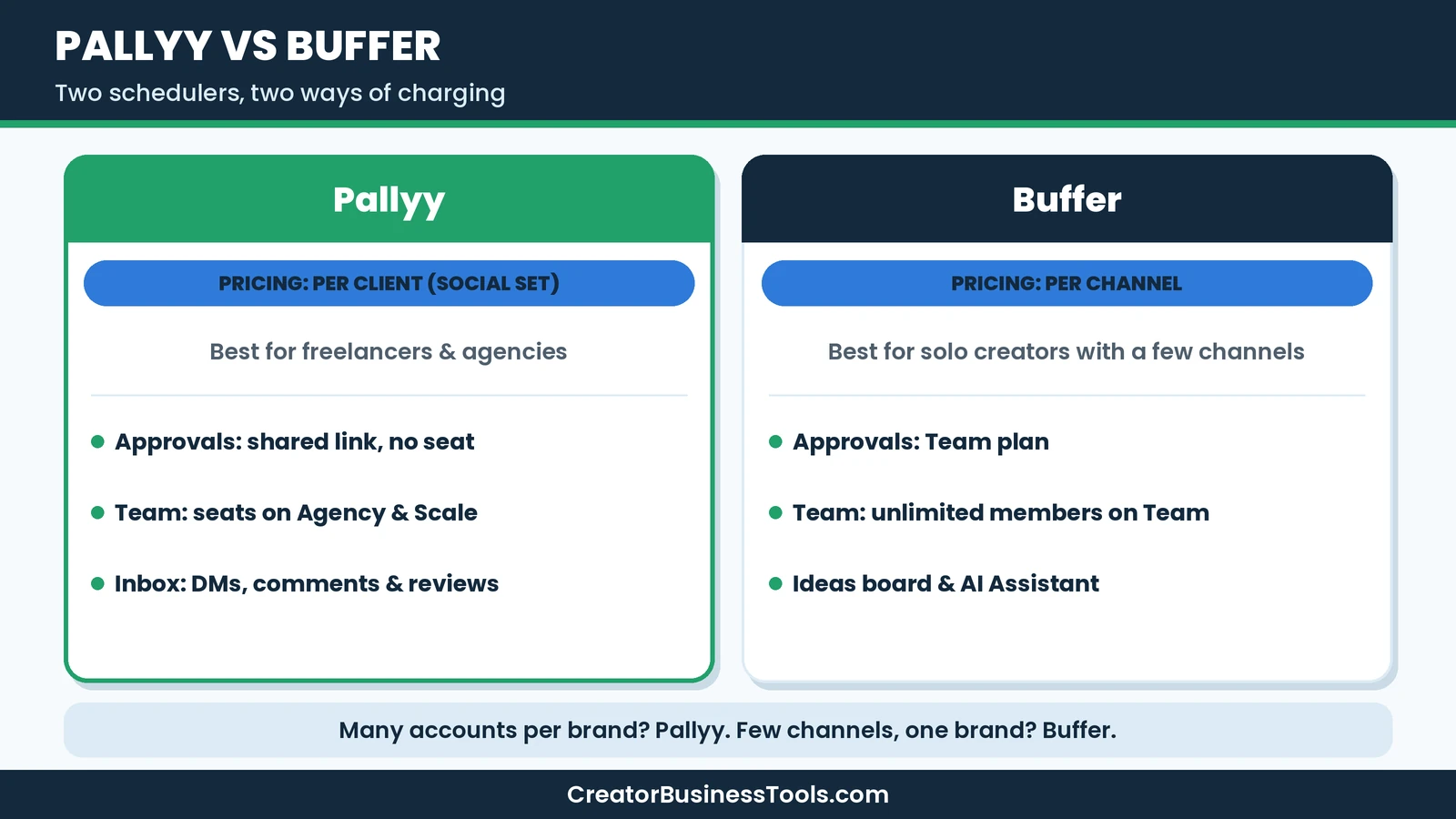
Pallyy and Buffer are both popular social media schedulers for creators and small businesses, but they charge in completely different ways. Buffer charges per channel, so every Instagram, TikTok, or Pinterest account adds to your bill. Pallyy charges per social set, which is one client or brand with all of its accounts. That single difference decides which tool is cheaper for you more than any feature list. This Pallyy vs Buffer comparison explains both pricing models, the features that matter, and which tool fits which kind of creator. We based it on each company’s official pricing and product pages.
Quick verdict: Buffer is the better choice for solo creators who post to a handful of channels and want a simple, budget-friendly tool with a generous free plan. Pallyy is the better choice for freelancers, agencies, and multi-brand businesses, because flat per-client pricing and seat-free client approvals keep costs predictable as you add accounts.
Quick picks
- Best for solo creators: Buffer Essentials, paying only for the few channels you use. Buffer
- Best free plan for one brand: Buffer Free, with a few channels and a handful of scheduled posts per channel.
- Best for freelancers with clients: Pallyy Pro with extra social sets, one per client. Pallyy
- Best for small agencies: Pallyy Agency, with ten social sets, three seats, and custom reports.
- Best for teams on one brand: Buffer Team, with unlimited team members and approval workflows.
Pallyy vs Buffer at a glance
| Feature | Pallyy | Buffer |
|---|---|---|
| Pricing model | Per social set (client or brand) | Per channel (social account) |
| Plans | Free, Pro, Agency, Scale | Free, Essentials, Team |
| Price tiers | Free, budget, mid-range, premium | Free, then budget per channel |
| Free plan | One set, small monthly post cap, images only | A few channels, small number of queued posts per channel |
| Users | One on Pro, three on Agency, ten on Scale | One on Free and Essentials, unlimited on Team |
| Client approvals | Shared calendar link, no account needed | Approval workflows on Team |
| Inbox | DMs, comments, and reviews on paid plans | Community replies to comments on all plans |
| Analytics | Instagram, Facebook, LinkedIn | Most connected networks, with advanced analytics on paid plans |
| Networks | Instagram, Facebook, LinkedIn, TikTok, Pinterest, Google Business Profile, YouTube, X, Threads, Bluesky | Same core networks plus Mastodon, Substack, and Start Page |
| Extras | Link in bio, AI captions, post ideas, custom reports | Ideas board, AI Assistant, Start Page, hashtag manager |
What each tool is
Pallyy is an Australian social media scheduler built around client work. It started as an Instagram planner and grew into a full platform with a calendar, inbox, analytics, approvals, link in bio pages, and reports. Its pitch to agencies is simple: pay per client, not per channel.
Buffer is one of the longest-running social schedulers, used by solo creators, small businesses, and agencies. It focuses on a clean publishing experience, an ideas workspace, community replies, and analytics, with transparent per-channel pricing and a free plan that many creators start on.
How the pricing models differ
Buffer: pay per channel
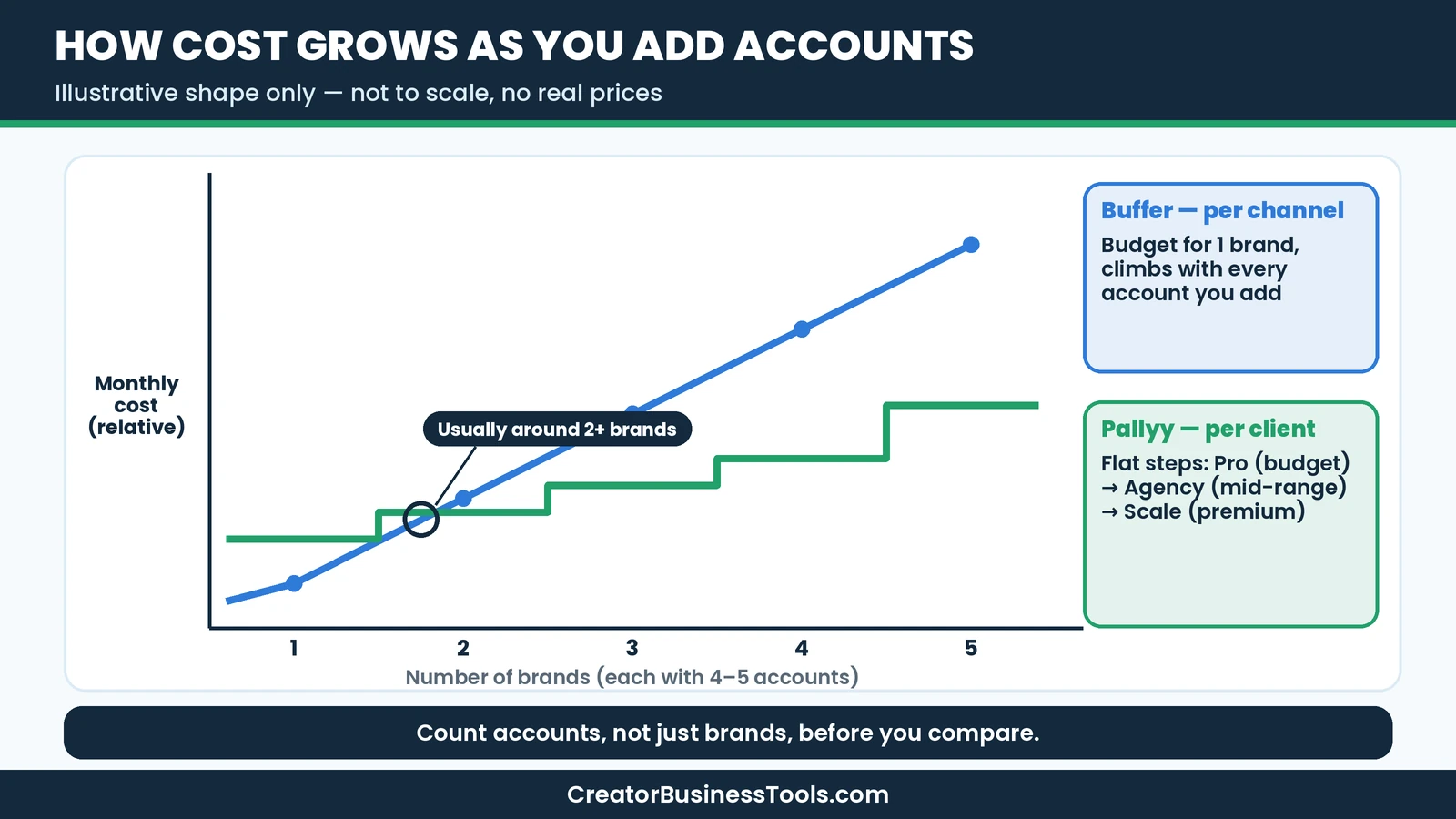
With Buffer, a channel is one connected account, such as one Instagram profile or one Facebook page. Essentials and Team are priced per channel, so your bill scales with the number of accounts you connect. Buffer also lowers the per-channel price once you go past ten channels, and both monthly and yearly billing are available.
For a creator with three or four channels, that means a budget-level monthly cost. For an agency with ten clients that each have four accounts, it means paying for forty channels.
Pallyy: pay per client
Pallyy groups all of a client’s accounts into one social set. Each set can hold up to eleven accounts, and you pay per set, not per account. Pro covers one set, with extra sets available for a small flat monthly fee. Agency includes ten sets, and Scale includes thirty.
So if a client posts to Instagram, Facebook, TikTok, LinkedIn, and Pinterest, Pallyy still counts that as one set, while Buffer counts five channels.
Features compared
Scheduling and publishing
Both tools offer a visual calendar, queues with saved posting times, and automatic publishing to the major networks. Buffer includes threaded posts for X, Bluesky, Threads, and Mastodon, plus first comment scheduling and custom video covers on paid plans. Pallyy supports Reels, carousels, Stories, first comments, collaborators, and product tags for Instagram on paid plans. Both can publish to Pinterest and TikTok.
Buffer’s Free plan works across all its channel types but limits how many posts you can queue per channel at once. Pallyy’s Free plan is image-only with a small monthly cap.
Ideas and content creation
Buffer has a strong ideas workflow: you can capture ideas, organize them on a kanban-style board, and use the AI Assistant to refine and repurpose posts. Pallyy offers post ideas and AI-generated captions on paid plans. If you brainstorm a lot and like turning comments into new posts, Buffer’s tools are a bit richer.
Engagement and inbox
Buffer’s community features let you reply to comments on many networks, with AI replies and saved replies. Pallyy’s inbox on paid plans goes further for client work, combining Instagram DMs, Facebook messages, comments, reviews, LinkedIn comments, TikTok comments, and Google reviews with labels, assignment, and bulk actions.
Collaboration and approvals
This is where the tools serve different users. Buffer’s Team plan includes unlimited team members, access levels, and approval workflows, which suits an in-house team working on one brand. Pallyy lets clients approve posts through a shared link with no account or seat, and gives agencies per-set team access. For freelancers who need client sign-off, Pallyy’s approach is simpler.
Analytics and reporting
Buffer offers insights on paid plans with performance overviews, custom analytics by tag or channel, report exports, and branded reports on Team. Pallyy offers long-term analytics for Instagram, Facebook, and LinkedIn, plus custom reports and exports on Agency and Scale. If you report on many networks, Buffer has broader coverage. If you produce monthly client reports focused on Instagram and Facebook, Pallyy is well suited.
Integrations
Buffer connects with a long list of apps, including Canva, Google Drive, Dropbox, Zapier, Make, and WordPress. Pallyy offers API access, Unsplash import, and Google Calendar import. Creators who automate their workflow will appreciate Buffer’s wider integration list.
Supported networks in detail
Both tools cover the networks most creators care about: Instagram, Facebook, LinkedIn, TikTok, Pinterest, YouTube, X, Threads, Bluesky, and Google Business Profile. Buffer also supports Mastodon and Substack, plus its own Start Page, a simple link landing page that counts as a channel.
A few details are worth checking for your accounts. Buffer publishes automatically to most account types, but some, such as Instagram personal profiles and Facebook groups, rely on reminder notifications so you finish the post in the app. Buffer also lists which networks get basic versus advanced analytics. Pallyy publishes through official APIs, including Reels, carousels, and Stories, with analytics focused on Instagram, Facebook, and LinkedIn. If one network is central to your business, confirm the exact publishing and analytics support for that account type before choosing.
Real-world scenarios
The solo creator with a blog and a shop
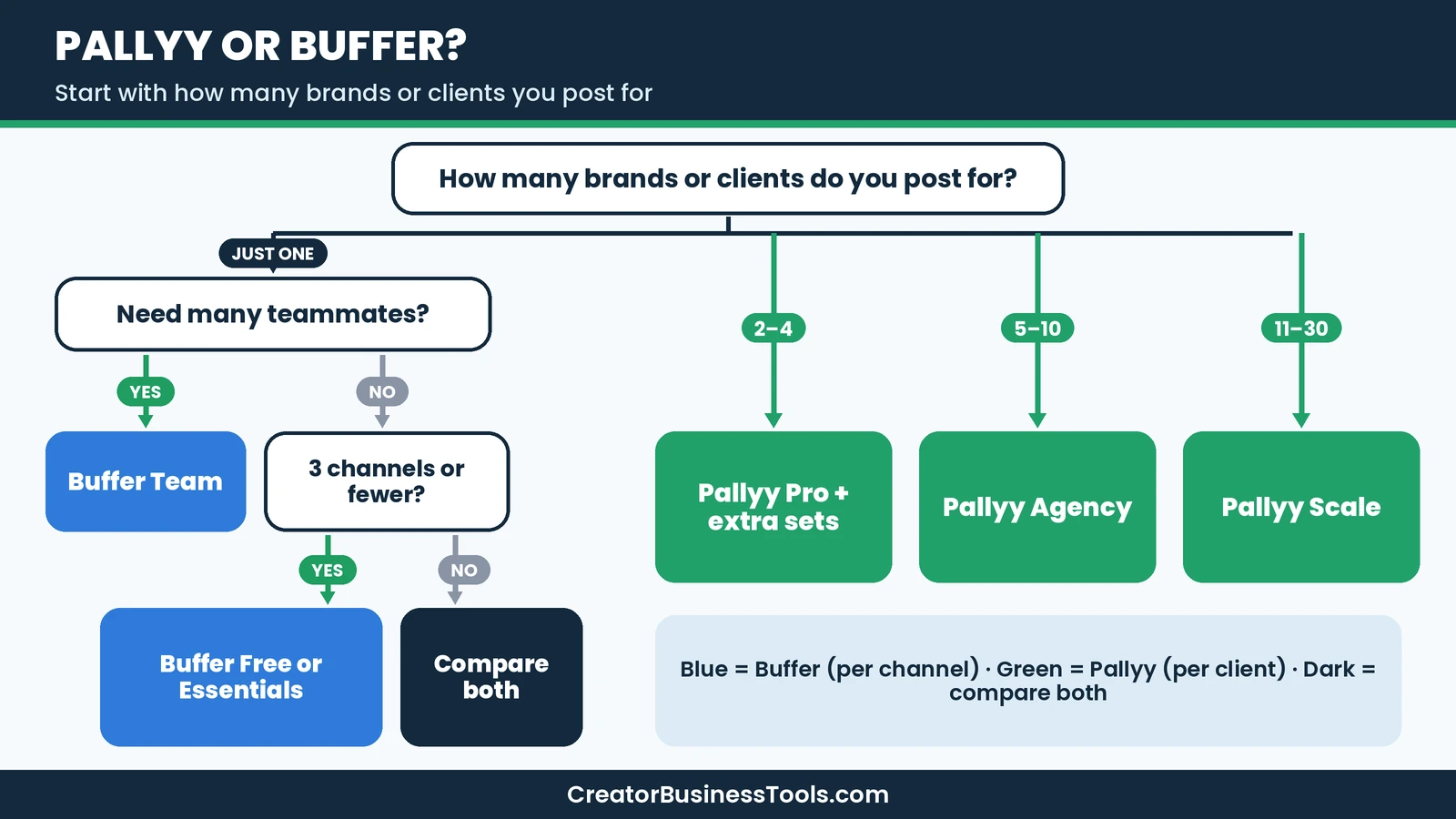
You post to Instagram, Pinterest, and Threads for one brand. You work alone and do not need approvals. Buffer is the natural choice. Three channels on Essentials stay in budget territory, and the free plan may even cover you while you build a habit.
The freelance social media manager
You handle four local businesses, each with Instagram, Facebook, and Google Business Profile, and two with TikTok. That is around fourteen channels on Buffer, but only four social sets on Pallyy. Pallyy Pro plus extra sets is likely the more affordable route, and clients can approve posts from a link.
The small agency
You have eight clients and two teammates. Buffer Team would mean paying for every client channel, though team members are unlimited. Pallyy Agency covers ten sets and three seats in one plan, with custom reports for month-end. For most small agencies, Pallyy is the better fit.
The in-house marketing team
You manage one brand across many channels with five colleagues who all draft posts. Buffer Team’s unlimited team members and approval workflows suit this well. Pallyy Agency includes three seats, with extra seats available, so it can work too, but Buffer is built for this shape of team.
Ease of use
Both tools are friendly for beginners. Buffer is known for a clean interface that gets you posting quickly, and its browser extension makes it easy to save content from anywhere on the web. Pallyy’s interface is organized around social sets, so you switch between clients rather than between accounts. If you manage only your own brand, Buffer may feel slightly simpler. If you juggle clients, Pallyy’s structure helps keep everything separate and avoids posting to the wrong account.
Which is cheaper for you?
| Your setup | Likely cheaper | Why |
|---|---|---|
| One brand, two or three channels | Buffer | You pay for only a few channels |
| One brand, many channels | Close, compare both | Pallyy counts one set, Buffer counts each channel |
| Freelancer with three or four clients | Pallyy | One Pro set plus flat extra sets |
| Agency with five to ten clients | Pallyy | Agency covers ten sets in one plan |
| In-house team on one brand with many helpers | Buffer Team | Unlimited team members |
| Multi-location brand | Pallyy Scale | Thirty sets and ten seats |
Billing flexibility
Both tools offer monthly or yearly billing, so you can match the billing period to how long you expect to keep each client account. Buffer’s per-channel model is especially flexible: you can add channels when you take on a project and remove them when it ends, so you are not paying for accounts you no longer manage. Pallyy’s per-set model works the same way at the client level. When a client leaves, you remove their set, and when a new one signs, you add a set or move up a plan.
That flexibility matters for freelancers, whose client lists change often. Whichever tool you pick, review your connected accounts every month or two and remove anything you no longer need.
Common mistakes when comparing schedulers
- Comparing plan names instead of real costs. A plan that looks cheap can become expensive once you add every channel or teammate.
- Forgetting about approvals. If clients need to sign off, factor in how they will do it and whether they need a seat.
- Ignoring analytics coverage. Check that the networks you report on are fully supported.
- Overlooking the inbox. Replying to comments and reviews often drives more growth than one extra post a week.
- Choosing for the future you might never reach. Pick the tool that fits your next six months, then reassess.
Pros and cons
Pallyy
Pros
- Per-client pricing that stays flat as clients add networks
- Client approvals without accounts or seats
- Full social inbox with reviews and DMs
- Custom reports for agencies
Cons
- Free plan is image-only with a small post cap
- Pro includes one user
- Analytics focus on three networks
Buffer
Pros
- Simple per-channel pricing that is very affordable for a few channels
- Useful free plan for getting started
- Unlimited team members on Team
- Rich ideas board, AI Assistant, and many integrations
Cons
- Costs climb with every channel you add
- Approval workflows only on Team
- Less tailored to multi-client agency work
A small story from our team
When we first mapped out a posting plan for our sites, we simply counted brands and assumed that would set the price. Then we listed every account, including Pinterest boards for each site, a LinkedIn page, Threads, and a TikTok we had barely touched. The channel count roughly doubled what we expected. That exercise taught us to count accounts, not brands, before comparing schedulers. It is the first thing we now suggest to anyone weighing Pallyy against Buffer.
How to decide in four steps
- List every account you will schedule, grouped by brand or client.
- Count channels and count brands. Many channels per brand favors Pallyy. Few channels and one brand favors Buffer.
- Decide who needs access. Client approvals favor Pallyy. A large in-house team favors Buffer Team.
- Start on a free plan with your real accounts to see which calendar you prefer.
Tips for whichever tool you choose
- Batch content weekly. One focused session saves more time than daily scrambling.
- Use saved posting times. Consistent slots help your audience know when to expect posts.
- Repurpose thoughtfully. Adjust captions and formats for each network rather than copying everything.
- Review analytics monthly. Double down on formats that earn saves and comments.
- Keep Pinterest in the mix. Both tools can schedule pins, which can bring long-lasting traffic to blogs and shops.
Is Pallyy or Buffer worth it?
Both are worth it for the right user. Buffer is a fantastic value for solo creators with a few channels and for teams focused on one brand. Pallyy is a better fit when you manage several brands or clients, especially if approvals and a shared inbox matter. Choose based on how many accounts you run and who needs to sign off, and you will likely be happy with either. The good news is that neither choice is permanent. Both tools make it easy to start small, test with your real accounts, and change plans as your work grows, so the best first step is simply to begin.
FAQ
Is Pallyy cheaper than Buffer? It depends on your setup. For one brand with a few channels, Buffer is usually cheaper. For several clients, each with multiple accounts, Pallyy is usually cheaper.
Do both have free plans? Yes. Buffer’s Free plan covers a few channels with a limited queue. Pallyy’s Free plan covers one social set with a small number of image posts.
Which is better for agencies? Pallyy, thanks to per-client pricing, seat-free client approvals, and custom reports on Agency and Scale.
Which is better for Pinterest? Both can schedule to Pinterest. If Pinterest is your main platform, you may also consider a Pinterest-specific tool.
Can clients approve posts in Buffer? Buffer’s approval workflows are on the Team plan and work through team access. Pallyy lets clients approve through a shared link without an account.
Can I switch later? Yes. Both tools let you change or cancel plans, so you can move as your needs change.
Conclusion: Pallyy vs Buffer
Count your accounts, not just your brands. If you are a solo creator with a few channels, Buffer keeps things simple and affordable. If you manage clients or several brands with many accounts each, Pallyy’s per-client pricing and easy approvals will likely save you money and time. Check Buffer or check Pallyy.
Related guides: Pin Generator Review · Pin Generator vs Tailwind · Pallyy Review · Tailwind Review
Get our free content calendar template
Want to plan a month of posts in one sitting? Join our email list for a free content calendar template with weekly themes, caption prompts, and a simple approval checklist for client work. Contact us to request a copy.
Pricing and features from official vendor pages, last checked October 25, 2026.