
Pin Generator vs Tailwind: Which Pinterest Tool Fits Your Workflow?
Disclosure: This post contains affiliate links. If you buy through them, we may earn a commission at no extra cost to you. How we make money.
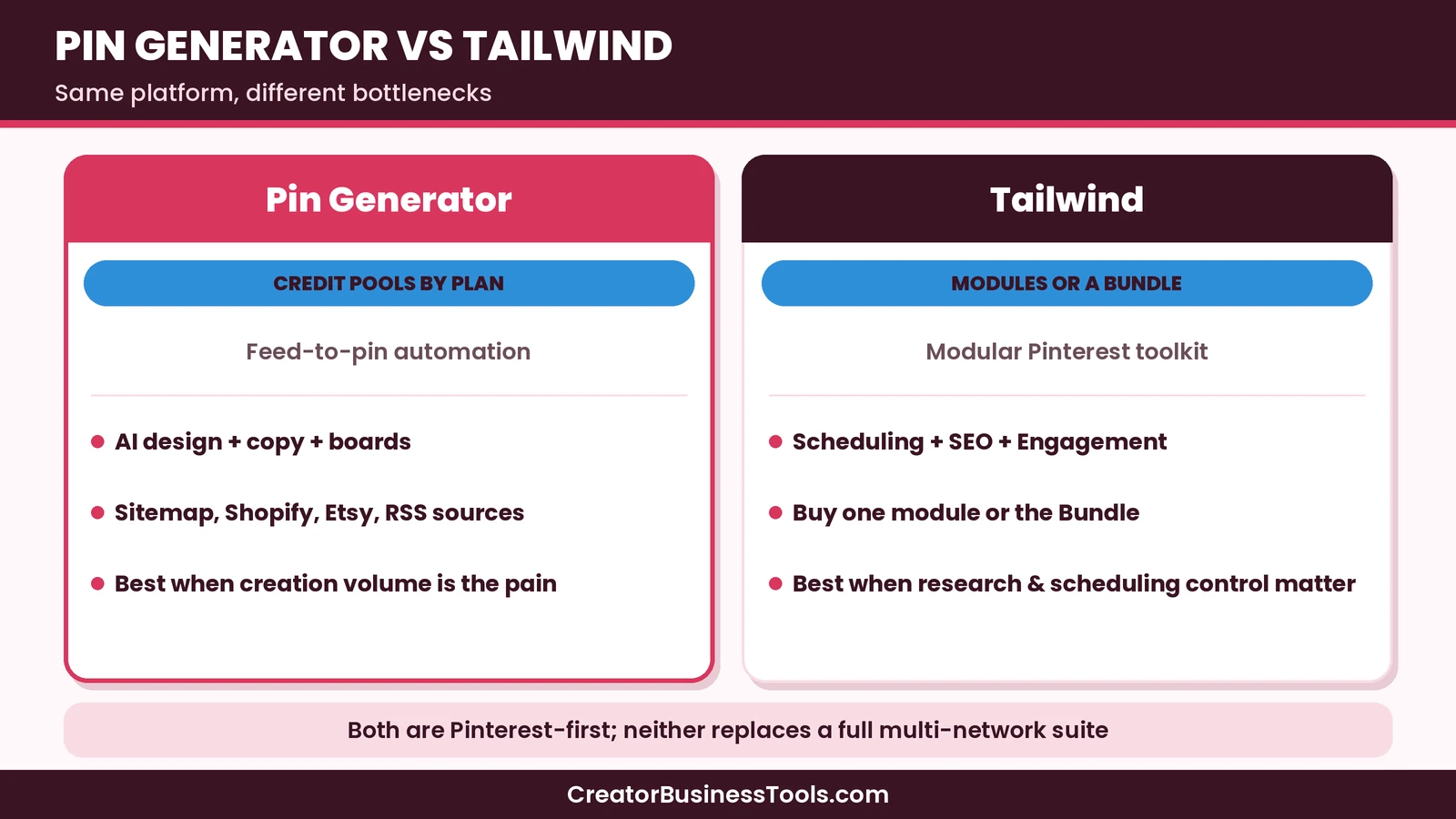
Pin Generator vs Tailwind is a common decision for creators who rely on Pinterest. Both tools help you publish more consistently, but they solve different parts of the job. Pin Generator focuses on turning posts and products into designed pins on autopilot. Tailwind focuses on modular scheduling, Pinterest keyword research, and engagement tools you can buy separately or as a bundle.
This guide compares the two so you can pick based on workflow, not marketing slogans. It is based on each company’s public pricing and product pages.
Quick verdict: Choose Pin Generator when your bottleneck is creating large volumes of fresh pin creatives from a blog or store feed. Choose Tailwind when you want flexible scheduling plus optional Pinterest SEO and engagement modules, or when you prefer à la carte pricing. Many Pinterest-first businesses will outgrow “either/or” and eventually evaluate a stack, but most should start with one clear primary tool.
Quick picks
- Best for automated pin design from Shopify, Etsy, or a sitemap: Pin Generator. Try Pin Generator
- Best modular Pinterest suite: Tailwind Bundle or Pin Scheduling alone if you already design elsewhere. Try Tailwind
- Best if keyword research is the missing piece: Tailwind Pinterest SEO module.
- Best if you manage many social networks for clients: a broader tool such as Pallyy. See Pallyy vs Buffer.
Pin Generator and Tailwind links on this page are affiliate links.
Related guides: Pin Generator Review · Tailwind Review · Pallyy Review · Pallyy vs Buffer
At a glance
| Pin Generator | Tailwind | |
|---|---|---|
| Primary job | Generate and schedule pins from content sources | Schedule pins; optional SEO and engagement |
| Pricing model | Credit pools on Pro → Scale | Separate products or Bundle |
| Price tier | Budget to premium | Budget modules; Bundle mid-range |
| AI pin design | Central feature | Available in creation workflow |
| Pinterest keyword tools | Automatic SEO research per URL (credits) | Dedicated Pinterest SEO product |
| Engagement boosting | Not the core pitch | Dedicated Engagement product |
| Store feeds | Shopify, Etsy, WooCommerce, RSS, CSV | Site sync and creation tools |
| Multi-network | Pinterest-focused | Pinterest-focused (with Instagram history in brand) |
| Free start | Preview credits / preview automation | Free start available on the pricing page |
Where each tool wins
Pin creation at volume
Pin Generator is built for this. Connect a catalog or sitemap, set a design profile, and generate batches on a weekly or monthly cadence. Titles, descriptions, alt text, and board picks can be automated. If your pain is “I know I should pin more fresh creatives, but design time blocks me,” Pin Generator is usually the closer match.
Tailwind can create pins and even help with recurring creation, but its product story is broader and more modular. Creation is one part of a suite, not the entire thesis.
Edge: Pin Generator for feed-driven bulk creative.
Scheduling control
Both schedule pins. Tailwind’s scheduling product is mature and pairs with smart timing concepts many Pinterest users already know. Pin Generator schedules as the last step of its automation loop and emphasizes natural posting windows and pins-per-day settings.
If you already have creatives and mainly need a reliable queue, Tailwind Scheduling can be enough on its own. If scheduling is just the last mile after AI generation, Pin Generator keeps that path inside one flow.
Edge: Tailwind when scheduling is the only gap; Pin Generator when scheduling must follow automated design.
Pinterest SEO and research
Tailwind sells a dedicated Pinterest SEO product for keyword research and tracking. Pin Generator includes automatic SEO and trend targeting inside batches, charged in credits per post researched.
Creators who want an ongoing keyword workspace often prefer Tailwind’s SEO module. Creators who want research baked into each generated batch may prefer Pin Generator’s integrated approach.
Edge: Tailwind for dedicated research; Pin Generator for research-as-part-of-generation.
Engagement features
Tailwind offers an Engagement product aimed at boosting proven pins. Pin Generator’s public pitch centers on creation and scheduling volume, not engagement boosting.
If resharing and boosting winners is core to your strategy, Tailwind has a clearer product for that job.
Edge: Tailwind
Pricing shape
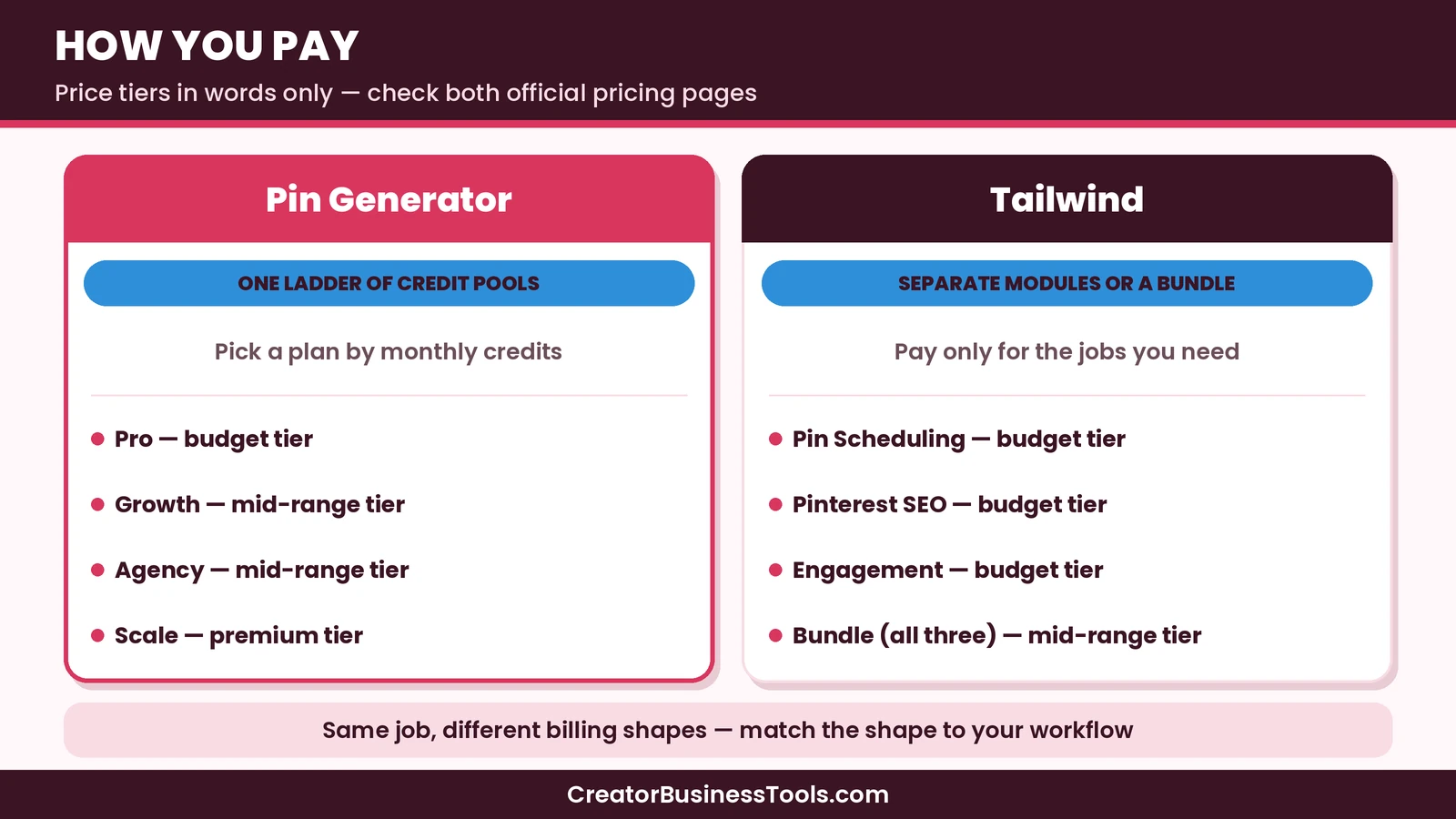
Pin Generator uses one ladder of credit pools. You pick Pro, Growth, Agency, or Scale based on monthly credits. Heavier AI image use burns credits faster.
Tailwind lets you buy Pin Scheduling, Pinterest SEO, and Engagement separately, or take the Bundle. That can feel fairer if you only need one job done. It can also feel fiddly if you know you want all three.
We will not declare a universal price winner in the abstract. Credit burn and module mix change the real monthly outlay. Compare your expected pin volume and whether you need SEO and engagement before you decide.
Feature comparison table
| Capability | Pin Generator | Tailwind |
|---|---|---|
| Bulk AI pin design from URLs | Strong | Available, less central |
| Brand / design profiles | Yes | Yes, in creation tools |
| Smart scheduling | Yes | Yes (Scheduling product) |
| Keyword research workspace | Via automatic SEO credits | Dedicated SEO product |
| Engagement boosting | Limited emphasis | Dedicated product |
| Shopify / Etsy sync | Strong first-party pitch | Site and creation workflows |
| À la carte buying | No (plan ladder) | Yes |
| Agency-scale credit pools | Agency / Scale plans | Scale via accounts and credits |
Which should you choose?
Choose Pin Generator if
- Your catalog or blog produces more URLs than you can design for
- You want weekly or monthly autopilot batches
- You are fine managing a credit balance
- Pinterest creative volume is the main bottleneck
Choose Tailwind if
- You already design pins in Canva or similar
- You want keyword research as a standing workspace
- You care about engagement boosting for winners
- You prefer paying only for the modules you use
Consider a different tool if
- You need Instagram, LinkedIn, and Facebook in one scheduler — look at Pallyy or Buffer
- You only pin occasionally — Pinterest’s native scheduler may be enough
- You want AI article writing, not pins — that is a different category (see our Koala and Frase guides)
Workflow recipes
Recipe A — shop owner with no designer
Use Pin Generator as the primary tool. Connect the store, build a design profile from the brand site, generate weekly batches for new and best sellers, and review creatives once a week. Add Tailwind later only if keyword research becomes a weekly habit you cannot do inside Pin Generator’s automatic SEO.
Recipe B — blogger who already designs in Canva
Use Tailwind Scheduling as the primary queue. Keep designing in Canva if you prefer that craft. Add Tailwind SEO if keyword tracking is part of your editorial calendar. Consider Pin Generator only when you want a second stream of AI variants for cornerstone posts.
Recipe C — freelancer with mixed clients
Default to a multi-network scheduler such as Pallyy for clients who need Instagram and Facebook. Use Pin Generator or Tailwind only for Pinterest-heavy clients, billed as a specialized add-on workflow. Mixing every tool into every client retainer creates support debt.
Evaluation scorecard
Score each tool from 1–5 for your situation:
| Criterion | Why it matters |
|---|---|
| Creative automation | Do you lack design time? |
| Scheduling reliability | Do you already have creatives? |
| Keyword workspace | Do you research Pinterest terms weekly? |
| Engagement tooling | Do you reshare winners on purpose? |
| Credit or module clarity | Will billing surprise you? |
| Multi-network needs | Is Pinterest only one channel? |
If creative automation scores highest, Pin Generator leads. If keyword workspace and engagement score highest, Tailwind leads. If multi-network needs score highest, neither is the whole answer.
Migration notes
Moving from Tailwind to Pin Generator usually means exporting or recreating templates and reconnecting sources. Moving the other way means you may keep designing in Pin Generator while you test Tailwind modules — or pause generation while you rebuild queues. There is no magic one-click switch. Plan a quiet week where you run both in parallel on a small URL set before you cancel anything.
What we are not claiming
We are not claiming that either tool will deliver a fixed number of impressions, sales, or hours returned. Testimonials on vendor sites are anecdotes, not proof. Your niche, creative quality, and offer strength still decide outcomes. Treat these products as leverage on consistency, not as a substitute for strategy.
A hypothetical example
Picture a home-decor blogger who publishes two posts a week and sells a small printables pack. Her bottleneck is design time, not keyword spreadsheets. In this hypothetical case, Pin Generator on a budget-tier plan matches the pain: connect the sitemap, set a design profile, and schedule a steady batch. If she later wants deeper keyword tracking and resharing of top pins, she might add Tailwind’s SEO or Engagement modules — or switch primary tools — once the creation problem is solved. The sequence matters: fix the biggest bottleneck first.
Plans in plain language
Pin Generator ladder
Pro is the budget on-ramp with a smaller credit pool. Growth and Agency sit in the mid-range for higher volume. Scale is premium for very high monthly credits. All paid plans share the same general feature suite; credits and support emphasis change.
Tailwind modules
Pin Scheduling is the core budget-friendly module for most users who need a queue. Pinterest SEO and Engagement are separate budget modules. The Bundle combines them at a mid-range tier and is the simple choice if you know you want the full Pinterest toolkit.
Common mistakes
- Buying Scale on day one because a competitor posts dozens of pins daily
- Buying Tailwind Bundle when you only needed scheduling
- Ignoring AI image credit costs inside Pin Generator
- Expecting either tool to replace a multi-network client scheduler
- Chasing absolute time-claim marketing from testimonials instead of measuring your own workflow
FAQ
Is Pin Generator a Tailwind alternative?
For creation-heavy Pinterest workflows, yes it is often evaluated that way. For SEO research and engagement, Tailwind still has clearer dedicated products.
Can I use both?
Yes, some teams generate in one tool and research in another. Most solo creators should master one primary workflow first to avoid overlapping fees.
Which is better for Etsy sellers?
If product-to-pin automation is the priority, Pin Generator’s store integrations are compelling. If you already have creatives and need scheduling plus keywords, Tailwind fits well.
Which is better for agencies?
Pin Generator’s higher credit plans target high volume. Tailwind’s modular seats and products can fit clients with different needs. Confirm account limits for either before you standardize.
Do both offer a free plan?
Both list limited free options on their pricing pages. Confirm current free limits before you commit.
Does Pin Generator include Tailwind-style SmartLoop?
Do not assume feature parity on engagement boosting. Treat Tailwind Engagement as the purpose-built option unless Pin Generator’s current docs show an equivalent.
Feature depth that marketing pages gloss over
Pin Generator’s automatic SEO is generation-time research. That is different from living inside a keyword tool every Monday. Tailwind’s SEO product is closer to a standing research habit. Likewise, Tailwind Engagement assumes you already have winners to boost. Pin Generator assumes you need more creatives in the first place.
These nuances explain why Twitter-style hot takes (“X killed Y”) rarely help. The better question is which habit you will protect on a busy week.
Budget planning without banned shortcuts
Instead of chasing the lowest sticker price, write three numbers:
- Pins you truly intend to publish per day
- Share of those pins that need new AI images
- Whether you need a keyword workspace weekly
Those three inputs usually pick the tool and tier faster than a feature grid. If (1) is high and (2) is high, Pin Generator credits dominate the conversation. If (1) is moderate and (3) is yes, Tailwind modules dominate.
Team roles
- Designer-founder: may prefer Tailwind + Canva
- Operator-founder: may prefer Pin Generator automation
- SEO-led blogger: often wants Tailwind SEO in the mix
- Agency PM: often wants Pallyy for client networks, plus a Pinterest specialist tool for Pinterest-heavy retainers
Match the tool to the human who will click it daily.
Risks of switching too often
Pinterest compounds with consistency. Switching schedulers every month resets learning, breaks queues, and creates duplicate creative patterns. Pick a primary tool for a quarter unless it clearly fails a core job.
Board strategy and creative variety
Neither tool fixes a board architecture that confuses Pinterest’s recommendation systems. Before you automate, clean up board names, descriptions, and overlaps. Then decide how many creatives each URL deserves. Cornerstone posts often need more variants than routine news updates. Product launches need a burst, then a maintenance drip.
Pin Generator shines when that variant count is high. Tailwind shines when you already know which creatives to queue and need timing, research, or boosting around them.
Seasonal campaigns
Holiday and seasonal niches create bursty demand. Credit-pool tools need headroom before the rush. Modular tools need queues built early. Whichever you choose, build the campaign creatives before the season starts rather than during it.
Accessibility and alt text
Alt text matters for accessibility and can support discovery. Pin Generator can generate alt text with credits. Tailwind workflows may include descriptive fields depending on how you create. Do not skip alt text just because automation can post without it.
Reporting to clients or stakeholders
If you report to a client, decide which screenshots matter: Pinterest Analytics outbound clicks, engagement, and top pins usually beat “pins scheduled” vanity metrics. Pin Generator and Tailwind both help you publish; your report should still center platform outcomes and business results.
When to re-open the decision
Revisit Pin Generator vs Tailwind if:
- your credit burn doubles without a traffic lift
- you hired a designer and creation is no longer the bottleneck
- keyword research became a weekly ritual you do outside the tool
- client mix shifted toward or away from Pinterest-only work
Summary table for busy readers
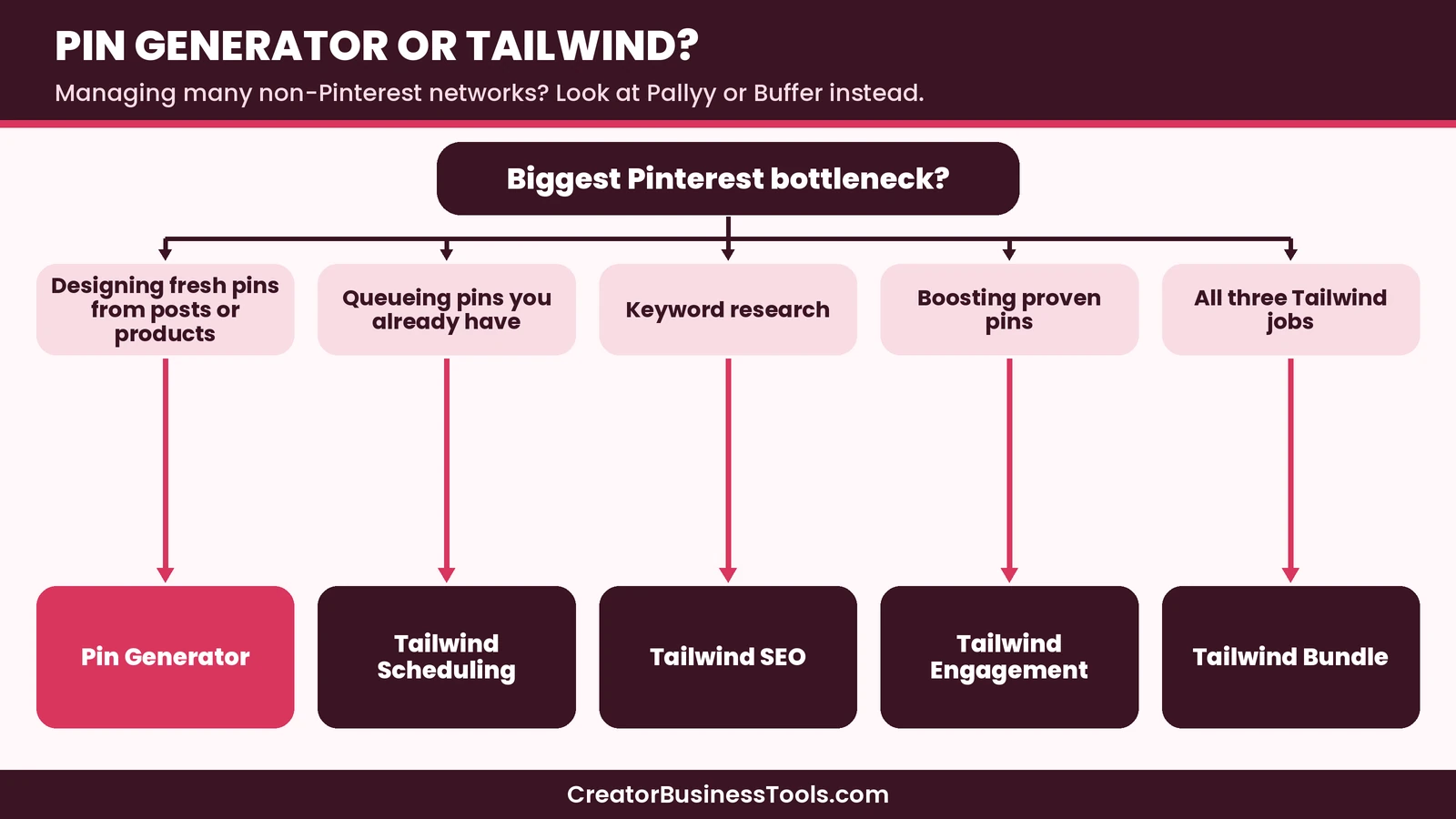
| Need | Lean toward |
|---|---|
| Autopilot creatives from feeds | Pin Generator |
| À la carte scheduling | Tailwind Scheduling |
| Keyword workspace | Tailwind SEO |
| Boost proven pins | Tailwind Engagement |
| Full Tailwind kit | Tailwind Bundle |
| Multi-network clients | Pallyy / Buffer first |
Keep this table nearby when you compare checkout pages so feature marketing does not pull you off the job you named.
Closing note
If you are still torn, run a one-week pilot on the tool that matches your top bottleneck score from earlier. Judge the pilot on creatives published, credits or modules used, and whether you still wanted to open the other tool. That single week usually ends the debate more cleanly than another round of feature reading.
Bottom line
Pin Generator vs Tailwind comes down to the bottleneck you feel every week. If fresh creative production blocks you, Pin Generator is the more direct answer. If you need a modular Pinterest operating system with scheduling, research, and engagement, Tailwind is the safer default. Neither is a full replacement for multi-network social suites, and neither promises traffic on its own — consistent strategy still matters.
Affiliate links below may earn us a fee at no extra cost to you.
[See Pin Generator's plans](https://pingenerator.com/pricing)[See Tailwind's plans](https://www.tailwindapp.com/)
Free checklist: Get our free Pinterest Tool Decision Checklist before you subscribe. Contact us to request a copy.
Pricing and features from official vendor pages, last checked October 28, 2026.