
Sellfy vs Podia: Which Platform Fits What You Sell?
Disclosure: This post contains affiliate links. If you buy through them, we may earn a commission at no extra cost to you. How we make money.
This Sellfy vs Podia comparison is for creators who want to sell digital products from their own storefront and are choosing between two very different approaches. Sellfy is a creator store: it focuses on selling downloads, subscriptions, physical products, and print-on-demand merch with no Sellfy transaction fees on any plan. Podia is an all-in-one creator platform: it bundles courses, community, coaching, events, email, and a website into one subscription.
We compared the two using their official pricing and feature pages, not a test store. Below you’ll find a quick verdict, plan tiers, a feature table, and a simple way to choose.
Quick verdict: Choose Sellfy if you mainly sell products, such as templates, ebooks, music, presets, or merch, and want a simple store with a flat plan price and print-on-demand built in. Choose Podia if your business centers on courses, a paid community, or coaching, and you want those tools in one place alongside email and a website.
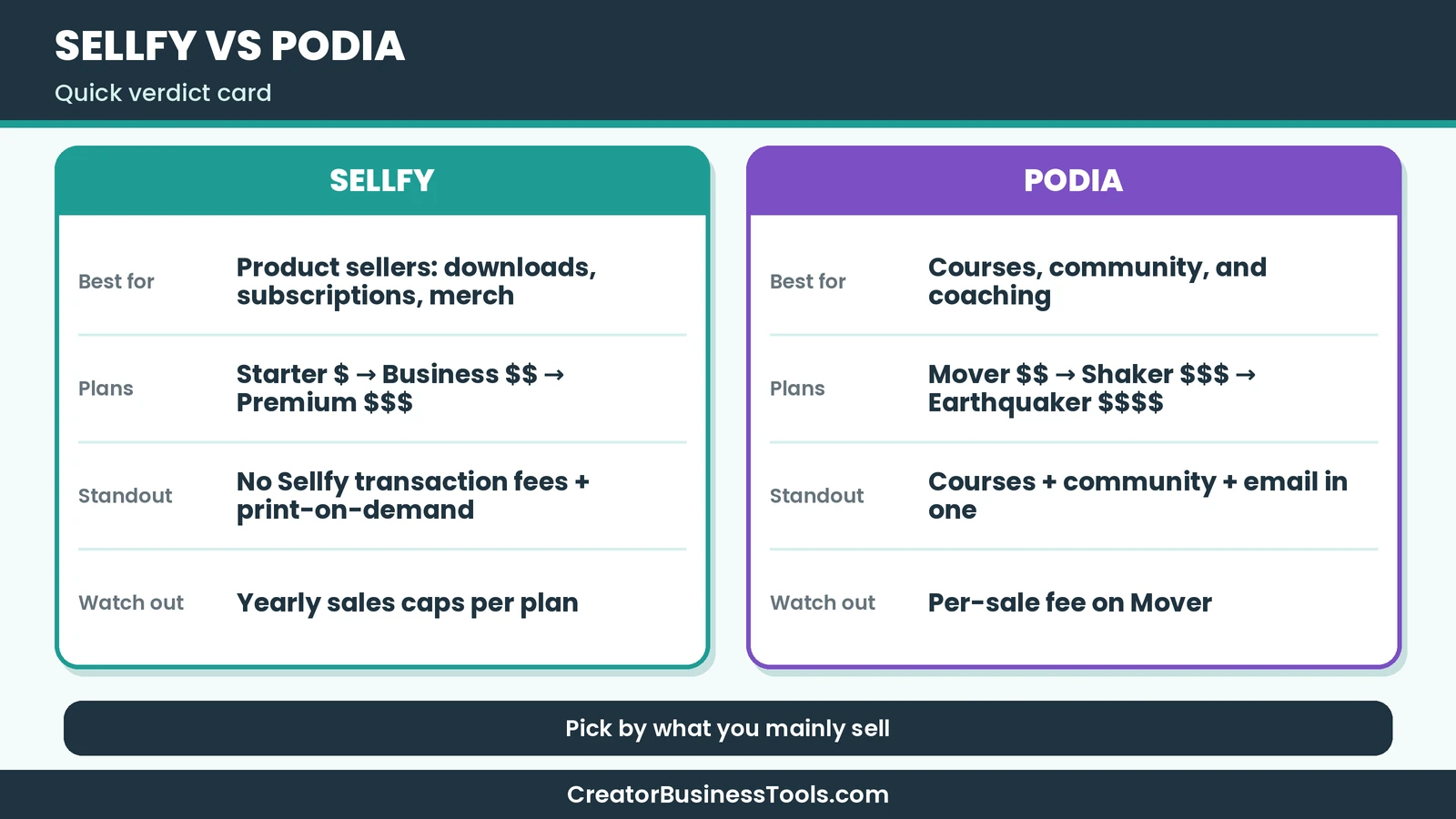
Quick picks
- Best for selling downloads and merch: Sellfy Starter or Business, with digital, physical, subscription, and print-on-demand products on every plan.
- Best for growing product shops: Sellfy Business, which adds upsells, cart abandonment, an affiliate program, and help migrating products.
- Best for course creators: Podia, with drip lessons, quizzes, and completion certificates.
- Best for paid communities: Podia, with free or paid community tiers, spaces, and direct messages.
- Best if you sell both products and courses: compare Sellfy with a dedicated course platform, or read our Kajabi vs Teachable comparison.
Sellfy vs Podia at a glance
| Item | Sellfy | Podia |
| Core idea | Creator storefront for products | All-in-one platform for courses, community, and products |
| Plans | Starter, Business, Premium | Mover, Shaker, Earthquaker |
| Free plan | No | No |
| Entry price tier | \$ | \$\$ |
| Platform transaction fees | None on any plan | Per-sale fee on Mover, none on higher plans |
| Main limit | Yearly sales cap per plan | Email subscribers and products per plan |
| Physical and print-on-demand | ✓ All plans | Not listed |
| Courses | Not a course builder | ✓ Lessons, drips, quizzes, certificates |
| Community | Not offered | ✓ All plans |
| Email marketing | ✓ Monthly email credits | ✓ Subscribers included by plan |
| Support | 24/7 email; priority on Premium | Email and chat |
What is Sellfy?
Sellfy is an ecommerce platform built for creators. Its pricing page describes three plans, Starter, Business, and Premium, and every plan lets you sell digital downloads, subscriptions, physical products, and print-on-demand items, with unlimited products.
Sellfy’s pitch is simplicity. You get a store editor with themes, custom code, and your own domain, plus coupon codes, customer reviews, and built-in email marketing. You can also skip a website entirely and sell through social platforms, or embed buy buttons and your full store on a site you already have.
Sellfy charges no transaction fees on any plan. Instead, each plan has a yearly sales cap, and you move up a plan as your sales grow. Payment processing through Stripe or PayPal is charged separately by those providers, and payouts go straight to your own account.
What is Podia?
Podia is an all-in-one platform for creators who sell knowledge and community. Every plan includes online courses, digital downloads, coaching, community, events, a website and blog, landing pages, a custom domain, and email marketing.
Its course tools include drip content, quiz lessons, completion certificates, and progress tracking. Its community tools include topic-based spaces, group chats, direct messages, and free or paid tiers. You can bundle courses, downloads, coaching, events, and community access into one offer.
Podia’s plans differ mainly by how many email subscribers, products, videos, and community spaces you get, and by whether Podia takes a per-sale fee. The entry plan, Mover, includes a fee on each sale, while Shaker and Earthquaker have no Podia fees. Payment processing is charged separately by Stripe or PayPal.
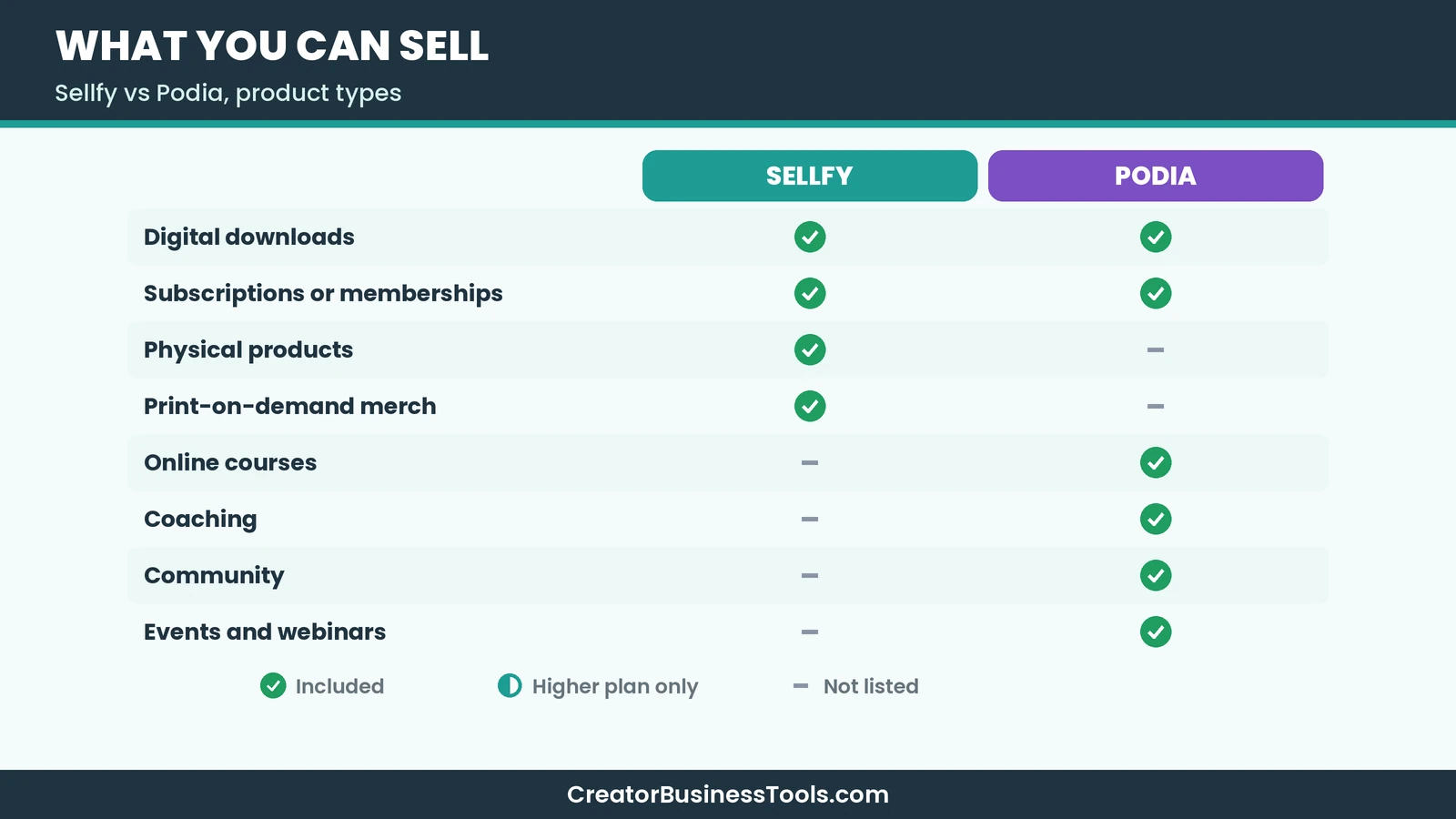
Sellfy vs Podia pricing
Both platforms charge a monthly plan price, but they scale in different ways. Sellfy scales by yearly sales volume, while Podia scales by email subscribers, products, and community size. We show price tiers rather than exact figures because both pages vary by billing period.
| Plan level | Sellfy | Podia |
| Entry | Starter: \$ | Mover: \$\$ (plus a per-sale fee) |
| Growth | Business: \$\$ | Shaker: \$\$\$ |
| Advanced | Premium: \$\$\$ | Earthquaker: \$\$\$\$ |
| High volume | Custom offer via sales | Unlimited products on Earthquaker |
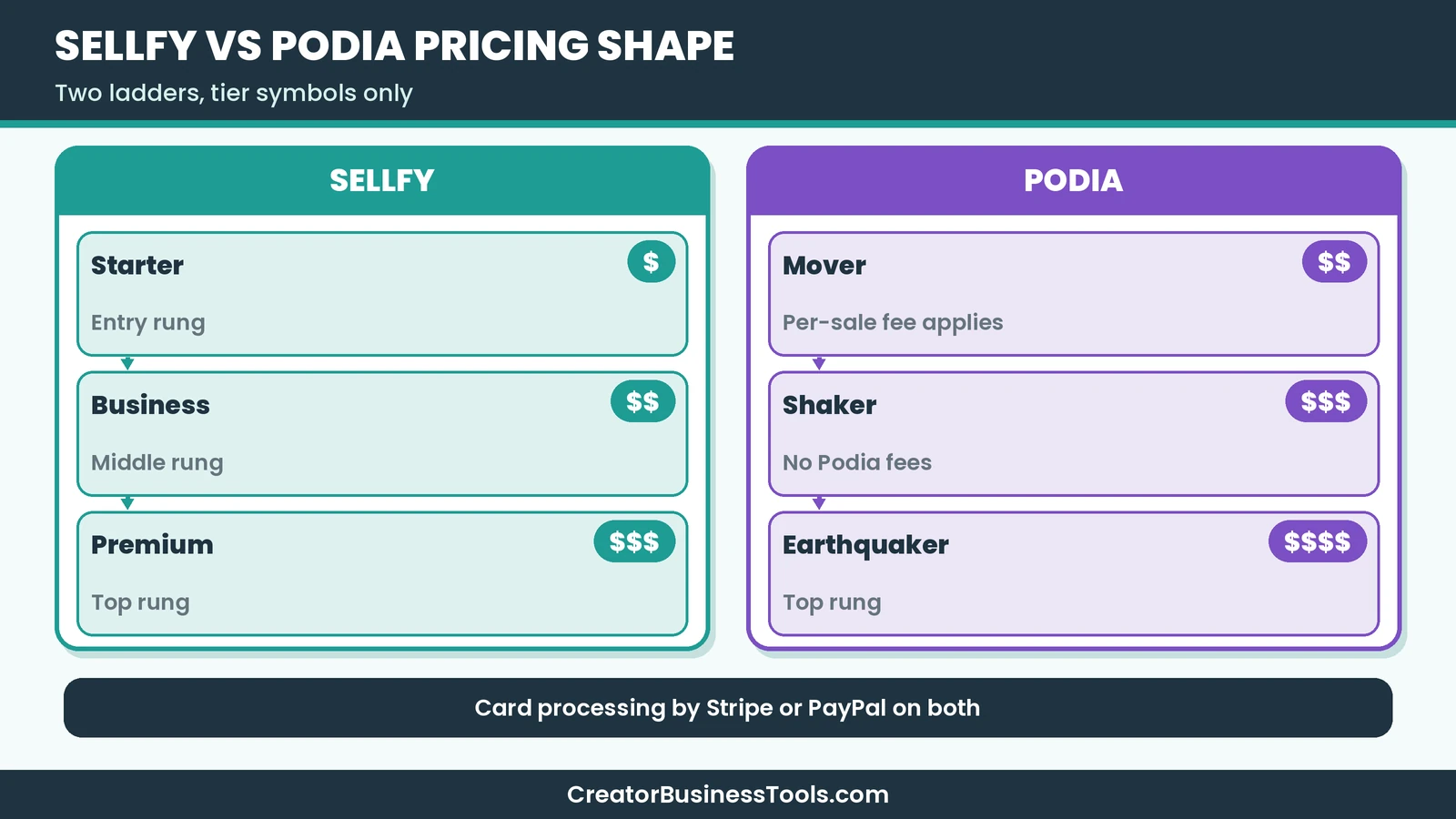
How the price scales
- Sellfy scales by sales. Starter, Business, and Premium each have a yearly sales cap. Sellfy says that if you exceed your cap and don’t upgrade, it may charge an overage fee on sales above the limit, while your store keeps running.
- Podia scales by audience and catalog. Each plan includes a set number of email subscribers, products, videos, and community spaces. Podia says it notifies you near the subscriber limit and does not upgrade you automatically.
- Per-sale fees differ. Sellfy has no transaction fees on any plan. Podia’s Mover plan adds a per-sale fee, which disappears on Shaker and Earthquaker.
- Email is priced differently. Sellfy gives each plan a monthly allowance of email credits. Podia includes a number of email subscribers on each plan and lets you add more.
- Processing fees apply on both. Stripe or PayPal charges its usual rates on every sale, on either platform.
Which costs less for you?
For a product seller with modest sales, Sellfy Starter sits in a lower tier than Podia’s entry plan and has no per-sale fee. Once you need courses or community, the comparison shifts, because Sellfy doesn’t offer them and you would need a second tool.
A hypothetical example: a designer selling planner templates and a few print-on-demand mugs gets everything on Sellfy Starter or Business. A coach selling a course, a paid community, and booking calls would need several tools alongside Sellfy, while Podia covers all three in one plan. For a full walk-through of Sellfy’s plans, see our Sellfy pricing guide.
Feature comparison
| Feature | Sellfy | Podia |
| Digital downloads | ✓ | ✓ |
| Subscriptions or memberships | ✓ Subscriptions | ✓ Paid community tiers |
| Physical products | ✓ | Not listed |
| Print-on-demand | ✓ | Not listed |
| Online courses | — | ✓ Drips, quizzes, certificates |
| Coaching | — | ✓ |
| Community | — | ✓ Spaces, chats, DMs |
| Events and webinars | — | ✓ |
| Email marketing | ✓ Credits by plan | ✓ Subscribers by plan |
| Website, blog, landing pages | ✓ Store pages and custom domain | ✓ Website, blog, landing pages, custom domain |
| Upsells | ✓ Business and Premium | ✓ Shaker and Earthquaker |
| Cart abandonment | ✓ Business and Premium | Not listed on pricing page |
| Affiliate program for your products | ✓ Business and Premium | ✓ Shaker and Earthquaker |
| Coupon codes and reviews | ✓ All plans | See Podia's features page |
| Tax support | Advanced VAT and tax settings | Tax calculation for 230 jurisdictions |
| Migration help | Email on all plans; products and store design on Business and Premium | Migration help on all plans |
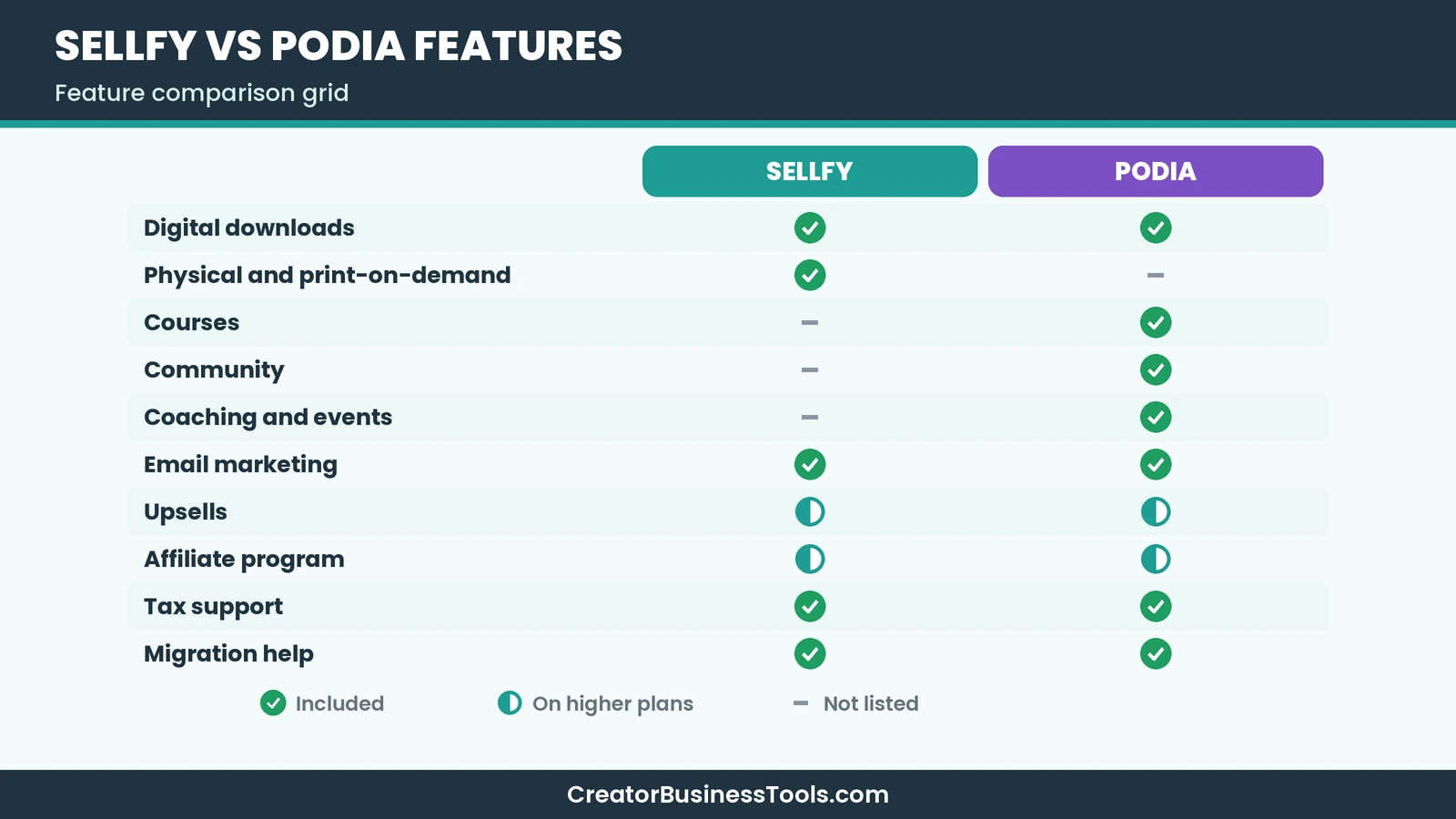
When Sellfy wins
Sellfy is the stronger fit for product sellers. Print-on-demand and physical products on every plan, unlimited products, no Sellfy transaction fees, and payouts straight to your Stripe or PayPal account make it practical for designers, musicians, illustrators, and template sellers. Being able to sell through social links without a website also helps creators who live on TikTok, Instagram, or YouTube.
When Podia wins
Podia is the stronger fit when your product is teaching or community. Courses with drips, quizzes, and certificates, a built-in community with free or paid tiers, coaching, events, and email in one subscription can replace several separate tools. Podia’s tax calculation across many jurisdictions and support for 20+ currencies also help creators selling internationally.
Pros and cons
| Sellfy pros | Sellfy cons |
| No Sellfy transaction fees on any plan | Yearly sales caps per plan |
| Physical and print-on-demand products on every plan | No course builder or community |
| Unlimited products, social selling, and embeds | Upsells and cart abandonment start on Business |
| Built-in email marketing with monthly credits | Sellfy branding stays on Starter |
| Direct payouts to Stripe or PayPal | Priority support only on Premium |
| Podia pros | Podia cons |
| Courses, community, coaching, and events in one place | Entry plan sits in a higher tier than Sellfy Starter |
| Website, blog, and landing pages included | Per-sale fee on the Mover plan |
| Email subscribers included on every plan | Product and subscriber limits by plan |
| Tax calculation across 230 jurisdictions | Physical and print-on-demand selling not listed |
| Migration help on every plan | PayPal and affiliate tools start on Shaker |
Before you sign up
- Prices depend on billing period. Check each pricing page for the option you plan to use.
- On Sellfy, estimate your yearly sales so you pick a plan whose sales cap fits.
- On Podia, count your email subscribers and products, since each plan has limits.
- Stripe and PayPal charge processing fees on both platforms.
- Read each platform’s tax help pages for how sales tax and VAT are handled in your country.
How to choose between Sellfy and Podia
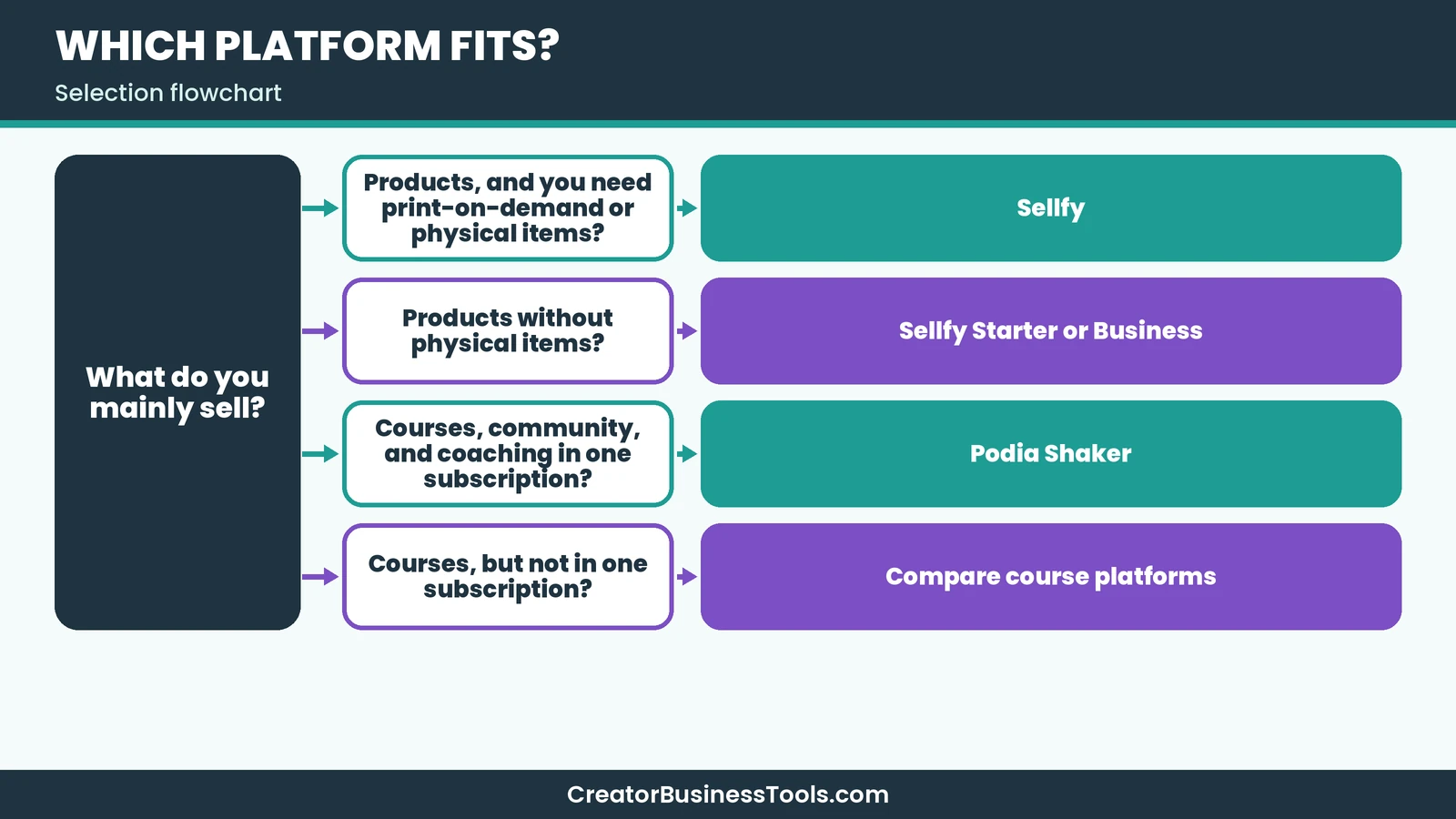
- List what you sell now and next. Products point to Sellfy; courses, community, and coaching point to Podia.
- Estimate your sales and your list. Sellfy plans follow sales volume; Podia plans follow subscribers and products.
- Check per-sale fees. If you choose Podia, compare Mover against Shaker once your sales grow.
- Count the tools you’d replace. Podia may replace a course tool, a community tool, and an email tool at once.
- Start with one product. Launch a single offer before moving your whole catalog.
Who should use each platform?
| Reader | Suggested pick | Why |
| Designer selling templates and printables | Sellfy Starter | Simple store, unlimited products, no Sellfy fees |
| Musician selling beats and merch | Sellfy Business | Downloads, print-on-demand, upsells |
| Illustrator selling prints and stickers | Sellfy | Physical and print-on-demand on every plan |
| Coach selling a course and calls | Podia Shaker | Courses, coaching, and no Podia fees |
| Creator running a paid community | Podia | Free or paid community tiers and spaces |
| Educator with a large catalog | Podia Earthquaker | Unlimited products, videos, and spaces |
If you sell printables, our guide on how to sell printables online walks through product ideas and setup.
Selling internationally: taxes, currencies, and payouts
If your buyers live in many countries, the back-office details matter as much as the storefront.
- Sellfy lists advanced VAT and tax settings on every plan, so you can configure how tax is applied to your products. Payments go through Stripe or PayPal, and Sellfy says payouts reach your own account with no holding period. It also notes that if neither Stripe nor PayPal supports receiving payments in your country, you can only offer free products.
- Podia says it calculates and applies tax rates for customers across 230 jurisdictions and accepts payment in more than 20 currencies. PayPal checkout is available on Shaker and Earthquaker, alongside card payments.
Neither page replaces tax advice. Check each platform’s help center and, if needed, a local accountant to understand what you are responsible for filing.
Store design and branding
Your storefront is often a buyer’s first impression, so it’s worth comparing how much control each tool gives you.
| Design option | Sellfy | Podia |
| Themes and editor | ✓ Store editor and themes | ✓ Website builder with your fonts and colors |
| Custom code | ✓ All plans | See Podia's features page |
| Custom domain | ✓ All plans | ✓ All plans |
| Remove platform branding | Business and Premium | Listed among Podia's features |
| Blog | — | ✓ |
| Help with store design | Store design migration on Business and Premium | Migration help on all plans |
Sellfy suits sellers who want a clean product grid that matches their brand. Podia suits creators who want a full website with a blog and landing pages that lead into courses and community.
Setting up your first product on either platform
Whichever tool you choose, a first launch follows the same steps:
- Pick one offer. A single template pack, ebook, or mini-course is easier to launch than a full catalog.
- Write a clear product page. Say who it’s for, what’s inside, and what result it helps with.
- Connect payments. Link Stripe or PayPal and run a test purchase.
- Add an email step. Send buyers a thank-you email and invite them to your list.
- Share one link everywhere. Put your store or product link in your bio, posts, and videos.
A launch checklist
- ☐ Product files or lessons uploaded and tested
- ☐ Product page with clear benefits and an image
- ☐ Payment gateway connected and test order completed
- ☐ Thank-you email written
- ☐ Store link added to your social profiles
- ☐ A simple plan for your first week of posts
Common mistakes when choosing a creator platform
- Paying for features you won’t use. If you only sell downloads, an all-in-one platform may be more than you need.
- Ignoring caps and limits. Sellfy’s sales caps and Podia’s subscriber limits both shape your real price.
- Forgetting processing fees. Stripe or PayPal fees apply on both platforms.
- Splitting your audience across tools. Keep your email list in one place where you can.
- Overbuilding before launching. Sell one offer first, then expand.
FAQ
Is Sellfy better than Podia?
It depends on what you sell. Sellfy is usually the stronger fit for products, including print-on-demand and physical items. Podia is often the stronger fit for courses, community, and coaching.
Does Sellfy charge transaction fees?
No. Sellfy’s pricing page lists no transaction fees on any plan. Payment processing by Stripe or PayPal is charged separately.
Does Podia charge transaction fees?
Podia’s Mover plan includes a per-sale fee. Shaker and Earthquaker have no Podia fees. Payment processing is charged separately.
Can I sell courses on Sellfy?
Sellfy’s pricing page does not list course-building features such as lessons, quizzes, or certificates. If courses are central to your business, Podia or a dedicated course platform is the closer fit.
Can I sell physical products or merch on Podia?
Podia’s pricing and feature pages focus on digital products, courses, coaching, community, and events, and we did not find physical or print-on-demand selling listed. Sellfy includes both on every plan.
Do Sellfy and Podia have free plans?
Neither platform lists a free plan on its pricing page. Both offer paid plans in different price tiers.
Which is better for email marketing?
Both include email. Sellfy gives each plan a monthly allowance of email credits, while Podia includes a set number of email subscribers on each plan with the option to add more.
Do I need a website to use Sellfy or Podia?
No. Sellfy lets you sell through social links or embed your store on an existing site. Podia includes a website, blog, and landing pages on every plan.
Can I move my products to Sellfy or Podia?
Sellfy offers email migration on all plans and product and store design migration on Business and Premium. Podia lists migration help on every plan, with the number of products it moves depending on your plan.
Is Sellfy vs Podia a fair comparison for coaches?
Partly. Coaches who sell only downloads can use Sellfy, but coaches who sell sessions, courses, or a community will find more of what they need built into Podia.
Bottom line
The Sellfy vs Podia choice comes down to what you sell. If your business is products, such as templates, music, art, or merch, Sellfy gives you a simple store, print-on-demand, and no Sellfy transaction fees, with plans that grow with your sales. If your business is teaching and community, Podia bundles courses, community, coaching, events, email, and a website into one platform.
Write down your main offer and your next one, then pick the platform built for it. For more on Sellfy, see our Sellfy review and our Sellfy vs Gumroad comparison.
Free checklist: Planning your first launch? Get our free Digital Product Launch Checklist, a one-page plan for your product page, payment setup, and first week of posts. Contact us to request a copy.