
Make Alternatives: 5 Automation Tools Creators Compare
Disclosure: This post contains affiliate links. If you buy through them, we may earn a commission at no extra cost to you. How we make money.
If you’re searching for Make alternatives, something about Make probably isn’t clicking. Maybe the visual canvas feels like more than you need for a two-step automation. Maybe you’re not sure how many credits your scenarios burn, or you’d rather own your automations on your own server. Or maybe you just want to know whether you’re missing something better before you commit to a paid plan.
This guide compares the five Make alternatives creators and small businesses most often weigh: Zapier, n8n, Pabbly Connect, Activepieces, and IFTTT. For each one, we cover how it charges, who it suits, and where it falls short compared with Make. We also include a short section on fixes you can try inside Make first, because switching tools has a real cost: every automation you’ve built has to be rebuilt.
Everything here is based on the official pricing and product pages of each tool, not on hands-on benchmarks. We use price tiers ($ = budget, $$ = mid-range, $$$ = premium) instead of exact prices, because plans and prices change, and each company’s pricing page is the place to confirm the final number. If you’re still deciding whether Make itself is right for you, our Make review covers it in depth.
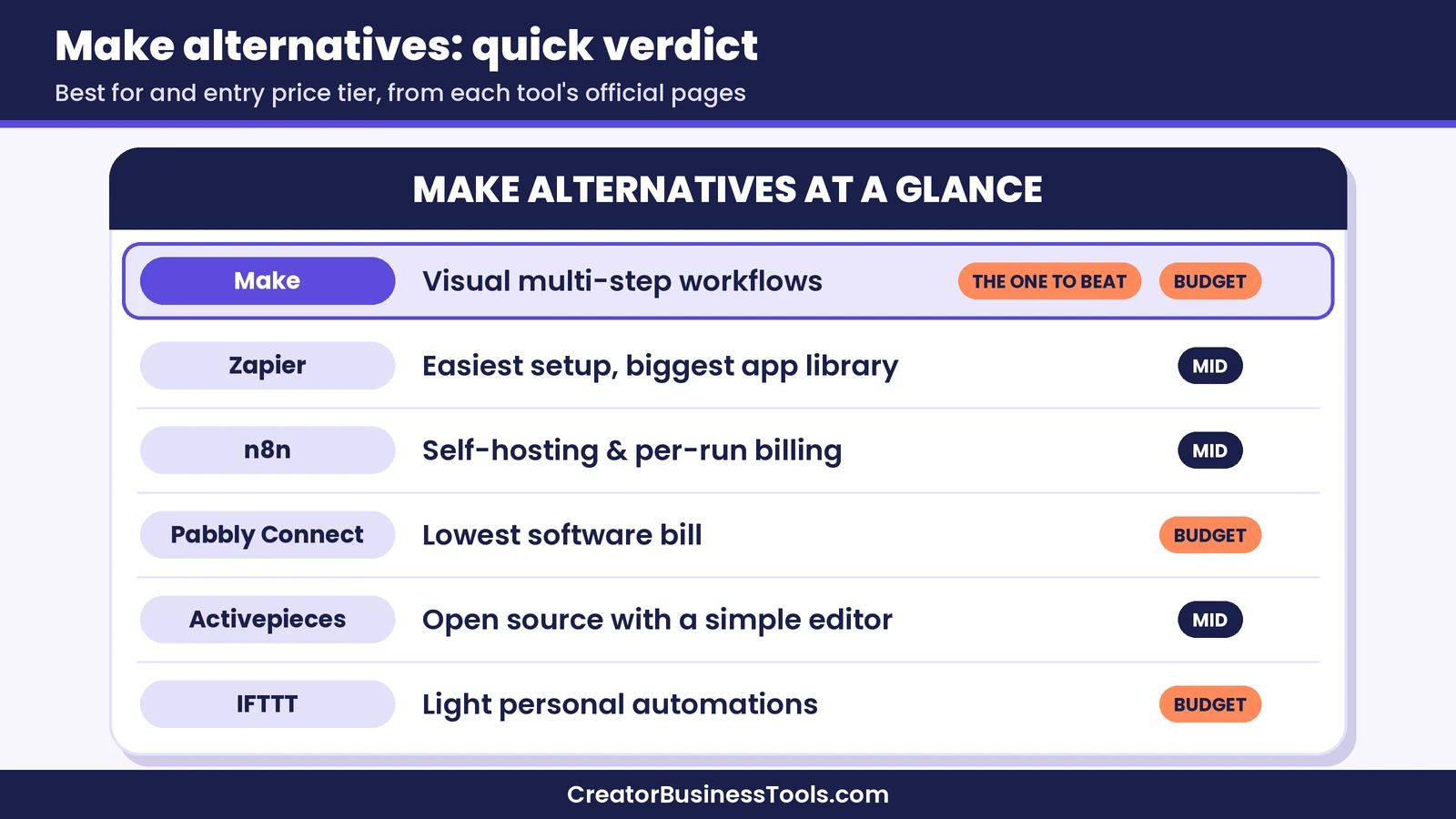
Quick verdict: Zapier is the easiest Make alternative for non-technical creators who want simple, linear automations and the biggest app directory. n8n fits technical founders who want self-hosting and per-run billing. Pabbly Connect is the budget pick for bloggers on a tight software bill. Activepieces suits builders who like open source but want a friendlier editor. IFTTT is only for very light personal automations. If your main problem with Make is cost or complexity, it’s often worth fixing your setup before you switch.
Quick picks
- Best for non-technical creators: Zapier, for its simple step-by-step editor and the largest app directory of the group.
- Best for technical solo founders: n8n, for self-hosting and billing by full workflow run.
- Best budget Make alternative: Pabbly Connect, which doesn’t count triggers or internal steps as tasks. Visit the official Pabbly Connect site
- Best open-source option with a gentle learning curve: Activepieces.
- Best for tiny personal automations: IFTTT.
- Still the best value for visual multi-step workflows: Make. Try Make free
Why Creators Look for Make Alternatives
Make is a strong tool. Its visual canvas lets you see a whole workflow at once, branch it with routers, and handle errors with dedicated modules. Its free plan is generous for learning, and its paid plans start in the budget tier. So why do people go looking for something else? In our research, the reasons usually fall into four buckets.
1. The canvas feels like overkill. If your automations are simple, such as “new buyer, add to email list,” a full visual canvas can feel heavier than a linear list of steps. Some creators simply think more clearly in a top-to-bottom checklist.
2. Credit math is hard to predict. Make charges credits for each module action, including reading data and iterating rows. That’s efficient for most small setups, but it means a scenario that polls frequently or loops through big lists can use more credits than you expect.
3. You want to own the infrastructure. Make is a hosted service. If you want automations running on your own server, for cost, privacy, or control, you need a tool with a self-hosted edition.
4. You need an app Make doesn’t support well. Make has a large library, and it also lets you connect to any app with a public API through HTTP and webhook modules. Still, some apps have better ready-made integrations elsewhere.
Knowing which bucket you’re in matters, because each alternative solves a different one. Zapier mainly solves bucket one, n8n and Activepieces solve bucket three, Pabbly Connect mostly targets the cost side of bucket two, and IFTTT solves none of them for a business, but it’s fine for tiny personal tasks.
Make Alternatives Comparison Table
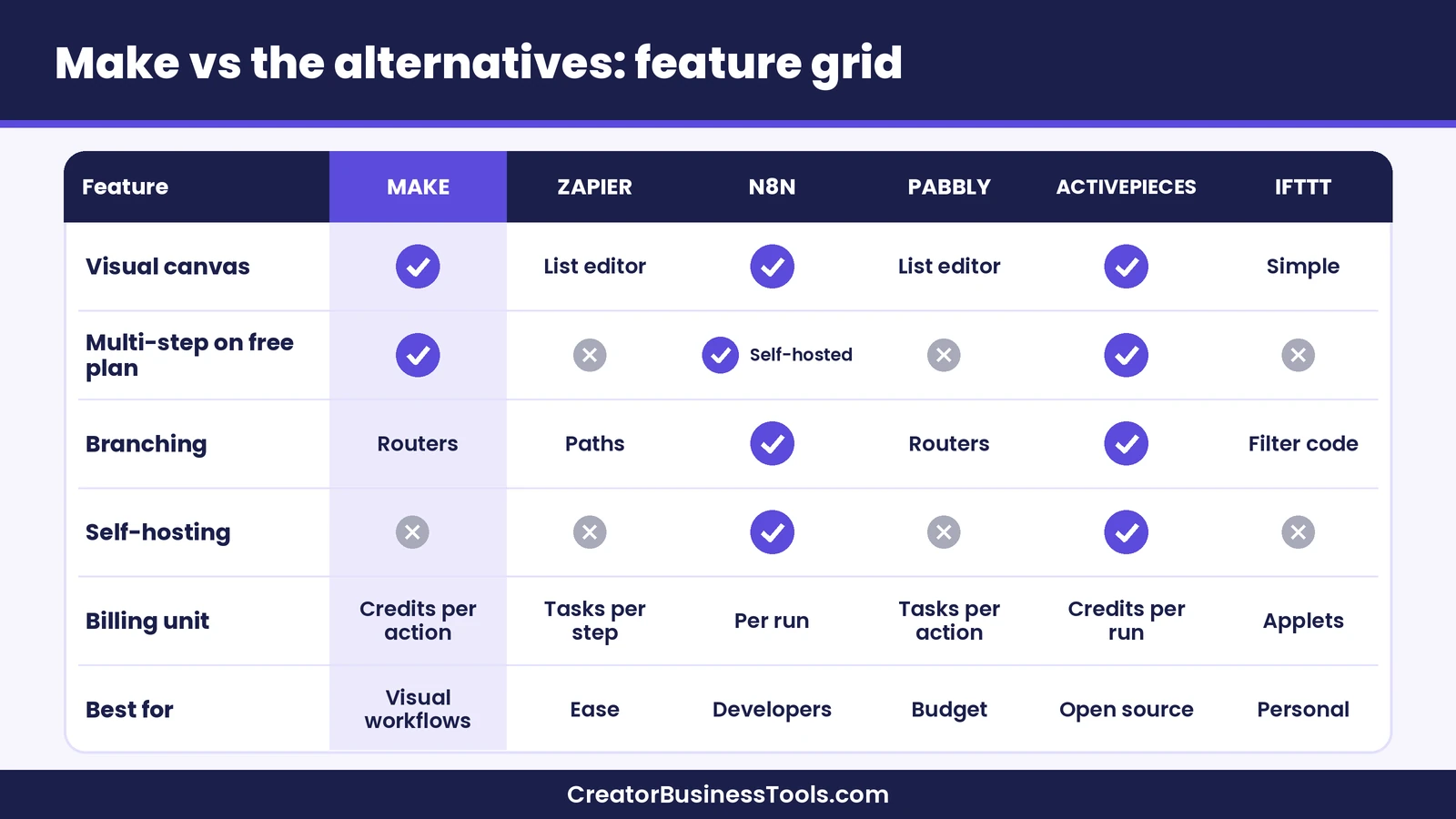
Here’s how the main Make alternatives compare at a glance. Price tiers reflect each tool’s entry-level paid plan.
| Tool | Best for | How it charges | Free option | Main drawback | Entry price tier |
|---|---|---|---|---|---|
| Make | Visual multi-step workflows with branching | Credits per module action | Free plan with a monthly credit pool | Credit use can be hard to estimate at first | $ |
| Zapier | Non-technical creators who want simple setup | Tasks per successful action step | Free plan limited to two-step Zaps | Gets expensive as task volume grows | $$ |
| n8n | Technical founders and self-hosters | Executions per full workflow run | Free self-hosted Community Edition | Steeper learning curve for non-developers | $$ |
| Pabbly Connect | Budget-conscious bloggers | Tasks per action step (triggers and internal steps free) | Free plan with a small task allowance | Smaller app library and ecosystem than Zapier or Make | $ |
| Activepieces | Open-source fans who want a simple editor | Credits per run (AI steps cost more) | Free plan plus self-hosting | Smaller ecosystem with fewer integrations | $$ |
| IFTTT | Light personal and smart-home automations | Number of Applets | Free plan with a couple of Applets | Not built for business workflows | $ |
How Each Tool Charges (and Why It Matters More Than the Sticker Price)
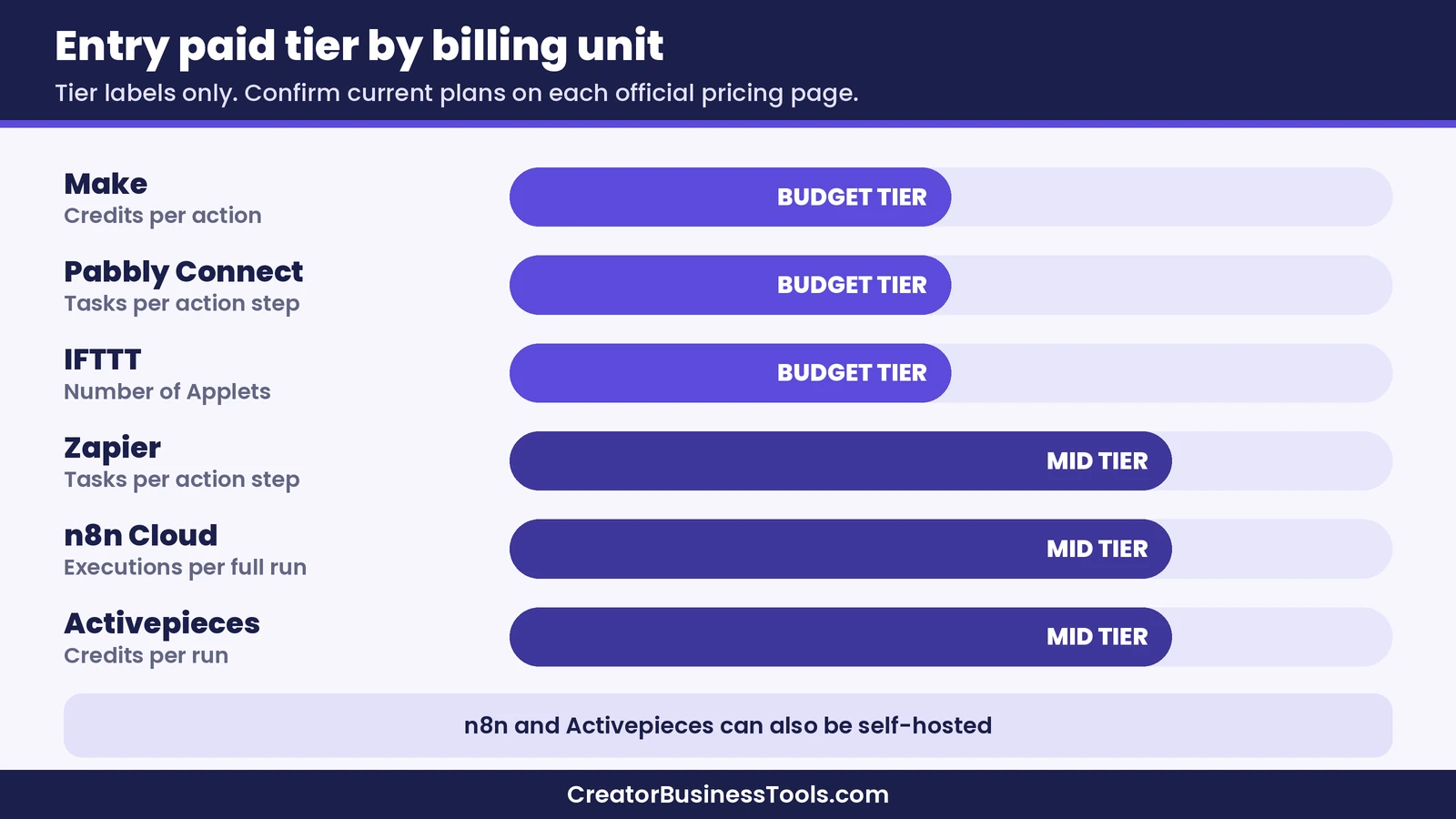
The single biggest difference between these tools isn’t the interface. It’s the billing unit. Two tools with similar sticker prices can cost very different amounts for the same workflow, depending on what they count.
- Make counts credits for each module action, such as reading a payment, creating a subscriber, or iterating a row. According to Make’s pricing FAQ, the Router and error handler modules don’t use credits.
- Zapier counts a task for each successful action step. Zapier says triggers, polling, and its built-in tools, such as Formatter, Filter, Paths, and Delay, don’t count as tasks.
- n8n counts one execution each time a workflow runs from start to finish, no matter how many steps it has, according to its pricing page.
- Pabbly Connect counts a task for each action step. Pabbly says triggers and internal steps like Filter, Router, Formatter, Iterator, Delay, and Code are free.
- Activepieces says a run is one credit however many steps it has, with AI steps costing extra credits when you use its built-in AI. On paid plans, you can connect your own AI provider keys instead.
- IFTTT charges by how many Applets you can have, with unlimited Applet runs on every plan.
Here’s what that means in practice. Picture a buyer-onboarding workflow with a trigger and four actions: tag the buyer in your email tool, invite them to your community, log the sale in a spreadsheet, and send a Slack alert. On per-step tools, each sale costs roughly four or five units. On per-run tools like n8n and Activepieces, it costs roughly one. For a creator with modest volume, the difference may be small. For a high-volume store or a scenario that loops through long lists, it can be large.
That’s why we suggest estimating your monthly volume before comparing price tiers. Count your workflows, count the steps in each, and multiply by how often they run.
The 5 Best Make Alternatives, Reviewed
1. Zapier: the easiest Make alternative for non-technical creators
Zapier is the tool most people compare Make with first, and for good reason. Its editor is a linear list of steps, which many beginners find easier to read than a canvas. Zapier also advertises the largest app directory of any tool in this guide, so niche creator apps are more likely to have a ready-made integration.
Zapier’s free plan is meant for trying automation solo: it allows two-step Zaps (one trigger and one action) and a small monthly task allowance. Multi-step Zaps, filters and paths, webhooks, and premium apps start on the Professional plan, which sits in the mid-range tier. The Team plan adds shared workspaces, shared app connections, and SAML single sign-on.
Zapier has also built a wide set of extras around its core: Tables, Forms, AI-powered Agents and Chatbots, and an AI Copilot that drafts Zaps from a chat. For creators who want everything in one familiar place, that breadth is a real plus.
Pros
- Linear editor that’s easy to follow, plus AI help for drafting Zaps.
- Largest app directory of the group, according to Zapier.
- Triggers and built-in tools like Filter and Formatter don’t use tasks.
Cons
- Mid-range entry price, and costs climb as task volume grows.
- The free plan is limited to two-step Zaps.
- Complex branching is possible with Paths, but Make’s canvas tends to handle it more visually.
Best for: non-technical creators with simple, linear automations who value ease over cost.
Not ideal for: high-volume, many-step workflows on a tight budget.
For a full head-to-head, see our Make vs Zapier guide.
2. n8n: the best Make alternative for technical founders
n8n takes a different approach. It’s a workflow tool you can use in the cloud or self-host, and its pricing is based on executions: one execution is one full run of a workflow, regardless of how many steps it contains. That makes long, complex workflows more predictable to budget.
The self-hosted Community Edition is available on GitHub at no cost, which is the main draw for founders comfortable running a server. n8n Cloud plans add hosting, collaboration features, and an AI assistant, with paid tiers that start in the mid-range. n8n also supports code steps in JavaScript and Python, custom API requests, and AI agent nodes, so developers rarely hit a wall.
Pros
- Billing per full run, not per step, which suits long workflows.
- Free self-hosted edition for people who can manage a server.
- Code steps, custom API requests, and AI agent features for advanced builds.
Cons
- Steeper learning curve than Make or Zapier for non-developers.
- Self-hosting means you handle updates, backups, and uptime.
- Cloud pricing is listed in euros, so the amount you pay can vary with exchange rates.
Best for: technical solo founders and small teams who want control and predictable per-run costs.
Not ideal for: creators who want a no-code tool they don’t have to maintain.
We compare the two in detail in our Make vs n8n guide.
3. Pabbly Connect: the budget Make alternative
Pabbly Connect pitches itself squarely on price. It counts only action steps as tasks, and it says triggers and internal tools such as Filter, Router, Formatter, Iterator, Delay, and Code don’t use tasks at all. Its paid plans start in the budget tier, it offers an Unlimited plan for very high volume, and its pricing page also lists one-time payment plans, which some bloggers like because they cap software spending.
Feature-wise, Pabbly covers the essentials: multi-step workflows, routers, filters, an iterator, scheduling, delays, webhooks, code steps, and a human-approval step that pauses a workflow until someone signs off. Its free plan is small and limited to simple two-step workflows, so it works more as a test drive than a long-term home.
Pros
- Budget entry tier, with triggers and internal steps excluded from task counts.
- Unlimited-task plan option for heavy users.
- Covers routers, filters, iterators, and code steps.
Cons
- Smaller app library and smaller community than Zapier or Make.
- Free plan is limited to a couple of simple two-step workflows.
- One-time plans can change, so confirm what’s offered and what support is included before you buy.
Best for: bloggers and solo creators who want to keep their automation bill as low as possible.
Not ideal for: anyone who depends on niche apps or wants the largest template ecosystem.
For task counting and plan details, see our Pabbly Connect review.
Visit the official Pabbly Connect site
4. Activepieces: the open-source alternative with a simple editor
Activepieces is an open-source automation tool that aims to be approachable for non-developers while still offering a self-hosted option. Its builder lets you create flows, AI agents, and simple data tables, and it supports MCP servers and API access on every plan.
On pricing, Activepieces says a run costs one credit no matter how many steps it has, with AI steps costing more when you use its built-in AI models. The free plan includes a small credit allowance, unlimited flows, and up to five users. Paid plans start in the mid-range tier and let you bring your own AI provider keys, which drops AI steps back to a single credit each.
Pros
- Per-run credits, similar in spirit to n8n’s per-execution model.
- Open source, with cloud or self-hosted options.
- Free plan allows several users and unlimited flows.
Cons
- Smaller integration library and community than the established tools.
- Advanced governance features sit on higher tiers.
- Its feature set and plans may change, so confirm details on its pricing page before you commit.
Best for: creators who like the idea of open source but want something friendlier than a developer tool.
Not ideal for: businesses that need a long track record or a huge library of ready-made app connections.
5. IFTTT: only for very light automations
IFTTT (“If This Then That”) is the simplest tool here. It connects apps and smart devices with small automations called Applets, and every plan includes unlimited Applet runs. The free plan allows a couple of Applets, while paid plans add more Applets, faster speeds, multi-action Applets, webhooks, and, on the top plan, filter code and AI services.
For a creator, IFTTT can handle small personal jobs, like saving posts to a spreadsheet or getting a phone notification. It isn’t designed for business workflows like onboarding buyers, tagging subscribers, or syncing a course platform with a community.
Pros
- Very simple, with an entry paid tier at the low end of budget.
- Unlimited Applet runs, so there’s no usage math.
- Strong for smart-home and personal productivity tasks.
Cons
- Limited multi-step logic and error handling compared with Make.
- Fewer business-focused integrations.
- Not a realistic replacement for a full creator automation stack.
Best for: personal productivity and smart-home automations.
Not ideal for: any workflow your income depends on.
Before You Switch: Fixes to Try Inside Make
Switching tools means rebuilding every automation, reconnecting every app, and retesting every edge case. If your frustration is cost or complexity rather than a missing feature, these fixes inside Make may solve it faster.
- Use instant triggers where you can. Webhook-based triggers react to events instead of checking for new data on a schedule, and checking for data uses credits.
- Filter early. Put filters near the start of a scenario so runs that don’t qualify stop before they use more credits.
- Branch with routers. Make doesn’t count credits for the Router module, so splitting one workflow into paths is affordable.
- Split big scenarios into small ones. Paid plans include unlimited active scenarios, so several focused scenarios are often easier to debug than one giant one.
- Right-size your plan. Make’s pricing FAQ notes that unused credits expire at the end of the term, so a smaller tier plus a buffer is often better value than a big tier “just in case.” Our Make pricing guide walks through estimating credits.
- Use templates. Make’s app pages list ready-made templates for common creator stacks, like tagging a Kit subscriber when a Stripe payment succeeds.
If you’ve tried these and Make still feels wrong for the way you think, that’s a good sign one of the alternatives above is a better fit.
Which Make Alternative Should You Choose?
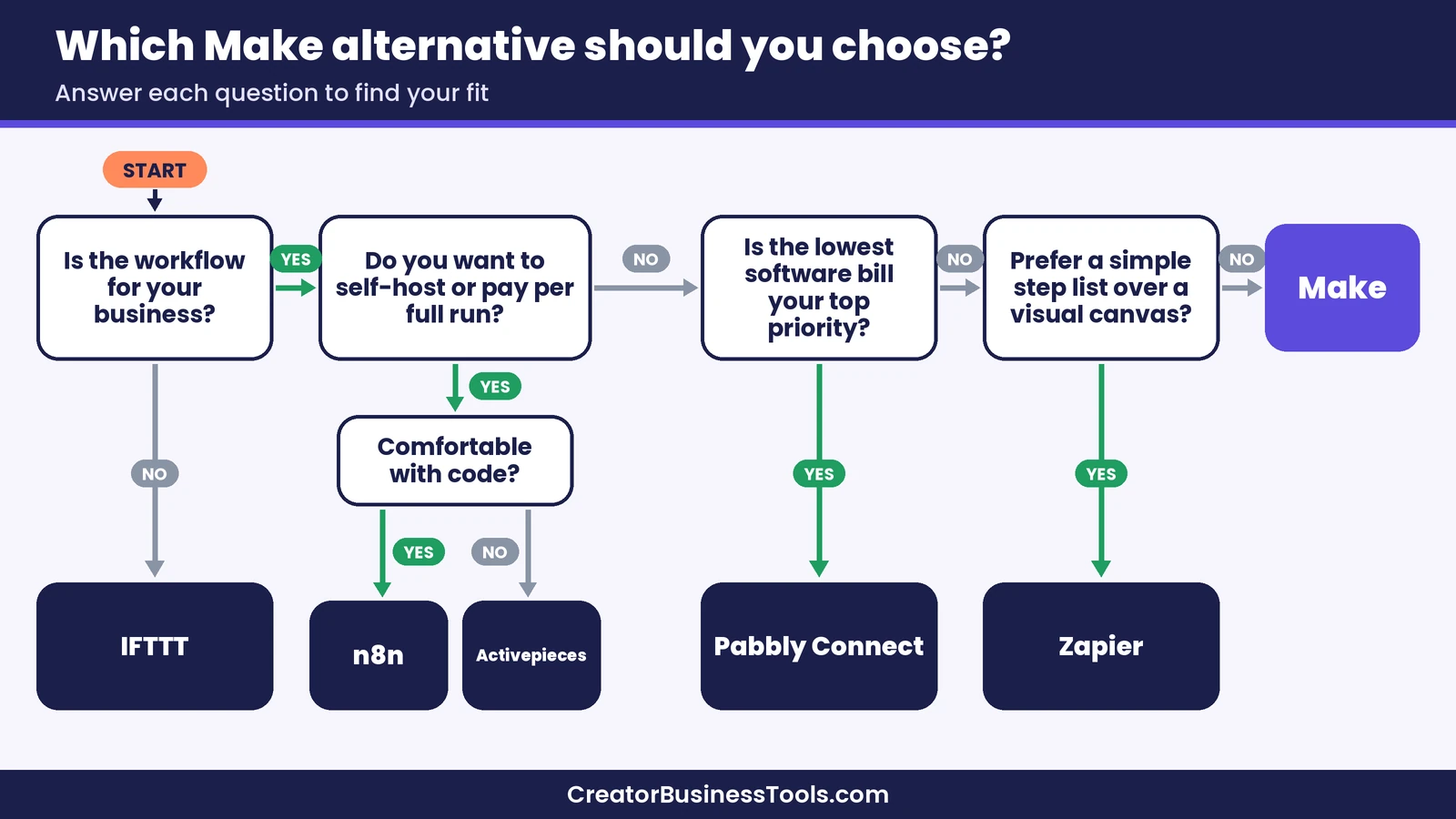
Here’s how we’d match each tool to common situations. Use these as starting points, then confirm current plans on each official pricing page.
You’re a non-technical creator who wants the simplest setup. Choose Zapier. Its linear editor and huge app directory make it the easiest place to start, as long as your volume stays modest.
You’re comfortable with servers and want control. Choose n8n, and consider self-hosting the Community Edition. Per-run billing also helps if your workflows have many steps.
Your main goal is the lowest possible software bill. Choose Pabbly Connect, and check whether the apps you rely on are supported before you commit.
You like open source but don’t want a developer tool. Try Activepieces on its free plan and see whether its integrations cover your stack.
You only need tiny personal automations. IFTTT is enough.
You want visual, multi-step workflows at a budget price. Stay with Make, and use the fixes above to keep your credit use in check.
How to switch without breaking your business
If you do decide to move, a careful switch protects your buyers’ experience.
- List every automation. Write down each workflow, its trigger, its steps, and which customers it affects.
- Rank them by risk. Payment and access workflows come first; reporting workflows can wait.
- Rebuild one at a time. Recreate a single workflow in the new tool and test it with real sample data.
- Run both briefly. Keep the old scenario on until the new one has handled a few real events correctly, but make sure the two aren’t both sending emails or tags to the same person.
- Turn off the old version. Once you’re confident, switch off the Make scenario and keep a note of how it was built.
Make Alternatives FAQ
What is the closest alternative to Make?
For a visual canvas with branching and code options, n8n is the closest match in how workflows look and behave. For ease of use rather than similarity, most creators compare Make with Zapier.
Is there a cheaper alternative to Make?
Pabbly Connect is the budget option in this guide, and IFTTT’s paid plans sit at the low end of the budget tier. Make’s own paid plans also start in the budget tier, so the real answer depends on how many steps and runs your workflows use.
Is there a free alternative to Make?
n8n and Activepieces both offer self-hosted editions you can run on your own server, and most tools in this guide have a free plan. Free plans tend to limit steps, volume, or the number of workflows.
Is Zapier better than Make?
Zapier is easier for simple, linear automations and has a larger app directory. Make tends to be more economical and more visual for multi-step workflows. Our Make vs Zapier guide walks through the full comparison.
Should I switch from Make to n8n?
Switch if you’re comfortable with technical setup and want self-hosting or per-run billing. If you’d rather not maintain software yourself, Make or Zapier is usually the easier path.
Bottom line: pick the Make alternative that fixes your actual problem
The best choice among these Make alternatives depends on why you’re leaving. Zapier fixes complexity, n8n and Activepieces fix ownership and per-step billing, Pabbly Connect targets cost, and IFTTT covers only small personal tasks. If your problem is really about credit use or plan size, the fixes inside Make may save you a migration altogether.
If you’re still unsure, start by listing your workflows and estimating their steps and runs. That one exercise usually makes the right Make alternative, or the case for staying with Make, obvious.
Free download: the Automation Switch Checklist. Thinking about moving away from Make, or choosing your first automation tool? Our one-page checklist helps you list your workflows, estimate your monthly usage, and compare tools side by side before you commit. Contact us to request a copy.
Pricing and features from official vendor pages, last checked October 19, 2026.