
Make vs Pipedream: Where to Run Your Workflows Now
Disclosure: This post contains affiliate links. If you buy through them, we may earn a commission at no extra cost to you. How we make money.
Make vs Pipedream used to be a simple question: do you want a visual, no-code workflow builder, or a developer-first platform where every step can be code? That question has changed. Pipedream has announced that its Workflows product will shut down and has stopped accepting new Workflows signups, while it focuses on Pipedream Connect, an integration layer for developers building AI agents and apps.
So if you’re comparing the two, you’re probably in one of two situations. You run workflows on Pipedream and need a new home for them, or you were considering Pipedream and want to know what to use instead. This guide covers both. It compares what each product does, how each one charges, and how to move existing workflows to Make step by step. It’s based on each company’s official pages, not on sponsored claims.
Quick verdict: If you want to automate your own business, such as sales, subscribers, students, content, and reporting, Make is the practical choice. It’s a visual workflow builder with thousands of apps, a free plan, and a code step on paid plans for the parts that need custom logic. Pipedream Connect is a different kind of product: it’s built for developers who want to give their own app or AI agent access to their users’ accounts. Pick it only if that’s what you’re building.
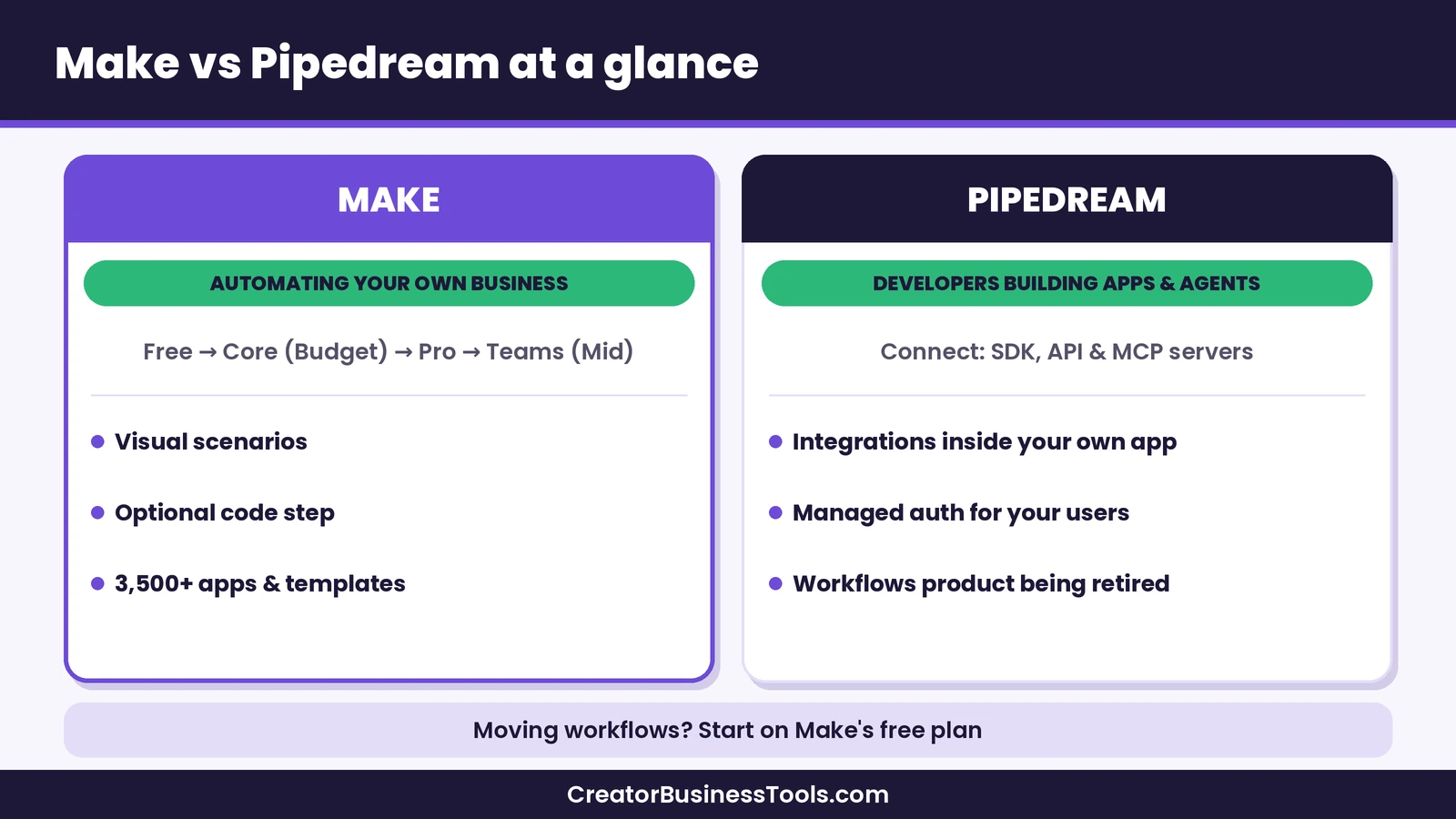
Quick picks
- Best for creators and small businesses: Make, with a visual builder, thousands of apps, and a free plan for testing. Try Make
- Best for Pipedream Workflows users who want a managed home: Make, with webhooks, schedules, data stores, and a JavaScript or Python code step on paid plans.
- Best for developers embedding integrations in a product: Pipedream Connect, with managed authentication and prebuilt tools for AI agents.
- Best if you want to self-host: Consider n8n instead; our Make vs n8n comparison explains the trade-offs.
What changed at Pipedream
Pipedream’s documentation states that Workflows, the product most people mean when they say “Pipedream,” is in maintenance mode and will shut down. According to the notice:
- Pipedream is no longer accepting new signups or subscriptions for Workflows, and it won’t ship new Workflows features.
- Existing workflows keep running normally until the shutdown date.
- Workflows data, including the credentials and OAuth tokens for connected accounts, will be permanently deleted after shutdown.
- An export tool lets you download the structure of your workflows as JSON, one project at a time.
- Pipedream Connect, its Connect API, MCP servers, and API proxy are not affected.
Pipedream says the change reflects a decision to focus on being the integration layer companies use to connect AI to the outside world. Check Pipedream’s official notice for the exact shutdown and data deletion dates, and plan your move well before them.
What this means in practice: you can’t start a new workflow project on Pipedream, and if your business depends on one, you’ll need to rebuild it somewhere else. That’s why most people searching “Make vs Pipedream” are really asking where to go next.
Make vs Pipedream at a glance
| Item | Make | Pipedream |
|---|---|---|
| Main product | Visual workflow automation (scenarios) | Pipedream Connect, an integration layer for AI agents and apps |
| Who it’s for | Creators, small businesses, teams | Developers building products |
| How you build | Drag-and-drop modules, plus optional code | SDK, API, MCP servers, and code |
| Workflow product | Active, with new AI and automation features | Workflows is shutting down; no new signups |
| Plans | Free, Core, Pro, Teams, Enterprise | Free (development only), Startup, Business |
| Price tier | Free, then budget (Core), budget to mid-range (Pro), mid-range (Teams) | Free to build, then premium (Startup) to run in production |
| Pricing model | Monthly credits; most module actions use one credit | External users and usage credits |
| Apps | 3,500+ apps, plus custom apps for any public API | 3,000+ APIs with 10,000+ prebuilt tools and triggers |
| Code | JavaScript or Python code step on paid plans | Code-first by design |
| Best for | Running your own business workflows | Giving your users’ accounts to your app or agent |
What is Make?
Make is a visual automation platform. You build a scenario by placing modules on a canvas and connecting them. A scenario starts with a trigger, such as a new order, a new form response, or a scheduled time, and then passes data through as many steps as you need.
Each module performs an action in an app: read a record, search for data, create a row, update a contact, or transform text. You can branch a flow with a router, stop records that don’t match with a filter, loop through lists with an iterator, combine results with an aggregator, and decide what happens on failure with error handlers.
Make lists 3,500+ apps on its pricing page, and its Custom Apps feature lets you connect virtually any service that offers a public API. For anything without an app, the HTTP module can call an API directly, and the Webhooks app can receive data from any service that sends a webhook.
For a full tour, read our Make review.
What is Pipedream?
Pipedream describes itself as “the integration layer for AI agents.” Its main product, Pipedream Connect, gives developers three things:
- Managed authentication for 3,000+ APIs, so a developer’s users can connect their own accounts without the developer handling OAuth flows or storing tokens.
- Prebuilt tools and triggers, more than 10,000 of them, that an app or AI agent can call on behalf of each user.
- A proxy and MCP servers, so agents can call any endpoint or discover tools through one connection.
Pipedream also lists Conduit, a gateway for companies that want employees to connect their apps to AI agents with access policies and audit trails, as an early-access product.
Notice who these products are for. Connect is something you build into your own software. It isn’t a place where a creator logs in to build “when a sale happens, tag the buyer and update a spreadsheet.” That job used to belong to Pipedream Workflows, which is the product being retired.
The key difference: who each tool is built for
The clearest way to frame Make vs Pipedream is by the question each one answers.
Make answers: “How do I connect the apps I use so my business runs with less manual work?” You’re the user. The automations run on your own accounts, and you build them visually.
Pipedream Connect answers: “How do I let my users connect their accounts to the product or AI agent I’m building?” Your customers are the users. You write code, and Pipedream handles the authentication and tools behind the scenes.
If you’re a course creator, newsletter writer, coach, or shop owner, you almost certainly want the first. If you’re a developer building a SaaS product or an AI assistant that needs access to customers’ Gmail, Slack, or Notion accounts, the second is the one to look at.
Make vs Pipedream pricing
The two price very different things, so compare what you’d actually pay for, not just the headline tier.
How Make charges
Make bills by credits. Each time a module performs an action, it uses credits. Most actions use one credit, while some AI features that run on Make’s AI provider can use more. Router and error handler modules don’t use credits. A single scenario run might use two credits or thousands, depending on how many steps run and how many records pass through.
- Free: A small monthly credit allowance, the visual builder, routers and filters, and a minimum interval of 15 minutes between scheduled runs.
- Core (budget): Unlimited active scenarios, scheduling down to the minute, higher data transfer limits, and access to the Make API.
- Pro (budget to mid-range): Everything in Core plus priority execution, custom variables, and full-text execution log search.
- Teams (mid-range): Everything in Pro plus teams, team roles, and shared scenario templates.
- Enterprise: Custom pricing with enterprise apps, advanced security, and dedicated support.
Paid plans scale with the number of credits you choose. If you run out of credits, scenarios pause until you add more, and incoming webhooks wait in a queue up to your plan’s limit. Our Make pricing guide breaks this down further.
How Pipedream charges
Pipedream’s pricing page covers Connect, not the retired Workflows product.
- Free: Every feature in development, 3,000+ connectors, 10,000+ prebuilt tools and triggers, unlimited team members, and community support. Production use isn’t included.
- Startup (premium): Running in production, a set number of external users and usage credits included, then pay-as-you-go for more, plus email support.
- Business (custom): Volume pricing, SSO, SCIM, HIPAA support, dedicated static IPs, SLAs, and dedicated support.
Usage credits on Connect measure compute time for actions, tool calls, proxy requests, and deployed triggers. That model makes sense for a product serving many end users, but it’s a different scale of spend from automating one creator business.
Which costs less?
For a creator or small business, Make is the lower-cost option by a wide margin. You can build and run real workflows on the Free plan, and paid plans start in the budget tier. Pipedream’s paid tier starts in the premium range because it’s priced for software companies serving their own customers in production.
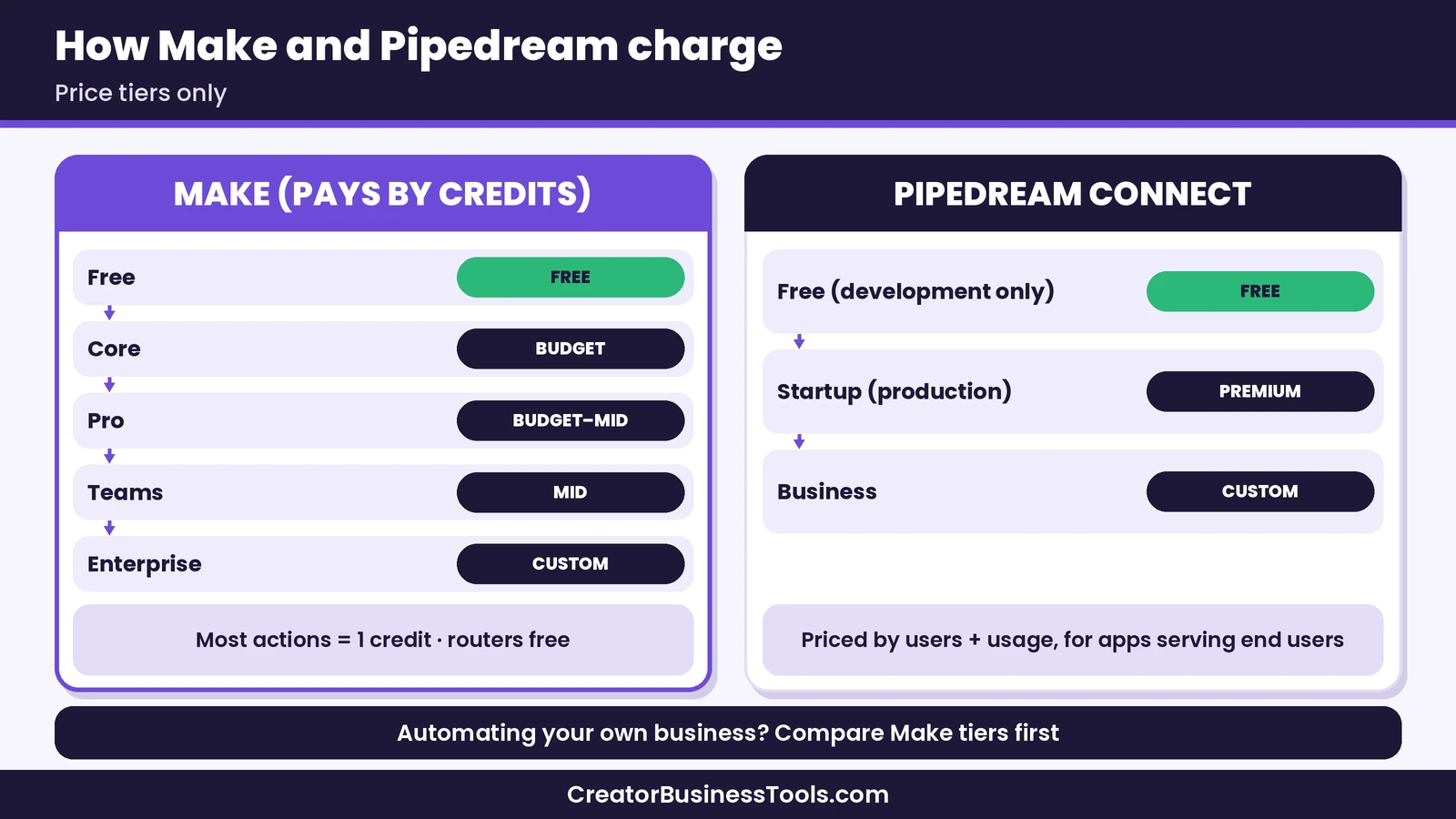
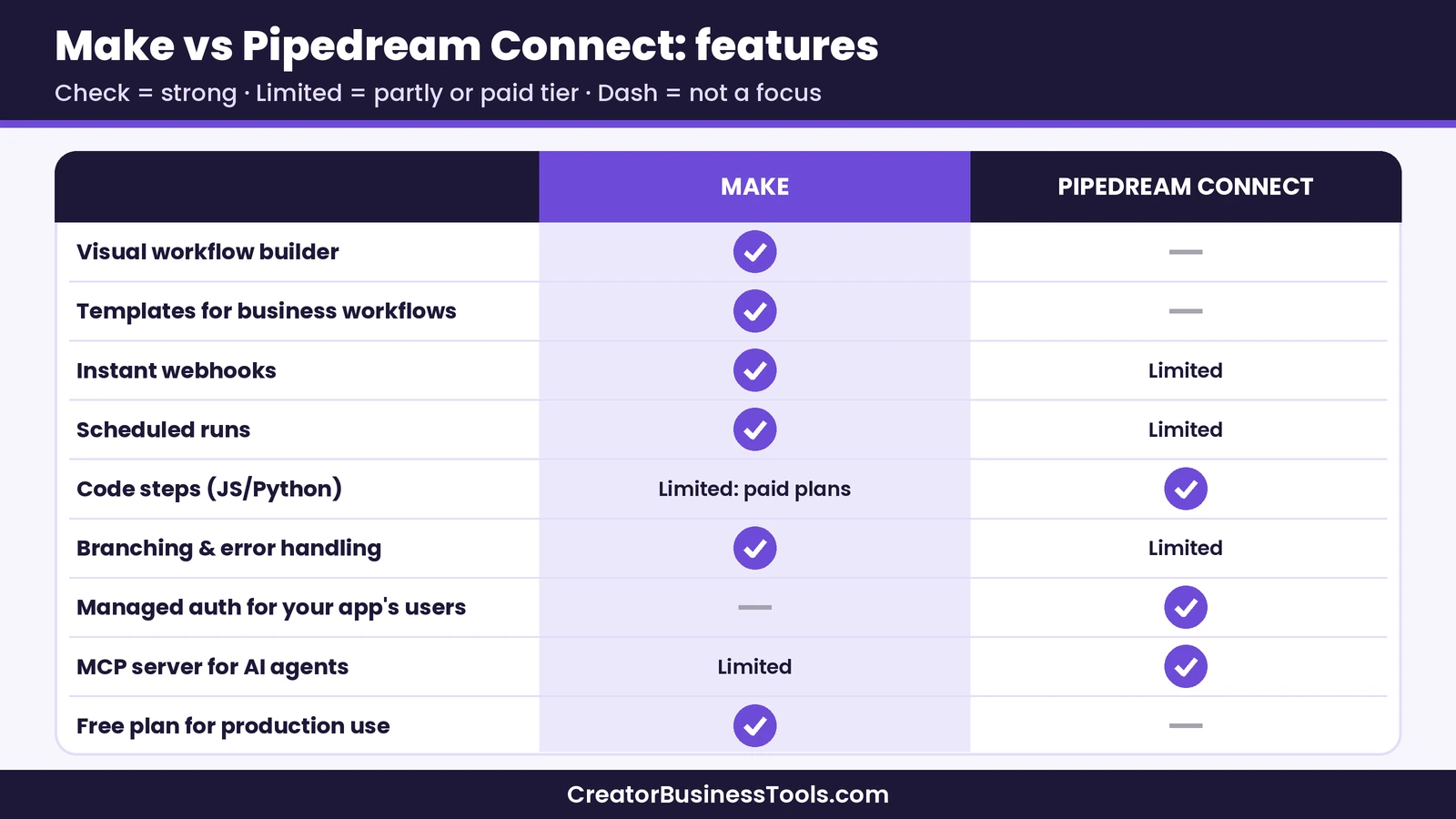
Features compared
Building workflows
Make’s canvas shows every step of a scenario, the data that passes between steps, and the result of each run. You can start from a template gallery of thousands of pre-built scenarios or describe what you want to Maia by Make, its conversational builder, and refine the result.
Pipedream Connect doesn’t offer a visual builder for your own business processes. You work through its SDK, API, and MCP endpoints from your own code.
Triggers and webhooks
Make’s Webhooks app creates a unique URL that instantly starts a scenario when another service sends data to it. You can add API key authentication, restrict which IP addresses may call it, and define a data structure so Make validates incoming requests. A Webhook Response module lets you send a custom reply, and a Custom Mailhook gives you an email address that triggers a scenario when a message arrives. Scheduled triggers run on an interval: at least 15 minutes apart on Free, and down to the minute on paid plans.
Pipedream Connect offers deployable triggers that send events from your users’ apps to your own application by webhook.
Code steps
This is the feature Pipedream Workflows users care about most, because Pipedream made it easy to drop Node.js or Python into any step.
Make covers most of this with the Make Code app on paid plans. It runs JavaScript or Python in an isolated sandbox, with an editor that offers autocompletion and error highlighting, access to output and error logs, and a set of standard libraries. On Core, Pro, and Teams, each code run has limited CPU, memory, and execution time; importing custom libraries requires Enterprise. Code execution uses credits based on run time, so short snippets are cheap and long jobs cost more.
For API calls, Make recommends the HTTP module rather than code, so credentials stay protected in connections instead of appearing in scenario logs.
Logic and error handling
Make scenarios can branch with routers, filter records, loop over lists with iterators, and combine results with aggregators. Error handler modules let you ignore a failure, resume with a fallback value, roll back, or stop. Execution history shows exactly which module failed and what data it received.
How to move your Pipedream workflows to Make
If you’re leaving Pipedream Workflows, a calm, step-by-step move is safer than a rushed rebuild the week before shutdown. Here’s a process that works for most small setups.
- Export everything first. Use Pipedream’s export tool to download each project’s workflow structure as JSON. Keep these files as your reference. The export captures structure, not a format Make can import, so you’ll rebuild each workflow in Make.
- List your workflows and rank them. Write down each workflow’s trigger, the apps it touches, and what breaks if it stops. Move the ones that touch money or customers first.
- Open a Make account on the Free plan. Build and test before you pay for anything. Try Make
- Match each trigger. HTTP or webhook triggers become a Custom Webhook in Make. Schedule triggers become scheduled scenarios. App event triggers become the matching app’s “Watch” module where one exists.
- Replace code steps where you can. Many short code steps format dates, clean text, or reshape data, and Make’s built-in functions and tools can usually do that without code. Keep the Make Code app for the logic that truly needs it.
- Reconnect your accounts. Pipedream will delete stored credentials, so you’ll create fresh connections in Make for every app.
- Run both side by side briefly. Point a test copy of each trigger at Make, compare outputs, and only then switch the live webhook URL or turn off the Pipedream workflow.
- Watch your credits for a week. Check how many credits each scenario uses, add filters to stop unneeded runs, and pick the plan that fits.
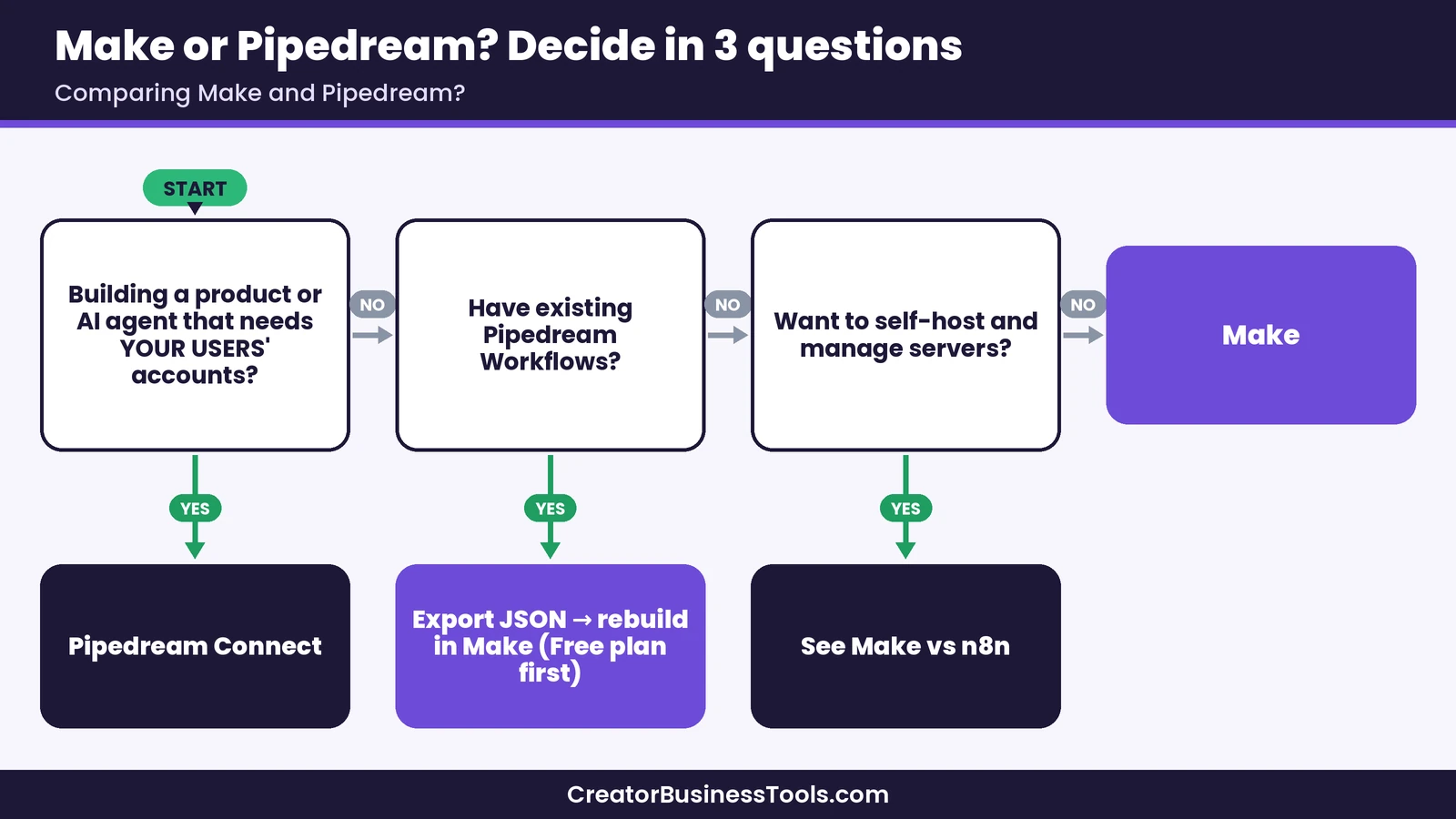
Example migrations: what maps where
These are hypothetical cases to show how common Pipedream workflows translate.
- Form webhook → email tool → spreadsheet. A Custom Webhook receives the form data, a filter checks the answers, and the email and Google Sheets modules do the rest. No code needed.
- Stripe payment → welcome email → community invite. Use Make’s Stripe app as the trigger and a router to send the buyer down separate paths for each product.
- Daily report built with a code step. A scheduled scenario searches records, an aggregator combines them into a table, and a single Make Code module handles any custom calculation before the report goes out.
- Custom API with no app. The HTTP module calls the endpoint with stored credentials, and Make parses the JSON response for later steps.
- Simple key-value storage between runs. Make’s data stores can hold small records, such as which items a scenario has already processed.
Make vs Pipedream: pros and cons
Make pros and cons
Pros
- Visual builder that shows every step and its data
- 3,500+ apps, plus HTTP, webhooks, and custom apps for anything else
- Free plan you can use for real workflows
- JavaScript or Python code step on paid plans
- Detailed execution history and error handlers
Cons - More concepts to learn than a single-step tool
- Credit-based pricing takes some planning
- Code steps have tighter limits than a full developer platform
Pipedream pros and cons
Pros
- Managed authentication for thousands of APIs
- Large registry of prebuilt tools and triggers
- MCP servers designed for AI agents
- Free to build and test in development
Cons - Workflows, its business automation product, is shutting down
- Connect is built for developers, not for automating your own business
- Production use starts in a premium price tier
Other options to consider
Make isn’t the only destination for former Pipedream users.
- n8n appeals to developers who want code-friendly workflows and the option to self-host. Our Make vs n8n comparison covers pricing and hosting differences.
- Zapier is the most familiar no-code option, with a simpler step-by-step editor. See our Make vs Zapier comparison.
- For a wider roundup, our guide to Make alternatives compares several tools side by side.
Common mistakes to avoid
- Waiting until the last week. Rebuilding, reconnecting accounts, and testing take longer than expected.
- Copying every code step as code. Many can become simpler, cheaper built-in steps in Make.
- Forgetting webhook URLs in other tools. Payment processors, forms, and apps that call your old Pipedream URL need the new Make URL.
- Skipping a test run. Run each scenario once with sample data before turning it on.
- Ignoring credit use. A scenario that polls too often or processes unneeded records can burn credits; filters and sensible schedules fix that.
FAQ
Is Pipedream shutting down?
Not entirely. Pipedream has announced that its Workflows product will shut down and has stopped accepting new Workflows signups. Pipedream Connect, its API, MCP servers, and proxy continue.
Can I import Pipedream workflows into Make?
Not directly. Pipedream’s export tool downloads each workflow’s structure as JSON, which is a useful reference, but you’ll rebuild the workflow in Make’s visual builder.
Does Make support code like Pipedream?
Yes, on paid plans. The Make Code app runs JavaScript or Python inside a scenario. It has time and memory limits, so very heavy jobs may need a different approach.
Is Make cheaper than Pipedream?
For automating a creator or small business, yes. Make has a free plan and budget paid tiers. Pipedream Connect’s production plan sits in a premium tier because it’s priced for software products.
Does Make have a free plan?
Yes. Make’s Free plan includes a monthly credit allowance, the visual builder, and routers and filters, with no time limit.
Who should still choose Pipedream?
Developers building an app or AI agent that needs to act on their users’ accounts. That’s what Pipedream Connect is built for.
Bottom line
The Make vs Pipedream decision is clearer than it used to be. Pipedream is now focused on Connect, an integration layer for developers building AI agents and apps, and its Workflows product is on the way out. If you want to automate your own creator business, Make is the stronger fit: a visual builder, thousands of apps, webhooks and schedules, a code step on paid plans, and a free plan to test your migration before you spend anything.
Start by exporting your Pipedream workflows, rebuild the most important one in Make, and run it side by side until you trust it.
Start free with Make
Free checklist: Moving workflows or automating for the first time? Get our free Automation Switch Checklist, a one-page worksheet for mapping your workflows, picking the right tool, and launching your first scenario safely. Contact us to request a copy.
Pricing and features from official vendor pages, last checked October 23, 2026.