
Zapier Alternatives: 5 Automation Tools Creators Switch To
Disclosure: This post contains affiliate links. If you buy through them, we may earn a commission at no extra cost to you. How we make money.
If you’re looking for Zapier alternatives, the reason is usually the bill. Zapier is easy to start with, but it counts a task for every successful action step, so a busy multi-step Zap can climb into a higher price tier faster than you planned. Others want self-hosting, per-run billing, or a tool that fits the Microsoft apps their business already pays for.
This guide compares the five Zapier alternatives creators and small businesses most often weigh: Make, n8n, Pabbly Connect, Activepieces, and Microsoft Power Automate. For each one, we explain how it charges, who it suits, and what you give up compared with Zapier. We also include a practical switching checklist, because moving automations from one tool to another takes real work.
Everything here comes from each company’s official pricing and product pages, not from hands-on benchmarks. We use price tiers ($ = budget, $$ = mid-range, $$$ = premium) instead of exact prices, because plans change and each pricing page is the place to confirm the final number.
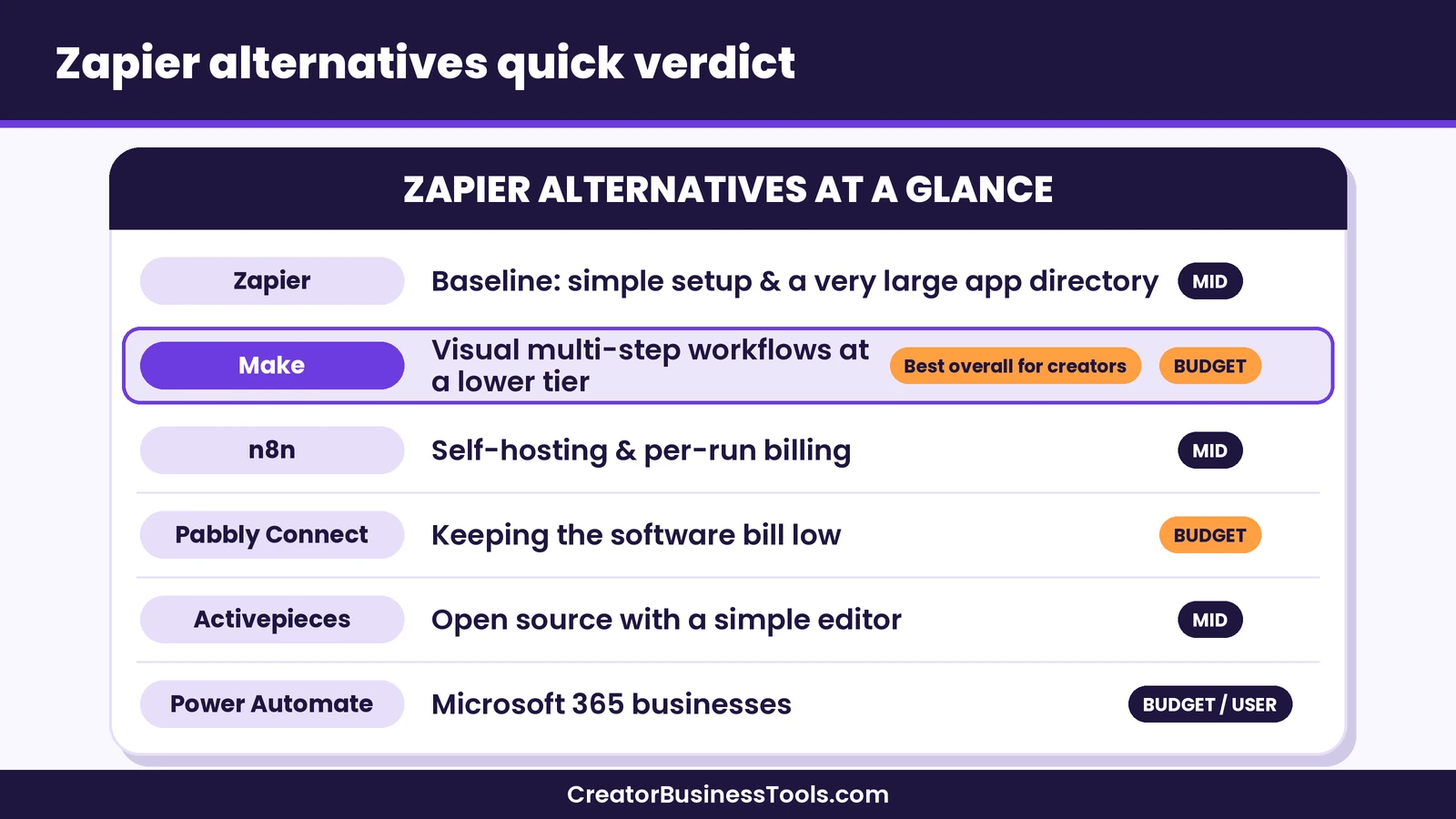
Quick verdict: For most creators leaving Zapier, Make is the strongest all-round alternative: it sits in a lower price tier, handles branching visually, and connects the creator apps most people use. Pick n8n if you’re technical and want self-hosting or per-run billing. Pick Pabbly Connect if the lowest software bill is your top priority. Pick Activepieces for an open-source tool with a gentle editor. Pick Power Automate if your business lives inside Microsoft 365.
Quick picks
- Best overall Zapier alternative for creators: Make, for visual multi-step workflows, routers, and error handling at a budget price tier. Try Make free
- Best for technical solo founders: n8n, for its free self-hosted Community Edition and billing by full workflow run.
- Best budget pick: Pabbly Connect, which doesn’t count triggers or internal steps as tasks. Visit the official Pabbly Connect site
- Best open-source option with an easy editor: Activepieces, which counts one credit per run on standard steps.
- Best for Microsoft 365 businesses: Power Automate, which has a free plan for work or school accounts and limited use rights in many Microsoft 365 business plans.
Why People Look for Zapier Alternatives
Zapier earned its reputation. Its editor walks you through a trigger and actions in plain language, and by the counts each company publishes, it has the largest app directory of the tools in this guide. So why do so many creators start searching for Zapier alternatives? Based on Zapier’s own pricing page and the questions we see from readers, the reasons usually fall into four groups.
1. Task-based pricing adds up. Zapier counts a task each time an action step succeeds. A Zap with one trigger and four actions uses four tasks per run. That’s easy to understand, but a growing store, course, or community can push your monthly task count up quickly.
2. AI and code steps can cost more. Zapier’s pricing page says Zap steps, AI by Zapier, Code by Zapier, and programmatic access like its MCP and SDK all draw from one shared task pool, and that many actions cost more than one task depending on the step type and, for AI steps, the model tier. If you plan to lean on AI inside your workflows, it’s worth estimating that usage before you commit.
3. The free plan is limited to two-step Zaps. Multi-step Zaps, premium apps, and webhooks start on the paid Professional plan. If you only need a few multi-step workflows, a tool with a more flexible free or budget tier may be enough.
4. You want control or a different ecosystem. Some founders want to run automations on their own server for privacy or cost reasons. Others already pay for Microsoft 365 and would rather use the automation tool that comes with it.
Each alternative below solves a different one of these problems, so it helps to know which group you’re in before you compare features.
Zapier Alternatives Comparison Table
Here’s how the main Zapier alternatives compare at a glance. Price tiers reflect each tool’s entry-level paid plan.
| Tool | Best for | How it charges | Free option | Main trade-off vs Zapier | Entry price tier |
|---|---|---|---|---|---|
| Zapier (baseline) | Simple linear automations | Tasks per successful action step | Free plan limited to two-step Zaps | (baseline) | $$ |
| Make | Visual multi-step workflows | Credits per module action | Free plan with a monthly credit pool | Visual canvas takes a little longer to learn | $ |
| n8n | Technical founders and self-hosters | Executions per full workflow run | Free self-hosted Community Edition | Steeper learning curve for non-developers | $$ |
| Pabbly Connect | The lowest software bill | Tasks per action step (triggers and internal steps free) | Free plan with 100 tasks a month and up to two 2-step workflows | Smaller app directory and community | $ |
| Activepieces | Open source with a simple editor | Credits per run (AI steps cost more) | Free plan with 1,000 free credits (one credit per workflow run), plus self-hosting | Smaller integration library | $$ |
| Power Automate | Microsoft 365 businesses | Per user, or per bot for unattended automation | Free plan for work or school accounts (standard connectors only) | Premium connectors need a paid license; fewer creator-app connectors | $ per user |
Compare Make plans on the official pricing page
How Each Alternative Charges (and Why It Matters)
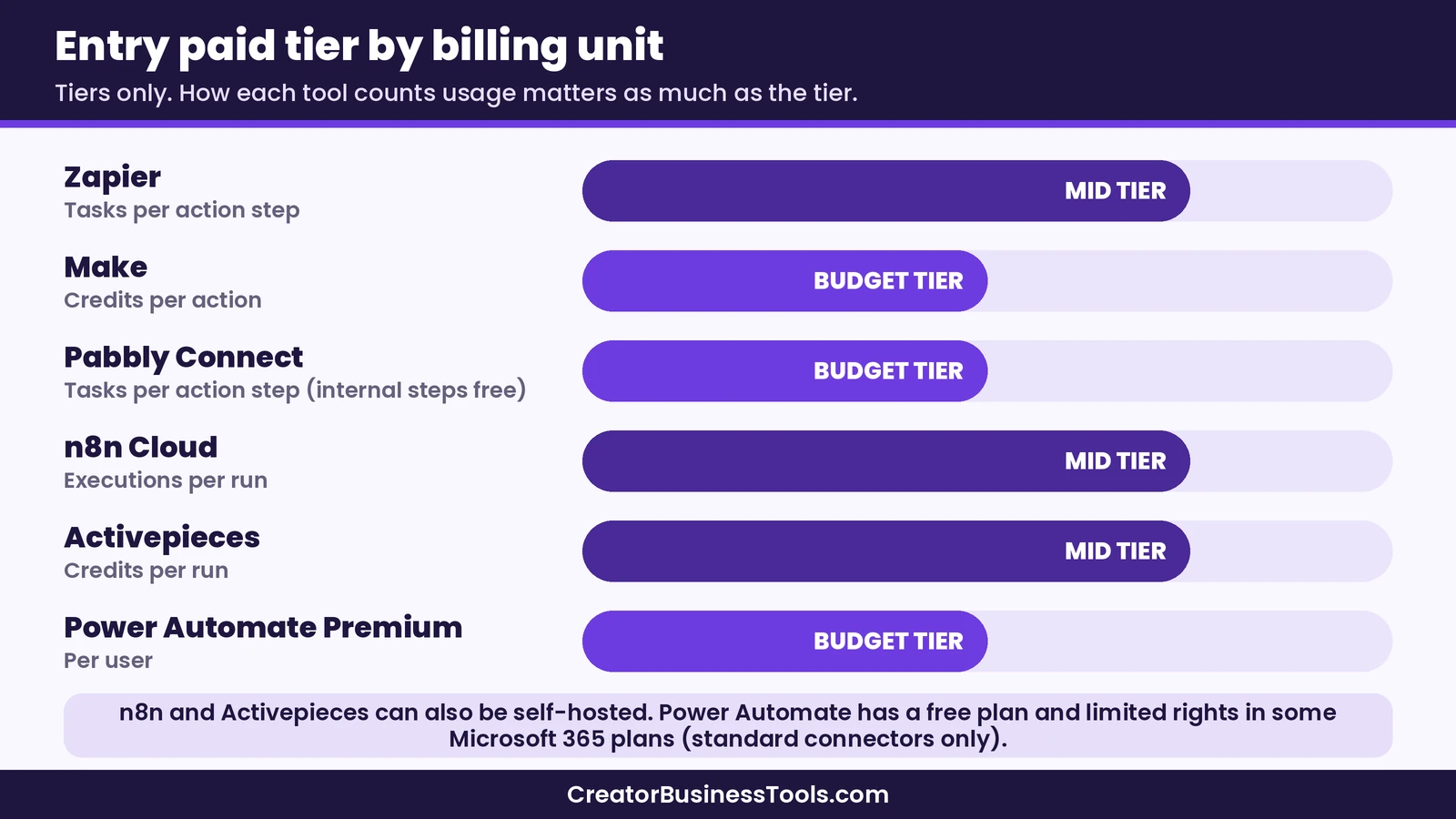
The billing unit matters more than the sticker price. Two tools in the same price tier can cost very different amounts for the same workflow, depending on what they count.
- Zapier counts a task for each successful action step. Triggers, checking for new data (polling), and Zapier’s built-in tools like Filter, Formatter, and Paths don’t use tasks, according to Zapier’s pricing page.
- Make counts credits each time a module performs an action, such as reading a record, creating a subscriber, or iterating a row. Make’s pricing FAQ says the Router and error-handler modules don’t use credits. Our Make pricing guide explains the plans in detail.
- n8n counts one execution each time a workflow runs from start to finish, regardless of how many steps it has.
- Pabbly Connect counts a task for each action step, while triggers and internal steps like Filter, Router, Formatter, Iterator, Delay, and Code are free.
- Activepieces counts one credit per run however many steps it has, with built-in AI steps costing extra credits. On paid plans, you can connect your own AI provider keys instead.
- Power Automate is licensed per user (Premium) or per bot for unattended desktop automation (Process), rather than by task count. Daily action limits apply to each license.
Here’s a hypothetical example. Picture a new-buyer workflow with a trigger and four actions: tag the buyer in your email tool, invite them to your community, log the sale in a spreadsheet, and post a team alert. On Zapier, each sale uses four tasks. On Make, it uses roughly one credit per module action, so a similar count. On Pabbly Connect, it uses four tasks, but any filters or formatters you add along the way are free. On n8n or Activepieces, it uses about one unit per run.
For a creator with modest sales, those differences may be small. For a busy store or a workflow that loops through long lists, they can decide which tier you land in. Before you compare plans, count your workflows, count the action steps in each, and multiply by how often they run each month.
The 5 Best Zapier Alternatives, Reviewed
1. Make: the best all-round Zapier alternative for creators
Make is where most creators land when they leave Zapier, and for good reason. Instead of a top-to-bottom list of steps, Make shows each workflow, called a scenario, as a visual map of modules. You can split a scenario into branches with a router, add filters between modules, and attach error handlers that decide what happens when a step fails.
For creators, the practical benefits are price and flexibility. Make’s paid plans start in the budget tier, and its free plan includes a monthly credit pool that’s enough to learn on. Make lists verified apps for tools many creators use, including Kit, Stripe, Circle, Thinkific, and Teachable, plus Microsoft 365 apps like Excel and Outlook. If an app isn’t listed, Make’s HTTP app can connect to any service that offers a public API. Make also offers a template gallery, so you don’t have to start every scenario from a blank canvas.
Pros
- Visual canvas makes branching and multi-step logic easy to see
- Budget entry tier and a free plan with a monthly credit pool
- Routers and error handlers don’t use credits
- HTTP app and webhooks for apps without a ready-made module
- Data stores for keeping small amounts of data between runs
Cons
- The canvas takes a little longer to learn than Zapier’s step list
- Credit use can be hard to predict for scenarios that loop through big lists
- Scenarios stop when credits run out, until you add more or upgrade
Best for: creators and small teams who want multi-step automations at a lower price tier and are willing to spend an afternoon learning the canvas. Our Make review covers it in depth, and our Make vs Zapier comparison goes feature by feature.
2. n8n: best for technical founders and self-hosting
n8n is a workflow automation tool built for technical teams. Its biggest difference from Zapier is billing: n8n charges per execution, meaning one full run of a workflow, no matter how many steps it contains. Its pricing page says all plans include unlimited users, unlimited workflows, and every integration.
n8n also offers a free, self-hosted Community Edition on GitHub. If you’re comfortable running a server, that can lower your software bill and keep your data on infrastructure you control. Its cloud plans store data in the EU. You can add JavaScript or Python code steps, make custom API requests, and trigger workflows from webhooks.
Pros
- Billing per full workflow run, not per step
- Free self-hosted Community Edition
- Code steps and custom API requests for advanced logic
- Unlimited users and workflows on every plan
Cons
- Steeper learning curve for non-developers
- Self-hosting means you handle updates, backups, and uptime
- Cloud plans are priced in euros, so costs can shift with exchange rates
Best for: technical solo founders and developers who want maximum control. If you’re weighing it against Make, see our Make vs n8n comparison.
3. Pabbly Connect: best budget Zapier alternative
Pabbly Connect positions itself as a lower-cost Zapier alternative, and its pricing model backs that up. Triggers don’t count as tasks, and neither do internal steps such as filters, routers, formatters, iterators, delays, and code. You still pay a task for each action step that touches another app.
Pabbly Connect supports multi-step workflows, routers, and instant webhooks. It also lists a one-time payment option on its pricing pages, which may appeal to bloggers who prefer fewer recurring bills. The trade-off is ecosystem size: its app directory and community are smaller than Zapier’s, and its editor isn’t as polished.
Pros
- Triggers and internal steps don’t use tasks
- Budget entry tier with a large task allowance
- Multi-step workflows on paid plans, plus routers
- One-time payment option listed on its pricing pages
Cons
- Smaller app directory and fewer tutorials than Zapier
- Less polished interface
- Fewer advanced error-handling options than Make
Best for: bloggers and solo creators who want to cut their automation bill and mostly use popular apps. Our Pabbly Connect review covers it in detail. Visit the official Pabbly Connect site
4. Activepieces: best open-source option with an easy editor
Activepieces is an open-source automation tool with a simple step-by-step editor that will feel familiar to Zapier users. Its pricing page says a run counts as one credit no matter how many steps it has. Built-in AI steps cost more credits depending on the model, but on paid plans you can connect your own AI provider keys to reduce that.
You can use Activepieces in the cloud or run it on your own servers. It also includes tables, AI agents, and MCP support. The trade-off is a smaller integration library than Zapier’s, so check that your key apps are supported before you switch.
Pros
- One credit per run on standard steps
- Familiar, linear editor for Zapier users
- Cloud or self-hosted options
- Bring your own AI keys on paid plans
Cons
- Smaller integration library
- The free plan’s credit allowance is small
- Younger ecosystem with fewer community templates
Best for: open-source fans and small teams who want per-run pricing without n8n’s learning curve.
5. Microsoft Power Automate: best for Microsoft 365 businesses
Power Automate is Microsoft’s automation platform. It covers cloud flows, which work like Zaps, and desktop flows, which use robotic process automation (RPA) to control desktop apps and websites. You can build flows from scratch, start from a template, or describe what you want in plain language using Copilot.
Its biggest advantage is licensing. Microsoft offers a free Power Automate plan for work or school accounts that covers cloud flows (without sharing) and attended desktop flows on your own machine, using standard connectors only. According to Microsoft’s licensing FAQ, Microsoft 365 business plans such as Business Basic, Business Standard, and Business Premium, as well as Enterprise plans like E1, E3, and E5, also include limited Power Automate rights for cloud flows that use standard connectors. Premium and custom connectors need a standalone Power Automate license, which is priced per user. Unattended desktop automation is licensed per bot at a higher tier.
For creators, the catch is app coverage. Microsoft’s own connectors for Outlook, Excel, Teams, and SharePoint are standard, but some popular business apps, such as Stripe and Mailchimp, are premium connectors. Some creator tools appear only as community-built connectors, which are also premium, and we didn’t find connectors for course platforms like Teachable or Thinkific in Microsoft’s connector reference.
Pros
- Free plan for work or school accounts, plus limited rights in many Microsoft 365 business plans
- Deep integration with Outlook, Excel, Teams, and SharePoint
- Desktop automation (RPA) for apps without an API
- Copilot can draft flows from a plain-language description
Cons
- Premium connectors require a paid license
- Licensing has more moving parts than Zapier’s plans
- Fewer ready-made connectors for creator platforms
Best for: small businesses that already run on Microsoft 365 and mainly automate Microsoft apps.
Feature Comparison: What You Get With Each Tool
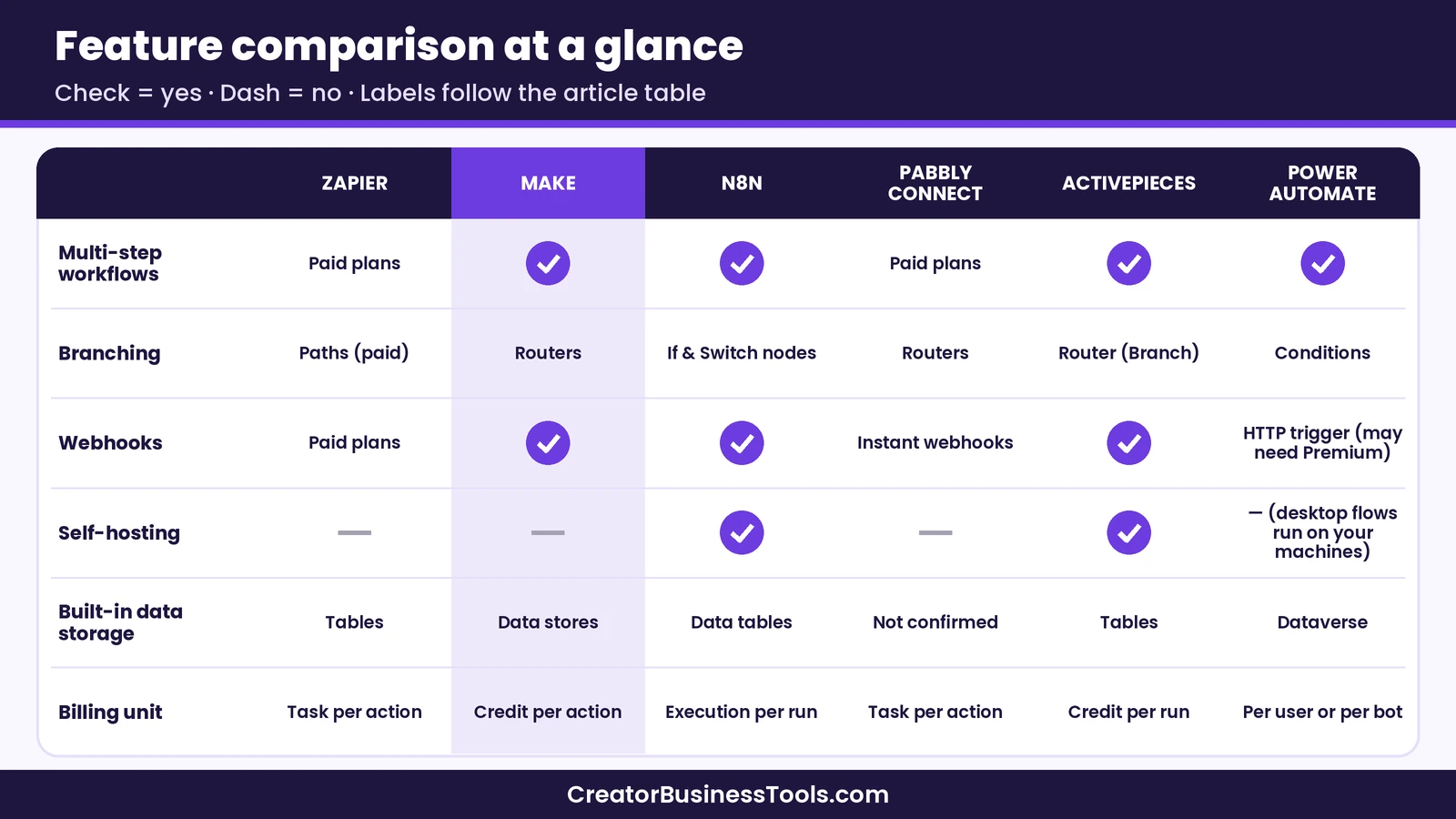
Use this table to check the features that matter most when you leave Zapier.
| Feature | Zapier | Make | n8n | Pabbly Connect | Activepieces | Power Automate |
|---|---|---|---|---|---|---|
| Multi-step workflows | Paid plans | Yes | Yes | Paid plans | Yes | Yes |
| Branching | Paths (paid) | Routers | If and Switch nodes | Routers | Router (Branch) | Conditions |
| Webhooks | Paid plans | Yes | Yes | Instant webhooks | Yes | HTTP request trigger (check licensing; may need Premium) |
| Self-hosting | No | No | Yes | No | Yes | No (desktop flows run on your machines) |
| Built-in data storage | Tables | Data stores | Data tables | Not confirmed | Tables | Dataverse |
| Billing unit | Task per action | Credit per action | Execution per run | Task per action | Credit per run | Per user or per bot |
How to Choose the Right Zapier Alternative
Start with the problem that sent you looking, then follow the path below.
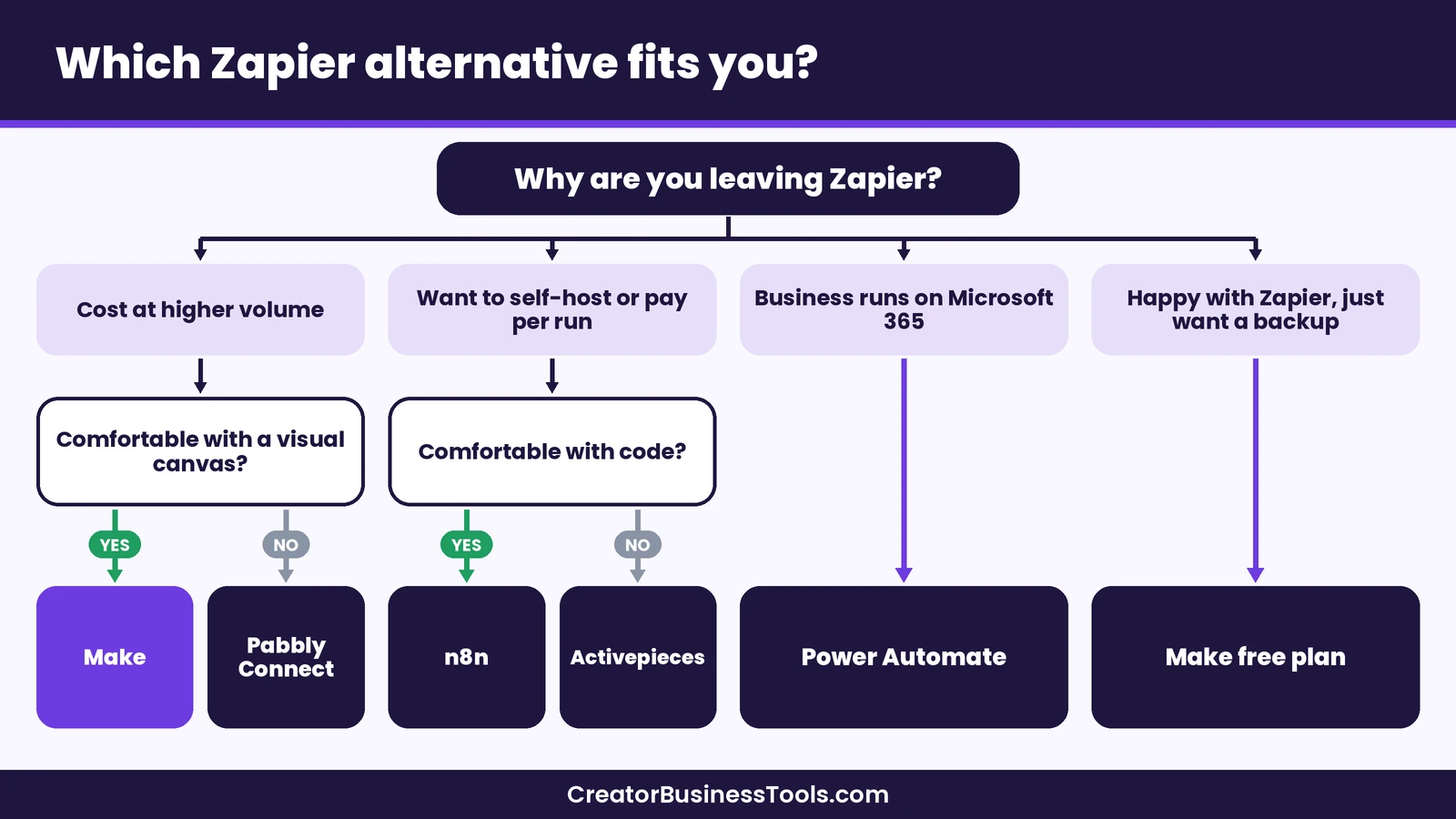
- If cost is the main issue and you want room to grow, choose Make. If you mostly run simple workflows and want the smallest bill, choose Pabbly Connect.
- If you want to self-host or pay per run, choose n8n if you write code and Activepieces if you’d rather not.
- If your business runs on Microsoft 365, check what your current plan already includes before buying anything else.
- If you rely on a niche app, confirm it’s supported first. Zapier’s large directory is hard to beat, and every alternative here has gaps.
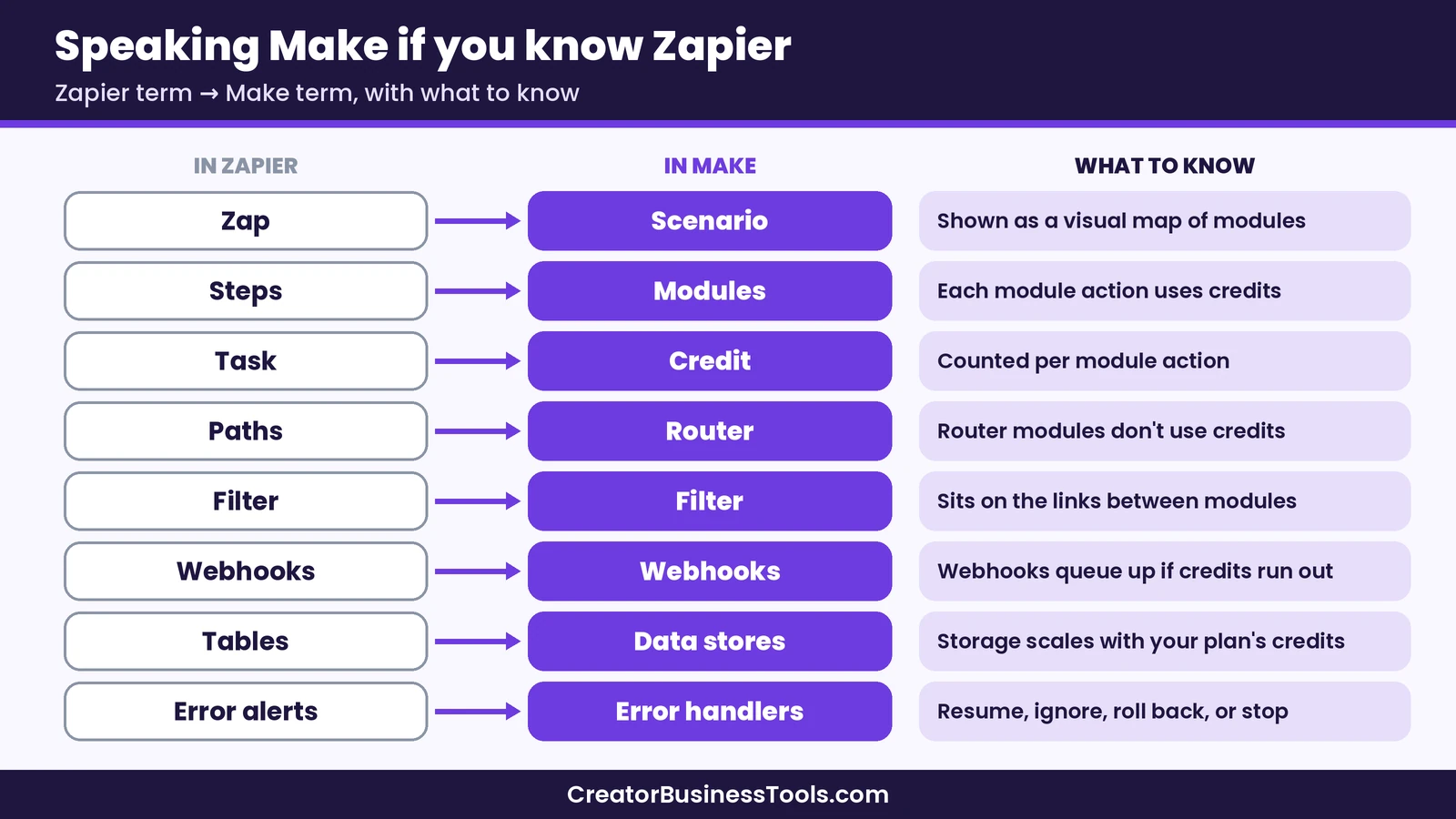
Zapier to Make: A Quick Translation Guide
Because Make is the most common destination, here’s how Zapier concepts map to Make. This makes rebuilding your first workflows faster.
| In Zapier | In Make | What to know |
|---|---|---|
| Zap | Scenario | A scenario is shown as a visual map of modules |
| Trigger and action steps | Modules | Each module action uses credits |
| Task | Credit | Make counts credits per module action |
| Paths | Router | Router modules don’t use credits |
| Filter | Filter | Filters sit on the links between modules |
| Webhooks by Zapier | Webhooks | Incoming webhooks queue up if credits run out |
| Tables | Data stores | Storage scales with the credits on your plan |
| Error notifications | Error handlers | Choose to resume, ignore, roll back, or stop |
How to Switch From Zapier Without Breaking Anything
Moving automations takes planning. This checklist keeps the switch low-risk.
- List every active Zap. Note the trigger, each action, and how often it runs. Turn off or delete anything you no longer need.
- Estimate your monthly volume. Multiply runs by action steps to compare against each alternative’s billing unit.
- Check app support. Confirm that every app in your Zaps has a ready-made integration, or a webhook or API option, in the new tool.
- Rebuild your most important workflow first. Start with the one that touches revenue, such as new-buyer onboarding.
- Test with real but low-stakes data. Run a test purchase or a test form entry and check every step.
- Run both tools side by side briefly. Keep the old Zap on, but make sure only one tool performs each action, so customers don’t get duplicate emails.
- Switch off the Zap and monitor. Watch the new tool’s run history for errors during the first weeks.
- Downgrade or cancel Zapier last. Only after every workflow runs cleanly in the new tool.
Before you switch
- Every alternative bills differently. Estimate your volume against each tool’s billing unit before choosing a plan.
- Check that your most important apps are supported, especially niche creator tools.
- Avoid duplicate actions while two tools run side by side. Duplicate welcome emails or invoices erode trust.
- Prices and plan limits change. Confirm the details on each company’s official pricing page.
Common Mistakes When Leaving Zapier
- Comparing sticker prices only. The billing unit decides what you really pay.
- Rebuilding everything at once. Move one workflow at a time.
- Forgetting about AI steps. If your workflows call AI models, check how each tool charges for them.
- Ignoring error handling. Set up alerts or error handlers so a failed step doesn’t go unnoticed.
- Skipping documentation. Write down what each workflow does, so future you can maintain it.
FAQ
What is the best Zapier alternative?
For most creators and small businesses, Make is a strong all-round choice because it starts in a lower price tier and handles multi-step workflows visually. n8n suits technical users, Pabbly Connect suits tight budgets, and Power Automate suits Microsoft 365 businesses.
Is there a free Zapier alternative?
Several tools have free options. Make has a free plan with a monthly credit pool, n8n and Activepieces offer free self-hosted editions, Activepieces’ free cloud plan includes 1,000 free credits (one credit per workflow run), and Pabbly Connect has a free plan with 100 tasks a month and up to two 2-step workflows. Power Automate has a free plan for work or school accounts, and many Microsoft 365 business plans include limited Power Automate rights, both limited to standard connectors.
Is Make cheaper than Zapier?
Make’s entry paid plan sits in a lower price tier than Zapier’s, and its routers and error handlers don’t use credits. Your real cost depends on how many module actions your scenarios perform, so estimate your volume first.
Can you import Zaps into another tool?
We couldn’t confirm an official one-click import from Zapier on the alternatives’ pricing pages, so plan to rebuild your workflows. Start with the most important ones and use templates where they exist.
Which Zapier alternative is easiest for beginners?
Activepieces and Pabbly Connect use a step-by-step layout similar to Zapier’s. Make’s visual canvas takes a little longer to learn but makes complex workflows easier to follow.
Is Power Automate a good Zapier alternative for creators?
It can be if your business runs on Microsoft 365. If you rely on creator platforms like course or community tools, check connector support first, since some are missing or community-built, and several are premium connectors.
Can you self-host a Zapier alternative?
Yes. n8n and Activepieces both offer self-hosted editions. You’ll be responsible for hosting, updates, and backups.
Bottom line
The best Zapier alternatives each solve a different problem. Make is the strongest all-round choice for creators who want visual, multi-step automations at a lower price tier. n8n is the pick for technical founders who want self-hosting and per-run billing. Pabbly Connect keeps your bill as small as possible, Activepieces offers open source with an easy editor, and Power Automate makes sense when your business already runs on Microsoft 365.
If you’re not sure where to start, try Make’s free plan, rebuild your most important Zap, and compare the credit use with your Zapier task history. That one test usually tells you whether switching is worth it.
Try Make’s free plan · Explore Zapier · Explore n8n
Free checklist: Planning your move? Get our free Automation Switch Checklist, a one-page worksheet for listing your workflows, estimating volume, and testing safely before you cancel anything. Contact us to request a copy.
Pricing and features from official vendor pages, last checked October 20, 2026.