
Make vs Activepieces: Which Automation Tool Fits Your Business?
Disclosure: This post contains affiliate links. If you buy through them, we may earn a commission at no extra cost to you. How we make money.
Make vs Activepieces comes down to a simple trade-off. Make is a mature, cloud-based automation platform with a visual canvas and a very large app library. Activepieces is an open source automation tool that you can run in its cloud or on your own servers, and it counts usage per run instead of per step. Both can connect your apps, add AI to your workflows, and take busywork off your plate.
In this guide, we compare Make and Activepieces on pricing models, app coverage for creators, ease of use, AI features, and self-hosting. We also walk through hypothetical example workflows and a simple decision path, so you can pick the tool that fits how your business runs.
Everything here comes from each company’s official pricing, product, and integration pages, not from hands-on benchmarks. We use price tiers ($ = budget, $$ = mid-range, $$$ = premium) instead of exact prices, because plans change and each pricing page is the place to confirm the final number.
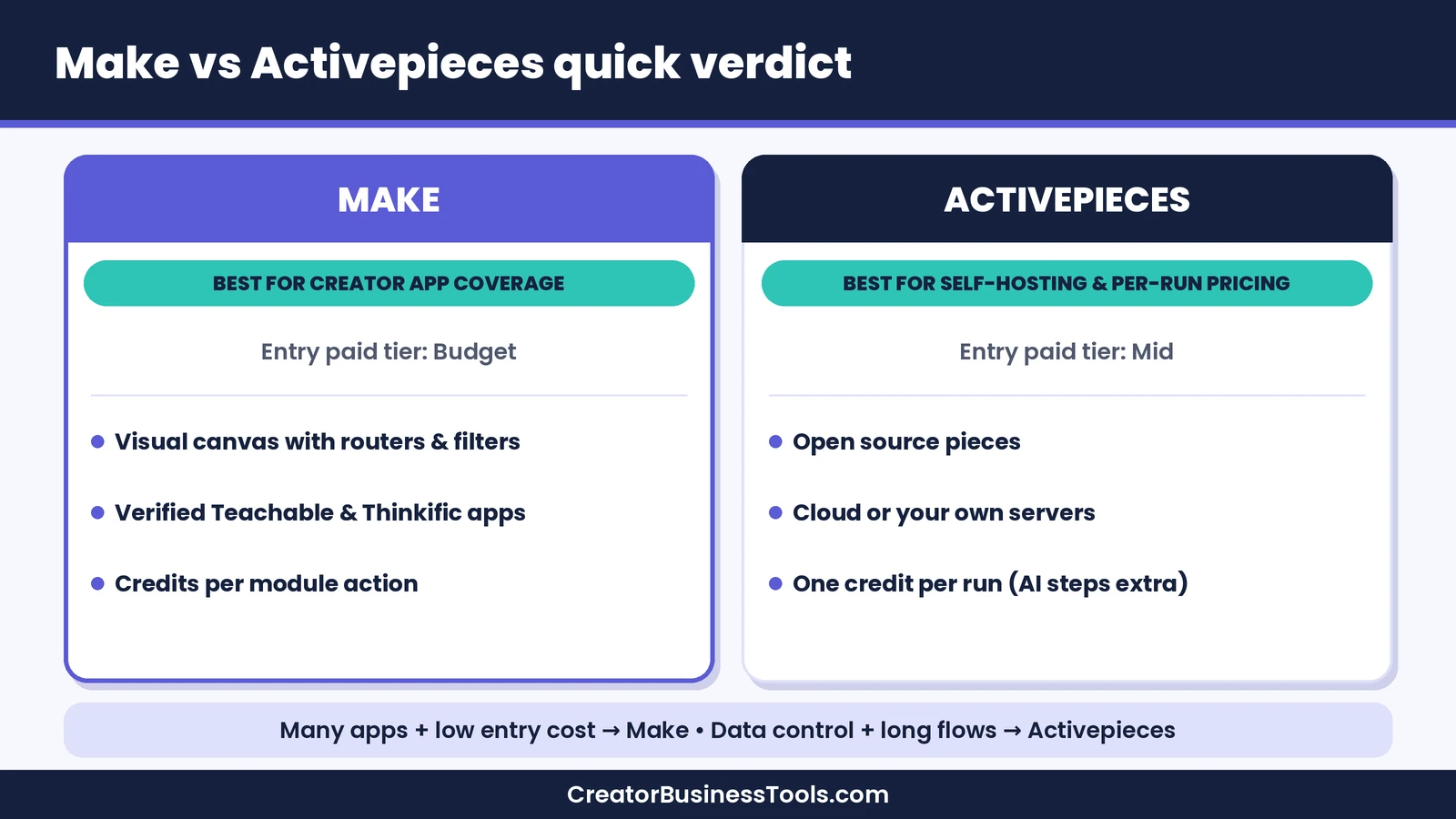
Quick verdict: Choose Make if you want the widest app coverage, verified apps for creator platforms like Teachable and Thinkific, and a low-cost entry plan for everyday automations. Choose Activepieces if you want open source pieces, the option to self-host, and per-run pricing that can stay predictable for long, multi-step flows. Solo creators on a budget will usually find Make’s entry tier easier to start with, while technical teams that need data control may lean toward Activepieces.
Quick picks
- Best for creators and online sellers: Make, for its large app library, verified course-platform apps, and budget-tier entry plan. Try Make free
- Best for teams that must keep data on their own servers: Activepieces, which can run in its cloud or on your own infrastructure, with fully air-gapped setups offered as a custom enterprise option.
- Best for long, multi-step flows on a fixed budget: Activepieces, because a run counts as one credit no matter how many steps it has.
- Best for visual thinkers who want to see every branch: Make, with its canvas of modules, routers, and error handlers.
Make vs Activepieces at a glance
| Category | Make | Activepieces |
|---|---|---|
| What it is | Cloud-based visual automation platform | Open source automation and AI agent platform |
| Pricing model | Credits per module action | Credits per run, with extra credits for AI steps |
| Entry price tier | Free plan, then $ | Free plan, then $$ |
| Hosting | Make’s cloud | Activepieces cloud, your own servers, or air-gapped |
| App coverage | Thousands of prebuilt apps | 760+ open source pieces |
| Creator platforms | Verified apps for Teachable and Thinkific, plus Kit, Stripe, Circle | Pieces for ConvertKit (Kit), Stripe, Circle, Shopify |
| Custom connections | HTTP app and custom apps | HTTP piece and TypeScript code steps |
| AI features | Make AI Agents with a Reasoning panel | Agents, chat-to-automation, MCP server |
| Best for | Creators, coaches, small marketing teams | Technical teams and businesses that need data control |
What Is Make?
Make is a no-code automation platform where each workflow, called a scenario, appears as a visual map of modules. A module is one action, such as watching for a new Stripe payment, adding a subscriber in Kit, or creating a row in Google Sheets. You connect modules, map data between them, and use routers and filters to send data down different paths.
Make’s pricing FAQ explains that most module actions use one credit, including reading, searching, creating, updating, and deleting data. The Router and error-handler modules don’t use credits. Make also offers custom apps for connecting any service with a public API, more than 300 REST API endpoints for managing the platform itself, and built-in data stores.
For creators, a standout is app coverage. Make lists Teachable and Thinkific as verified apps supported and maintained by Make, and it offers apps for Kit, Stripe, and Circle. Make AI Agents, available on all plans, add an AI step that can reason and choose tools inside a scenario. For a deeper look, read our Make review.
What Is Activepieces?
Activepieces is an automation platform that combines flows, AI agents, chat, and data tables in one workspace. Its building blocks are called pieces, built in the open by hundreds of contributors. Its Community Edition core is MIT-licensed, while enterprise features use a separate license. You can describe a flow in plain words and let its chat feature draft it, or open the builder for full control.
The builder supports branching, retries, waitpoints, subflows, error handling, and human approvals. When a step needs custom logic, you can write TypeScript inline. An HTTP piece connects to any REST or GraphQL endpoint, and an MCP server lets AI tools such as Claude and Cursor run what you build.
Activepieces can run in its own cloud, on your servers with Docker or Kubernetes, or fully air-gapped. A self-hosted Community Edition covers the automation core, while paid plans add features like access control, team management, and Agents and Chat, according to its pricing FAQ.
Pricing: Per-Action Credits vs Per-Run Credits
This is the biggest difference between the two tools, and it can change which one costs less for you.
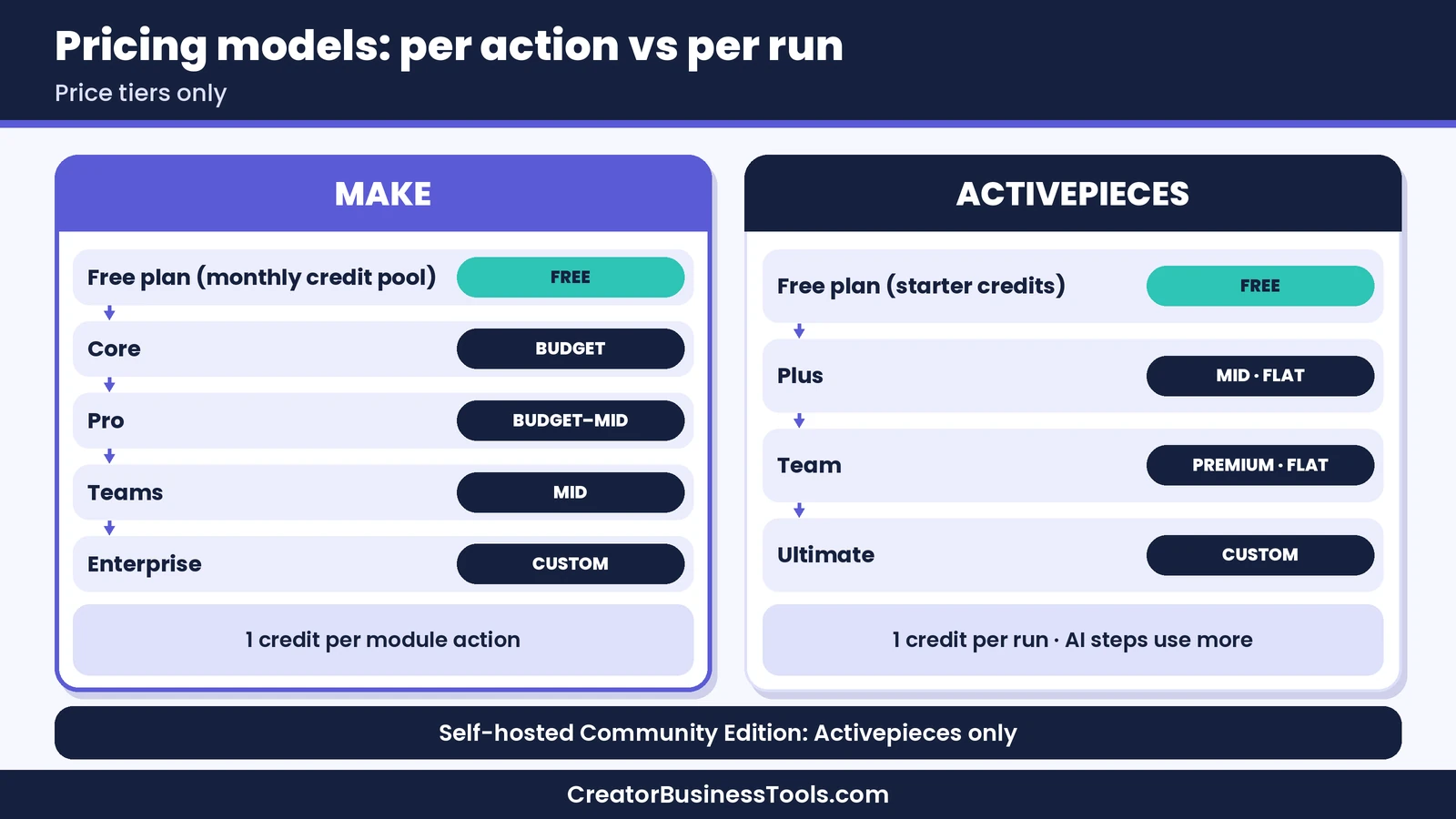
Make counts credits per module action. A simple scenario with three modules uses about three credits per run. A scenario that loops through a long list of records uses a credit for each item processed in each module, so credit use grows with both steps and data volume. The free plan includes a small monthly credit pool, and paid plans start in the budget tier ($). Annual billing costs less than monthly, and you can buy extra credits if you run short.
Activepieces counts one credit per run, however many steps the flow has. AI is the exception: according to its pricing FAQ, an AI step uses more credits depending on the model tier, from a fast model up to a frontier model, while agentic actions use one credit each. On paid plans you can connect your own AI provider keys, which drops each AI step to one credit and moves the model cost to your provider’s bill. Its free plan includes 1,000 free credits, the Plus plan sits in the mid-range tier ($$) at a flat monthly price, and the Team plan is in the premium tier ($$$). On paid plans, flows keep running past your allowance and extra credits are billed as you go.
Which pricing model costs less?
It depends on how your workflows are shaped.
- Short, simple flows: Make’s entry plan is in a lower price tier, so a creator with a handful of short scenarios will often spend less on Make.
- Long, multi-step flows: Activepieces’ per-run counting can be easier to predict when each run has many steps, because adding steps doesn’t add credits.
- Heavy AI use: On Activepieces, AI steps on larger models use many more credits than regular runs. On Make, AI usage adds token-based credits. Bringing your own AI keys helps on both, since paid plans on each platform support custom AI provider connections.
- Big teams: Activepieces’ Free and Plus plans allow a small number of users, and its Team plan adds more seats at a higher tier. Make’s higher tiers add team features as well. Check each pricing page for the seat limits you need.
For a full breakdown of Make’s plans, see our Make pricing guide.
App Coverage for Creators
For most creators and online sellers, this section decides the choice.
Make offers thousands of prebuilt apps. On its integration pages, Teachable and Thinkific carry a “Verified” label, meaning Make supports and maintains them. The Thinkific app includes triggers for new enrollments, completed lessons, and new orders, which are exactly the events a course creator wants to automate. Our Make for course creators guide walks through those workflows step by step. Make also has apps for Kit, Stripe, and Circle.
Activepieces offers 760+ open source pieces. It has pieces for ConvertKit (Kit’s former name) with a long list of triggers and actions, as well as Stripe, Circle, Shopify, Google Sheets, and Notion. When we checked its piece directory, we didn’t find dedicated pieces for Teachable, Thinkific, or Kajabi. You could still reach those platforms through the HTTP piece, but that takes API knowledge and more setup.
If your business runs on a course platform, Make usually means fewer workarounds. If your stack is mostly Kit, Stripe, Shopify, and Google tools, both platforms cover the basics.
Ease of Use
Make shows the whole workflow on one canvas, which makes branches, loops, and error paths easy to see. It takes some time to learn how modules, mapping, and routers fit together, but Make’s template gallery helps you start from working examples.
Activepieces leans on plain-language building. You can describe what you want in chat and let it draft the flow, then adjust it in the builder. Activepieces also lets you connect an app once and reuse that connection across every flow and agent. Writing TypeScript is optional, but developers will appreciate having it for tricky steps.
Neither tool is clearly easier for everyone. If you think visually, Make’s canvas often clicks. If you prefer describing tasks in words, Activepieces’ chat-first approach may feel more natural.
AI Features
Both platforms put AI front and center.
Make AI Agents live inside scenarios. An agent follows your instructions, uses knowledge files, and chooses which tools to call, such as modules, other scenarios, MCP tools, or other agents. The Reasoning panel shows each decision step by step, and you can add manual approvals or stop points. Make says agents are available on all plans.
Activepieces offers agents that you describe in plain words. An agent works out the steps and picks its own tools from your connected apps and any MCP server you add. You can gate the steps that touch money, customers, or production behind approvals. Activepieces also includes tables and a knowledge base that every flow and agent can read.
If AI is a big part of your plans, compare how each tool charges for AI steps, and consider bringing your own AI keys on a paid plan.
Self-Hosting and Data Control
This is where Activepieces has a clear edge. Its pricing page lists cloud or on-prem hosting on every plan, and fully air-gapped deployments are available through its custom enterprise option. For businesses with strict data rules, that flexibility can be the deciding factor.
Make runs in its own cloud. On the official pages we reviewed, we didn’t find a self-hosted edition. For most creators and small businesses, a managed cloud service is a benefit, since there are no servers to maintain. But if you need data to stay on your own infrastructure, Activepieces, or another self-hostable tool like n8n, is the better fit. See our Make vs n8n comparison for that angle.
Make vs Activepieces: Pros and Cons
Make pros and cons
Pros
- Thousands of prebuilt apps, including verified Teachable and Thinkific apps.
- Visual canvas makes complex branching easy to follow.
- Router and error-handler modules don’t use credits.
- Low-cost entry tier for everyday automations.
- AI Agents with a Reasoning panel on all plans.
Cons
- Credits are counted per module action, so long or looping scenarios use more.
- No self-hosted edition on the pages we reviewed.
- The canvas takes a little time to learn.
Activepieces pros and cons
Pros
- One credit per run, regardless of the number of steps.
- Open source pieces and a self-hosted Community Edition.
- Runs in the cloud, on your servers, or air-gapped.
- Chat-based building plus optional TypeScript code steps.
- Paid plans let you bring your own AI keys.
Cons
- Smaller app library, with no dedicated pieces for some course platforms.
- The first paid plan sits in a higher tier than Make’s entry plan.
- AI steps on larger models use many more credits.
- Free and Plus plans offer community support rather than email support.
Feature Comparison
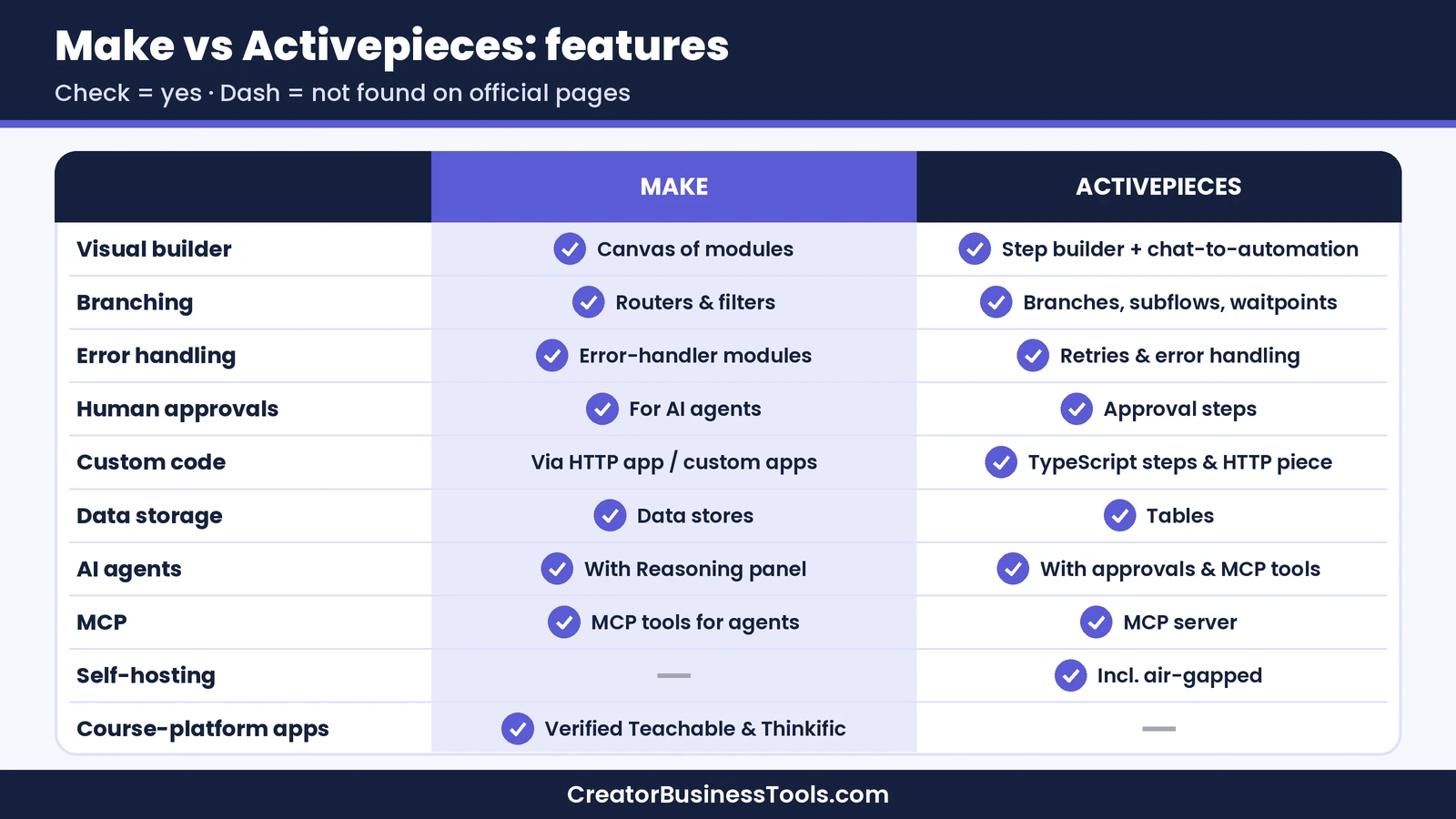
| Feature | Make | Activepieces |
|---|---|---|
| Visual builder | Canvas of modules | Step builder plus chat-to-automation |
| Branching | Routers and filters | Branches, subflows, waitpoints |
| Error handling | Error-handler modules | Retries and error handling |
| Human approvals | Manual approvals for AI agents | Human approval steps |
| Custom code | Custom apps and HTTP app | TypeScript code steps and HTTP piece |
| Data storage | Data stores | Tables |
| AI agents | Make AI Agents with Reasoning panel | Agents with approvals and MCP tools |
| MCP support | MCP server tools for agents | MCP server for AI tools |
| Self-hosting | Not offered on pages we reviewed | Yes, including air-gapped |
| Course-platform apps | Verified Teachable and Thinkific apps | Not found in piece directory |
Example Workflows: Which Tool Fits?
These hypothetical examples show how the choice plays out.
1. Course sale → onboarding. A coach sells a course on Thinkific and uses Kit for email. When an order comes in, the workflow tags the buyer in Kit, invites them to a Circle community, and logs the sale in Google Sheets. Make fits better here because it has verified apps for every step.
2. Long data-cleanup flow. A small agency runs a nightly flow with many steps that formats, checks, and enriches new leads before sending them to a CRM. Activepieces may cost less here, because each run counts as one credit no matter how many steps it has.
3. Client data that can’t leave your servers. A consultant handles sensitive client files and must keep data in-house. Activepieces fits better because it can run on their own infrastructure.
4. Shopify order alerts. An online seller posts new Shopify orders to a team chat and updates a spreadsheet. Both tools can handle this with prebuilt apps. Make’s entry plan is in a lower tier, so it’s often the simpler starting point.
5. AI inbox helper. A creator wants AI to sort support emails and draft replies from an FAQ. Both tools offer agents with approvals. Make shows the agent’s reasoning on the canvas, while Activepieces lets you describe the agent in plain words. Try a small batch of real emails on each before you commit.
How to Choose Between Make and Activepieces
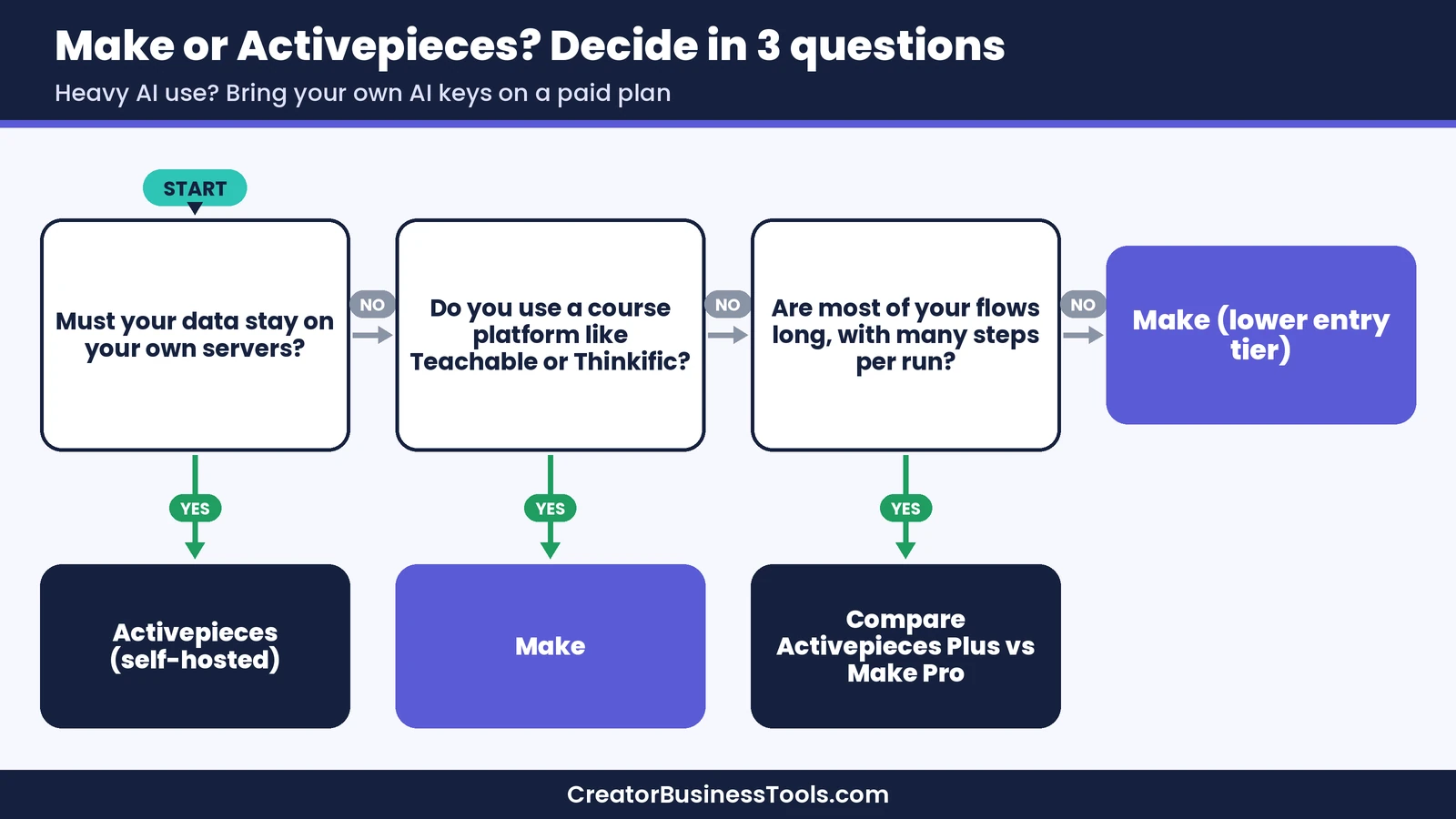
- Choose Make if you rely on creator platforms, want the largest app library, prefer a visual canvas, and want a budget-tier starting point.
- Choose Activepieces if you need self-hosting or air-gapped deployment, want open source pieces, or run long multi-step flows where per-run pricing helps.
- Test both if your stack is mostly common apps like Kit, Stripe, Shopify, and Google Sheets. Build your most important workflow on each free plan and compare.
Before you decide
- List every app you need and check that each one has a prebuilt app or piece.
- Count steps per run and runs per month to estimate credits on each platform.
- Note which steps use AI and which model tier they need.
- Decide whether you need self-hosting before you build anything.
- Prices and plan limits change. Confirm the details on Make’s and Activepieces’ official pricing pages.
Other Tools Worth a Look
If neither tool feels right, these alternatives cover different needs. Price tiers reflect each tool’s entry paid plan.
| Tool | Best for | Key strength | Main drawback | Entry price tier |
|---|---|---|---|---|
| Make | Creators who want visual multi-step workflows | Large app library with verified course-platform apps | Per-action credits add up on long scenarios | $ |
| Activepieces | Teams that need self-hosting or per-run pricing | Open source pieces and flexible hosting | Smaller app library | $$ |
| Zapier | The simplest setup and a very large app directory | Easy, guided Zap builder | Multi-step workflows need a paid plan | $$ |
| n8n | Technical teams that want self-hosting | Per-execution billing and deep customization | Steeper learning curve | $$ |
For more options, see our Make alternatives and Zapier alternatives guides.
Common Mistakes to Avoid
- Comparing sticker prices only. Per-action and per-run credits behave very differently. Estimate with your real workflows.
- Forgetting about AI credits. AI steps on larger models can use many more credits than regular steps.
- Choosing self-hosting you don’t need. Running your own servers means handling updates, backups, and security.
- Skipping the app check. A missing integration can turn a simple workflow into an API project.
- Building without error handling. Set up error handlers in Make or retries in Activepieces, so a failed step doesn’t go unnoticed.
FAQ
Is Activepieces cheaper than Make?
It depends on your workflows. Make’s entry plan is in a lower price tier, which suits short, simple scenarios. Activepieces counts one credit per run regardless of steps, so it can be easier to budget for long, multi-step flows.
Can I self-host Make?
On the official pages we reviewed, we didn’t find a self-hosted edition of Make. If self-hosting is a requirement, Activepieces or n8n are better fits.
Does Activepieces work with Teachable or Thinkific?
We didn’t find dedicated Teachable or Thinkific pieces in Activepieces’ directory. You could connect them through its HTTP piece, which requires API knowledge. Make offers verified apps for both.
Is Activepieces open source?
Yes, mostly. Its Community Edition core is MIT-licensed, and you can self-host it. Enterprise features use a separate license, and paid plans add team and governance features on top.
Which is easier for beginners?
Activepieces lets you describe a flow in plain words and have it drafted for you. Make’s visual canvas takes a little longer to learn but makes complex workflows easy to follow.
Bottom line
In the Make vs Activepieces decision, start with your apps and your data rules. Make is the better fit for creators, coaches, and online sellers who rely on platforms like Teachable, Thinkific, Kit, and Stripe, want a visual canvas, and prefer a budget-tier entry plan. Activepieces is the better fit for technical teams that need self-hosting or air-gapped deployment, or that run long multi-step flows where per-run pricing keeps costs predictable.
If you’re not sure, build your most important workflow on Make’s free plan first, check how many credits it uses, and compare that with Activepieces’ per-run model.
Free checklist: Planning your automation setup? Get our free Automation Switch Checklist, a one-page worksheet for listing your workflows, estimating volume, and testing safely before you commit. Contact us to request a copy.
Pricing and features from official vendor pages, last checked October 21, 2026.